Shturval Platform Architecture
The Shturval container orchestration platform architecture consists of a management cluster (Cluster Management) and workload clusters (client clusters):
- Management cluster — a Kubernetes container orchestration cluster that creates and manages client container orchestration clusters. It can also be used as a standalone cluster.
- Client cluster — a container orchestration cluster deployed under management cluster control.
Platform structure
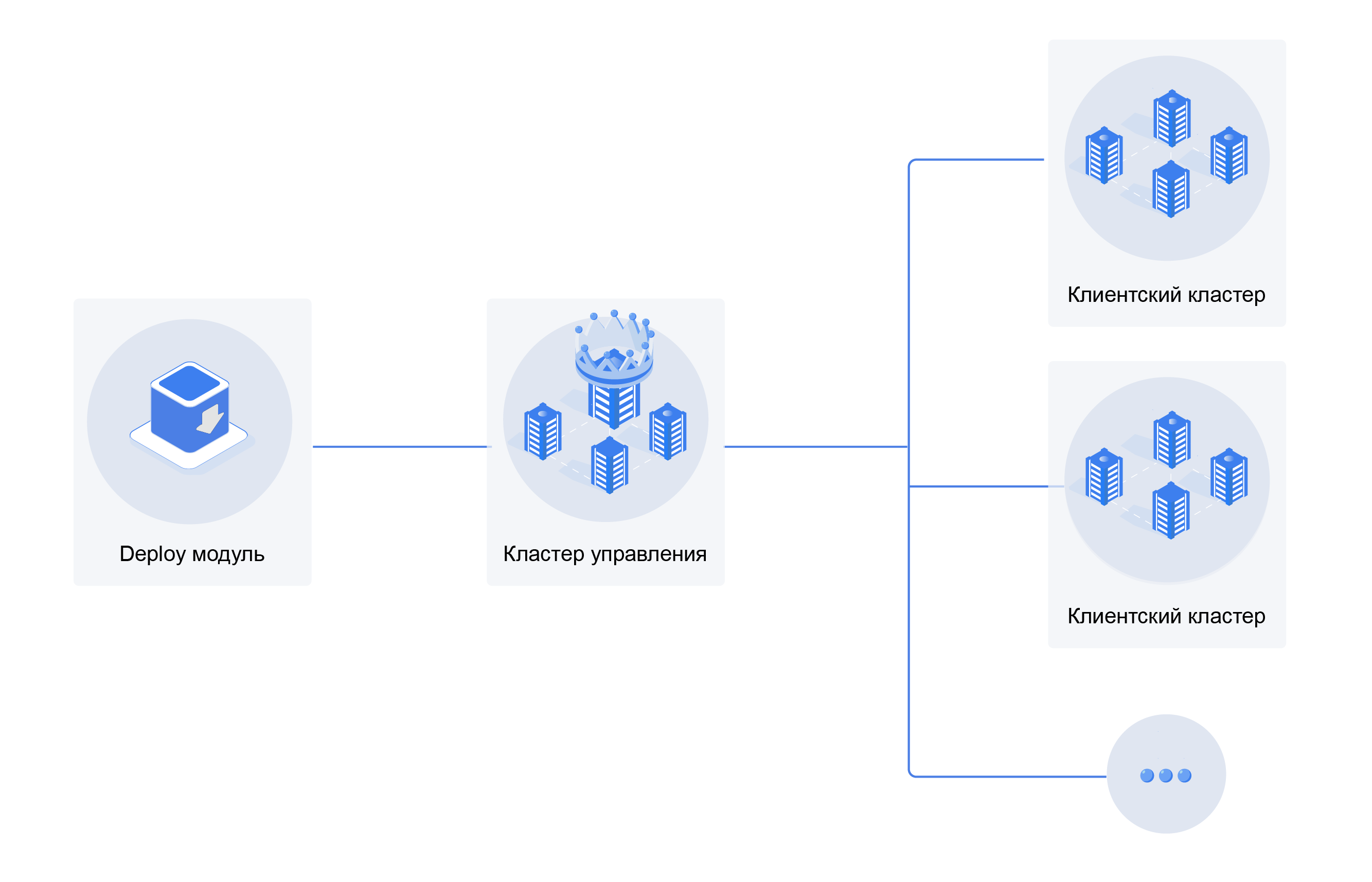
Management cluster
The management cluster manages client cluster infrastructure, centralizes log and monitoring metric collection and storage, and manages access and users. The management cluster is not intended to run or control workloads in client clusters. If the management cluster fails, client clusters continue to operate. Management cluster recovery is described here. Deploying a DR management cluster is described here.
Installation is supported on Linux only. Management cluster installation starts on a dedicated machine.
Supported OS versions for the installation host
| Operating system | System version | Kernel version |
|---|---|---|
| Astra Linux SE | 1.7.5, 1.8 | 5.10, 5.15, 6.1, 6.6 |
| Debian | bullseye | 5.10 |
| Debian | bookworm | 6.1.0 |
| Ubuntu | Noble 24.04 | 6.8 |
| RED OS | 8 | 6.6, 6.12 |
| Rosa | Chrome | 6.6 |
| Alt Linux | 10 | 6.1 |
| RHEL | 9 | 5.14 |
| Rocky Linux | 9 | 5.14 |
| SberLinux | 5.9.1 | 5.14 |
Supported OS versions for cluster nodes
| Operating system | System version | Kernel version |
|---|---|---|
| Astra Linux SE | 1.7, 1.7.5, 1.8 | 5.10, 5.15, 6.1, 6.6 |
| Debian | bullseye | 5.10 |
| Debian | bookworm | 6.1.0 |
| Ubuntu | Focal 20.04 | 5.10 |
| Ubuntu | Jammy 22.04 | 5.15 |
| Ubuntu | Noble 24.04 | 6.8 |
| RED OS | Murom, 7.3.4, 8 | 5.10, 5.15, 6.1, 6.6, 6.12 |
| Rosa | Chrome | 6.6 |
| Alt Linux | 10 | 6.1 |
| OSnova | Onyx | 6.6 |
| Oracle Linux | 8.x* | 5.15 |
| RHEL | 9 | 5.14 |
| Rocky Linux | 9 | 5.14 |
| SberLinux | 5.9.1 | 5.14 |
* Before installation with the Shturval v2 provider, disable Firewalld on all hosts.
The recommended management cluster configuration is:
- 3 Control Plane nodes;
- 3 Worker nodes (or more).
The management cluster can be deployed on a single Control Plane node. See Resource requirements for details.
Recommended system requirements for the management cluster
These requirements apply if you do not use the management cluster to run custom workloads. If you use the management cluster as a standalone cluster, allocate additional resources for custom workloads on top of the requirements below.
| Parameter | CPU (vCPU) | Memory (GiB) | Disk (GiB) | IOPS |
|---|---|---|---|---|
| Mirror (Registry) | 4 | 16 | 300 | 300 |
| Control Plane node | 12 | 16 | 200 | 600 |
| Worker node | 15 | 62 | 800 | 600 |
Client cluster
Client clusters can be created after the management cluster is deployed successfully. Clusters can be deployed in a secure configuration. This option sets up a secure connection to Kubelet and automatically configures an audit policy. You can create client clusters with different Kubernetes versions under one management cluster.
You can create client clusters using pre-provisioned hosts or infrastructure provider templates:
- VMware vSphere 6.7 update 3 or 7.0 and later;
- oVirt (including RedVirt, zVirt) with oVirt Engine API version 4.4 or later;
- OpenStack;
- Basis Dynamix;
- Shturval v2;
- VMware vCloud Director;
- Yandex Cloud.
Recommended system requirements for a client cluster
| Parameter | CPU (vCPU) | Memory (GiB) | Disk (GiB) | IOPS |
|---|---|---|---|---|
| Control Plane node | 12 | 16 | 200 | 600 |
| Worker* | 2 + WL* | 8 | 100 | 300 |
| Infra Worker | 16 | 16 | 800 | 600 |
The Worker node requirement of 2 + WL applies only when Infra Worker nodes are present in the cluster. It means you must add the CPU required for custom workloads to the minimum count (2 CPU). When no Infra Worker nodes are present, use the recommended Worker node requirement of 16 + WL.
You can create and manage clusters:
- in the GUI;
- from the command line using commands;
- through the API (for example, to embed requests in CI/CD pipelines).
Management cluster interaction with client clusters
The management cluster:
- manages cluster creation and client cluster infrastructure objects (including machines and machinehealthchecks);
- provides centralized access management, including user permissions and sessions;
- provides centralized storage and GUI visualization of client cluster metrics and logs.
Network interaction between the management cluster and client clusters in different configurations is described here.
Installation
The shtil initial deployment utility is used to deploy the Shturval platform. It supports deployment in open and closed (air-gapped) environments. All information required for platform installation is available in the Installation section.
Updates
The platform releases two types of versions:
- minor. Minor versions are released four times per year, once per quarter. The two most recent minor versions are supported. Bug fixes and component vulnerability remediations are not released for unsupported versions.
- patch. Patch versions are released optionally when vulnerabilities and defects need to be addressed.
Manual and automatic cluster updates are available for each version type. Each cluster is updated independently. Updates are available in closed and open environments.
For more details on how updates work, see here.
Shturval release version and Kubernetes version mapping
Version mapping
| Release version | Kubernetes version |
|---|---|
| 2.13.1 | 1.34.3 |
| 2.13.0 | 1.34.3 |
| 2.12.1 | 1.34.1 |
| 2.12.0 | 1.34.1 |
| 2.11.0 | 1.33.1 |
| 2.10.0 | 1.32.3 |
| 2.9.2 | 1.31.8 |
| 2.9.1 | 1.31.3 |
| 2.8.1 | 1.30.5 |
| 2.8.0 | 1.30.5 |
| 2.7.2 | 1.29.6 |
| 2.7.1 | 1.29.6 |
| 2.7.0 | 1.29.4 |
| 2.6.1 | 1.29.1 |
| 2.6.0 | 1.29.1 |
| 2.5.3 | 1.28.9 |
| 2.5.2 | 1.28.3 |
| 2.5.1 | 1.28.3 |
| 2.5.0 | 1.28.3 |
| 2.4.1 | 1.27.6 |
| 2.4.0 | 1.27.6 |
| 2.3.3 | 1.26.10 |
| 2.3.2 | 1.26.5 |
| 2.3.1 | 1.26.5 |
| 2.3.0 | 1.26.5 |
| 2.2.6 | 1.25.9 |
| 2.2.5 | 1.25.9 |
| 2.2.4 | 1.25.9 |
| 2.2.0 | 1.25.9 |
For clusters running Kubernetes 1.34.x, see Cluster troubleshooting for operational details.
Authentication and authorization
The platform does not store users. The exception is the built-in (backup) account with administrative rights created by default during platform installation.
For user authentication, the platform integrates with a centralized directory service. Supported directories include:
- Active Directory;
- OpenLDAP;
- FreeIPA;
- ALDPro;
- SambaDC.
The internal authentication service is used by default. You can connect an external service that supports OIDC OAuth 2.0, such as Blitz or Keycloak.
The platform includes a predefined set of access roles for flexible access configuration at multiple levels:
- the management cluster and all client clusters;
- the management cluster or a specific client cluster;
- specific objects in the management cluster or a client cluster;
- a specific namespace in the management cluster or a client cluster;
- specific objects in a namespace of the management cluster or a client cluster.
Every request is authorized. For example, if a user’s access rights change after authentication, unauthorized access is denied.
Using services
During platform and client cluster installation, you can choose services to deploy automatically. The service list is available here. All services are scanned for vulnerabilities before use in the platform.
Logging and monitoring
VM Agent is used to collect metrics in client clusters and the management cluster. Vector collects logs. Cluster logs are available on the Logs tab of the cluster dashboard. Metrics are available on preconfigured Grafana dashboards. Grafana access uses SSO with the role model.
If a cluster is installed in a secure configuration, an Audit Policy is configured automatically and a corresponding project is created in VLogs. You can flexibly manage alerting from the platform GUI.
Graphical interface
The platform GUI is available in Russian and English with light or dark themes. It includes tooltips and informational messages to simplify platform use. The GUI also supports object management through manifest import and YAML manifest editing. Platform GUI pages link to documentation for the corresponding platform version.
Security
The Shturval platform includes built-in tools for cluster security:
- Kyverno;
- Trivy Operator;
- a graphical editor for Cilium Network Policies.
You can also install overlay security tools, such as Kaspersky Container Security.
Backup and restore
The Shturval platform includes a Velero-based backup and restore module. Manual and automated backups are available in clusters and namespaces. S3 storage is required to store backups.