2.13.0 — Installation automation and operational transparency
In short, 2.13.0 makes the platform easier to automate:
- shtil now works through YAML and command-line flags,
- GPU nodes are configured automatically,
- configuration profiles help you create clusters from templates.
The release also adds consolidated security reports and UI improvements for day-to-day work.
See the full Release Notes 2.13.
The main thing in the release (TL;DR)
Main focus - automation of platform installation without a GUI, advanced configuration options.
- Shtil can now be used via YAML manifests and command line flags - this is a real breakthrough for CI/CD and GitOps.
- Nvidia GPU integrate with automatic node configuration - no manual setup with drivers and configuration.
- Containerd 2.x brought cgroup v2, image encryption and loading acceleration - the update is transparent, no manual configuration required.
- Cluster configuration profiles let you create configuration templates for client clusters (for example, for ML workloads) and reuse them.
- Kyverno and Trivy summary reports provide a complete picture of security across all clusters of the platform.
- In the Enterprise ML edition Kubeflow and MLflow appeared - the foundation for a future release with a focus on ML.
Shtil. Installing the platform in your own way
In 2.12, the transition to shtil was made as the main installation tool. In 2.13, the ability to install without a GUI has been returned, as was the case in stc, with an additional bonus.
YAML manifests for installation Now you can describe the entire management cluster configuration in a YAML file and run the installation from the console. This is especially useful if you install the platform in several data centers.
YAML manifest example
# YAML manifest template for installing the platform with the OVirt provider
# Provider configuration

# name: cluster-management-provider # [OPTIONAL] Provider instance name. Default - cluster-management-provider

# [MANDATORY] Credentials for connecting to the oVirt Engine API

credentials:
  oVirt:
    url: <https://ovirt-engine.example.com/ovirt-engine/api> # [MANDATORY] URL to connect to oVirt Engine API
    username: <admin@internal> # [REQUIRED] Username for authentication in oVirt API
    password: <password> # [REQUIRED] Password for authentication in the oVirt API

# TLS connection settings to the oVirt API

# connection:
# tlsInsecure: true # [OPTIONAL] Disable TLS certificate verification. Default is true. Set to false for production with valid certificates
# tlsCertPath: '' # [OPTIONAL] Path to the CA certificate file for TLS verification. Used when tlsInsecure: false
# # Example: /path/to/ca-bundle.crt

# oVirt provider configuration

providerConfig:
  # subtype: ovirt # [OPTIONAL] Provider subtype. Default - ovirt
  datacenter: <Default> # [MANDATORY] Name of the oVirt datacenter where the VMs will be created
  datacenterCluster: <Default> # [MANDATORY] Name of the oVirt cluster inside the datacenter
  vnicProfile: <ovirtmgmt/ovirtmgmt> # [REQUIRED] VNIC name of the oVirt profile for the VM network interfaces
  template: <rocky9-template> # [REQUIRED] Name of the VM template in the selected data center (base image for cluster nodes)
  # csiStorage: '' # [OPTIONAL] Storage domain name for dynamic persistent volumes via the CSI driver. Leave blank to disable CSI
  # vmType: server # [OPTIONAL] The VM type for the virtual machines to be created. Default - server. Do not override without special requirements
  # templateNetInterface: eth0 # [OPTIONAL] The name of the network interface in the template. Default is eth0. Do not override unless the template uses a different interface

---

# Management cluster configuration

cluster:
  apiEndpoint: <192.168.1.100:6443> # [REQUIRED] cluster API server address (IP or FQDN with port, for example, 192.168.1.100:6443)
  # clusterName: cluster-management # [OPTIONAL] The name of the management cluster to create. Default - cluster-management
  # disabledServices: [] # [OPTIONAL] List of disabled services in the shturval repository
  # enabledServices: [] # [OPTIONAL] List of enabled shturval repository services
  # externalKubeAPILB: false # [OPTIONAL] Use an external balancer for the API server. Default - false
  # externalingresslb: false # [OPTIONAL] Use outsideExternal balancer for Ingress. Default - false
  # ingress: '' # [REQUIRED if externalingresslb: true] Wildcard DNS record for ingress (e.g. apps.corporate.domain). Override externalingresslb to true to use this field
  # controlPlaneNodesCount: 1 # [OPTIONAL] Number of Control Plane nodes. Must be at least 1. Default - 1
  ingressvip: <192.168.1.101> # [MANDATORY if externalingresslb: false] VIP address for the Ingress controller
  # podSubnet: 172.16.0.0/16 # [OPTIONAL] CIDR of the pod subnet. Default - 172.16.0.0/16
  # secure: false # [OPTIONAL] Enable advanced security options. Default - false
  # serviceSubnet: 10.96.0.0/12 # [OPTIONAL] CIDR of the service subnet. Default - 10.96.0.0/12
  # shturvalVersion: 2.12.0 # [OPTIONAL] Platform version. Must match the shtil utility version

# Provider-specific node configurations
# By default, shtil fills everything out automatically, allowing you to configure additional groups of worker nodes

# provider:
# name: cluster-management-provider # [OPTIONAL] Must match the name of the provider instance. Default - cluster-management-provider

  # Configuration of Control Plane nodes

# controlPlaneNodeConfig:
# capovNodeConfig:
# cpu:
# cores: 4 # [OPTIONAL] Number of CPU cores on the Control Plane node. Default - 4
# sockets: 1 # [OPTIONAL] Number of CPU sockets on the Control Plane node. Default - 1
# threads: 1 # [OPTIONAL] Number of CPU threads per socket. Default - 1
# memory:
# sizeMB: 16000 # [OPTIONAL] Memory size in MB on the Control Plane node. Default - 16000
# guaranteedMB: 16000 # [OPTIONAL] Guaranteed memory in MB. Must match sizeMB. Default - 16000
# osDiskSizeGB: 100 # [OPTIONAL] Size of the OS disk in GB on the Control Plane node. Default - 100

  # Worker node configuration

# workerNodeConfigs:

    # Creating a default group of Worker nodes

# - nodeConfig:
# groupName: default # [MANDATORY] Name of the default group of Worker nodes
# roles:
# - name: node-role.kubernetes.io/workers # [OPTIONAL] Worker role-nodes
# workersCount: 3 # [OPTIONAL] Number of nodes in the default Worker group. Default - 3
# capovNodeConfig:
# cpu:
# cores: 8 # [OPTIONAL] Number of CPU cores per worker node. Default - 8
# sockets: 1 # [OPTIONAL] Number of CPU sockets per worker node. Default - 1
# threads: 1 # [OPTIONAL] Number of CPU threads per socket. Default - 1
# memory:
# sizeMB: 32000 # [OPTIONAL] Memory size in MB per worker node. Default - 32000
# guaranteedMB: 32000 # [OPTIONAL] Guaranteed memory in MB. Must match sizeMB. Default - 32000
# osDiskSizeGB: 300 # [OPTIONAL] OS disk size in GB per worker node. Default - 300

    # Creating an infra group of Worker nodes

# - nodeConfig:
# groupName: infra # [MANDATORY] Name of the infra group of Worker nodes
# roles:
# - name: node-role.kubernetes.io/infra # [OPTIONAL] Role of infra worker nodes
# workersCount: 0 # [OPTIONAL] Number of nodes in the infra Worker group. Set to 0 to disable
# capovNodeConfig:
# cpu:
# cores: 8 # [OPTIONAL] Number of CPU cores per infra node. Default - 8
# sockets: 1 # [OPTIONAL] Number of CPU sockets per infra node. Default - 1
# threads: 1 # [OPTIONAL] Number of CPU threads per socket. Default - 1
# memory:
# sizeMB: 32000 # [OPTIONAL] Memory size in MB per infra node. Default - 32000
# guaranteedMB: 32000 # [OPTIONAL] Guaranteed memory in MB. Must match sizeMB. Default - 32000
# osDiskSizeGB: 300 # [OPTIONAL] OS disk size in GB per infra node. Default - 300
Examples of YAML manifests here.
Command Line Flags
For those who prefer scripts, you can pass all parameters through flags.
shtil install ovirt\
    --api-endpoint=10.11.12.13 \
    --ingress-default-fqdn="*.some.address.com" \
    --use-external-ingress-lb=true \
    --url-provider="https://ovirt.example.com/ovirt-engine/api" \
    --user-provider="user@internal" \
    --password-provider="mypas\$\$word" \
    --datacenter-provider=Datacenter1 \
    --datacenter-cluster-provider=some_dc_cluster_name \
    --vnic-profile-provider=ovirtmgmt \
    --template=LinuxVM_001 \
    --bootstrap-license=/path/to/license.yaml
Installation via shtil here.
Containerd 2.x and modern container capabilities
2.13 moved to Containerd 2.x as the container runtime. The update is transparent — no extra steps are required; everything happens automatically.
Advantages of the approach:
- cgroup v2 - more precise resource control and better container isolation.
- Image encryption - an additional level of security for sensitive workloads.
- Accelerated loading of images (streaming) - containers start faster, without waiting for the image to be fully loaded.
- Mounting container images as file systems - great for mounting trained models and large datasets.
You’ll immediately notice these improvements when working with large images (ML models, datasets) or strict isolation requirements.
Automatic GPU tuning
In the node configuration (NCI), the container runtime configuration options have been expanded. Now all the necessary parameters for configuring nvidia runtime can be set declaratively, without using imperative commands.
NCI — illustration
apiVersion: node.shturval.tech/v1beta2
kind: NodeConfigItem
metadata:
  name: nvidia-runtime
spec:
  nodeconfigselector:
    node-role.kubernetes.io/gpu: ""
  priority: 100
  runtimecfg:
    configSections:
      - exist: true
        params:
          - exist: true
            key: default_runtime_name
            value: nvidia
        path: plugins."io.containerd.grpc.v1.cri".containerd
      - exist: true
        params:
          - exist: true
            key: base_runtime_spec
            value: ""
          - exist: true
            key: cni_conf_dir
            value: ""
          - exist: true
            key: cni_max_conf_num
            value: 0
          - exist: true
            key: container_annotations
            value: []
          - exist: true
            key: pod_annotations
            value: []
          - exist: true
            key: privileged_without_host_devices
            value: false
          - exist: true
            key: runtime_engine
            value: ""
          - exist: true
            key: runtime_path
            value: ""
          - exist: true
            key: runtime_root
            value: ""
          - exist: true
            key: runtime_type
            value: io.containerd.runc.v2
        path: plugins."io.containerd.grpc.v1.cri".containerd.runtimes.nvidia
      - exist: true
        params:
          - exist: true
            key: BinaryName
            value: /usr/bin/nvidia-container-runtime
          - exist: true
            key: CriuImagePath
            value: ""
          - exist: true
            key: CriuPath
            value: ""
          - exist: true
            key: CriuWorkPath
            value: ""
          - exist: true
            key: IoGid
            value: 0
          - exist: true
            key: IoUid
            value: 0
          - exist: true
            key: NoNewKeyring
            value: false
          - exist: true
            key: NoPivotRoot
            value: false
          - exist: true
            key: Root
            value: ""
          - exist: true
            key: ShimCgroup
            value: ""
          - exist: true
            key: SystemdCgroup
            value: true
        path: plugins."io.containerd.grpc.v1.cri".containerd.runtimes.nvidia.options
Configuration profiles. Templates for typical scenarios
The ability to manage configuration profiles for client clusters has been expanded. A profile is a template with pre-configured parameters for a typical use case.
For example, a “GPU workload” profile might include:
- Configuration of nodes with GPU;
- System services for working with GPU (NVIDIA Device Plugin);
- Integration settings with Vault;
- Integration settings with Argo CD.
Create a profile once and use it for all similar clusters. As a result: reducing routine and copy-pasting, avoiding mistakes, reducing the time from an idea to a working cluster.
Logs. Structured and with advanced search
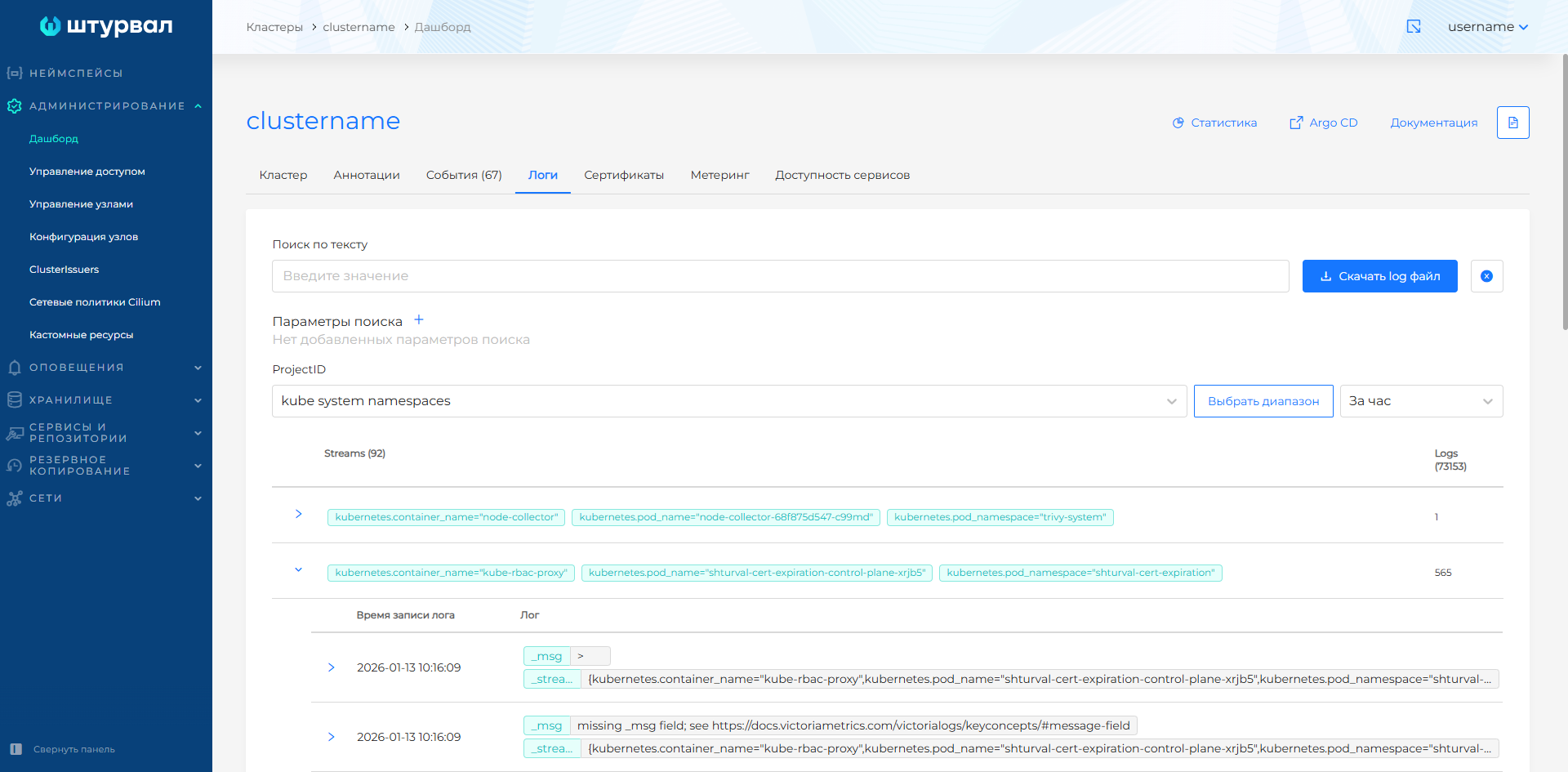
The GUI of the cluster logs is optimized:
- Logs are now grouped by stream - it’s easier to navigate the flow of messages.
- There is now a search for log parameters with a list of available fields for selection - you can search by namespace, pod, container, severity level and other attributes.
Read more about working with cluster logs here.
Screenshot of logs grouped by stream
NCI. All configuration in modal windows
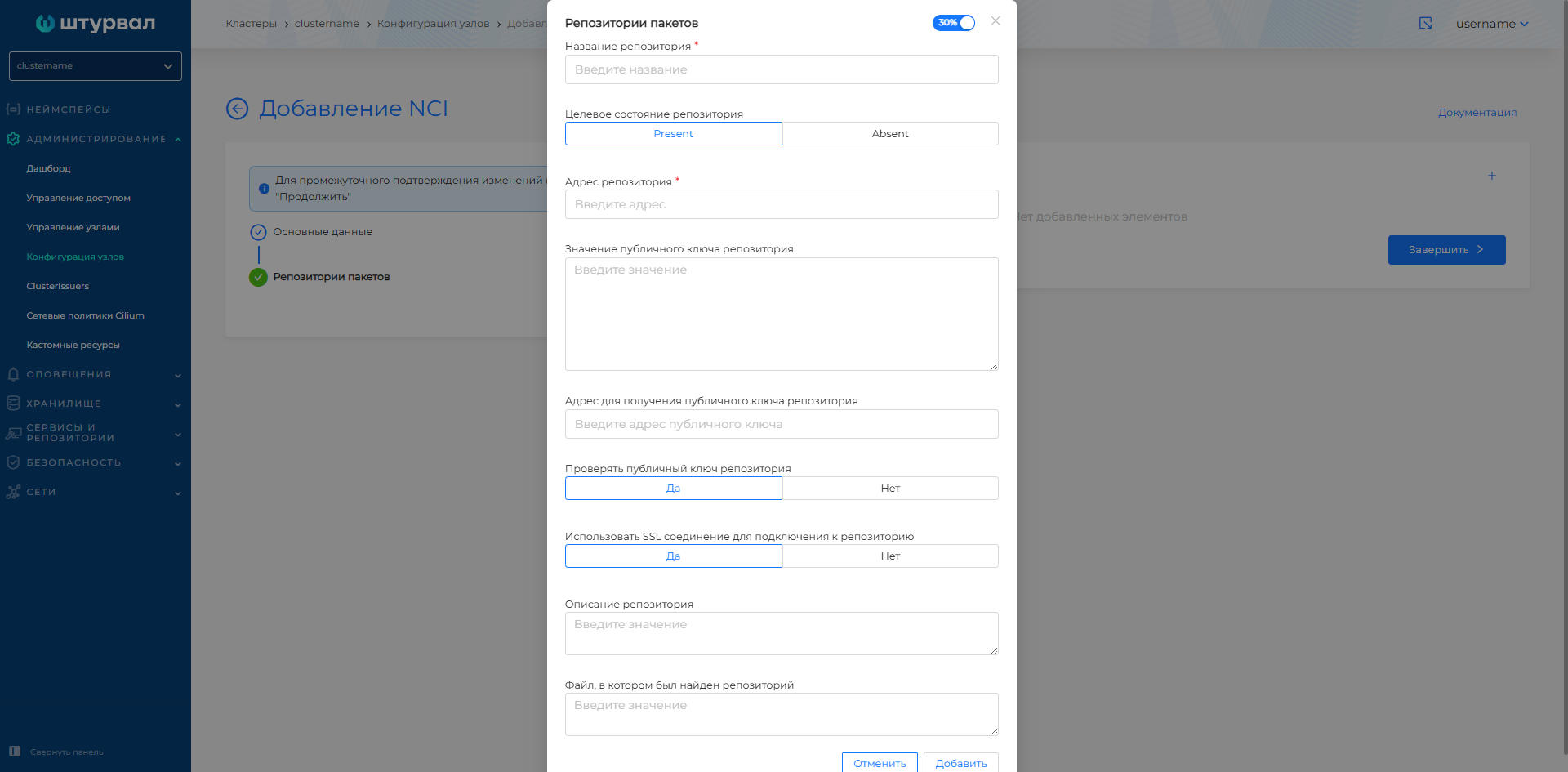
The Node Configuration Interface (NCI) has been redesigned:
Kube API Server Settings
You can now configure API server parameters directly in the NCI GUI. No need to edit YAML or use kubectl. Feature gates, Admission Controllers, audit parameters are available through the UI.Modal windows for all sections
The configuration of all NCI sections is placed in modal windows, which streamlines the interface. It has become easier to focus on a specific section of settings.Visibility of NodeConfig states
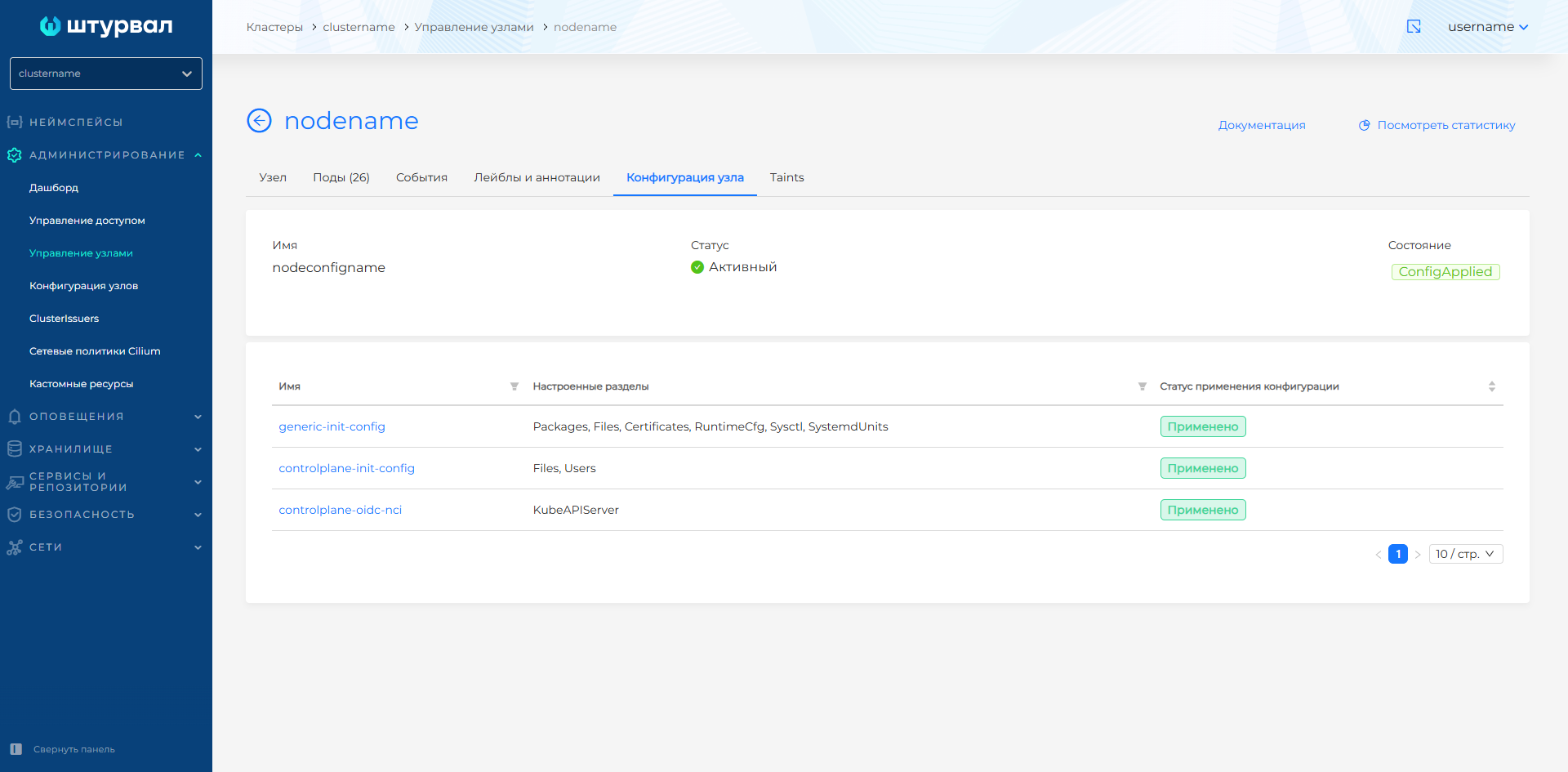
Added display of cluster node configuration states (NodeConfigs). Now you can see whether the configuration has been applied on the nodes and what status each NodeConfig is in.
More details on the Node Configuration (NCI) page and in the Kube API Server section.
Screenshot of NCI configuration in a modal window
Screenshot of NodeConfig in a cluster
Services and security. More control and transparency
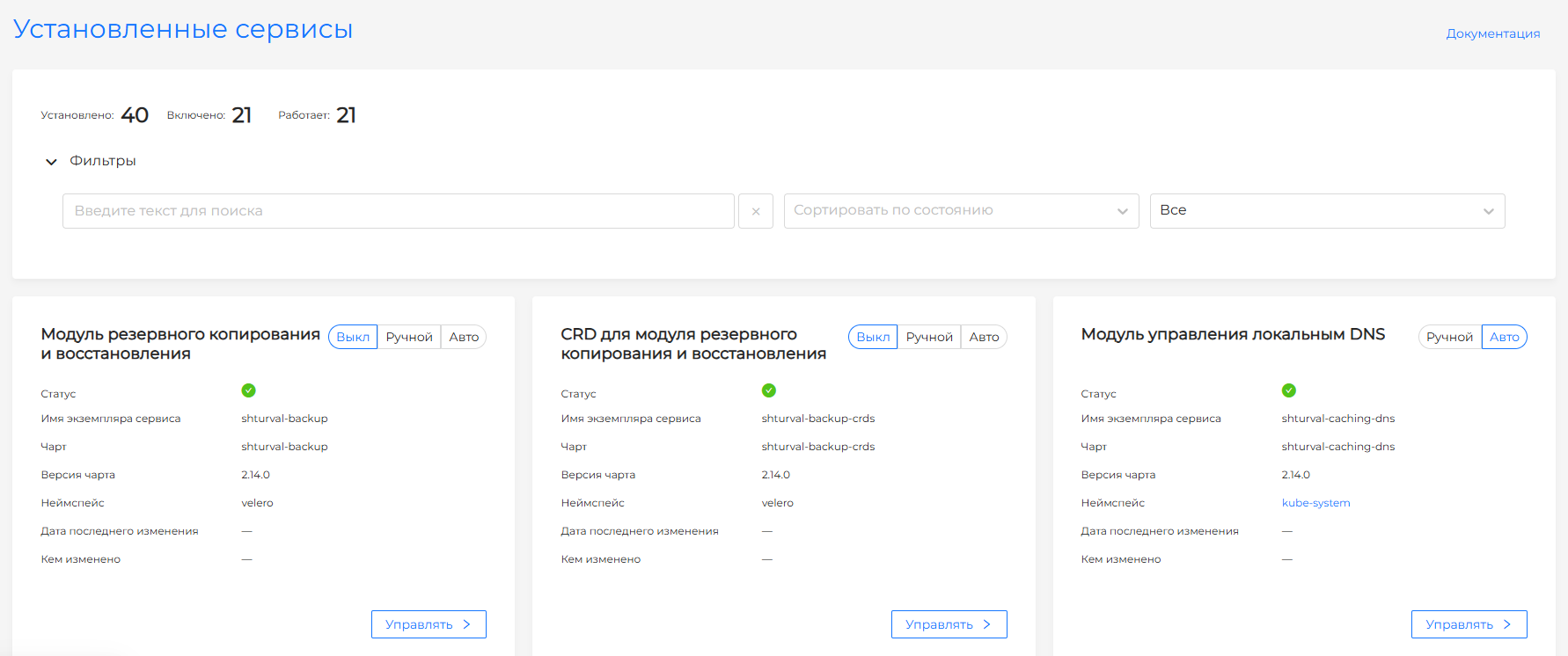
Three-position switch for services
Control of operating modes of system services in the cluster is optimized through a three-position switch: Absent/Manual/Auto. This works on the installed services pages and in the installation services configuration settings.
Screenshot of the three-position system services control switch
Safety Summary Reports
Summary reports for all clusters have been added to the platform GUI:
- Kyverno - security and compliance policies in a single view.
- Trivy — results of scanning container images for vulnerabilities.
Screenshots of summary reports on Kyverno and Trivy for all clusters
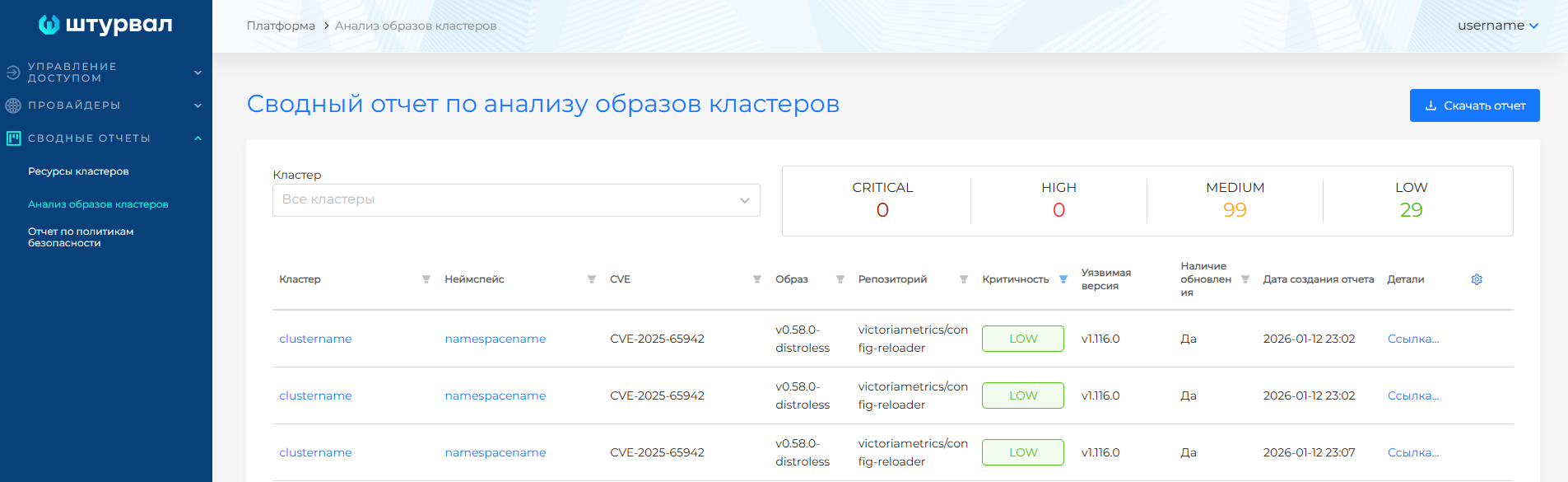
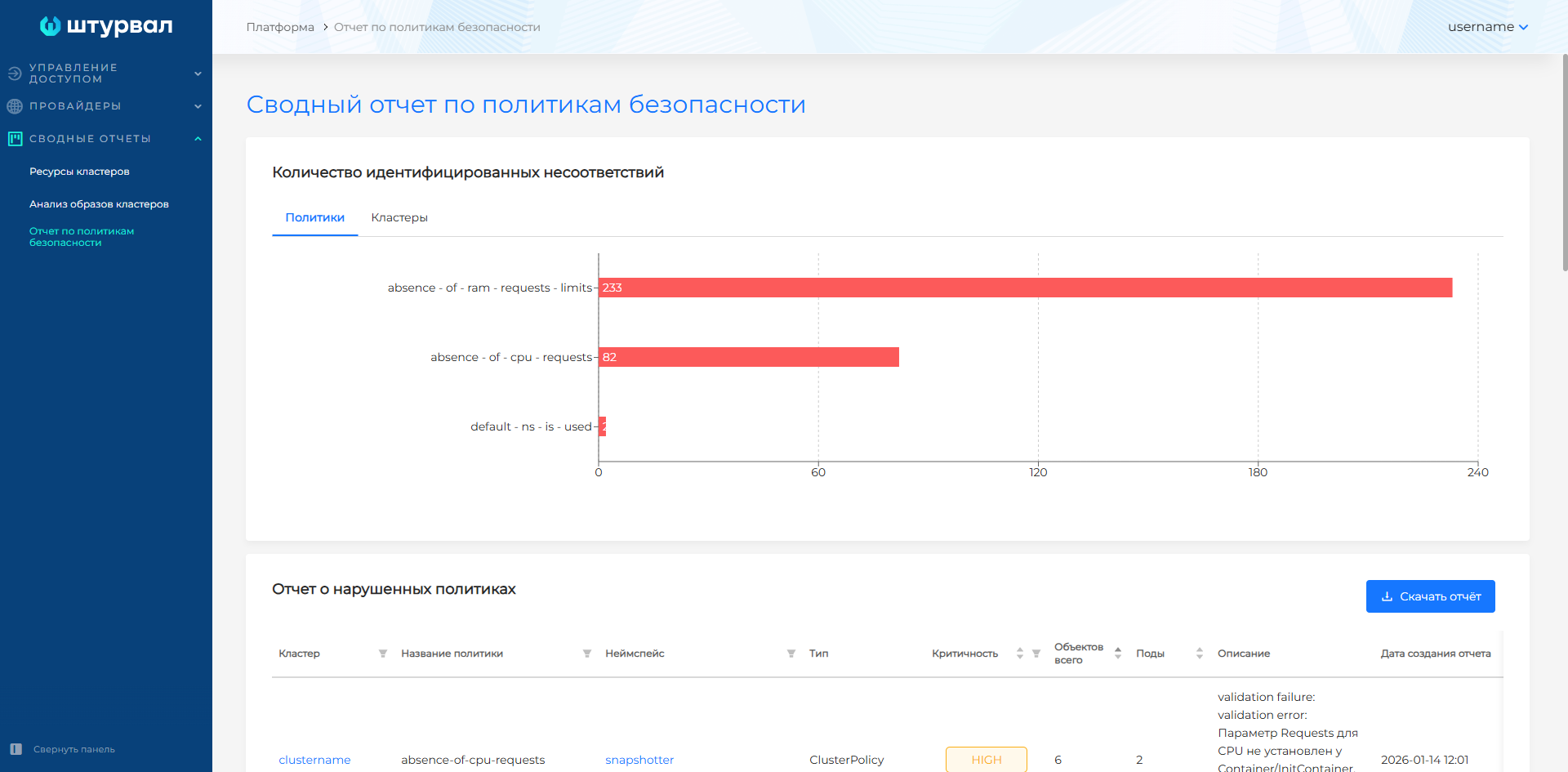
A complete view is now available across the entire platform, not just individual clusters.
Saving custom settings
The platform remembers your filtering settings, pagination, and search queries as you navigate between pages. Reduce routine steps, set up once and work comfortably.
- Service Management
- Platform security reports
- Kyverno Policies
- Scanning Trivy images across all clusters
Additional information on cluster configuration
For clusters with providers without Cloud Controller Manager, you can specify an Ingress DNS record when using an internal load balancer. This simplifies network access in classic infrastructure (vSphere, Shturval v2, oVirt).
Also in client clusters, the default resource configuration has been brought into line with client cluster requirements. Now there is less chance that the cluster will fail due to lack of memory or CPU.
Enterprise ML edition
The Enterprise ML edition integrates two key platforms for machine learning:
- Kubeflow - organization of ML processes in Kubernetes (pipelines, experiments, model serving).
- MLflow — life cycle management of ML models (tracking, registry, deployment).
Integrated platforms create the foundation for the next release, where ML will be a central theme. However, now you can start building ML infrastructure on the platform.
Platform components. Kubernetes, Cilium, containerd
Key components updated in this release:
- Kubernetes 1.34.3
- Cilium 1.19
- Cluster API 1.11.0
- Container Runtime / Containerd 2.x
More details about how this works in the platform:
Fixed
The list of bugs fixed in 2.13.0 is provided on the page Release 2.13.0 (2026 Q1)