Cilium Network Policies
The “Cilium Network Policies” page contains 2 tabs: cluster (ClusterwideCiliumNetworkPolicy) and namespace (CiliumNetworkPolicy) network policies.
Each tab contains a list of policies (rules) for incoming and outgoing traffic to cluster resources. It is based on Cilium. A graphical interface is implemented to create policies. It is presented in the form of blocks indicating the components between which access is configured, and lines that display the connections between the components. You can also create a network policy using import manifest.
The created network policy page displays the status of the applied policy.
Screenshot
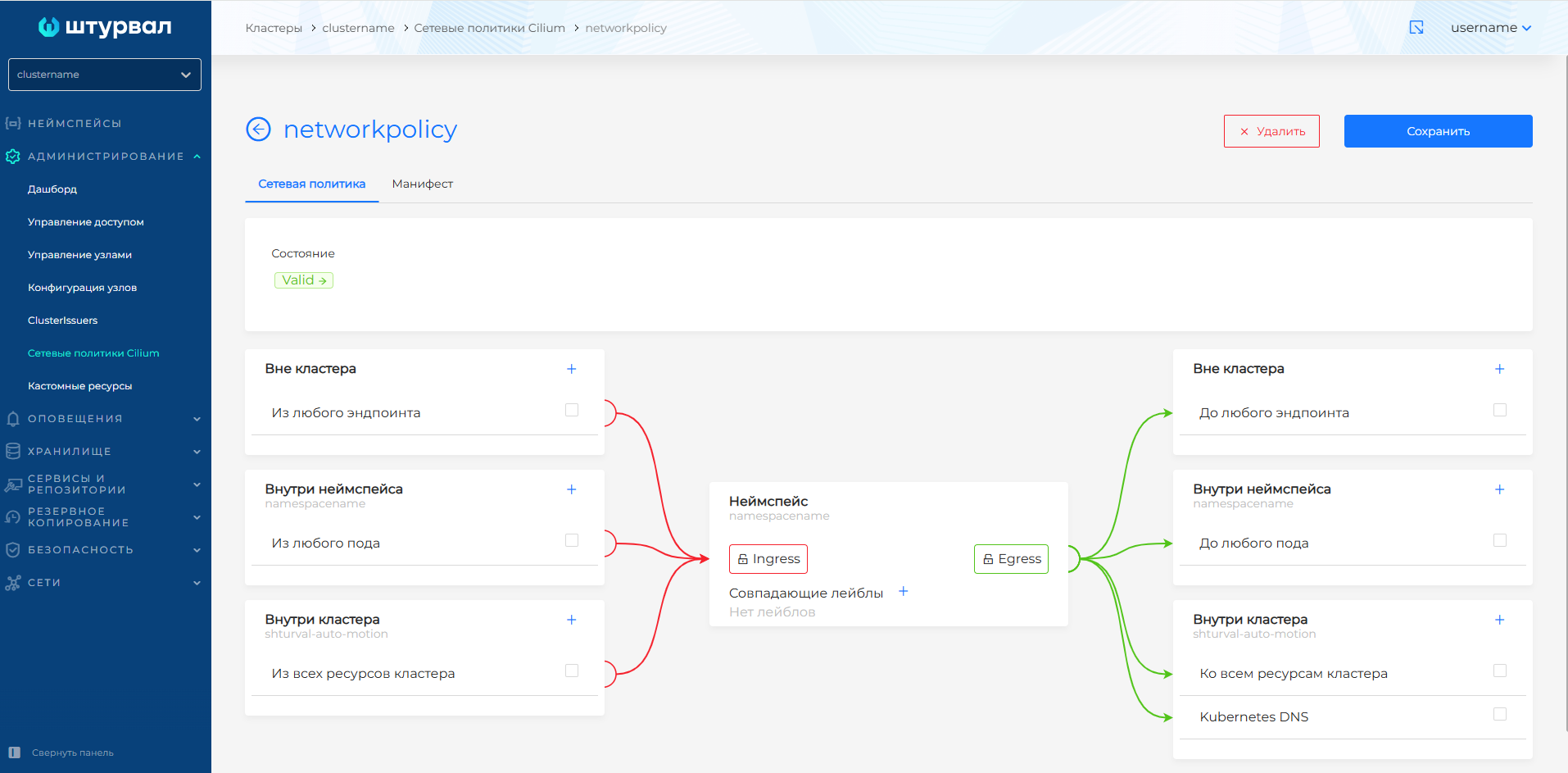
The created network policy can be modified in a graphical editor or using a YAML manifest.
To change using a YAML manifest, go to the Manifest tab and make changes. After changing the manifest, click Apply and the verification result will be displayed on the right side of the screen. Expand the verification result block to see the full manifest.
Save the changes you made to the manifest. Unsaved data will not be applied.
Also on the Manifest tab you can delete the network policy by clicking on.
Cluster network policies
Screenshot
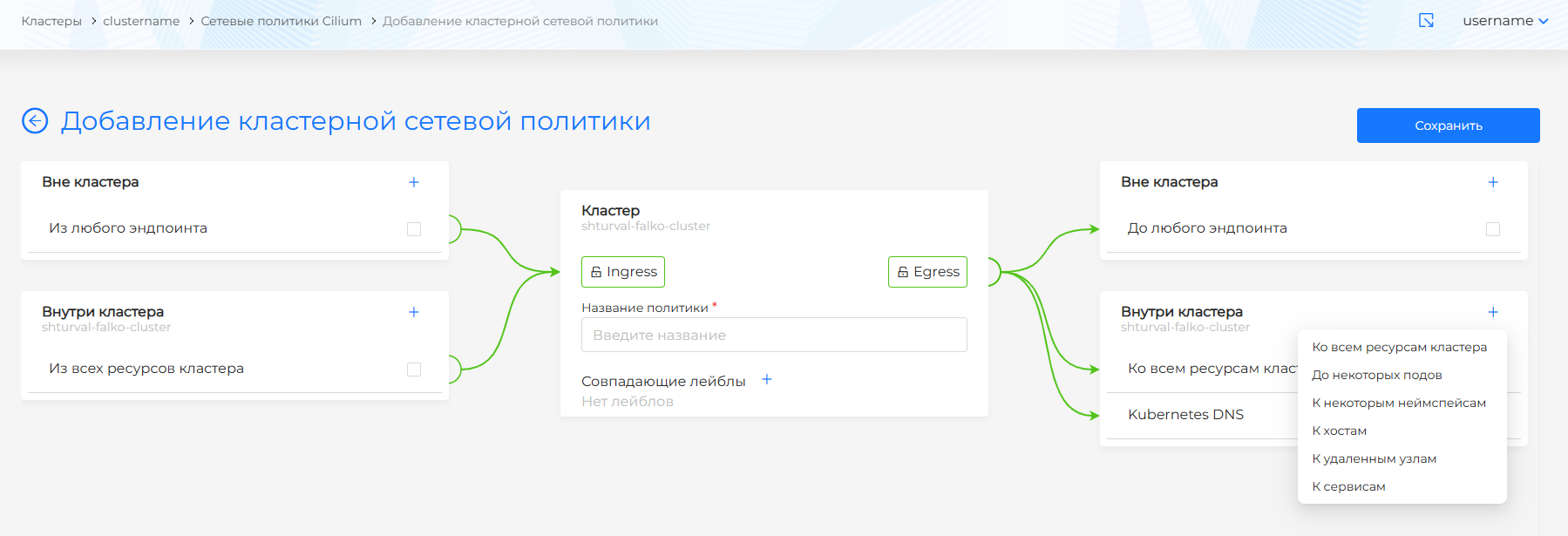
There are 2 levels of components:
- outside the cluster;
- inside the cluster.
The central component of the scheme is the cluster within which the configuration takes place. Set the policy name. If necessary, use labels to define which resources will have this policy applied to them.
Namespace network policies
Screenshot
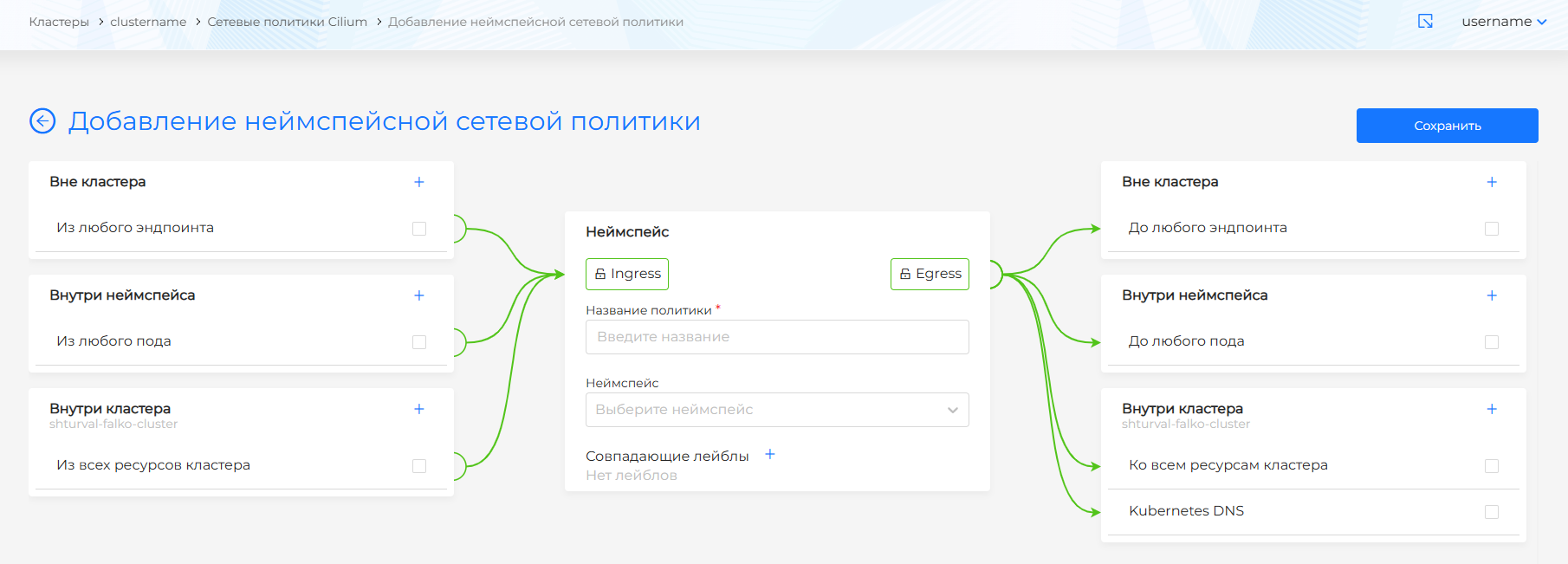
There are 3 levels of components:
- outside the cluster;
- inside the cluster;
- inside namespace.
The central component of the scheme is the namespace, within which the configuration takes place. Specify the name of the policy and the name of the namespace. If necessary, use labels to define which resources will have this policy applied to them.
Network policy rules
For each component, you can configure a rule for interaction with the namespace. Incoming flows into the configured namespace are regulated by Ingress rules, outgoing flows by Egress rules. To create a rule, click on + in the component block and select parameters. The added rules will be displayed at the bottom of the component block. To delete a rule, click on the rule, then on the trash can icon in the window that opens. From each created rule, the connection to the configurable namespace is displayed.
The rules can be:
- Denying (prohibits one object from contacting another on the specified port)
- Permissive (allows one object to access another on the specified port)
- Disabled (the rule is inactive and does not allow or deny).
When all traffic is allowed by default and a rule is added that imposes a restriction, traffic outside that rule is denied.
Ingress rules (Incoming traffic)
Outside the cluster
At this level, you can define the rules for the traffic cluster entering the namespace:
- From any endpoint. When a deny rule is set, traffic from any endpoints outside the cluster to the specified ports of objects in the configured namespace will be discarded.
- From CIDR. When you set an exclusion rule for a CIDR, traffic from that CIDR outside the cluster will be discarded.
If you need the pods of a configurable namespace to receive incoming traffic, consider one of the following options:
- allow incoming traffic from any endpoints;
- allow incoming traffic from any endpoints, but only to a specific port(s) (for example, port 80);
- allow incoming traffic from a specific CIDR;
- allow incoming traffic from a specific CIDR, but only to a specific port(s) (for example, port 80).
Inside the cluster
Traffic from any pod or namespace in the cluster will be dropped unless allowed by other rules.
If pods in a configurable namespace need to receive incoming traffic from other pods in the cluster, consider one of the following options:
- allow incoming traffic only from selected namespaces;
- allow incoming traffic only from pods corresponding to the selected labels;
- allow all incoming traffic from any pod in the cluster.
Types of rules:
- From all cluster resources;
- From some namespaces;
- From some hearths;
- From hosts (selects the local host and all containers running on this host);
- From remote nodes (Any node in any of the connected clusters, except the local host, all containers running in host network mode on remote nodes).
Inside the namespace (applies only to namespace network policies)
All incoming traffic to any pod of the configured namespace will be discarded unless it is allowed by other rules.
Types of rules:
- From any hearth.
- From some hearths.
If you need the pods of a configurable namespace to receive incoming traffic, consider one of the following options:
- allow incoming traffic to any servers;
- allow incoming traffic to any server, but only to a specific port(s) (for example, to port 80);
- allow incoming traffic to some pods;
- allow incoming traffic to some pods, but only to a specific port(s) (for example, port 80).
allow incoming traffic only to any pod of the configured namespace from any endpoints.
Egress rules (Outgoing traffic)
Outside the cluster
Outgoing traffic to any endpoint outside the cluster will be denied unless other rules allow it.
If pods in a configured namespace must be able to forward traffic to endpoints outside the cluster, consider one of the following options:
- Allow traffic to specific CIDRs;
- Allow traffic to specific FQDNs;
- Allow traffic to any endpoint outside the cluster.
Types of rules:
- To any endpoint;
- Before CIDR;
- Up to FQDN.
To allow traffic to the FQDN, traffic to the Kubernetes DNS must be allowed. Without this condition, you can add a rule, but it will not work. This connection will be displayed in gray. DNS proxy will be enabled when you allow traffic to Kubernetes DNS.
Inside the cluster
Outgoing traffic to any pod in any namespace of the cluster will be prohibited unless it is allowed by other rules.
If you need to send outbound traffic to other pods in other namespaces within the cluster, consider one of the following options:
- allow outgoing traffic only to selected namespaces;
- allow outgoing traffic only to pods corresponding to the selected labels.
Types of rules:
- To all cluster resources (by default);
- Kubernetes DNS (When enabled: Allows Egress flows to Kubernetes DNS. When disabled: Current policy does not allow traffic to be sent to Kubernetes DNS. As a result, DNS requests from pods of the configured namespace will be ignored within the cluster unless allowed by other rules). When Kubernetes DNS is enabled, DNS proxy is enabled by default. When disabled, you cannot enable DNS proxy.
- To some namespaces;
- To some pods;
- To services;
- To hosts (selects the local host and all containers running on this host);
- To remote nodes (any node in any of the connected clusters, except the local host. Also selects all containers running in host network mode on remote nodes).
Inside the namespace (applies only to namespace network policies)
Outgoing traffic to any pod from the configured namespace will be prohibited unless allowed by other rules.
Use pod selectors to ensure minimal security privileges, or allow all incoming traffic within the namespace to get started with a simpler policy.
Please note! The label selector works on the principle of union. The selected object must have all of the specified labels.
Types of rules:
- To any hearth;
- To services;
- To some pods.
Examples of network policies
Access to KubeAPI server
allow-kube-apiserver
Prohibitory policy
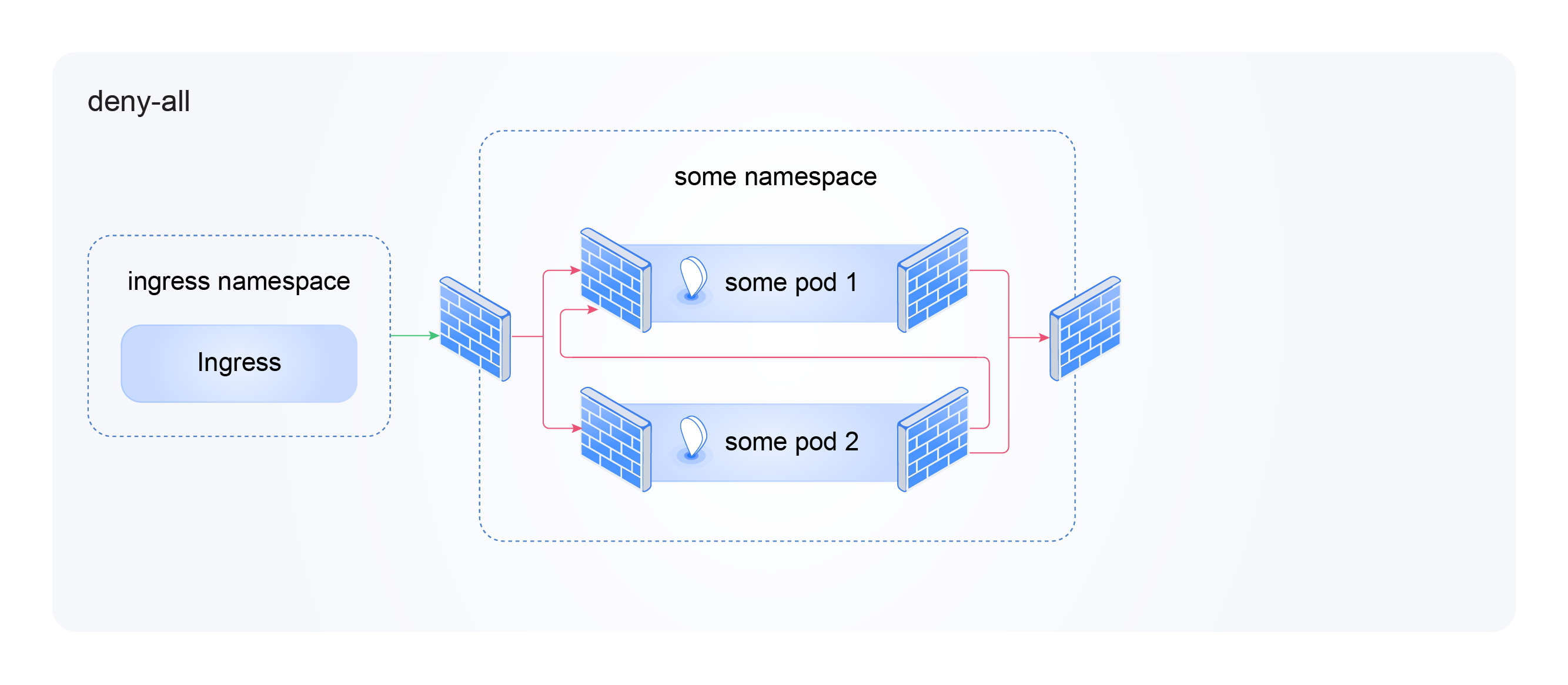
deny-all
Outgoing traffic to KubeDNS and NodeLocalDNS
allow-dns
Outgoing traffic to a specific application
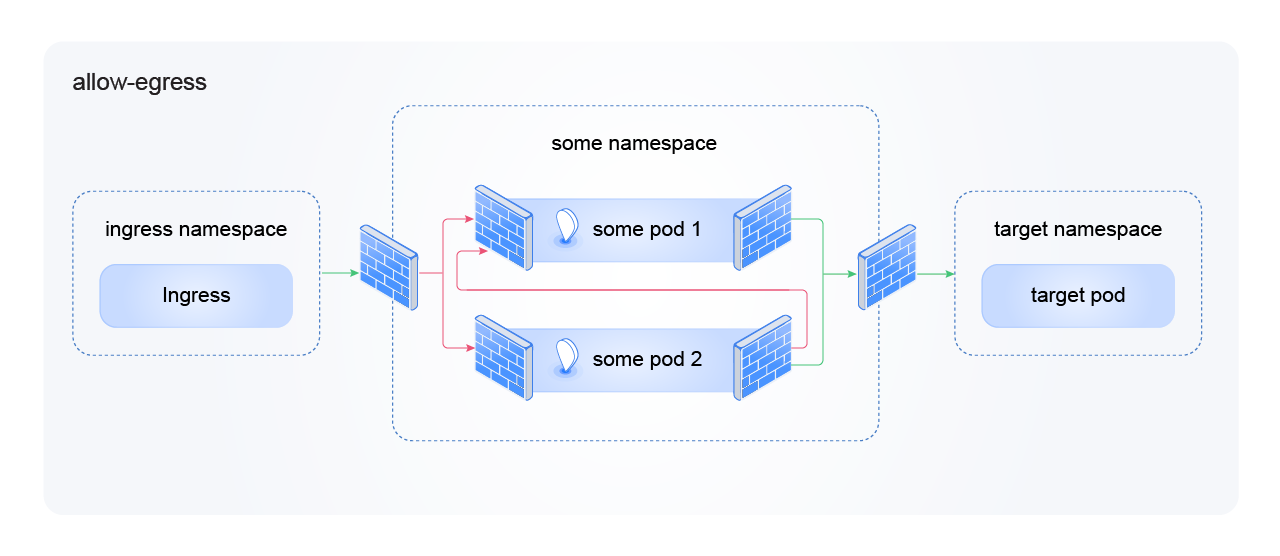
allow-egress
Incoming traffic from the Ingress controller
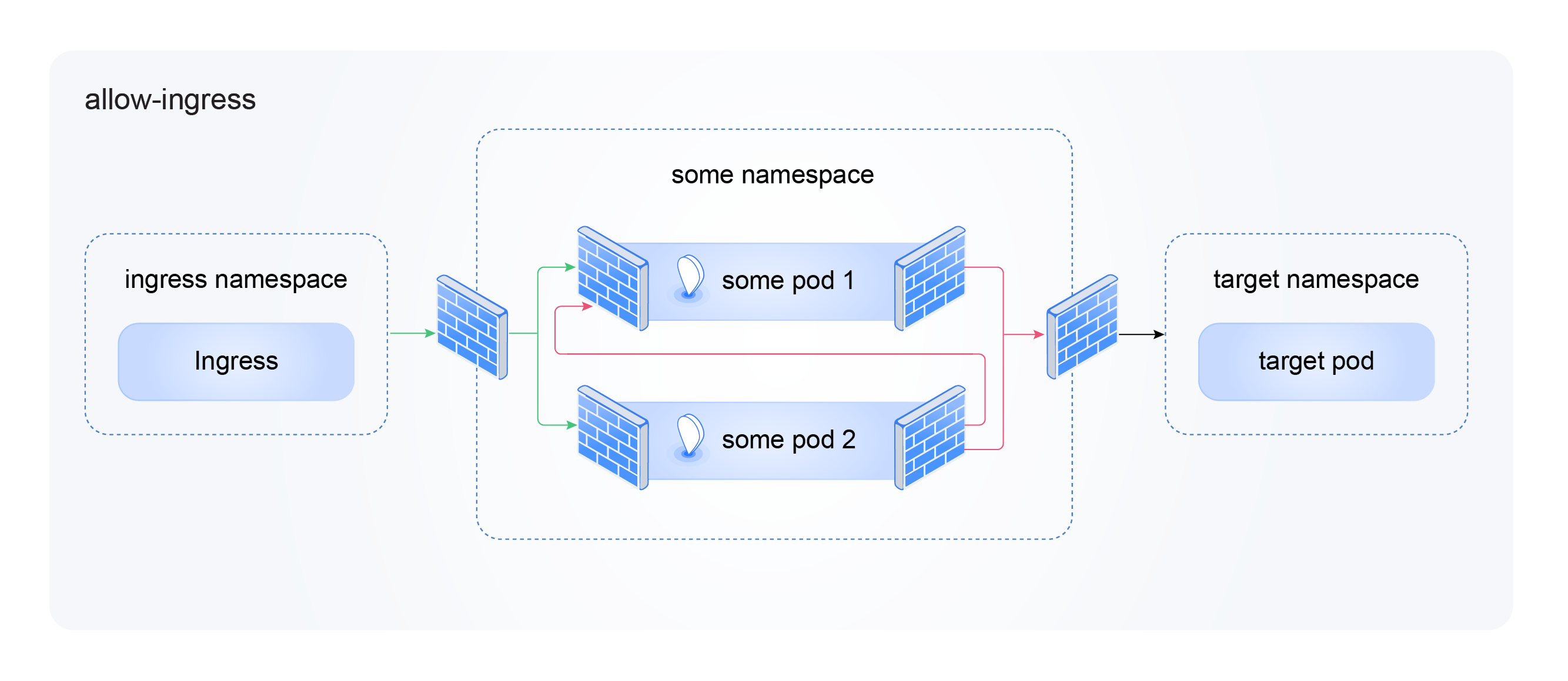
allow-ingress
Traffic inside namespace