Autoscaler in ClusterAPI
Cluster Autoscaler in ClusterAPI provides a mechanism for changing the number of nodes in a cluster depending on the load on the nodes. Autoscaling allows you to optimize resources under variable load in Kubernetes clusters. The main purpose of Cluster Autoscaler is to provide nodes to Pods waiting to be launched.
Cluster Autoscaler can only manage autoscaling on groups of Worker nodes. It monitors the state of pods, nodes in the cluster and:
- Increases the number of nodes in a group if there are not enough resources (CPU, memory) on existing nodes to launch new Pods.
- If resources on nodes become excessive, Cluster Autoscaler can remove unused nodes. During Cluster consolidation, Autoscaler selects specific nodes for removal.
Cluster Autoscaler is enabled by default on clusters. Autoscaling is available in the GUI on the node group configuration page, on the ClusterAPI Configuration.
Screenshot
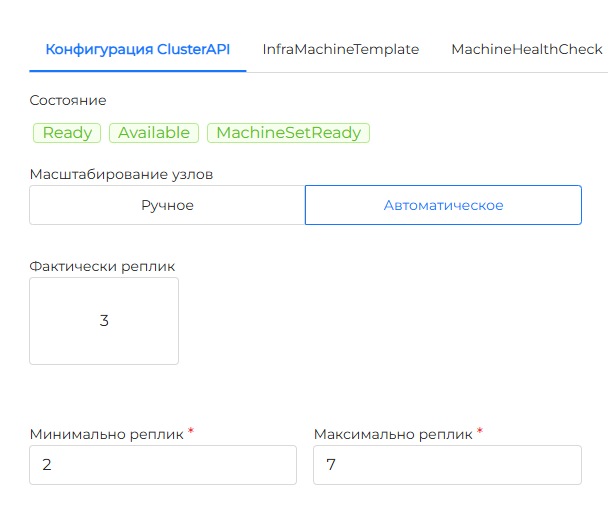
Autoscale Annotations
When a node group is set to autoscaling, the MachineDeployment resource is assigned annotations with the specified range of the number of nodes in the group:
Annotation that sets the minimum number of nodes
*Defines the minimum number of nodes in the group. Autoscaling will not occur if there are fewer replicas than the value specified.* Corresponds to the *Minimum Replicas* field in the GUI.Please note! Autoscaling from scratch for replicas in a group is not enabled in the Shturval platform. For cluster fault tolerance, it is recommended to use at least 2 Worker nodes in the cluster, so you cannot set less than 2 replicas for a range in the GUI.
Annotation that sets the maximum number of nodes
*Defines the maximum number of nodes in the group. Autoscaling will not occur if the number of nodes in the group is greater than the value specified.* Corresponds to the *Maximum Replicas* field in the GUI.MachineDeployment example with autoscaling
Autoscaler monitors the range values in MachineDeployment annotations and decides to change the number of nodes in the group depending on their state and load.
The principle of autoscaling
If a group of nodes is set to autoscale, then Cluster Autoscaler every 10 seconds:
- checks the existence of unscheduled Pods. Such pods are identified by their Pending status and PodScheduled status with the value false and reason unschedulable;
- analyzes requests from unscheduled pods (Pods) for vCPU, RAM and GPU.
- checks the load of group nodes.
Based on the results of the Cluster Autoscaler check, you can change the number of nodes in the cluster:
- Add the required number of nodes to the cluster group if there are pods in the Pending status and the cluster does not have enough free resources to accommodate them.
- Delete a node if all conditions are met simultaneously:
- The sum of CPU and memory requests of all pods on a node is less than 50% of the node’s allocated memory.
- All pods on a node (except those that run on all nodes by default) can be moved to other nodes.
- The node does not have annotation about disabling zoom out.
Annotations about disabling zoom out
The provisioning time for a new node is independent of Cluster Autoscaler. Cluster Autoscaler waits for 15 minutes for the requested nodes to be created, after which time it may try to scale another group of nodes.
Cluster Autoscaler can work simultaneously in several Worker groups and distribute the created nodes evenly.
Example
When analyzing pods, Cluster Autoscaler takes into account the PodDisruptionBudget (PDB) and the established rules for distributing pods across nodes, such as:
- nodeSelector;
- nodeAffinity with type requiredDuringSchedulingIgnoredDuringExecution.
However, the preferred rules for placing a hearth on a node are not taken into account, i.e. nodeAffinity with type preferredDuringSchedulingIgnoredDuringExecution.
Features of deleting a node
Cluster Autoscaler will not be able to delete a node if at least one condition is true:
- pods on the node have a PDB (PodDisruptionBudget);
- there is no PDB in Kube-system pods;
- there are “stand-alone” pods (not subject to loads: Deployment, ReplicaSet, StatefulSet, etc.);
- pods with local storage;
- there are not enough resources on the remaining nodes for pod requests;
- other nodes do not comply with nodeSelector, nodeAffinity rules of the pods.
If necessary, annotate the pods to allow them to be redistributed.