From ETCD backup
In the “Shturval” platform, you can create a backup copy of the ETCD using the NCI object. Backing up the ETCD cluster data may be necessary to restore the cluster. It is recommended to perform backups during the period of least load on the cluster.
Create a backup copy of ETCD
- Prepare a backup script, for example, named
etcdbackup.sh.
Example script etcdbackup.sh
#!/bin/sh

# Verify the script is run as root
if [[ $EUID -ne 0 ]]; then
  echo "This script must be run as root"
  exit 1
fi

# Verify etcdctl is installed for backup
if which etcdctl > /dev/null; then
  echo etcdctl found
else
fi

function usage {
  echo 'Path to backup dir required: ./cluster-backup.sh <path-to-backup-dir>'
  exit 1
}

# If the first argument is missing, or it is an existing file, then print usage and exit
if [ -z "$1" ] || [ -f "$1" ]; then
  usage
fi

# Verify manifests exist
function checkManifests {
  echo 'No manifsts found in /etc/kubernetes/manifests'
  exit 1
}

if [ -z "$(ls /etc/kubernetes/manifests/)" ];then
  checkManifests
fi

function checkStatus () {
  status=$?
  if test $status -eq 0
  then
    echo "passed $1"
  else
    echo "failed $1"
    exit 1
  fi
}

# Declare variables
archive="$(hostname)-$(date '+%F_%H%M%S').tar.gz" # ETCD backup archive name
backupdate="$1/backup/"  # ETCD backup location
mkdir -p $backupdate/manifests # Directory for ETCD manifest backup
mkdir -p $backupdate/etcd # Directory for ETCD backup

# Get connection data and create a backup (snapshot)
ETCDCTL_API=3 \
ETCDCTL_CACERT='/etc/kubernetes/pki/etcd/ca.crt' \
ETCDCTL_CERT='/etc/kubernetes/pki/etcd/server.crt' \
ETCDCTL_KEY='/etc/kubernetes/pki/etcd/server.key' \
ETCDCTL_ENDPOINTS='https://XX.XX.XX.XX:2379' \
/usr/local/bin/etcdctl snapshot save $backupdate/etcd/etcd.snapshot ;

checkStatus "etcd backup"

cp -r /etc/kubernetes/manifests/* $backupdate/manifests/
checkStatus "Create copies of static manifests"

echo "Manifests saved at $backupdate/manifests"
# Back up secrets_encryption.yaml for clusters with advanced security options (secure=true)
cp /etc/kubernetes/secrets_encryption.yaml $backupdate/etcd/ >/dev/null 2>&1
echo "Create copies of secrets_encryption.yaml"

echo "Archiving backup...."
tar -zcf $1/$archive $backupdate 2> /dev/null
checkStatus "archiving file"
echo "Backup archiving finished"
chmod 666 $1/$archive

echo "Backup archive is located in $1/archive"

# Delete backup archives older than 3 days
find /tmp/ -name "*.tar.gz" -mtime +3 -delete
checkStatus "removing old backups"

echo Backup finished
exit 0
- In the cluster graphical interface, open the Node Configuration page of the Administration section, click +Add NCI. From the NCI Add page:
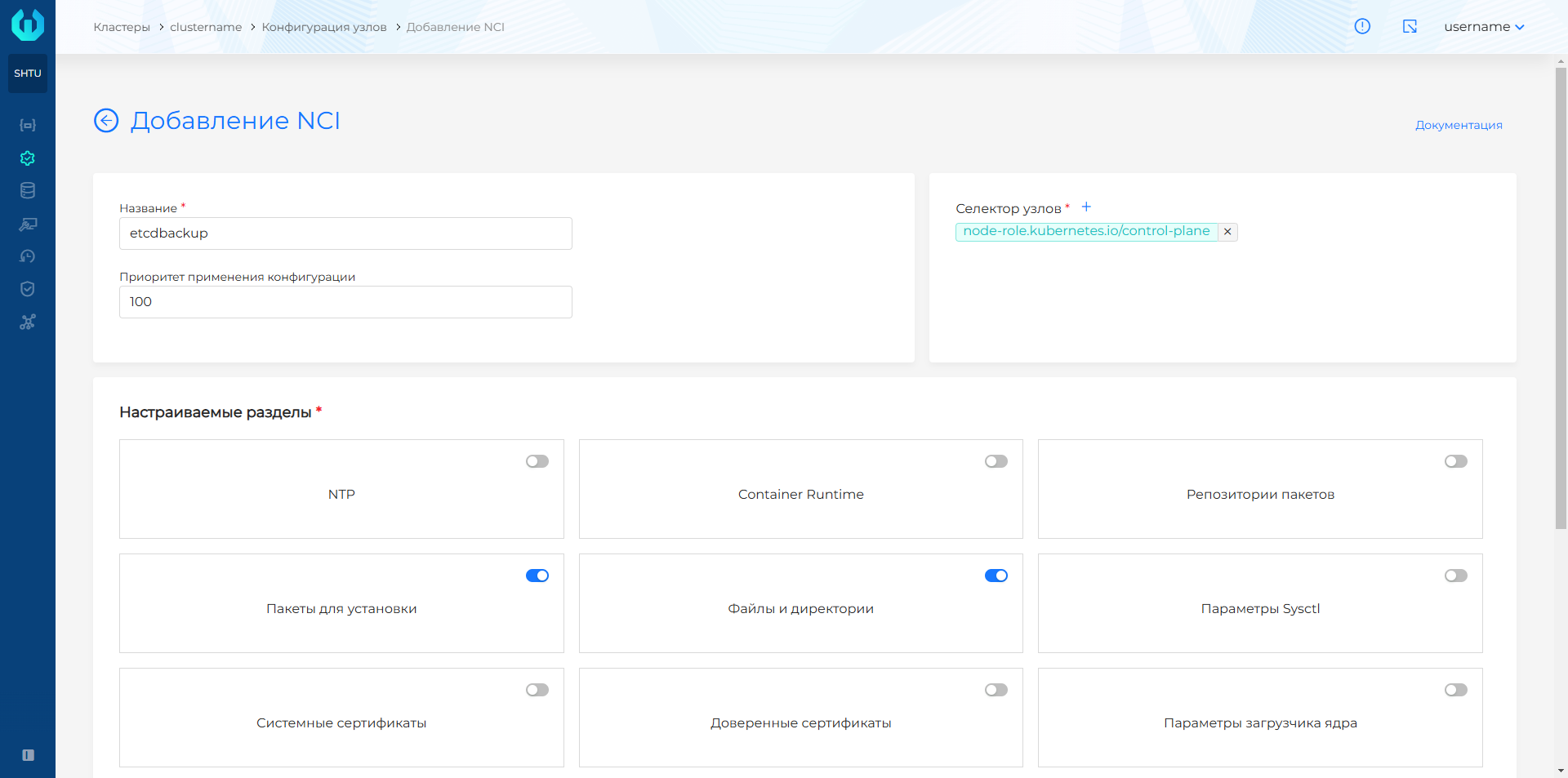
- Set a name, for example, etcdbackup and in the node selector from the drop-down list, select the label key node-role.kubernetes.io/control-plane. Do not set a value for the label.
- In the Customizable sections block, select Files and directories and Packages for installation, click Continue.
Screenshot
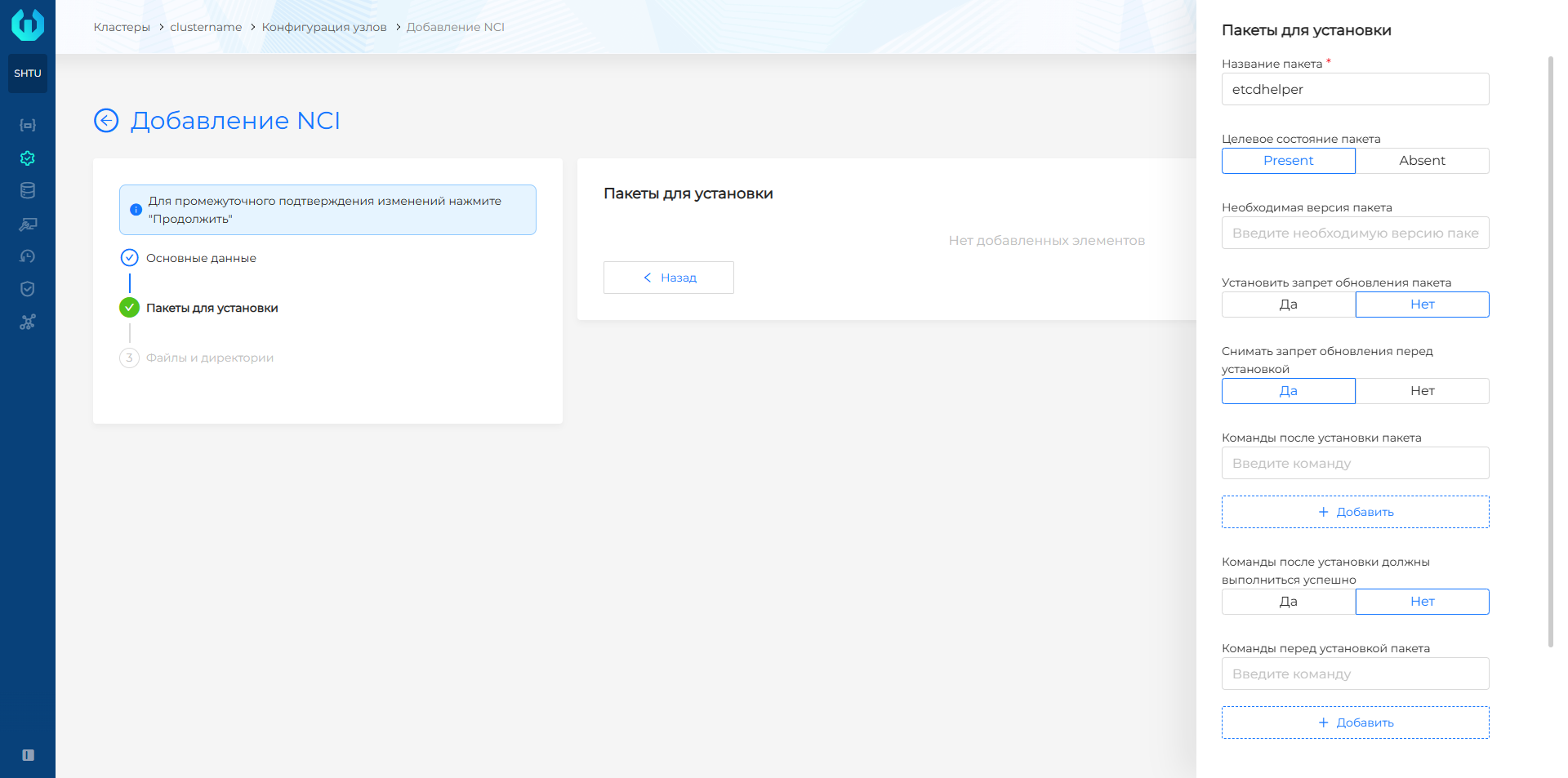
- In the window that opens, at the configuration step of the Packages for installation section, click + and specify the package
etcdhelper, select the target state of the package Present.
Screenshot
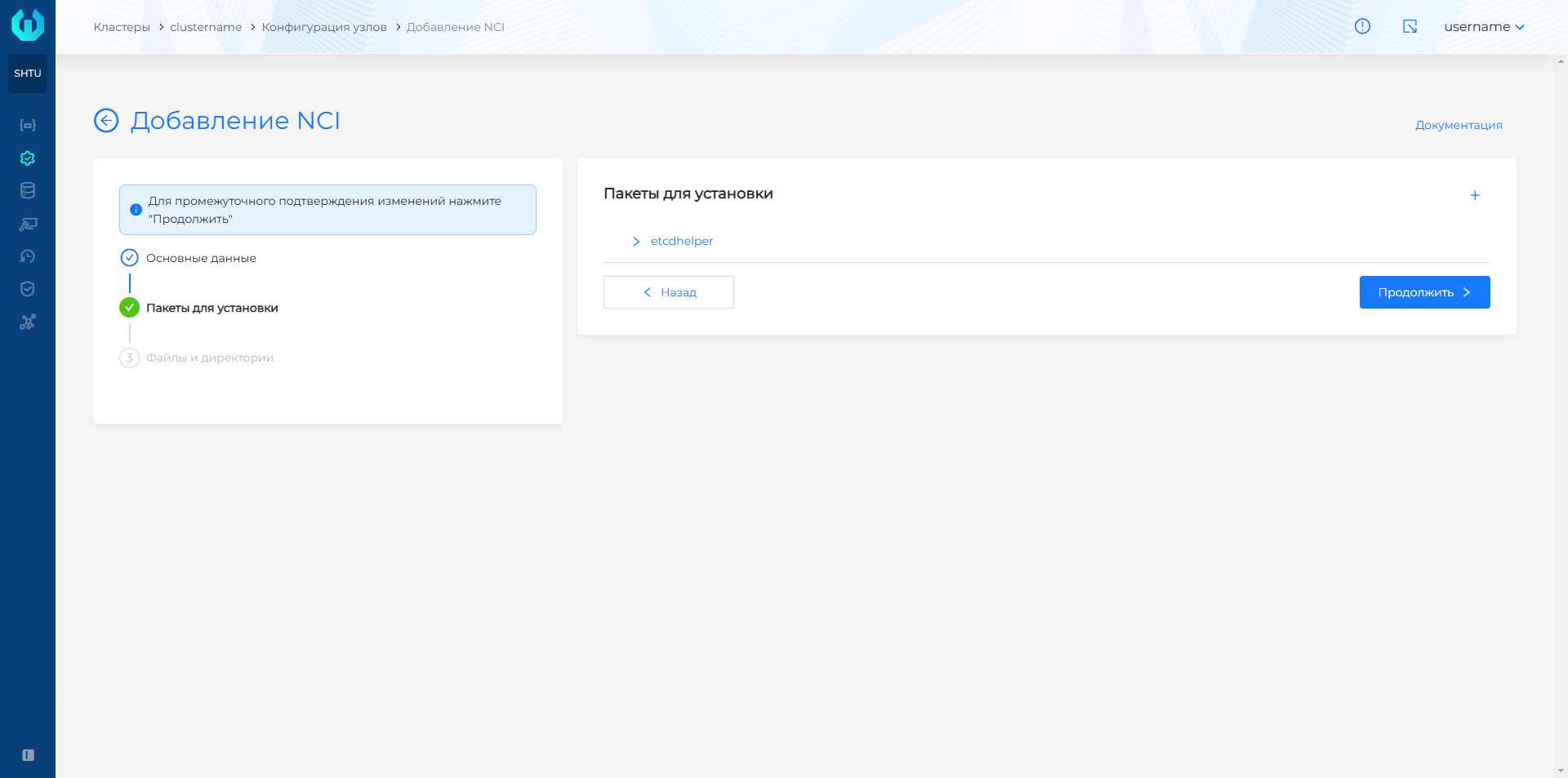
- Click Add and then Continue to go to the Files and Directories section.
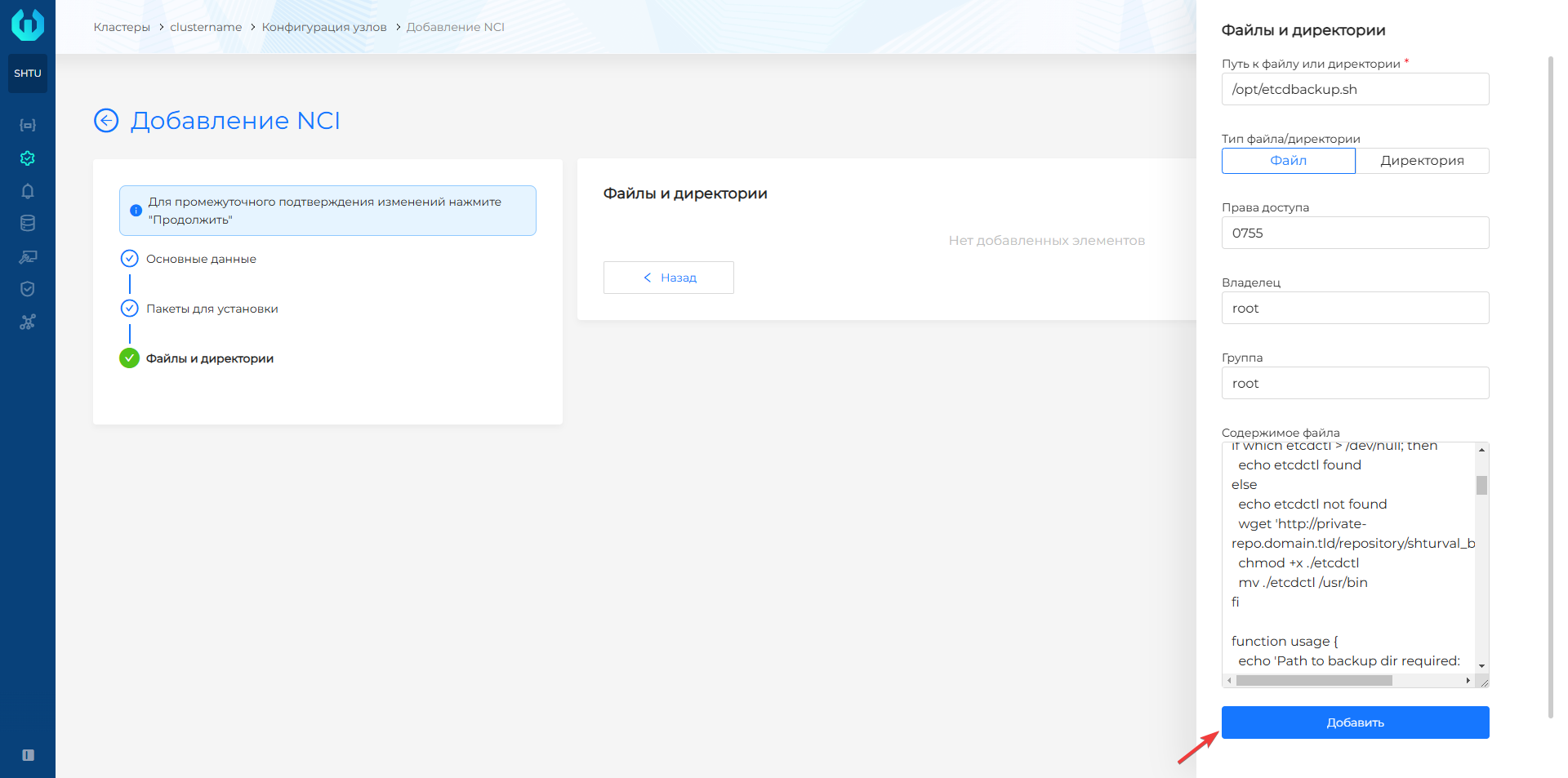
- At the Files and directories step, click + and in the Path to file or directory field, write the path to the file to be created with the backup script. File must be selected in the file/directory type.
- In the access rights field, specify the necessary rights, for example, 0755, which will provide the owner with full access to the file, the owner’s group and other users with read and execute access. The owner and group must be root.
- In the File Contents field, paste the contents of the prepared script from the
etcdbackup.shfile, click Add.
Screenshot
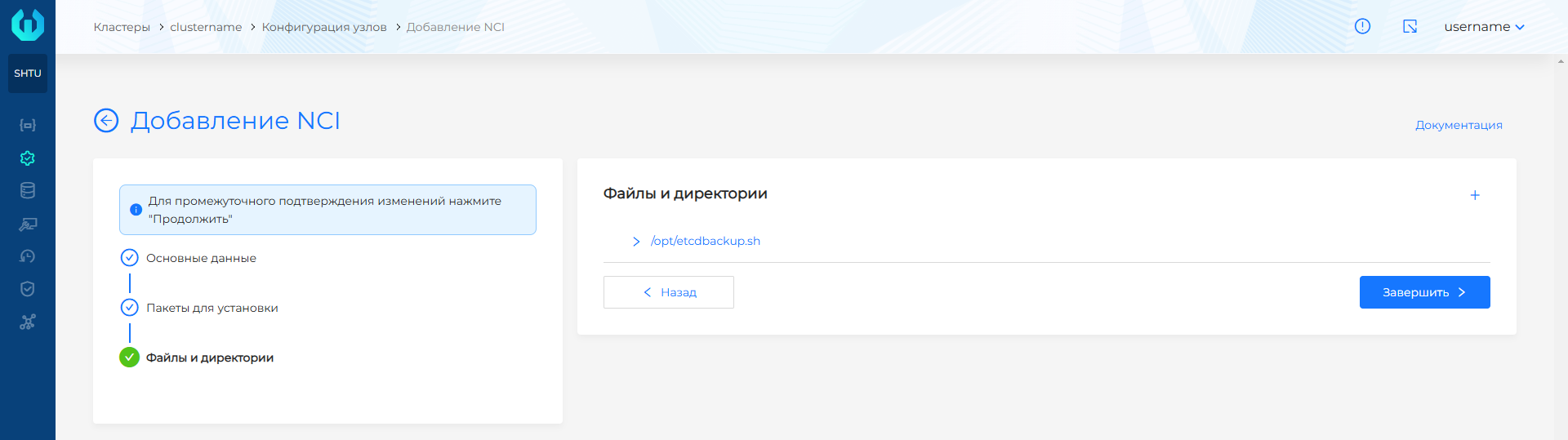
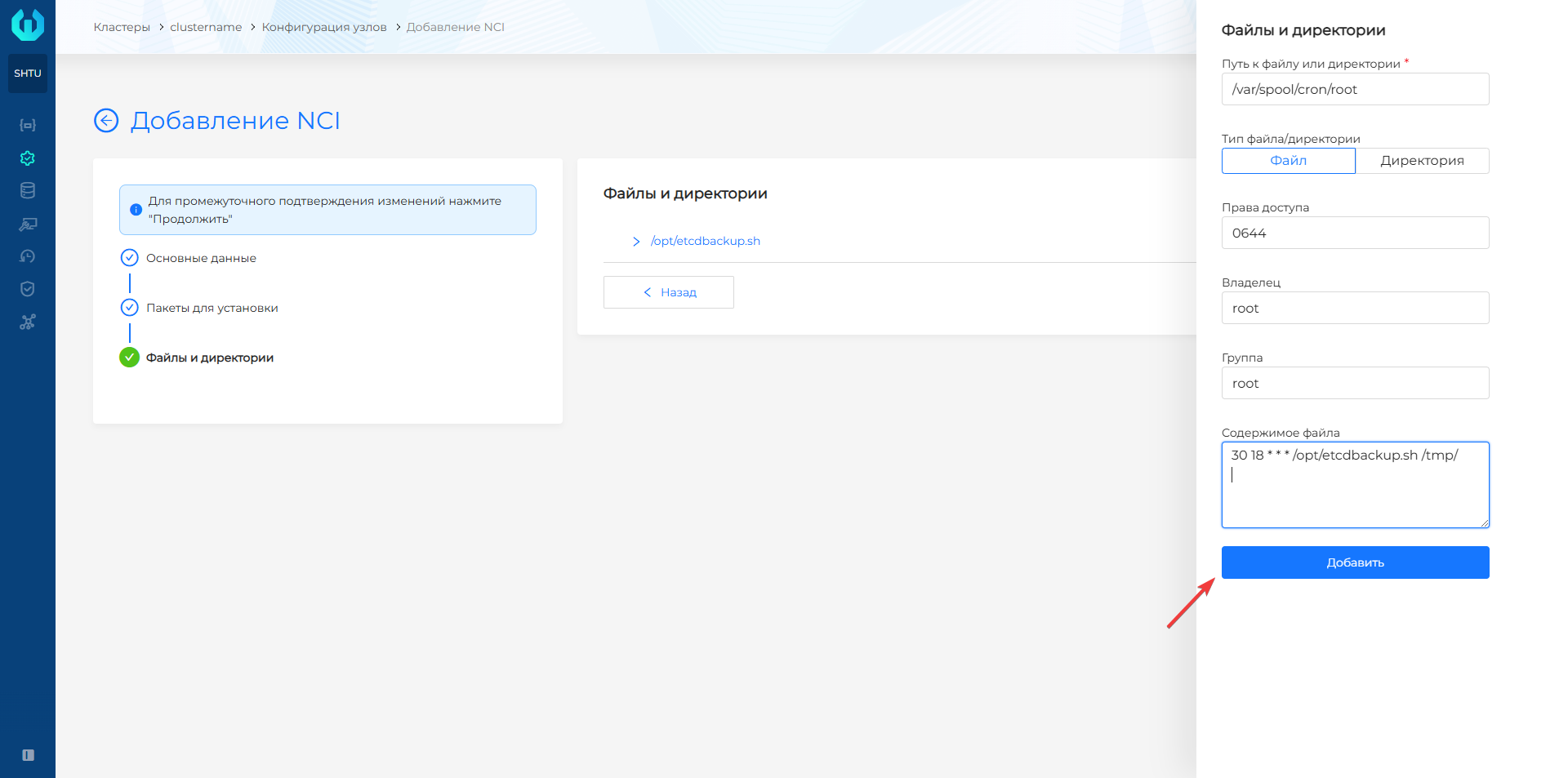
- Click + and in the Path to file or directory field, enter the path to the file with the backup schedule.
- In the access rights field, specify the necessary rights, for example, 0600, which will ensure that only the owner of the file has read and write rights. The owner and group must be root.
- In the File Contents field, specify the backup launch configuration: schedule in cron fformat, the path to the file with the script and the path to the ETCD backup being created. In the File Contents field after recording the launch configuration, a line break is required.
- Click Add. Please note! It is recommended to store a backup copy of ETCD on a network file system not on Control Plane nodes, but, for example,
/nfs/share. This can be useful if Control Plane nodes are unavailable.
Example launch configuration
30 18 * * * /opt/etcdbackup.sh /tmp/
Screenshot
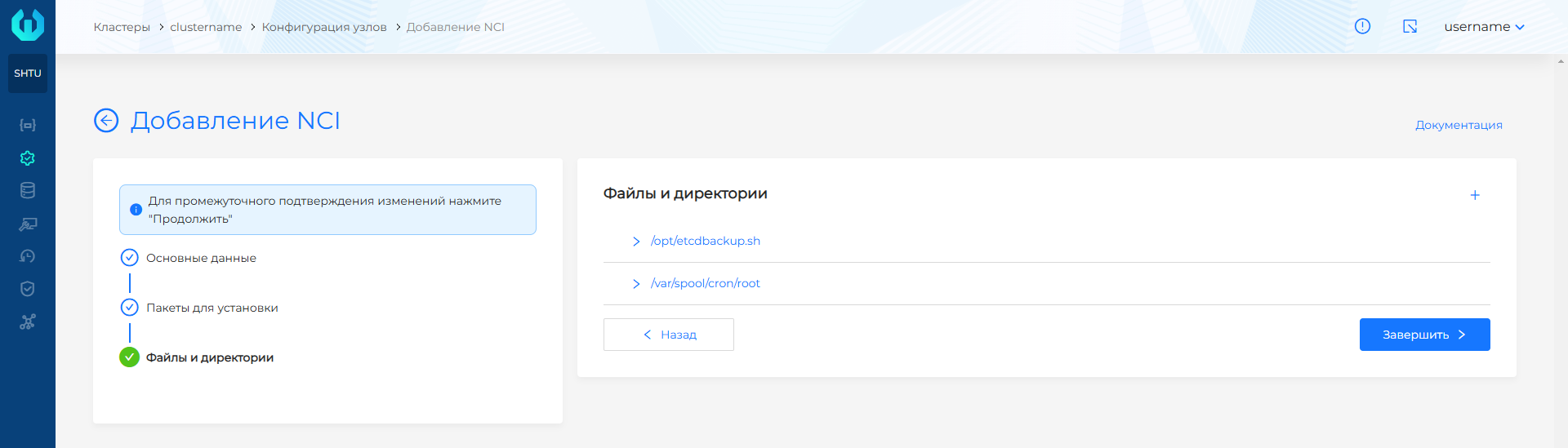
- Click Finish.
NCI example
 apiVersion: node.shturval.tech/v1beta2
kind: NodeConfigItem
metadata:
  annotations:
    shturval.tech/name: etcdbackup
  finalizers:
  - node.shturval.tech/finalizer
  name: etcdbackup
spec:
  packages:
    - name: etcdhelper
      state: present
  files:
  - content: |
#!/bin/sh

if [[ $EUID -ne 0 ]]; then
  echo "This script must be run as root"
  exit 1
fi

if which etcdctl > /dev/null; then
  echo etcdctl found
else
  echo etcdctl not found
fi

function usage {
  echo 'Path to backup dir required: ./cluster-backup.sh <path-to-backup-dir>'
  exit 1
}

# If the first argument is missing, or it is an existing file, then print usage and exit
if [ -z "$1" ] || [ -f "$1" ]; then
  usage
fi

function checkManifests {
  echo 'No manifsts found in /etc/kubernetes/manifests'
  exit 1
}

if [ -z "$(ls /etc/kubernetes/manifests/)" ];then
  checkManifests
fi

function checkStatus () {
  status=$?
  if test $status -eq 0
  then
    echo "passed $1"
  else
    echo "failed $1"
    exit 1
  fi
}

archive="$(hostname)-$(date '+%F_%H%M%S').tar.gz"
backupdate="$1/backup/"
mkdir -p $backupdate/manifests
mkdir -p $backupdate/etcd

ETCDCTL_API=3 \
ETCDCTL_CACERT='/etc/kubernetes/pki/etcd/ca.crt' \
ETCDCTL_CERT='/etc/kubernetes/pki/etcd/server.crt' \
ETCDCTL_KEY='/etc/kubernetes/pki/etcd/server.key' \
ETCDCTL_ENDPOINTS='https://XX.XX.XX.XX:2379' \
/usr/local/bin/etcdctl snapshot save $backupdate/etcd/etcd.snapshot ;

checkStatus "etcd backup"

cp -r /etc/kubernetes/manifests/* $backupdate/manifests/
checkStatus "Create copies of static manifests"

echo "Manifests saved at $backupdate/manifests"

cp /etc/kubernetes/secrets_encryption.yaml $backupdate/etcd/ >/dev/null 2>&1
echo "Create copies of secrets_encryption.yaml"

echo "Archiving backup...."
tar -zcf $1/$archive $backupdate 2> /dev/null
checkStatus "archiving file"
echo "Backup archiving finished"
chmod 666 $1/$archive

echo "Backup archive is located in $1/archive"

find /tmp/ -name "*.tar.gz" -mtime +3 -delete
checkStatus "removing old backups"

echo Backup finished
exit 0
    group: root
    mode: "0755"
    owner: root
    path: /opt/etcdbackup.sh
    type: file
  - content: "30 18 * * * /opt/etcdbackup.sh /tmp/"
    group: root
    mode: "0600"
    owner: root
    path: /var/spool/cron/root
    type: file
  nodeconfigselector:
    node-role.kubernetes.io/control-plane: ""
  priority: 100
As a result of successful execution of the script according to schedule, an ETCD backup copy will be created for each Control Plane node.
Restore ETCD backup
To restore from an ETCD backup, you must run restore for each Control Plane node.
- On the Control Plane node, move the pod manifest with the file name
kube-apiserver.yamlfrometc/kubernetes/manifests/to another folder, for example,/root, to stop the API server. After moving, you must wait until the pod is removed.
# Move the pod manifest to /root/
mv /etc/kubernetes/manifests/kube-apiserver.yaml  /root/
# Get API server pod information
crictl ps | grep api
Screenshot

- Restore from the ETCD backup.
Command
export ETCDCTL_API=3
/usr/local/bin/etcdctl --data-dir /var/lib/etcd snapshot restore /tmp/backup/etcd/etcd.snapshot
Where instead of /var/lib/etcd specify the directory that will be created during the process of restoring the ETCD backup, and instead of /tmp/backup/etcd/etcd.snapshot indicate the path to the backup. Please note! If you specify the /var/lib/etcd directory, delete it before restoring from the ETCD backup.
Screenshot

Please note! In case of restoring ETCD on Control Plane nodes of a newly created cluster, it is necessary to restore secrets_encryption.yaml from the archive. Saving secrets_encryption.yaml is required for clusters with advanced security options (secure=true).
Command
cp status/backup/etcd/secrets_encryption.yaml /etc/kubernetes/
Where instead of status/backup/etcd/secrets_encryption.yaml specify the path to the saved file secrets_encryption.yaml.
- Restart the API server by moving the
kube-apiserver.yamlfile back toetc/kubernetes/manifests/on the node.
Command
mv /root/kube-apiserver.yaml /etc/kubernetes/manifests/
# Get API server pod information
crictl ps | grep api
Screenshot

Recommended:
- Restart
kube-scheduler,kube-controller-manageron Control Plane nodes. One by one, move the manifest files to the root folder. Check that the pod has been deleted, then return the manifest back to/etc/kubernetes/manifests/.
Kube-scheduler restart command
# Move the pod manifest to /root/
mv /etc/kubernetes/manifests/kube-scheduler.yaml /root/
# Get kube-scheduler pod information. Wait until the pod is removed
crictl ps | grep scheduler
# Restore the kube-scheduler pod
mv /root/kube-scheduler.yaml /etc/kubernetes/manifests/
Restart kube-controller-manager command
# Move the pod manifest to /root/
mv /etc/kubernetes/manifests/kube-controller-manager.yaml  /root/
# Get kube-controller-manager pod information. Wait until the pod is removed
crictl ps | grep controller
# Restore the kube-controller-manager pod
mv /root/kube-controller-manager.yaml /etc/kubernetes/manifests/
- Restart
kubelet.
Kubelet restart command
sudo systemctl restart kubelet
sudo systemctl status kubelet