With configuration file from console
Before you authenticate:
- Review options for gaining access to the cluster from the console.
- Install cluster access module
kubectl-shturval-plugin. See the module installation instructions.
Once the kubectl-shturval-plugin module is installed, you can generate a configuration file with the required set of parameters. To do this in the command line interface:
- Run the command
kubectl shturval login genconfig, into which you need to substitute your parameter values.
Available parameters for the kubectl shturval login genconfig command
| Parameter | Required | Description |
|---|---|---|
--auth-url [string] | no | Authentication Server URL |
--cacert [string] | no | Contents of the root trusted certificate |
--cacert-file [string] | no | Path to the root trusted certificate |
--client-id [string] | no | Client ID for the external authentication service. Default: backend |
--client-secret [string] | no | Secret client for external authentication service |
-n, --cluster-name [string] | no | Name of the cluster to get kubeconfig. Not specified if you need to get the kubeconfigs of all available clusters |
--config-path [string] | no | Path to the location of the shturval-login-plugin.yaml configuration file. Default for Linux: /root |
-i, --insecure | no | TLS connection security check sign |
-k, --kubeconfig [string] | no | Path to downloaded kubeconfigs. Default for Linux: /root/.kube/config |
-p, --password [string] | no | Password for connecting to the shturval-backend server. If your password contains special characters ($,<, >, *, &, ?, /,\ ), you must escape them using single quotes. For example, --password='my$Password?' |
-s, --server-url [string] | no | shturval-backend server URL |
--ttl [string] | no | Token lifetime. By default 24h |
-u, --username [string] | no | Username for connecting to the server shturval-backend |
-v, --version | no | login command version |
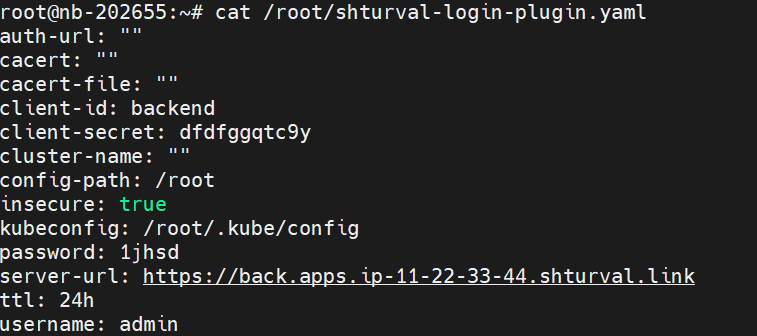
- Make sure that the configuration file is prepared.
Command example
cat ENTER-PATH-TO-shturval-login-plugin.yaml
Screenshot
- Run the command
kubectl shturval loginto load kubeconfigs of available clusters, into which you substitute your parameter values.
Available parameters for the kubectl shturval login command
| Parameter | Required | Description |
|---|---|---|
--auth-url [string] | no | Authentication Server URL |
--cacert [string] | no | Contents of the root trusted certificate |
--cacert-file [string] | no | Path to the root trusted certificate |
--client-id [string] | no | Client ID for the authentication service. Default: backend |
--client-secret [string] | yes | Secret client for authentication service |
-n, --cluster-name [string] | no | Name of the cluster to get kubeconfig. Not specified if you need to get kubeconfigs of all clusters |
--config-path [string] | no | Path to the location of the shturval-login-plugin.yaml configuration file. Default for Linux: /root |
-i, --insecure | no | TLS connection security check sign |
-k, --kubeconfig [string] | no | Path to downloaded kubeconfigs. Default for Linux: /root/.kube/config |
-p, --password [string] | no | Password for connecting to the shturval-backend server. If your password contains special characters ($,<, >, *, &, ?, /,\ ), you must escape them using single quotes. For example, --password='my$Password?' |
-s, --server-url [string] | yes, if there is no configuration file or the URL is not specified in it | shturval-backend server URL |
--ttl [string] | no | Token lifetime. Default 24h |
-u, --username [string] | yes, if there is no configuration file or the username is not specified in it | Username for connecting to the shturval-backend server |
-v, --version | no | login command version |
Please note!
- Parameter data that is inYou specify
kubectl shturval loginin the command will take precedence over the values of the same parameters in theshturval-login-plugin.yamlconfiguration file. In this case, the values of the configuration file parameters will not be overwritten. - After calling the command without a connection password (parameter
-p/--password), it will be requested interactively.
- Once the clusters’ kubeconfigs are loaded, you can manage the available clusters using the kubectl utility commands.
If you encounter cluster access errors, you can find a solution to the problem in the next section Actions for common access errors.
Examples of generating a configuration file
To generate a configuration file, run the kubectl shturval login genconfig command, into which you need to substitute your parameter values.
1. Command to generate a configuration file without specified parameters (only with default values)
kubectl shturval login genconfig
2. Command to generate a configuration file with account parameters (without password), shturval-backend server URL and without TLS connection security check
kubectl shturval login genconfig --username=ENTER-USERNAME-FOR-CONNECTION --server-url=ENTER-shturval-backend-SERVER-URL --insecure=true --client-secret=ENTER-AUTHENTICATION-SERVICE-CLIENT-SECRET
In --client-secret enter the value of the backend secret key backend-shturval-backend of the management cluster. If you do not have access to the secret, request the data from the platform administrator.
Screenshot

Your configuration file named shturval-login-plugin.yaml and the specified parameters will be located in the user’s home directory (for example, for Linux /root).
3. A command to generate a configuration file with account parameters, shturval-backend server URL, loading the configuration file into a specified directory and without checking the TLS connection
kubectl shturval login genconfig --username=ENTER-USERNAME-FOR-CONNECTION --password='ENTER-USER-PASSWORD' --server-url=ENTER-shturval-backend-SERVER-URL --insecure=true --client-secret=ENTER-AUTHENTICATION-SERVICE-CLIENT-SECRET --config-path=ENTER-PATH-TO-CONFIGURATION-FILE
In --client-secret enter the value of the backend secret key backend-shturval-backend of the management cluster.
4. Command to generate a configuration file with account parameters URL shturval-backend server and with TLS connection security check (root certificate is specified)
kubectl shturval login genconfig --username=ENTER-USERNAME-FOR-CONNECTION --password='ENTER-USER-PASSWORD' --server-url=ENTER-shturval-backend-SERVER-URL --client-secret=ENTER-AUTHENTICATION-SERVICE-CLIENT-SECRET --cacert=-----BEGIN CERTIFICATE-----Base64 content-----END CERTIFICATE-----
5. Command to generate a configuration file with TLS connection security check (the path to the root trusted certificate is specified in the parameter)
kubectl shturval login genconfig --username=ENTER-USERNAME-FOR-CONNECTION --password='ENTER-USER-PASSWORD' --server-url=ENTER-shturval-backend-SERVER-URL --client-secret=ENTER-AUTHENTICATION-SERVICE-CLIENT-SECRET --cacert-file=ENTER-PATH-TO-ROOT-TRUSTED-CERTIFICATE
6. The command to generate a configuration file with the default parameters modified for the client ID for the external authentication service, the authentication server URL and the kubeconfigs loading directory
kubectl shturval login genconfig --kubeconfig=ENTER-PATH-FOR-kubeconfig-DOWNLOAD --auth-url=keycloak.clustername.ip-XX-XX-XXX-XX.shturval.link --client-id=ENTER-EXTERNAL-AUTHENTICATION-SERVICE-CLIENT-ID
Examples of loading kubeconfigs of available clusters when the configuration file is generated
To load the kubeconfigs of available clusters, run the kubectl shturval login command, into which you need to substitute your parameter values.
1. The command to load kubeconfigs of available clusters, if the configuration file was configured without specified parameters (only with default values)
kubectl shturval login --username=ENTER-USERNAME-FOR-CONNECTION --server-url=ENTER-shturval-backend-SERVER-URL --insecure=true --client-secret=ENTER-AUTHENTICATION-SERVICE-CLIENT-SECRET
The connection password will be requested interactively.
2. Command to load kubeconfigs of available clusters if the configuration file includes all required parameters for loading kubeconfigs of available clusters
kubectl shturval login
The connection password will be requested interactively.
Screenshot

3. Command to load kubeconfigs available clusters, if the configuration file has all the required parameters for loading kubeconfigs of available clusters and you need to load kubeconfigs with another account access
kubectl shturval login --username=ENTER-USERNAME-FOR-CONNECTION --password='ENTER-USER-PASSWORD'