Module installation and commands
To get started with the module:
- Download the module binary file from the link:
If the platform is deployed in a closed environment (share), instead of a download link, use the link address to kubectl-shturval on your mirror, for example, https://adress-resgistry/repository/shturval_bin_public/kubectl-shturval/2.13.1/kubectl-shturval (Linux only).
- Check the location of the kubectl executable.
Example commands for Linux
which kubectl
Screenshot

Example commands for Windows
Get-ChildItem -Path C:\ "kubectl.exe" -Recurse -Force -ErrorAction SilentlyContinue
Screenshot

- Place the binary file in the same directory as the kubectl file and ensure execution permission is granted. If the loaded file name is different from
kubectl-shturval, rename it when moving it.
Example commands for Linux
sudo cp ENTER-PATH-TO-DOWNLOADED-kubectl-shturval-version ENTER-DIRECTORY-WHERE-kubectl-shturval-IS-LOCATED && sudo chmod +x ENTER-DIRECTORY-WHERE-kubectl-shturval-IS-LOCATED
Screenshot

Example commands for Windows
If the binary file name is different from kubectl-shturval.exe, rename it when moving it.
cp ENTER-PATH-TO-DOWNLOADED-kubectl-shturval.exe ENTER-DIRECTORY-WHERE-kubectl.exe-IS-LOCATED
Screenshot

- Make sure the file is located in the same directory as kubectl.
Example commands for Linux
ls ENTER-DIRECTORY-WHERE-kubectl-IS-LOCATED | grep kubectl-shturval
Screenshot

Example commands for Windows
Test-Path -PathType Leaf -Path 'ENTER-DIRECTORY-WHERE-kubectl.exe-IS-LOCATED\kubectl-shturval.exe'
Screenshot

Module commands
| Command | Description |
|---|---|
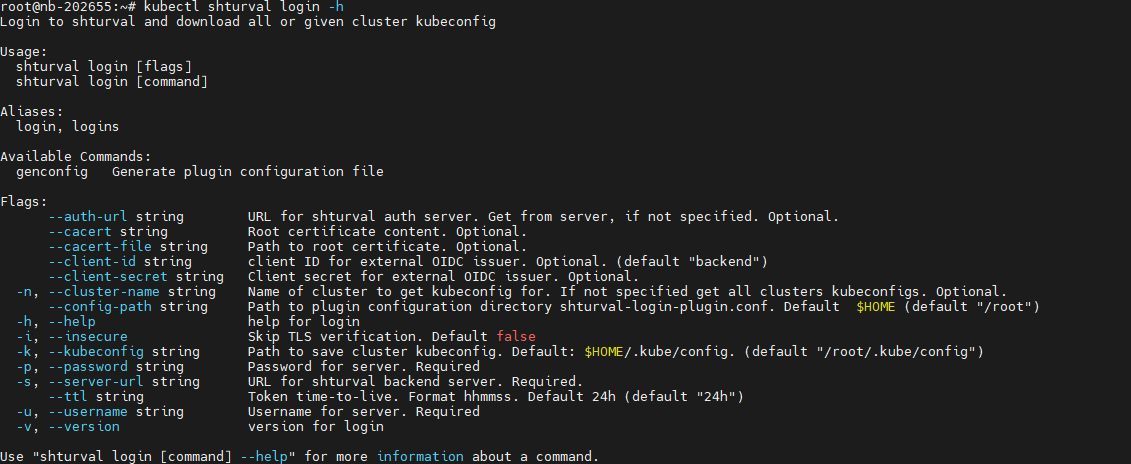
kubectl shturval login | Authenticates to the platform and downloads kubeconfigs for all clusters available to the user, or kubeconfig for one cluster |
kubectl shturval login genconfig | Generates a configuration file with the specified parameters. The configuration file is used by the kubectl shturval login command when accessing clusters |
Example of calling the help command kubectl shturval login
kubectl shturval login -h
Screenshot