Exclude marked vulnerabilities from reports (VulnerabilityReports)
When the Container Image Scanning Module Trivy is enabled in the cluster, reports are generated on identified vulnerabilities in container images (VulnerabilityReports). The reports may reveal vulnerabilities with a HIGH criticality that are not related to the container images of the Shturval platform components (known marked vulnerabilities).
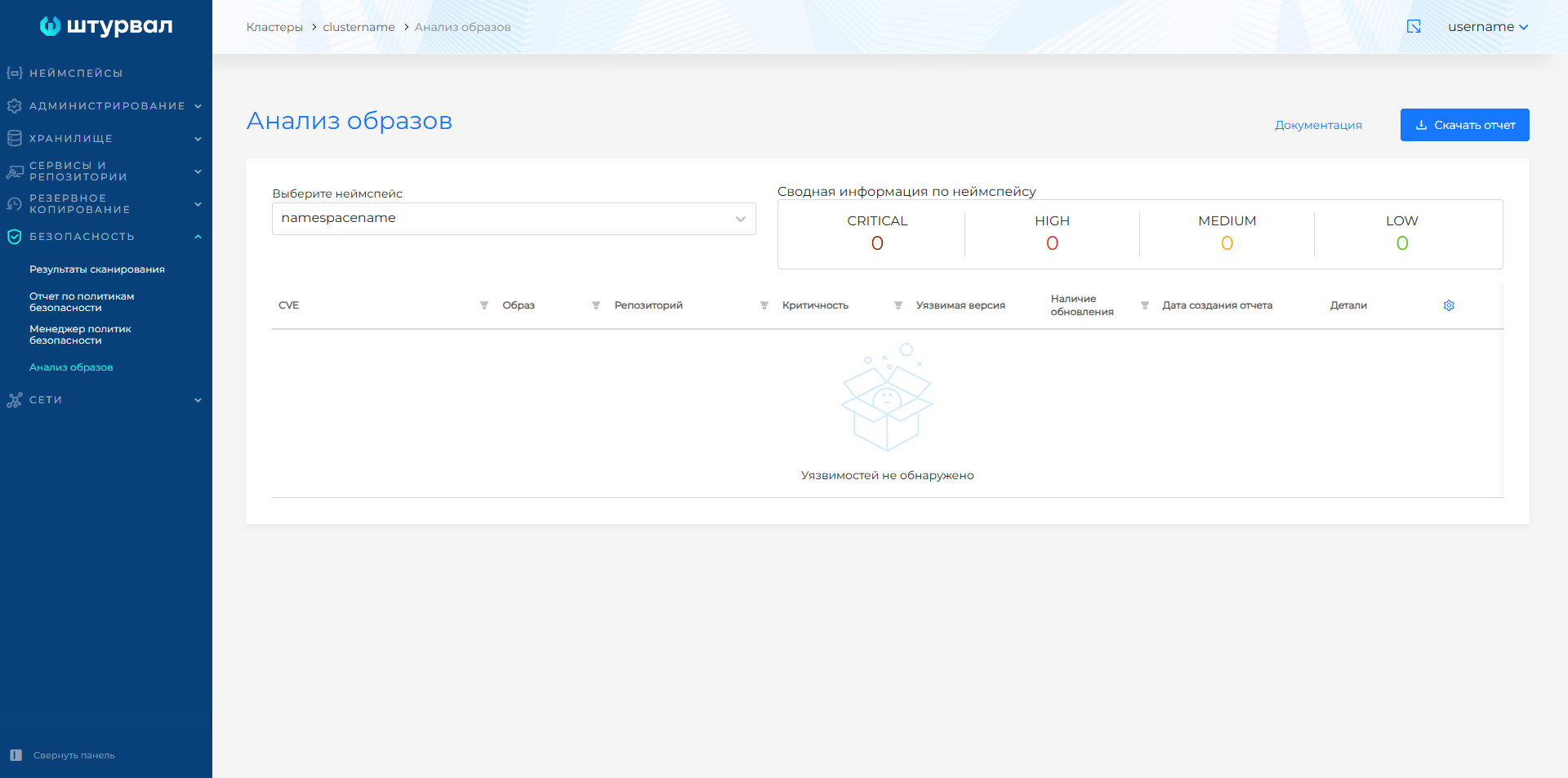
In the graphical interface, reports are presented in the Security section, on the Image Analysis page.
If necessary, you can exclude known (tagged) vulnerabilities from reports. To do this you need:
- Prepare configuration for Trivy and upload file vex-updated.json with marked vulnerabilities in VEX format;
- Create ConfigMaps in cluster with configuration for Trivy and file vex-updated.json;
- Prepare and load ShturvalServicePatch to apply to ssc shturval-scanner.
Preparing the configuration and file with vulnerabilities
- Create a YAML configuration file for Trivy named trivy.yaml.
trivy.yaml
vulnerability:
  vex:
    - /tmp/vex/openvex.json
Download from the link vex-updated.json dla 2.13.1.
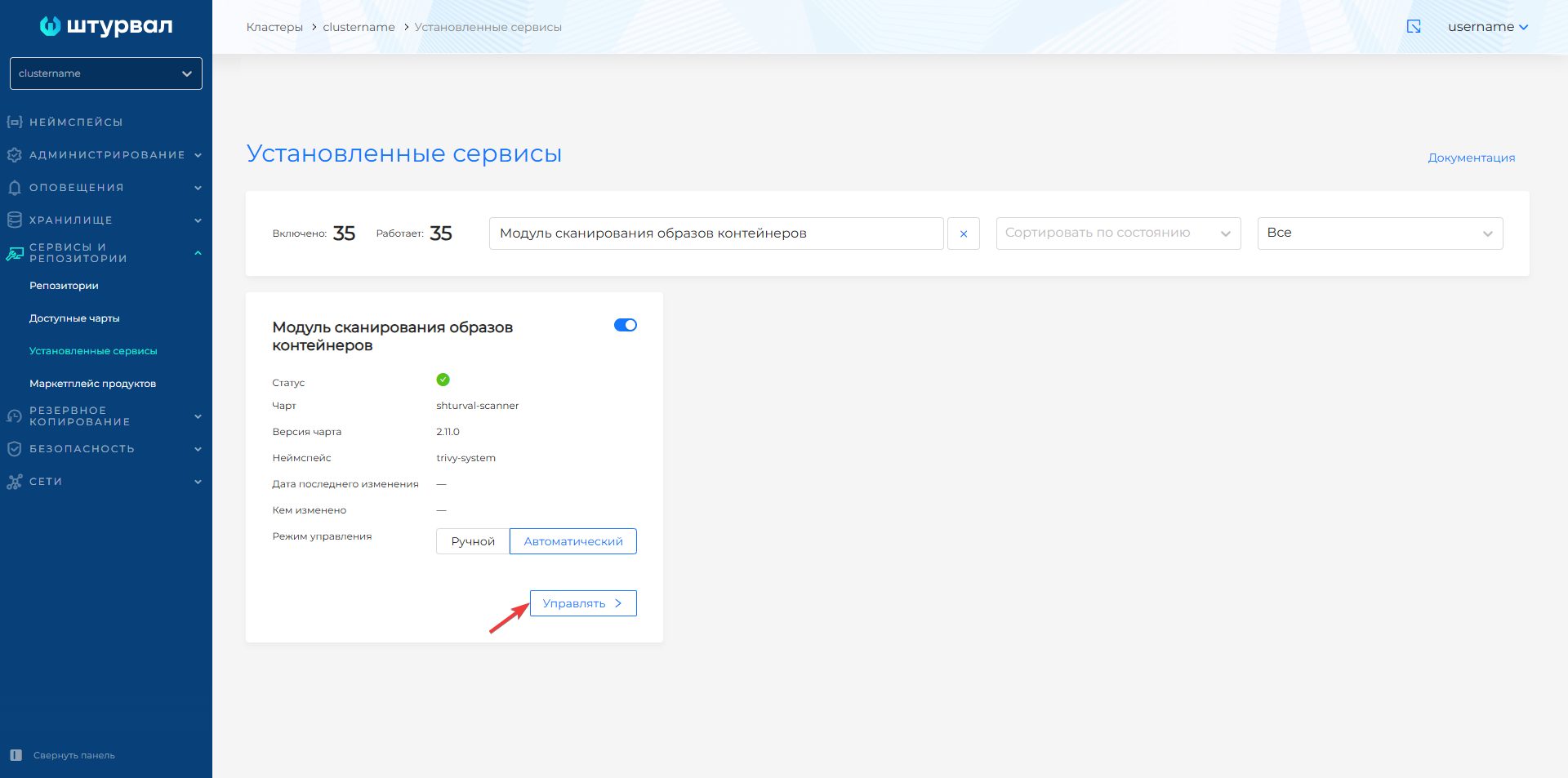
Go to the cluster where you want to exclude marked vulnerabilities from the report. Open the Services and Repositories section, go to the Installed services page and find Container image scanning module
shturval-scanner, go to management.
Screenshot
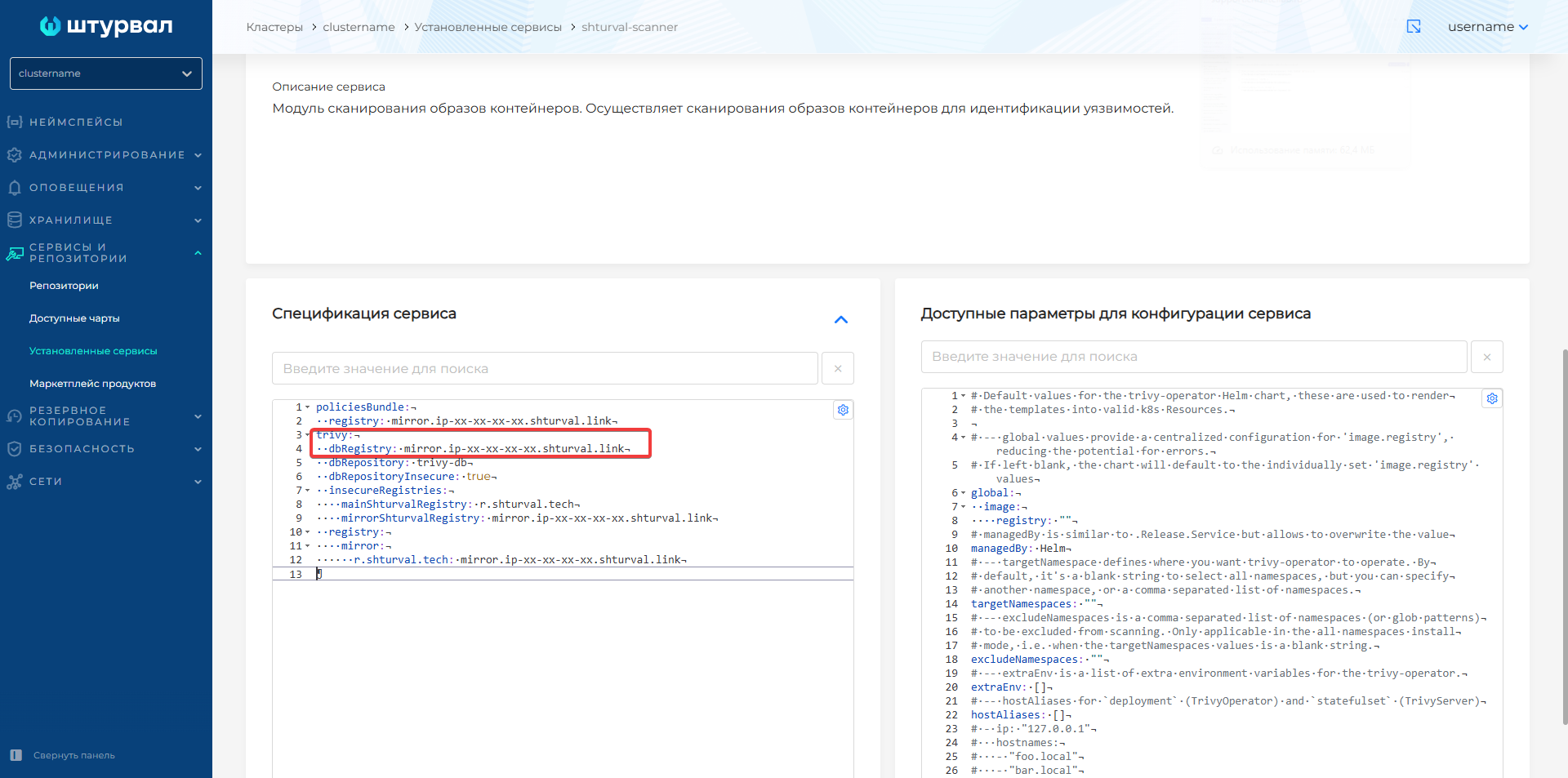
- In the Service Specification block, find the
trivy.dbRegistryparameter and copy its value.
Screenshot
- Open the downloaded vex-updated.json file and find
repository_url. The default registry inrepository_urlis r.shturval.tech. Replace r.shturval.tech with the value fromtrivy.dbRegistryand save the changes.
Example vex-updated.json before changes
{
  "@context": "https://openvex.dev/ns/v0.2.0",
  "@id": "https://openvex.dev/docs/public/vex/ee517aa7-57db-4d0b-9909-90aabf452bce",
  "author": "Numerator Laboratory",
  "timestamp": "2025-08-18T08:32:53.692213Z",
  "version": 1,
  "statements": [
    {
      "vulnerability": {
        "name": "CVE-2025-47907"
      },
      "products": [
        {
          "@id": "pkg:oci/csi-snapshotter@sha256%3Aed26fa61da16cefa307ce5761f6208ec4cf88ec4efde20f0d0fba47e83e54f18?arch=amd64&repository_url=r.shturval.tech%2Fsig-storage%2Fcsi-snapshotter\npkg:oci/csi-snapshotter@sha256%3Aed26fa61da16cefa307ce5761f6208ec4cf88ec4efde20f0d0fba47e83e54f18?arch=amd64&repository_url=r.shturval.tech%2Fsig-storage%2Fcsi-snapshotter\npkg:oci/csi-snapshotter@sha256%3Aed26fa61da16cefa307ce5761f6208ec4cf88ec4efde20f0d0fba47e83e54f18?arch=amd64&repository_url=r.shturval.tech%2Fsig-storage%2Fcsi-snapshotter\npkg:oci/csi-snapshotter@sha256%3Aed26fa61da16cefa307ce5761f6208ec4cf88ec4efde20f0d0fba47e83e54f18?arch=amd64&repository_url=r.shturval.tech%2Fsig-storage%2Fcsi-snapshotter\npkg:oci/csi-snapshotter@sha256%3Aed26fa61da16cefa307ce5761f6208ec4cf88ec4efde20f0d0fba47e83e54f18?arch=amd64&repository_url=r.shturval.tech%2Fsig-storage%2Fcsi-snapshotter\npkg:oci/csi-snapshotter@sha256%3Aed26fa61da16cefa307ce5761f6208ec4cf88ec4efde20f0d0fba47e83e54f18?arch=amd64&repository_url=r.shturval.tech%2Fsig-storage%2Fcsi-snapshotter"
        },
        {
          "@id": "pkg:oci/cinder-csi-plugin@sha256%3A2c197dce4b635a170a1c5c0c040761e7b83ab8affd4e1c4edaed813bad65d268?arch=amd64&repository_url=r.shturval.tech%2Fprovider-os%2Fcinder-csi-plugin\npkg:oci/cinder-csi-plugin@sha256%3A2c197dce4b635a170a1c5c0c040761e7b83ab8affd4e1c4edaed813bad65d268?arch=amd64&repository_url=r.shturval.tech%2Fprovider-os%2Fcinder-csi-plugin"
        },
        {
          "@id": "pkg:oci/csi-attacher@sha256%3A66ab827e23958d971a5e29219a2d4cff2e873fd1b2a9b7c6d4d30c61928e8ecf?arch=amd64&repository_url=r.shturval.tech%2Fsig-storage%2Fcsi-attacher\npkg:oci/csi-attacher@sha256%3A66ab827e23958d971a5e29219a2d4cff2e873fd1b2a9b7c6d4d30c61928e8ecf?arch=amd64&repository_url=r.shturval.tech%2Fsig-storage%2Fcsi-attacher\npkg:oci/csi-attacher@sha256%3A66ab827e23958d971a5e29219a2d4cff2e873fd1b2a9b7c6d4d30c61928e8ecf?arch=amd64&repository_url=r.shturval.tech%2Fsig-storage%2Fcsi-attacher\npkg:oci/csi-attacher@sha256%3A66ab827e23958d971a5e29219a2d4cff2e873fd1b2a9b7c6d4d30c61928e8ecf?arch=amd64&repository_url=r.shturval.tech%2Fsig-storage%2Fcsi-attacher\npkg:oci/csi-attacher@sha256%3A66ab827e23958d971a5e29219a2d4cff2e873fd1b2a9b7c6d4d30c61928e8ecf?arch=amd64&repository_url=r.shturval.tech%2Fsig-storage%2Fcsi-attacher"
        },
        {
          "@id": "pkg:oci/csi-node-driver-registrar@sha256%3Ad544f280fb3b683b6d15ddd5371bbeee5ce6295721bfcf684706453a755c6d9f?arch=amd64&repository_url=r.shturval.tech%2Fsig-storage%2Fcsi-node-driver-registrar\npkg:oci/csi-node-driver-registrar@sha256%3Ad544f280fb3b683b6d15ddd5371bbeee5ce6295721bfcf684706453a755c6d9f?arch=amd64&repository_url=r.shturval.tech%2Fsig-storage%2Fcsi-node-driver-registrar\npkg:oci/csi-node-driver-registrar@sha256%3Ad544f280fb3b683b6d15ddd5371bbeee5ce6295721bfcf684706453a755c6d9f?arch=amd64&repository_url=r.shturval.tech%2Fsig-storage%2Fcsi-node-driver-registrar"
        },

        ...
Screenshot before changes

Example vex-updated.json after changes
{
  "@context": "https://openvex.dev/ns/v0.2.0",
  "@id": "https://openvex.dev/docs/public/vex/ee517aa7-57db-4d0b-9909-90aabf452bce",
  "author": "Numerator Laboratory",
  "timestamp": "2025-08-18T08:32:53.692213Z",
  "version": 1,
  "statements": [
    {
      "vulnerability": {
        "name": "CVE-2025-47907"
      },
      "products": [
        {
          "@id": "pkg:oci/csi-snapshotter@sha256%3Aed26fa61da16cefa307ce5761f6208ec4cf88ec4efde20f0d0fba47e83e54f18?arch=amd64&repository_url=mirror.ip-xx-xx-xx-xx.shturval.link%2Fsig-storage%2Fcsi-snapshotter\npkg:oci/csi-snapshotter@sha256%3Aed26fa61da16cefa307ce5761f6208ec4cf88ec4efde20f0d0fba47e83e54f18?arch=amd64&repository_url=mirror.ip-xx-xx-xx-xx.shturval.link%2Fsig-storage%2Fcsi-snapshotter\npkg:oci/csi-snapshotter@sha256%3Aed26fa61da16cefa307ce5761f6208ec4cf88ec4efde20f0d0fba47e83e54f18?arch=amd64&repository_url=mirror.ip-xx-xx-xx-xx.shturval.link%2Fsig-storage%2Fcsi-snapshotter\npkg:oci/csi-snapshotter@sha256%3Aed26fa61da16cefa307ce5761f6208ec4cf88ec4efde20f0d0fba47e83e54f18?arch=amd64&repository_url=mirror.ip-xx-xx-xx-xx.shturval.link%2Fsig-storage%2Fcsi-snapshotter\npkg:oci/csi-snapshotter@sha256%3Aed26fa61da16cefa307ce5761f6208ec4cf88ec4efde20f0d0fba47e83e54f18?arch=amd64&repository_url=mirror.ip-xx-xx-xx-xx.shturval.link%2Fsig-storage%2Fcsi-snapshotter\npkg:oci/csi-snapshotter@sha256%3Aed26fa61da16cefa307ce5761f6208ec4cf88ec4efde20f0d0fba47e83e54f18?arch=amd64&repository_url=mirror.ip-xx-xx-xx-xx.shturval.link%2Fsig-storage%2Fcsi-snapshotter"
        },
        {
          "@id": "pkg:oci/cinder-csi-plugin@sha256%3A2c197dce4b635a170a1c5c0c040761e7b83ab8affd4e1c4edaed813bad65d268?arch=amd64&repository_url=mirror.ip-xx-xx-xx-xx.shturval.link%2Fprovider-os%2Fcinder-csi-plugin\npkg:oci/cinder-csi-plugin@sha256%3A2c197dce4b635a170a1c5c0c040761e7b83ab8affd4e1c4edaed813bad65d268?arch=amd64&repository_url=mirror.ip-xx-xx-xx-xx.shturval.link%2Fprovider-os%2Fcinder-csi-plugin"
        },
        {
          "@id": "pkg:oci/csi-attacher@sha256%3A66ab827e23958d971a5e29219a2d4cff2e873fd1b2a9b7c6d4d30c61928e8ecf?arch=amd64&repository_url=mirror.ip-xx-xx-xx-xx.shturval.link%2Fsig-storage%2Fcsi-attacher\npkg:oci/csi-attacher@sha256%3A66ab827e23958d971a5e29219a2d4cff2e873fd1b2a9b7c6d4d30c61928e8ecf?arch=amd64&repository_url=mirror.ip-xx-xx-xx-xx.shturval.link%2Fsig-storage%2Fcsi-attacher\npkg:oci/csi-attacher@sha256%3A66ab827e23958d971a5e29219a2d4cff2e873fd1b2a9b7c6d4d30c61928e8ecf?arch=amd64&repository_url=mirror.ip-xx-xx-xx-xx.shturval.link%2Fsig-storage%2Fcsi-attacher\npkg:oci/csi-attacher@sha256%3A66ab827e23958d971a5e29219a2d4cff2e873fd1b2a9b7c6d4d30c61928e8ecf?arch=amd64&repository_url=mirror.ip-xx-xx-xx-xx.shturval.link%2Fsig-storage%2Fcsi-attacher\npkg:oci/csi-attacher@sha256%3A66ab827e23958d971a5e29219a2d4cff2e873fd1b2a9b7c6d4d30c61928e8ecf?arch=amd64&repository_url=mirror.ip-xx-xx-xx-xx.shturval.link%2Fsig-storage%2Fcsi-attacher"
        },
        {
          "@id": "pkg:oci/csi-node-driver-registrar@sha256%3Ad544f280fb3b683b6d15ddd5371bbeee5ce6295721bfcf684706453a755c6d9f?arch=amd64&repository_url=mirror.ip-xx-xx-xx-xx.shturval.link%2Fsig-storage%2Fcsi-node-driver-registrar\npkg:oci/csi-node-driver-registrar@sha256%3Ad544f280fb3b683b6d15ddd5371bbeee5ce6295721bfcf684706453a755c6d9f?arch=amd64&repository_url=mirror.ip-xx-xx-xx-xx.shturval.link%2Fsig-storage%2Fcsi-node-driver-registrar\npkg:oci/csi-node-driver-registrar@sha256%3Ad544f280fb3b683b6d15ddd5371bbeee5ce6295721bfcf684706453a755c6d9f?arch=amd64&repository_url=mirror.ip-xx-xx-xx-xx.shturval.link%2Fsig-storage%2Fcsi-node-driver-registrar"
        },

        ...
Screenshot after changes

Please note! If in trivy.dbRegistry the register is specified with a port, then in repository_url the colon must be replaced with %3A.
Example
In ssc shturval-scanner trivy.dbRegistry:
trivy:
  dbRegistry: registry:443
Then in vex-updated.json:
repository_url=registry%3A443
Creating ConfigMaps
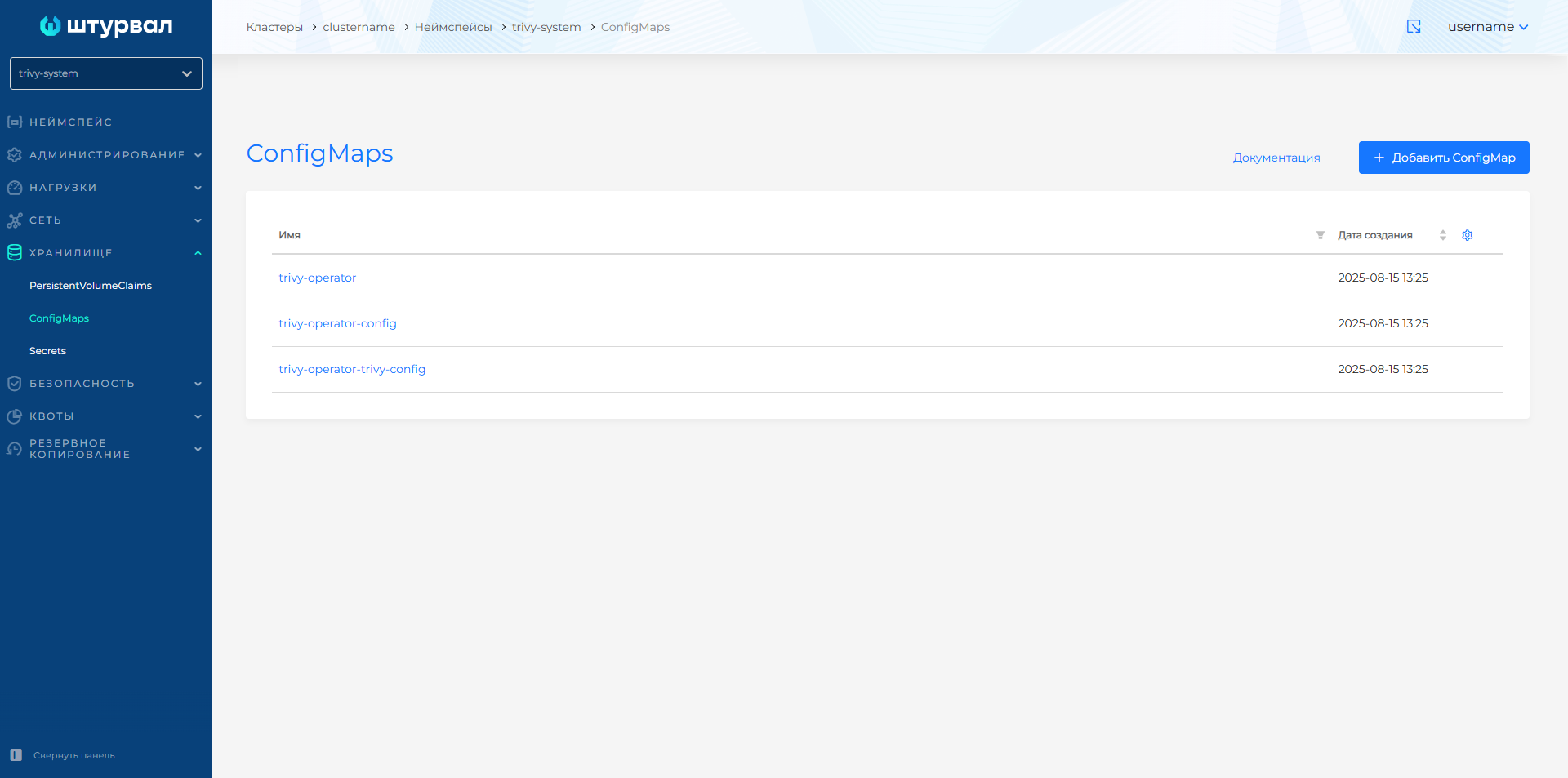
- In the graphical interface of the “Shturval” platform, go to the namespace
trivy-systemof the cluster, where you need to exclude the marked vulnerabilities from the report. Open the Storage section and go to the ConfigMaps page.
Screenshot
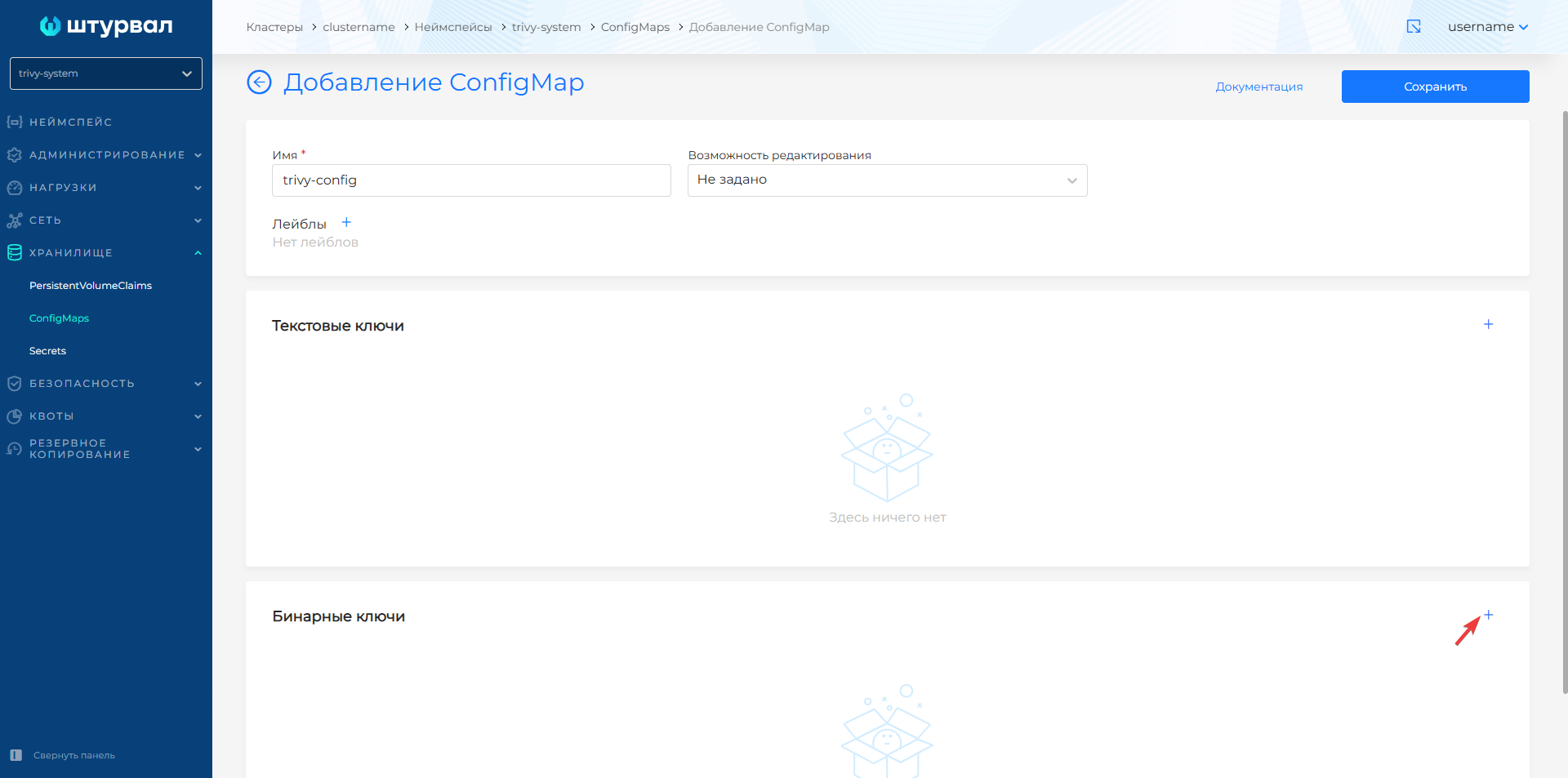
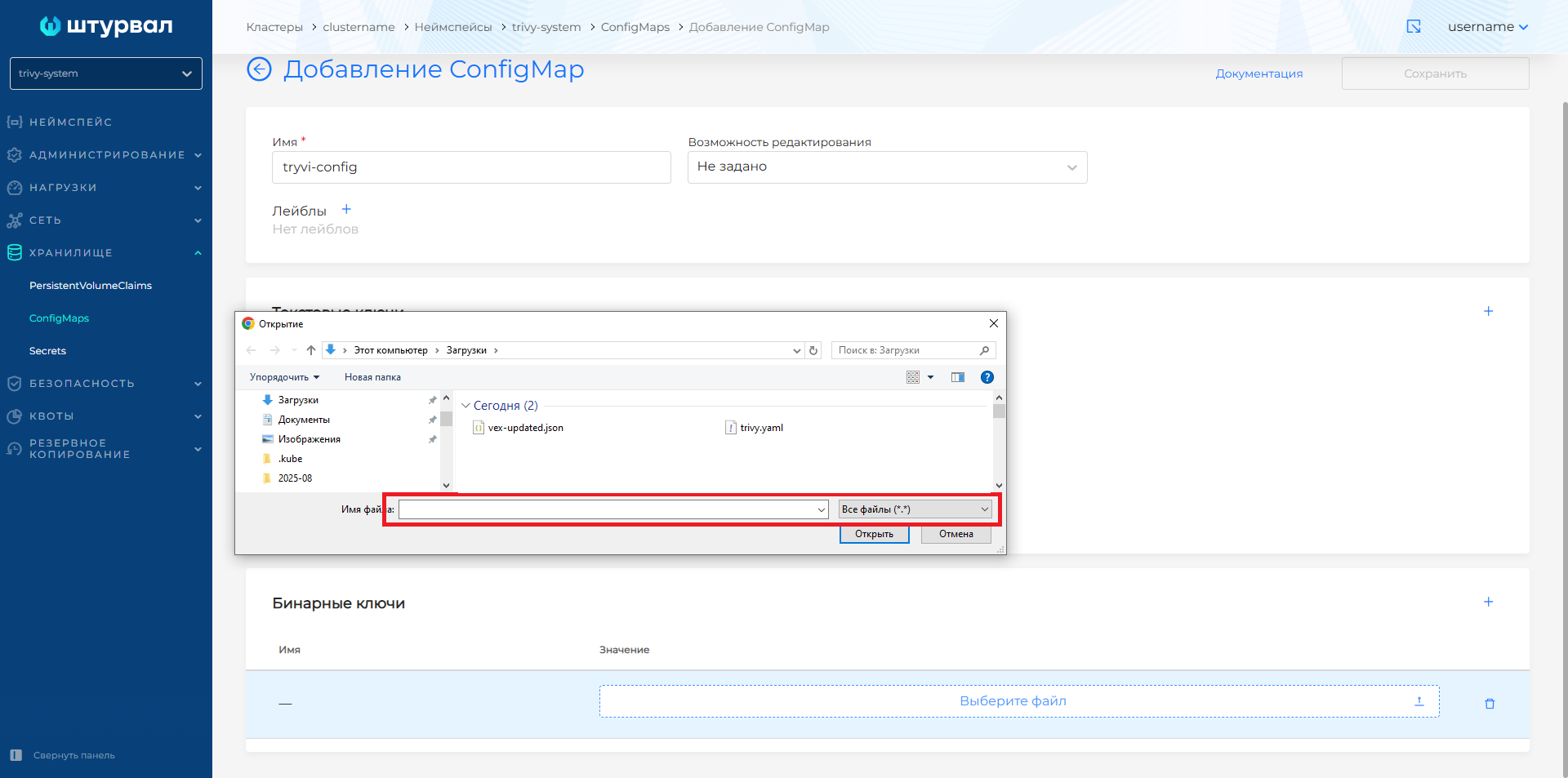
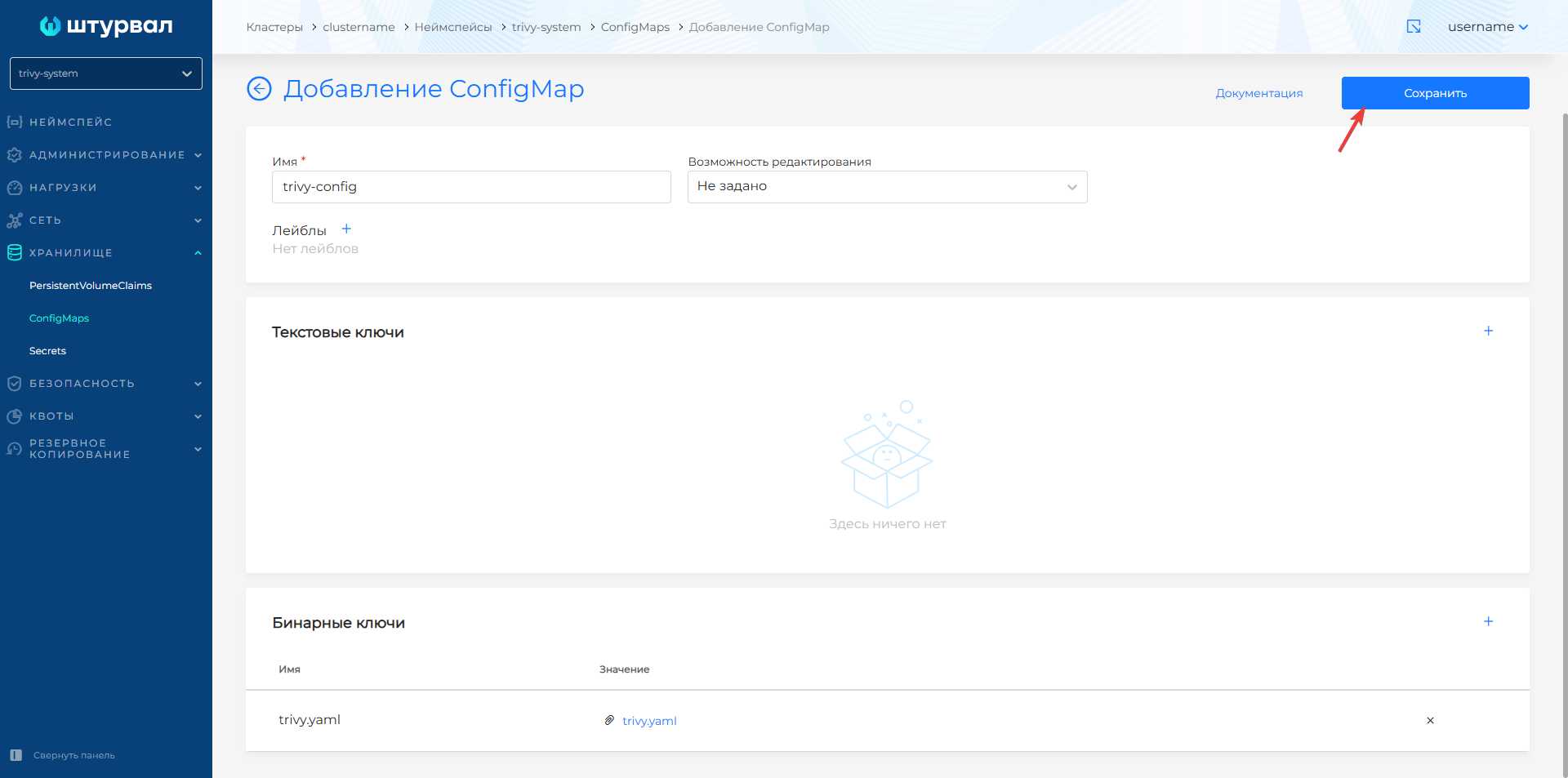
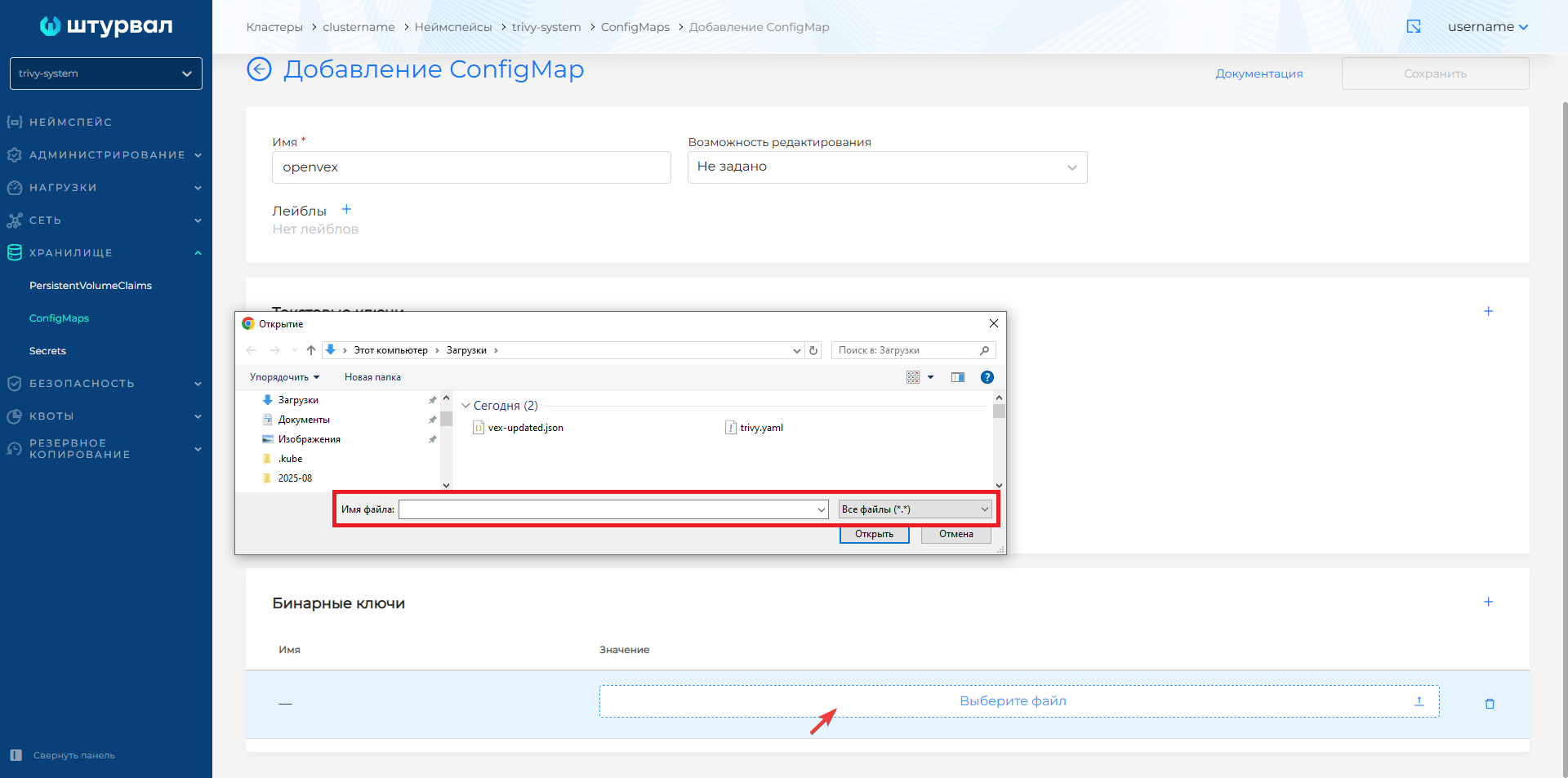
- Create a ConfigMap named trivy-config. In the Binary keys block, load the trivy.yaml configuration file generated at the preparation step. In the download window in the lower right corner, select
All files (*.*)to be able to find trivy.yaml. When the file is downloaded, click Save.
Screenshot
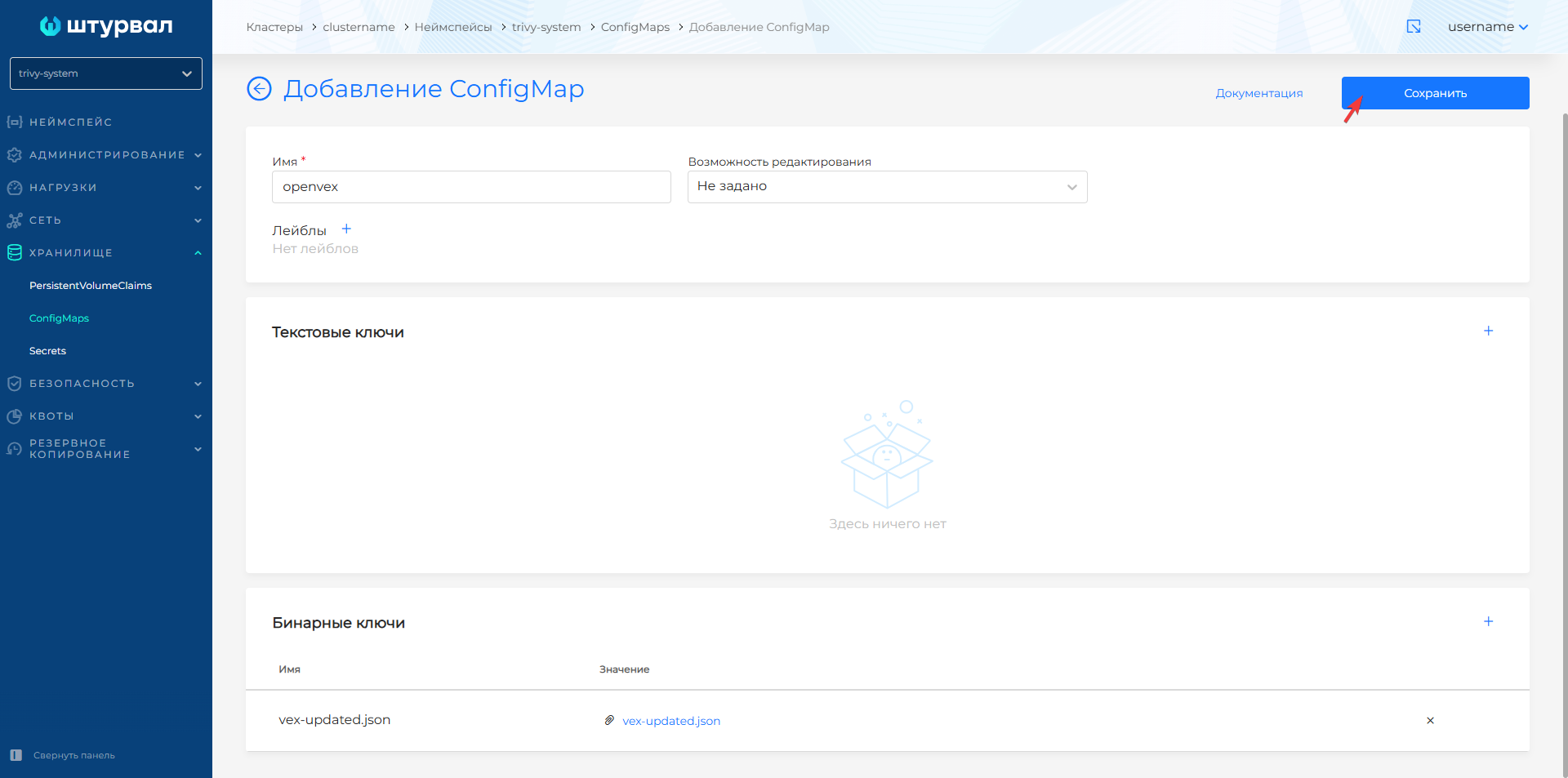
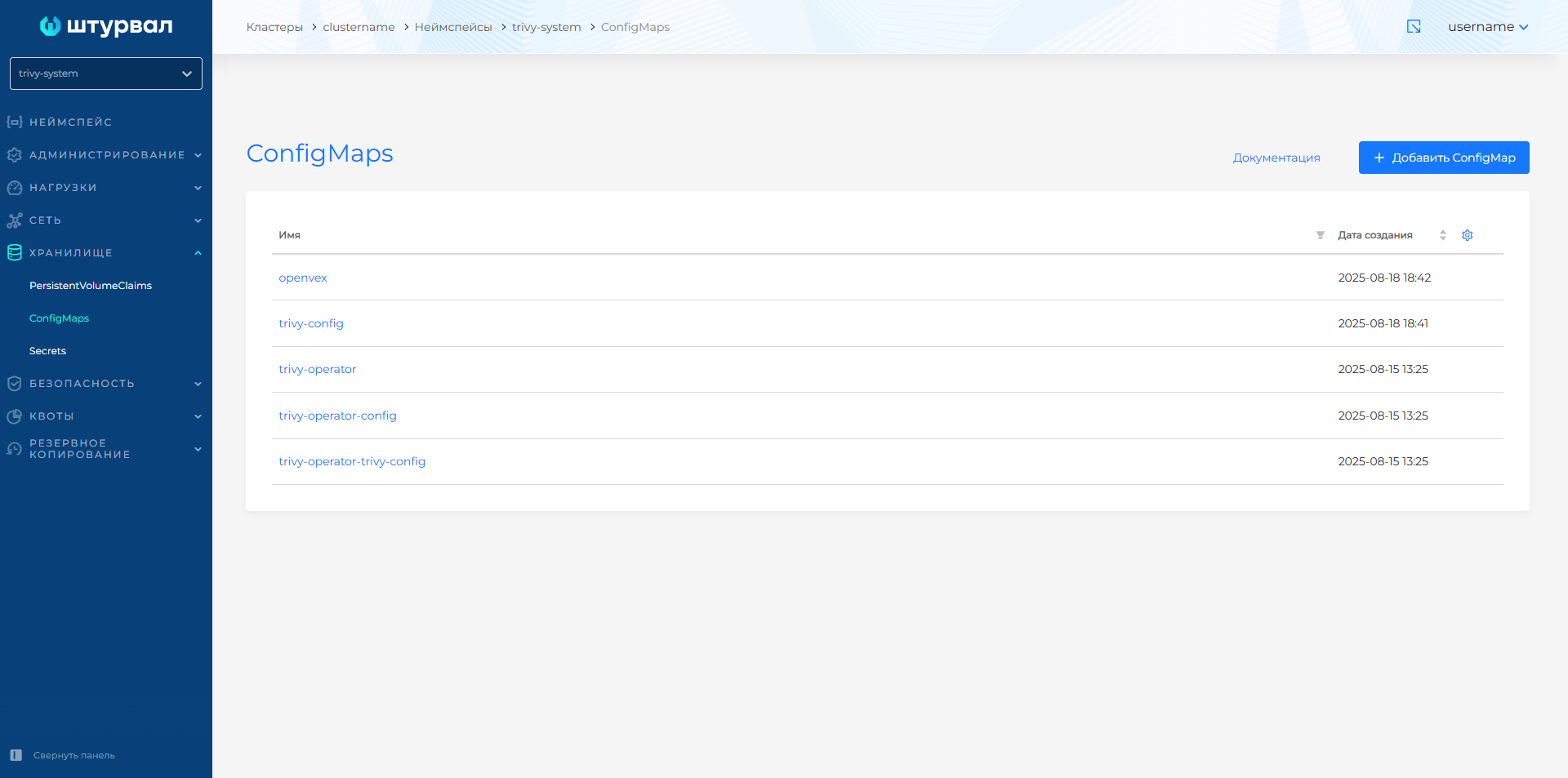
- Create a ConfigMap named openvex. In the Binary Keys block, load vex-updated.json. In the download window in the lower right corner, select
All files (*.*)to be able to find vex-updated.json. When the file is downloaded, click Save.
Screenshot
Changing ssc shturval-scanner
- Once ConfigMaps have been added, in the cluster, prepare a ShturvalServicePatch to apply to the Container Image Scan Module (
shturval-scanner) specification (ssc), where add customvalues as follows.
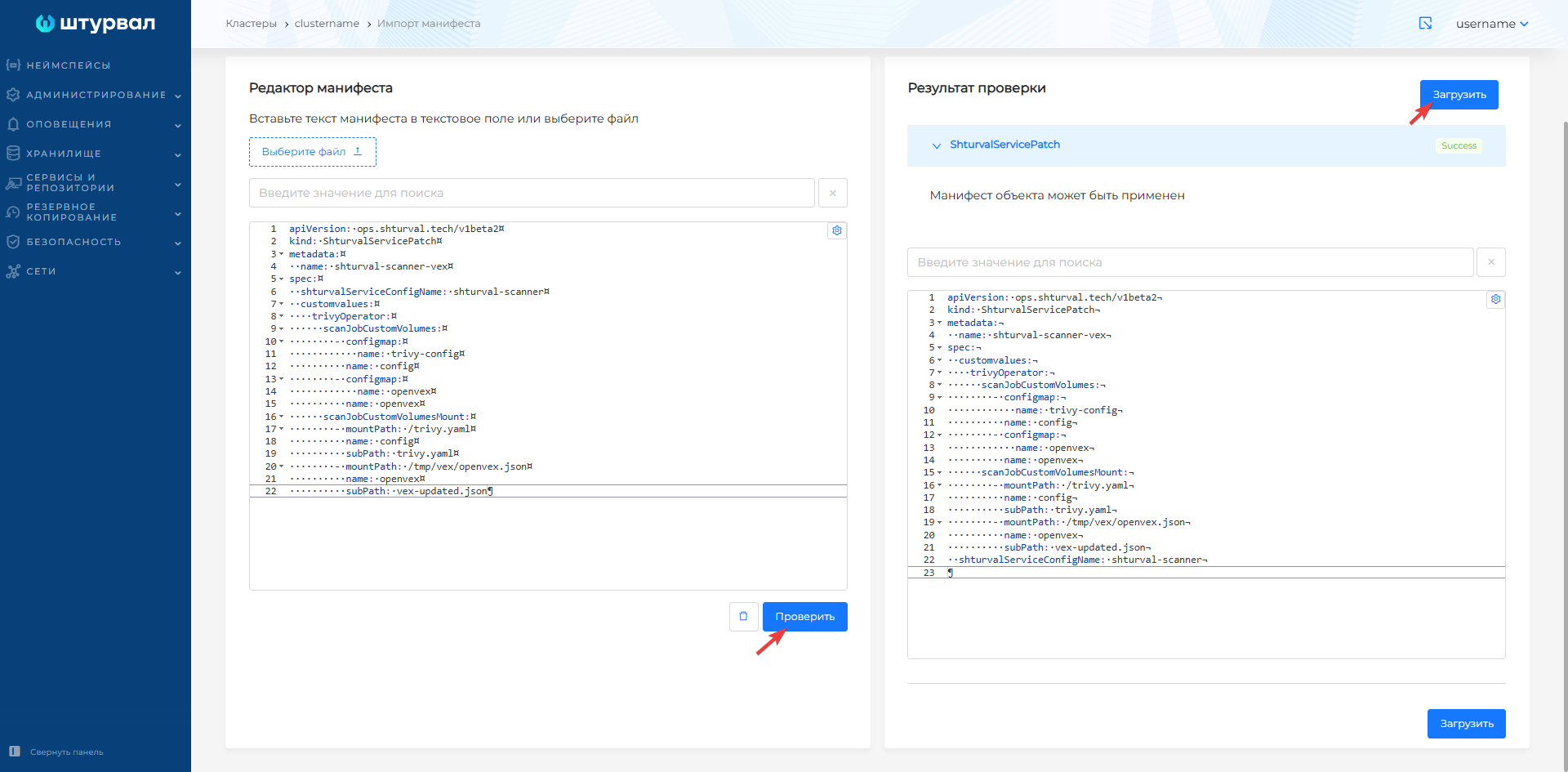
Example ShturvalServicePatch
apiVersion: ops.shturval.tech/v1beta2
kind: ShturvalServicePatch
metadata:
  name: shturval-scanner-vex
spec:
  shturvalServiceConfigName: shturval-scanner
  customvalues:
    trivyOperator:
      scanJobCustomVolumes:
        - configmap:
            name: trivy-config
          name: config
        - configmap:
            name: openvex
          name: openvex
      scanJobCustomVolumesMount:
        - mountPath: /trivy.yaml
          name: config
          subPath: trivy.yaml
        - mountPath: /tmp/vex/openvex.json
          name: openvex
          subPath: vex-updated.json
- Load the prepared ShturvalServicePatch into the cluster using manifest import.
Screenshot
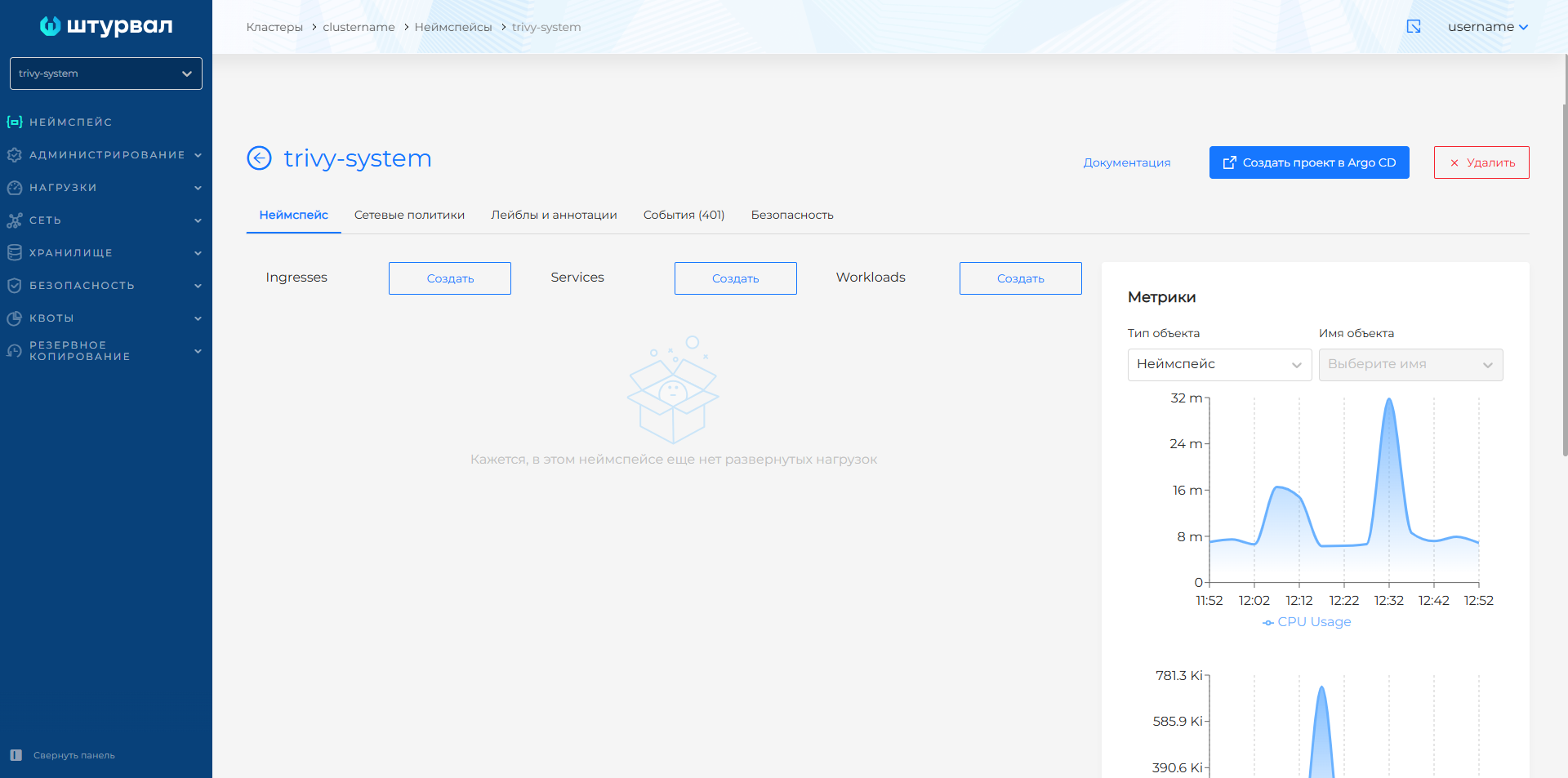
- When ShturvalServicePatch is added, open the Services and Repositories section in the cluster, pGo to the Installed Services page and find Container Image Scanning Module
shturval-scanner. Switch the module to the off state by selecting the Off mode. Wait until all loads are removed from the trivy-system namespace, then turn on the module by selecting Auto mode and save the changes.
Screenshot
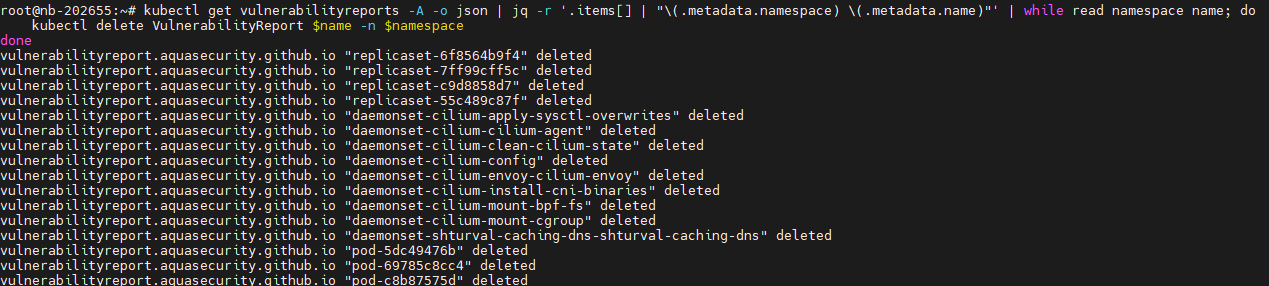
- Afterwards, in the command line interface, connect to the cluster and delete the previously generated reports based on the scanning results - VulnerabilityReport.
Command example
kubectl get vulnerabilityreports -A -o json | jq -r '.items[] | "\(.metadata.namespace) \(.metadata.name)"' | while read namespace name; do
kubectl delete VulnerabilityReport $name -n $namespace
done
Screenshot
Container image scanning will restart automatically.
- Check the start of scanning and generation of new VulnerabilityReports.
Command
kubectl get vulnerabilityreports -A
Screenshot

- In the cluster graphical interface, open the Security section and go to the Image Analysis page. Make surethat there are no marked vulnerabilities.
Screenshot of an example of vulnerability analysis before loading
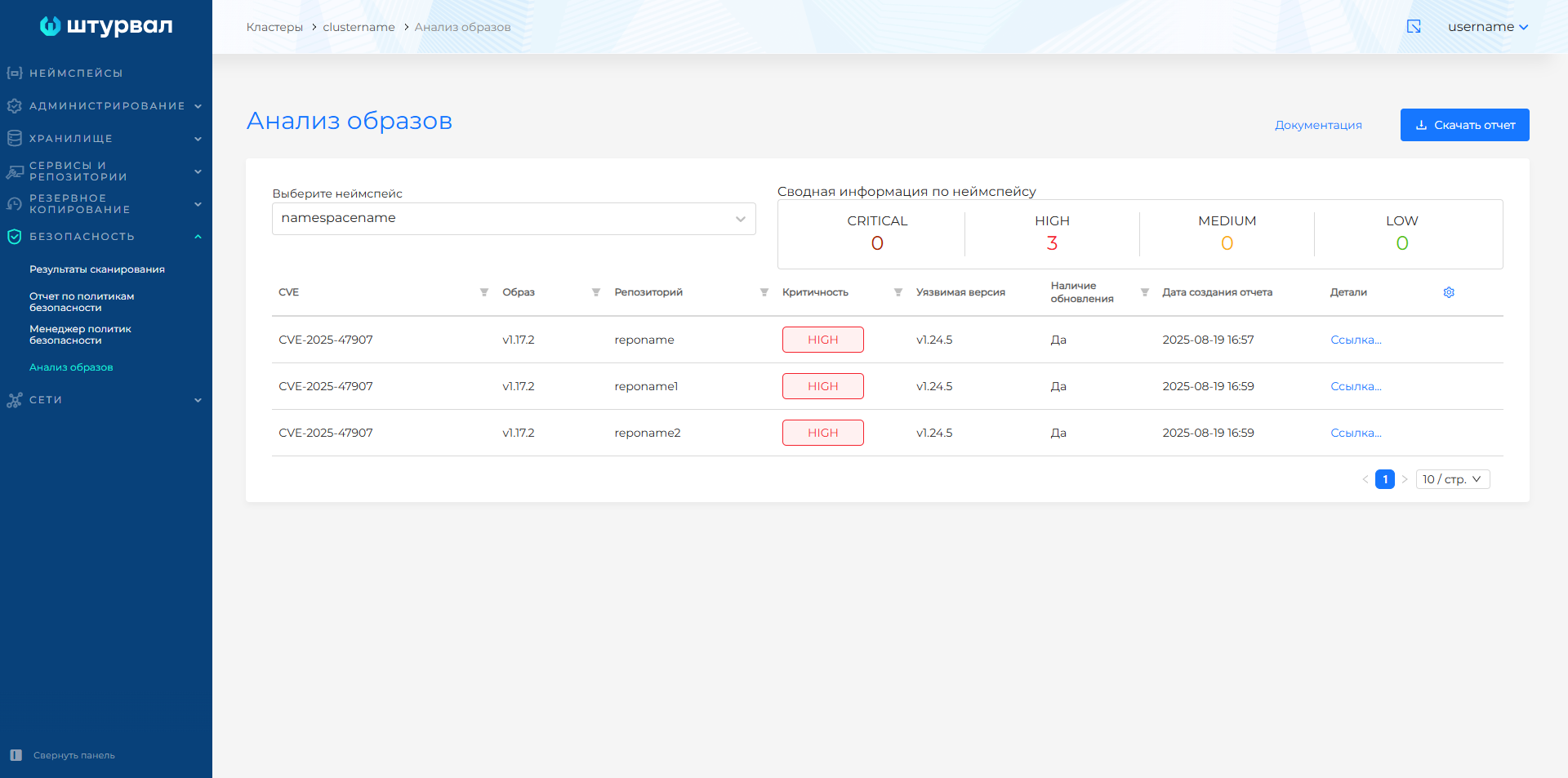
Screenshot of an example of vulnerability analysis after downloading