Local log collection module (Vector)
The Vector-based local log collection module collects, aggregates and transmits logs.
Vector is an open source data processing and communication tool written in Rust. The Vector architecture is based on three main components:
- Sources - components that receive or collect data.
- Transforms - components that change or filter data.
- Sinks (Recipients) - components that send data to external systems.
Cluster logs are available in the graphical interface on the Logs tab of the cluster dashboard if the following conditions are met:
- The local log collection module (Vector) (
shturval-log-collector) is enabled in the cluster. - The management component of the monitoring module Victoria Metrics Agent (
shturval-metrics-collector) is running in the management cluster.
Module installation and basic configuration
By default, the module is installed in the client clusters and management cluster in the enabled state. To configure the configuration, go to the Installed services page of the Services and repositories section, find the Local log collection module and click Manage.
If there is no module in the cluster, go to the Available charts page of the Services and repositories section. On the shturval tab, select the shturval-log-collector chart and click Install.
Select the required chart version, as well as the logging namespace. After selecting the chart version, Available configuration parameters for the service (values) will be displayed on the right side of the screen. Enter the required parameters as customvalues in the Service Specification block.
Please note! For the module to work, CRD for the log collection module (shturval-log-collector-crds) must be enabled.
To configure the local log collection module (Vector), use Vector Operator.
Custom resources supported by Vector Operator (Kubernetes Custom Resources)
| Kind | Group | Version |
|---|---|---|
| ClusterVectorAggregator | observability.kaasops.io | v1alpha1 |
| ClusterVectorPipeline | observability.kaasops.io | v1alpha1 |
| Vector | observability.kaasops.io | v1alpha1 |
| VectorAggregator | observability.kaasops.io | v1alpha1 |
| VectorPipeline | observability.kaasops.io | v1alpha1 |
The basic configuration of the module includes custom resources ClusterVectorPipeline and Vector, which determine its configuration. You can view ClusterVectorPipeline and Vector in the platform’s graphical interface. In your cluster, open the Custom Resources page of the Administration section, find and expand the observability.kaasops.io API group. Select CRD ClusterVectorPipeline or Vector, on the page with a list of custom resources, go to the object manifest.
Please note! Changing the basic setting may lead to errors in log collection, aggregation and analysis. If necessary, set the configuration by creating a new ClusterVectorPipeline.
ClusterVectorPipeline in Shturval platform
The local log collection module collects log records from the standard output stream stdout of the cluster system services.
Pre-configured custom resources ClusterVectorPipeline collect and aggregate cluster logs according to their types.
ClusterVectorPipeline custom resources
| Name ClusterVectorPipeline | Description |
|---|---|
| k8s-logs | Collects container logs. If the namespace has a label shturval_tech/system-namespace, the logs are aggregated to k8s-logs, without the specified label to k8s-user_logs |
| k8s-audit | Collects logs from /var/log/kube-api-audit/audit.log |
| k8s-events | Collects events from the Kubernetes cluster |
| auditd | Collects system logs from the log with _TRANSPORT = audit |
| journal | Collects logs: containerd, kubelet, shturvald |
Log collection sources
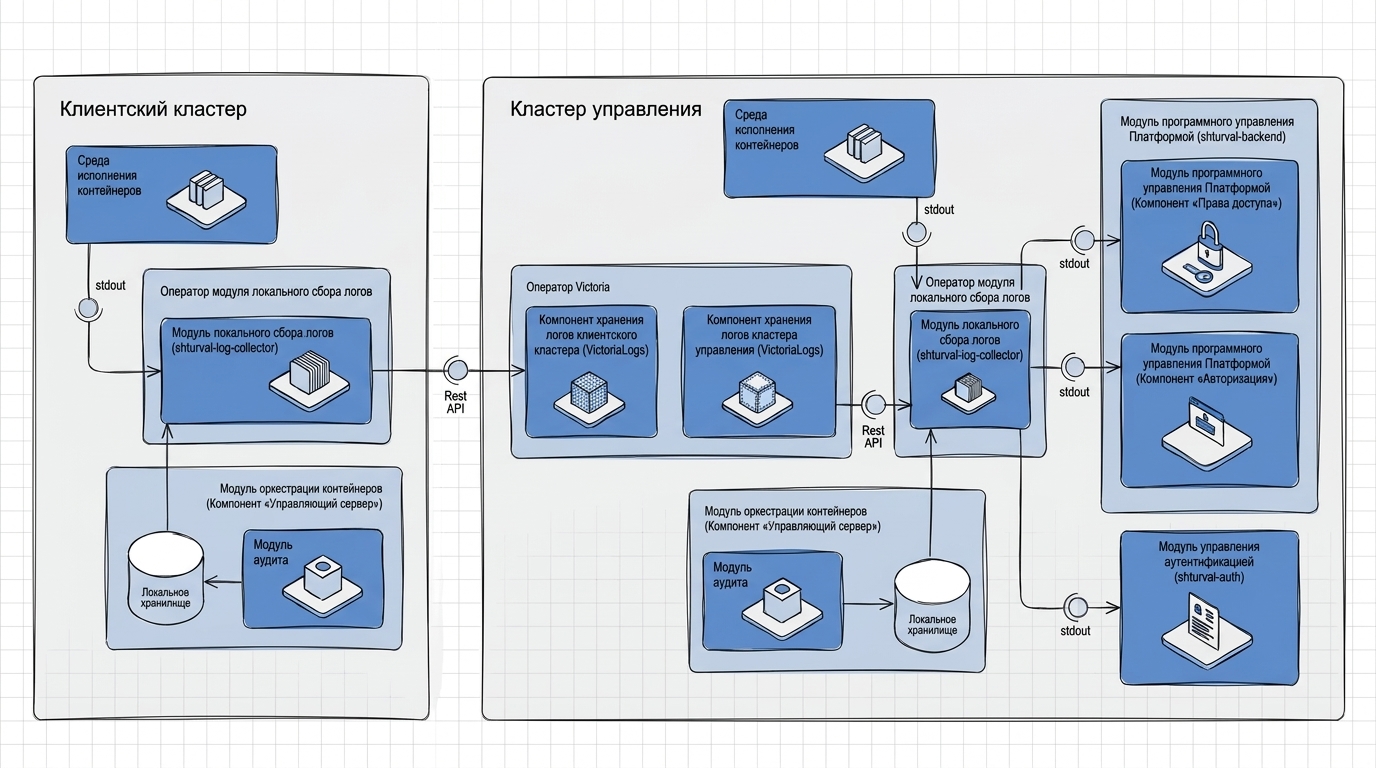
Component interaction
| Component name | System component name | Description |
|---|---|---|
| Local log collection module | shturval-log-collector | Collects log records from the standard output stream stdout of the cluster system services. Reads records from local storage path /var/log/kube-api-audit/audit.log |
| Container Orchestration Module | API Server | Logs requests and writes records of logged requests in volume mount with type hostpath /var/log/kube-api-audit/audit.log to local storage |
| Log storage component (control cluster, client cluster) | VLogs | Stores event log records. Provides an API for retrieving event log entries for Vector (shturval-log-collector) |
| Platform software management module (Authorization Component) | shturval-backend | Publishes user and system account request authorization events to stdout |
| Platform software management module (Access Rights Component) | shturval-backend | Creates, changes and deletes access rights for users and groups. Publishes permission assignments, changes, and removals to stdout |
| Authentication Management Module | shturval-auth | Provides user authentication to the Shturval platform. Publish authentication records to stdout |
| Container Runtime | Containerd | Logs container start and stop events. Publishes container starting and stopping records to stdout |
Collection and processing of logs
To configure log collection and processing, you can configure ClusterVectorPipeline. Specification (spec) ClusterVectorPipeline contains blocks:
sources- defines data sources;transforms- defines data transformations;sinks- defines endpoints for sending data.
Example configuration for processing logs Kubernetes
apiVersion: observability.kaasops.io/v1alpha1
kind: ClusterVectorPipeline
metadata:
  name: k8s-logs
  namespace: monitoring
spec:
  # Data source - Kubernetes logs
  sources:
    kubernetes_logs:
      type: kubernetes_logs

  # Transformation chain
  transforms:
    # Timestamp conversion
    remap_timestamp:
      type: remap
      inputs: [kubernetes_logs]
      source: |
        parsed_time = parse_timestamp!(.timestamp, format: "%+")
        if is_timestamp(parsed_time) {
          ."@timestamp" = parsed_time
          del(.timestamp)
        }

    # Replace dots with underscores in field names
    dedot_fields:
      type: remap
      inputs: [remap_timestamp]
      source: |
                . = map_keys(., recursive: true) -> |key| { replace(key, ".", "_") }

    # Filter system namespaces
    filter_system_namespaces:
      type: filter
      inputs: [dedot_fields]
      condition: |
                exists(.kubernetes.namespace_labels."shturval_tech/system-namespace")

    # Filter user namespaces
    filter_user_namespaces:
      type: filter
      inputs: [dedot_fields]
      condition: |
                !exists(.kubernetes.namespace_labels."shturval_tech/system-namespace")
Features of log processing:
- Uses the built-in source
kubernetes_logs; remap_timestamp: parsing and converting timestamps;dedot_fields: replacing dots with underscores in field names;filter_system_namespacesandfilter_user_namespaces: separation of logs by namespace type.
Please note! To apply configuration changes, you must switch the Local log collection module (shturval-log-collector) to manual control mode (Manual); when choosing control in automatic mode (Auto), the basic configuration is applied.
Configuration recommendations
- Use clear names for pipelines;
- Follow a consistent naming style for components;
- Build a logical chain of transformations;
- Use inputs (
inputs) to define the sequence; - Filter unnecessary data as early as possible;
- Use clear filtering conditions;
- Minimize the number of transformations;
- Avoid duplication of processingdata.
Integration with SIEM
To integrate with the SIEM information security and security event management system, the Local Log Collection Module (Vector) must be enabled in the cluster.
- To configure the integration, prepare a ShturvalServicePatch to apply to the Local Log Collection Module (
shturval-log-collector) specification (ssc).
Example ShturvalServicePatch
apiVersion: ops.shturval.tech/v1beta2
kind: ShturvalServicePatch
metadata:
  name: <resource-name>
spec:
  shturvalServiceConfigName: shturval-log-collector
  customvalues:
    shturval:
      k8s_audit:
        enable: true
        sinks:
          siem:
            type: socket
            inputs:
            - dedot_specific_fields
            address: "<your-parameter-value>"
            mode: <your-parameter-value>
            encoding:
              codec: json
      journald:
        sinks:
          siem:
            type: socket
            inputs:
            - journald
            address: "<your-parameter-value>"
            mode: <your-parameter-value>
            encoding:
              codec: json
      k8s_logs:
        transforms:
          filter_backend:
            condition: |
              .kubernetes.pod_namespace == "shturval-backend" &&
              ((.kubernetes.container_name == "opa" && starts_with(string!(.kubernetes.pod_name), "shturval-backend-")) || (.kubernetes.container_name == "authn" &starts_with    (string!(.kubernetes.pod_name), "authn-")))
            inputs:
            - filter_system_namespaces
            type: filter
        sinks:
          siem:
            type: socket
            inputs:
            - filter_backend
            address: "<your-parameter-value>"
            mode: <your-parameter-value>
            encoding:
              codec: json
| Parameter | Description | Data type | Example |
|---|---|---|---|
metadata.name | Name ShturvalServicePatch | string | shturval-log-collector-siem |
address | Socket (IP address and port) SIEM | string | 10.11.12.13:514 |
mode | Connection protocol | string | udp |
In the given specification, the following logs will be sent to SIEM: k8s_logs, journald and k8s_audit. You can override the list of sent logs. To do this, in the shturval block, delete the unnecessary block with logs.
- In the cluster, load the prepared ShturvalServicePatch using import manifests.
Screenshot
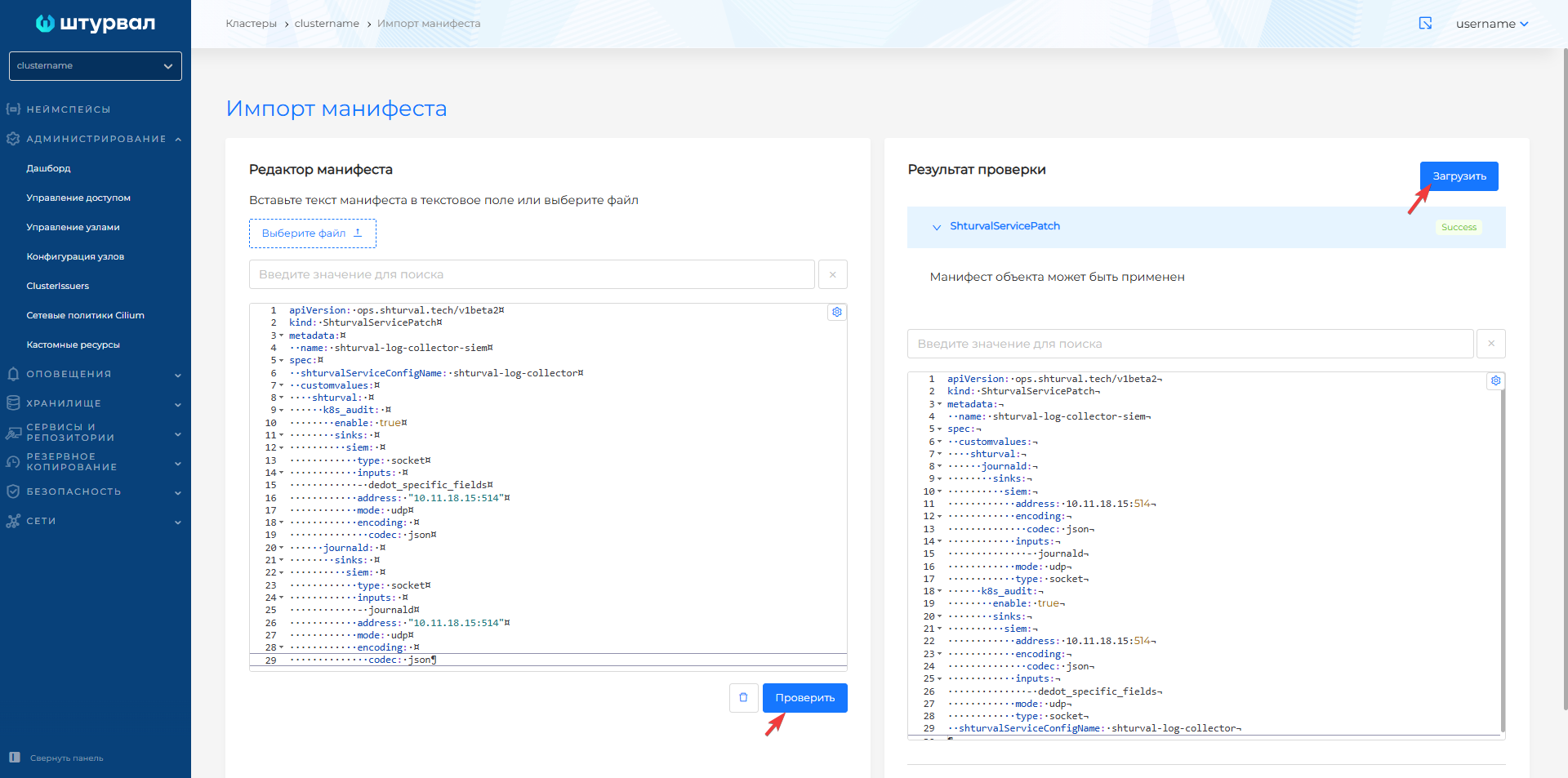
Once ShturvalServicePatch is downloaded, it will take some time for the changes to take effect.
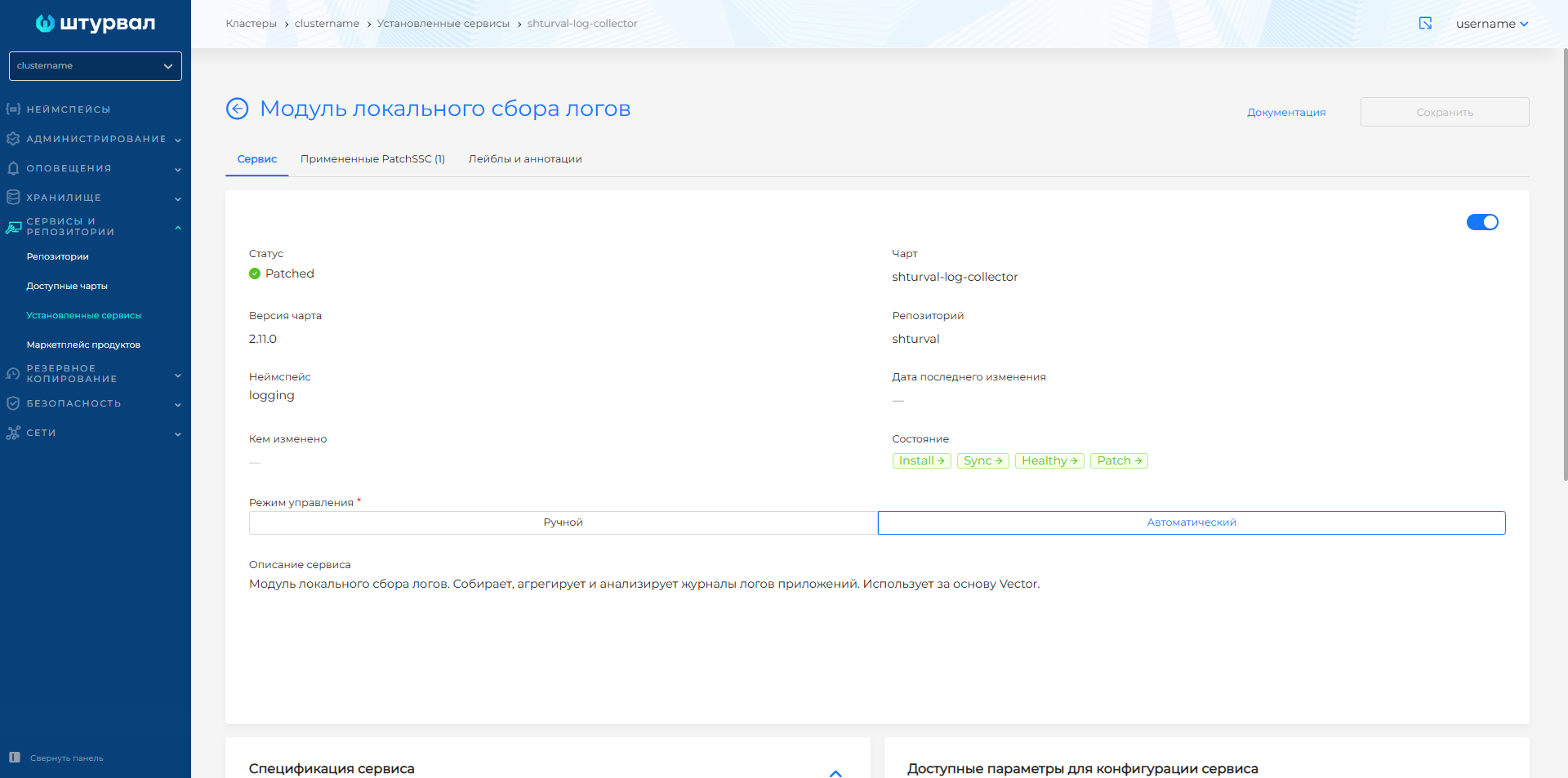
- To go to view the applied ShturvalServicePatch:
- In the cluster from the Services and repositories section, open the Installed services page.
- Find Local log collection module (shturval-log-collector) and go to management.
- When ShturvalServicePatch is applied, the Service tab status will update to Patched, and the Applied PatchSSC tab will display the loaded ShturvalServicePatch in the list.
Screenshot
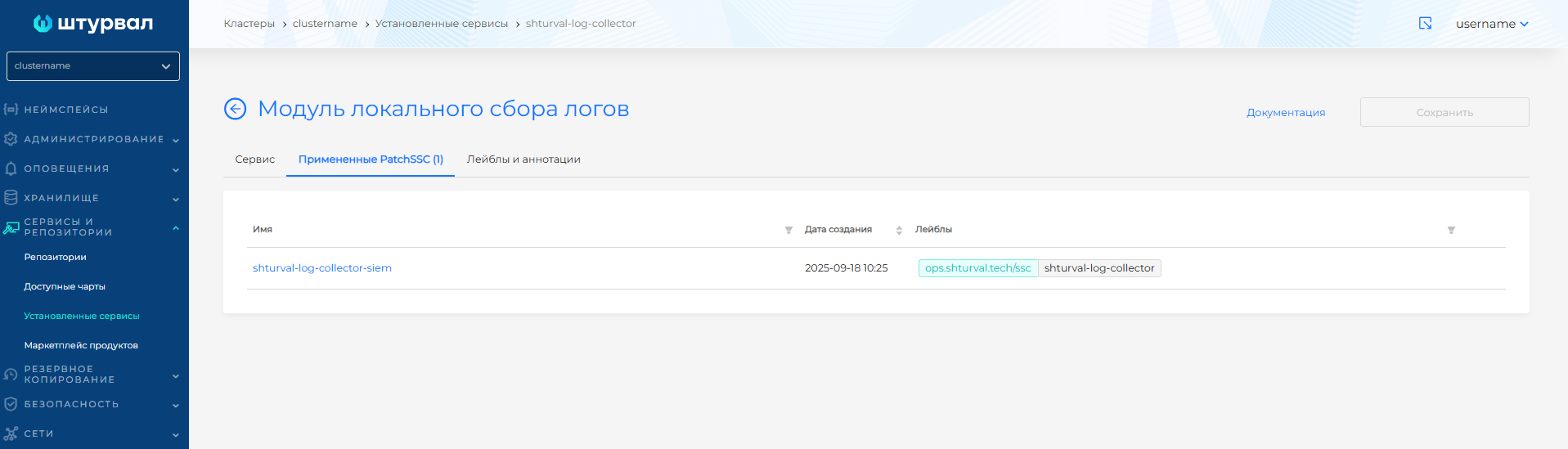
Vector has a data delivery confirmation system. If the data is delivered incorrectly, it is sent again, which makes it possible to neutralize the peculiarities of the UDP protocol.
Log redirection
To redirect logs to Elasticsearch/OpenSearch in a cluster, follow these steps:
- In the cluster, create a Secret of type
Opaquenamedexternal-es-cain theloggingnamespace. Add theca.crtkey and put the external Elasticsearch/OpenSearch CA certificate in its value.
Example command:
kubectl create secret generic external-es-ca -n logging \
  --from-file=ca.crt=/path/to/external-es-ca.crt
Example manifest
apiVersion: v1
kind: Secret
metadata:
  name: external-es-ca
  namespace: logging
type: Opaque
stringData:
  ca.crt: |
    -----BEGIN CERTIFICATE-----
    <external Elasticsearch/OpenSearch CA certificate>
    -----END CERTIFICATE-----
- In the cluster, create a Secret of type
Opaquenamedexternal-es-credsin theloggingnamespace. Add theusernameandpasswordkeys: inusernameput the external Elasticsearch/OpenSearch account name, inpasswordput that account’s password.
Example command:
kubectl create secret generic external-es-creds -n logging \
  --from-literal=username='<username>' \
  --from-literal=password='<password>'
Example manifest
apiVersion: v1
kind: Secret
metadata:
  name: external-es-creds
  namespace: logging
type: Opaque
stringData:
  username: <username>
  password: <password>
- Prepare ShturvalServicePatch to apply to the specification (ssc) of the Local Log Collection Module (
shturval-log-collector), where in customvalues add thevector,aggregator, andshturvalconfiguration:
- log types to redirect:
auditd,journald,k8s_audit,k8s_events,k8s_logs. List all required types undershturval; - log recipients in
sinksnamedelastic_bank, connection URL, TLS settings, and buffer configuration; - if you need to transform logs before sending, configure the
transformsparameter.
We recommend storing credentials for the external storage in a Secret and passing them into the sink as ${username} and ${password}. If you do not use a Secret, omit the vector and aggregator blocks in the SSP and set the username and password directly in auth.
Example ShturvalServicePatch
apiVersion: ops.shturval.tech/v1beta2
kind: ShturvalServicePatch
metadata:
  name: <resource-name>
spec:
  shturvalServiceConfigName: shturval-log-collector
  customvalues:
    vector:
      agent:
        envFrom: # All Secret keys become agent environment variables
          - secretRef:
              name: <secret-creds>
        volumes: # Agent volumes; the list fully replaces chart values
          - name: var-log
            hostPath:
              path: /var/log/
              type: ""
          - name: journal
            hostPath:
              path: /var/log/journal/
              type: ""
          - name: var-lib
            hostPath:
              path: /var/lib/
              type: ""
          - name: <volume-ca>
            secret:
              secretName: <secret-ca>
              items:
                - key: ca.crt
                  path: ca.crt
        volumeMounts: # Mount volumes into the agent container
          - name: var-log
            mountPath: /var/log/
          - name: journal
            mountPath: /run/log/journal/
          - name: var-lib
            mountPath: /var/lib/
          - name: <volume-ca>
            mountPath: /etc/ssl/external-es
            readOnly: true
    aggregator:
      env: # Aggregator environment variables; the list fully replaces chart values
        - name: PLATFORM_USERNAME
          valueFrom:
            secretKeyRef:
              name: platform-creds
              key: username
        - name: PLATFORM_PASSWORD
          valueFrom:
            secretKeyRef:
              name: platform-creds
              key: password
        - name: username
          valueFrom:
            secretKeyRef:
              name: <secret-creds>
              key: username
        - name: password
          valueFrom:
            secretKeyRef:
              name: <secret-creds>
              key: password
      volumes: # Aggregator volumes; the list fully replaces chart values
        - name: data
          emptyDir: {}
        - name: <volume-ca>
          secret:
            secretName: <secret-ca>
            items:
              - key: ca.crt
                path: ca.crt
      volumeMounts: # Mount volumes into the aggregator container
        - name: <volume-ca>
          mountPath: /etc/ssl/external-es
          readOnly: true
    shturval:
      <your-value>: # Log type for redirection
        enable: true # Enables sending logs to Elasticsearch
        transforms: {} # Log transformation
        sinks: # Endpoints for sending data
          elastic_bank: # Data recipient name
            type: <your-parameter-value>
            auth:  # Authentication settings for Elasticsearch connection
              user: "${username}"
              password: "${password}"
              strategy: <your-parameter-value>
            endpoints: # Connection URL
              - <your-parameter-value>
            tls: # TLS connection settings
              ca_file: /etc/ssl/external-es/ca.crt
              verify_certificate: true
            api_version: <your-parameter-value>
            buffer: # Buffer settings for storing logs before sending
              max_size: <your-parameter-value>
              type: <your-parameter-value>
| Parameter | Description | Data type | Example |
|---|---|---|---|
metadata.name | Name ShturvalServicePatch | string | shturval-log-collector-logs |
vector.agent.envFrom | Sources that populate environment variables in the agent container: all key-value pairs from the Secret become environment variables | array | secretRef.name: external-es-creds |
vector.agent.volumes | Volumes for the agent pod. The list fully replaces chart values: keep the hostPath mounts var-log, journal, var-lib and add the CA Secret | array | var-log, journal, var-lib, external-es-ca |
vector.agent.volumeMounts | Mounts the volumes into the agent container filesystem | array | mountPath: /etc/ssl/external-es |
aggregator.env | Environment variables for the aggregator container. The list fully replaces chart values: keep PLATFORM_USERNAME / PLATFORM_PASSWORD and add the external Elasticsearch credentials | array | PLATFORM_USERNAME, username |
aggregator.volumes | Volumes for the aggregator pod. The list fully replaces chart values: keep the data emptyDir and add the CA Secret | array | data, external-es-ca |
aggregator.volumeMounts | Mounts the volumes into the aggregator container filesystem | array | mountPath: /etc/ssl/external-es |
elastic_bank.type | Vector sink type; for Elasticsearch/OpenSearch use elasticsearch | string | elasticsearch |
elastic_bank.auth.user | Username for HTTP Basic Authentication | string | ${username} |
elastic_bank.auth.password | Password for HTTP Basic Authentication | string | ${password} |
elastic_bank.auth.strategy | Vector authentication strategy: basic is HTTP Basic Authentication | string | basic |
elastic_bank.endpoints | List of Elasticsearch URLs to send logs to. Each URL must include an HTTP scheme, a hostname or IP, and a port | array | https://external-opensearch.address:9200/insert/elasticsearch/ |
elastic_bank.tls.ca_file | Absolute path to an additional CA certificate file in DER or PEM (X.509) format | string | /etc/ssl/external-es/ca.crt |
elastic_bank.tls.verify_certificate | Validates the upstream server certificate on TLS connect | boolean | true |
elastic_bank.api_version | Elasticsearch API version: v6, v7 (including OpenSearch), v8, or auto | string | v8 |
elastic_bank.buffer.max_size | Maximum buffer size. For type: disk it must be at least ~256 MB (268435488 bytes) | int | 268435488 |
elastic_bank.buffer.type | Buffer type: disk stores events on disk and is more durable; memory is faster but data is lost on crash | string | disk |
- Lists
volumes,volumeMounts, andaggregator.envinShturvalServicePatchfully replace the corresponding chart values. If you set these blocks, keep the hostPath mountsvar-log,journal, andvar-libon the agent. On the aggregator, keep thedataemptyDir andPLATFORM_USERNAME/PLATFORM_PASSWORDfromplatform-creds. Then add env and volumes for the external Elasticsearch. - Keep TLS verification enabled (
verify_certificate: true) and setca_file.
Combined ShturvalServicePatch for all log types
apiVersion: ops.shturval.tech/v1beta2
kind: ShturvalServicePatch
metadata:
  name: shturval-log-collector-external-es
spec:
  shturvalServiceConfigName: shturval-log-collector
  customvalues:
    vector:
      agent:
        envFrom:
          - secretRef:
              name: external-es-creds
        volumes:
          - name: var-log
            hostPath:
              path: /var/log/
              type: ""
          - name: journal
            hostPath:
              path: /var/log/journal/
              type: ""
          - name: var-lib
            hostPath:
              path: /var/lib/
              type: ""
          - name: external-es-ca
            secret:
              secretName: external-es-ca
              items:
                - key: ca.crt
                  path: ca.crt
        volumeMounts:
          - name: var-log
            mountPath: /var/log/
          - name: journal
            mountPath: /run/log/journal/
          - name: var-lib
            mountPath: /var/lib/
          - name: external-es-ca
            mountPath: /etc/ssl/external-es
            readOnly: true
    aggregator:
      env:
        - name: PLATFORM_USERNAME
          valueFrom:
            secretKeyRef:
              name: platform-creds
              key: username
        - name: PLATFORM_PASSWORD
          valueFrom:
            secretKeyRef:
              name: platform-creds
              key: password
        - name: username
          valueFrom:
            secretKeyRef:
              name: external-es-creds
              key: username
        - name: password
          valueFrom:
            secretKeyRef:
              name: external-es-creds
              key: password
      volumes:
        - name: data
          emptyDir: {}
        - name: external-es-ca
          secret:
            secretName: external-es-ca
            items:
              - key: ca.crt
                path: ca.crt
      volumeMounts:
        - name: external-es-ca
          mountPath: /etc/ssl/external-es
          readOnly: true
    shturval:
      auditd:
        sinks:
          elastic_bank:
            type: elasticsearch
            inputs:
              - auditd-fmt
            bulk:
              index: "{{ .Values.CLUSTER_NAME }}_auditd-%Y.%m.%d"
            auth:
              user: "${username}"
              password: "${password}"
              strategy: basic
            endpoints:
              - "https://external-opensearch.address:9200/insert/elasticsearch/"
            tls:
              ca_file: /etc/ssl/external-es/ca.crt
              verify_certificate: true
            api_version: "v8"
            buffer:
              max_size: 268435488
              type: disk
      journald:
        sinks:
          elastic_bank:
            type: elasticsearch
            inputs:
              - journald
            bulk:
              index: "{{ .Values.CLUSTER_NAME }}_journald-%Y.%m.%d"
            auth:
              user: "${username}"
              password: "${password}"
              strategy: basic
            endpoints:
              - "https://external-opensearch.address:9200/insert/elasticsearch/"
            tls:
              ca_file: /etc/ssl/external-es/ca.crt
              verify_certificate: true
            api_version: "v8"
            buffer:
              max_size: 268435488
              type: disk
      k8s_audit:
        sinks:
          elastic_bank:
            type: elasticsearch
            inputs:
              - dedot_specific_fields
            bulk:
              index: "{{ .Values.CLUSTER_NAME }}_kaudit-%Y.%m.%d"
            auth:
              user: "${username}"
              password: "${password}"
              strategy: basic
            endpoints:
              - "https://external-opensearch.address:9200/insert/elasticsearch/"
            tls:
              ca_file: /etc/ssl/external-es/ca.crt
              verify_certificate: true
            api_version: "v8"
            buffer:
              max_size: 268435488
              type: disk
      k8s_events:
        sinks:
          elastic_bank:
            type: elasticsearch
            inputs:
              - delete_managed_fields
            bulk:
              index: "{{ .Values.CLUSTER_NAME }}_events-%Y.%m.%d"
            auth:
              user: "${username}"
              password: "${password}"
              strategy: basic
            endpoints:
              - "https://external-opensearch.address:9200/insert/elasticsearch/"
            tls:
              ca_file: /etc/ssl/external-es/ca.crt
              verify_certificate: true
            api_version: "v8"
            buffer:
              max_size: 268435488
              type: disk
      k8s_logs:
        sinks:
          elastic_bank:
            type: elasticsearch
            inputs:
              - post_transforms_system_namespaces
            bulk:
              index: "{{ .Values.CLUSTER_NAME }}_logs-%Y.%m.%d"
            auth:
              user: "${username}"
              password: "${password}"
              strategy: basic
            endpoints:
              - "https://external-opensearch.address:9200/insert/elasticsearch/"
            tls:
              ca_file: /etc/ssl/external-es/ca.crt
              verify_certificate: true
            api_version: "v8"
            buffer:
              max_size: 268435488
              type: disk
          user-namespaces:
            type: elasticsearch
            inputs:
              - post_transforms_user_namespaces
            bulk:
              index: "{{ .Values.CLUSTER_NAME }}_user-logs-%Y.%m.%d"
            auth:
              user: "${username}"
              password: "${password}"
              strategy: basic
            endpoints:
              - "https://external-opensearch.address:9200/insert/elasticsearch/"
            tls:
              ca_file: /etc/ssl/external-es/ca.crt
              verify_certificate: true
            api_version: "v8"
            buffer:
              max_size: 268435488
              type: disk
If some log types are not needed, remove the corresponding keys under shturval in the same manifest.
If the message field in k8s_logs arrives as an object (the container writes JSON), add a remap with encode_json(.message) and put it in sink inputs instead of post_transforms_*.
- In the cluster, load the prepared ShturvalServicePatch using import manifests.
Illustration: importing a ShturvalServicePatch into the cluster
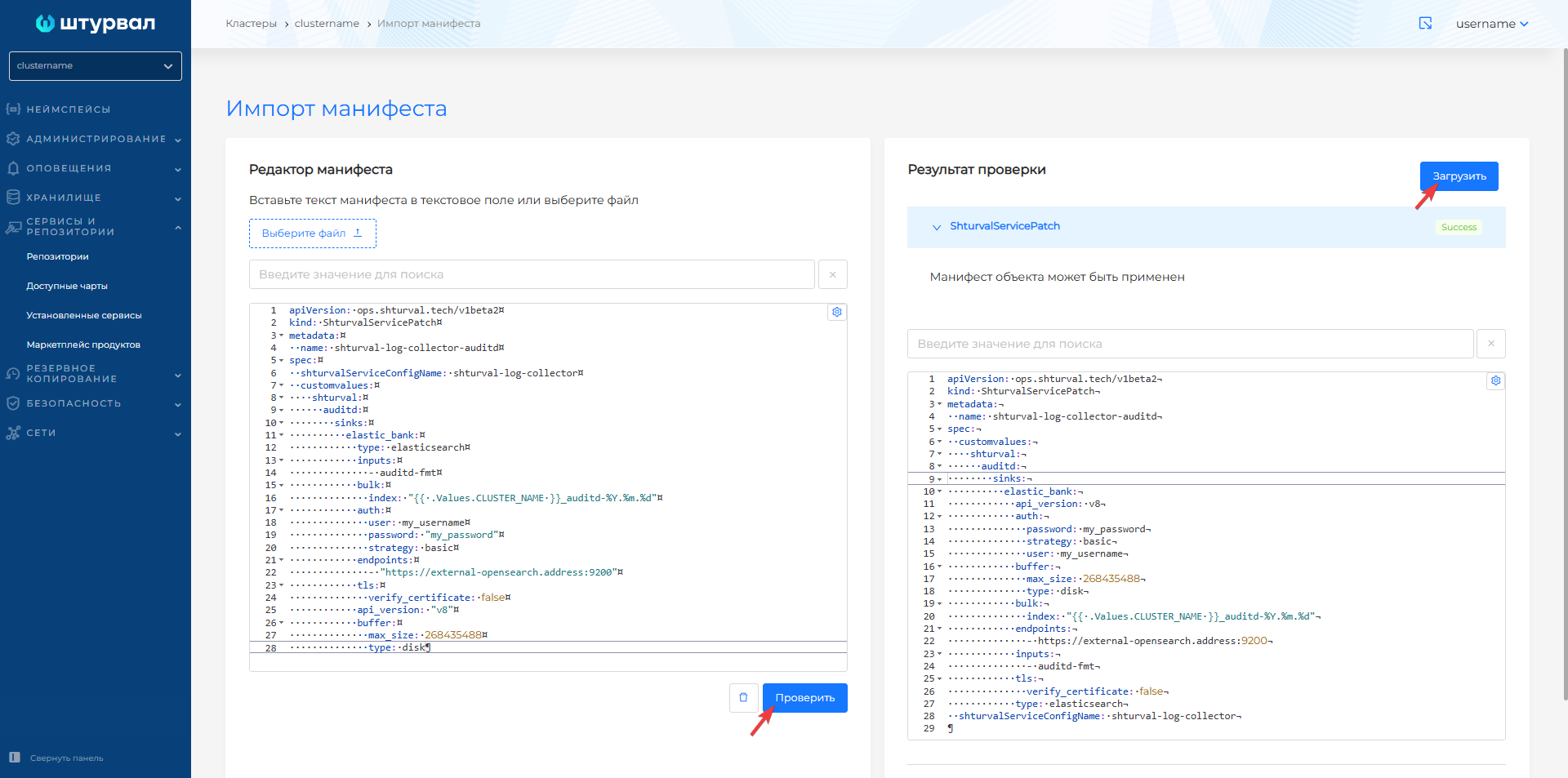
Once ShturvalServicePatch is downloaded, it will take some time for the changes to take effect.
In Loki
To redirect logs to Loki:
- Prepare ShturvalServicePatch to apply to the specification (ssc) of the Local Log Collection Module (
shturval-log-collector), where in customvalues addshturvalwith the required parameters.
Example of ShturvalServicePatch redirection in Loki
apiVersion: ops.shturval.tech/v1beta2
kind: ShturvalServicePatch
metadata:
  name: shturval-log-collector-logs-to-loki
spec:
  shturvalServiceConfigName: shturval-log-collector
  customvalues:
    shturval:
      platform_logs_enable: true
      k8s_logs:
        enable: true
        sinks:
          loki_external:
            type: loki
            inputs:
              - post_transforms_system_namespaces
              - post_transforms_user_namespaces
            endpoint: <your-parameter-value>
            path: /loki/api/v1/push
            compression: snappy
            tenant_id: "<your-parameter-value>"
            encoding:
              codec: json
            tls:
              verify_certificate: false
            labels:
              __tenant_id__: "<your-parameter-value>"
              resourceRealm: "<your-parameter-value>"
              log_type: "kubernetes"
      k8s_audit:
        enable: true
        sinks:
          loki_external:
            type: loki
            inputs:
              - parse_kube_audit
            endpoint: <your-parameter-value>
            path: /loki/api/v1/push
            compression: snappy
            tenant_id: "<your-parameter-value>"
            encoding:
              codec: json
            tls:
              verify_certificate: false
            labels:
              __tenant_id__: "<your-parameter-value>"
              resourceRealm: "<your-parameter-value>"
              log_type: "k8s_audit"
      k8s_events:
        enable: true
        sinks:
          loki_external:
            type: loki
            inputs:
              - delete_managed_fields
            endpoint: <your-parameter-value>
            path: /loki/api/v1/push
            compression: snappy
            tenant_id: "<your-parameter-value>"
            encoding:
              codec: json
            tls:
              verify_certificate: false
            labels:
              __tenant_id__: "<your-parameter-value>"
              resourceRealm: "<your-parameter-value>"
              log_type: "k8s_events"
      journald:
        enable: true
        sinks:
          loki_external:
            type: loki
            inputs:
              - journald
            endpoint: <your-parameter-value>
            path: /loki/api/v1/push
            compression: snappy
            tenant_id: "<your-parameter-value>"
            encoding:
              codec: json
            tls:
              verify_certificate: false
            labels:
              __tenant_id__: "<your-parameter-value>"
              resourceRealm: "<your-parameter-value>"
              log_type: "journald"
      auditd:
        enable: true
        sinks:
          loki_external:
            type: loki
            inputs:
              - auditd
            endpoint: <your-parameter-value>
            path: /loki/api/v1/push
            compression: snappy
            tenant_id: "<your-parameter-value>"
            encoding:
              codec: json
            tls:
              verify_certificate: false
            labels:
              __tenant_id__: "<your-parameter-value>"
              resourceRealm: "<your-parameter-value>"
              log_type: "auditd"
| Parameter | Description | Data type | Example |
|---|---|---|---|
metadata.name | Name ShturvalServicePatch | string | shturval-log-collector-logs-to-loki |
platform_logs_enable | Enables sending platform logs | boolean | true |
<log-type>.enable | Enables sending of the selected log type: auditd, journald, k8s_audit, k8s_events, k8s_logs | boolean | true |
loki_external.type | Data recipient type | string | loki |
loki_external.inputs | List of log sources or transformations to send to Loki | array | post_transforms_system_namespaces |
loki_external.endpoint | Loki URL | string | https://loki.example.com |
loki_external.path | API path for sending logs to Loki | string | /loki/api/v1/push |
loki_external.compression | Data compression algorithm before sending | string | snappy |
loki_external.tenant_id | Tenant ID in Loki | string | tenant-example |
loki_external.encoding.codec | Log encoding format | string | json |
loki_external.tls.verify_certificate | Verifying TLS certificate upon connection | boolean | false |
loki_external.labels.__tenant_id__ | Tenant label for log entries | string | tenant-example |
loki_external.labels.resourceRealm | Label of the environment or cluster from which logs are sent | string | cluster-example |
loki_external.labels.log_type | Log Type Label | string | kubernetes |
In the example above, the following logs will be sent to Loki: auditd, journald, k8s_audit, k8s_events and k8s_logs. To change the list of sent logs, remove the unnecessary block with the log type from shturval.
- In the cluster, load the prepared ShturvalServicePatch using import manifests.
Once ShturvalServicePatch is downloaded, it will take some time for the changes to take effect.
In syslog
To redirect logs to syslog:
- Prepare ShturvalServicePatch to apply to the specification (ssc) of the Local Log Collection Module (
shturval-log-collector), where in customvalues addshturvalwith the required parameters.
Example ShturvalServicePatch redirection to syslog
apiVersion: ops.shturval.tech/v1beta2
kind: ShturvalServicePatch
metadata:
  name: shturval-log-collector-syslog
spec:
  shturvalServiceConfigName: shturval-log-collector
  customvalues:
    shturval:
      k8s_audit:
        sinks:
          syslog:
            type: socket
            inputs:
             - <your-parameter-value>
            address: <your-parameter-value>
            mode: <your-parameter-value>
| Parameter | Description | Data type | Example |
|---|---|---|---|
k8s_audit.sinks.syslog.inputs | Transforms for k8s_audit logs. The list of transforms is defined in a custom ClusterVectorPipeline resource named k8s-audit | array | dedot_specific_fields |
k8s_audit.sinks.syslog.address | Syslog server address | string | 11.12.13.14:5000 |
k8s_audit.sinks.syslog.mode | Transfer protocol type | string | tcp |
The example above shows the setting using socket. You can find other ways to configure parameters for redirecting logs to the syslog server in official documentation.
- In the cluster, load the prepared ShturvalServicePatch using import manifests.
Screenshot
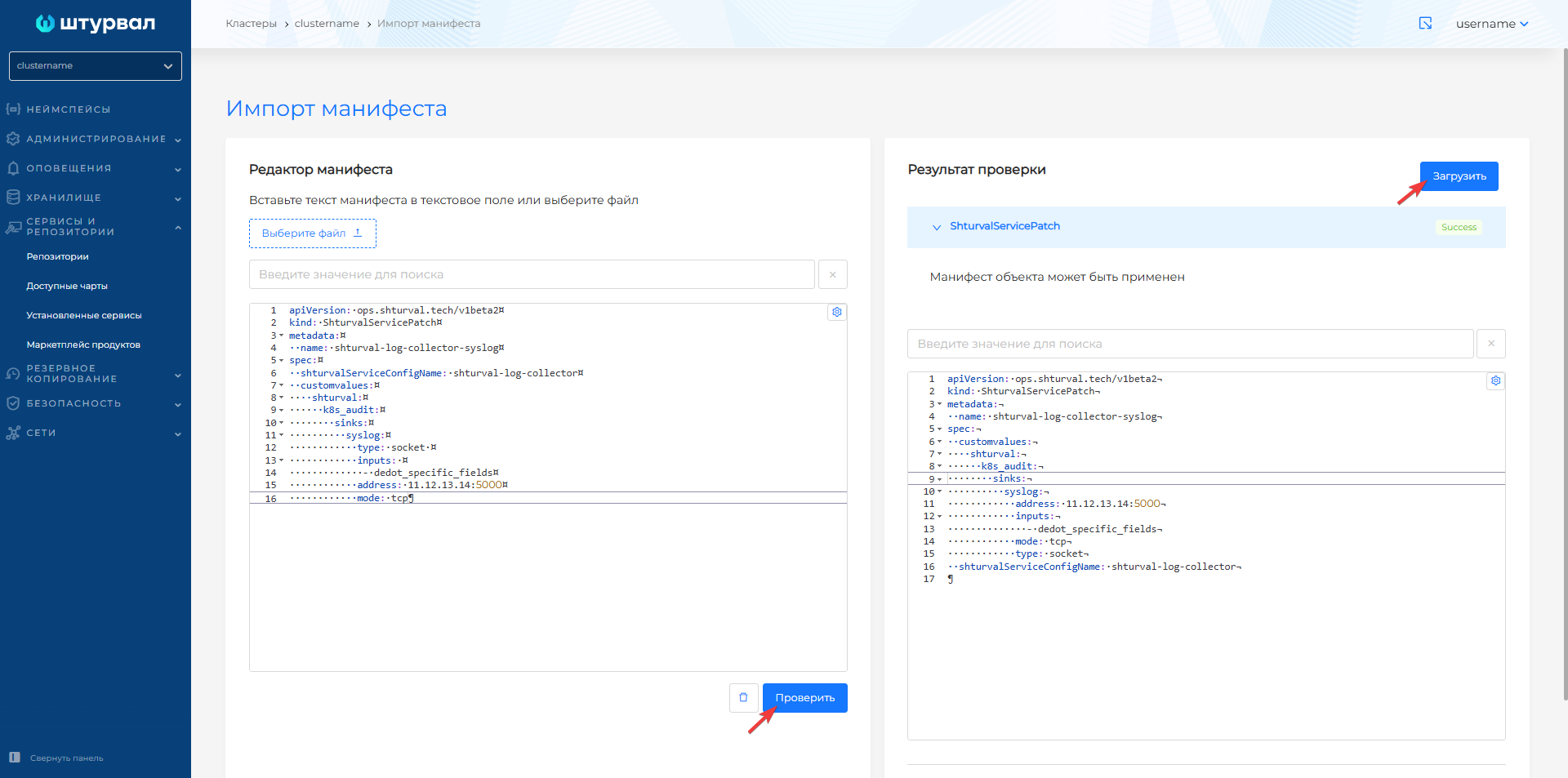
Once ShturvalServicePatch is downloaded, it will take some time for the changes to take effect.
Disable sending logs
If you need to disable sending all logs:
- Prepare ShturvalServicePatch to apply to the specification (ssc) of the Local Log Collection Module (
shturval-log-collector), where in customvalues add theshturvalconfiguration and override the value of the platform_logs_enable parameter inshturvalfrom true to false, as given below.
ShturvalServicePatch
apiVersion: ops.shturval.tech/v1beta2
kind: ShturvalServicePatch
metadata:
  name: shturval-log-collector-disable
spec:
  shturvalServiceConfigName: shturval-log-collector
  customvalues:
    shturval:
      platform_logs_enable: false
- In the cluster, load the prepared ShturvalServicePatch using import manifests.
Screenshot
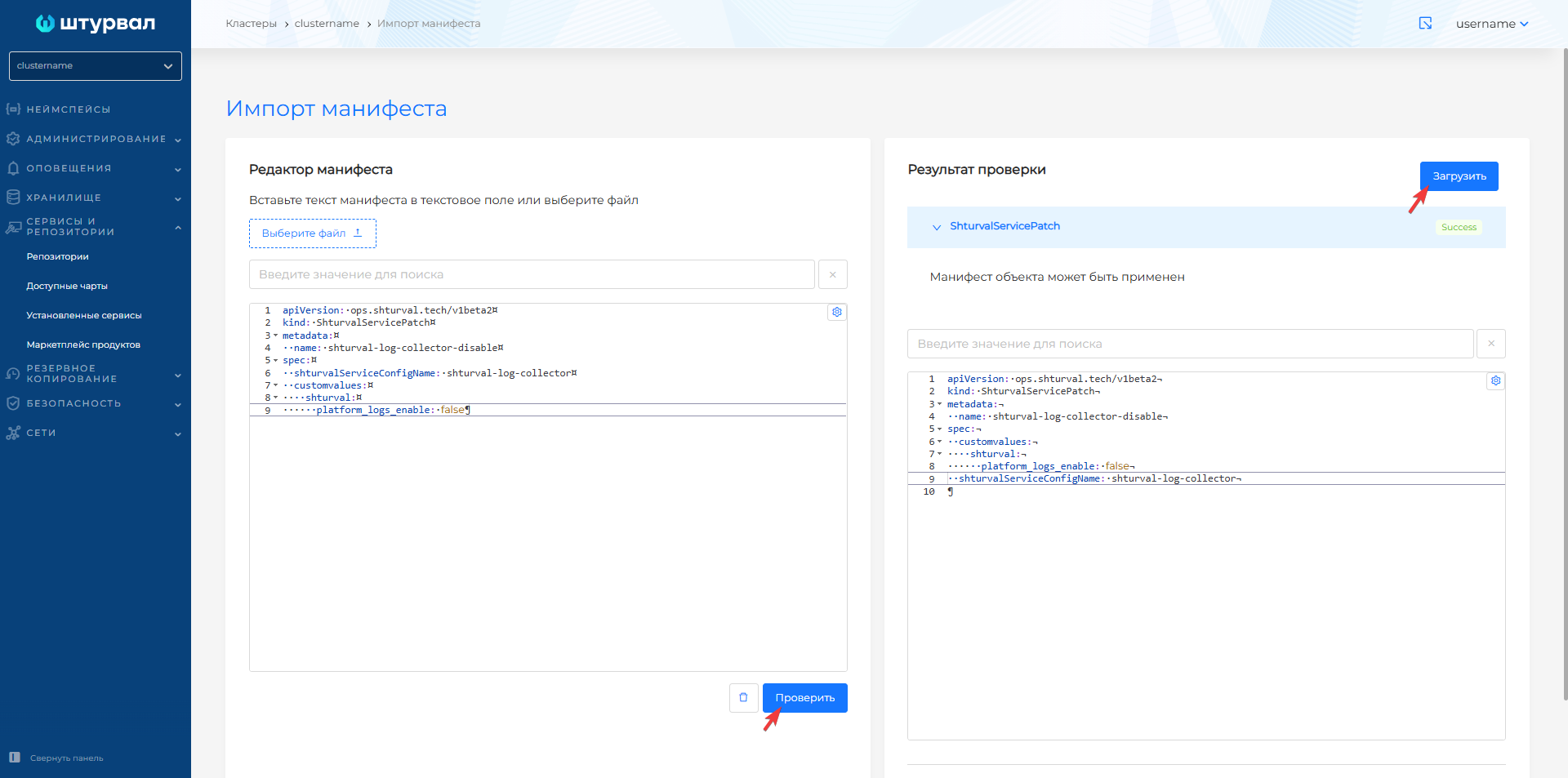
Once ShturvalServicePatch is downloaded, it will take some time for the changes to take effect.
If you need to disable sending one type of logs in a cluster
- Prepare ShturvalServicePatch for application to the specification (ssc) of the Local Log Collection Module (
shturval-log-collector), where in customvalues add the configurationshturvalwith the log type and redefine the value of the enable parameter from true to false, as shown in the example.
Example ShturvalServicePatch of disabling journald logs
apiVersion: ops.shturval.tech/v1beta2
kind: ShturvalServicePatch
metadata:
  name: shturval-log-collector-disable-journald
spec:
  shturvalServiceConfigName: shturval-log-collector
  customvalues:
    shturval:
      journald:
        enable: false
- In the cluster, load the prepared ShturvalServicePatch using import manifests.
Screenshot
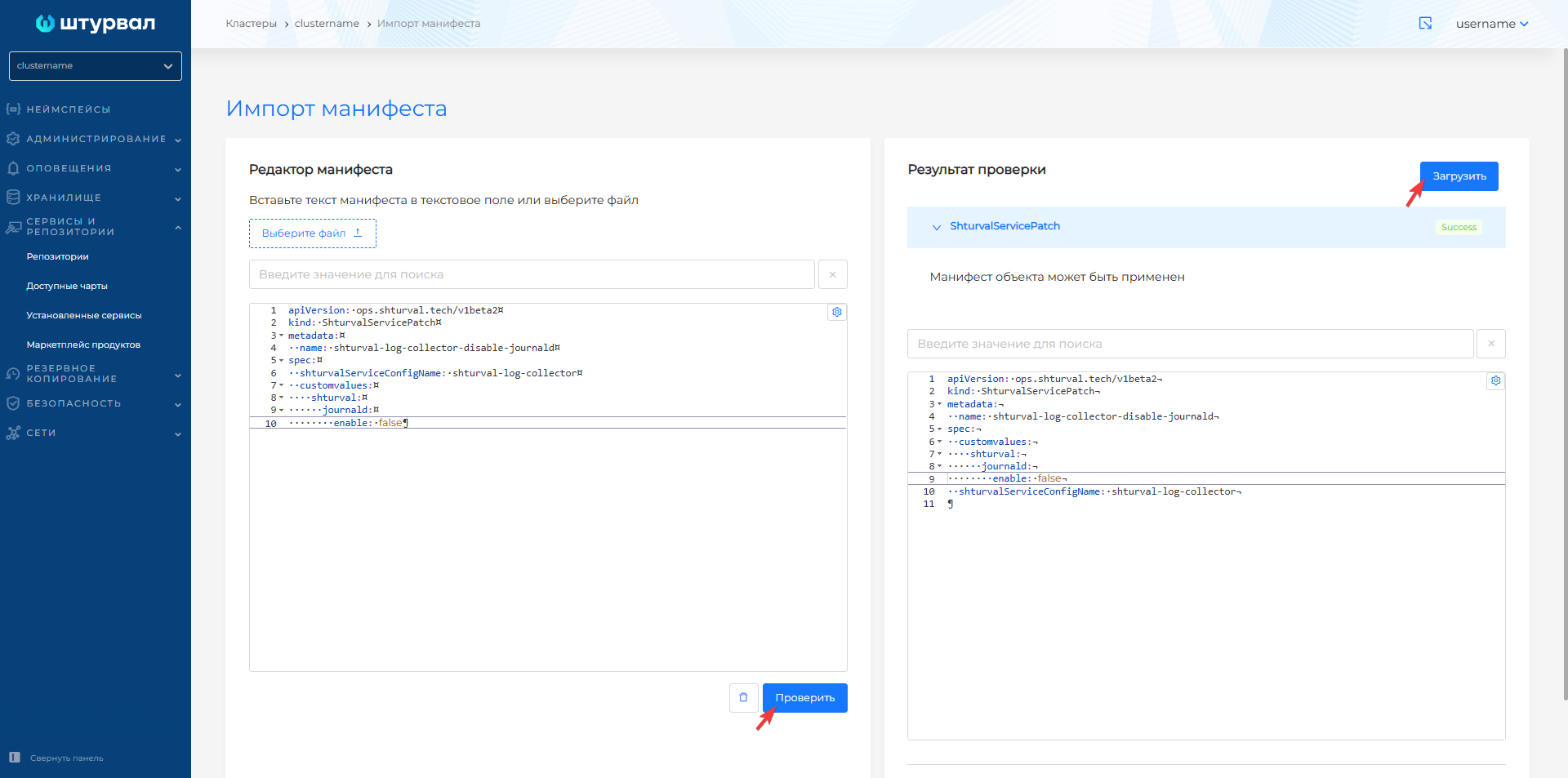
Once ShturvalServicePatch is downloaded, it will take some time for the changes to take effect.