VictoriaMetrics and VictoriaLogs
VictoriaMetrics/vmagent
The dashboard provides an extensive overview of the operation of VictoriaMetrics vmagent version 1.102.0 and higher. It is designed to monitor various metrics related to the data collection and processing process, as well as identify errors and the performance of system components. The main features of the dashboard include displaying statistics on the number of samples retrieved, resource load levels, errors and delays when recording data, which allows you to quickly respond to possible problems in the infrastructure.
Dashboard structure
Stats:
- Samples scraped/s: Displays the rate at which samples are scraped from configured sources.
- Samples ingested/s: Shows the rate at which samples are processed into the system.
- Targets scraped/s: Displays information about the number of target metrics scraped per second.
- Scrape targets: Displays the total number of all configured metrics extraction targets and their operating status (enabled or disabled).
- Log errors (30m): Displays the number of errors generated in the logs over the last 30 minutes.
- Persistent queue size: Displays the size of pending samples in bytes that have not been sent to remote storage. An increase in this value may indicate connection problems.
- Uptime: A time graph showing the operating time of system instances.
Overview:
- Samples rate ($instance): A time graph showing the input and output rate of samples, including push and pull models.
- Persistent queue size ($instance) to ($url): A timeline showing the size of the persistent queue of pending samples that have not yet been sent to remote storage, with an emphasis on values above 2MB.
- Logging rate: A time graph showing the frequency of messages being logged by severity level.
- Requests rate ($instance): A time graph showing the frequency of requests processed by the vmagent HTTP server.
- Errors rate ($instance): A time graph showing error rates for various metrics, which may indicate network or data formatting issues.
Resource usage:
- CPU ($instance): Time graph showing usageInstance CPU usage.
- RSS memory % usage ($instance): A time graph showing the percentage of resident memory usage (RSS) of the instance.
- Disk writes/reads ($instance): Time graph displaying the performance of writing/reading data from the storage.
- Network usage ($instance): A time graph showing the transfer rate of data received and sent by the vmagent.
- Open FDs usage % ($instance): A time graph showing the percentage of open file descriptors in the OS for each instance.
- Goroutines ($instance): A time graph showing the number of goroutines running in the instance.
- CPU spent on GC ($instance): Time graph showing the percentage of CPU usage occupied by the garbage collector.
- Threads ($instance): A time graph showing the number of threads running in the instance.
Troubleshooting:
- Top 10 jobs by unique samples: Time graph showing the top 10 jobs by number of new registered services in the last 5 minutes.
- Top 10 instances by unique samples: Time graph showing the top 10 instances by number of new registered services in the last 5 minutes.
- Persistent queue write saturation ($instance): A time graph showing the write queue saturation rates for the instance.
- Persistent queue read saturation ($instance): A time graph showing read queue saturation rates for the instance.
- Data blocks dropped ($instance) to ($url): Displays the frequency of dropped data blocks when receiving
400 Bad Requestand409 Conflictresponses from the remote storage. - Non-default flags: Table of non-default configuration flags set for jobs and instances.
Scraping:
- Scrape targets UP(By Type): Time graph showing the number of active target metrics by type.
- Scrape targets DOWN(By Type): A time graph showing the number of unavailable target metrics by type.
- Scrape rate ($instance): A time graph showing the number of metrics extraction requests per second.
- Scraped datapoints rate ($instance): A time graph showing the amount of data scraped per second.
- Scrape response size 0.99 quantile ($instance): Time graph showing the 99th percentile size of query responses.
- Scrape duration 0.99 quantile ($instance): Time graph showing the 99th percentile of the time required to retrieve metrics.
- Scrape fails ($instance): A time graph showing the failure rate when extracting metrics.
Ingestion:
- Requests rate ($instance): Time graph showing the frequency of requests to write data to the ingestserver and HTTP server.
- Rows rate ($instance): A time graph showing the frequency of rows loaded into vmagent via push protocols.
- Concurrent inserts ($instance): A time graph showing the number of simultaneous data insertions into the system.
- Error rate ($instance): Time graph showing the error rate when writing to ingestserver and HTTP Server.
Streaming aggregation:
- Matched samples ($instance): Displays the number of samples that match the aggregation rules.
- Ignored samples ($instance): Displays the frequency of ignored samples during aggregation.
- Produced samples ($instance): Displays the number of created samples according to aggregation rules.
- Flush timeouts ($instance): Displays metrics for timeouts that occur during deduplication or aggregation.
- Samples lag 0.99 quantile ($instance): Displays the delay between sample timestamps within the same group.
- Dedup flush duration 0.99 quantile ($instance): Displays the 99th percentile flush duration for aggregated data.
- Labels compressor ($instance): A time graph showing the size of the label compressor by number of records.
Remote write:
- Requests rate ($instance) to ($url): A time graph showing the frequency of requests to remote endpoints.
- Bytes write rate ($instance): A time graph showing the global byte write rate over remote connections.
- Retry rate ($instance) to ($url): A time graph showing the retry rate of requests to remote endpoints.
- Connections ($instance): A time graph showing the current number of established connections to remote endpoints.
- Hourly series limit: A time graph showing the usage of the unique series limit per hour.
- Remote write connection saturation ($instance): Time graph showing saturation rates of connections to remote storages.
- Daily series limit: A time graph showing the usage of the unique series limit forday.
Drilldown:
- CPU usage ($instance): A time graph showing the instance’s CPU usage.
- RSS memory usage ($instance): A time graph showing the instance’s resident memory usage.
- Persistent queue size ($instance) to ($url): A time graph showing the size of the persistent queue of pending samples.
- Samples rate ($instance): A time graph showing the sample input and output rate for an instance.
- Disk writes/reads ($instance): A time graph displaying the Data Read/Write metrics for an instance.
Configurable parameters
- ds: Allows you to select the data source to use in graphs.
- job: Allows you to select a specific task to filter metrics on the dashboard.
- instance: Allows you to select specific instances to display metrics.
- url: Allows you to select the URL for the remote data entry.
- adhoc: Allows you to add arbitrary variables to filter data.
VictoriaMetrics/vmalert
The dashboard is designed to monitor the vmalert alert management system, which is part of VictoriaMetrics. It provides an overview of the status and performance of various alerting and recording rules, as well as resource metrics such as memory and processor usage. The dashboard allows the user to track errors in the execution of rules, as well as the effectiveness of sending alerts to Alertmanager, which is critical to ensuring the correct operation of the alert system.
Dashboard structure
Stats:
- Config update: Displays the status of the latest configuration update. A value of “Not Ok” indicates that there were errors during the update.
- Alerting rules: Displays the total number of loaded alerting rules for the selected instances and groups.
- Recording rules: Displays the total number of loaded recording rules for the selected instances and groups.
- Errors: Displays the total number of errors that occurred as a result of the notification and recording rules.
- No data errors: Displays the number of recording rules that do not produce data, which may indicate an erroneous configuration.
- Uptime: A time graph showing the availability status of vmalert instances.
Overview ($instance):
- Alerts fired total ($instance): Time graphIC showing the total number of triggered alerts for each job.
- Top $topk groups avg evaluation duration ($group): A time graph showing the top $topk groups by evaluation duration.
- Rules execution rate ($instance): Time graph showing the execution speed of requests to the Datasource.
- Rules execution errors ($instance): A time graph showing the frequency of errors when executing rules.
Resource usage:
- Memory usage % ($instance): A time graph showing the percentage of memory usage.
- Memory usage ($instance): Time graph showing the amount of memory used.
- CPU usage %($instance): A time graph showing the percentage of CPU usage.
- CPU usage ($instance): Time graph showing the maximum number of cores used.
- Open FDs usage % ($instance): A time graph showing the percentage of open file handles in the operating system.
- Goroutines ($instance): A time graph showing the total number of active goroutines.
Troubleshooting:
- Non-default flags: Table of use of non-standard flags in the system.
- Missed evaluations ($instance): A time graph showing the number of evaluations that were missed, which can cause problems with notifications.
- Restarts ($instance): Displays the number of restarts for each job, allowing you to identify intermittent problems.
Alerting rules ($instance):
- Top $topk active alerts ($group): A time graph showing the top $topk active alert rules.
- Errors ($group): A timeline showing events where execution of the rules resulted in errors.
- Pending ($group): A time graph showing the number of currently pending alert rules.
- Errors rate to Alertmanager: A time graph showing the error rate when sending alerts to Alertmanager.
- Requests rate to Alertmanager by job ($group): Time graph showing the number of alerts sent to Alertmanager.
Recording rules ($instance):
- Top $topk rules by produced samples ($group): Time graph showing the top $topk rules generating the most samples.
- Rules with 0 produced samples ($group): Timeline showing rules that do not produce samples.
- Errors ($group): Timeline,showing errors that occurred during the execution of the recording rules.
Remote write:
- Datapoints send rate ($instance): A time graph showing the rate of sending data over remote connections.
- Datapoints drop rate ($instance): A time graph showing the number of data points dropped when sent.
- Connections ($instance): A time graph showing the number of established connections to remote endpoints.
- Bytes write rate ($instance): A time graph showing the global byte write rate across remote connections.
Configurable parameters
- ds: Allows you to select the data source to use in graphs.
- job: Allows you to select a specific task to filter metrics on the dashboard.
- instance: Allows you to select specific instances to display metrics.
- group: Allows you to select a group to display metrics for specific groups only.
- topk: Allows you to define the number of top metrics displayed in some panels.
- adhoc: Allows you to add arbitrary variables to filter data.
VictoriaMetrics/vmauth
The dashboard provides an overview of the authentication system for VictoriaMetrics (vmauth) version 1.80.0 and higher. It is designed to monitor key metrics related to the operation and effectiveness of the authentication system. Integration with VM Agent allows you to monitor health and performance, providing the ability to configure various parameters for more detailed analysis.
Dashboard structure
Stats:
- Uptime: A time graph showing the total operating time, allowing you to see the dependence on the specified interval.
- Config update: Shows the success of the last configuration update, where “Not Ok” indicates an update error.
- Requests rate: Displays the speed of processing requests in the system.
- Users count: Shows the total number of users defined in the configuration file.
- Errors rate: Displays the frequency of errors in request processing.
- Version: Table with application versions.
Overview:
- Requests rate: Time graph displaying the rate of requests received by user.
- User concurrent requests usage: A time graph showing the percentage of usageUsing allowed parallel queries by user.
- Requests rejected rate: A time graph displaying the rate of rejected requests along with the reason.
- Concurrent limit reached: Displays cases when the number of concurrent connections has reached the limit, with recommendations for action.
- User requests duration: A time graph showing the duration of user requests by quantile.
Resource usage:
- RSS memory % usage ($instance): A time graph showing the percentage of resident memory usage that is critical to performance.
- CPU % usage ($instance): A time graph showing the percentage of CPU usage, indicating the system load.
- Memory usage ($instance): A time graph showing various memory usage metrics.
- CPU ($instance): Time graph showing CPU usage and available limits.
- TCP connections ($instance): Time graph showing the number of active TCP connections.
- TCP connections rate ($instance): Time graph showing the speed of a new TCP connection.
- Open FDs ($instance): A time graph showing the percentage of open file descriptors relative to the set limit.
- Goroutines ($instance): A time graph showing the number of goroutines in the system.
- Threads ($instance): A time graph showing the number of threads.
Troubleshooting:
- Non-default flags: Table showing flags that are not set by default.
- Log errors: A time graph showing the number of errors and warnings in the logs, which may indicate connection problems or incorrect configuration.
Configurable parameters
- ds: Allows you to select the data source to use in graphs.
- job: Allows you to select a specific task to filter metrics on the dashboard.
- instance: Allows you to select specific instances to display metrics.
- user: Allows you to select a user from the list for further query analysis.
- adhoc: Allows you to add arbitrary variables to filter data.
VictoriaMetrics/cluster
The dashboard provides extensive capabilities for tracking the performance and status of cluster components, including statistics on resource consumption, request frequency, metricsand data ingression and error rate. The dashboard supports flexibility in choosing data sources, which facilitates in-depth analysis of the system’s operation.
Screenshot
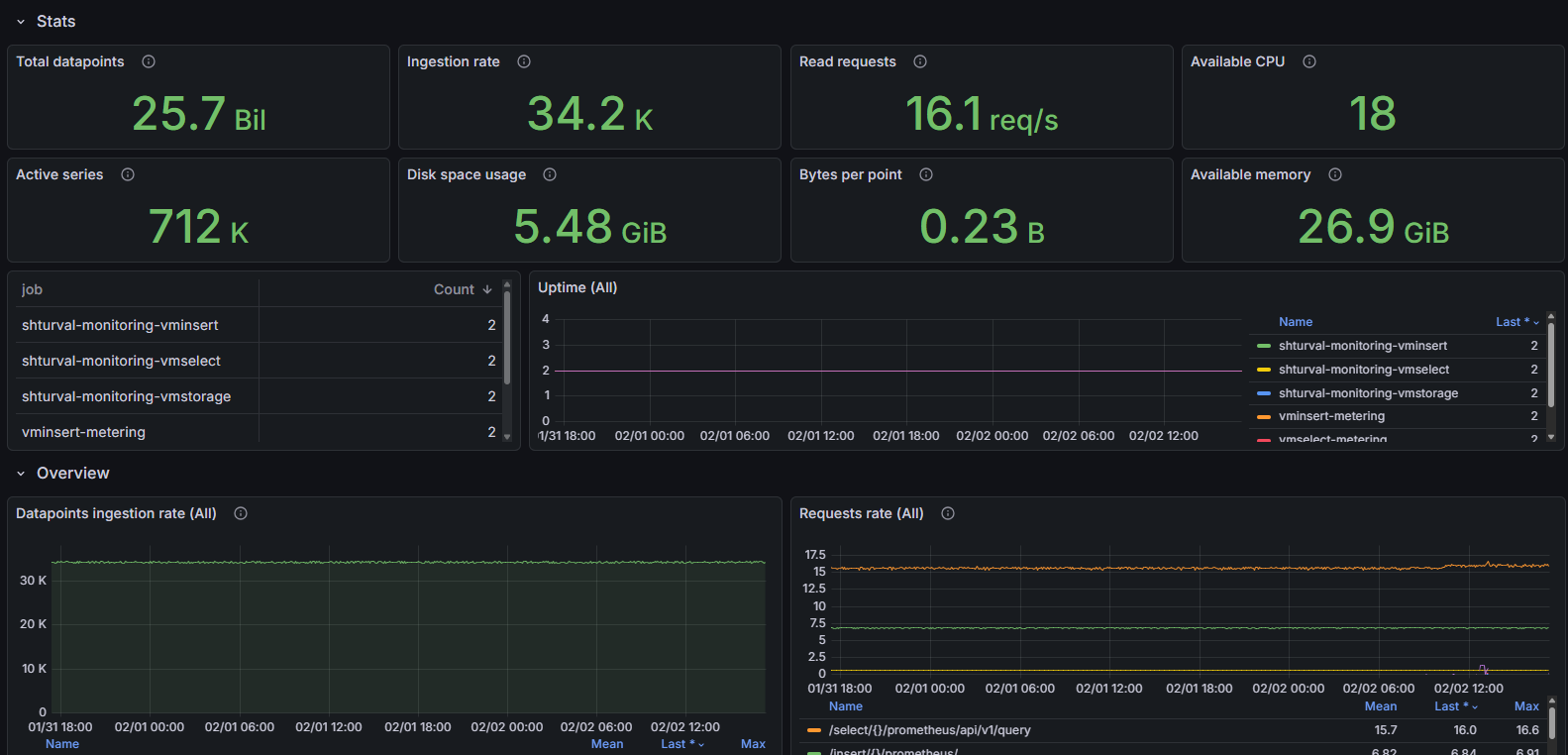
Dashboard structure
Stats:
- Total datapoints: Displays the total amount of data stored in the system.
- Ingestion rate: Shows the data ingestion rate, including the replication factor.
- Read requests: Displays the frequency of HTTP read requests.
- Available CPU: Shows the total number of available processors for all VictoriaMetrics components.
- Active series: Displays the number of active time series with new data in the last hour.
- Disk space usage: Displays information about the used disk space.
- Bytes per point: Displays the average disk space consumed by one time series.
- Available memory: Displays the total amount of available RAM for all VictoriaMetrics components.
- Uptime ($job): A time graph showing the operating time of the component.
Overview:
- Datapoints ingestion rate ($instance): A time graph showing the amount of data entering the cluster per second.
- Requests rate ($instance): A time graph showing various metrics, including insert and read commands.
- Active time series ($instance): A time graph showing the number of active time series in the last hour.
- Query duration 0.99 quantile ($instance): Time graph showing the processing time of read requests.
- Requests error rate ($instance): A time graph showing the error rate when executing requests.
- Logging rate: A time graph showing the frequency of message logging by level.
Resource usage ($job):
- RSS memory % usage ($instance): A time graph showing the usage condition of RSS (backup) memory.
- RSS anonymous memory % usage ($instance): Time graph showing anonymous memory usage.
- CPU ($instance): Time graph showing CPU usage.
- Disk writes/reads ($instance): A time graph showing reads and writes to the disk.
- Open FDs usage % ($instance): Time graph showing percentage usedused file descriptors.
- Disk write/read calls ($instance): Time graph showing the number of read/write system calls.
- Goroutines ($instance): A timeline showing the use of goroutines in the application.
- TCP connections ($instance): A time graph showing the current number of TCP connections.
- Threads ($instance): A time graph showing the current number of threads of the application.
- CPU pressure: Time graph showing the load on the CPU.
- Memory pressure: Time graph showing memory load.
- IO pressure: Time graph showing I/O loads.
- CPU spent on GC ($instance): Time graph showing the percentage of CPU spent on garbage collection.
- TCP connections rate ($instance): Time graph showing the frequency of new TCP connections.
- Go scheduling latency: The time goroutines spend waiting to run. Elevated values may indicate CPU shortage or processor throttling.
- Memory allocations rate: Time graph showing the speed of memory allocation.
Troubleshooting:
- Churn rate ($instance): A time graph showing the frequency of creation of new series over the last 24 hours.
- Slow inserts: A time graph showing the percentage of slow inserts relative to the total number of inserts.
- Storage in readonly status for vminsert ($instance): Displays the availability status of vmstorage.
- Slow queries % ($instance): Time graph showing the percentage of slow queries.
- Assisted merges ($instance): A time graph showing the number of assisted merges of data in the warehouse.
- Cache usage % by type ($instance): Time graph showing cache usage by type.
- Cache miss ratio ($instance): A time graph showing the cache miss ratio.
- Deduplication rate ($instance) : Shows the rate of deduplication of data during processing.
- Samples dropped for last 1h ($instance): Displays the number of data samples dropped by reason.
- Partial query results ($instance): Displays the number of partial query results due to some nodes being unavailable.
- Restarts ($instance): Displays the number of process restarts.
Interconnection ($job):- Rows ($instance): Shows the number of rows sent and received.
- RPC errors ($instance): Displays communication errors between nodes.
- Rows ($instance) rerouted to: Displays the number of rerouted rows.
- Pending: A timeline showing the status of currently active requests.
- Rows ($instance) rerouted from: Shows the number of rows rerouted from vmstorage.
- RPC network usage ($instance): Displays network activity associated with internal RPC protocols.
vmstorage ($instance):
- Ingestion rate ($instance): A time graph showing the rate at which data arrives at the storage nodes.
- CPU usage % ($instance): A time graph showing CPU usage for the storage component.
- Memory (anon) usage % ($instance): Time graph showing RAM usage for storage components.
- Concurrent selects ($instance): A time graph showing the number of concurrent read requests.
- Concurrent flushes on disk ($instance): A time graph showing the current and maximum level of concurrent writes to disk.
- Merge speed: Time graph showing the speed of data merging on storage nodes.
- Active merges ($instance): A time graph showing the maximum number of merges currently occurring.
- LSM parts max by type ($instance): A time graph showing the maximum number of LSM tree parts for different data types.
- Disk space usage % ($instance): A time graph showing the percentage of disk space usage.
- Pending datapoints ($instance): A time graph showing the number of data points and index entries pending for writing.
- Disk space usage % by type ($instance): A time graph showing the percentage of disk space usage by type (data points and indexdb).
- Readonly mode: Displays the read-only mode status for the storage.
- Network usage ($instance): A time graph showing the network read and write activity of the storage.
- Number of snapshots: A time graph showing the number of data snapshots taken.
vmselect ($instance):
- Requests rate ($instance): A time graph showing the frequency of requests accepted by vmselect nodes.
- Concurrent selects ($instance): Time graphIC showing the current and maximum number of parallel requests.
vminsert ($instance):
- Requests rate ($instance): A time graph showing the request rate for vminsert nodes.
- Concurrent inserts ($instance): A time graph showing the number of concurrent inserts.
- CPU usage % ($instance): Time graph showing vminsert CPU usage.
- Memory (anon) usage % ($instance): A time graph showing anonymous memory usage by the vminsert process.
- Storage connection saturation ($instance): Time graph showing the saturation level of connections between vminsert and vmstorage.
- Storage reachability ($instance): Time graph showing the availability of vmstorage nodes for vminsert.
- Network usage: clients ($instance): Time graph showing the network load between vminsert and clients.
- Network usage: vmstorage ($instance): Time graph showing the network load between vminsert and vmstorage.
- Rows per insert ($instance): A time graph showing the maximum number of rows inserted per request.
Drilldown:
- RSS memory usage ($instance): Time graph showing memory usage (backup).
- Storage full ETA ($instance): Time graph showing the approximate time required to reach 100% of storage space.
- RSS anonymous memory usage ($instance): Time graph showing anonymous memory (backup) usage.
- CPU usage ($instance): A time graph showing the total CPU usage.
- Storage full ETA ($instance): Time graph showing the approximate time until the disk is filled to 100%, taking into account the insertion and compression speed.
- Disk space usage ($instance): Time graph showing used disk space.
- Disk space usage by type ($instance): A time graph showing disk space usage by data type.
- Logging rate: A time graph showing the speed of logging by level and location.
Configurable parameters
- ds: Allows you to select the data source to use in graphs.
- job: Allows you to select a specific task to filter metrics on the dashboard.
- job_insert: Allows you to filter the data selection for insert operations.
- job_select: ByAllows you to filter the data selection for selection operations.
- job_storage: Allows you to filter the data selection for storage operations.
- instance: Allows you to select specific instances to display metrics.
- adhoc: Allows you to add arbitrary variables to filter data.
VictoriaMetrics/Cluster Per Tenant Statistic
The dashboard provides the ability to track and analyze data for each tenant. The main features of the dashboard include monitoring data injection rate, read request frequency, time series activity and disk space usage. This is an important tool for identifying bottlenecks, optimizing cluster performance, and supporting operational decision-making in the field of data storage and processing.
Dashboard structure
Tenant functionality is not fully used
Statistics:
- Datapoints ingestion rate: A time graph showing the number of data points ingested into the store per second, broken down by accountID and projectID.
- Read query rate: A time graph showing the rate of queries received by vmselect nodes for each tenant.
- Active time series: Displays the number of active time series with new data inserted within the last hour. A high value may indicate that the data injection process is slow.
- Time spent on queries, seconds: A time graph showing the time spent on queries for each tenant per second.
- Disk space usage (datapoints only): Shows the amount of disk space used by data points only. There is no way to differentiate tenant statistics for indexdb.
- New series over 24h: Displays the number of new time series created in the last 24 hours.
Billing:
- Ingestion Rate Top 5, by account id: Pie chart showing the top 5 accounts by data injection rate.
- Read query rate, Top 5, by account id: Pie chart showing the top 5 accounts by frequency of read requests.
- Time spent on queries, seconds, Top 5, by account id: Pie chart showing the top 5 accounts by time spent on queries.
- Active time series, Top 5, by account id: Pie chart showing the top 5 accounts by number of active time series.
- Disk space usage, Top 5, by account id: Pie chart showing the top 5 accounts by disk space usage.
- New series over 24h, Top 5, by account id: Pie chart showing the top 5 accounts by the number of new time series created in the last 24 hours.
Configurable parameters
- ds: Allows you to select the data source to use in graphs.
- account: Allows you to choose to filter data by account ID. The user can select one or more accounts for analysis.
- project: Allows you to filter data by project ID for the selected account. The option includes the ability to select multiple projects.
- adhoc: Allows you to add arbitrary variables to filter data.
###VictoriaMetrics/operator
The dashboard allows you to track key performance metrics and states related to object management in the Kubernetes cluster. Using this dashboard, users can quickly assess the overall health of the system, as well as identify and diagnose problems at the controller and resource levels.
Dashboard structure
Overview:
Version: Displays the current version of the operator.
CRD Objects count by controller: A “stat” panel showing the number of objects in the Kubernetes cluster for each controller.
Uptime: A “stat” panel that displays the system uptime on each instance.
Reconciliation rate by controller: A “timeseries” panel that displays the speed of reconciliation operations for each controller.
Log message rate: A “timeseries” type panel showing the frequency of message logging depending on the logging level.
Prometheus Objects watchers: Displays the total number of watchers monitoring Prometheus Operator objects (for example, ServiceMonitors, PodMonitors) by namespace.
Elected Leaders: Shows the number of operator instances that have received leader status. A value above 1 indicates possible problems with operator behavior and requires checking the logs.
Active workers: Shows the number of active workers performing reconcile tasks.
Prometheus Converter Watch events: Time graph of the number of events of processing Prometheus Operator objects by the operator, divided by event types and object types.- Troubleshooting:
reconcile errors by controller: A “timeseries” type panel displaying reconcile errors by controller. Non-zero values indicate problems with defining CR objects or connecting to the Kubernetes API.
throttled reconcilation events: A “timeseries” panel showing the number of reconciliation events that have been throttled. This helps reduce the load on the Kubernetes cluster and improve operator productivity.
Working queue depth: A “timeseries” panel that displays the number of objects waiting to be processed in the queue. Non-zero values indicate operator difficulty in processing changes to CR objects.
Reconciliation latency by controller: A “timeseries” panel showing the reconciliation latency for each controller. High latency may indicate operator performance issues.
reconcile errors by controller: A time graph showing the number of reconcile errors for each controller. Non-zero values indicate problems with defining CR objects or problems interacting with the Kubernetes API.
throttled reconciliation config events: Displays the number of reconciliation config events that have been throttled by the operator to prevent congestion (default to 5 events per 2 seconds).
Working queue depth: A time graph showing the depth of the queue of objects waiting to be reconcile processed. Non-zero values may indicate insufficient operator resources.
Reconciliation latency by controller: Latency of reconciliation operations (99th percentile) by controllers. For stateful controllers, latency of up to 3 seconds is allowed, for others - above 2 seconds may indicate problems.
Rest client requests: A time graph showing the number of HTTP requests to the Kubernetes API, broken down by method and response code.
Concurrent reconcile ($instance): Shows the current and maximum number of concurrent reconcile tasks for each operator instance. Consistently reaching the maximum indicates the need to increase resources or configuration parameters.
Go scheduling latency: The time goroutines spend waiting to run. Elevated values may indicate CPU shortage or processor throttling.
rest client latency: Latency of HTTP requests to Kubernetes API, broken down by methods and APIs.
resources:
- Memory usage ($instance): A time graph showing memory usage for each instance, including requested system memory, memory in use, and resident memory.
- CPU ($instance): Time graph showing CPU usage for each instance.
- Goroutines ($instance): A timeline showing the number of goroutines for each instance.
- GC duration ($instance): A time graph showing the average garbage collection duration for each instance.
Configurable parameters
- ds: Allows you to select the data source to use in graphs.
- job: Allows you to select a specific task to filter metrics on the dashboard.
- instance: Allows you to select specific instances to display metrics.
- version: Allows you to select the version of the application for analyzing metrics.
###VictoriaLogs/cluster
The dashboard is designed for monitoring a cluster of VictoriaLogs version v1.22.0 and higher. It provides an overview of logging system statistics and performance metrics, including record count, record processing speed, resource usage, and performance metrics. The main features of the dashboard include tracking log injection, disk space usage, available resources (CPU and memory) and query performance analysis.
Screenshot
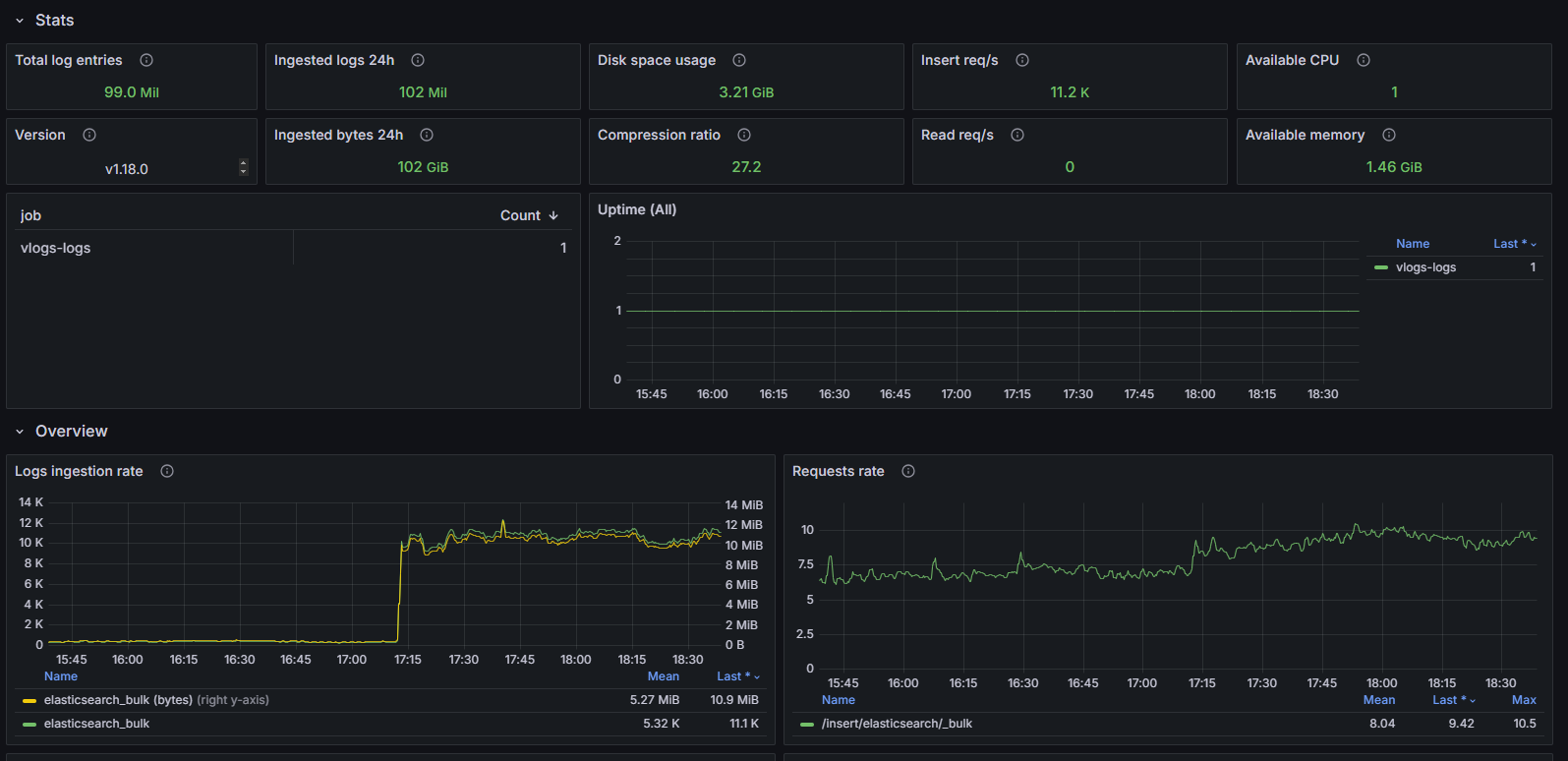
Dashboard structure
Stats:
- Total log entries: Displays the total number of log entries in the storage.
- Ingested logs 24h: Displays the accumulated number of log entries ingested over the last 24 hours.
- Disk space usage: Displays the total amount of disk space used, taking into account all compressed log entries and index sizes.
- Insert req/s: Displays the average speed of inserting log entries.
- Available CPU: Displays the total number of available processors for the VictoriaLogs process.
- Ingested bytes 24h: Displays the accumulated total amount of data ingested over the last 24 hours before compression.
- Compression ratio: Displays the ratio between the original data size and the compressed data storedI’m on disk.
- Read req/s: Displays the speed of HTTP read requests.
- Available memory: Displays the total available memory for the VictoriaLogs process.
- Uptime ($job): Displays the uptime indicator for a specific task.
Overview:
- Logs ingestion rate: A time graph showing the ingestion rate in the number of records and bytes per second.
- Requests rate: A time graph showing the frequency of HTTP requests along various paths.
- Requests error rate: A time graph showing the error rate of HTTP requests.
- Query duration 0.99 quantile: Time graph showing query execution times for the lowest 99% values.
- Disk space usage: A time graph showing the amount of disk space used by all data in the storage.
- Logging rate: A time graph showing the rate of message logging by level.
Troubleshooting:
- Restarts: Display the number of restarts for the task.
- Log stream churn rate: A time graph showing the number of new log streams created in the last 24 hours.
- Non-default flags: Table with flags set to non-default values.
- Logs dropped for last 1h: Time graph showing the number of log entries ignored or rejected during injection.
Resource usage:
- RSS memory % usage ($instance): A time graph showing the percentage of resident memory used by the process.
- CPU % usage ($instance): A time graph showing the percentage of CPU usage by the process.
- RSS anonymous memory % usage ($instance): A time graph showing the percentage of memory allocated by the process itself.
- CPU pressure: Time graph showing the load on the CPU.
- Memory pressure: Time graph showing memory load.
- Disk writes/reads ($instance): A time graph showing the number of bytes read and written per storage layer.
- Open FDs ($instance): A time graph showing the percentage of open file descriptors relative to the limit set in the OS.
- Disk write/read calls ($instance): Time graph showing the number of read/write system calls.
- Goroutines ($instance): A time graph showing the current number of goroutines.
- IO pressure: Temporarygraph showing I/O loads.
- Threads ($instance): A time graph showing the current number of threads.
- TCP connections ($instance): Time graph showing the number of active TCP connections.
- CPU spent on GC ($instance): Time graph showing the percentage of CPU spent on garbage collection.
- TCP connections rate ($instance): Time graph showing the frequency of new TCP connections.
- Memory allocations rate: Time graph showing the speed of memory allocation.
- Go scheduling latency: A graph showing the time spent by goroutines waiting before execution begins.
Configurable parameters
- ds: Allows you to select the data source to use in graphs.
- job: Allows you to select a specific task to filter metrics on the dashboard.
- instance: Allows you to select an instance to be monitored within the task.
- version: Allows you to select a specific version of the application for analysis.
- adhoc: Allows you to add arbitrary variables to filter data.
VictoriaLogs/single-node
The dashboard is a tool for monitoring the performance and status of log storage in VictoriaLogs. This dashboard provides the user with all the necessary metrics to assess the state of the system and its resources, including the number of logs being processed, disk space usage, as well as current CPU and memory load. It allows you to quickly identify and diagnose problems, ensuring high availability and reliable logging.
Screenshot
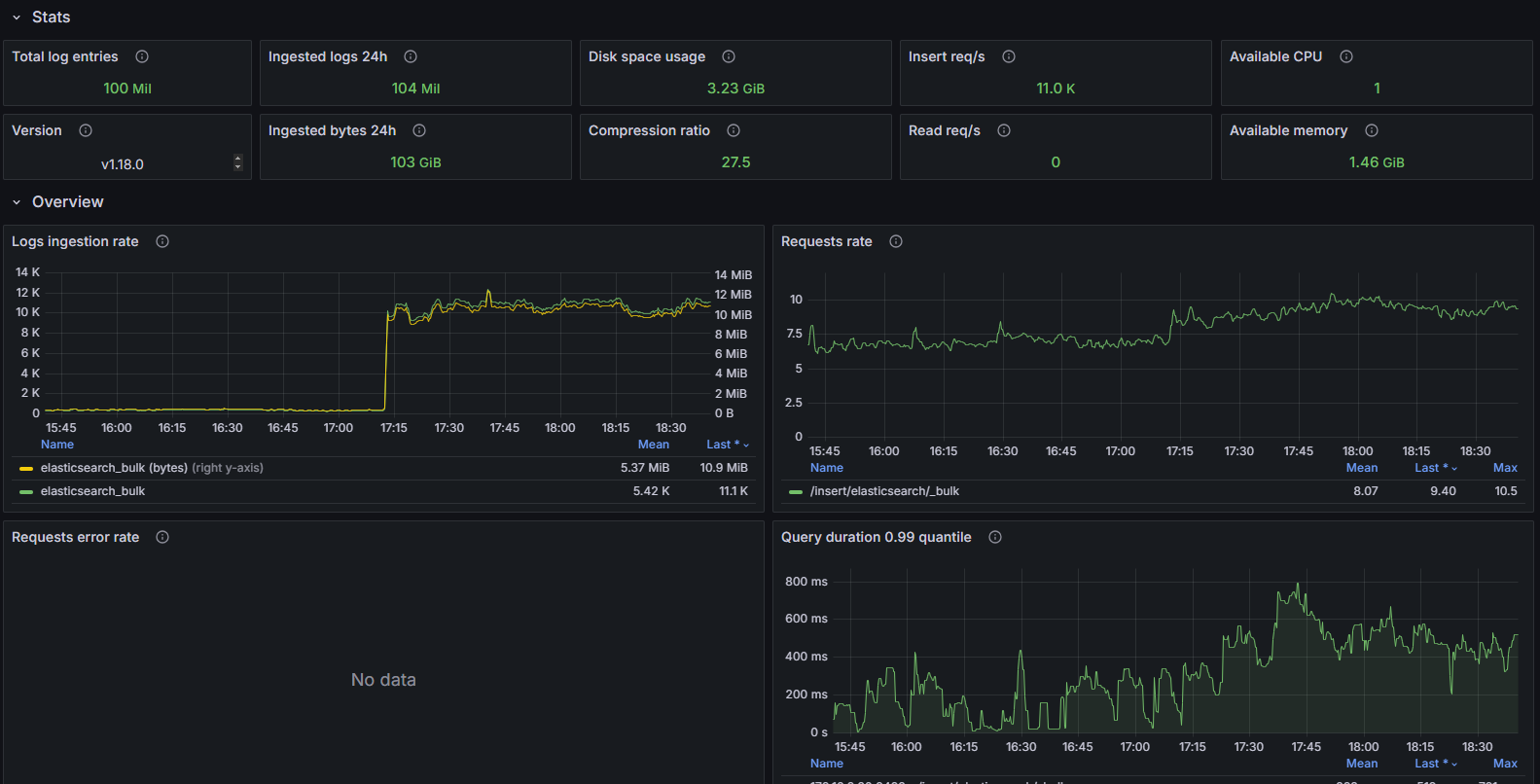
Dashboard structure
Stats:
- Total log entries: Displays the total number of log entries in the storage.
- Ingested logs 24h: Displays the total number of log entries downloaded in the last 24 hours.
- Disk space usage: Displays the total amount of disk space used, taking into account compressed log entries and index size.
- Insert req/s: Displays the average loading speed of log entries.
- Available CPU: Displays the total number of available processors for the VictoriaLogs process.
- Ingested bytes 24h: Displays the total number of bytes downloaded in the last 24 hours before compression.
- Compression ratio: Displays thethe relationship between the original size of the data and the compressed size stored on disk.
- Read req/s: Shows the speed of HTTP read requests.
- Available memory: Displays the total available memory for the VictoriaLogs process.
- Version: Displays a link to the latest VictoriaLogs releases.
Overview:
- Logs ingestion rate: A time graph showing the loading speed of logs in records and bytes per second.
- Requests rate: A time graph showing the speed of HTTP requests along various paths.
- Requests error rate: Time graph showing request error rate.
- Query duration 0.99 quantile: Time graph showing query execution time at the 99th percentile.
- Disk space usage: A time graph showing the amount of disk space used by all data in the storage.
- Logging rate: A time graph showing the rate of message logging by level.
Troubleshooting:
- Restarts: Displays the number of restarts for each job, allowing you to identify intermittent problems.
- Log stream churn rate: A time graph showing the number of new log streams created in the last 24 hours.
- Non-default flags: Table with flags set to non-default values.
- Logs dropped for last 1h: A time graph showing the number of log entries that were ignored or dropped when inserted.
Resource usage:
- RSS memory % usage ($instance): A time graph showing the percentage of memory used (resident).
- CPU % usage ($instance): A time graph showing the percentage of CPU usage.
- RSS anonymous memory % usage ($instance): A time graph showing the percentage of anonymous memory allocated by the process.
- CPU ($instance): Time graph showing CPU usage and available cores.
- Memory usage ($instance): Time graph showing memory usage in different sections.
- CPU pressure: Time graph showing the pressure on the CPU based on pressure information (PSI).
- Memory pressure: Time graph showing memory pressure based on PSI data.
- Disk writes/reads ($instance): A time graph showing the number of bytes read/written from/to storage.
- Goroutines ($instance): Timeline showingand the total number of goroutines (independent functions that execute in parallel).
- Disk write/read calls ($instance): Time graph showing the number of read/write system calls.
- Threads ($instance): A time graph showing the total number of threads.
- IO pressure: Time graph showing I/O pressure based on PSI.
- TCP connections rate ($instance): Time graph showing the speed of established TCP connections.
- TCP connections ($instance): A time graph showing the total number of current TCP connections.
- Go scheduling latency: A graph showing the time the goroutine spends waiting.
- Open FDs ($instance): A time graph showing the percentage of open file descriptors compared to the set limit.
Configurable parameters
- ds: Allows you to select the data source to use in graphs.
- job: Allows you to select a specific task to filter metrics on the dashboard.
- instance: Allows you to select specific instances to display metrics.
- version: Allows you to select a specific version of the application for analysis.
- adhoc: Allows you to add arbitrary variables to filter data.