Module for searching nodes running hostport services (CoreHA)
The module for searching for nodes with running hostport services (shturval-coreha) is designed for dynamically adding backends to HAProxy. The service is required if you are using an external balancer for Ingress.
The module is not critical for the operation of the platform; by default, it is installed in clusters in a disabled state. To enable, go to the Services and repositories section and open the Installed services page. Find Module for searching for nodes with running hostport services and change the value of the switch.
If there is no such service in the cluster, go to the Services and repositories section and open the Available charts page. On the shturval tab, select the shturval-coreha chart and click Install.
Select the required version of the chart, as well as the namespace kube-system. After selecting a chart version, the available “Service Configuration Options” (values) will be displayed on the right side of the screen. Enter the required parameters as customvalues in the “Service Specification” block.
Please note! If you need to configure the search for Ingress Controller pods, you will need to make changes to the specification of the External Connection Control Module (shturval-ingress-controller).
Configuration helm chart shturval-coreha
| Parameter | Description | Example |
|---|---|---|
config.zoneName | DNS zone name | cluster-prod01-dc1.shturval |
config.labelKey | The name of the label key by which the service will track pods. The value of this key will be added to the dns entry | ingress.cluster/name |
config.dns_port | Port that the dns server will listen to | Default: 1053 |
config_name | Custom configuration file name CoreDNS | Default: shturval-coreha-config |
strictHostPort | Use strict selection of pods using hostPort | Default: false |
Example of use in customvalues when installing helm chart
config:
  zoneName: <your-parameter-value>
| Parametr | Description | Data type | Example |
|---|---|---|---|
config.zoneName | DNS zone name | string | cluster-prod01-dc1.shturval |
Changes in the external connection management module
When you need to configure the search for Ingress Controller pods and the Module for searching nodes with running hostport services (shturval-coreha) is running in the cluster, configure the Module for managing external connections:
- Prepare a ShturvalServicePatch to apply to the specification (ssc) of the External Connection Control Module (
shturval-ingress-controller), where add a label with the keyingress.cluster/namein customvalues, as in the example below.
Example ShturvalServicePatch
apiVersion: ops.shturval.tech/v1beta2
kind: ShturvalServicePatch
metadata:
  name: <resource-name>
spec:
  shturvalServiceConfigName: shturval-ingress-controller
  customvalues:
    controller:
      labels:
        ingress.cluster/name: <your-parameter-value>
      hostPort:
        enabled: true # When enabled, ingress controller pods also use ports 80 and 443 on cluster nodes
      service:
        nodePorts:
          http: "<your-parameter-value>"
          https: "<your-parameter-value>"
        type: NodePort
| Parameter | Description | Data type | Example |
|---|---|---|---|
metadata.name | Name ShturvalServicePatch | string | shturval-ingress-coreha |
ingress.cluster/name | Label value to use when generating the DNS name * | string | default-nginx |
nodePorts.http | HTTP connection port | int | 30080 |
nodePorts.https | Port for connecting via HTTPS | int | 30443 |
*The DNS record will look like <label_value>.<namespace>.<config.zoneName>, where namespace is the namespace of the ingress pods to monitor. Example DNS record: default-nginx.ingress.cluster-prod01-dc1.shturval.
- Load the prepared ShturvalServicePatch into the cluster using import manifests.
Screenshot
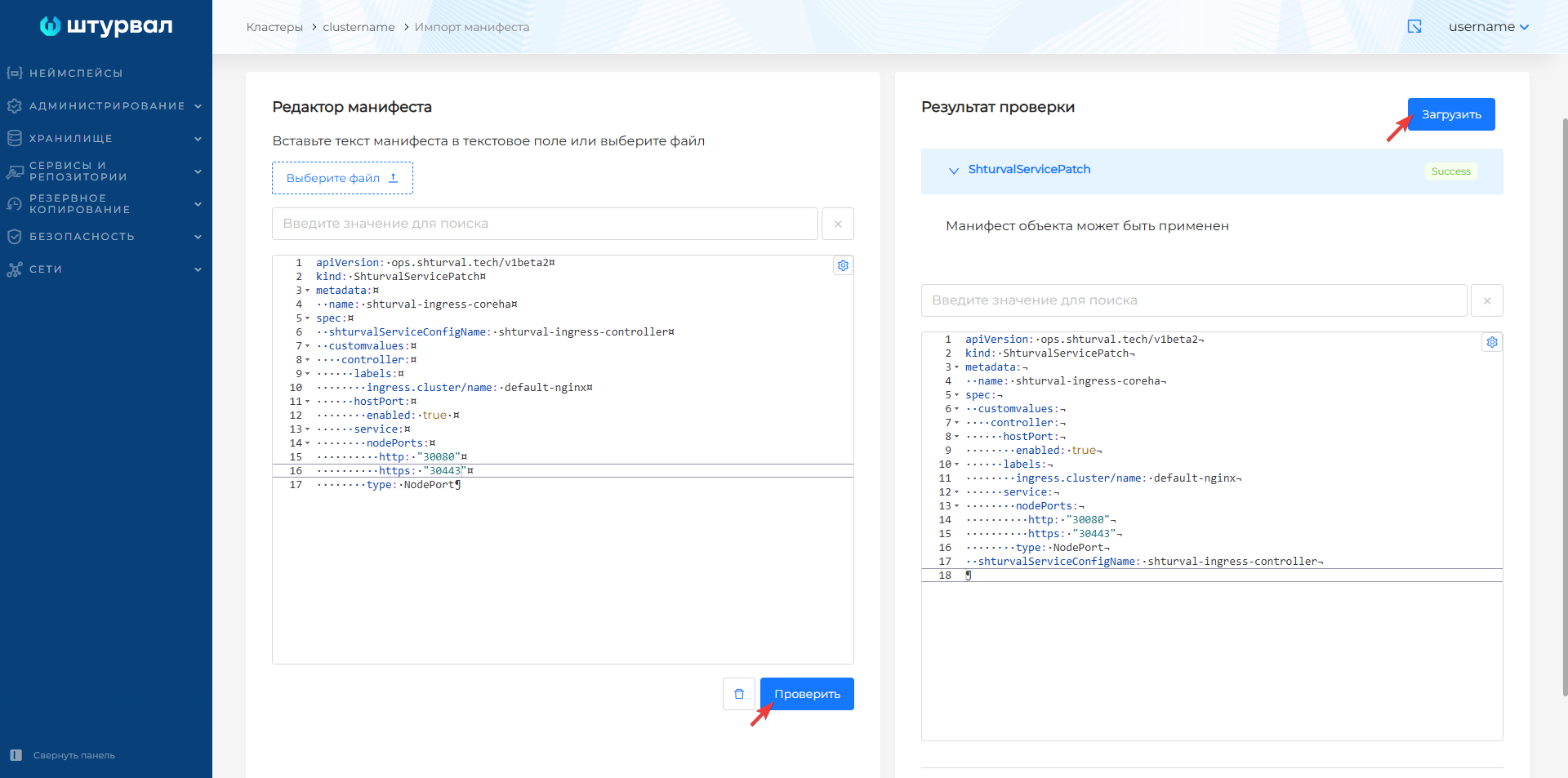
Once ShturvalServicePatch is loaded, it will take time for the configuration to be applied. After completing the Ingress settings, the controller will work on host ports 30080/30443 and ports 80/443.
- Set up the HAProxy configuration as in the example below using your parameter values.
HAProxy configuration example
resolvers coredns-cluster
    nameserver ns1 <api-server-vip>:<config.dns_port>
    accepted_payload_size 8192

backend cluster-prod01-dc1-ingress-http
    balance source
    mode tcp
    server-template daemonset 2 <label_value>.<namespace>.<config.zoneName>:80 check resolvers coredns-cluster init-addr none
| Parameter | Description | Example |
|---|---|---|
api-server-vip | cluster API server address | 10.12.13.14 |
config.dns_port | DNS Server Port | 1053 |
label_value | Label value with key ingress.cluster/name in applied ShturvalServicePatch | default-nginx |
namespace | Namespace of pods (ingress) that need to be tracked | ingress |
config.zoneName | The value of the config.zoneName parameter in the specification (ssc) of the Module for searching for nodes with running hostport services shturval-coreha | cluster-prod01-dc1.shturval |
Please note! The example is missing the frontend and backend sections for port 443.
- To check if the settings are correct
shturval-coreha, you can use thedigcommand from the balancer, using your own parameter values.
Command example
dig @<api-server-vip> -p 1053 <label_value>.<namespace>.<config.zoneName>
| Parameter | Description | Example |
|---|---|---|
api-server-vip | cluster API server address | 10.12.13.14 |
config.zoneName | The value of the config.zoneName parameter in the specification (ssc) of the Module for searching for nodes with running hostport services shturval-coreha | cluster-prod01-dc1.shturval |
label_value | The value of the label with the key ingress.cluster/name in the applied ShturvalServicePatch | default-nginx |
namespace | Namespace of pods (ingress) that need to be tracked | ingress |
Example command output
;; ANSWER SECTION:
default-nginx.ingress.cluster-prod01-dc1.shturval. 15 IN A  172.18.104.93
default-nginx.ingress.cluster-prod01-dc1.shturval. 15 IN A  172.18.104.92