Module for managing node configurations (Shturval Node Config)
The module for managing node configurations (Shturval Node Config) is a product of internal development of the Shturval platform.
Shturval Node Config provides:
- centralized management of configuration parameters of cluster nodes;
- automatic application of configurations on cluster nodes;
- protecting the health of the cluster.
The module is critical for the operation of the Shturval platform (cannot be disabled). By default, the module is installed in the client clusters and management cluster in the enabled state.
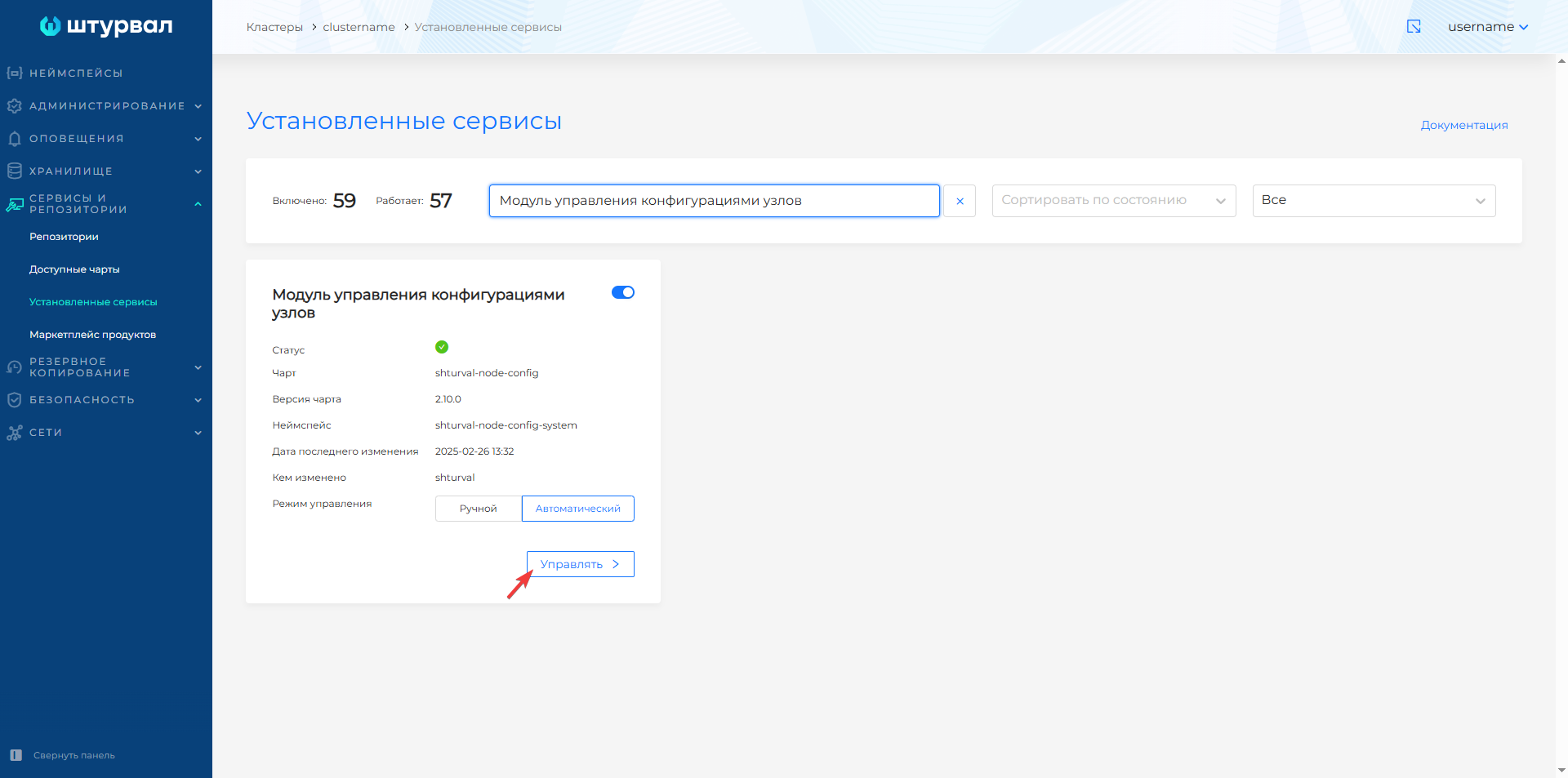
To view the service status, go to the Installed Services page of the Services and Repositories section. Find Node Configuration Management Module (shturval-node-config) and click Manage.
Screenshot
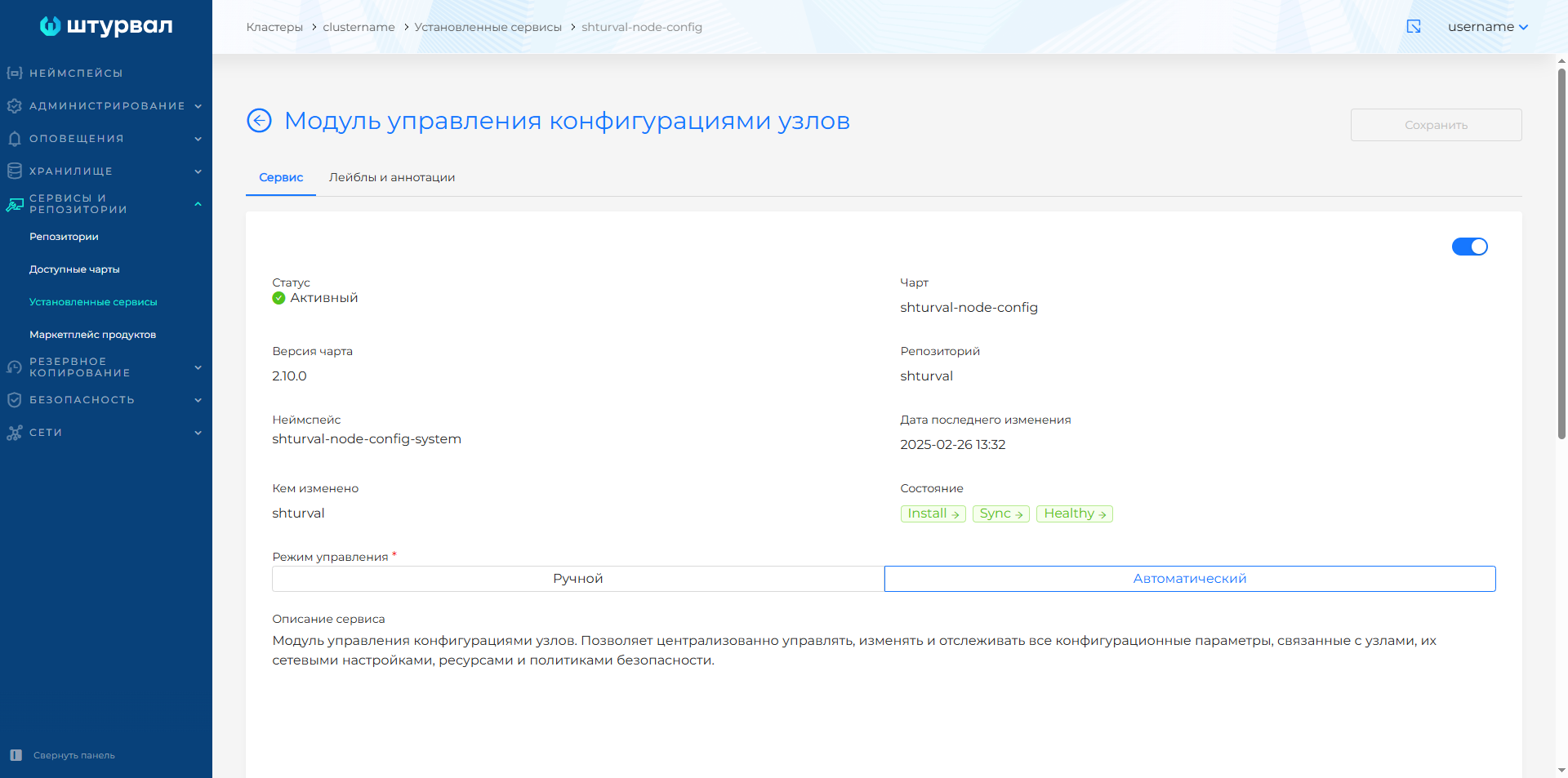
For the module to work correctly, Component of the node configuration management module (shturval-node-config-crds) must be enabled.
The Shturval Node Config controller operates with custom resources (Custom Resource):
- NodeConfigItems (NCI);
- Node Config.
##NCI
To apply the node configuration, the controller uses custom NodeConfigItems (NCI) resources. NCIs can be reused across different clusters. The label mechanism allows you to select nodes that require NCI.
NCI example
apiVersion: node.shturval.tech/v1beta2
kind: NodeConfigItem
metadata:
  annotations:
    updatedDate: 2025-02-26T10:18:40Z
    username: kubernetes-admin
  creationTimestamp: 2025-02-26T10:18:40Z
  finalizers:
    - node.shturval.tech/finalizer
  generation: 13
  name: generic-init-config
  resourceVersion: "1993844"
  uid: c64d9844-6928-4742-822a-c75141dcf556
spec:
  certificates:
    - exist: true
      name: shturval.crt
      url: repo.su:443
  files:
    - group: root
      mode: "0700"
      owner: root
      path: /etc/kubernetes
      type: directory
  nodeconfigselector:
    kubernetes.io/os: linux
  packages:
    - adhoccmd:
        postinstallmustsucceed: false
        preinstallmustsucceed: false
      name: shturvald
      setlock: false
      state: present
      version: 2.11.0
  runtimecfg:
    cgroupdriver: systemd
    pauseimage: r.shturval.tech/pause:3.10
    registries:
      - capabilities:
          - resolve
          - pull
        host: https://repo.su:443
        name: r.shturval.tech
  sysctl:
    param:
      fs.inotify.max_user_instances: "8192"
      kernel.panic: "10"
      kernel.panic_on_oops: "1"
      net.bridge.bridge-nf-call-iptables: "1"
      net.ipv4.ip_forward: "1"
      vm.max_map_count: "262144"
      vm.overcommit_memory: "1"
  systemdunits:
    - active: true
      enabled: true
      name: containerd
    - active: true
      enabled: true
      name: kubelet
status:
  ready: true
  selectednodeconfigs: # Selected nodes for configuration application
    - redos5t6q
    - redos9aex
  updatednodeconfigs:  # List of nodes where configuration was applied
    - redos5t6q
    - redos9aex
Shturval Node Config can apply node configurations both during cluster initialization and in an already working cluster. When deploying a cluster, NCI is used for:
- creating Linux users for system components on Control Plane nodes;
- KubeAPI server settings on Control Plane nodes;
- settings of Container Runtime parameters, Sysctl parameters, Systemd units, cube certificate rotation period, trusted certificates;
- installation of packages for shturvald (containerd) on all nodes.
In some cases, a node restart may be required to apply node configuration changes or cluster upgrades. In such cases, Shturval Node Config provides automatic restart with preliminary distribution of pods to other nodes. To control the restart of a node in manual mode, use the instructions on how to protect nodes from automatic restart.
Node Config
The Shturval Node Config controller uses custom resources (Custom Resource) Node Config (NC), in which, based on selectors, it aggregatesThere are no NCIs applied to one node.
Node Config Example
apiVersion: node.shturval.tech/v1beta2
kind: NodeConfig
metadata:
  annotations:
    node.shturval.tech/initchecksum: 4b0ef0
    node.shturval.tech/ssh: accessed
  labels:
    beta.kubernetes.io/arch: amd64
    beta.kubernetes.io/os: linux
    hostname: redos5t6q
    infra: vsphere
    kubernetes.io/arch: amd64
    kubernetes.io/hostname: redos5t6q
    kubernetes.io/os: linux
    node-role.kubernetes.io/workers: ''
    node.shturval.tech/applygroup: workers
  name: redos5t6q
  ownerReferences:
    - apiVersion: v1
      blockOwnerDeletion: true
      controller: true
      kind: Node
      name: redos5t6q
      uid: 257f60b0-9b5d-4b8a-b124-e0bd443cfd6f
    - apiVersion: node.shturval.tech/v1beta2
      kind: NodeConfigItem
      name: generic-init-config
      uid: c64d9844-6928-4742-822a-c75141dcf556
status:
  ncistate:
    - name: generic-init-config
      state: applied
  ready: true
spec:
  applygroup: workers
  nodeconfigitems: # List of NCIs for node configuration
    - generic-init-config
NodeConfig fields
| Field | Description |
|---|---|
| applygroup | Application group: control-plane or workers. Determines the order of application. |
| nodeconfigitems | A list of NCI names that should be applied to the node. Filled by the controller based on NCI selectors. |
| status.ready | true — configuration applied successfully; false - there are errors or application in the process. |
| status.ncistate | The status of each NCI: name - NCI name, state - status (for example, applied, error). |
Annotations (examples)
| Abstract | Description |
|---|---|
node.shturval.tech/initchecksum | Checksum to verify initialization. |
node.shturval.tech/ssh | SSH access status (for example, accessed). |
Removing a checksum annotation
If NodeConfig is in state ConfigApplied=False with reason ChecksumMismatch, the local /etc/std/nci.json on the node does not match the checksum recorded in NodeConfig. After reconciling the local init NCI and the expected cluster configuration, remove the node.shturval.tech/initchecksum annotation to re-enable the configuration to be applied.
Example commands
# Check status
kubectl get nodeconfig <node-name> -o jsonpath='{.status}'

# Remove node.shturval.tech/initchecksum annotation
kubectl annotate nodeconfig <node-name> node.shturval.tech/initchecksum-
Example NodeConfig view commands
# List NodeConfigs (one per node)
kubectl get nodeconfig -A

# NodeConfig details for node
kubectl get nodeconfig <node-name> -o yaml

# Check application status
kubectl get nodeconfig <node-name> -o jsonpath='{.status.ready}'