ShturvalServicePatch (PatchSSC)
The Shturval platform implements a custom resource ShturvalServicePatch (PatchSSC) for application to the specification (ShturvalServiceConfig, ssc) of cluster services. PatchSSC can be useful for mass application of a typical configuration of service instances in different clusters. The PatchSSC mechanism allows you to quickly roll back changes to customvalues of services in case of errors or incorrect configuration.
You can prepare one PatchSSC service by adding the required configuration parameters for the ssc service, and roll it out to all the necessary clusters.
Example ShturvalServicePatch
apiVersion: ops.shturval.tech/v1beta2
kind: ShturvalServicePatch
metadata:
  name: patchsscname
spec:
  shturvalServiceConfigName: servicename
  patchOrder: 1
  customvalues:
    paramname: value
  mode: auto
When generating ShturvalServicePatch:
you need to set the connection with the service. Specify the system name (name) ShturvalServiceConfig in
shturvalServiceConfigName. To get the name, in the cluster graphical interface, go to the Services and repositories section on the Installed services page. Find the required service and on the service card, copy the name from the Service Instance Name line.you must specify a name for the created PatchSSC in
metadata.name. The name of the created PatchSSC cannot be changed.you can set the priority of using ShturvalServicePatches in
patchOrder. The higher the value in patchOrder, the higher the priority of ShturvalServicePatch. IfpatchOrderis not specified, the system assumes it is equal to0.you can set the necessary configuration parameters for the ssc service. Specify a list of parameters in
customvalues, maintaining the hierarchical structure.if necessary, redefine the service control mode (automatic, manual, disabled). Available values for
mode: auto, manual, absent.
Example of applied ShturvalServicePatch
apiVersion: ops.shturval.tech/v1beta2
kind: ShturvalServicePatch
metadata:
  creationTimestamp: 2025-07-03T08:02:17Z
  generation: 1
  labels:
    ops.shturval.tech/ssc: servicename
  name: servicename
  ownerReferences:
    - apiVersion: ops.shturval.tech/v1beta2
      blockOwnerDeletion: true
      controller: true
      kind: ShturvalServiceConfig
      name: servicename
      uid: c4908b5e-df92-4996-9403-2e452a6101e1
  resourceVersion: "1435845"
  uid: c3ca01fb-594f-4bb8-addb-bbbafff542d0
spec:
  customvalues:
    paramname: value
  shturvalServiceConfigName: servicename
Example ssc with ShturvalServicePatch applied
apiVersion: ops.shturval.tech/v1beta1
kind: ShturvalServiceConfig
metadata:
  ...
  name: servicename
  resourceVersion: '1489960'
  uid: c4908b5e-df92-
  selfLink: /apis/ops.shturval.tech/v1beta1/shturvalserviceconfigs/servicename
status:
  appliedCustomValues:
    paramname: value
## Other customvalues parameters may appear here
  appliedPatches:
    - patchsscname
  conditions:
    - lastTransitionTime: '2025-07-01T09:03:58Z'
      message: ''
      reason: Install
      status: 'True'
      type: Install
    - lastTransitionTime: '2025-07-03T07:10:44Z'
      message: ''
      reason: Sync
      status: 'True'
      type: Sync
    - lastTransitionTime: '2025-07-01T09:08:11Z'
      message: ''
      reason: Healthy
      status: 'True'
      type: Healthy
    - lastTransitionTime: '2025-07-03T09:44:46Z'
      message: ''
      reason: Patch
      status: 'True'
      type: Patch
  currentmode: auto
  currentversion: 2.11.0
  ready: true
spec:
  chart: servicename
  customvalues: |
      ...
  dependency:
    - servicename-crds
  insecure: true
  mode: auto
  namespace: namespacename
  reponame: shturval
  version: 2.11.0
How to apply in GUI
In the GUI, you can download ShturvalServicePatch using import manifests.
Information about created ShturvalServicePatch services is available in the Administration section on the Installed Services/Service View page, on the Applied PatchSSC tab.
Screenshot
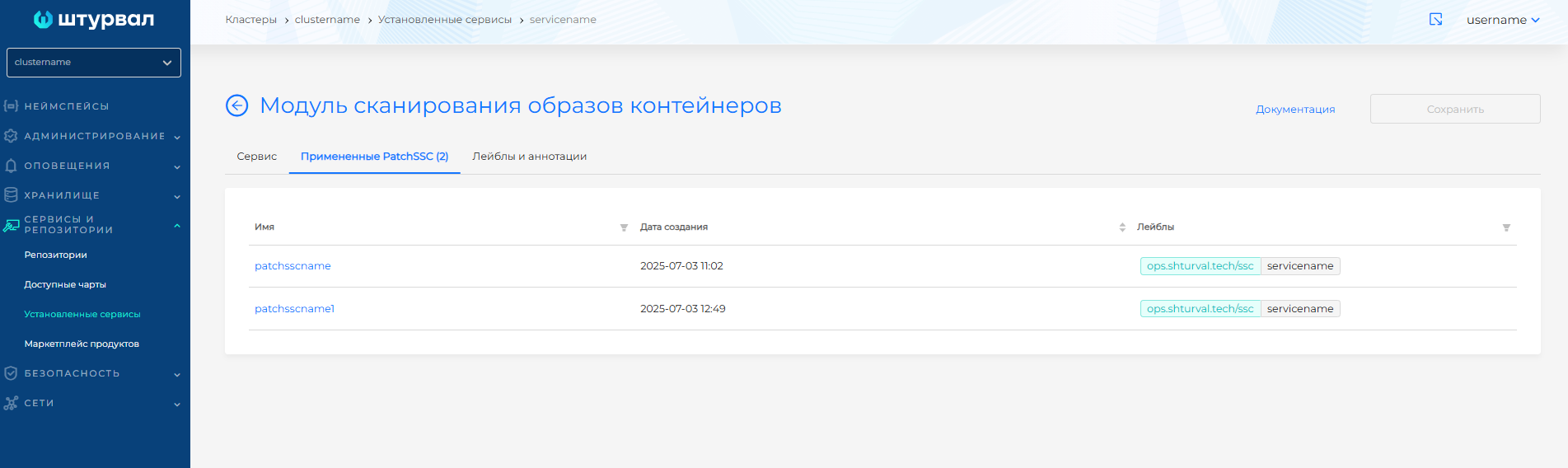
When a ShturvalServicePatch has been applied to a service, the service will have a Patch state and a Patched status.
You can remove ShturvalServicePatch in one of the following ways:
- on the At tabchanged PatchSSC press in the object line;
- On the PatchSSC manifest view page, click .
For system PatchSSC the labels are set: generated-by: cluster-manager or generated-by: shturval-update.
Features of ShturvalServicePatch
- It is possible to create an unlimited number of ShturvalServicePatches for one service.
- Using ShturvalServicePatch it is possible to add or override the values of service configuration parameters. Using ShturvalServicePatch it is impossible to delete parameters and their values in the customvalues of the service.
- If ShturvalServicePatches have priorities set, then the aggregation will be carried out taking into account the priority, otherwise it will be random.
- The value of the parameter in ShturvalServicePatch takes precedence over the value of the same parameter in the customvalues of the service itself. The parameter value in customvalues will be ignored if the same parameter is present in ShturvalServicePatch.
- If the same parameters are specified in several ShturvalServicePatch, then the parameters of the higher-priority ShturvalServicePatch will be applied. Therefore, in such cases, it is recommended to set
patchOrderwhen creating the ShturvalServicePatch. If priority is not set in such ShturvalServicePatch, then the choice of application is not predictable. - When creating a ShturvalServicePatch, the creation date is automatically entered.
- ShturvalServicePatch can be applied to a service specification in Automatic control mode. If the service operates in Manual control mode, to use ShturvalServicePatch, switch the service to automatic mode or set the ShturvalServicePatch parameter
modeto auto.