ServiceAccounts
ServiceAccounts are account types in Kubernetes used for in-cluster identity. They are not user accounts. Pods, system components, and external applications can use a ServiceAccount’s credentials to act as that ServiceAccount.
In the namespace Security section, on the ServiceAccounts page you can create, edit, delete, or view ServiceAccounts.
Creating a ServiceAccount
To add a ServiceAccount, click + Add ServiceAccount.
On the page that opens, set the ServiceAccount name. Optionally add labels and annotations.
Screenshot
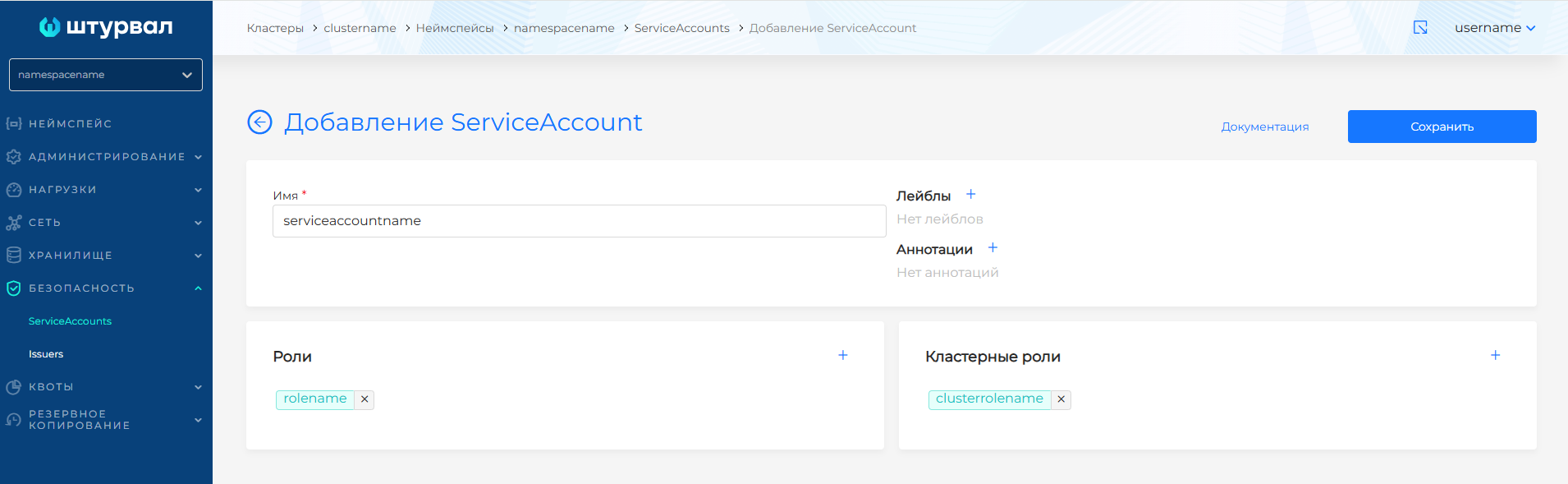
If you have the required permissions, you can assign cluster and namespace roles to the ServiceAccount.
To assign a namespace role, click + next to Role. You can view namespace roles (Role) and their manifests under namespace Administration on Custom resources in the rbac.authorization.k8s.io API group.
To assign a cluster role, click + next to Cluster role. You can view cluster roles (ClusterRole) and their manifests under cluster Administration on Custom resources in the rbac.authorization.k8s.io API group.
In the modal dialog, select a role from the dropdown and click Add. Assigned namespace roles appear under Roles; cluster roles appear under Cluster roles.
To remove an assigned role, click the cross next to the role name and confirm.
After creating the ServiceAccount, click Save.
Viewing and editing a ServiceAccount
On the ServiceAccount view page you can:
- On the ServiceAccount tab, change namespace and cluster roles.
- On the Labels and annotations tab, update labels and annotations.
You can also change a ServiceAccount with a YAML manifest. Open the Manifest tab and edit it. After editing, run validation. The result appears on the right side of the screen. Expand the validation result block to see the full manifest. If manifest format validation fails, manifest validation is unavailable.
Save manifest changes. Unsaved data is not applied.
To delete a ServiceAccount, click in the row on the ServiceAccounts page or click Delete on the ServiceAccount view page.