Access manager
In Shturval, access is managed with the permissions resource (permission set), which lets you configure access to different parts of the platform flexibly. You can create permission sets in the platform Access management section. Permission sets created in the access manager can be assigned to users and groups in client clusters and namespaces according to the level for which the set was created.
You can create permission sets that grant access to:
- platform resources (infrastructure and access control);
- cluster resources (including namespaces);
- Argo CD.
You can combine permissions as needed for your tasks. A permission set can grant access selectively—for example, to Argo CD only. To create such a set, leave cluster and platform permissions empty.
Note
- Changing a permission set in the access manager updates access for all users and groups assigned that set.
- If a permission set is assigned to at least one user or group, you can delete it only after removing those assignments.
- Predefined permission sets cannot be changed or deleted. Their permissions are fixed. Create new sets if you need different permissions.
Screenshot
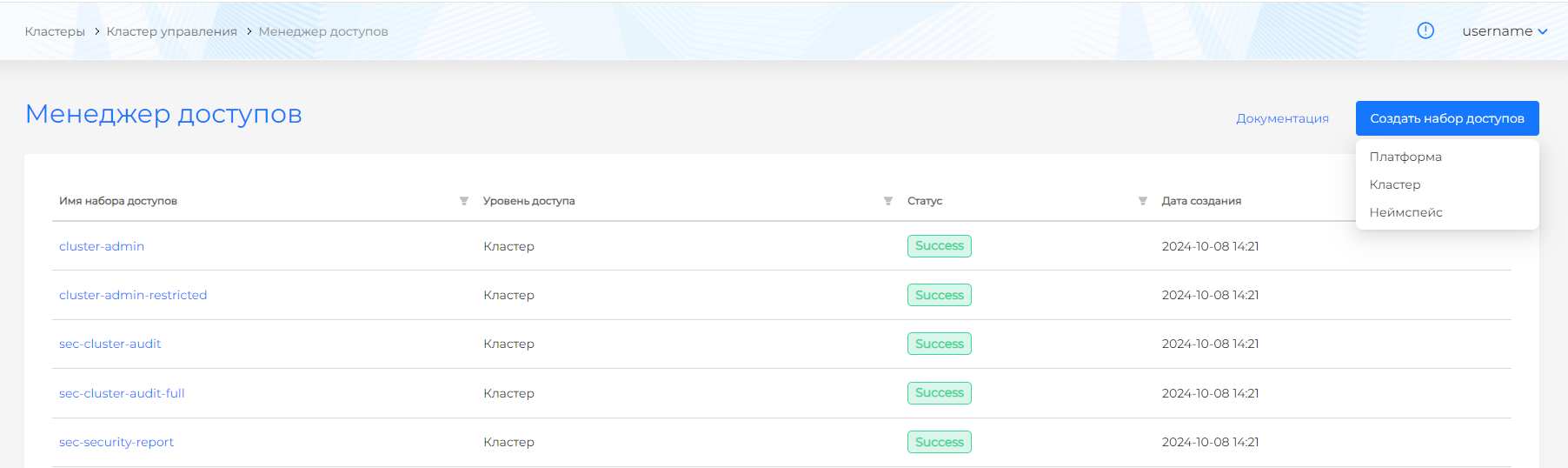
Permission sets can be created at three levels:
| Permission set level | Level capabilities |
|---|---|
| Platform | Grants access to the entire platform; to client clusters without management cluster access; to the management cluster only; to management and client cluster logs; to Argo CD in client clusters and the management cluster |
| Cluster | Grants access to a specific client cluster as a whole or to selected objects; to client cluster logs; to client cluster infrastructure; to Argo CD projects in a specific cluster |
| Namespace | Grants access to a specific client cluster namespace as a whole or to selected objects; to the Argo CD project for that namespace |
Screenshot
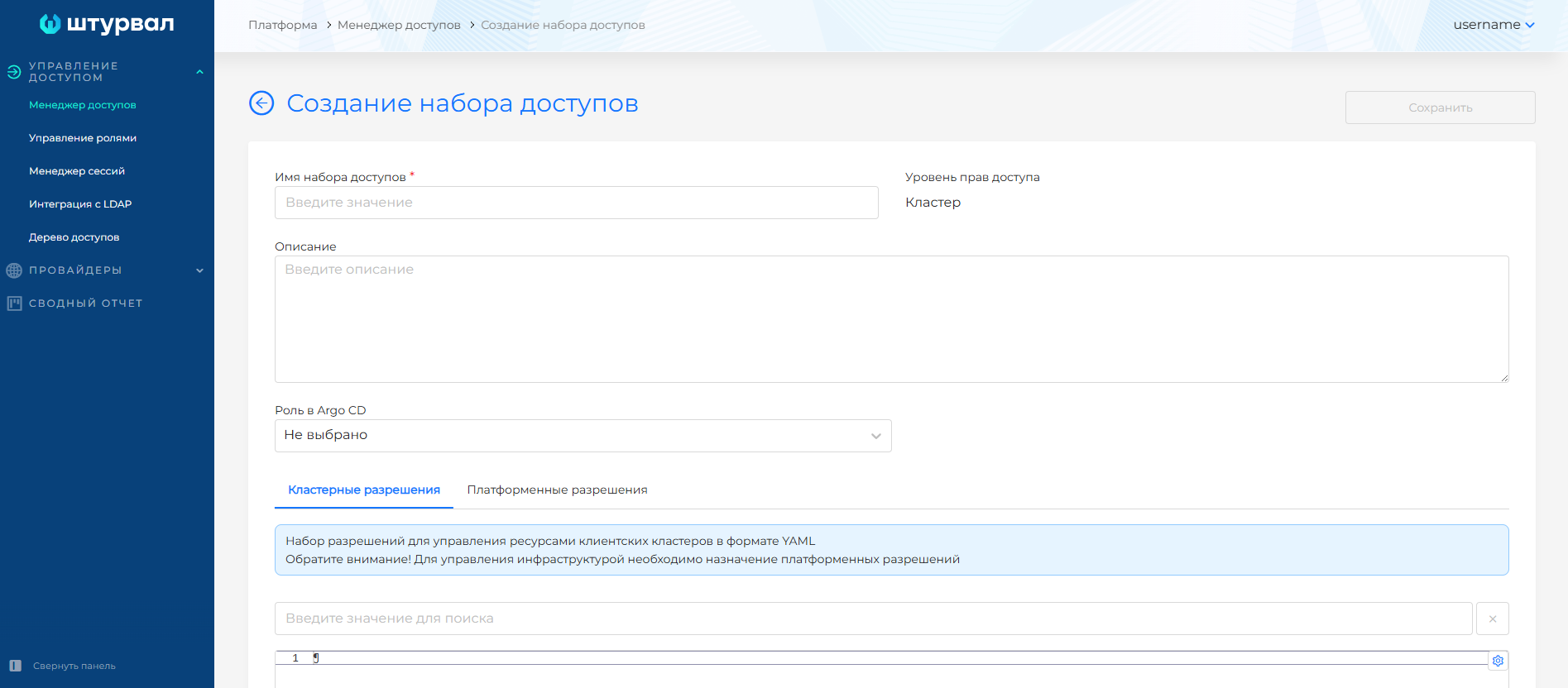
At each access level, the permission set page includes:
- permission set name. Set when the set is created. Required and immutable.
- permission set description. Optional short description to simplify assignment. Keep it up to date for easier use.
- Argo CD role. Optional role in the Argo CD UI.
- cluster permissions. Optional YAML rules. Each rule must include an API group, verbs, and resources.
- platform permissions. Optional permissions for resources managed by the management cluster. For cluster and namespace levels, these cover infrastructure objects (nodes, machines), namespaces, and access control. For the platform level, they cover management cluster resources.
Cluster permissions
These permissions apply only to client clusters. For example, cluster permissions in a platform-level set grant access to the specified resources in client clusters. Valid YAML is required. The first line must be an API group.
Example
- apiGroups:
  - '*'
  resources:
  - '*'
  verbs:
  - '*'
- nonResourceURLs:
  - '*'
  verbs:
  - '*'
Platform permissions
Because the management cluster (platform) manages cluster creation, infrastructure objects, and access, these permissions are called platform permissions. Available platform permissions depend on the permission set level:
Platform permissions
| Permission name | Capabilities | Permission set levels | Comment |
|---|---|---|---|
| access-map-get | View assigned roles and the access tree | Platform | - |
| cluster-create | Create client clusters | Platform | Also requires at least provider-get, provider-edit, and ippool-get. For cluster creation, use the platform-admin permission set |
| permissions-edit | Manage user and group permissions in the management cluster | Platform | - |
| permissions-get | View access permissions in the management cluster | Platform | - |
| platform-roles-edit | Manage service account access permissions | Platform | - |
| platform-roles-get | View service account access permissions | Platform | - |
| provider-edit | Manage infrastructure providers | Platform | Recommended together with ippool-get |
| provider-get | View infrastructure providers | Platform | Recommended together with ippool-get |
| ippool-edit | Manage IP address pools in the management cluster | Platform | Recommended together with ippool-get, provider-get, provider-edit |
| ippool-get | View IP address pools in the management cluster | Platform | Pools are assigned to providers; recommended together with provider-get and provider-edit |
| cluster-delete | Delete client clusters | Platform, Cluster | - |
| cluster-edit | Set annotations, pause infrastructure reconciliation, create info messages in client clusters | Platform, Cluster | Also requires at least cluster-get and cluster-info |
| cluster-get | View a client cluster and info messages | Platform, Cluster, Namespace | At the Namespace level, allows viewing cluster objects |
| cluster-info | View client cluster information | Platform, Cluster | - |
| cluster-infra-edit | Manage cluster nodes and machines | Platform, Cluster | - |
| cluster-infra-get | View cluster nodes and machines | Platform, Cluster | - |
| cluster-roles-edit | Manage user and group permissions in a cluster | Platform, Cluster | - |
| cluster-roles-get | View access permissions in a cluster | Platform, Cluster | - |
| namespace-roles-edit | Manage user and group permissions in client cluster namespaces | Platform, Cluster, Namespace | - |
| namespace-roles-get | View access permissions in client cluster namespaces | Platform, Cluster, Namespace | - |
| tenant-get | View tenant information | Platform, Cluster, Namespace | Only users with platform assignments can view the tenant itself |
| tenant-edit | Manage tenants | Platform, Cluster | Only users with platform assignments can change tenant information |
Argo CD roles
All roles are available at any permission set level. When created at the Platform level, the role is assigned in each client cluster. It is not created in the management cluster.
| Role name | Argo CD permissions | Description |
|---|---|---|
| admin | policyAppCreate, policyAppGet, policyAppUpdate, policyAppSync, policyAppDelete, policyAppSetCreate, policyAppSetGet, policyAppSetUpdate, policyAppSetDelete, policyExecCreate, policyLogsGet | Full access to create projects and applications |
| edit | policyAppCreate, policyAppGet, policyAppSync, policyAppSetCreate, policyAppSetGet | Can create applications but cannot change the repository or delete applications |
| view | policyAppGet, policyAppSetGet | Read-only access to information in Argo CD projects |
Default permission sets
Platform level
| Permission set | Purpose | Permission description | Argo CD role |
|---|---|---|---|
| platform-admin | Platform administrator | Full access to all platform resources and all clusters | admin |
| sec-platform-admin | Security administrator | Manage assignments at all levels (Platform, Tenant, Cluster, Namespace) and ClusterIssuers. View logs, cluster certificates, metering, service availability, namespace Issuers, Cilium network policies, and Security section pages (security policies, scan results report, policy violations report, vulnerability report) | view |
| sec-platform-audit | Platform and cluster core object auditor | View all pages at the platform level and in all clusters except Secrets, Node configuration (NCI), Installed services (SSC), and Ingress Controllers | view |
| sec-platform-audit-full | Platform and cluster full object auditor | View all platform pages and all pages in all clusters | view |
| tenant-role-binder | Tenant access manager | Auxiliary set for managing tenant access, viewing tenants, and platform Access management pages (Access manager, Role management, LDAP integration, Access tree). No cluster access | - |
| tenant-role-viewer | Tenant access auditor | Auxiliary set for viewing tenant access, tenants, access manager pages, and the access tree. No cluster access | - |
Cluster level
| Permission set | Purpose | Permission description | Argo CD role |
|---|---|---|---|
| cluster-admin | Cluster administrator | Full access to all resources in the selected cluster | admin |
| cluster-admin-restricted | Cluster management | Manage all cluster resources except node and machine management, tenant management, and cluster deletion | admin |
| sec-cluster-audit | Cluster core object auditor | View all pages in the selected cluster except Secrets, Node configuration (NCI), Installed services (SSC), and Ingress Controllers | view |
| sec-cluster-audit-full | Cluster full object auditor | View all pages in the selected cluster | view |
| sec-security-report | Security report viewer | View Security section pages in the selected cluster (security policies, scan results report, policy violations report, vulnerability report), including events and policy violation and vulnerability reports in all cluster namespaces | - |
Namespace level
| Permission set | Purpose | Permission description | Argo CD role |
|---|---|---|---|
| dev-basic | View resources | View Workloads and Network sections, PersistentVolumeClaims, ConfigMaps, and Quotas pages in a specific namespace, including events, security policy reports, and vulnerability reports. No access to subresources (for example, pods/logs, pods/exec, etc.) | view |
| dev-debugger | Troubleshooting | View vulnerability reports, Pods in the selected namespace, including logs (pods/logs), port forwarding (pods/portforward), and remote access (pods/exec) | - |
| dev-deployer | Deploy applications | Full access to manage resources in Workloads and Network sections and on PersistentVolumeClaims, ConfigMaps, and Quotas pages, including events, security policy reports, and vulnerability reports. No access to subresources (for example, pods/logs, pods/exec, etc.) | edit |
| edit | Modify resources | Change all resources in the namespace, including subresources (services/proxy, deployments/rollback, pods/attach, pods/exec, pods/portforward, pods/proxy, deployments/scale, replicasets/scale, statefulsets/scale, serviceaccounts/token). View events, security policy reports, vulnerability reports, and logs (pods/log) in the namespace | edit |
| namespace-admin | Namespace administrator | Full access to all resources in the selected namespace | admin |
| ops-ns-manager | Manage namespace quotas | Full access to manage Quotas in the selected namespace | - |
| ops-role-manager | Manage access | Manage service accounts and permission assignments in the selected namespace | - |
| view | View resources | View all resources in the namespace except Secrets. View events, security policy reports, vulnerability reports, and logs (pods/log) in the namespace | view |