How to configure in Shturval
To configure integration in Shturval, you need to:
- Obtain LDAP connection parameters.
- Obtain LDAP entry attributes to configure user and group search correctly in Shturval.
See LDAP integration for integration setup stages.
After integration is configured successfully, you can search for groups and users in the platform web UI. See Search for a user in the LDAP directory for details.
Next are the common steps for all LDAP directories to configure integration in the web UI or from the command line.
Examples for configuring integration in Shturval with LDAP directories:
In the web UI
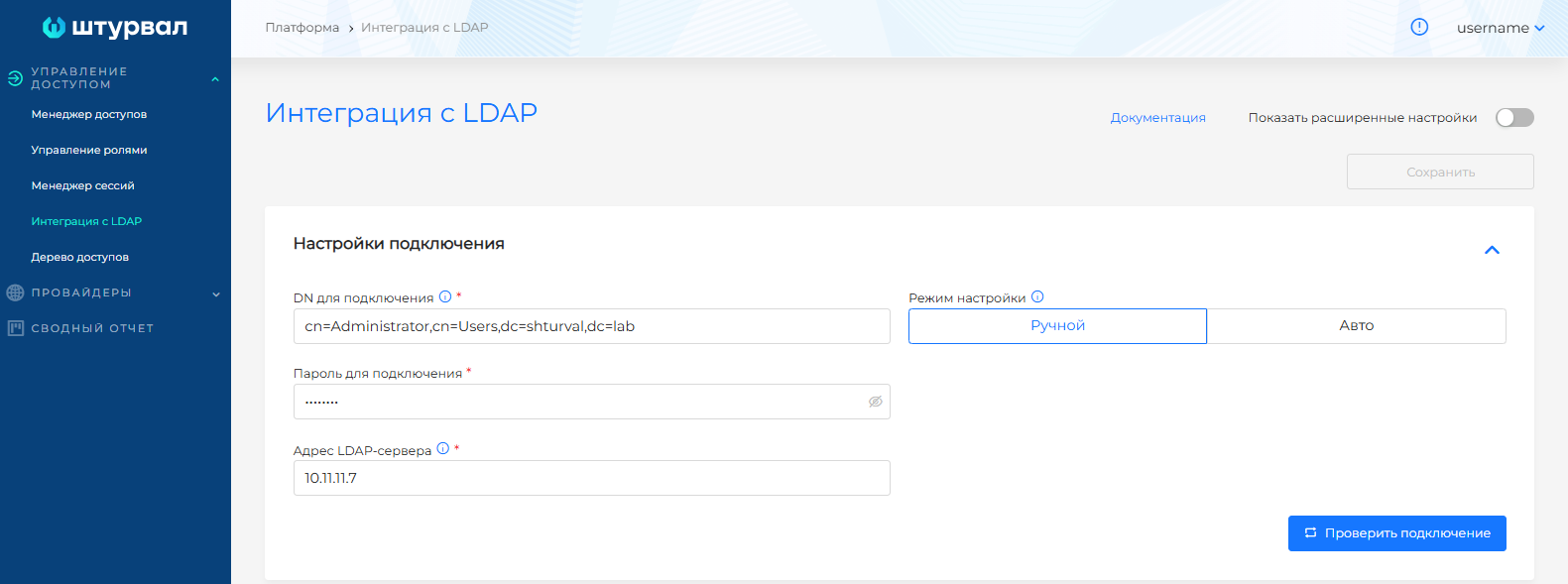
- In Access management, on the LDAP integration page, enter connection test details:
- In Connection DN, specify the Distinguished Name of the user account for LDAP authentication. The DN must match the value passed to
-Din ldapsearch. - In Connection password, specify the user password for LDAP authentication. It must match the value passed to
-win ldapsearch. - In LDAP server address, specify an FQDN or IP address (for example, ldap.example.ru, 10.11.112.33). It must match the address passed to
-Hin ldapsearch. To set a port, open advanced settings, set Use TLS connection to Yes, and specify the port.
Screenshot
Advanced integration settings
If needed, connect with TLS. TLS settings are available in advanced integration settings. Toggle Show advanced settings to change the mode.
When Use TLS is selected, additional fields are available:
- Connect with startTLS (disabled by default);
- Enable CA verification (disabled by default);
- Client certificate (file upload);
- Trusted root certificate (file upload) when CA verification is enabled;
- Client private key (file upload).
- Port. If not set and the LDAP server connection uses startTLS, port 389 is used by default.
Screenshot
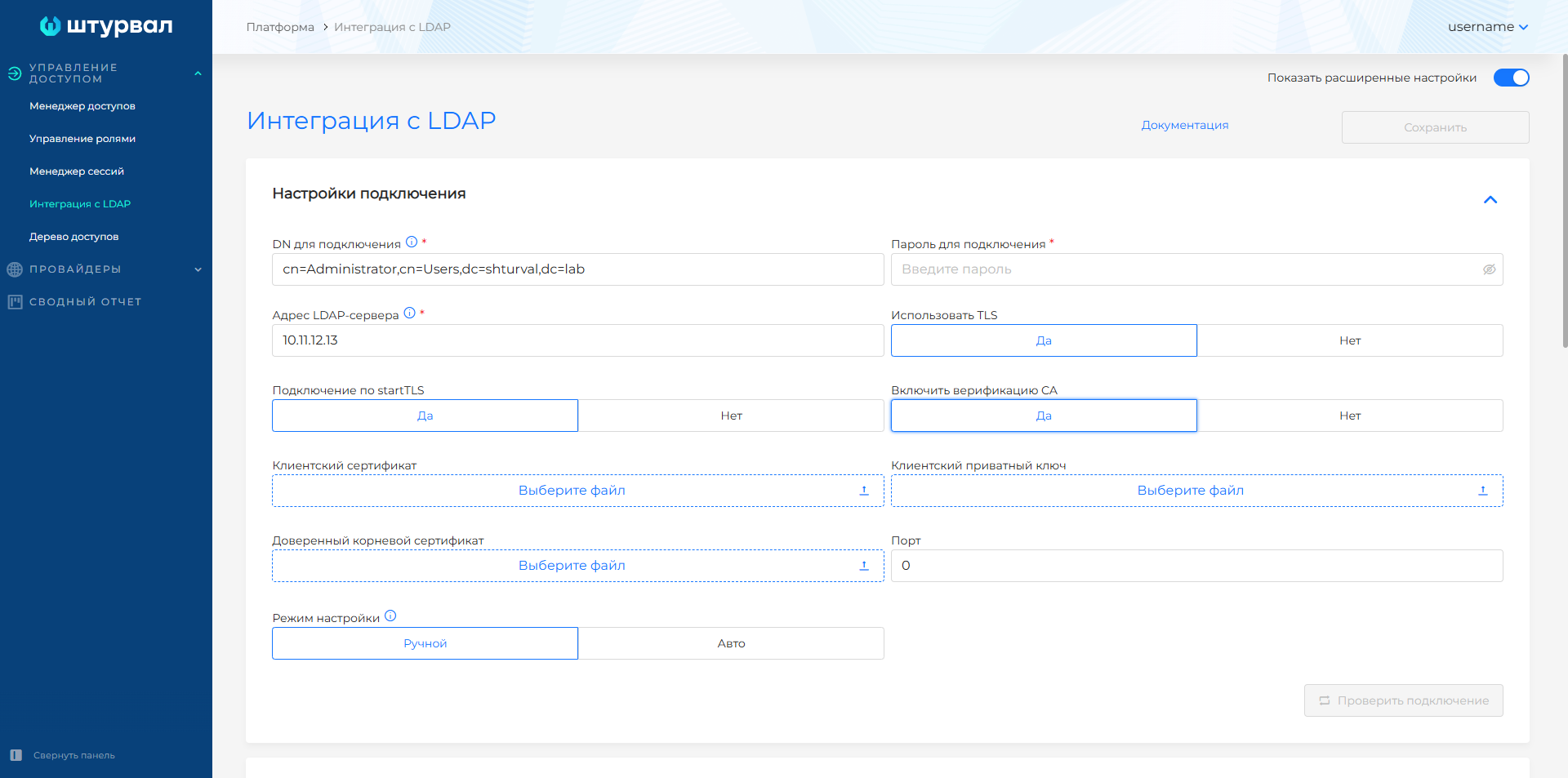
Uploaded files are converted to base64. After integration is complete, the files are available for download from the UI.
Note To change an existing configuration, enter the password in the connection settings.
Click Test connection.
After a successful connection:
3.1. Manual connection mode is selected
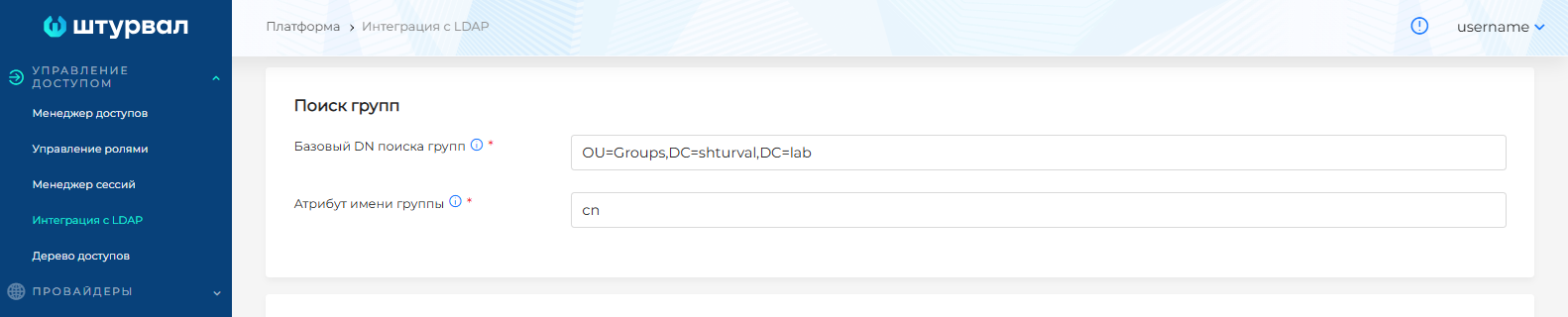
In the Group search block, specify:
- in Group search base DN — the Distinguished Name of the container (search base) where entries are searched. The value must match the
-bparameter in ldapsearch. - in Group name attribute — the entry attribute for the common (short) group name, identified when you obtained entry attributes.
Screenshot
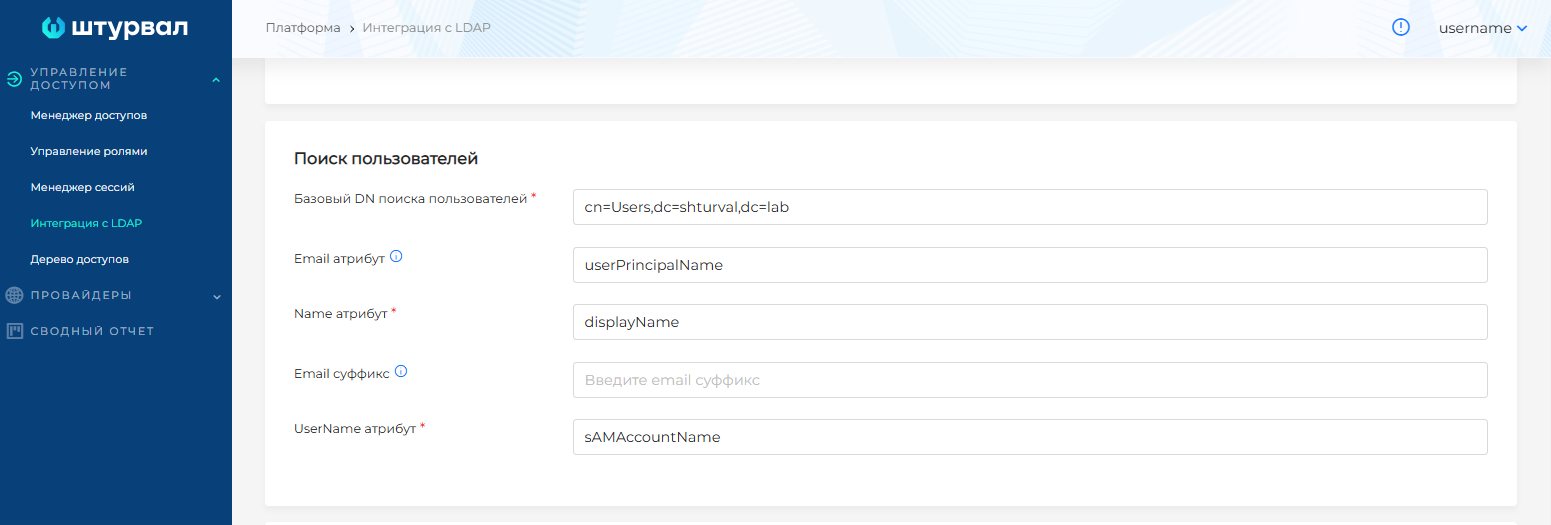
In the User search block, specify:
- in User search base DN — the Distinguished Name of the container where user entries are searched. The value must match the
-bparameter in ldapsearch. - in Email attribute, Name attribute, UserName attribute, and Email suffix — attributes identified with ldapsearch. For the employee email address, fill in at least one of Email attribute or Email suffix.
Screenshot
UI field descriptions
| Field | Description |
|---|---|
| Email attribute | user email address with UPN suffix and @ |
| Name attribute | full user name |
| UserName attribute | unique user name |
| Email suffix | UPN suffix for the user email address |
3.2. Automatic connection mode is selected
- Click Run analysis.
Screenshot
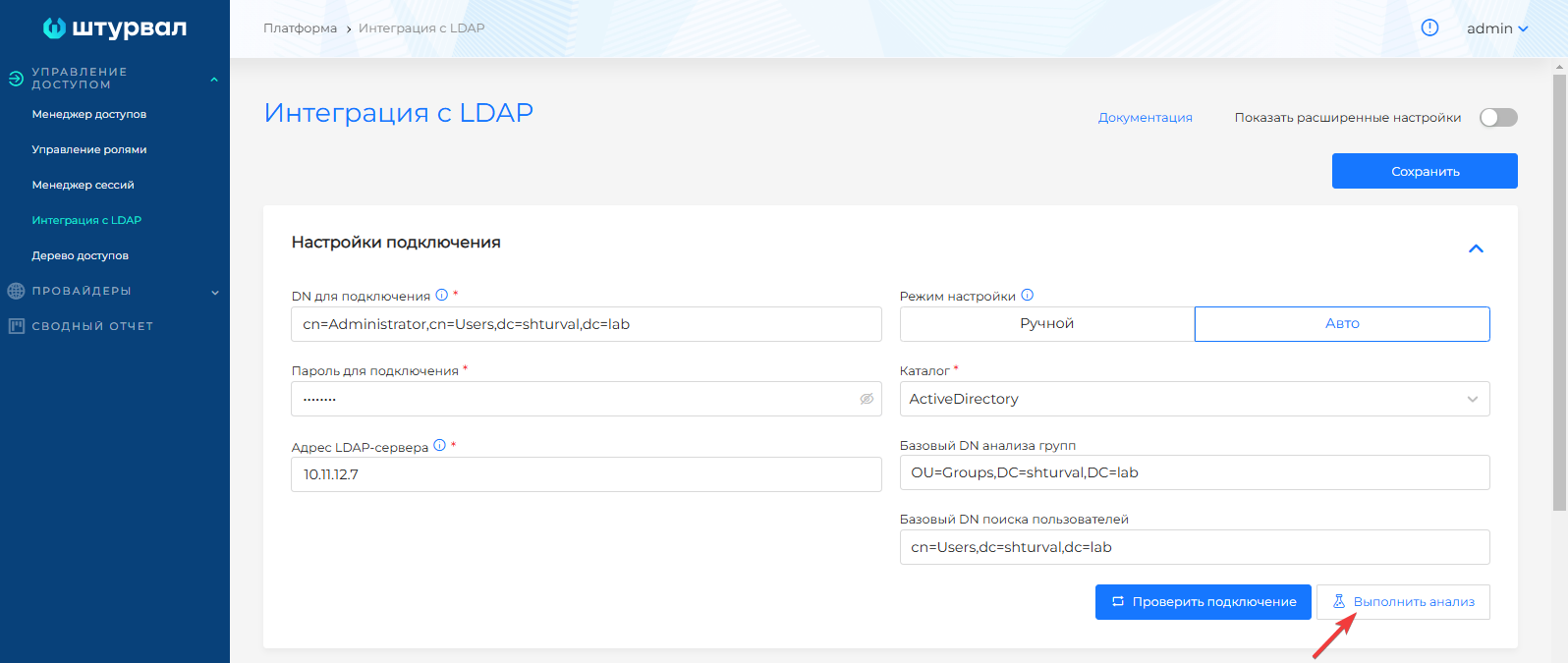
Verify the attributes in the filled group and user search fields.
Screenshot

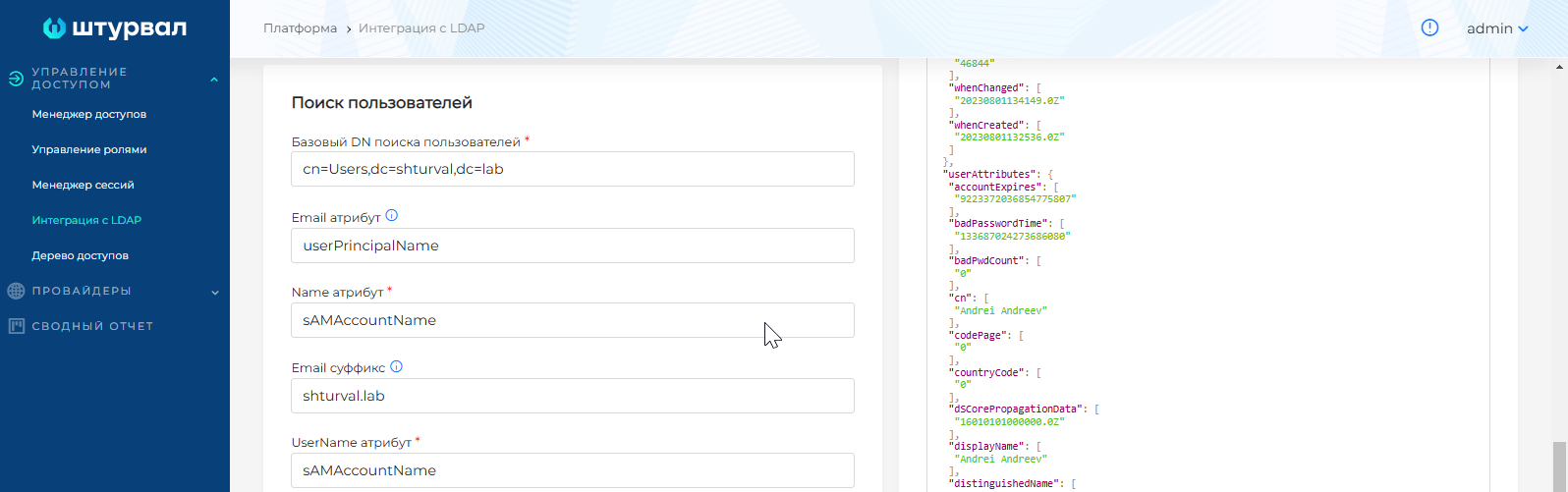
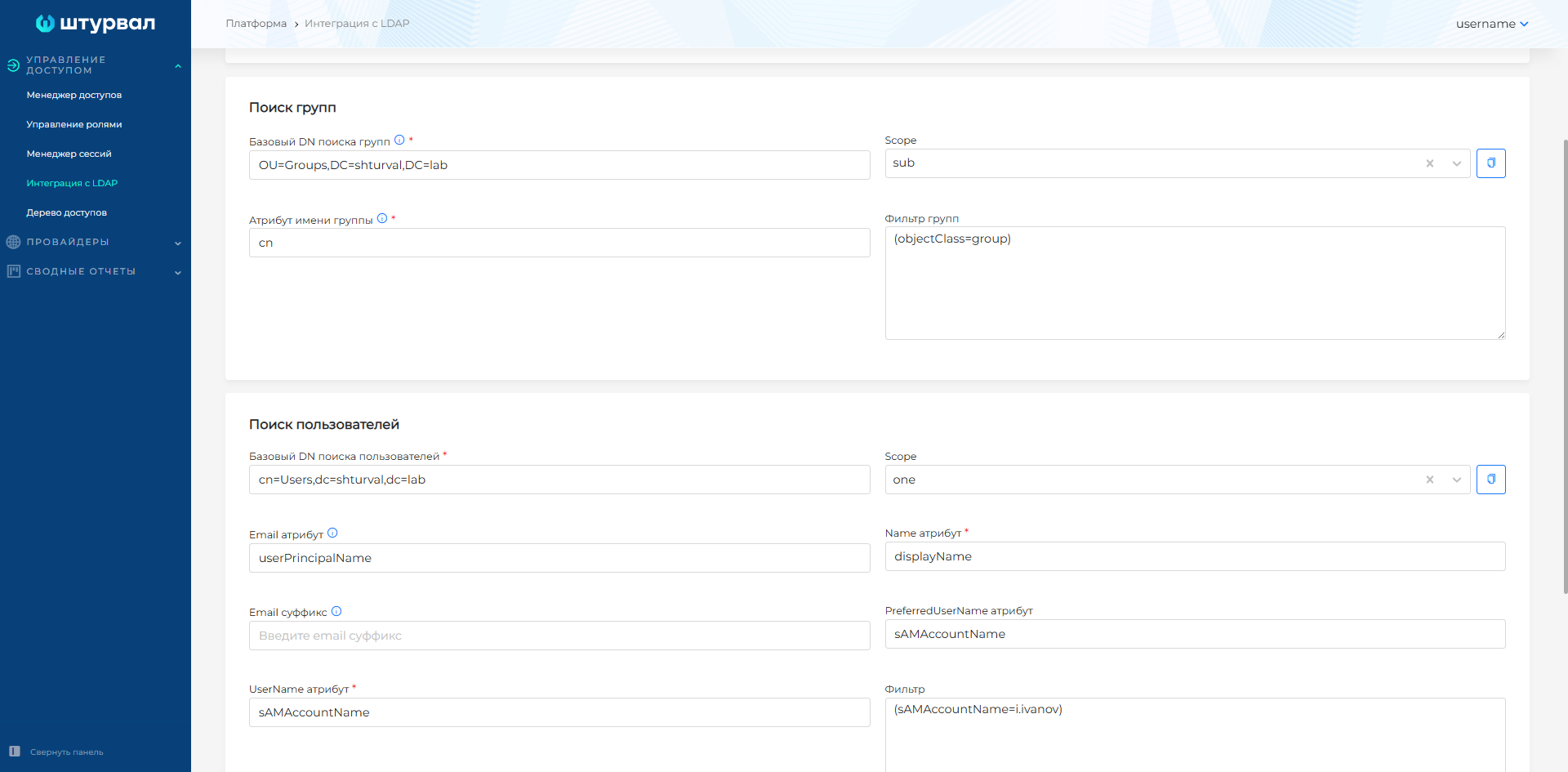
3.3 In advanced settings for group and user search, additional options are available:
- Filter: an optional field applied when searching the directory. Specify an entry attribute and value to filter by. Note Enter filter values in parentheses, as in an ldapsearch query, for example, (objectClass=group).
Filter examples
# Filter by sAMAccountName value without an operator
(sAMAccountName=i.ivanov)
# Filter by name match or sAMAccountName value. Uses OR - |
(|(name=Ivan Ivanov)(sAMAccountName=ll.romashka))
# Filter by name and sAMAccountName match. Uses AND - &
(&(name=Ivan Ivanov)(sAMAccountName=i.ivanov))
# Filter excluding sAMAccountName value. Uses NOT - !
(!(sAMAccountName=i.ivanov))
- Scope (search scope, for example, “sub” searches the entire object tree, “one” searches one level). You can type a value or select from the drop-down list.
- PreferredUserName attribute (user-level LDAP field containing the employee preferred name).
Screenshot
- In the User mapping block, define the mapping between user and group attributes.
Screenshot

When required fields are filled, the Test button becomes available. Clicking it attempts to connect to the directory. After a successful connection, the Save button becomes available.
After successful testing, save the settings.
To change saved settings, enter the password, test the integration with the updated settings, and save again.
From the command line
- Prepare a
config.jsonconfiguration file with LDAP integration data.
Example config.json
{
  "host": "10.11.11.7",
  "insecureNoSSL": true,
  "insecureSkipVerify": true,
  "startTLS": false,
  "rootCA": "",
  "clientCert": "",
  "clientKey": "",
  "bindDN": "cn=Administrator,cn=Users,dc=shturval,dc=lab",
  "bindPW": "dkjhdfss",
  "usernamePrompt": "",
  "userSearch": {
    "baseDN": "cn=Users,dc=shturval,dc=lab",
    "filter": "",
    "username": "sAMAccountName",
    "scope": "",
    "idAttr": "DN",
    "emailAttr": "userPrincipalName",
    "nameAttr": "displayName",
    "preferredUsernameAttr": "sAMAccountName",
    "emailSuffix": ""
  },
  "groupSearch": {
    "baseDN": "OU=Groups,DC=shturval,DC=lab",
    "filter": "",
    "scope": "",
    "userAttr": "",
    "groupAttr": "",
    "userMatchers": [
      {
        "UserAttr":  "DN",
        "GroupAttr": "member"
      }
    ],
    "nameAttr": "cn"
  }
}
| Parameter | Description |
|---|---|
| host | LDAP server address |
| insecureNoSSL | Do not use a TLS session for the LDAP connection |
| insecureSkipVerify | Disable CA verification |
| startTLS | Create a TLS session when connecting to LDAP |
| rootCA | Trusted root certificate in base64 format |
| clientCert | Client certificate generated with the root CA, in base64 format |
| clientKey | Client private key generated with the root CA, in base64 format |
| usernamePrompt | Value used instead of Username |
| bindDN | DN of the user account for LDAP connection |
| bindPW | Password of the user account for LDAP connection |
| userSearch.baseDN | Base DN for user search |
| userSearch.filter | User search filter |
| userSearch.username | Unique user name attribute |
| userSearch.scope | Search scope (“sub” searches the entire object tree, “one” searches one level) |
| userSearch.idAttr | Maps user ID to an LDAP attribute |
| userSearch.emailAttr | User Email attribute |
| userSearch.preferredUsernameAttr | Preferred user name attribute |
| userSearch.nameAttr | Full user name attribute |
| userSearch.emailSuffix | Email suffix |
| groupSearch.baseDN | Base DN for group search |
| groupSearch.filter | Group search filter |
| groupSearch.scope | Search scope (“sub” searches the entire object tree, “one” searches one level) |
| groupSearch.UserAttr | User attribute that corresponds to a group |
| groupSearch.GroupAttr | Group attribute that corresponds to a user attribute |
| groupSearch.nameAttr | Common group name attribute |
- Encode the configuration file in base64.
Command
cat ~/date/config.json | base64 --wrap=0
Replace ~/date/config.json with the path to your configuration file.
Example output
ew0KICAiaG9zdCI6ICIxMC4zMS4xNDUuNyIsDQogICJpbnNlY3VyZU5vU1NMIjogdHJ1ZSwNCiAgImluc2VjdXJlU2tpcFZlcmlmeSI6IHRydWUsDQogICJzdGFydFRMUyI6IGZhbHNlLA0KICAicm9vdENBIjogIiIsDQogICJjbGllbnRDZXJ0IjogIiIsDQogICJjbGllbnRLZXkiOiAiIiwNCiAgInJvb3RDQURhdGEiOiBudWxsLA0KICAiYmluZEROIjogImNuPUFkbWluaXN0cmF0b3IsY249VXNlcnMsZGM9c2h0dXJ2YWwsZGM9bGFiIiwNCiAgImJpbmRQVyI6ICJQQHNzdzByZCIsDQogICJ1c2VybmFtZVByb21wdCI6ICIiLA0KICAidXNlclNlYXJjaCI6IHsNCiAgICAiYmFzZUROIjogImNuPVVzZXJzLGRjPXNodHVydmFsLGRjPWxhYiIsDQogICAgImZpbHRlciI6ICIiL
- In the
shturval-backendnamespace of the management cluster, create a Secret namedldap-configof typeOpaquecontaining the base64-encodedconfig.jsonindata.
Command
kubectl apply -f - <<EOF
apiVersion: v1
data:
  config.json: ew0KICAiaG9zdCI6ICIxMC4zMS4xNDUuNyIsDQogICJpbnNlY3VyZU5vU1NMIjogdHJ1ZSwNCiAgImluc2VjdXJlU2tpcFZlcmlmeSI6IHRydWUsDQogICJzdGFydFRMUyI6IGZhbHNlLA0KICAicm9vdENBIjogIiIsDQogICJjbGllbnRDZXJ0IjogIiIsDQogICJjbGllbnRLZXkiOiAiIiwNCiAgInJvb3RDQURhdGEiOiBudWxsLA0KICAiYmluZEROIjogImNuPUFkbWluaXN0cmF0b3IsY249VXNlcnMsZGM9c2h0dXJ2YWwsZGM9bGFiIiwNCiAgImJpbmRQVyI6ICJQQHNzdzByZCIsDQogICJ1c2VybmFtZVByb21wdCI6ICIiLA0KICAidXNlclNlYXJjaCI6IHsNCiAgICAiYmFzZUROIjogImNuPVVzZXJzLGRjPXNodHVydmFsLGRjPWxhYiIsDQogICAgImZpbHRlciI6ICIiL
kind: Secret
metadata:
  name: ldap-config
  namespace: shturval-backend
type: Opaque
EOF