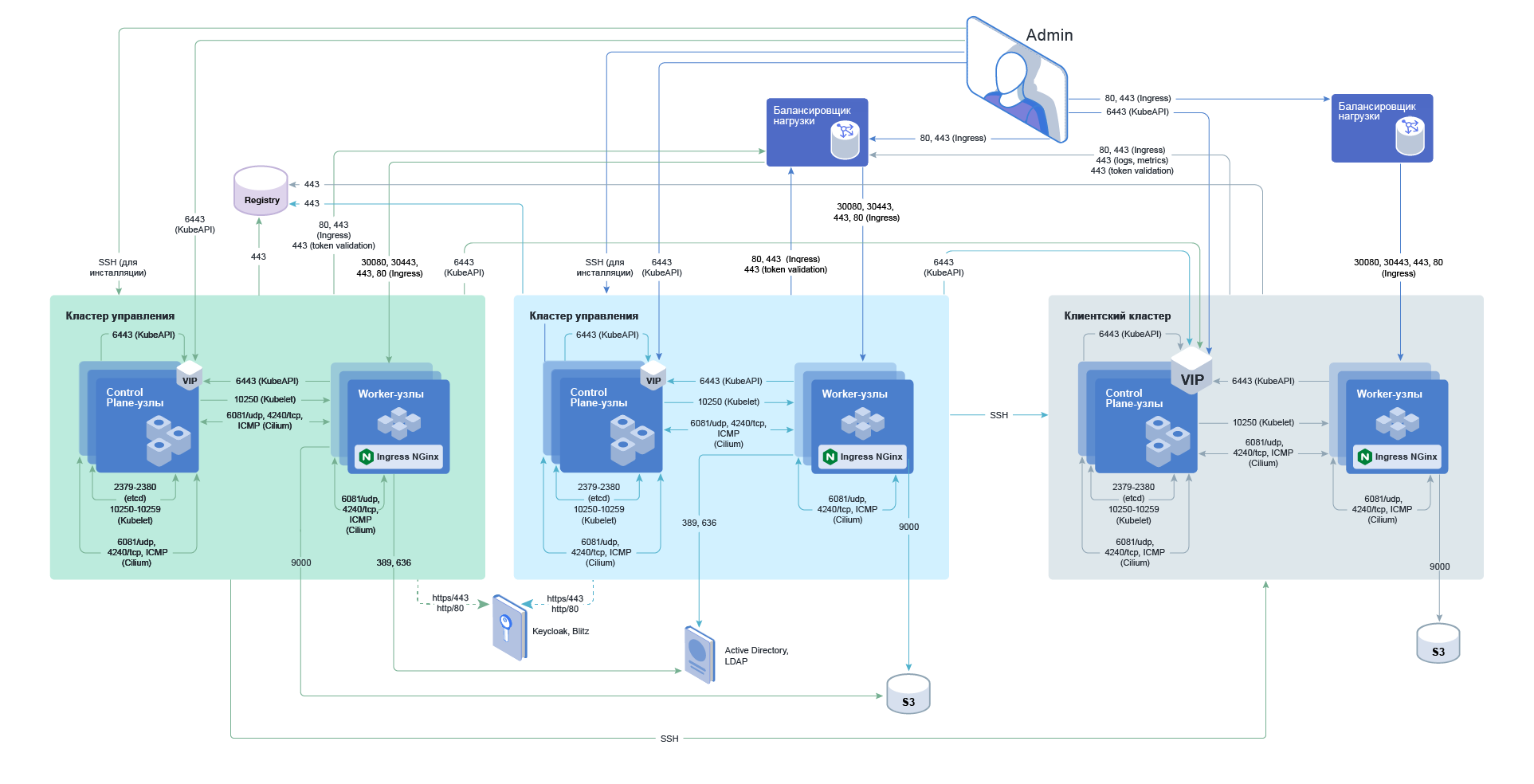
DR management cluster
With external load balancer or DNS records
At any given time, you can access only one management cluster through the graphical interface. Users and client clusters remain fully transparent to the switch. Migrating client cluster data to the standby management cluster is recommended with deployment engineer support.
- Create a shared Ingress name for the management clusters and a certificate for it.
- Install clusters with the shared Ingress certificate (required so authentication is trusted regardless of which management cluster is active). Two options:
- Install two management clusters with an external load balancer for Ingress and specify the shared Ingress name (the load balancer points to the primary management cluster). Kube API must use a separate external load balancer instance or no external load balancer;
- Install two management clusters with an internal load balancer, specifying different Ingress IPs but a shared Ingress name.
On the primary management cluster
- Configure S3 storage connection for backup on the primary management cluster.
- Configure infrastructure providers for creating client clusters.
- Create client clusters.
- Connect the centralized directory service (LDAP).
- Create platform or cluster role assignments for groups/users if needed.
- On cluster dashboards, click pause infrastructure reconciliation and create backups of providers, client cluster namespaces, and assigned roles in the management cluster.
- In case of failure or for testing, switch the load balancer (or change the DNS record IP) to the second management cluster.
On the standby management cluster
- Configure S3 storage connection for backup on the second management cluster.
- Wait until backups created on the primary management cluster appear in the interface. Restore backups in this order:
- infrastructure providers;
- client cluster namespaces;
- UserRoles, GroupRoles.
- Wait until client clusters appear in the interface. On cluster dashboards, click resume infrastructure reconciliation. Restoring cluster operation may take several minutes.
Everything should work the same as on the primary management cluster.
Two separate management clusters
Advantages: both platforms are available immediately; no external load balancer is required. Migrating client cluster data to the standby management cluster is recommended with deployment engineer support.
- Create a shared certificate for Ingress on both management clusters (otherwise after switching to the standby management cluster you must update the CA certificate on each client cluster Control Plane node)
- Install 2 management clusters with the shared Ingress certificate. Treat one as primary and the other as DR.
On the primary management cluster
- Configure S3 storage connection for backup on the primary management cluster. The DR cluster must have access to the same storage.
- Configure infrastructure providers for creating client clusters.
- Create client clusters.
- Connect the centralized directory service (LDAP).
- Create platform or cluster role assignments for groups/users if needed.
- On cluster dashboards, click pause infrastructure reconciliation and create backups of providers, client cluster namespaces, and assigned roles in the management cluster.
On the standby management cluster
- Configure S3 storage connection on the second management cluster (DR).
- Connect the centralized directory service (LDAP).
- Wait until backups created on the primary management cluster appear in the interface. Restore backups in this order:
- infrastructure providers;
- client cluster namespaces;
- UserRoles, GroupRoles.
- Wait until client clusters appear in the interface. On cluster dashboards, click resume infrastructure reconciliation. Restoring cluster operation may take several minutes.
For kubeconfig authorization you must also:
- Reconfigure Kube-APIServer on all client cluster Control Plane nodes, setting
oidc-issuer-urlto the required management cluster. - Reconfigure authorization parameters for chart services to the Ingress IP: shturval-cd, shturval-dashboards, shturval-log-collector, shturval-metrics-collector.
Examples
The examples use the cfssl utility to create certificates.
Certificate creation: ca.json
{
  "CN": "Yourcompany Root CA",
  "key": {
    "algo": "ecdsa",
    "size": 256
  },
  "ca": {
    "expiry": "175200h"
  },
  "names": [
  {
    "C": "RU",
    "L": "Moscow",
    "ST": "Moscow",
    "O": "yourcompany.ru",
    "OU": "Yourcompany Root CA"
  }
 ]
}
Certificate creation: cfssl.json
{
  "signing": {
    "default": {
      "expiry": "8760h"
    },
    "profiles": {
      "intermediate_ca": {
        "usages": [
            "signing",
            "digital signature",
            "key encipherment",
            "cert sign",
            "crl sign",
            "server auth",
            "client auth"
        ],
        "expiry": "87600h",
        "ca_constraint": {
            "is_ca": true,
            "max_path_len": 0,
            "max_path_len_zero": true
        }
      },
      "peer": {
        "usages": [
            "signing",
            "digital signature",
            "key encipherment",
            "client auth",
            "server auth"
        ],
        "expiry": "8760h"
      },
      "server": {
        "usages": [
          "signing",
          "digital signing",
          "key encipherment",
          "server auth"
        ],
        "expiry": "8760h"
      },
      "client": {
        "usages": [
          "signing",
          "digital signature",
          "key encipherment",
          "client auth"
        ],
        "expiry": "8760h"
      }
    }
  }
}
Certificate creation: interm-ca.json
{
  "CN": "Shturval Intermediate CA 2",
  "key": {
    "algo": "ecdsa",
    "size": 256
  },
  "ca": {
    "expiry": "87600h"
  },
  "names": [
    {
      "C": "RU",
      "L": "Moscow",
      "ST": "Moscow",
      "O": "shturval.tech",
      "OU": "Shturval Intermediate CA 2"
    }
  ]
}
Certificate creation: server-csr.json
{
    "CN": "clustername.ip-XX-XX-XXX-XX.shturval.link",
    "hosts": [
        "*.clustername.ip-XX-XX-XXX-XX.shturval.link",
        "*.clustername.ip-XX-XX-XXX-XXY.shturval.link",
        "*.clustername.ip-XX-XX-XXX-XXZ.shturval.link"
    ],
    "key": {
        "algo": "ecdsa",
        "size": 256
    },
    "names": [
        {
            "C": "RU",
            "ST": "Moscow",
            "L": "Moscow",
            "O": "Multi cluster manage cert",
            "OU": "Multi cluster manage cert"
        }
    ]
}
Creating the CA
cfssl gencert -initca ca.json | cfssljson -bare ca
Creating the intermediate certificate
cfssl gencert -initca interm-ca.json | cfssljson -bare interm-ca
Signing the intermediate certificate with the CA
cfssl sign -ca ca.pem -ca-key ca-key.pem -config cfssl.json -profile intermediate_ca interm-ca.csr | cfssljson -bare interm-ca
Creating and signing the end (wildcard) certificate
cfssl gencert -ca=interm-ca.pem -ca-key=interm-ca-key.pem \
     --config=cfssl.json -profile=server \
     server-csr.json | cfssljson -bare server
Getting the certificate chain
cat server.pem interm-ca.pem ca.pem >server-chain.pem
Install the first management cluster, then the second.
Backup creation examples
Infrastructure provider backup manifest
apiVersion: velero.io/v1
kind: Backup
metadata:
  annotations:
    velero.io/resource-timeout: 10m0s
    velero.io/source-cluster-k8s-gitversion: v1.29.1
    velero.io/source-cluster-k8s-major-version: "1"
    velero.io/source-cluster-k8s-minor-version: "29"
  labels:
    velero.io/storage-location: s3
  name: backup-platform-providers
  namespace: velero
spec:
  csiSnapshotTimeout: 24h
  defaultVolumesToFsBackup: false
  hooks: {}
  includedNamespaces:
  - capv-system
  - capov-system
  - capbd-system
  - shturval-capsm
  includedClusterScopedResources:
  - vspherefailuredomains.infrastructure.cluster.x-k8s.io
  - vspheredeploymentzones.infrastructure.cluster.x-k8s.io
  - vsphereclusteridentities.infrastructure.cluster.x-k8s.io
  - ovirtproviders.infrastructure.cluster.x-k8s.io
  - basisproviders.infrastructure.cluster.x-k8s.io
  - shturvalproviders.infrastructure.cluster.x-k8s.io
  - shturvalhosts.infrastructure.cluster.x-k8s.io
  metadata: {}
  snapshotMoveData: false
  storageLocation: s3
  ttl: 24h
Client cluster namespace objects backup manifest
apiVersion: velero.io/v1
kind: Backup
metadata:
  annotations:
    velero.io/resource-timeout: 10m0s
    velero.io/source-cluster-k8s-gitversion: v1.29.1
    velero.io/source-cluster-k8s-major-version: "1"
    velero.io/source-cluster-k8s-minor-version: "29"
  labels:
    velero.io/storage-location: s3
  name: backup-clusters
  namespace: velero
spec:
  csiSnapshotTimeout: 24h
  defaultVolumesToFsBackup: false
  hooks: {}
  includedNamespaces:
  - shturval-myclustername-client1
  - shturval-myclustername-client2
  metadata: {}
  snapshotMoveData: false
  storageLocation: s3
  ttl: 24h
User and group role assignment backup manifest
apiVersion: velero.io/v1
kind: Backup
metadata:
  annotations:
    velero.io/resource-timeout: 10m0s
    velero.io/source-cluster-k8s-gitversion: v1.29.1
    velero.io/source-cluster-k8s-major-version: "1"
    velero.io/source-cluster-k8s-minor-version: "29"
  labels:
    velero.io/storage-location: s3
  name: backup-platform-roles
  namespace: velero
spec:
  csiSnapshotTimeout: 10m0s
  defaultVolumesToFsBackup: false
  hooks: {}
  includedNamespaces:
  - shturval-backend
  includedResources:
  - GroupRole
  - UserRole
  metadata: {}
  snapshotMoveData: false
  storageLocation: s3
  ttl: 24h
Network interaction example
Shturval v2 DR platform with internal load balancer for KubeAPI and external load balancer for Ingress