Custom resources
What is CRD and custom resources
Custom resources extend the Kubernetes object model beyond built-in types such as Pod, Service, and Deployment. Types are defined with CRD (CustomResourceDefinition).
Most GUI operations (creating clusters, changing node configuration, installing services, assigning rights) create or update resources; operators reconcile cluster state to match them.
Custom resources in GUI
In the Administration → Custom Resources section, you can view and manage custom resources (CR) Kubernetes at the cluster and namespace level.
Where in the cluster: select cluster → Administration → Custom Resources. Where in the cluster namespace: select namespace → Administration → Custom resources.
The Custom Resources page lists CRDs grouped by API group — core Kubernetes and cluster-defined. For example: operator.victoriametrics.com, ops.shturval.tech. A switch hides CRDs with no custom resource instances. Each row shows how many instances exist. In a namespace, the page shows namespace-scoped instance counts per CRD.
CRD “Custom Resources” page
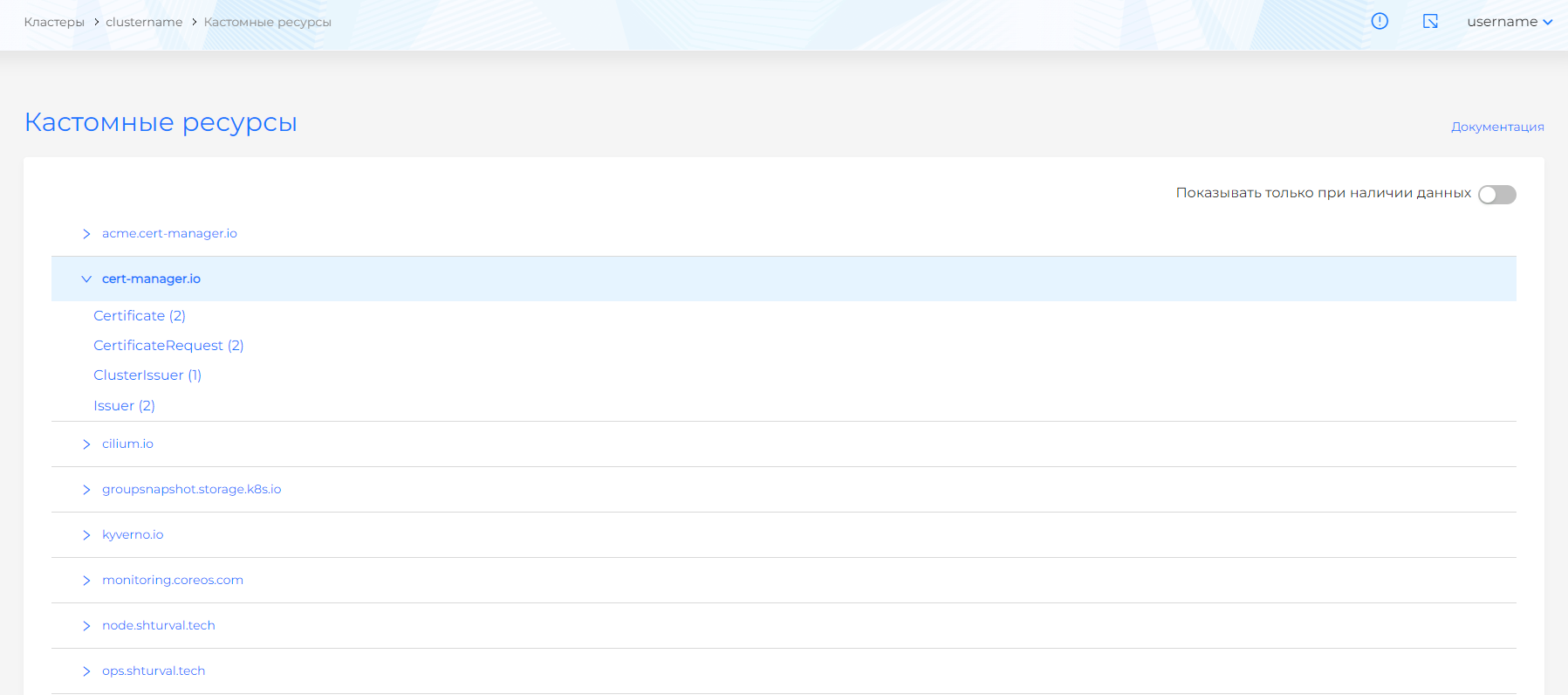
By clicking on the name of a CRD, you can go to a page with a list of custom resources for this CRD. Objects can be viewed, edited (Manifest tab) and deleted according to access rights. To add a custom resource, including in namespace, use Import manifests.
Custom Resources Instances Page
To remove a custom resource from a cluster or namespace, use delete from the list of objects or from the custom resource viewing page. On the resource view page, you can also edit or copy its manifest; After the change, check.
Custom platform resources
Below are specific custom resources in API groups *.shturval.tech, which are used in clusters of the “Shturval” platform.
API group auth.shturval.tech
In the management cluster.
| Resource | Purpose | GUI location | Documentation |
|---|---|---|---|
| AuthOidcClient | Clients of the platform’s internal authentication service (backend, frontend, Argo CD, Grafana, etc.) using OIDC | When switching via SSO to an external service | Custom IAM Resources |
| User | Local users stored in the platform | Access control → users | Local Administrator Password Management |
Kubectl example for auth.shturval.tech
kubectl get authoidcclient -A
API group node.shturval.tech
In the management cluster and client cluster.
| Resource | Purpose | GUI location | Documentation |
|---|---|---|---|
| NodeConfigItem | Object for applying node configuration: NTP, sysctl, packages, registries, systemd units, etc.; applied by node selector | Administration → Node Configuration (list and NCI cards) | Node Configuration (NCI), NCI Object (NodeConfigItem) |
| NodeConfig | Summary of actual node-specific configuration collected from all applicable NCIs, with application status | Administration → Node Management → node view page → Node Configuration tab | NodeConfig (NC) |
Kubectl example for node.shturval.tech
kubectl get nodeconfigitem
API group cluster.shturval.tech
In the management cluster.
| Resource | Purpose | GUI location | Documentation |
|---|---|---|---|
| ClusterConfig | Actual cluster configuration: API parameters, networks, set of services, links to profiles, etc. | Cluster dashboard | API for cluster management |
| ClusterInfo | Summary information about the cluster for dashboards: status, versions, number of nodes | Cluster dashboard | Cluster graphs and dashboards |
| ClusterProfile | Configuration profile with which the client cluster will be deployed | Platform → Cluster Profiles → Client Cluster Configuration Profiles page | Cluster Profiles |
Kubectl example for cluster.shturval.tech
kubectl get clusterprofile -A
Reference: Cluster API and infrastructure provider resources (cluster.x-k8s.io, bootstrap.cluster.x-k8s.io, controlplane.cluster.x-k8s.io, infrastructure.cluster.x-k8s.io) associated with the node life cycle are tabulated on the Creating nodes when deploying a client cluster page.
API group ops.shturval.tech
In the management cluster and client cluster.
| Resource | Purpose | GUI location | Documentation |
|---|---|---|---|
| ShturvalRepoConfig | Helm repositories configuration: URL, protocol, credentials, TLS | Services and repositories → Repositories page | How to connect your repository |
| ShturvalServiceConfig | Configuration of Helm charts (system services) (SSC): version, control mode, basic customvalues | Services and repositories → Installed services → Manage button → Service tab on the service view page | Overview of working with services, System services of the Shturval repository |
| ShturvalServicePatch | Patch for customvalues system service, overlaid on top of the base SSC; allows you to safely customize services | Applied ShturvalServicePatch tab on the service page | How to manage CustomValues services |
Kubectl example for ops.shturval.tech
kubectl get shturvalserviceconfig -A
API group update.shturval.tech
In the management cluster and client cluster.
| Resource | Purpose | GUI location | Documentation |
|---|---|---|---|
| ShturvalUpdate | Resource for manually running a cluster update and tracking update status | Cluster dashboard → Manage → Cluster Update window | Update Kubernetes |
| ShturvalUpdateChannel | Specifying the update channel (only the stable channel stable is available in the platform) | Cluster dashboard → Manage → Cluster Update window | Update Kubernetes, Update mirror in closed loop |
| ShturvalUpdateSchedule | Schedule for automatic (delayed) cluster update | Cluster dashboard → Manage → Cluster update window → Configuring deferred update | Update Kubernetes |
Kubectl example for update.shturval.tech (ShturvalUpdateSchedule)
```bash kubectl get shturvalupdateschedule -n shturval-update-system ```API group permissions.shturval.tech
In the management cluster.
| Resource | Purpose | GUI location | Documentation |
|---|---|---|---|
| GroupRole | An object to associate a permission set with a user group; determines which Permissions apply to the group and at what level (platform, tenant, cluster, namespace) | Access Control/Role Management→ Groups and assigning rights to groups | Custom resources for managing access rights, How access rights are assigned |
| UserRole | Object to associate a permission set with a specific user | Access Control/Role Management → Users and assigning rights to users | Custom resources for managing access rights, How access rights are assigned |
| Scope | A set of permission enforcement objects (for example, a platform, a specific tenant, a cluster, or a namespace) | The internal essence of the access control system; displayed through the access tree and rights assignment pages | Permission settings |
| Permission | Set of permissions | Access Control → Access Manager | Setting permissions, Custom resources for managing access rights |
| Tenant | Logical combination of entire clusters or namespaces of one or more clusters for access control | Tenants tab | Tenant concept |
Kubectl example for permissions.shturval.tech
kubectl get userrole -n shturval-backend
When to use GUI and when to use manifests
- GUI is convenient for typical operations: creating a cluster, setting up services, assigning rights, changing node configurations.
- Custom resource manifests (
kubectl, YAML import) are useful when:- you want to version changes and apply them via GitOps;
- requires access to the full set of resource fields, not all of which are in the GUI.
Instructions for importing YAML manifests through the interface: Import manifests.
For all of the listed resources, it is recommended to focus on the specialized sections of the documentation (links in the tables above) - they contain YAML examples, restrictions and typical usage scenarios.