Resource Quotas and LimitRanges
ResourceQuota and LimitRange in namespaces.
Overview
ResourceQuota and LimitRange cap CPU, memory, and other resource use in namespaces. Use them to isolate teams and prevent cluster exhaustion.
Where to create: in a namespace — Storage → ResourceQuotas / LimitRanges, or via manifest import.
ResourceQuota
ResourceQuota sets strict limits on the total consumption of resources in the namespace.
Creating a quota in the GUI
- Open namespace → Storage → ResourceQuotas (or Quotas).
- Click + Create Quota.
- Set the quota name and, if necessary, labels and annotations.
- To scope the quota application, specify matching expressions (scope selector).
- On the Resources tab, set:
requests.cpu— the sum of CPU requests of the pods;requests.memory— sum of memory requests;limits.cpu— sum of CPU limits;limits.memory— the sum of memory limits.
- On the Storage tab, set:
requests.storage— total volume of requests for storage;persistentvolumeclaims— number of PVC;requests.ephemeral-storage,limits.ephemeral-storage- ephemeral storage;- by Storage Class - limits for a specific class.
- On the Quantity tab, set limits on the number of objects: pods, services, secrets, configmaps, etc.
- Click Save.
Screenshot: creating a quota
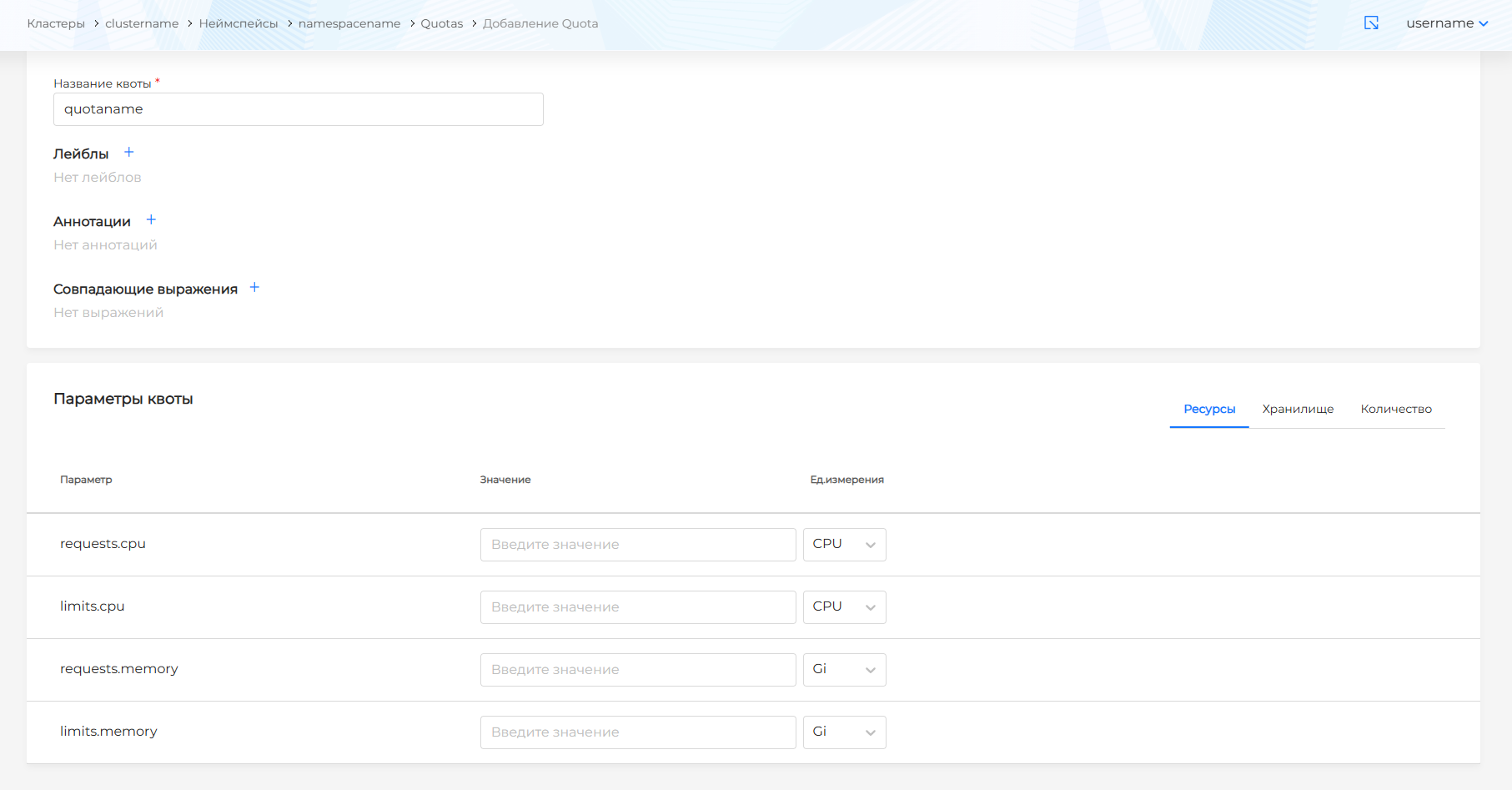
View and edit quota
On the ResourceQuotas page, click on the quota name. Update the settings and click Save. Or go to the Manifest tab, make changes and validate.
LimitRange
LimitRange sets default limits and acceptable ranges for pods and containers in the namespace.
Note: LimitRange applies only to new objects at creation time. Existing pods and PVCs are not changed.
Creating LimitRange in the GUI
- Open namespace → Storage → LimitRanges (or Quotas → Limit Ranges).
- Click + Create LimitRange or New.
- Set a title.
- On the Container tab, set:
- CPU Default Request (
limits.defaultRequest.cpu) — default CPU request; - CPU Default Limit (
limits.default.cpu) — default CPU limit; - Memory Default Request (
limits.defaultRequest.memory) — default memory request; - Memory Default Limit (
limits.default.memory) — default memory limit; - CPU Min/Max, Memory Min/Max — acceptable ranges for containers.
- CPU Default Request (
- On the Pod tab, set the min/max for the total resources of the pod.
- On the PersistentVolumeClaims tab, set the min/max for the PVC size.
- Click Save.
Screenshot: creating LimitRange
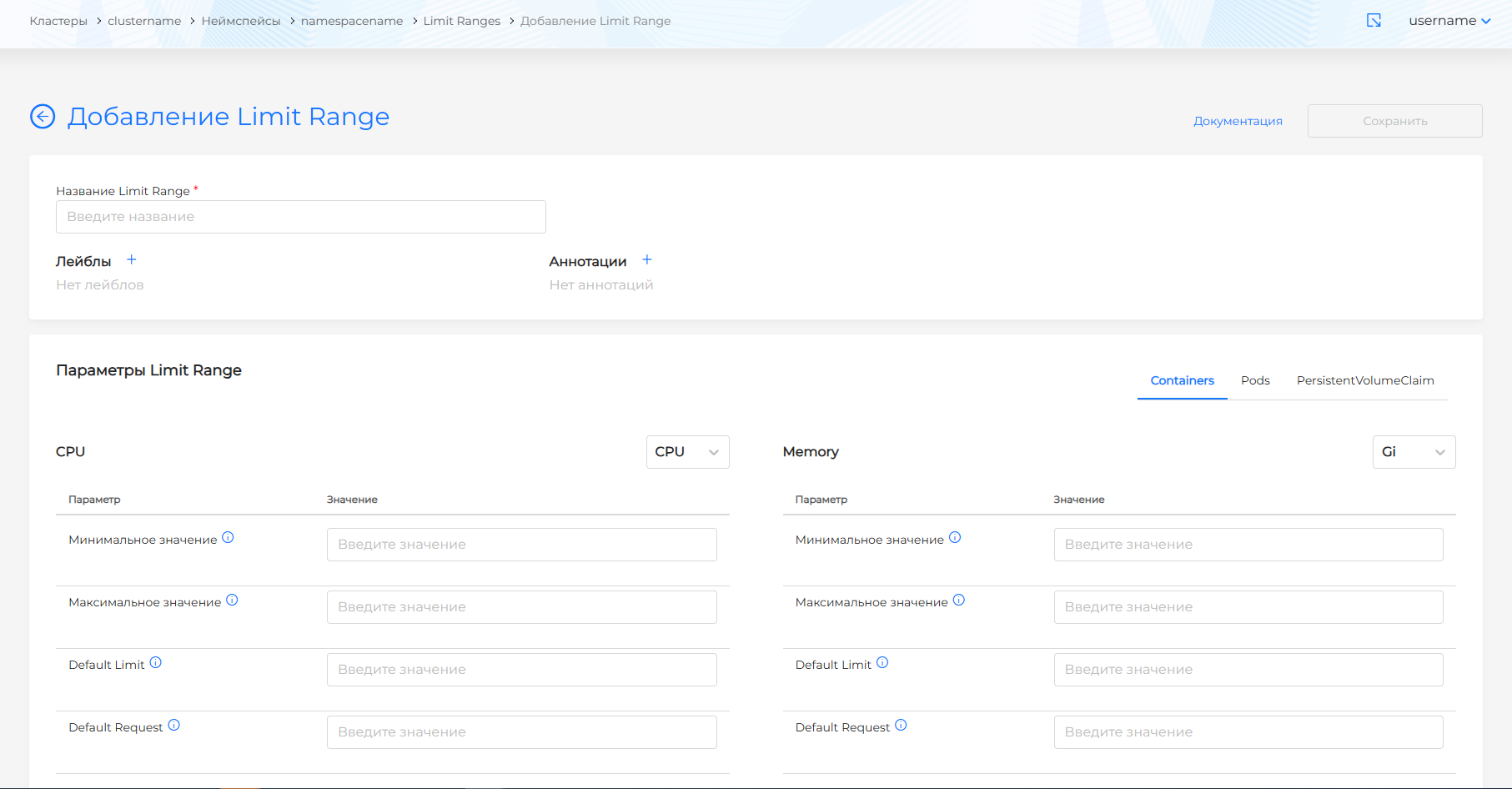
Units of measurement
- Memory: B, Ki, Mi, Gi.
- CPU: whole cores (1, 2) or millicores (100m, 500m).
View and edit LimitRange
To view LimitRange, click on the name in the list. Update the settings and click Save. Or go to the Manifest tab, make changes and validate.
Examples: ResourceQuota
CPU and memory limits
apiVersion: v1
kind: ResourceQuota
metadata:
  name: compute-quota
  namespace: team-a
spec:
  hard:
    requests.cpu: "4"
    requests.memory: 8Gi
    limits.cpu: "8"
    limits.memory: 16Gi
Limits on objects
apiVersion: v1
kind: ResourceQuota
metadata:
  name: object-quota
  namespace: team-a
spec:
  hard:
    pods: "20"
    services: "5"
    persistentvolumeclaims: "10"
    secrets: "20"
    configmaps: "20"
Combined quota
apiVersion: v1
kind: ResourceQuota
metadata:
  name: team-quota
  namespace: team-a
spec:
  hard:
    requests.cpu: "10"
    requests.memory: 20Gi
    limits.cpu: "20"
    limits.memory: 40Gi
    pods: "50"
    persistentvolumeclaims: "15"
Examples: LimitRange
Default limits for containers
apiVersion: v1
kind: LimitRange
metadata:
  name: default-limits
  namespace: team-a
spec:
  limits:
  - default:
      cpu: "500m"
      memory: 512Mi
    defaultRequest:
      cpu: "100m"
      memory: 128Mi
    type: Container
Example: default values
Memory Default Limit: 512Mi, CPU Default Limit: “1”, Memory Default Request: 256Mi, CPU Default Request: “0.5”:
- If the container does not specify a memory request, it will be assigned 256Mi.
- If the container does not specify a memory limit - 512Mi.
- If the container does not specify a request for CPU - 0.5 CPU.
- If the container does not specify a CPU limit - 1 CPU.
Min/Max for containers
apiVersion: v1
kind: LimitRange
metadata:
  name: container-limits
  namespace: team-a
spec:
  limits:
  - min:
      cpu: "100m"
      memory: 128Mi
    max:
      cpu: "2"
      memory: 2Gi
    type: Container
- CPU Min—a container with a CPU lower than the specified one will not be launched.
- CPU Max—a container with a CPU higher than the specified one will not be launched.
- Memory Min/Max - analogous for memory.
Limit for PVC
apiVersion: v1
kind: LimitRange
metadata:
  name: pvc-limits
  namespace: team-a
spec:
  limits:
  - type: PersistentVolumeClaim
    min:
      storage: 1Gi
    max:
      storage: 10Gi
Checking quotas
# Quota status in namespace
kubectl get resourcequota -n team-a

# Quota details
kubectl describe resourcequota compute-quota -n team-a

# LimitRanges in namespace
kubectl get limitrange -n team-a
If the quota is exceeded, the creation of new resources (pods, PVCs, etc.) will be rejected with a message indicating that the limit has been exceeded.
Best practices and anti-patterns
Best practices
- Quota and LimitRange consistency: LimitRange should not set defaultRequest/default higher than Quota allows. Otherwise, the total requests of the pods may exceed the quota.
- Realistic Limits: Set quotas based on monitoring and actual team consumption.
- Scope for Quota: Use a scope selector (e.g.
NotInforTerminating) to exclude terminating pods from the quota. - Separation by namespaces: Allocate separate namespaces for teams and set quotas for each.
Anti-patterns
- Inadequate default values: LimitRange that is too high can lead to resource exhaustion; too low - application inoperability. Example: an application requires 2000m CPU, and LimitRange sets 1000m - the application will run with delays or crash.
- Ignoring actual usage: Max/min in LimitRange must correspond to actual consumption. Otherwise, the pods may be Pending or the application will be throttled.
- LimitRange is greater than the node size: If the default CPU/memory in LimitRange is greater than that of the node (for example, 2 CPUs and 4Gi with a node of 1 CPU and 2Gi), Kubernetes will not be able to schedule pods.
- Max is too low: If the pod requires 1 CPU and 2Gi, and the max in LimitRange is 500m and 1Gi, the pod will remain in Pending.
Typical scenarios
| Scenario | Quota | LimitRange |
|---|---|---|
| Development Team - Limit Consumption | requests.cpu, requests.memory, limits.cpu, limits.memory, pods | defaultRequest, default for containers |
| Multitenancy - Team Isolation | Quotas for each namespace | Min/max to prevent “noisy neighbors” |
| PVC Restriction | persistentvolumeclaims, requests.storage | min/max for PVC |
| Protection against runaway pods | pods, limits.cpu, limits.memory | max for containers |
Several LimitRanges in one namespace
If there are several LimitRanges in the namespace with different default values, the values of the last created LimitRange object are used.