CPU reservation in a cluster
CPU pinning for etcd can be configured in the GUI or CLI.
CPU reservation reduces Allocatable CPUs on the node. Check Capacity and Allocatable on the node page or with kubectl describe node. Reservation sets CPU affinity priorities; it does not cap CPU usage. A pod without limits can still use 100% CPU when nothing else is competing. Allocatable also affects scheduling: if requests exceed available resources, the pod stays pending or lower-priority pods may be preempted.
CPU reservation in GUI
In the cluster GUI, open Node Configuration and create a new NCI.
Select Kubelet. In the node selector, set node-role.kubernetes.io/control-plane.
Screenshot
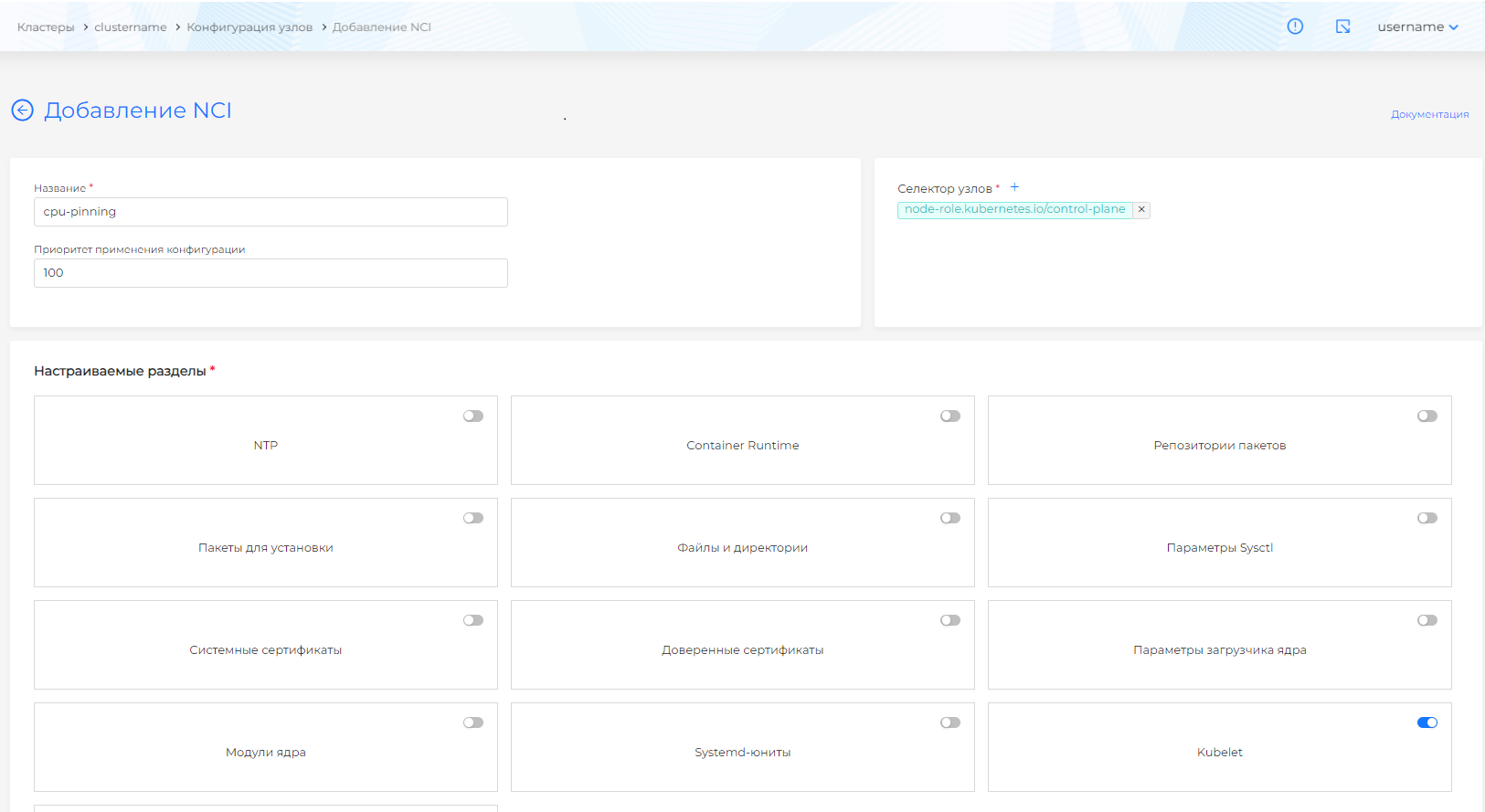
Fill in:
- CPU management policy (
cpuManagerPolicy):static— kubelet binds pods to reserved CPUs. - Reserved CPUs (
reservedSystemCPUs): range or comma-separated list, for example0-1.
In Feature Gates, set:
CPUManagerPolicyOptions: true
In CPU Management Options (cpuManagerPolicyOptions), set:
full-pcpus-only: "true"
Screenshot
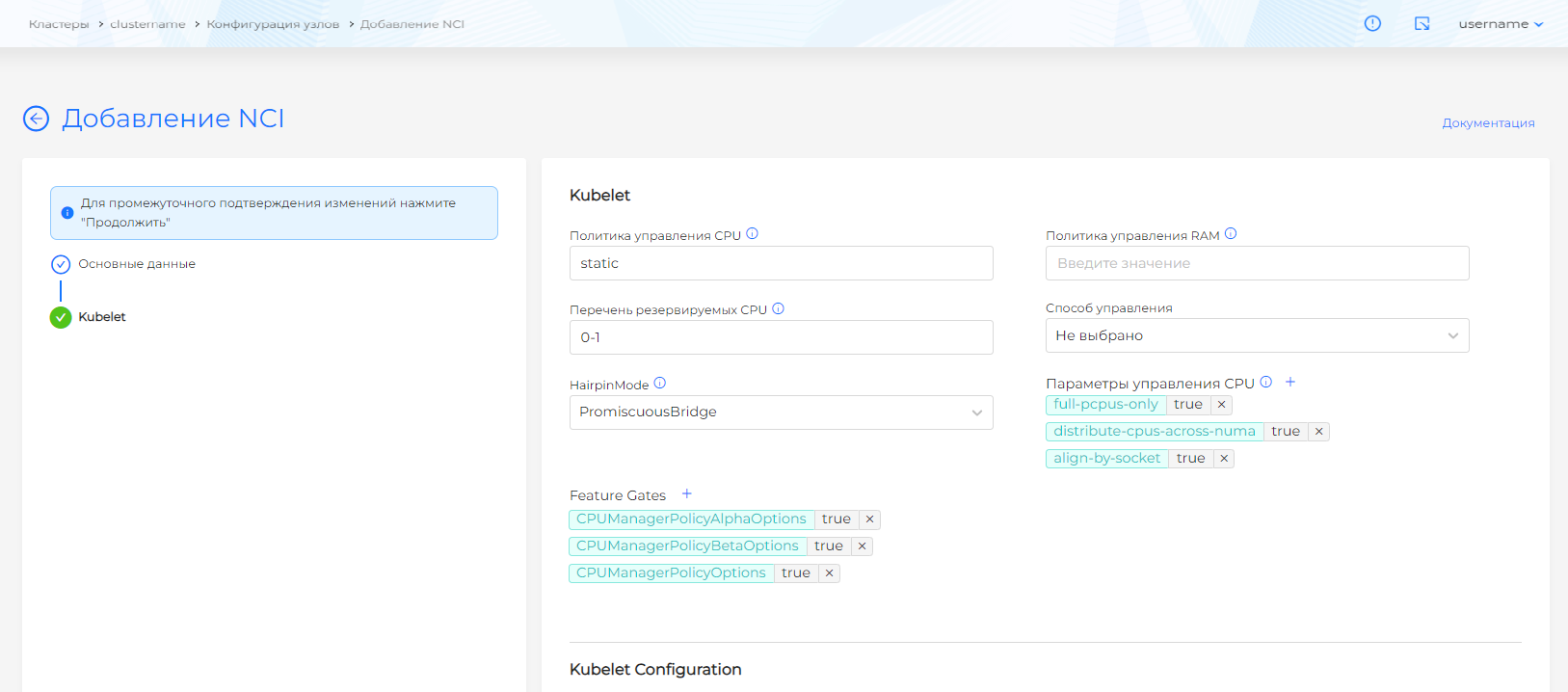
Save the NCI. Kubelet restarts automatically.
CPU reservation via CLI
Connect to the cluster from the console.
Create an NCI manifest
apiVersion: node.shturval.tech/v1beta2
kind: NodeConfigItem
metadata:
  name: cpu-pinning-test
spec:
  kubelet:
    cpuManagerPolicy: static
    featureGates:
      CPUManagerPolicyOptions: true
      CPUManagerPolicyAlphaOptions: true
      CPUManagerPolicyBetaOptions: true
    cpuManagerPolicyOptions:
      align-by-socket: "true"
      distribute-cpus-across-numa: "true"
      full-pcpus-only: "true"
    reservedSystemCPUs: 0-1
  nodeconfigselector:
    node-role.kubernetes.io/control-plane: ""
  priority: 100
Apply the manifest.
Command — illustration
kubectl apply -f cpu-pinning-test.yaml
Checking CPU reservation status
To check the status of Kubelet CPU Manager.
Command — illustration
cat /var/lib/kubelet/cpu_manager_state
Example command result
{"policyName":"static","defaultCpuSet":"0-1,4-7","entries":{"3f6868ef501db41abc9cc55c40ab1020":{"etcd":"2-3"}},"checksum":4106740397}
Here you can see that:
- static policy is used
- by default, all pods are placed in a distributed pool of processors 0-1,4-7
- 2-3 CPUs are allocated for the etcd pod
If the CPU reservation is successful, there will be a message in the kubelet log.
Message — illustration
policy_static.go:175] "Reserved CPUs not available for exclusive assignment" reservedSize=2 reserved="0-1" reservedPhysicalCPUs="0-1"
Error example
I0613 19:29:30.525539 5408 cpu_manager.go:172] "Detected CPU topology" topology={"NumCPUs":8,"NumCores":8,"NumSockets":2,"NumNUMANodes":1,"CPUDetails":{"0":
{"NUMANodeID":0,"SocketID":0,"CoreID":0}
,"1":{"NUMANodeID":0,"SocketID":0,"CoreID":1},"2":{"NUMANodeID":0,"SocketID":0,"CoreID":2},"3":{"NUMANodeID":0,"SocketID":0,"CoreID":3},"4":{"NUMANodeID":0,"S ocketID":1,"CoreID":4},"5":{"NUMANodeID":0,"SocketID":1,"CoreID":5},"6":{"NUMANodeID":0,"SocketID":1,"CoreID":6},"7":{"NUMANodeID":0,"SocketID":1,"CoreID":7}}}
Jun 13 19:29:30 shturval-mycluster-cpu-master-qc2rv kubelet[5408]: E0613 19:29:30.525580 5408 container_manager_linux.go:329] "Failed to initialize cpu manager" err="new static policy error: Align by socket is not compatible with hardware where number of sockets are more than number of NUMA"
Jun 13 19:29:30 shturval-mycluster-cpu-master-qc2rv kubelet[5408]: E0613 19:29:30.525610 5408 run.go:74] "command failed" err="failed to run Kubelet: new static policy error: Align by socket is not compatible with hardware where number of sockets are more than number of NUMA"
Conditions for using reserved resources for pods
CPU reservation results in no pods being placed on the selected nodes allocated for CPU reservation. The exception is those pods that meet all the conditions for using guaranteed resources:
- must be present as requests and limits;
- requests and CPU limits must be integers;
- requests and limits must match.
Example — illustration
spec:
  containers:
    - name: etcd
      resources:
        limits:
          memory: "500Mi"
          cpu: "2"
          example.com/device: "1"
        requests:
          memory: "500Mi"
          cpu: "2"
          example.com/device: "1"
If all conditions are met, then after the pod is launched, the status will indicate the QoS Class: Guaranteed type.