Additional networks
Overview
Additional networks allow custom networks alongside the main Cilium CNI. For SR-IOV, use SriovNetworkNodePolicy and SriovNetwork. With shturval-metacni installed, use NetworkAttachmentDefinition.
SR-IOV
SR-IOV allows you to connect containers directly to network equipment. The SriovNetworkNodePolicy and SriovNetwork resources are interconnected and together provide node-level management of SR-IOV network settings.
All SR-IOV resources must be located in the same namespace where SRIOV-Operator is installed. The interface for these resources automatically uses the namespace kube-system.
The settings are performed in this order:
- Create
SriovNetworkNodePolicy: This defines which hosts and NICs are covered by the SR-IOV policy. - Create
SriovNetwork: it creates a network for the SR-IOV-compatible NIC and communicates with the policy throughResourceName. - Check the created resources.
Creating SriovNetworkNodePolicy
- Open the SriovNetworkNodePolicy page in the Networks section.
- Click + Add SriovNetworkNodePolicy.
- Fill in the policy settings:
- Name — resource name.
- ResourceName is the name of the resource that associates
SriovNetworkNodePolicywithSriovNetwork. - Node selector - labels of nodes that are affected by the policy. The label selector works on the AND logic (all labels must match): the selected object must have all the specified labels.
- Priority—the order in which the policy is applied if several policies are suitable for a node.
- deviceTypes — driver type for the created VFs:
netdevicefor a driver in the Linux kernel orvfio-pcifor DPDK. - mtu — MTU value for devices.
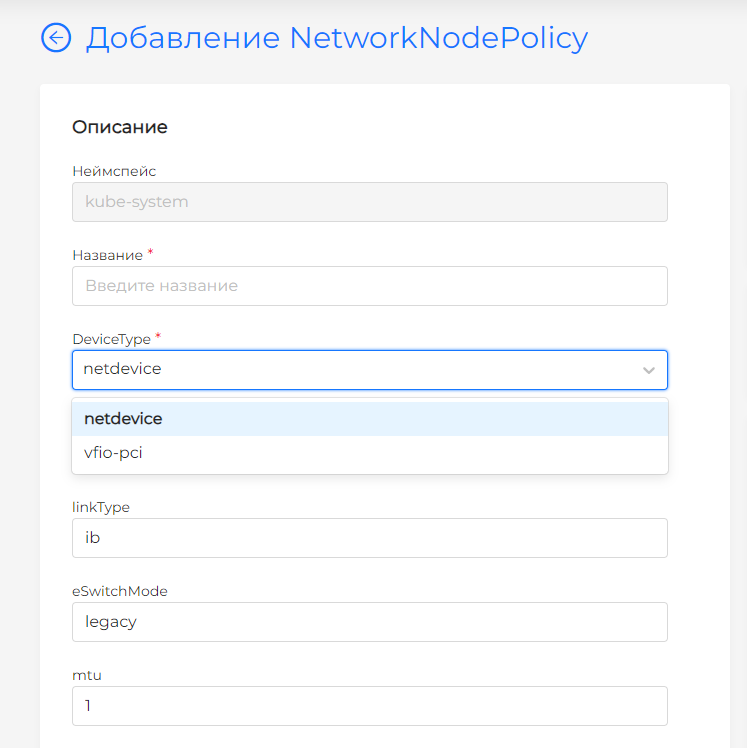
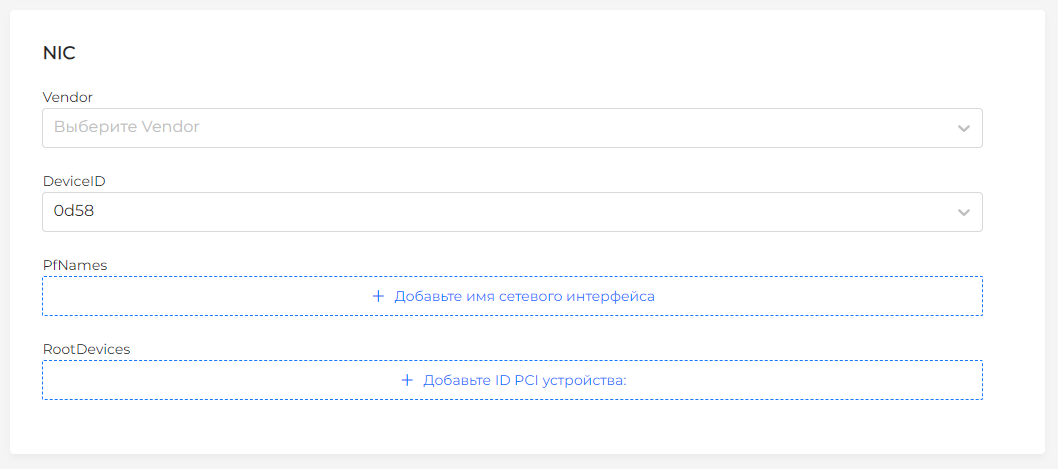
- nicSelector — filters for selecting NIC. You can use subsets based on Vendor ID, Device ID, Root Device ID and PfNames.
- numVfs is the number of virtual functions that must be configured on each NIC.
- linkType — network connection type:
Ethfor Ethernet orIBfor InfiniBand. - eSwitchMode — operating mode of the virtual switch:
legacyorswitchdev. - isRdma — sign of RDMA support.
- Set labels and annotations as needed.
- Save the resource. The created policy appears in the list of items.
Screenshot: SriovNetworkNodePolicy
Screenshot: nicSelector
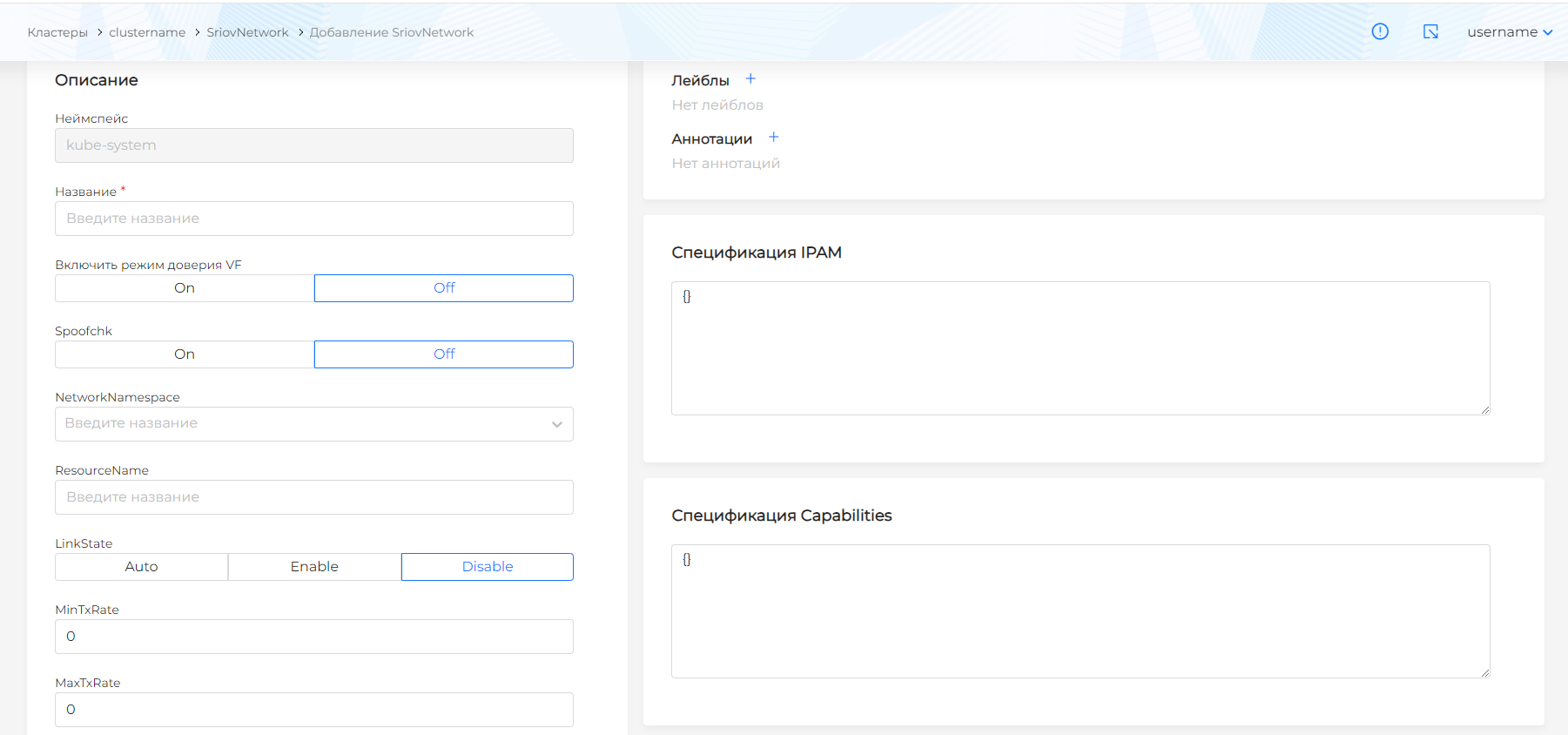
Creation of SriovNetwork
Before creating SriovNetwork, the resource SriovNetworkNodePolicy must be created.
- Open the SriovNetworks page in the Networks section.
- Click + Add SriovNetwork.
- Fill in the network parameters:
- Name — resource name.
- ResourceName is a value that corresponds to
ResourceNamenetwork policySriovNetworkNodePolicy. - IPAM Specification - IP address management parameters in JSON format.
- Specification capabilities - SR-IOV capabilities in JSON format.
- vlan—optional VLAN identifier.
- spoofChk — parameter to enable or disable spoof checking.
- Enable VF trust mode - an optional parameter that specifies whether VF should trust packets with potentially malicious content.
- maxTxRate and minTxRate — maximum and minimum TX speed in megabits per second. You can only limit one of the values.
- linkState — VF link state:
auto,enableordisable. - networkNamespace — namespace in which the network will be created.
- vlanQoS — level of service for network traffic within the VLAN.
- If necessary, set labels.
- Save the resource. The created network will appear in the list of elements.
Screenshot: SriovNetworks
linkState values:
auto— the communication state is determined by the network interface driver. This is the default value.enable— VF is always on, even if PF is not connected to the network. In this case, outgoing traffic initialized with VF is available, but incoming traffic from PF is not available.disable- VF is always off, regardless of the PF state.
vlanQoS values:
0-best effort: Network packets are processed on equal terms without preference or priority.1-7- CoS according to the 802.1p standard. The values determine packet processing priorities based on the significance or type of traffic.-1- default setting or no explicit VLAN QoS setting for this VF.
Example IPAM for SriovNetwork
IPAM is used to manage and allocate IP addresses. The whereabouts type means dynamically managing ranges of IP addresses and assigning them to containers. The static type means static address management: addresses are assigned manually, and automatic address assignment and management mechanisms are disabled.
{
  "spec": {
    "ipam": {
      "type": "static",
      "subnet": "10.56.217.0/24",
      "rangeStart": "10.56.217.171",
      "rangeEnd": "10.56.217.181",
      "routes": [{"dst": "0.0.0.0/0"}],
      "gateway": "10.56.217.1"
    }
Example capabilities for SriovNetwork
capabilities specifies SR-IOV capabilities. In the example, mac indicates that the SR-IOV interface can have its own MAC address, and ips indicates that the SR-IOV interface can have its own IP address.
{
  "mac": true,
  "ips": true
}
Checking SR-IOV resources
After creating the resources, check that they appear in the cluster:
kubectl get sriovnetworknodepolicies -n kube-system
kubectl get sriovnetworks -n kube-system
NetworkAttachmentDefinitions
The NetworkAttachmentDefinition resource allows you to use custom networks in addition to the main Cilium CNI when the shturval-metacni module is installed.
NetworkAttachmentDefinition is created automatically when you create SriovNetwork. For an existing NetworkAttachmentDefinition, you can change only labels and annotations. To change the specification, update the SriovNetworkNodePolicy resource.
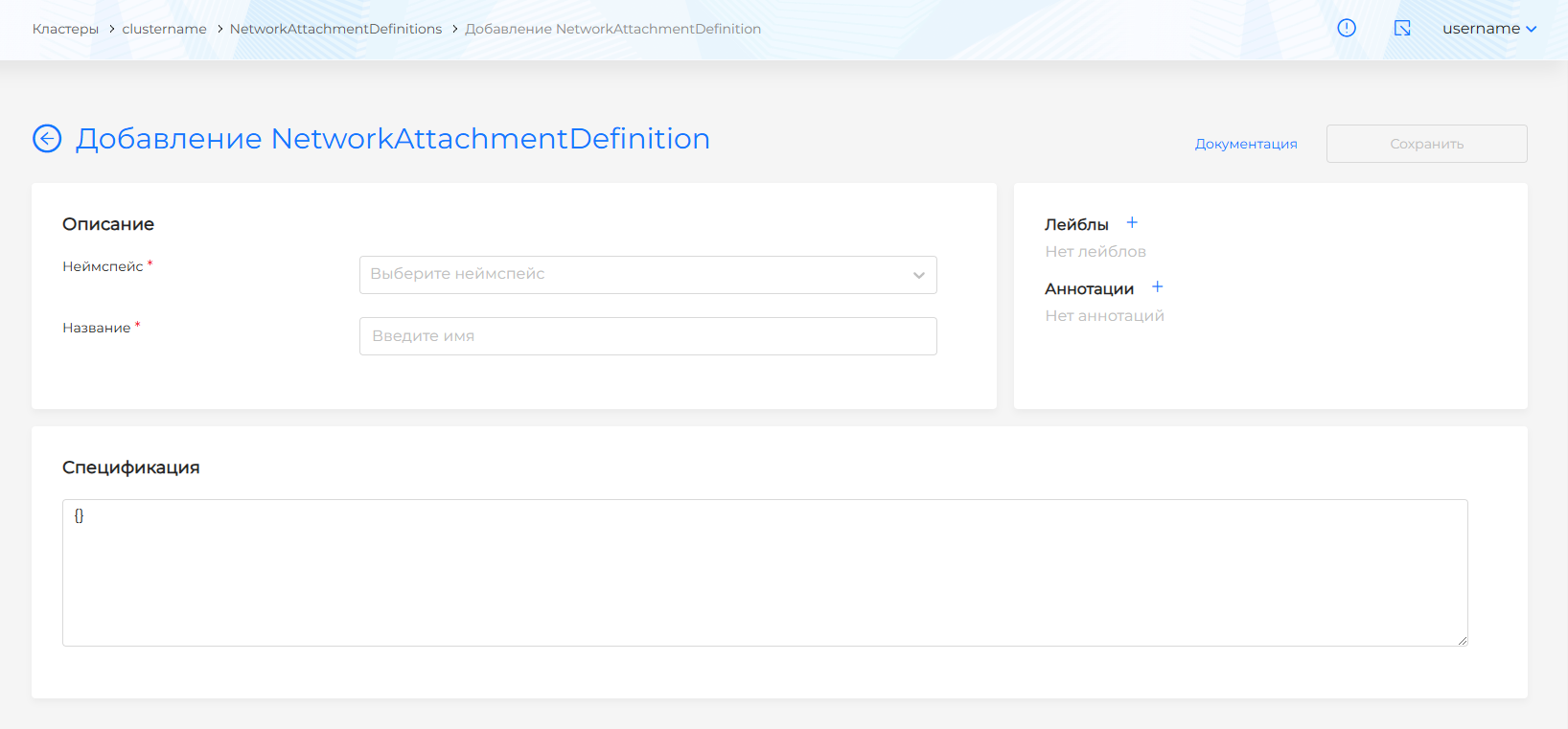
Create NetworkAttachmentDefinition
- Open the NetworkAttachmentDefinitions page in the Networks section.
- Click + Add NetworkAttachmentDefinition.
- Enter the name of the resource.
- Select the namespace in which the resource will be used.
- Set labels and annotations as needed.
- In the Specification block, specify the configuration of the user resource in JSON format.
- Save the resource. The created
NetworkAttachmentDefinitionwill appear in the list of elements.
Screenshot: NetworkAttachmentDefinitions
Example NetworkAttachmentDefinition specification
config: '{
      "cniVersion": "0.3.1",
      "name": "my-multus-network",
      "type": "macvlan",
      "master": "eth0",
      "mode": "bridge",
      "ipam": {
        "type": "host-local",
        "subnet": "192.168.1.0/24",
        "rangeStart": "192.168.1.200",
        "rangeEnd": "192.168.1.216",
        "routes": [{ "dst": "0.0.0.0/0" }],
        "gateway": "192.168.1.1"
      }
    }'
Description of specification fields:
- cniVersion — CNI version.
- name - network name.
- type — network interface type, for example
macvlan. - master — the name of the main network interface on the Kubernetes node.
- mode — operating mode.
- ipam — IP address management parameters:
- type — IPAM type.
- subnet — the network in which IP addresses will be distributed.
- rangeStart and rangeEnd — the range from which IP addresses are allocated.
- routes — routes for the network.
- gateway — gateway for the network.
Check NetworkAttachmentDefinition
After creating a resource, check its availability:
kubectl get network-attachment-definitions -A
kubectl get network-attachment-definitions <name> -n <namespace> -o yaml