Architectural diagrams of cluster networks
How the network layer in the cluster is structured and how its key components interact.
General diagram of cluster networks
The network layer in the cluster is built around modules:
- Cilium CNI (
shturval-networking) - core network of pods and services; - Ingress controllers (
shturval-ingress-controller) — incoming HTTP/HTTPS traffic; - Gateway API — routing model (GatewayClass, Gateway, HTTPRoute, etc.);
- Egress Gateway - controlled outgoing traffic with predictable IPs;
- Additional networks - SR‑IOV and Multus for high-performance and isolated scenarios;
- Cilium Network Policies — traffic isolation between pods and services.
In practice it looks like this:
- Cilium CNI connects all pods to a single overlay/underlay network, provides routing and service discovery (ClusterIP, kube proxy/cilium proxy).
- Ingress controllers receive external traffic on nodes (via VIP, NodePort/hostPort) and route it to services within the cluster.
- Egress Gateway redirects outgoing traffic of certain pods/namespaces through dedicated nodes/addresses.
- Additional networks add secondary interfaces to pods (via Multus/SR‑IOV) without disrupting the main Cilium network.
- Network policies determine which flows (pod → pod, pod → service, pod → external resource) are allowed or denied.
For more information on subnets and CIDR intersection diagnostics, see
Diagnostics of intersection of subnets in a cluster.
Check the interconnection diagrams (ports and traffic directions between clusters, balancers and external systems) against the open loop and closed loop requirements pages.
Subnets used
By default, when you create a cluster in the platform, the following subnets are assigned:
- pod subnet:
172.16.0.0/16; - service subnet:
10.96.0.0/12.
Subnet ranges can be changed to suit your requirements. It is recommended to check ranges for intersections before creating a cluster (for example, using an online subnet calculator).
Subnets of pods and services are located in the common overlay network of the cluster. These subnets:
- exist only within the cluster;
- do not overlap with other clusters and your corporate network in terms of routing level;
- even if the address space coincides with the corporate network, they do not allow pods direct access to services outside the cluster without explicitly setting up gateways/NAT. (see the screenshot below)
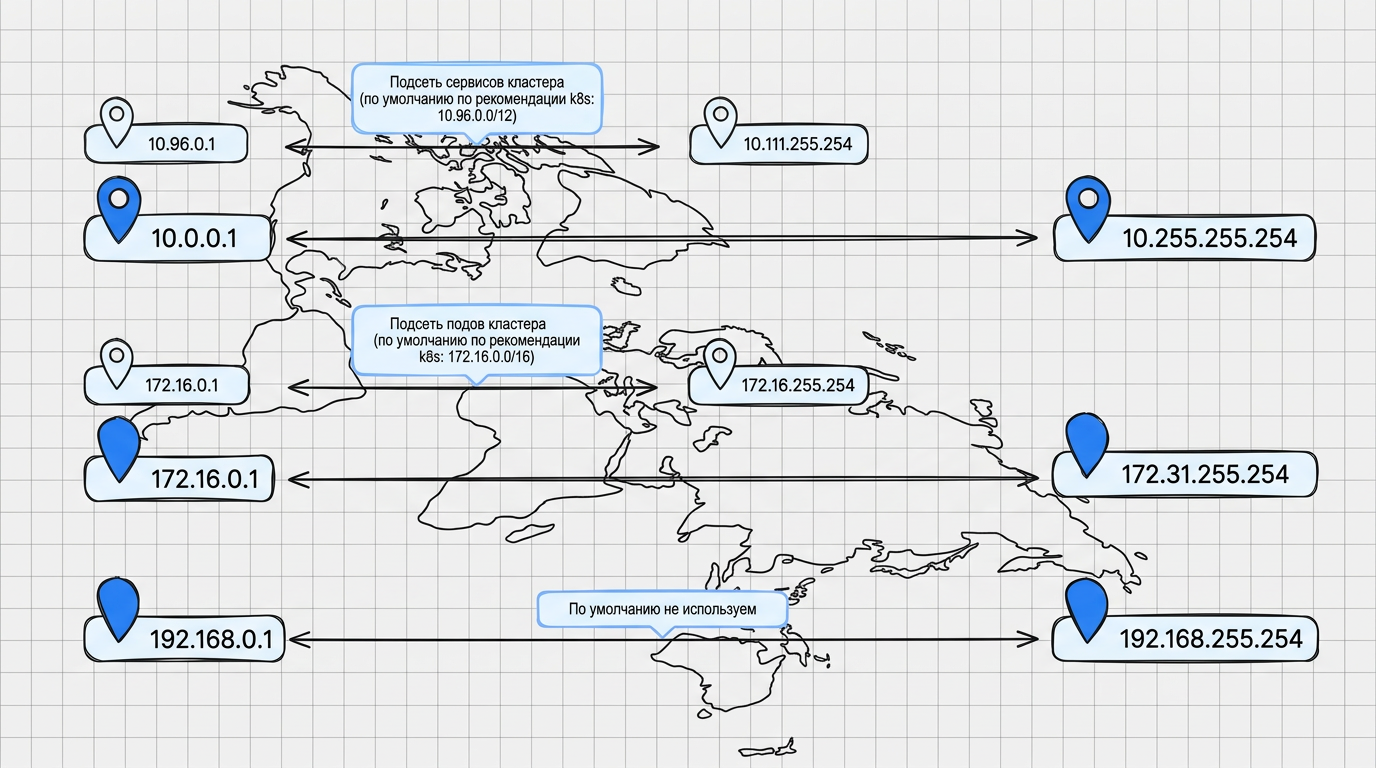
Example of using subnets
On each cluster node, a separate subnet is allocated from the common pod subnet. If outgoing traffic is allowed, by default it originates from the host IP address.
Illustration: Example of using subnets
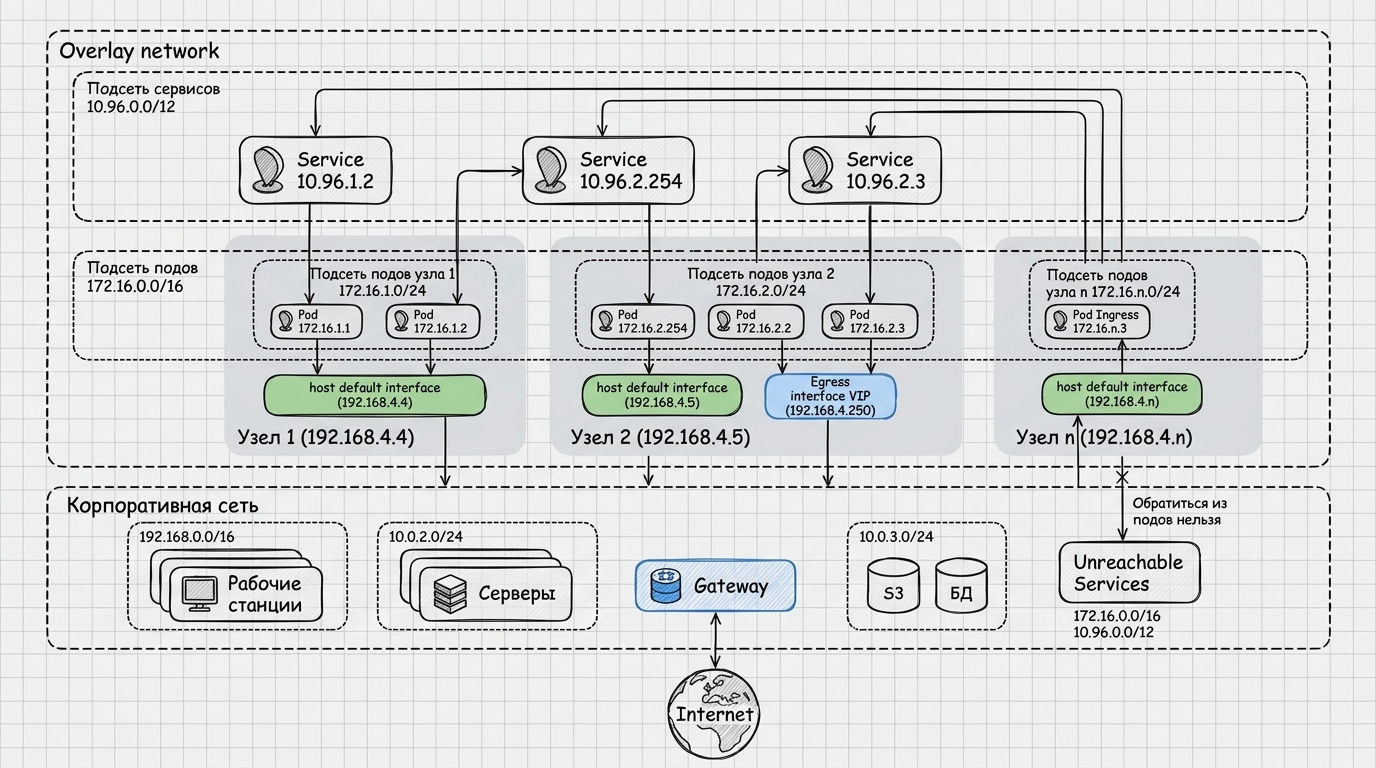
Taking this into account:
- Egress Gateway mechanisms and corresponding policies are used to manage outgoing traffic to IP addresses;
- Ingress controllers and Cilium network policies are used to control incoming traffic to the cluster.
Learn more about setting up cluster networks:
Interaction between Ingress and the core network
Ingress controllers run on top of the Cilium core network:
- the system Ingress Controller serves all namespaces by default;
- additional Ingress controllers allow you to select individual IPs/domains/namespaces.
Typical flow:
- An external client uses the DNS name to access the virtual IP or host address (NodePort/hostPort).
- Traffic reaches the Ingress Controller, which, according to the rules of Ingress resources, selects the target service.
- Cilium delivers traffic from the selected service to the required pods.
More information about configuring Ingress:
Gateway API and core network
Gateway API includes the main types of objects:
- GatewayClass specifies the controller type at the cluster level;
- Gateway describes the entry point (for example, an external load balancer) and defines addresses, ports, protocols, and TLS settings for listeners;
- Routes (HTTPRoute, GRPCRoute) connect the Gateway with backend services in the namespace and define detailed routing rules for HTTP/HTTPS or gRPC traffic.
More details:
Interaction of Egress Gateway with clusters
Egress Gateway is used when it is important from which IP address requests to external systems (firewalls, external APIs, databases) are issued.
General logic:
- The administrator sets Egress Gateway Policy (for namespace, pods or tags).
- Cilium forwards outgoing traffic to eligible pods through a dedicated host or IP address.
- External systems see requests from pre-agreed addresses.
More details about the setup:
CoreHA and external balancer
For scenarios where an external balancer (for example, HAProxy) must dynamically discover active nodes running Ingress controllers, the CoreHA module (shturval-coreha) is used.
The diagram below shows typical traffic:
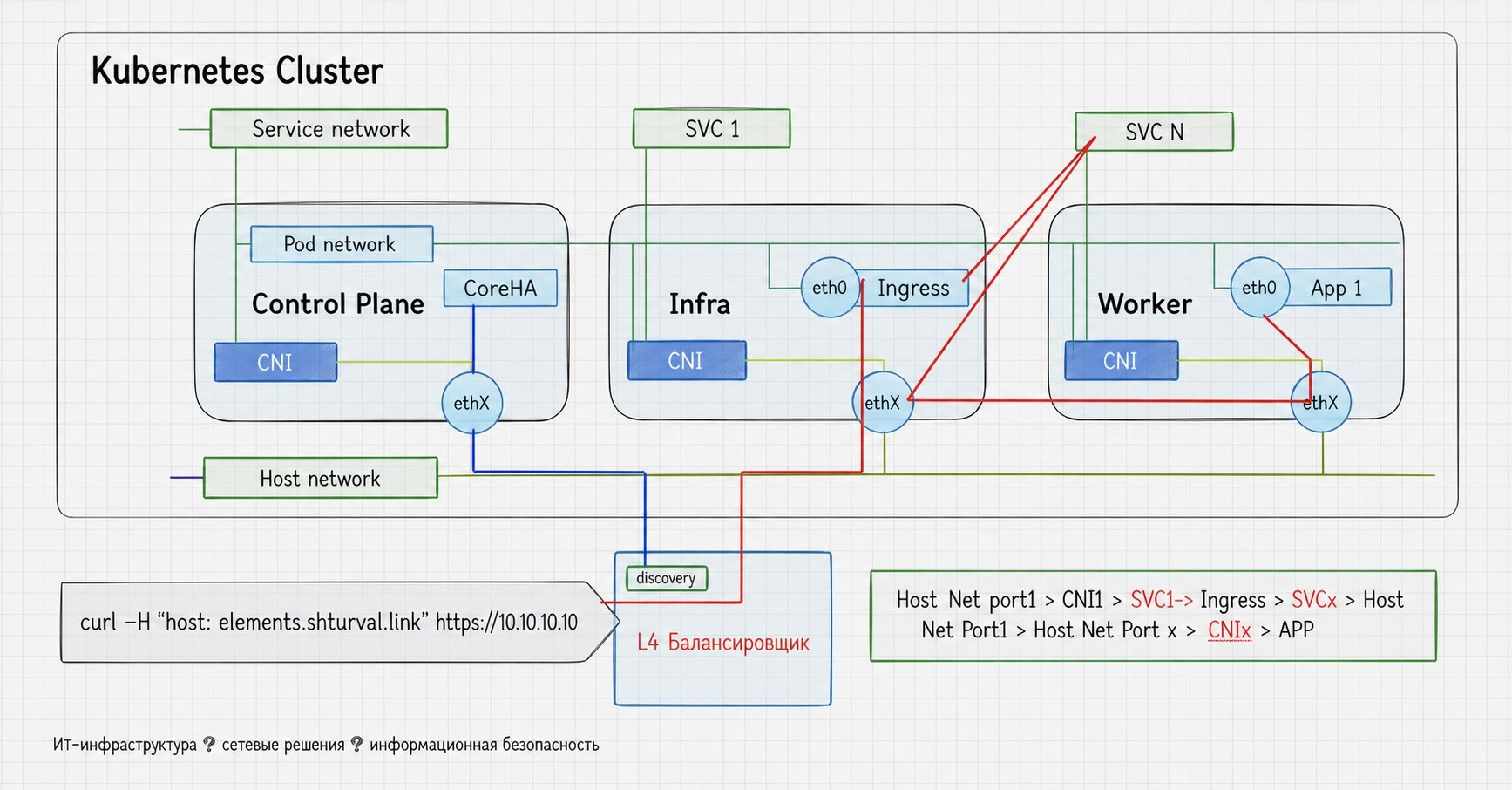
Key points:
- The shturval-coreha module runs in the cluster, which monitors Ingress controller pods with the necessary labels and generates DNS records.
- An external balancer (HAProxy) queries the DNS names generated by CoreHA and receives an up-to-date list of IP addresses of nodes with Ingress pods.
- Traffic from clients comes to HAProxy and is then distributed among the cluster nodes using these IP addresses.
- When the composition of nodes/pods changes (scale-up/scale-down), CoreHA updates DNS records, and the balancer automatically picks up the changes.
For more information about the module and configuration examples, see the page
Module for searching for nodes with running hostport services (shturval-coreha).
Additional networks and SR‑IOV
For scenarios with high bandwidth and strict network isolation requirements, the following are used:
- Multus (
shturval-metacni) - adds several network interfaces to the pods; - Whereabouts (
shturval-metacni-ipam) — manages IP addresses on secondary interfaces; - SR‑IOV Operator (
shturval-sriov) - allocates virtual functions (VF) of physical NICs and connects them to pods.
Typical flow:
- The application receives the main interface from Cilium for service/control traffic.
- Through Multus, a secondary interface (SR‑IOV, separate L2/L3‑network) is added to the pod.
- Whereabouts assigns IP addresses, SR-IOV Operator manages VF profiles and pools.
More details:
Cilium network policies
Cilium network policies define who can go where within a cluster and between clusters:
- CiliumNetworkPolicy and ClusterwideCiliumNetworkPolicy describe valid flows;
- policies can filter both L3/L4 traffic and L7 requests (HTTP, DNS, etc.);
- policies are applied on top of the Cilium core network and take into account pod/namespace labels.
Architecturally it looks like this:
- The administrator defines policies for namespaces and applications.
- The Cilium agent on each node applies policies to local pods (BPF programs).
- Any traffic that does not satisfy the policy is discarded before leaving the node or reaching the target pod.
More details: