Node groups
Overview
Cluster nodes are combined into groups. The Manage Nodes page displays:
- Control Plane — group of control nodes;
- Workers — groups of Worker nodes (default: Infra and Default).
Where to configure: Administration → Node Management → Node Groups tab.
Group configuration here refers to Cluster API (number of nodes, InfraMachineTemplate, etc.) and is not the same as the Node Configuration interface section, where NCIs are set for the OS and components on the nodes - see Node Configuration (NCI).
For each group, the number of nodes in the group and the number of working (Ready) nodes are displayed.
Screenshot: node groups
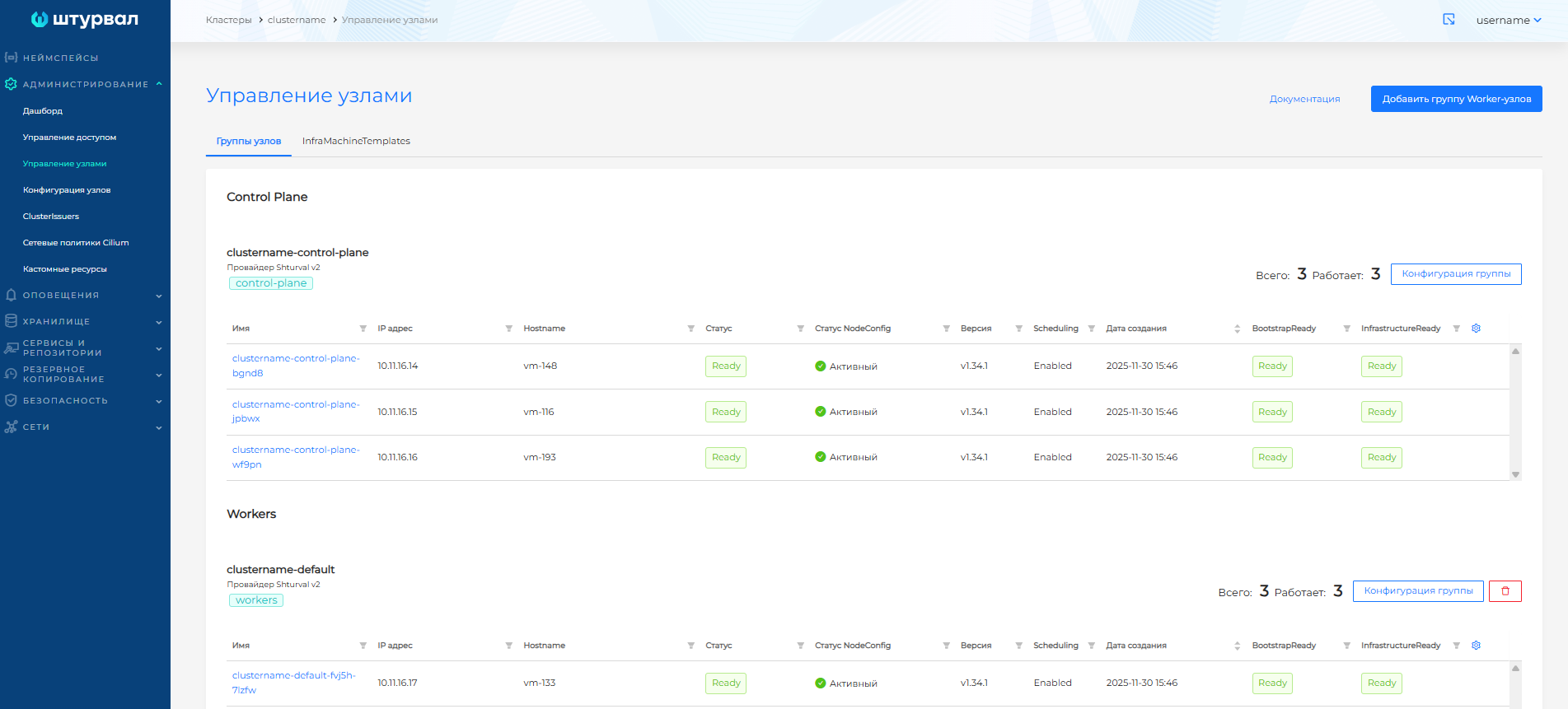
Clicking on the node name opens the node page.
Control Plane group
exactly one Control Plane group is created in the cluster - nodes with etcd and control plane components Kubernetes.
- For test clusters, one Control Plane node is usually sufficient.
- For fault tolerance, three nodes are recommended (etcd quorum).
- It is not recommended to increase the number of Control Plane nodes to more than three: this may slow down the cluster due to the difficulty of achieving etcd quorum.
The group status is displayed on the Manage Nodes page.
In the management cluster, information about the machines of the group can also be viewed in the resource MachineDeployment (API cluster.x-k8s.io) through the section Administration → Custom Resources.
Note: Warning: Reducing the number of Control Plane nodes in a management cluster may cause the management cluster to break.
Groups of Worker nodes
Worker groups are the nodes that run the workload. By default the following are created:
- Infra - preferable for infrastructure services (Ingress, monitoring). If there is a shortage of nodes, services can be deployed in other groups.
- Default - for application workloads.
Additional groups can be created (for example, for GPU, isolated applications).
In a hybrid cluster (the main provider is virtualization or cloud, additional nodes are on the hosts of the Shturval v2 provider), new Worker groups can be created with the Shturval v2 provider type. For more details, see the Hybrid clusters page.
The status of each Worker group can be monitored on the the Node Management page.
Adding a group of Worker nodes
- Click Add Worker Node Group.
- In clusters not on Shturval v2: in the Provider Type field, the cluster provider is selected by default; if you have an instance of Shturval v2, you can select Shturval v2.
- Fill in:
- Configuration Cluster API — scaling method, number of nodes, recovery type;
- InfraMachineTemplate - CPU, memory, disk, VM template (depending on the provider) or host parameters / provider instance for Shturval v2.
Note: for groups of Worker nodes default and infra the provider type is not selected. In a created Worker group, the provider type cannot be changed.
Screenshot: creating a group
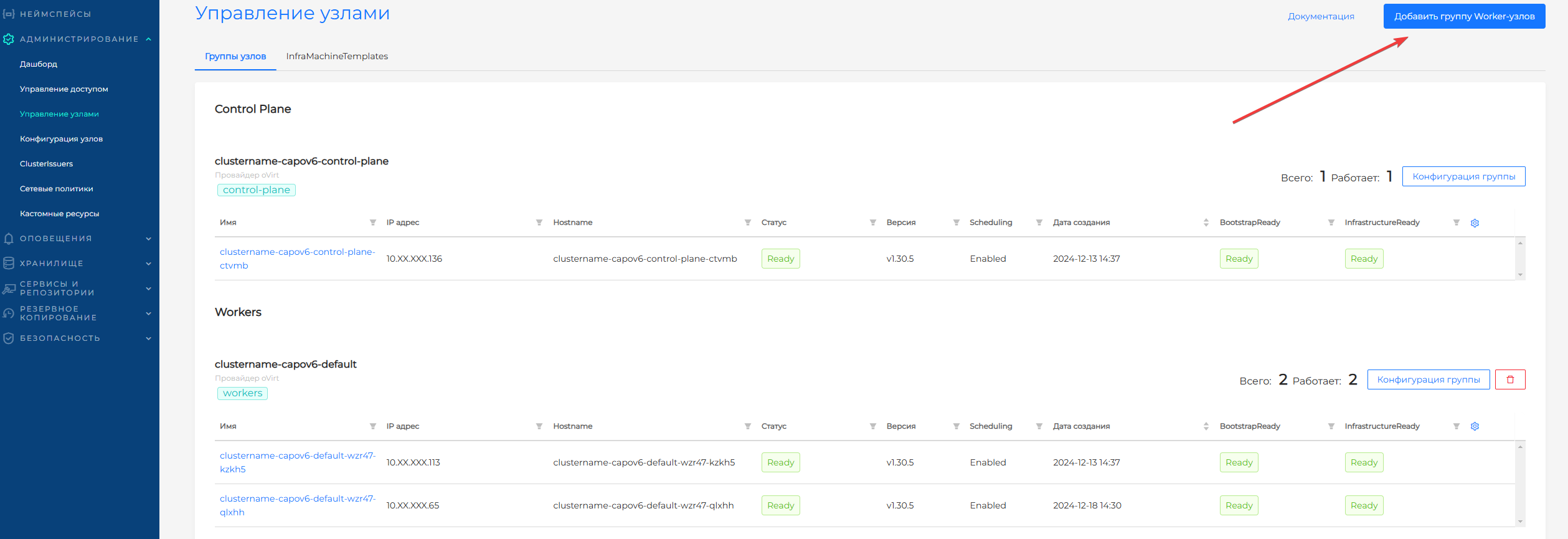
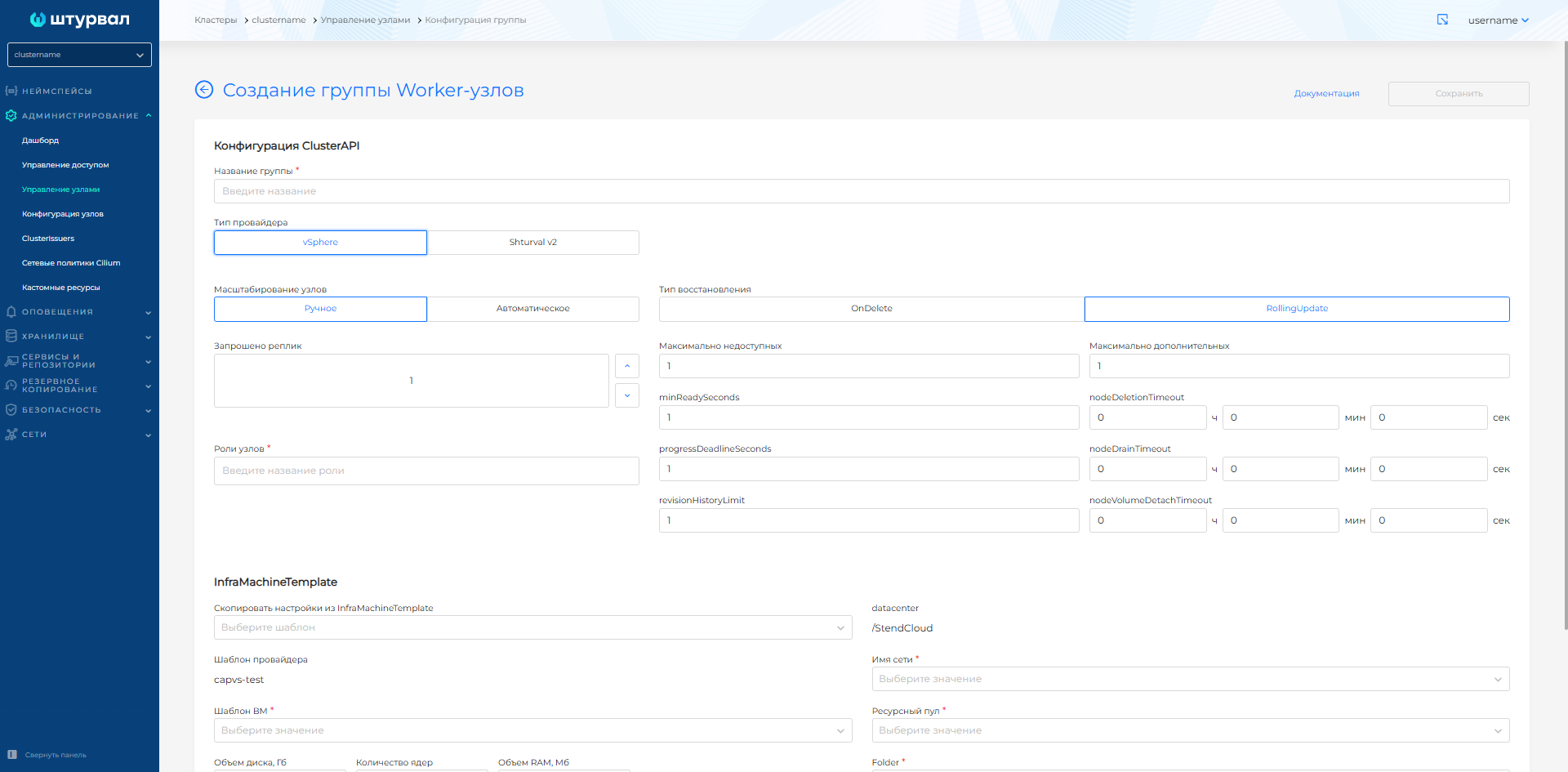
Group configuration
To the right of the group name, click Group Configuration. Available tabs:
- Configuration Cluster API — number of nodes, autoscaling, recovery type;
- InfraMachineTemplate — VM resources (CPU, RAM, disk), template;
- MachineHealthCheck - automatic recovery of inoperative nodes.
Screenshot: group configuration
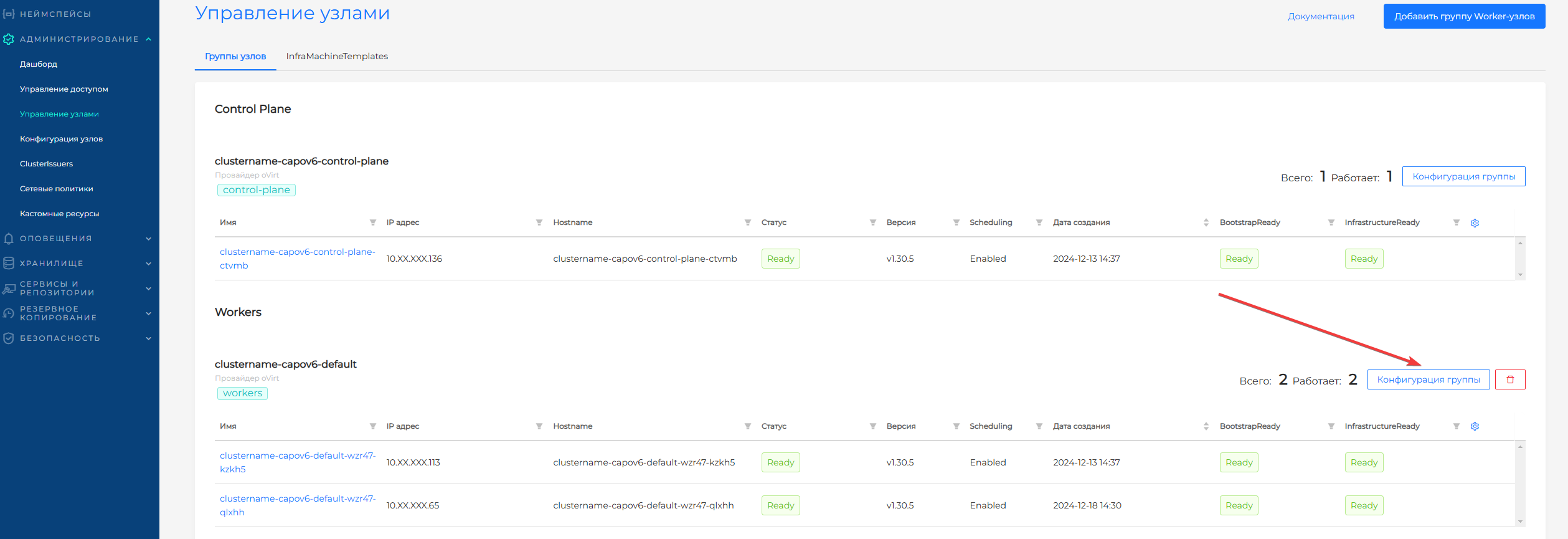
Configuration Cluster API
On the Configuration Cluster API tab in the GUI, set Cluster API parameters: for Worker groups, this is primarily MachineDeployment; for the Control Plane group, KubeadmControlPlane (API controlplane.cluster.x-k8s.io). View and edit YAML in the management cluster: Administration → Custom Resources.
For details about propagating labels, annotations, and taints from MachineDeployment and KubeadmControlPlane to Kubernetes nodes, see Labels, annotations, and taints in Cluster API.
Scaling method
| Mode | Description |
|---|---|
| Manual | The number of nodes is set manually in the “Replicas Requested” field. |
| Automatic | Cluster Autoscaler changes the number of nodes within a specified range (min-max). Minimum - 2 nodes. |
Screenshot: auto-scaling
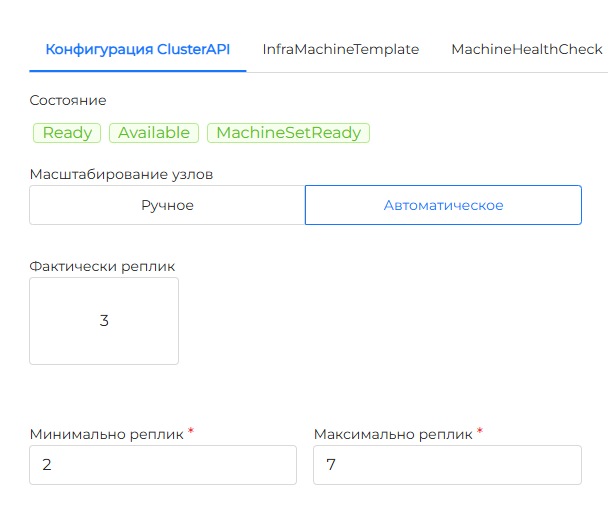
For more information about annotations, scale-from-zero and restrictions when deleting nodes, see the reference book Scaling nodes.
If necessary, remove a specific host from a Shturval v2 group by following the Release a specific host procedure.
Note: when the limit of Worker nodes or vCPUs under the license is exceeded, a notification is displayed on the GUI asking you to contact the vendor.
Recovery type (Strategy)
| Type | Description |
|---|---|
| OnDelete | When the configuration is changed, old nodes are deleted and new ones are created. |
| RollingUpdate | Recommended. New nodes are created by sequentially replacing old ones. You need to specify maxUnavailable and maxSurge. |
Additional options
- minReadySeconds - The minimum time in seconds that a node must be Ready before a replica is considered available. Default is 0.
- progressDeadlineSeconds — maximum deployment time (default 600 s). If exceeded - ProgressDeadlineExceeded.
- revisionHistoryLimit — number of MachineSets to rollback (default 1).
- nodeDeletionTimeout - how long
capi-controller-managerwill try to delete a node after resource Machine is marked for deletion. If the value is 0, attempts are repeated indefinitely; if not specified, the default value (10 s) for this field in Machine is used. - nodeDrainTimeout — total time for Drain node (0 — no limit). Different from
kubectl drain --timeout. - nodeVolumeDetachTimeout — waiting time for volumes to be detached (0 - no limit; Machine often defaults to 10 s for detaching).
- Roles - separated by commas: each role specifies the node label
node-role.kubernetes.io/<role>.
The Control Plane group settings on this tab correspond to the KubeadmControlPlane (controlplane.cluster.x-k8s.io) resource. The resource name is usually formed as <cluster-name>-control-plane.
- The requested number of nodes is only an odd number (etcd on Control Plane nodes; an odd number is required for quorum). For fault tolerance, 3 or 5 nodes are recommended.
- Update strategy: RollingUpdate - changes are applied sequentially; set by MaxSurge (integer number of nodes or percentage).
- nodeDeletionTimeout, nodeDrainTimeout, nodeVolumeDetachTimeout - the same meanings as for Worker (Machine): deleting a node after deleting Machine, waiting for Drain and detaching volumes.
“Remediation” parameters after a machine is declared unhealthy:
| Parameter | Description |
|---|---|
| maxRetry | Maximum retries for correction; If the new replacement machine breaks down again, a new attempt is considered. The default is not set - attempts are endless. |
| retryPeriod | Pause before the next attempt after failure. The default is next attempt immediately. |
| minHealthyPeriod | After this interval, the machine is considered “settled down”; The recovery counter is reset (by default it is often 1 hour). |
Note: It is not recommended to reduce the number of Control Plane nodes in a management cluster.
InfraMachineTemplate
InfraMachineTemplate specifies the parameters of virtual machines for a group. The template type depends on the provider. When a node is created, Cluster API creates an instance of InfraMachine (for example, VSphereMachine, ShturvalMachine) based on a template - this resource creates a VM in the infrastructure.
After a platform upgrade, replace the VM template in InfraMachineTemplate for each node group so that new nodes are created with the current Kubernetes version. Step-by-step instructions are on the VM nodes and templates page.
Note: changing the InfraMachineTemplate in an existing group causes re-creation of nodes.
Note: for providers zVirt, oVirt, HostVM, ED Virtualization, ROSA Virtualization, VMware vSphere, Yandex Cloud and VMware vCloud Director, in the InfraMachineTemplate drop-down list, all VM templates that exist in the infrastructure provider platform and to which the service management system has access rights are available. Use only those VM templates that are prepared using STC!!!
Basic parameters (general)
| Parameter | Description |
|---|---|
| CPU (cores/sockets) | Number of cores, sockets. |
| RAM (memoryMiB, sizeMb) | Memory capacity. |
| Disk(diskGiB, osdisksizegb) | System disk size. |
| VM template (template) | OS image. It is recommended to use one OS within the cluster. |
Providers and options
A detailed description of the parameters for each provider is in the InfraMachineTemplate Reference:
| Provider | Template type | Key parameters |
|---|---|---|
| vSphere | VSphereMachineTemplate | datacenter, datastore, diskGiB, memoryMiB, numCPUs, networkName, resourcePool, folder, template |
| oVirt | OVirtMachineTemplate | cores, sockets, threads, sizemb, osdisksizegb, vnicprofile, ovirtcluster, template, Storage domain |
| OpenStack | OpenStackMachineTemplate | cloudName, flavor, sshKeyName, volumeType, disk volume, template |
| Shturval v2 | ShturvalMachineTemplate | host role or label selector (In, NotIn, Exists, DoesNotExist) |
| Yandex Cloud | YandexMachineTemplate | platform type, disk type, RAM, disk, cpuCores, template |
| Basis Dynamix | BasisMachineTemplate | kernels, RAM, disk, resource group, VINS, ExtNet |
| vCloud Director | VCDMachineTemplate | DiskSize, SizingPolicy, template |
Screenshot: InfraMachineTemplates
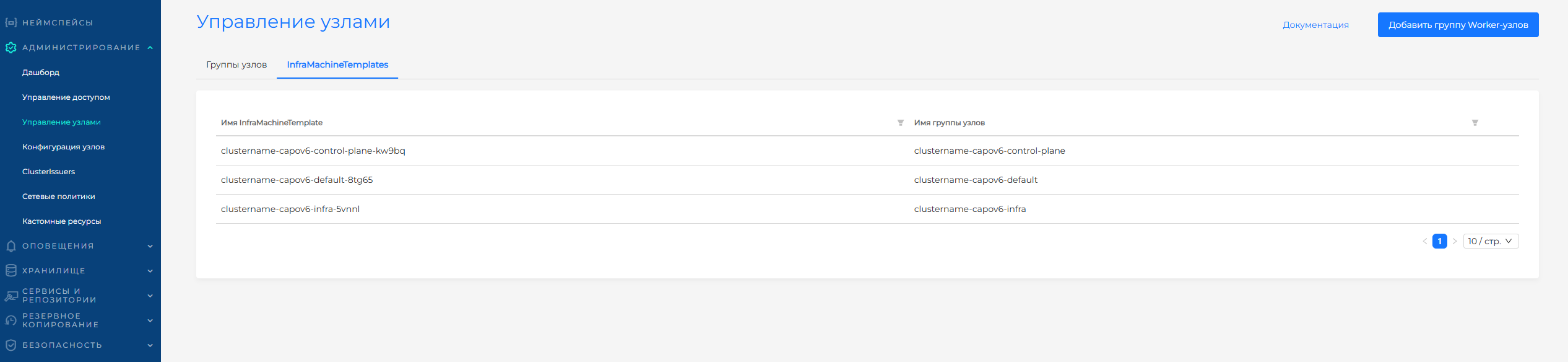
InfraMachineTemplates tab
On the Manage Nodes page, the InfraMachineTemplates tab contains all the infrastructure templates for the cluster. When you change a template in a group configuration, a new InfraMachineTemplate is created. You can delete templates that are not associated with groups.
Unidentified nodes tab
Displayed if the cluster has nodes without connection to Machine (Cluster API). Such nodes can be deleted.