Snapshots
Snapshot - a copy of the contents of a permanent volume (Persistent Volume / PVC) at a certain point in time without creating a new volume. Snapshots are created by storage tools through compatible CSI drivers and are used for quick data rollback, cloning volumes and recovery points before risky operations (for example, a backup before updating a database).
In the Shturval platform, snapshot support is provided by the shturval-snapshotter (CSI Snapshotter) operator. The operator is critical for the operation of the platform (it cannot be disabled); By default, it is installed in the enabled state in the client clusters and in the management cluster. More information about the service - shturval-snapshotter.
What are snapshots for?
Restore point - before updating an application, migrating a database or making massive data changes, you can create a snapshot and, if necessary, roll back to it.
Volume cloning - you can create a new PVC from a snapshot with the same data (copying without removing the data from the storage system).
Short-term backup - a quick “snapshot” on the same storage platform without copying to external storage.
Snapshots do not replace a full backup of the cluster and data to external storage. For information on the differences between snapshots and backups, see What is the difference between backups and snapshots.
Kubernetes objects for snapshots
The snapshotter operator enters in the CRD (Custom Resource Definitions) cluster:
| Object | Description |
|---|---|
| VolumeSnapshotClass | Snapshot class: sets attributes for creating snapshots; the main parameter is the CSI driver used (analogous to StorageClass for snapshots). |
| VolumeSnapshotContent | The actual contents of the snapshot on the storage system, associated with a VolumeSnapshot object (often created automatically). |
| VolumeSnapshot | An object in Kubernetes that describes a PVC snapshot - a request for a snapshot of a specific volume in the namespace. |
Typical scenario: the user creates a VolumeSnapshot, specifying the source (PVC) and optionally VolumeSnapshotClass. The snapshotter controller creates a snapshot via the CSI driver and, if successful, creates or updates VolumeSnapshotContent. Once the snapshot is ready, you can create a new PVC from it (cloning).
Support for snapshots with CSI drivers
Snapshots are used with compatible CSI drivers. The Shturval platform supports snapshots. The following CSI modules are available:
| Storage Type | CSI/module | Snapshot support |
|---|---|---|
| Local (RawFile) | shturval-local-csi | Yes |
| Ceph RBD / CephFS | shturval-ceph-rbd/shturval-ceph-cephfs | Yes |
| VMware vSphere | shturval-capvs-csi | Yes* |
* The VMware vSphere vCenter account requires assigned roles and permissions (including for CSI and volume snapshots). See VMware vSphere account requirements.
Before using snapshots, ensure that shturval-snapshotter-crds and shturval-snapshotter are enabled in the cluster, along with the CSI module for your volume type. Install CRDs first, then the snapshotter service. VolumeSnapshotClass must reference a driver compatible with your StorageClass.
Where to manage snapshots
- Operator Status: Services and Repositories → Installed Services → find Operator snapshotter (
shturval-snapshotter) → Manage. - Snapshot Objects (CR): select cluster → Administration → Custom Resources. In the search field, you can enter, for example,
snap- CRDs associated with volume snapshots will remain in the list.
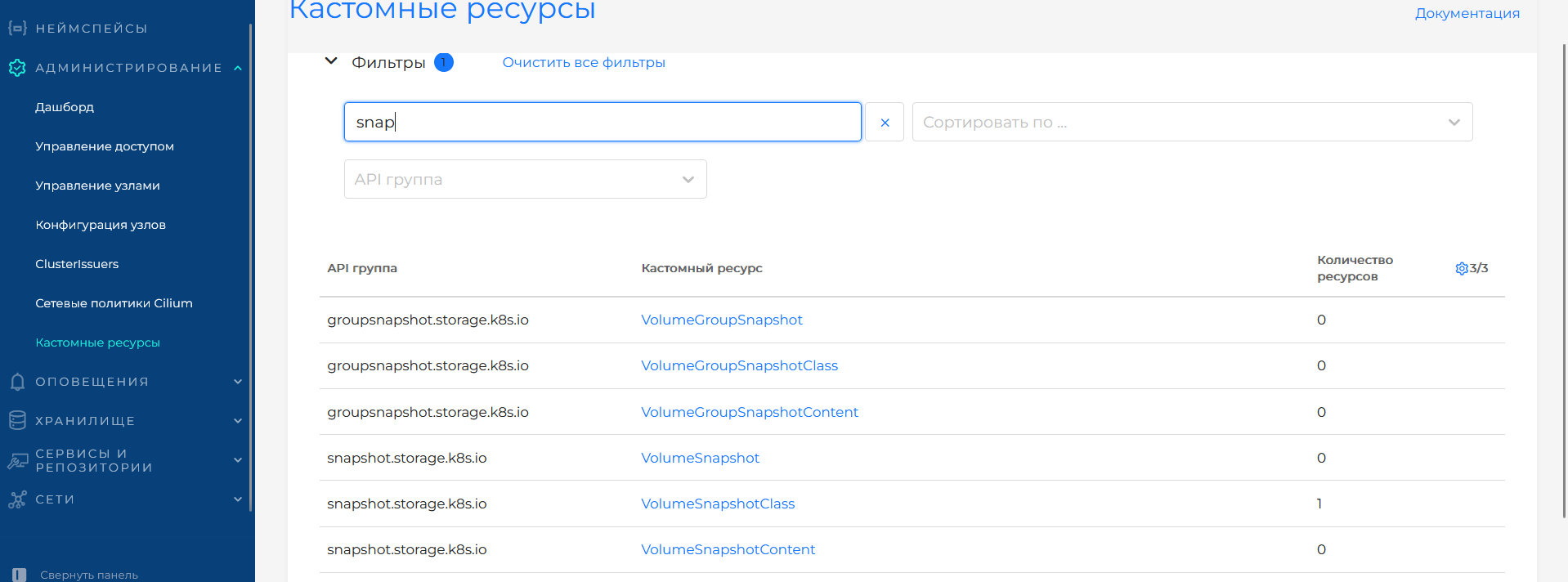
On the Custom Resources page, the table displays API group, custom resource and number of resources in the cluster. For snapshots of individual volumes, the snapshot.storage.k8s.io group is used - VolumeSnapshot, VolumeSnapshotClass, VolumeSnapshotContent. The groupsnapshot.storage.k8s.io group contains types for group snapshots: VolumeGroupSnapshot, VolumeGroupSnapshotClass, VolumeGroupSnapshotContent. Click on a resource name in the table to open a list of its instances and create or view it. Sorting, filtering by API group and resetting filters (Clear all filters) are available.
Limitations and recommendations
The snapshot records the state of the volume at the time of creation. Data recorded after the snapshot was created is not included in the snapshot.
To ensure the consistency of application data (for example, a database), before creating a snapshot, it is recommended to consistently stop recording or use application mechanisms (for example, flush, freeze).
Storing snapshots consumes space in the same storage system; long-term storage of a large number of snapshots may be limited by quotas and provider policies.
Deleting PVCs with existing snapshots may be prohibited or require prior deletion of snapshots - depending on the reclaim policy and driver implementation.