Architecture of access modules in the platform
How the access system works.
Components
- Authentication - checking the user’s identity via LDAP, AD or OIDC;
- Authorization — checking rights to access resources (RBAC);
- Access control module - application of assignments in clusters and namespaces.
Authentication
Authentication into the platform is available using the internal Authn provider. Additionally, you can connect external providers using the OAuth OIDC 2.0 protocol: Keycloak or Blitz.
Authentication scheme
Illustration: Authentication scheme
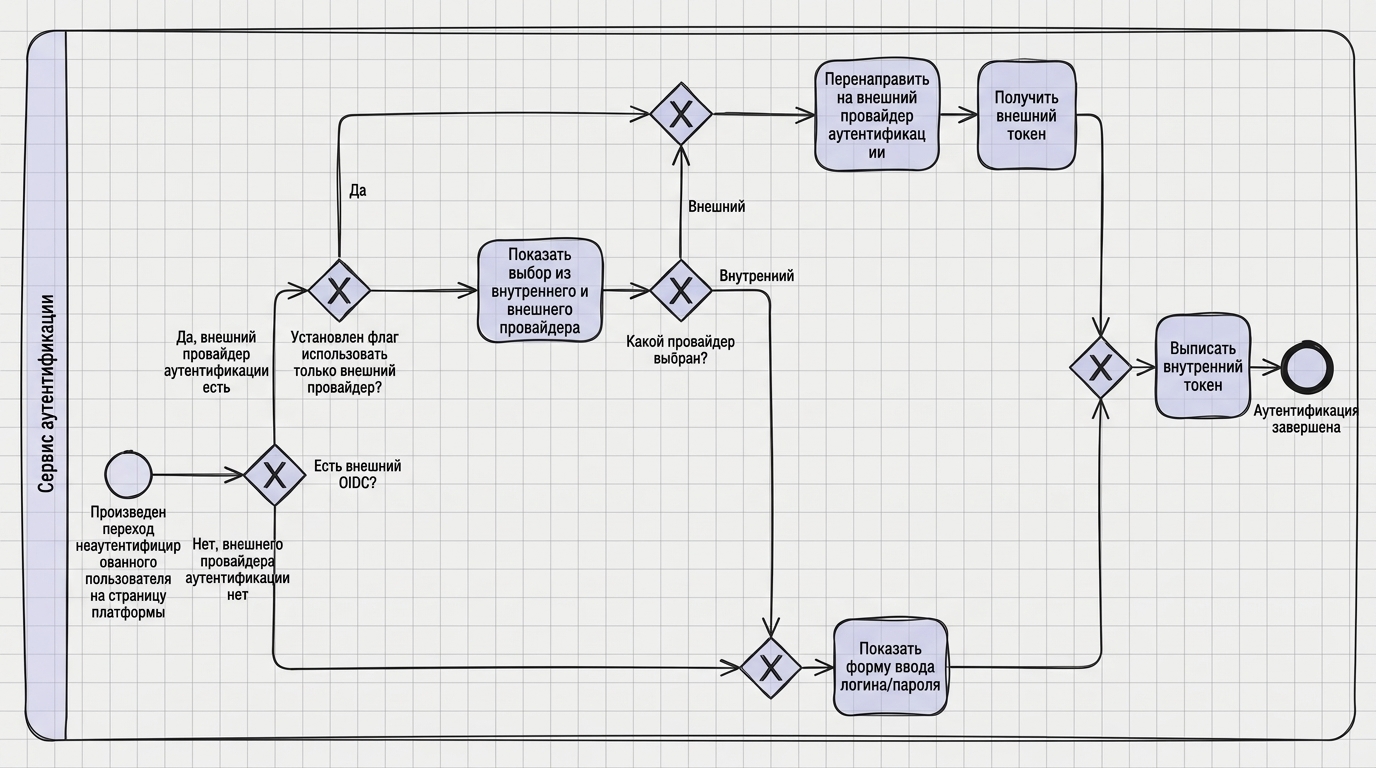
Authentication Process:
External Provider Check: When an unauthenticated user logs in, the system checks for a configured external OIDC provider.
Choosing a provider:
- If the external provider is not configured, the login/password entry form is displayed (internal Authn provider).
- If the external provider is configured:
- When the “use only external provider” flag is set, the user is redirected to the external provider.
- If the flag is not set, the user is offered a choice between an internal and external provider.
Authentication:
- Internal provider: user enters login and password in the platform form.
- External provider: the user is redirected to the page of an external service (Keycloak, Blitz, etc.), is authenticated, after which the system receives an external token.
Token Issuance: Regardless of the selected authentication method, the platform issues an internal token to access platform resources.
Features:
- Using internal Authn provider for LDAP integration.
- Connection of external OAuth OIDC 2.0 providers Keycloak and Blitz.
- Flexible configuration: you can use only an external provider or give the user a choice.
- A single internal token for all authentication methods, ensuring consistency of the access system.
Configuring external providers: see the External Authentication Providers page (includes Keycloak and Blitz connection scripts).
Access control
The platform’s access control system is built on RBAC (Role-Based Access Control) and uses custom Kubernetes resources to store rights assignments and synchronize them across clusters.
Access control scheme
Illustration: Access control scheme
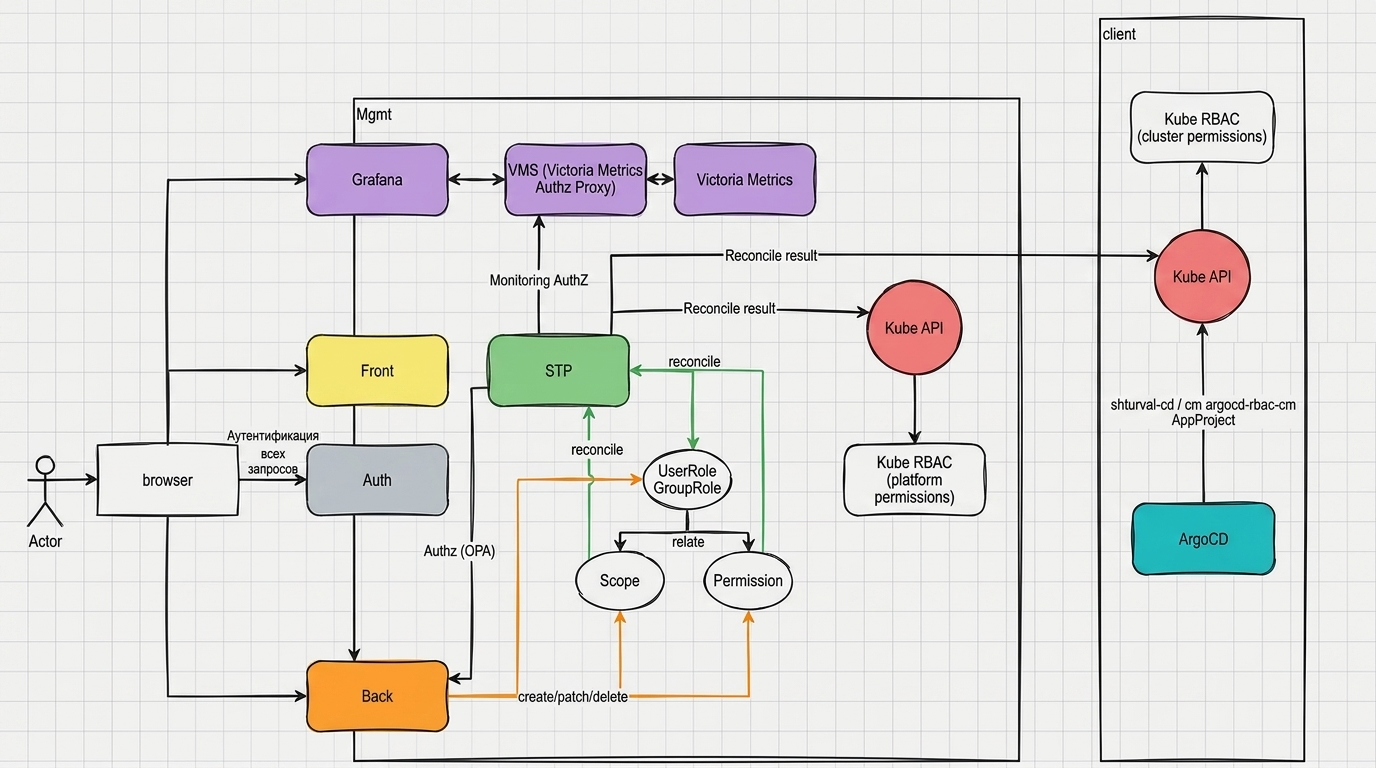
System components:
Authentication: processes all requests from users throughbrowser, verifies the user’s identity and issues an internal token.
Frontend (Front): interacts with the browser and sends requests to monitoring services (Grafana).
Backend: handles requests from the browser and uses Authz (OPA) to check permissions. Performs operations on creating, modifying, and deleting Scope and Permission objects.
Authorization (Authz, OPA): an authorization component based on the Open Policy Agent that verifies the user’s rights to perform operations.
STP (Security Token Processor): the central component of the access control system:
- Receives authorization decisions from Back (Authz OPA) and from VMS (Victoria Metrics Authz Proxy);
- Performs reconcile (synchronization) of UserRole and GroupRole objects;
- Sends synchronization results to the Kube API to enforce platform-level permissions.
UserRole and GroupRole: custom resources (API group
permissions.shturval.tech) that store rights assignments to users and groups. Associated with Scope and Permission objects.Scope and Permission: define scopes of application and specific permissions. Backend manages these objects (create/patch/delete), and STP uses them when reconcile.
Application of rights:
At the platform level: STP synchronizes UserRole/GroupRole into the Platform Kube API, which uses Kube RBAC (platform permissions) to access platform resources.
At the cluster level: permissions are synchronized in the Kube client cluster API, which uses Kube RBAC (cluster permissions) to access cluster resources.
Integration with services:
- Grafana: receives requests via Frontend; access is controlled through an authorization system.
- Victoria Metrics: access to metrics is controlled through VMS (Victoria Metrics Authz Proxy), which interacts with STP.
- Kubeflow: access to profiles is controlled through Kubeflow roles defined in access sets.
- Argo CD: access to projects and applications is controlled via Kubernetes RBAC in client clusters; Argo CD settings are synchronized via
argocd-rbac-cmandAppProject.
Synchronization process:
- The administrator creates or changes rights assignments through the GUI (Backend creates/changes UserRole/GroupRole).
- STP performs a reconcile: reads UserRole/GroupRole and associated Permissions, merges permissions from all assigned sets.
- STP sendsresults in Kube API platform and client clusters.
- Kubernetes RBAC applies rights in the corresponding clusters and namespaces.
More information about custom resources: UserRole, GroupRole and Permissions.
Request authorization scheme
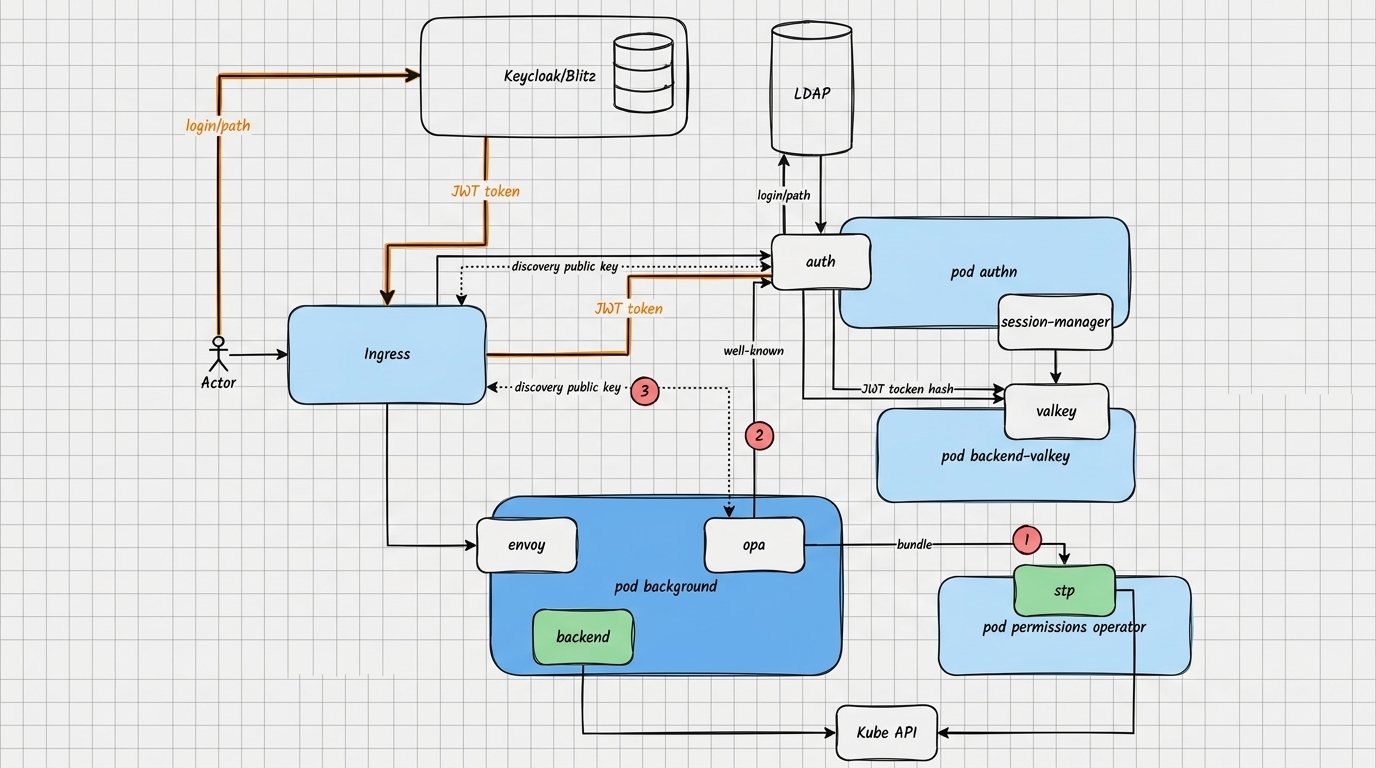
Interactions on the authorization scheme:
- The user in the browser accesses the platform GUI (Frontend), passing the internal token issued by the authentication module.
- Frontend proxies requests to Backend, as well as to individual services (Grafana, Victoria Metrics, Kubeflow, Argo CD) through configured integration points.
- Backend, before performing the operation, requests a decision from Authz (OPA) regarding the current user, the set of his roles and the target resource/action.
- Authz (OPA) uses rules and rights assignment data (Scope, Permission, UserRole, GroupRole), which are kept up to date by the STP (Security Token Processor) component.
- STP periodically reads UserRole/GroupRole/Permission objects from the management cluster, aggregates permissions and synchronizes them into:
- Kube API platform - for rights at the platform level;
- Kube API of client clusters - for rights at the cluster and namespace level.
- To access Victoria Metrics metrics, the authorization decision is made by the VMS proxy, which also relies on data synchronized by STP (a bunch of users/tenants/clusters).
- After a positive decision from Authz/OPA (and, if necessary, VMS), the Backend performs the requested operation or returns data to the user; if rejected, returns an authorization error.
Access levels
Rights are assigned at the following levels:
- Platform - access to the management cluster and client clusters in general;
- Tenant — access to all tenant objects;
- Cluster — access to a specific cluster (management or client);
- Namespace — access to namespace in the cluster.
Access rights management:
- At the platform level: see Assigning access rights in the “Platform Administrator” section.
- At the cluster level: see Cluster Access Control in the “Cluster Administrator” section.
Synchronization
Rights assignments are applied to the management cluster and client clusters. The application status is displayed in the GUI (successful / error / not required).