Requirements
Infrastructure, license, mirror, nodes.
Closed loop requirements
| Parameter | Description |
|---|---|
| Internet access | On cluster nodes - no; on the host mirror - no (completely closed loop) or yes (conditionally closed loop) |
| Mirror | Necessarily; deployed before cluster installation |
| Bundle | tar archive with images and packages for the platform version |
| License | Enterprise only |
All cluster nodes and shtil machine must have network access to the mirror (usually TCP 443 or the port specified when the mirror was initialized).
Requirements for administrator qualifications
The administrator must have:
- basic Linux administration skills;
- skills in working with Kubernetes and automation processes for managing container applications in clusters.
Supported providers
- Shturval v2 - bare metal / hosts via SSH
- oVirt (including zVirt, HostVM, ED Virtualization, ROSA Virtualization)
- VMware vSphere
Public clouds and providers that require nodes to access the Internet are not used in a closed loop.
More details: How work with providers works.
Requirements for the mirror host
- OS: Linux. The stm utility must be run on a host running Linux OS.
- Resources: minimum 2 vCPU, 4 GiB RAM, 150 GiB disk; 4 vCPUs, 16 GiB RAM, 300 GiB disk are recommended.
- SELinux:
permissiveordisabled. - Nginx ports (parameters
http-portandhttps-port, default 80 and 443): must be free. - Container runtime: on the host do not install Docker manually. Use Docker from the bundle; operation with another container runtime instance is not guaranteed.
- Certificate: when importing - PEM (CA chain and certificate), subjectAltName with the mirror FQDN matching the
--fqdnparameter.
Mirror Host Resources {#Mirror Host Resources}
| Configuration | CPU (vCPU) | Memory (GiB) | Disk (GiB) | IOPS |
|---|---|---|---|---|
| Minimal | 2 | 4 | 150 | 300 |
| Featured | 4 | 16 | 300 | 300 |
Resource requirements
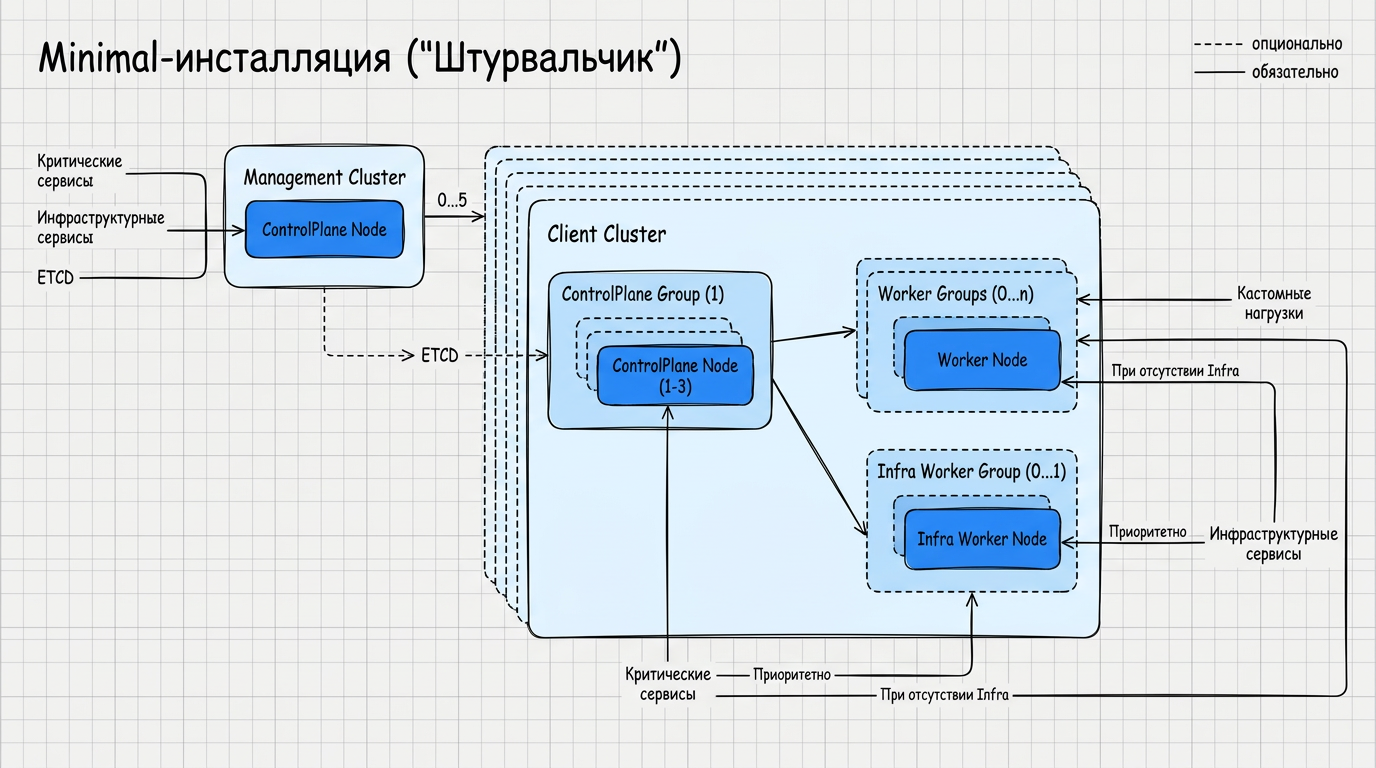
The management cluster must consist of at least one Control Plane node. For fault tolerance - at least three Control Planes and three Workers.
When installed on only one Control Plane, only critical services are installed on a node; lLogging, monitoring and backup are not installed in this configuration.
Note: A cluster on one Control Plane is not recommended for production. Up to 5 client clusters.
The license specifies limits on Worker nodes and vCPUs; When exceeded, a notification is displayed in the GUI.
When the load is over 80% it is recommended to add nodes. Metrics are stored for 7 days; logs are rotated based on completion.
Minimum configuration (1 Control Plane node)
For test installations only
Resource table and schema
| Component | CPU (vCPU) | Memory (GiB) | Disk (GiB) | IOPS |
|---|---|---|---|---|
| Mirror (Registry) | 2 | 4 | 150 | 300 |
| Control Plane node | 6 | 8 | 80 | 600 |
Recommended configuration (1 CP + 3 Workers)
Not recommended for production installations
Resource table
| Component | CPU (vCPU) | Memory (GiB) | Disk (GiB) | IOPS |
|---|---|---|---|---|
| Mirror (Registry) | 2 | 4 | 150 | 300 |
| Control Plane node | 4 | 16 | 100 | 600 |
| Worker node | 8 | 32* | 300** | 600 |
* When using the management cluster exclusively to manage client clusters (without user loads) - minimum 16 GiB. 32 GiB provides headroom for monitoring, logging and backup.
** Minimum 100 GiB for system components; 300 GiB provide storage of metrics (7 days) and rotating logs.
Fault-tolerant configuration (3 CP + 3 Worker)
Resource table
| Component | CPU (vCPU) | Memory (GiB) | Disk (GiB) | IOPS |
|---|---|---|---|---|
| Mirror (Registry) | 4 | 16 | 300 | 300 |
| Control Plane node (×3) | 4 | 16 | 100 | 600 |
| Worker node (×3) | 8 | 32* | 300** | 600 |
* When using the management cluster exclusively to manage client clusters (without user loads)zok) - minimum 16 GiB. 32 GiB provides headroom for monitoring, logging and backup.
** Minimum 100 GiB for system components; 300 GiB provide storage of metrics (7 days) and rotating logs.
Stand-alone cluster (without client clusters)
Resource table
| Component | CPU (vCPU) | Memory (GiB) | Disk (GiB) | IOPS |
|---|---|---|---|---|
| Mirror (Registry) | 2 | 4 | 150 | 300 |
| Control Plane (1 node) | 6 | 8 | 80 | 600 |
For stand-alone in a closed perimeter, use the Mirror line from the minimal configuration.
More information about the mode: Management cluster operating modes.
Machine resources shtil
The shtil utility must be run from a host with Linux OS. Minimum 3 vCPU, 3 GiB RAM, 20 GiB disk; Docker from the bundle; network access to the mirror via HTTPS (port according to the mirror settings, usually 443). If the mirror has a self-signed or enterprise CA, configure mirror trust at the Docker daemon level before running shtil: the --bootstrap-insecure and --bootstrap-registry-certs-dir flags do not affect the primary docker pull. Checks are on the Preparation page.
Supported operating systems for the shtil startup machine
| Operating system | Version | Kernel version |
|---|---|---|
| Astra Linux SE | 1.7.5, 1.8 | 5.10, 5.15, 6.1, 6.6 |
| Debian | bullseye | 5.10 |
| Debian | bookworm | 6.1.0 |
| Ubuntu | Noble 24.04 | 6.8 |
| RED OS | 8 | 6.6, 6.12 |
| ROSA | Chrome | 6.6 |
| Alt Linux | 10 | 6.1 |
| RHEL | 9 | 5.14 |
| Rocky Linux | 9 | 5.14 |
| SberLinux | 5.9.1 | 5.14 |
Requirements for hosts and OS
Supported cluster node operating systems
All cluster nodes must use the same kernel OS version.
| Operating system | Version | Kernel version |
|---|---|---|
| Astra Linux SE | 1.7, 1.7.5, 1.8 | 5.10, 5.15, 6.1, 6.6 |
| Debian | Bullseye, Bookworm | 5.10, 6.1.0 |
| Ubuntu | Focal 20.04, Jammy 22.04, Noble 24.04 | 5.10, 5.15, 6.8 |
| RED OS | Murom, 7.3.4, 8 | 5.10, 5.15, 6.1, 6.6, 6.12 |
| ROSA | Chrome | 6.6, 6.12 |
| Alt Linux | 10 | 6.1 |
| BASIS | Onyx | 6.6 |
| Oracle Linux | 8.7 | 5.15 |
| RHEL | 9 | 5.14 |
| Rocky Linux | 9 | 5.14 |
| SberLinux | 5.9.1 | 5.14 |
Required packages on nodes: openssh-server and dependencies, package manager (yum or apt), sudo, iptables, gnupg.
Infrastructure: physical servers of x86 architecture and/or virtual machines running oVirt version no lower than 4.4 and/or VMware vSphere (hypervisor no lower than 6.7 update 3).
Cluster nodes
- Nodes must resolve FQDN mirrors and other network names used by the selected scenario.
- SELinux -
permissiveordisabledmode. - Inaccessible OS package repositories should be disabled or removed.
- A home directory must be created for the Linux user under whose name the installation is performed (for example,
/home/shturval). - The installation user must be able to run
sudowithout a password on all target nodes.
Remote access via SSH during installation on pre-created hosts
On each server:
- The OpenSSH service accepts connections on port TCP 22.
- An identical service account for installation was created on all nodes.
- Authentication using the same public key is configured on all nodes.
- The service account is allowed to execute
sudowithout a password.
Local storage
RawFile Provisioner is used as local storage; ZFS is not supported. Valid file systems: ext4, btrfs, xfs.
Network requirements
Firewalls should not block necessary connections.
Main ports
| Destination | Port | Protocol |
|---|---|---|
| Ingress (HTTP/HTTPS) | 80, 443 | TCP |
| KubeAPI | 6443 | TCP |
| SSH (installation) | 22 | TCP |
| Mirror (Registry) | 443* | TCP |
| etcd | 2379, 2380 | TCP |
| Cilium (CNI) | 4240, 6081 | TCP, UDP |
| S3 (Velero) | 9000 | TCP |
| LDAP | 389, 636 | TCP/UDP |
| Keycloak, Blitz | 80, 443 | TCP |
* or the port specified when deploying the mirror.
LDAP and OIDC (Keycloak, Blitz): only inside a closed perimeter.
S3 (Velero): Internal S3-compatible storage only.
Addressing and access rules
- IP addresses of nodes do not change during cluster operation.
- The shtil machine and all cluster nodes must have access to the mirror via HTTPS (port as configured for the mirror, usually 443).
- Management cluster mustIt is not possible to have access to the API of the infrastructure providers used (oVirt Engine, vCenter, etc. - according to the deployment scenario).
Control Plane subnet and virtual IPs (VIPs)
The IP addresses of the Control Plane nodes must belong to the same subnet and the same broadcast segment. When using internal balancers for KubeAPI and Ingress, one free VIP is required for each.
If external balancers are used for KubeAPI and/or Ingress, VIP allocation is not required. Requirements and an example of setting up an external balancer are given below.
Additional rules for domestic VIP:
- VIP should not be configured on host interfaces prior to installation.
- The VIP for the API server must belong to the same subnet as the IP addresses of the Control Plane nodes.
- VIP for Ingress is used on the network load balancer and must be accessible from the admin workstation if the internal Ingress scenario is selected.
- For a management cluster with one Control Plane, IP addresses must be assigned in ascending order: first the node IP address, then the VIP API server, then the VIP Ingress.
External load balancer
When deploying a cluster with multiple Control Plane nodes, KubeAPI requires a load balancer. The platform can use a built-in (VIP via Kube-VIP) or external balancer.
An external load balancer is also used for Ingress when traffic must go through a common entry point such as HAProxy in front of the cluster.
Configuring an external balancer in a cluster
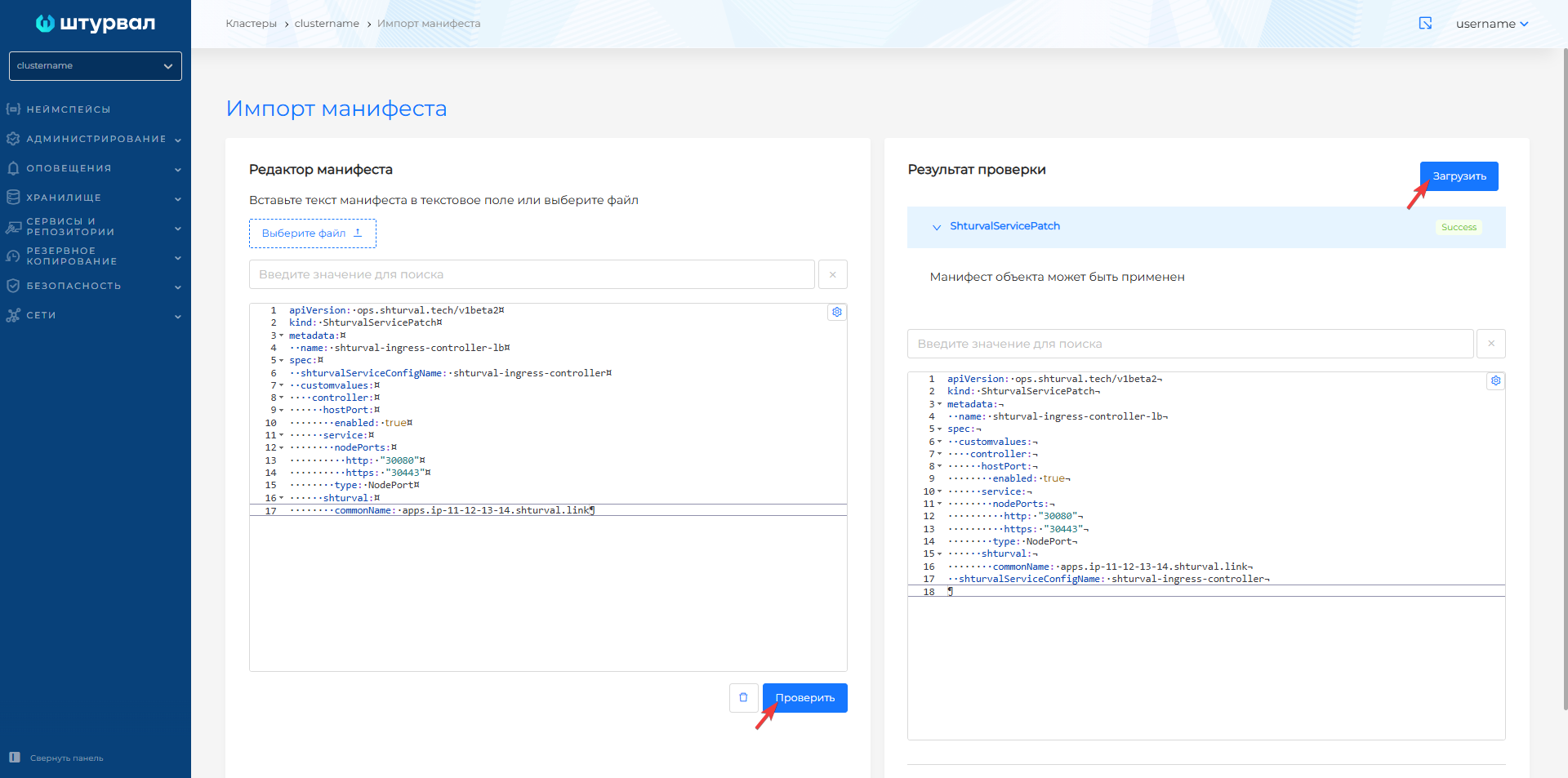
Requirements:
- Balancing is performed at level L4 (TCP).
- The balancer must support storing host selection by source IP address (sticky session / source IP affinity), for example
balance sourcein HAProxy. - An external balancer for KubeAPI when installing a cluster with the Shturval v2 provider must be configured before the start of the cluster installation.
HAProxy configuration example (static configuration) {#haproxy-configuration example-static-configuration}
HAProxy static configuration example
Below is an example of a HAProxy configuration for a cluster with 3 Control Plane and 2 Worker nodes. Substitute your IP addresses.
#---------------------------------------------------------------------
# myclustername cluster
#---------------------------------------------------------------------

frontend myclustername-api-server
    bind 10.11.12.100:6443
    default_backend myclustername-api-server
    mode tcp

backend myclustername-api-server
    balance source
    mode tcp
    server master1 10.11.13.1:6443 check
    server master2 10.11.13.2:6443 check
    server master3 10.11.13.3:6443 check

frontend myclustername-ingress-http
    bind 10.11.12.100:80
    default_backend myclustername-ingress-http
    mode tcp
    option tcplog

backend myclustername-ingress-http
    balance source
    mode tcp
    server worker1 10.11.13.4:80 check
    server worker2 10.11.13.5:80 check

frontend myclustername-ingress-https
    bind 10.11.12.100:443
    default_backend myclustername-ingress-https
    mode tcp
    option tcplog

backend myclustername-ingress-https
    balance source
    mode tcp
    server worker1 10.11.13.4:443 check
    server worker2 10.11.13.5:443 check
Deciphering addresses:
| Address | Purpose |
|---|---|
| 11/10/12/100 | External balancer IP (entry point) |
| 10.11.13.1–10.11.13.3 | Control Plane nodes (port 6443) |
| 10.11.13.4–10.11.13.5 | Worker nodes (ports 80, 443) |
When using NodePort for Ingress, specify ports 30080 and 30443 instead of 80 and 443 on Worker nodes.
Dynamically adding backends (CoreHA)
The shturval-coreha module allows HAProxy to dynamically obtain a list of nodes from the Ingress Controller via DNS. This is useful when scaling or migrating pods.
Setting up CoreHA:
- Install and enable Module for searching nodes with running hostport services (
shturval-coreha) in the Services and repositories section. - Configure chart parameters, for example:
config: zoneName: cluster-prod01-dc1.shturval - Apply ShturvalServicePatch to
shturval-ingress-controllerwith labelingress.cluster/nameand hostPort enabled. - In HAProxy use
resolversandserver-template:
resolvers coredns-cluster
    nameserver ns1 <api-server-vip>:1053
    accepted_payload_size 8192

backend cluster-prod01-dc1-ingress-http
    balance source
    mode tcp
    server-template daemonset 2 <label_value>.ingress.<zoneName>:80 check resolvers coredns-cluster init-addr none
Where <api-server-vip> is the address of the cluster API server, <zoneName> is the value of config.zoneName in shturval-coreha, <label_value> is the value of the ingress.cluster/name label.
Check: dig @<api-server-vip> -p 1053 <label_value>.ingress.<zoneName>.
Ports and traffic directions
| Target | Balancer port | Backends |
|---|---|---|
| KubeAPI | 6443 | Control Plane nodes:6443 |
| Ingress HTTP | 80 | Worker nodes:80 (or 30080 with NodePort) |
| Ingress HTTPS | 443 | Worker nodes:443 (or 30443 with NodePort) |
When using CoreHA, the balancer connects to the module’s DNS server on port 1053 (VIP Control Plane) to dynamically resolve backend names.
By provider
| Provider | Recommendations |
|---|---|
| Shturval v2 | HAProxy, Keepalived or similar. Balancer for KubeAPI - before installation |
| oVirt, VMware vSphere | A balancer can be used at the virtualization platform level |
DNS and network names
- Each cluster node must have a unique network name.
- The full network name of the host must be a valid DNS name no longer than 63 characters.
- The cluster name must be unique in combination with the organization’s DNS zone and form a valid DNS subdomain.
- A zone must be created in the DNS; For each cluster node, a record of type A must be created in this zone.
- An A-record of the form
api.<cluster_name>.<base_domain>is created for the management cluster API server. - A wildcard record of the form
*.<cluster_name>.<base_domain>is created for the Ingress of the management cluster. - The FQDN of the mirror must resolve to the IP address on the machine shtil andon cluster nodes.
Firewalls should not block network connections. This is required to support interaction between platform components.
In a closed loop, external cloud APIs in matrices are not used; instead of an external Registry - a mirror in your perimeter.
Internetworking schemes
Shturval v2 with internal balancer for KubeAPI and external balancer for Ingress and CoreHA for client cluster
Scheme — illustration
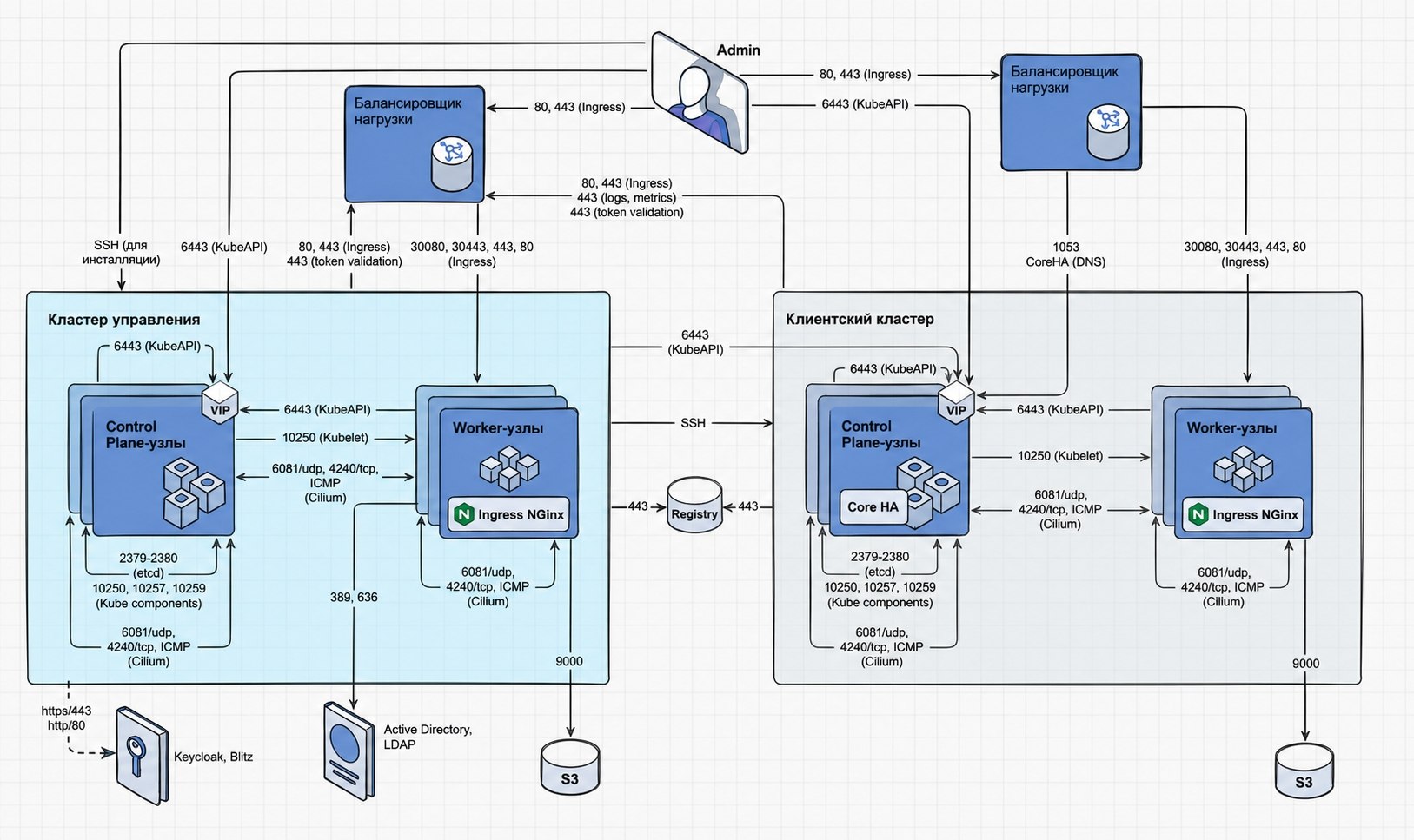
Description
| Source | Destination | Port | Protocol | Purpose |
|---|---|---|---|---|
| Admin | Load Balancer (Ingress) | 80 | TCP | Interaction with the cluster Ingress-controller |
| Admin | Load Balancer (Ingress) | 443 | TCP | Interaction with the cluster Ingress-controller |
| Admin | VIP Control Plane Nodes (KubeAPI) | 6443 | TCP | Cluster administration and management |
| Admin | Management Cluster | 22 | TCP | Installing a management cluster via SSH |
| Cluster nodes (Control Plane, Worker) | Node VIP Control Plane (KubeAPI) | 6443 | TCP | Kubernetes and STD components for interacting with the cluster |
| Cluster nodes | Load Balancer (Ingress) | 80 (optional) | TCP | Cluster interaction with Ingress-controller |
| Cluster nodes | Load Balancer (Ingress) | 443 | TCP | Cluster interaction with Ingress-controller |
| Load Balancer (Ingress) | Worker nodes | 30080 (optional) | TCP | Interaction with the cluster Ingress-controller |
| Load Balancer (Ingress) | Worker nodes | 30443 (optional) | TCP | Interaction with the cluster Ingress-controller |
| Load Balancer (Ingress) | Worker nodes | 443 | TCP | Interaction with the cluster Ingress-controller |
| Load Balancer (Ingress) | Worker nodes | 80 | TCP | Interaction with the cluster Ingress-controller |
| Control Plane nodes | Worker nodes (Kubelet) | 10250 | TCP | Kubernetes component for interacting with kubelet |
| Cluster nodes | Cluster nodes | 4240 | TCP | Cluster network (Cilium) |
| Cluster nodes | Cluster nodes | — | ICMP | Cluster network (Cilium) |
| Cluster nodes | Cluster nodes | 6081 | UDP | Cluster network (Cilium) |
| Worker nodes of the management cluster | S3 (Simple Storage Servicee) | 9000 | TCP | Interaction with S3 storage (Velero) |
| Control Plane node | Control Plane nodes (Etcd) | 2379, 2380 | TCP | Interaction of ETCD cluster nodes |
| Control Plane node | Control Plane nodes (Kube components) | 10250, 10257, 10259 | TCP | Components Kubernetes |
| Worker nodes of the management cluster | Active Directory | 389 | TCP/UDP | Interaction with Active Directory, LDAP |
| Worker nodes of the management cluster | Active Directory | 636 | TCP | Interaction with Active Directory, LDAP |
| Management Cluster | VIP Control Plane of client cluster nodes (KubeAPI) | 6443 | TCP | Interaction of the management cluster with the client cluster |
| Management Cluster | Client cluster | 22 | TCP | Installing a client cluster via SSH |
| Client cluster | Load Balancer | 443 | TCP | Validation of a client cluster token through the management cluster |
| Management Cluster | Load Balancer | 443 | TCP | Management Cluster Token Validation |
| Load Balancer | VIP Control Plane of client cluster nodes (CoreHA DNS) | 1053 | TCP | Dynamically adding backends to HAProxy |
| Client cluster | Load balancer (logs, metrics) | 443 | TCP | Redirection of metrics, logs |
| Client cluster | Mirror (Registry) | 443 | TCP | Repository of images on the mirror |
| Management Cluster | Mirror (Registry) | 443 | TCP | Repository of images on the mirror |
| Management Cluster | Keycloak, Blitz | 443, 80 | TCP | Authentication with an external provider |
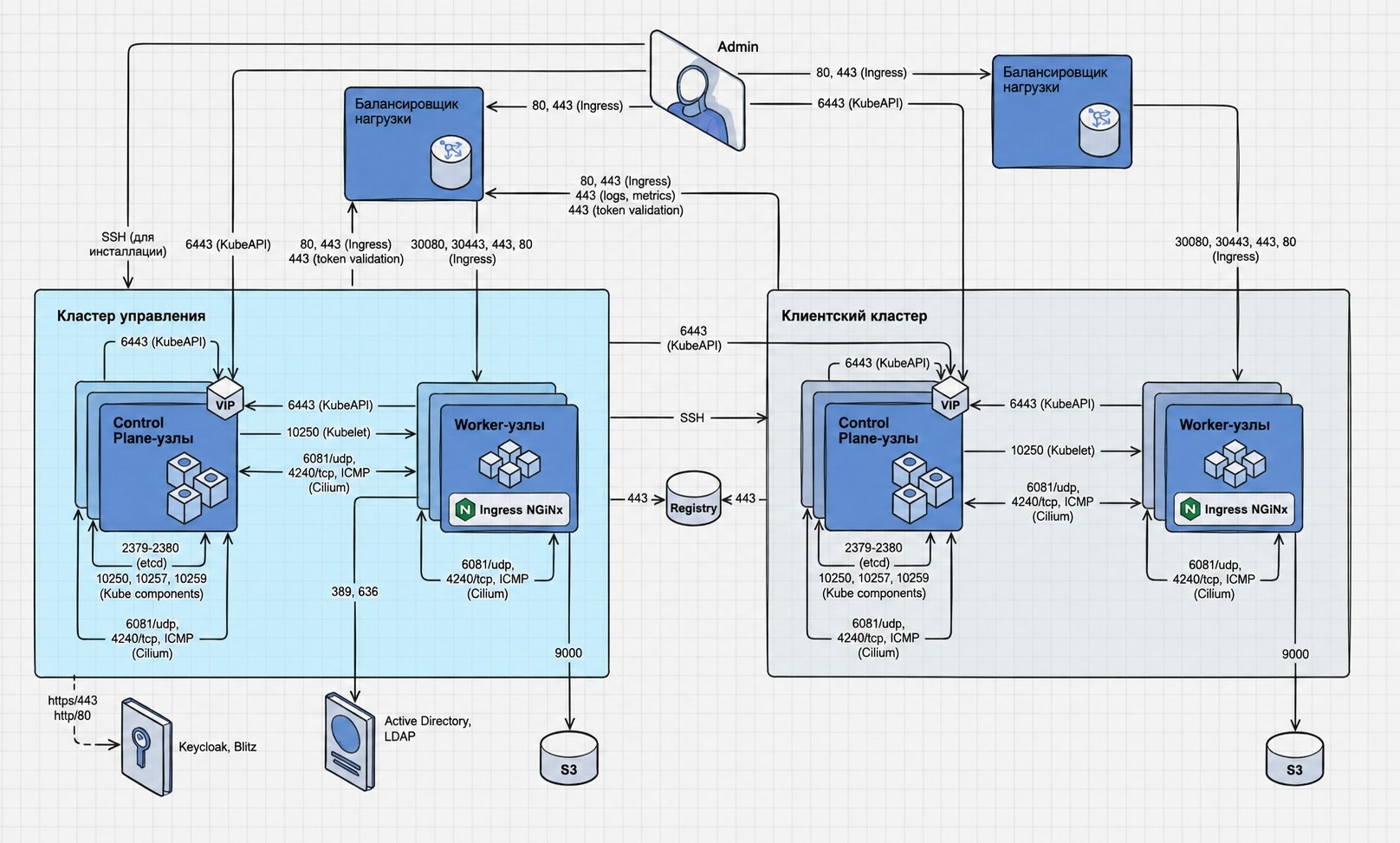
Shturval v2 with internal balancer for KubeAPI and external balancer for Ingress
Scheme — illustration
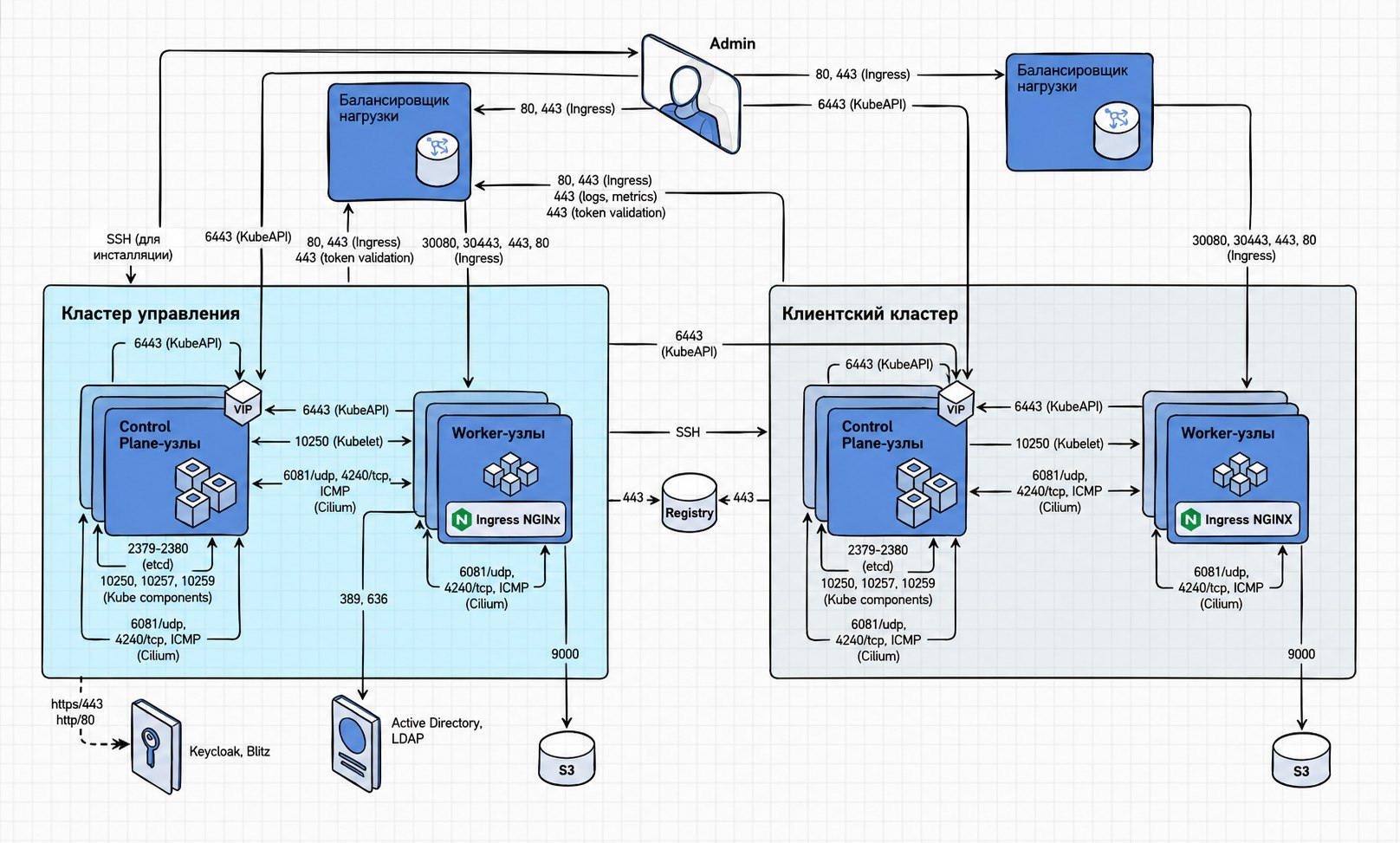
Description
| Source | Destination | Port | Protocol | Purpose |
|---|---|---|---|---|
| Admin | Load Balancer (Ingress) | 80, 443 | TCP | Interaction with Ingress-controller |
| Admin | VIP Control Plane Nodes (KubeAPI) | 6443 | TCP | Cluster administration and management |
| Admin | Management Cluster | 22 | TCP | Installation via SSH |
| Cluster nodes | Node VIP Control Plane (KubeAPI) | 6443 | TCP | Interaction with the cluster |
| Control Plane node | Load Balancer (Ingress) | 80 (optional), 443 | TCP | Interaction with Ingress-controller |
| Load Balancer (Ingress) | Worker nodes | 30080, 30443 (optional), 443, 80 | TCP | Interaction with Ingress-controller |
| Control Plane nodes | Worker nodes (Kubelet) | 10250 | TCP | Interacting with kubelet |
| Cluster nodes | Cluster nodes | 4240 | TCP | Cluster network (Cilium) |
| Cluster nodes | Cluster nodes | — | ICMP | Cluster network (Cilium) |
| Cluster nodes | Cluster nodes | 6081 | UDP | Cluster network (Cilium) |
| Worker nodes | S3 | 9000 | TCP | Velero |
| Control Plane node | Control Plane nodes (Etcd) | 2379, 2380 | TCP | ETCD |
| Control Plane node | Control Plane nodes (Kube components) | 10250, 10257, 10259 | TCP | Kubernetes |
| Worker nodes of the management cluster | Active Directory | 389, 636 | TCP/UDP, TCP | LDAP |
| Management Cluster | VIP Control Plane of the client cluster (KubeAPI) | 6443 | TCP | Client cluster management |
| Management Cluster | Client cluster | 22 | TCP | Installation via SSH |
| Client cluster | Load Balancer | 443 | TCP | Token Validation |
| Management Cluster | Load Balancer | 443 | TCP | Token Validation |
| Client cluster | Load balancer (logs, metrics) | 443 | TCP | Metrics, logs |
| Client cluster | Mirror (Registry) | 443 | TCP | Repository of images on the mirror |
| Management Cluster | Mirror (Registry) | 443 | TCP | Repository of images on the mirror |
| Management Cluster | Keycloak, Blitz | 443, 80 | TCP | Authentication |
Shturval v2 with internal balancer for KubeAPI and Ingress
Scheme — illustration
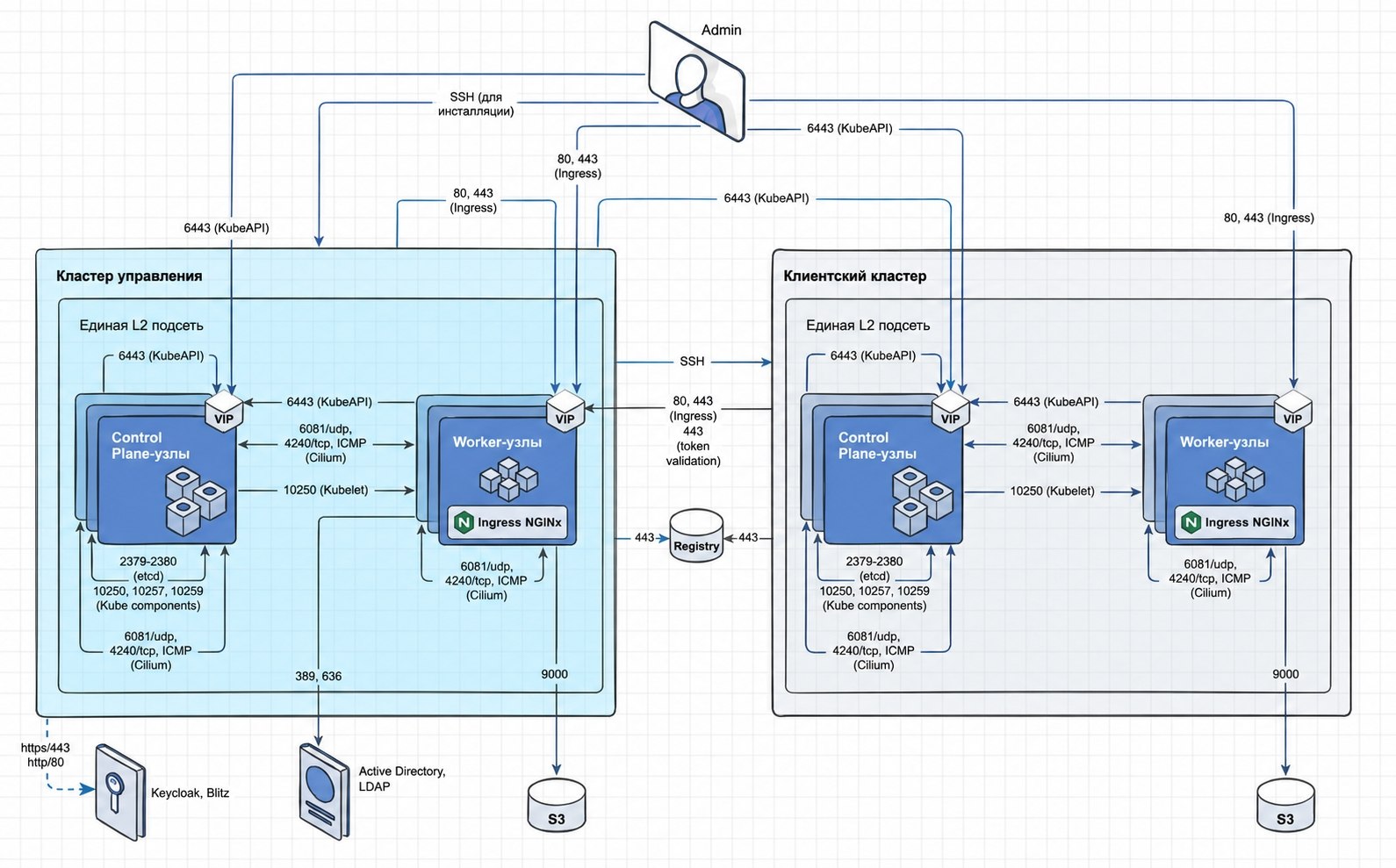
Description
| Source | Destination | Port | Protocol | Purpose |
|---|---|---|---|---|
| Admin | VIP Worker Nodes (Ingress) | 80 (optional), 443 | TCP | Interaction with Ingress-controller |
| Admin | VIP Control Plane Nodes (KubeAPI) | 6443 | TCP | Cluster administration and management |
| Admin | Management Cluster | 22 | TCP | Installation via SSH |
| Cluster nodes | Node VIP Control Plane (KubeAPI) | 6443 | TCP | Interaction with the cluster |
| Cluster nodes | VIP Worker node (Ingress) | 80, 443 | TCP | Interaction with Ingress-controller |
| Control Plane nodes | Worker nodes (Kubelet) | 10250 | TCP | Interacting with kubelet |
| Cluster nodes | Cluster nodes | 4240 | TCP | Cluster network (Cilium) |
| Cluster nodes | Cluster nodes | — | ICMP | Cluster network (Cilium) |
| Cluster nodes | Nodescluster | 6081 | UDP | Cluster network (Cilium) |
| Worker nodes | S3 | 9000 | TCP | Velero |
| Control Plane node | Control Plane nodes (Etcd) | 2379, 2380 | TCP | ETCD |
| Control Plane node | Control Plane nodes (Kube components) | 10250, 10257, 10259 | TCP | Kubernetes |
| Worker nodes of the management cluster | Active Directory | 389, 636 | TCP/UDP, TCP | LDAP |
| Management Cluster | VIP Control Plane of the client cluster (KubeAPI) | 6443 | TCP | Client cluster management |
| Management Cluster | Client cluster | 22 | TCP | Installation via SSH |
| Client cluster | VIP Worker node | 443 | TCP | Token Validation |
| Client cluster | Mirror (Registry) | 443 | TCP | Repository of images on the mirror |
| Management Cluster | Mirror (Registry) | 443 | TCP | Repository of images on the mirror |
| Management Cluster | Keycloak, Blitz | 443, 80 | TCP | Authentication |
Shturval v2 with external balancer for KubeAPI and Ingress
Scheme — illustration
Description
| Source | Destination | Port | Protocol | Purpose |
|---|---|---|---|---|
| Admin | Load Balancer (Ingress) | 80, 443 | TCP | Interaction with Ingress-controller |
| Admin | Load Balancer (KubeAPI) | 6443 | TCP | Interaction with the cluster |
| Admin | Management Cluster | 22 | TCP | Installation via SSH |
| Load Balancer (Ingress) | Worker nodes | 30080, 30443 (optional), 443, 80 | TCP | Ingress-controller |
| Load Balancer (KubeAPI) | Control Plane nodes | 6443 | TCP | KubeAPI |
| Cluster nodes | Load Balancer (Ingress) | 80, 443 | TCP | Ingress-controller |
| Control Plane nodes | Load Balancer (KubeAPI) | 6443 | TCP | KubeAPI |
| Control Plane nodes | Worker nodes (Kubelet) | 10250 | TCP | kubelet |
| Cluster nodes | Cluster nodes | 4240 | TCP | Cluster network (Cilium) |
| Cluster nodes | Cluster nodes | — | ICMP | Cluster network (Cilium) |
| Cluster nodes | Cluster nodes | 6081 | UDP | Cluster network (Cilium) |
| Worker nodes | S3 | 9000 | TCP | Velero |
| Control Plane node | Control Plane nodes (Etcd) | 2379, 2380 | TCP | ETCD |
| Control Plane node | Control Plane nodes (Kube components) | 10250, 10257, 10259 | TCP | Kubernetes |
| Worker nodes of the management cluster | Active Directory | 389, 636 | TCP/UDP, TCP | LDAP |
| Worker nodes | Load Balancer (KubeAPI) | 6443 | TCP | KubeAPI |
| Management Cluster | Load Balancer (KubeAPI) | 6443 | TCP | KubeAPI |
| Management Cluster | Client cluster | 22 | TCP | Installation via SSH |
| Client cluster | Load Balancer | 443 | TCP | Token Validation |
| Management Cluster | Load Balancer | 443 | TCP | Token Validation |
| Client cluster | Load balancer (logs, metrics) | 443 | TCP | Metrics, logs |
| Client cluster | Mirror (Registry) | 443 | TCP | Repository of images on the mirror |
| Management Cluster | Mirror (Registry) | 443 | TCP | Repository of images on the mirror |
| Management Cluster | Keycloak, Blitz | 443, 80 | TCP | Authentication |
Shturval v2 stand-alone cluster with internal balancer for KubeAPI and Ingress
Scheme — illustration
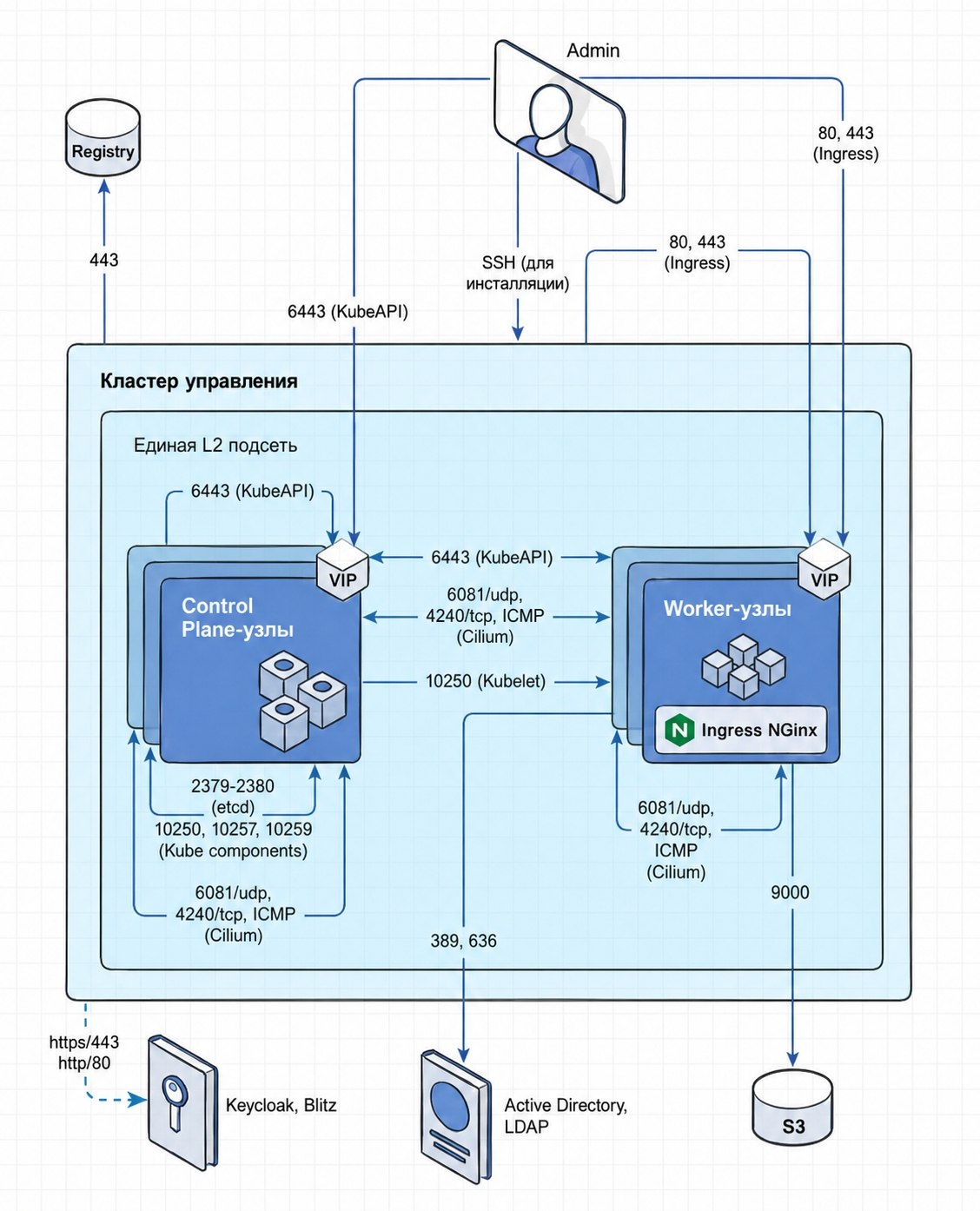
Description
| Source | Destination | Port | Protocol | Purpose |
|---|---|---|---|---|
| Admin | VIP Worker Nodes (Ingress) | 80 (optional), 443 | TCP | Ingress-controller |
| Admin | VIP Control Plane Nodes (KubeAPI) | 6443 | TCP | Cluster Administration |
| Admin | Management Cluster | 22 | TCP | Installation via SSH |
| Management Cluster | Load Balancer | 443 | TCP | Token Validation |
| Cluster nodes | Node VIP Control Plane (KubeAPI) | 6443 | TCP | Interaction with the cluster |
| Cluster nodes | VIP Control Plane of a node (Ingress) | 80, 443 | TCP | Ingress-controller |
| Control Plane nodes | Worker nodes (Kubelet) | 10250 | TCP | kubelet |
| Cluster nodes | Cluster nodes | 4240 | TCP | Cluster network (Cilium) |
| Cluster nodes | Cluster nodes | — | ICMP | Cluster network (Cilium) |
| Cluster nodes | Cluster nodes | 6081 | UDP | Cluster network (Cilium) |
| Worker nodes | S3 | 9000 | TCP | Velero |
| Control Plane node | Control Plane nodes (Etcd) | 2379, 2380 | TCP | ETCD |
| Control Plane node | Control Plane nodes (Kube components) | 10250, 10257, 10259 | TCP | Kubernetes |
| Worker nodes | Active Directory | 389, 636 | TCP/UDP, TCP | LDAP |
| Management Cluster | Mirror (Registry) | 443 | TCP | Repository of images on the mirror |
| Management Cluster | Keycloak, Blitz | 443, 80 | TCP | Authentication |
Shturval v2 stand-alone withinternal balancer for KubeAPI and external for Ingress
Scheme — illustration
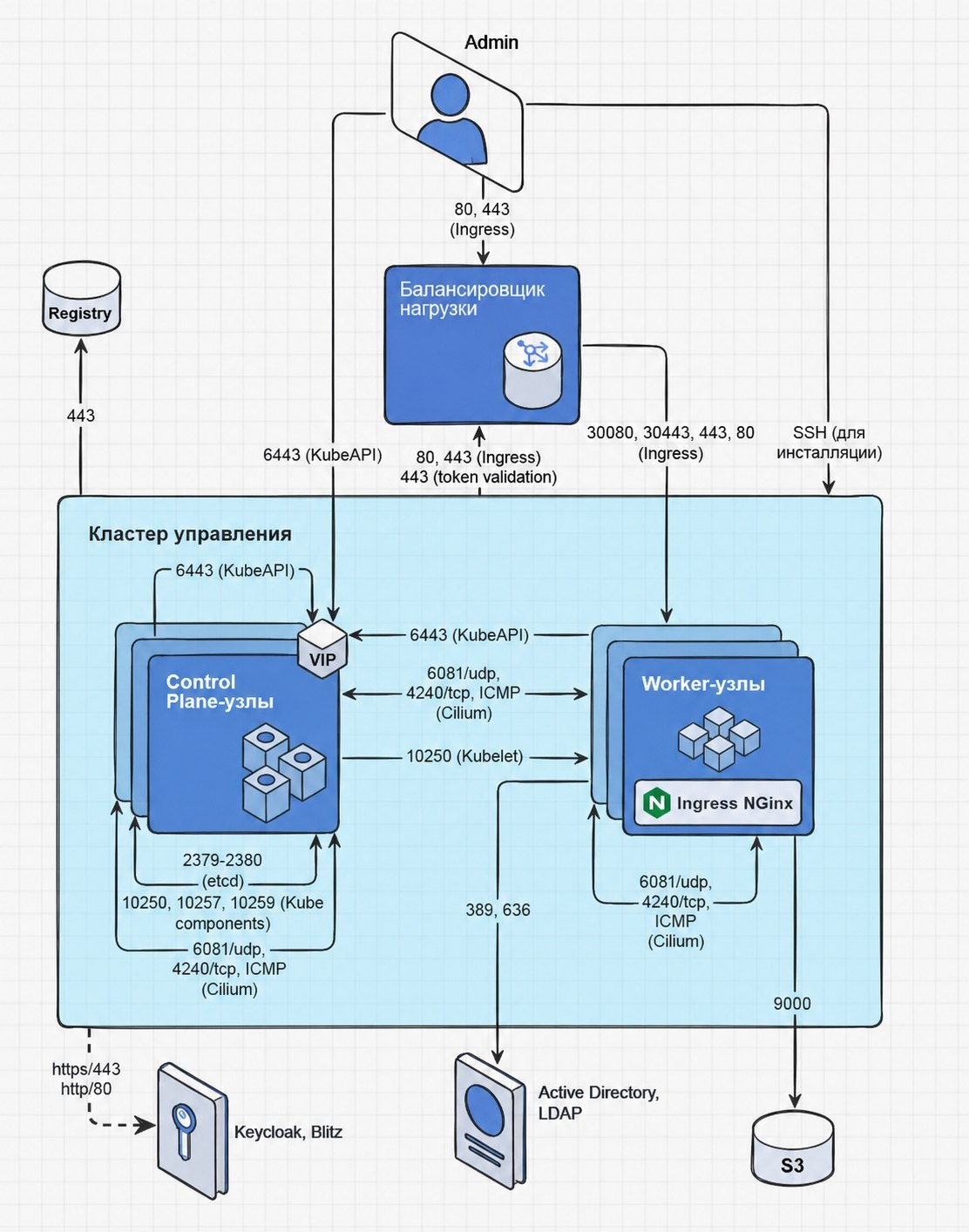
Description
| Source | Destination | Port | Protocol | Purpose |
|---|---|---|---|---|
| Admin | Load Balancer (Ingress) | 80, 443 | TCP | Ingress-controller |
| Admin | VIP Control Plane Nodes (KubeAPI) | 6443 | TCP | Cluster Administration |
| Admin | Management Cluster | 22 | TCP | Installation via SSH |
| Cluster nodes | Load Balancer (Ingress) | 80, 443 | TCP | Ingress-controller |
| Load Balancer (Ingress) | Worker nodes | 30080, 30443 (optional), 443, 80 | TCP | Ingress-controller |
| Cluster nodes | Node VIP Control Plane (KubeAPI) | 6443 | TCP | Interaction with the cluster |
| Control Plane nodes | Worker nodes (Kubelet) | 10250 | TCP | kubelet |
| Cluster nodes | Cluster nodes | 4240 | TCP | Cluster network (Cilium) |
| Cluster nodes | Cluster nodes | — | ICMP | Cluster network (Cilium) |
| Cluster nodes | Cluster nodes | 6081 | UDP | Cluster network (Cilium) |
| Worker nodes | S3 | 9000 | TCP | Velero |
| Control Plane node | Control Plane nodes (Etcd) | 2379, 2380 | TCP | ETCD |
| Control Plane node | Control Plane nodes (Kube components) | 10250, 10257, 10259 | TCP | Kubernetes |
| Worker nodes | Active Directory | 389, 636 | TCP/UDP, TCP | LDAP |
| Management Cluster | Mirror (Registry) | 443 | TCP | Repository of images on the mirror |
| Management Cluster | Keycloak, Blitz | 443, 80 | TCP | Authentication |
Shturval v2 DR platform with internal balancer for KubeAPI and external for Ingress
Scheme — illustration
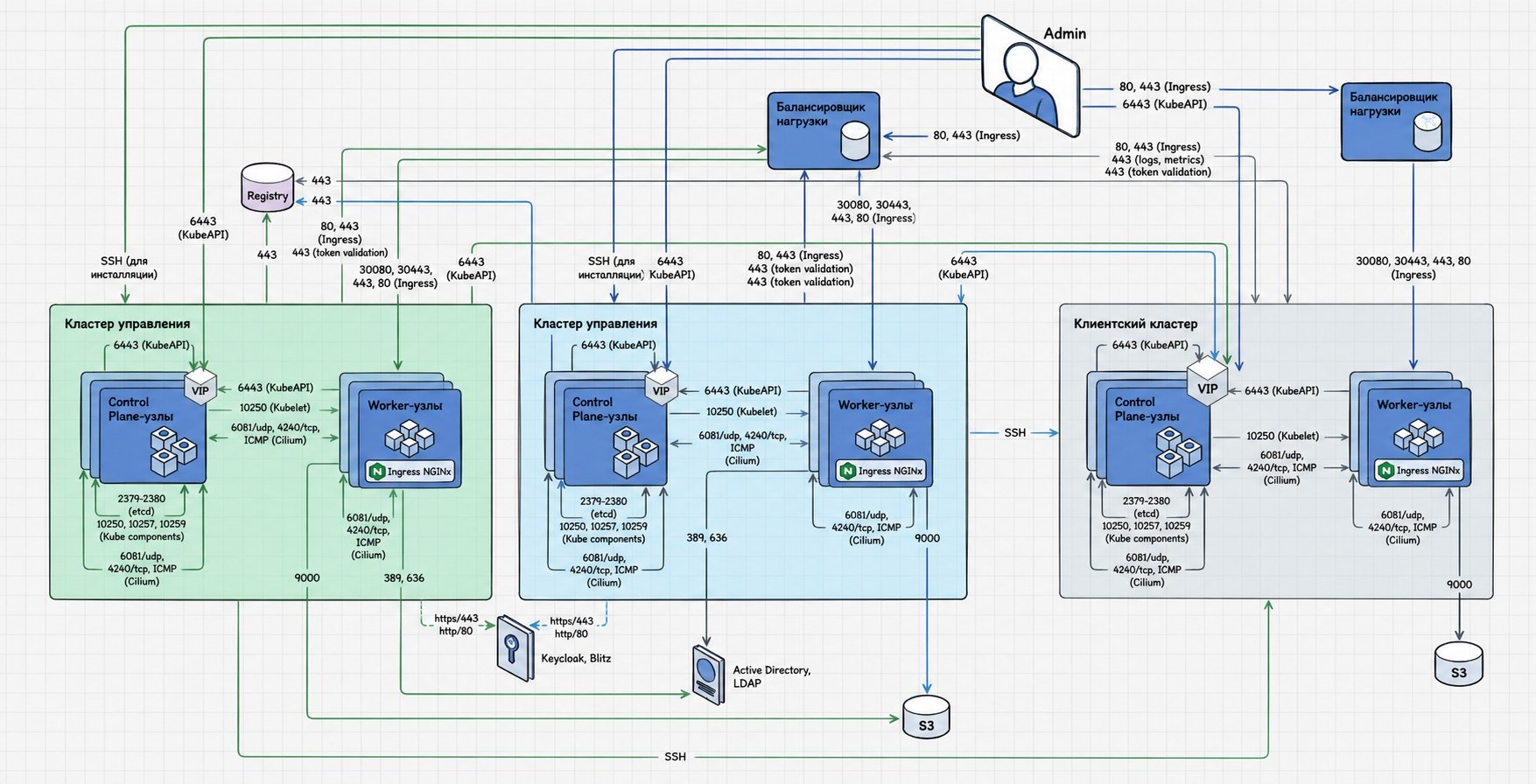
Description
| Source | Destination | Port | Protocol | Purpose |
|---|---|---|---|---|
| Admin | Load Balancer (Ingress) | 80 | TCP | Interaction with the cluster Ingress-controller |
| Admin | Load Balancer (Ingress) | 443 (optional) | TCP | Interaction with the cluster Ingress-controller |
| Admin | VIP Control Plane Nodes (KubeAPI) | 6443 | TCP | Cluster administration and management |
| Admin | Management Cluster | 22 | TCP | Management cluster installation — SSH |
| Cluster nodes (Control Plane, Worker) | Node VIP Control Plane (KubeAPI) | 6443 | TCP | Kubernetes and STD components for interacting with the cluster |
| Cluster nodes | Load Balancer (Ingress) | 80 (optional) | TCP | Interaction with the cluster Ingress-controller |
| Cluster nodes | Load Balancer (Ingress) | 443 | TCP | Interaction with the cluster Ingress-controller |
| Load Balancer (Ingress) | Worker nodes | 30080 (optional) | TCP | Interaction with the cluster Ingress-controller |
| Load Balancer (Ingress) | Worker nodes | 30443 (optional) | TCP | Interaction with the cluster Ingress-controller |
| Load Balancer (Ingress) | Worker nodes | 443 (optional) | TCP | Interaction with the cluster Ingress-controller |
| Load Balancer (Ingress) | Worker nodes | 80 | TCP | Interaction with the cluster Ingress-controller |
| Control Plane nodes | Worker nodes (Kubelet) | 10250 | TCP | Kubernetes component for interacting with kubelet |
| Cluster nodes (Control Plane, Worker) | Cluster nodes (Control Plane, Worker) | 4240 | TCP | Cluster network (Cilium) |
| Cluster nodes (Control Plane, Worker) | Cluster nodes (Control Plane, Worker) | — | ICMP | Cluster network (Cilium) |
| Cluster nodes (Control Plane, Worker) | Cluster nodes (Control Plane, Worker) | 6081 | UDP | Cluster network (Cilium) |
| Worker nodes | S3 (Simple Storage Service) | 9000 | TCP | Interaction with S3 storage (Velero) |
| Worker nodes of the DR management cluster | S3 (Simple Storage Service) | 9000 | TCP/UDP | Interaction with S3 storage (Velero) |
| Control Plane node | Control Plane nodes (Etcd) | 2379, 2380 | TCP | Interaction of ETCD cluster nodes |
| Control Plane node | Control Plane nodes (Kube components) | 10250, 10257, 10259 | TCP | Components Kubernetes |
| Worker nodes of the DR management cluster | Active Directory | 389 | TCP/UDP | Interaction with Active Directory, LDAP |
| Worker nodes of the DR management cluster | Active Directory | 636 | TCP | Interaction with Active Directory, LDAP |
| Worker nodes of the management cluster | Active Directory | 389 | TCP/UDP | Interaction with Active Directory, LDAP |
| Worker nodes of the management cluster | Active Directory | 636 | TCP | Interaction with Active Directory, LDAP |
| Management Cluster | VIP Control Plane of client cluster nodes (KubeAPI) | 6443 | TCP | Interaction of the management cluster with the client cluster |
| DR management cluster | VIP Cont.rol Plane of client cluster nodes (KubeAPI) | 6443 | TCP | Interaction of the DR management cluster with the client cluster |
| Management Cluster | Client cluster | 22 | TCP | Installing a client cluster via SSH |
| DR management cluster | Client cluster | 22 | TCP | Installing a client cluster via SSH |
| Client cluster | Load Balancer | 443 | TCP | Validation of a client cluster token through the management cluster |
| Management Cluster | Load Balancer | 443 | TCP | Management Cluster Token Validation |
| DR management cluster | Load Balancer | 443 | TCP | Validation of DR-cluster management token |
| Client cluster | Load balancer (logs, metrics) | 443 | TCP | Cluster interaction with Ingress-controller to redirect metrics and logs |
| Client cluster | Mirror (Registry) | 443 | TCP | Interaction of the cluster with the image repository on the mirror |
| Management Cluster | Mirror (Registry) | 443 | TCP | Interaction of the cluster with the image repository on the mirror |
| DR management cluster | Mirror (Registry) | 443 | TCP | Interaction of the DR cluster with the image repository on the mirror |
| Management Cluster | Keycloak, Blitz | 443, 80 | TCP | Authentication with an external provider |
| DR management cluster | Keycloak, Blitz | 443, 80 | TCP | Authentication with an external provider |
oVirt, VMware vSphere with internal balancer for KubeAPI and external for Ingress
Scheme — illustration
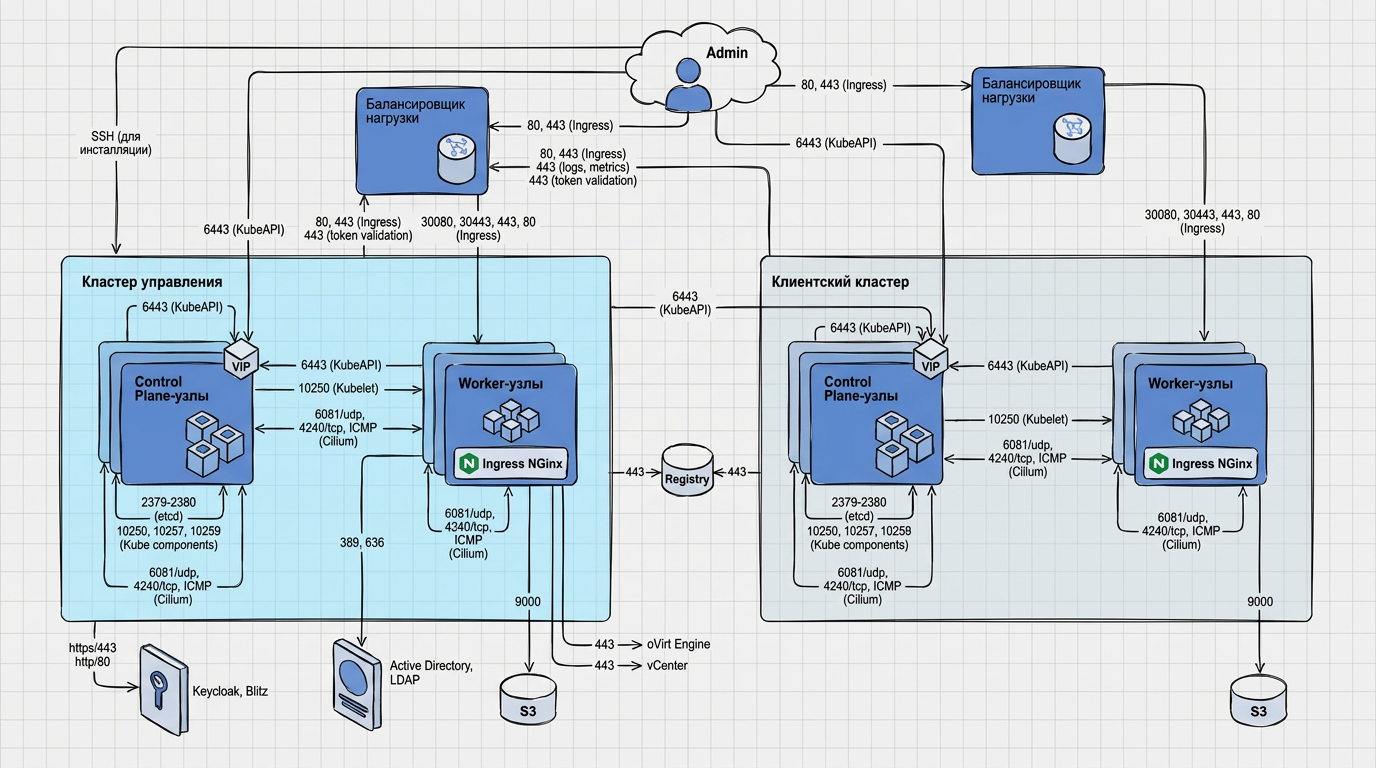
Description
| Source | Destination | Port | Protocol | Purpose |
|---|---|---|---|---|
| Admin | Load Balancer (Ingress) | 80, 443 | TCP | Ingress-controller |
| Admin | VIP Control Plane Nodes (KubeAPI) | 6443 | TCP | Cluster Administration |
| Admin | Management Cluster | 22 | TCP | Installation via SSH |
| Cluster nodes | Node VIP Control Plane (KubeAPI) | 6443 | TCP | Interaction with the cluster |
| Cluster nodes | Load Balancer (Ingress) | 80, 443 | TCP | Ingress-controller |
| Client cluster | Load Balancer | 443 | TCP | Token Validation |
| Management Cluster | Load Balancer | 443 | TCP | Token Validation |
| Load Balancer (Ingress) | Worker nodes | 30080, 30443 (optional), 443, 80 | TCP | Ingress-controller |
| Control Plane nodes | Worker nodes (Kubelet) | 10250 | TCP | kubelet |
| Cluster nodes | Cluster nodes | 4240 | TCP | Cluster network (Cilium) |
| Cluster nodes | Cluster nodes | — | ICMP | Cluster network (Cilium) |
| Cluster nodes | Cluster nodes | 6081 | UDP | Cluster network (Cilium) |
| Worker nodes | S3 | 9000 | TCP | Velero |
| Control Plane node | Control Plane nodes (Etcd) | 2379, 2380 | TCP | ETCD |
| Control Plane node | Control Plane nodes (Kube components) | 10250, 10257, 10259 | TCP | Kubernetes |
| Worker nodes of the management cluster | Active Directory | 389, 636 | TCP/UDP, TCP | LDAP |
| Management Cluster | VIP Control Plane of the client cluster (KubeAPI) | 6443 | TCP | Client cluster management |
| Worker nodes of the management cluster | oVirt Engine / vCenter | 443 | TCP | Creating clusters (oVirt, VMware vSphere) |
| Client cluster | Load balancer (logs, metrics) | 443 | TCP | Metrics, logs |
| Client cluster | Mirror (Registry) | 443 | TCP | Repository of images on the mirror |
| Management Cluster | Mirror (Registry) | 443 | TCP | Repository of images on the mirror |
| Management Cluster | Keycloak, Blitz | 443, 80 | TCP | Authentication |
oVirt, VMware vSphere with internal balancer for KubeAPI, external for Ingress and CoreHA in client cluster
Scheme — illustration

Description
| Source | Destination | Port | Protocol | Purpose |
|---|---|---|---|---|
| Admin | Load Balancer (Ingress) | 80 | TCP | Interaction with the cluster Ingress-controller |
| Admin | Load Balancer (Ingress) | 443 | TCP | Interaction with the cluster Ingress-controller |
| Admin | VIP Control Plane Nodes (KubeAPI) | 6443 | TCP | Cluster administration and management |
| Admin | Management Cluster | 22 | TCP | Installing a management cluster via SSH |
| Cluster nodes (Control Plane, Worker) | Node VIP Control Plane (KubeAPI) | 6443 | TCP | Kubernetes and STD components for interacting with the cluster |
| Load Balancer (Ingress) | Worker nodes | 30080 (optional) | TCP | Interaction of the management cluster with Ingress-controller |
| Cluster nodes | Load Balancer (Ingress) | 80 (optional) | TCP | Interaction with the cluster Ingress-controller |
| Cluster nodes | BaLoad Lancer (Ingress) | 443 (optional) | TCP | Interaction with the cluster Ingress-controller |
| Load Balancer (Ingress) | Worker nodes | 30443 (optional) | TCP | Interaction of the management cluster with Ingress-controller |
| Load Balancer (Ingress) | Worker nodes | 443 | TCP | Interaction of the management cluster with Ingress-controller |
| Load Balancer (Ingress) | Worker nodes | 80 | TCP | Interaction of the management cluster with Ingress-controller |
| Control Plane nodes | Worker nodes (Kubelet) | 10250 | TCP | Kubernetes component for interacting with kubelet |
| Client cluster | Load Balancer | 443 | TCP | Validation of a client cluster token through the management cluster |
| Management Cluster | Load Balancer | 443 | TCP | Management Cluster Token Validation |
| Cluster nodes (Control Plane, Worker) | Cluster nodes (Control Plane, Worker) | 4240 | TCP | Cluster network (Cilium) |
| Cluster nodes (Control Plane, Worker) | Cluster nodes (Control Plane, Worker) | — | ICMP | Cluster network (Cilium) |
| Cluster nodes (Control Plane, Worker) | Cluster nodes (Control Plane, Worker) | 6081 | UDP | Cluster network (Cilium) |
| Worker nodes of the management cluster | S3 (Simple Storage Service) | 9000 | TCP | Interaction with S3 storage (Velero) |
| Control Plane node | Control Plane nodes (Etcd) | 2379, 2380 | TCP | Interaction of ETCD cluster nodes |
| Control Plane node | Control Plane nodes (Kube components) | 10250, 10257, 10259 | TCP | Components Kubernetes |
| Worker nodes of the management cluster | Active Directory | 389 | TCP/UDP | Interaction with Active Directory, LDAP |
| Worker nodes of the management cluster | Active Directory | 636 | TCP | Interaction with Active Directory, LDAP |
| Management Cluster | VIP Control Plane of client cluster nodes (KubeAPI) | 6443 | TCP | Interaction of the management cluster with the client cluster |
| Load Balancer | VIP Control Plane of client cluster nodes (CoreHA DNS) | 1053 | TCP | Dynamically adding backends to HAProxy |
| Worker nodes of the management cluster | oVirt Engine | 443 | TCP | Creating clusters using the oVirt provider |
| Worker nodes of the management cluster | vCenter | 443 | TCP | Creating Clusters Using the vSphere Provider |
| Client cluster | Load balancer (logs, metrics) | 443 | TCP | Cluster interaction with Ingress-controller to redirect metrics and logs |
| Client cluster | Mirror (Registry) | 443 | TCP | Interaction of the cluster with the image repository on the mirror |
| Management Cluster | Mirror (Registry) | 443 | TCP | Interaction of the cluster with the image repository on the mirror |
| Management Cluster | Keycloak, Blitz | 443, 80 | TCP | Authentication with an external provider |
oVirt, VMware vSphere with internal balancer for KubeAPI and Ingress
Scheme — illustration
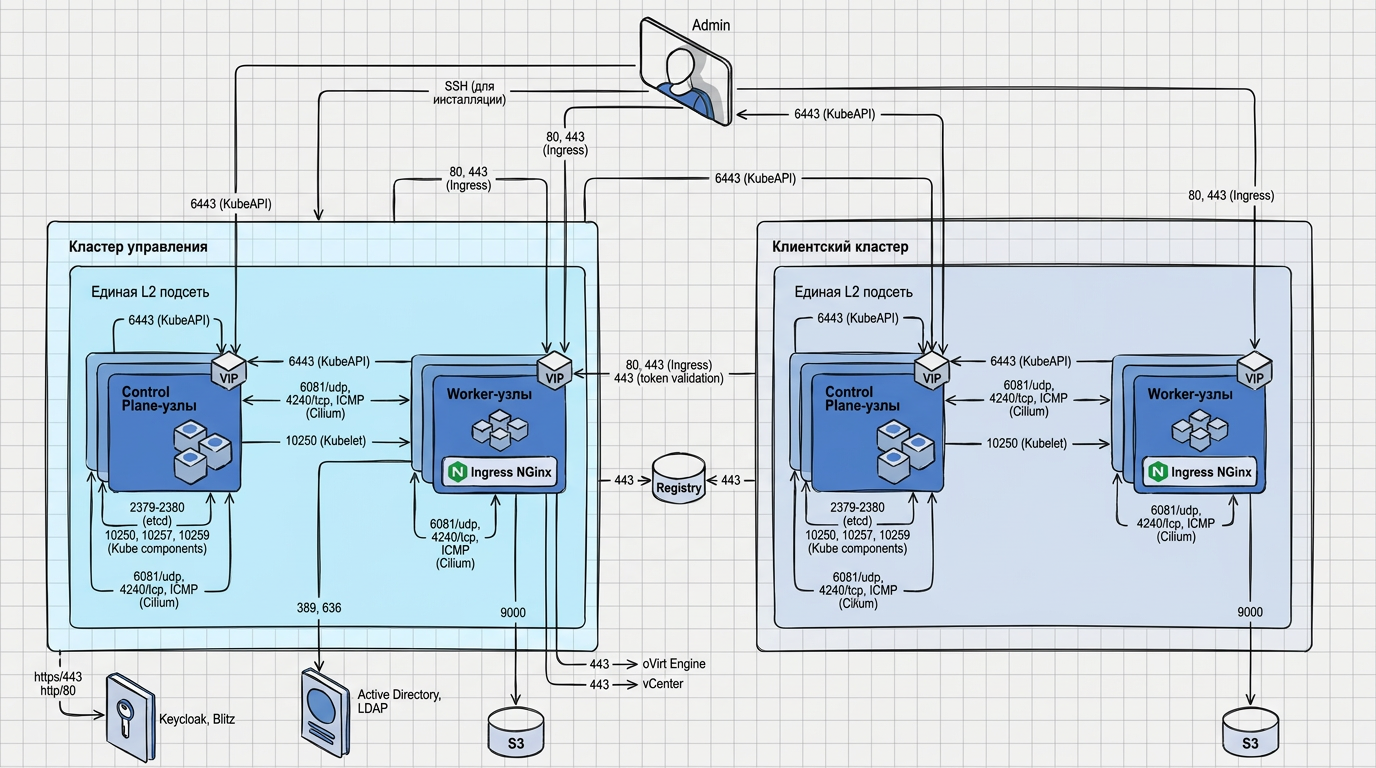
Description
| Source | Destination | Port | Protocol | Purpose |
|---|---|---|---|---|
| Admin | VIP Worker Nodes (Ingress) | 80, 443 | TCP | Ingress-controller |
| Admin | VIP Control Plane Nodes (KubeAPI) | 6443 | TCP | Cluster Administration |
| Admin | Management Cluster | 22 | TCP | Installation via SSH |
| Cluster nodes | Node VIP Control Plane (KubeAPI) | 6443 | TCP | Interaction with the cluster |
| Control Plane nodes | Worker nodes (Kubelet) | 10250 | TCP | kubelet |
| Cluster nodes | Cluster nodes | 4240 | TCP | Cluster network (Cilium) |
| Cluster nodes | Cluster nodes | — | ICMP | Cluster network (Cilium) |
| Cluster nodes | Cluster nodes | 6081 | UDP | Cluster network (Cilium) |
| Worker nodes | S3 | 9000 | TCP | Velero |
| Control Plane node | Control Plane nodes (Etcd) | 2379, 2380 | TCP | ETCD |
| Control Plane node | Control Plane nodes (Kube components) | 10250, 10257, 10259 | TCP | Kubernetes |
| Worker nodes of the management cluster | Active Directory | 389, 636 | TCP/UDP, TCP | LDAP |
| Management Cluster | VIP Control Plane of the client cluster (KubeAPI) | 6443 | TCP | Client cluster management |
| Cluster nodes | VIP Worker Nodes (Ingress) | 80, 443 | TCP | Ingress-controller |
| Client cluster | VIP Worker Nodes | 443 | TCP | Token Validation |
| Worker nodes of the management cluster | oVirt Engine / vCenter | 443 | TCP | Creating clusters |
| Client cluster | Mirror (Registry) | 443 | TCP | Repository of images on the mirror |
| Management Cluster | Mirror (Registry) | 443 | TCP | Repository of images on the mirror |
| Management Cluster | Keycloak, Blitz | 443, 80 | TCP | Authentication |
Additional requirements
| Requirement | Description |
|---|---|
| Time Synchronization | NTP or Chrony on nodes and on the mirror host |
| License | Enterprise; Worker and vCPU limits — in the license text; if exceeded — notification in the GUI |
Browser requirements
Recommended monitor resolution: 1498×906.
Supported
| Browser | Version |
|---|---|
| Chrome | 120–146 |
| Edge | 120–145 |
| Safari | 17–26 |
| Firefox | 122–148 |
| Opera | 107–126 |
Browsers from which the GUI is not available
- IE;
- Opera Mini;
- UC Browser for Android;
- QQ Browser;
- Baidu Browser;
- KaiOS Browser;
- Opera Mobile;
- Android Browser;
- Firefox for Android;
- Samsung Internet Browser;
- Safari on iOS.
Checklist before installation
- mirror expanded; there is a bundle and Enterprise license
- Nodes and machine shtil have access to the mirror via HTTPS
- If Docker is used on the shtil machine and the mirror has a self-signed or corporate CA, the CA is added to
/etc/docker/certs.d/<registry-host>/ca.crtor the mirror is configured toinsecure-registries - Resources and OS meet requirements
- DNS, VIP or balancers prepared according to the script
- Firewalls are configured according to matrices
Checks with the line command - Prepare.