Metrics exporter
Metrics Exporter/Nodes
The dashboard is designed to monitor node metrics collected using VM Agent exporters, in particular node-exporter. It provides users with the ability to monitor key performance metrics and system health, including CPU, memory, disk space, and network resource usage. Information is displayed in the form of graphs and statistics, allowing you to quickly assess the load and performance of nodes.
Screenshot
Illustration: Metrics Exporter/Nodes
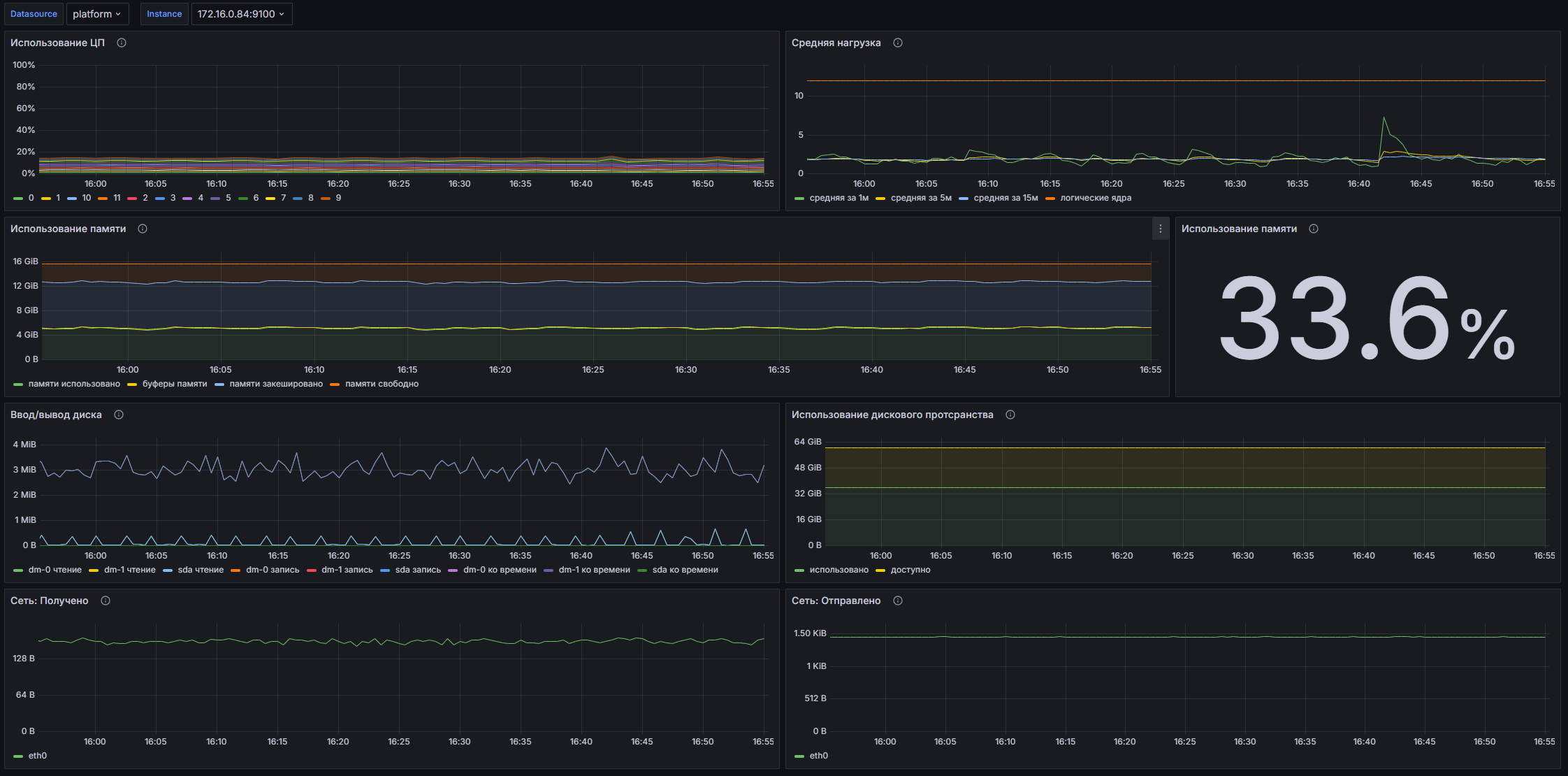
Dashboard structure
- CPU Usage: A time graph showing the CPU load for the selected node as a percentage.
- Average Load: A time graph showing the average load per node over various time intervals (1 minute, 5 minutes and 15 minutes), as well as the number of logical cores.
- Memory Usage: A time graph showing memory usage on the node, including total allocated, buffered, cached, and free memory.
- Memory Usage: Statistics for RAM, showing the percentage of memory used on the node.
- Disk I/O: A time graph showing the amount of memory used in disk read and write operations, as well as the total time spent in I/O operations.
- Disk Space Usage: A graph showing the disk space usage on the device, including available and used space.
- Network: Received: A graph displaying the amount of data received by a node from a specific device.
- Network: Sent: A graph showing the amount of data sent by a node to specific devices.
Customizable parameters
- datasource: Allows you to select the data source for the dashboard. In this case, VM Agent is used.
- instance: Allows you to select a specific node instance for which metrics will be displayed, with data retrieved based on label values.
Metrics Exporter/USE Method/Cluster
This dashboard is designed to monitor cluster resources using metrics export using node-exporter. It allows you to visualize system key performance indicators (KPIs) such as CPU, memory, network, and disk I/O usage. The main purpose of the dashboard is to provide technical specialists with the necessary information to analyze the status and performance of the system, which allowsquickly identify and eliminate bottlenecks.
Screenshot
Illustration: Metrics Exporter/USE Method/Cluster
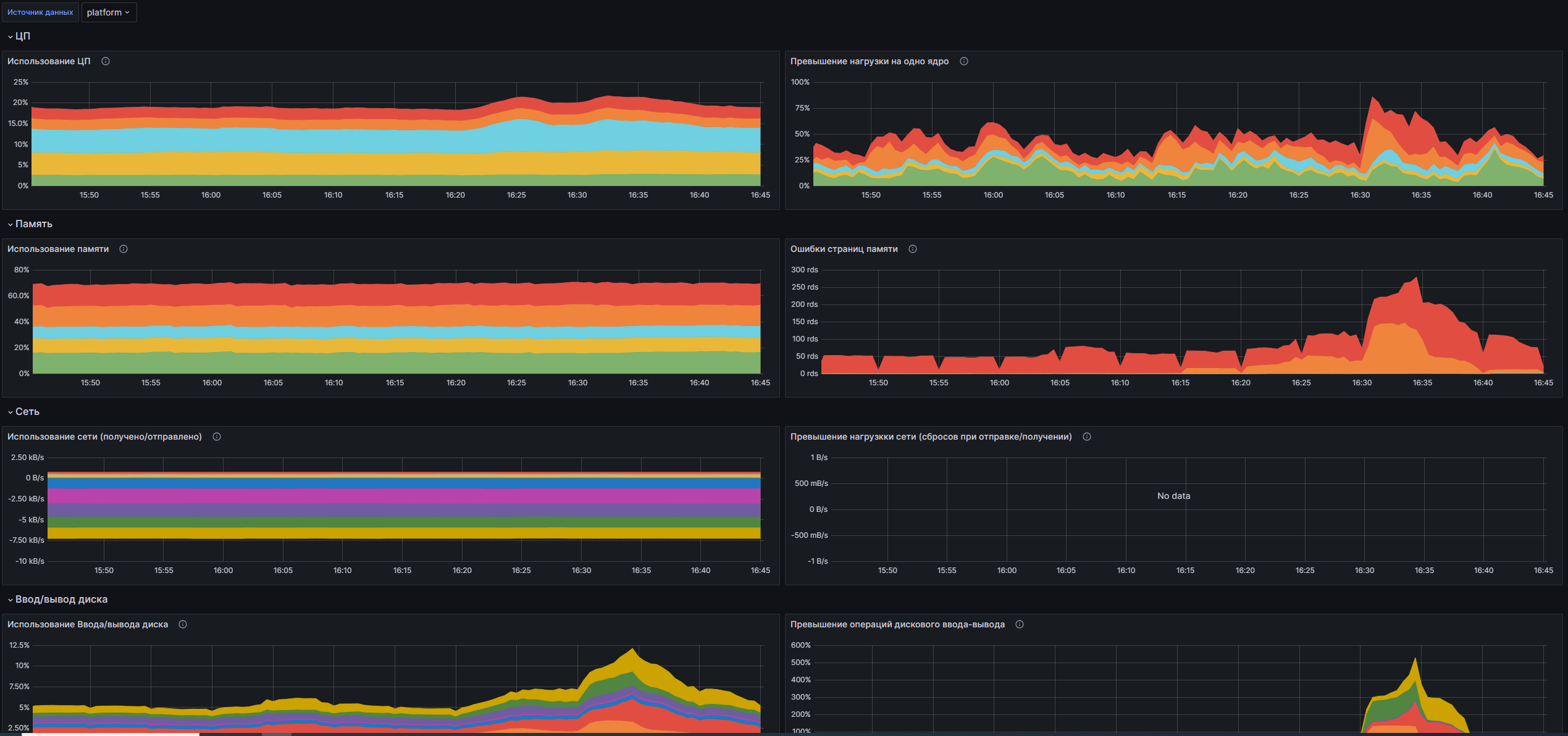
Dashboard structure
CPU:
- CPU Usage: A time graph showing the percentage of CPU time used by the metrics exporter.
- Load Excess per Core: A time graph showing the percentage of load on the metrics exporter per CPU.
Memory:
- Memory Usage: A time graph showing the amount of memory used by the metrics exporter.
- Memory Page Errors: A time graph showing the number of memory write errors in the last 5 minutes.
Network:
- Network Usage (Received/Sent): A time graph showing the data transfer rate in bytes/second for bytes sent and received.
- Exceeding network loads (flushes on sending/receiving): Time graph showing the rate of bytes dropped on sent and received connections.
Disk I/O:
- Disk I/O Utilization: Time graph showing disk I/O load.
- Disk I/O Overhead: A time graph showing the weighted I/O load based on time.
Disk space:
- Disk Space Usage: A time graph showing the percentage of disk space used on file systems.
Customizable parameters
- datasource: Allows you to select the data source for displaying metrics.
- cluster: Allows you to select a cluster to monitor and filter metrics by the selected cluster.
Metrics Exporter/USE Method/Node
This dashboard is designed to monitor the performance of nodes in a cluster using metrics export via Node Exporter. It allows you to monitor key load metrics on processors, memory, network and disks, which makes it possible to analyze the state of system resources and identify possible problems with their performance.
Screenshot
Illustration: Metrics Exporter/USE Method/Node
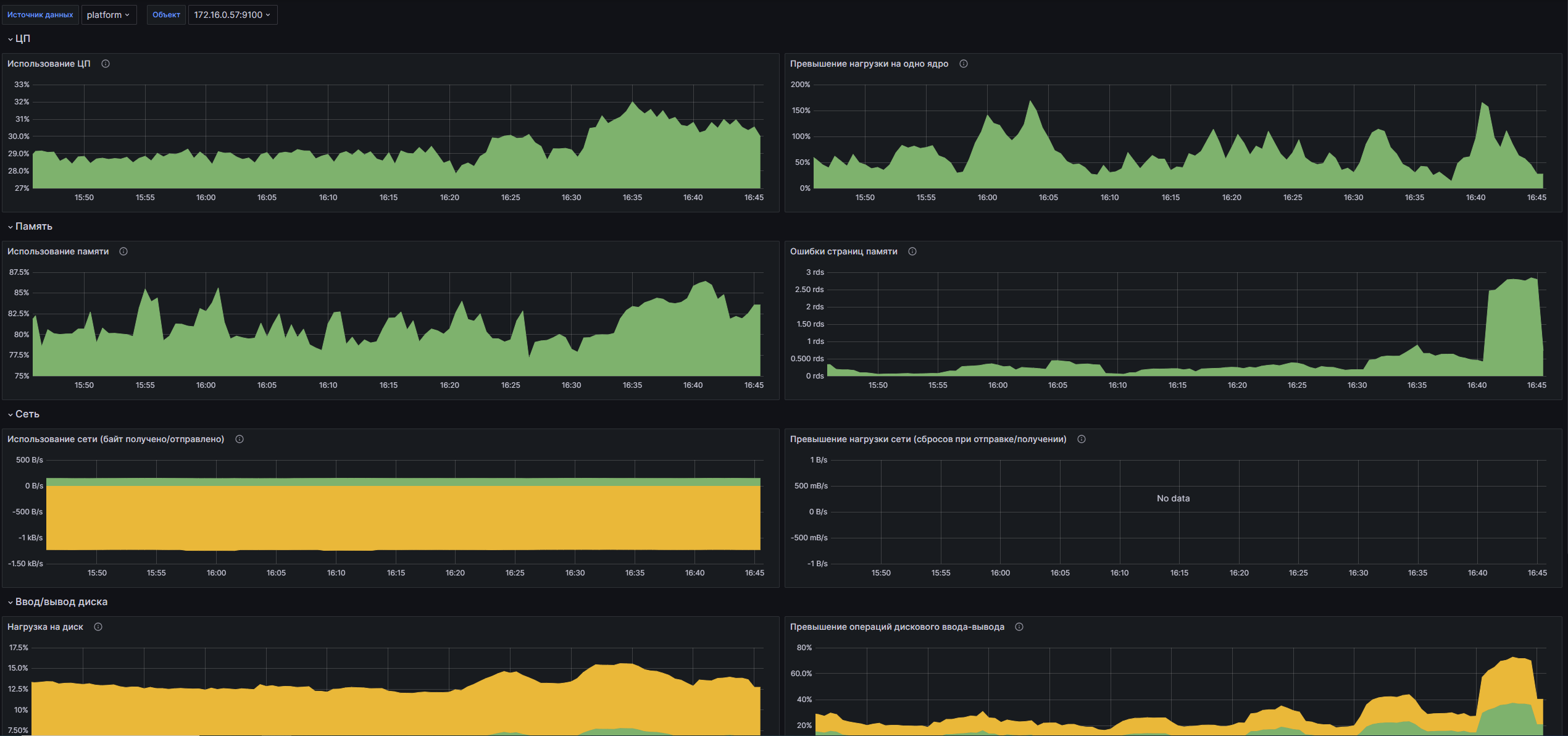
Dashboard structure
CPU:
- CPU Usage: A graph showing the CPU time used by the selected Metrics Exporter node.
- Single Core Load Excess: A graph showing CPU load for a selected node, showing the ratio of current load to full core load.
Memory:
- Memory Usage: GraA fic showing the amount of memory used by the selected Metrics Exporter node.
- Memory Page Errors: A graph showing the number of memory errors in the last 5 minutes, allowing you to monitor the status of memory management.
Network:
- Network Usage (Bytes Received/Sent): A graph showing the rate of bytes received and sent for the selected Metrics Exporter node.
- Excess network load (resets when sending/receiving): A graph showing access to network interfaces with a fixed number of resets when sending and receiving data.
Disk I/O:
- Disk Load: A graph showing the I/O load on each disk in the system.
- Disk I/O Overhead: A graph showing the weight of disk I/O operations, displaying the values in bytes.
Disk space:
- Disk Space Usage: A graph showing the percentage of disk space used on the selected device.
Customizable parameters
- datasource: Allows you to select a data source for displaying metrics, in this case VM Agent is used.
- cluster: Allows you to select a cluster to monitor, filtering by timestamp.
- instance: Allows you to select a specific node instance for which metrics will be displayed, allowing granular monitoring at the individual node level.