Kubernetes
Kubernetes/API server
The dashboard is designed to monitor the status of API servers in the Kubernetes environment. It provides visibility into the availability and performance of API requests, allowing you to analyze both inbound (read) and outbound (write) operations. Using this tool, you can quickly identify errors and anomalies in the operation of services, which is critical to ensuring the stability and reliability of applications.
Screenshot
Illustration: Kubernetes/API server
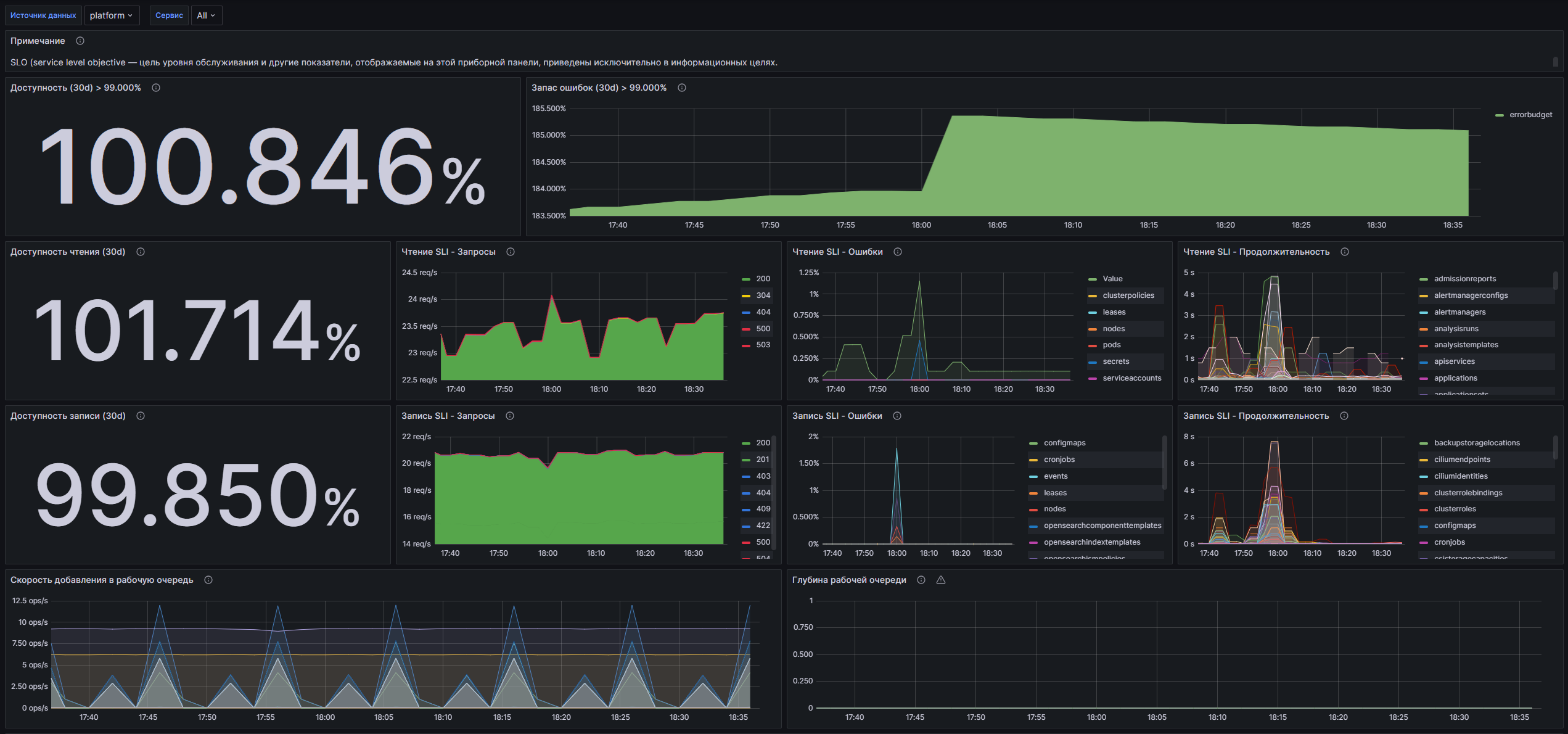
Dashboard structure
- Availability (30d) > 99.000%: Displays the percentage of successful API requests over the last 30 days.
- Error Margin (30d) > 99.000%: Graph showing the error margin remaining with a 0.990% availability guarantee.
- Read Availability (30d): Displays the percentage of successful read requests (LIST, GET) over the last 30 days.
- SLI Reading - Requests: Graph showing the number of read requests (LIST, GET) per second by response codes.
- SLI Read - Errors: Graph showing the percentage of errors (5xx) among read requests.
- SLI Read - Duration: Graph showing the 99th percentile of read request completion times. SLI metrics only on the master/over a longer period
- Write Availability (30d): Displays the percentage of successful write requests (POST, PUT, PATCH,DELETE) over the last 30 days.
- SLI Recording - Requests: A graph showing the number of write requests per second by response code.
- SLI Write - Errors: Graph showing the percentage of errors (5xx) among write requests.
- SLI Write - Duration: Graph showing the 99th percentile of write request completion times. SLI metrics only on the master/over a longer period
- Work Queue Add Rate: A graph showing the total number of work queue additions per second.
- Work Queue Depth: A graph showing the number of I/O operations being processed simultaneously in the queue.
- Work Queue Latency: A graph showing how long in seconds an item remains in the queue before being processed.
- Memory Usage: A graph showing the amount of memory used (in bytes) for API servers.
- CPU Usage: A graph showing how much time the process was using in the last time unit.
- Go-routines: Graph displaying toNumber of active Go routines.
Customizable parameters
- datasource: Allows you to select the data source used to display metrics.
- service: Allows you to select a service for which metrics will be filtered, or select all services (All) of the cluster.
Kubernetes/Controller Manager
The dashboard is designed to monitor Kubernetes Controller Manager and provides users with the ability to monitor the status and performance of system components. With it, you can monitor important metrics such as the number of running processes, the rate of additions to the work queue, Kube API request latencies, and system resource usage. The data update period is 10 seconds, which allows you to receive up-to-date information about the operation of clusters in real time.
Screenshot
Illustration: Kubernetes/Controller Manager
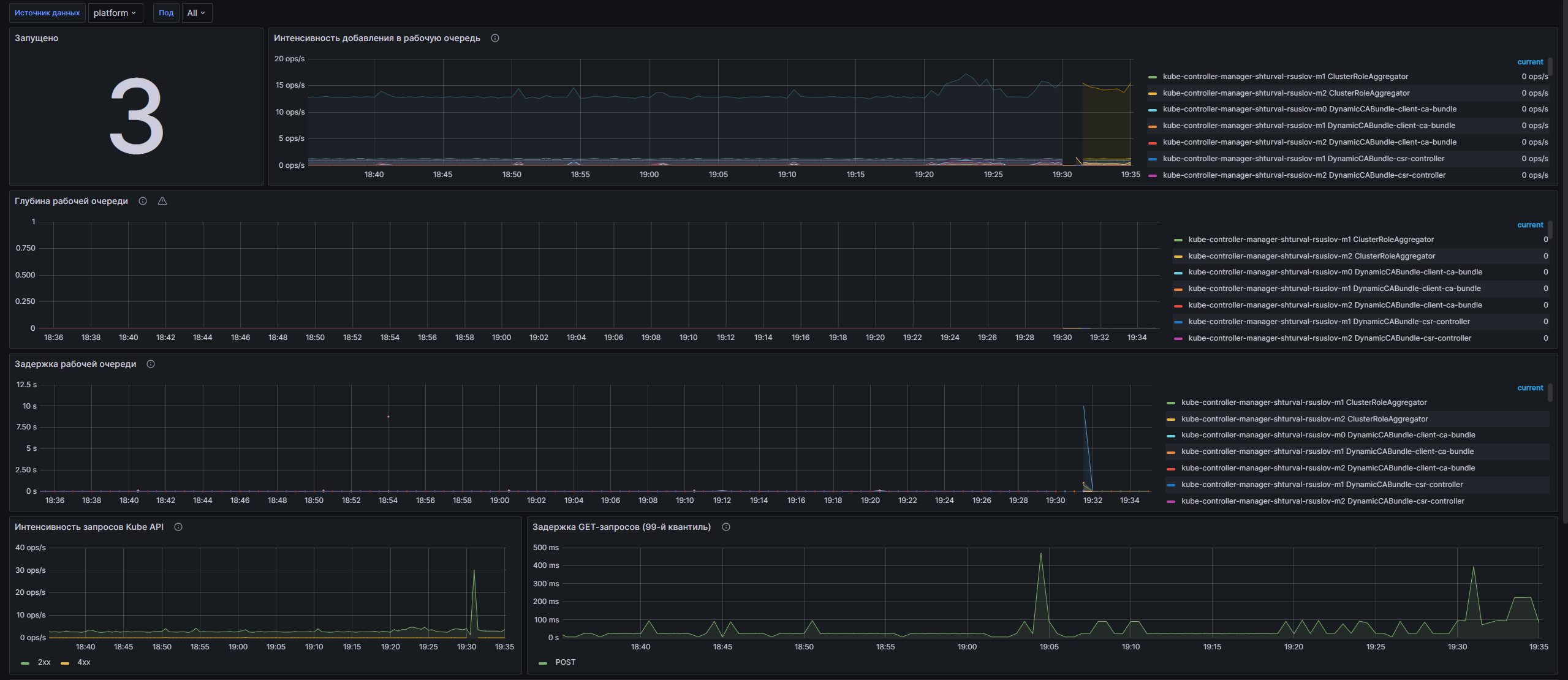
Dashboard structure
- Running: Displays the total number of running Kube Controller Manager instances on the selected cluster.
- Work Queue Addition Rate: A graph showing the total number of work queue additions broken down by cluster and thread.
- Work Queue Depth: A graph that displays the number of I/O operations that can be processed simultaneously by the system.
- Work Queue Latency: A graph that shows the time an item remains in the work queue before it is processed.
- Kube API Request Intensity: A graph that displays the total number of client requests to the Kube API broken down by response code.
- GET Request Latency (99th Quantile): Graph showing GET request latency in seconds, broken down by request type and URL.
- POST Request Latency (99th Quantile): Graph showing the latency of POST requests in seconds, broken down by request type and URL.
- Memory Usage: A graph showing the amount of memory used (in bytes) for each Kube Controller Manager pod.
- CPU Usage: A graph showing the CPU time used by the last object of each pod per unit of time.
- Go routines: A graph showing the number of active Go routines in each pod.
Customizable parameters
- datasource: Allows you to select a data source to configure the dashboard.
- pod: Allows you to select one pod to monitor or all pods on the selected cluster.
Kubernetes/ETCD Cluster Health
The dashboard is designed to monitor the health of the ETCD cluster in the Kubernetes environment. It is integrated with the VM Agent metrics collection system and provides detailed information about ETCD performance, including leadership status, number of leader changes, database size, throughput, and various performance metrics. Users can monitor key performance indicators and set alerts to improve cluster reliability and stability.
Screenshot
Illustration: Kubernetes/ETCD Cluster Health
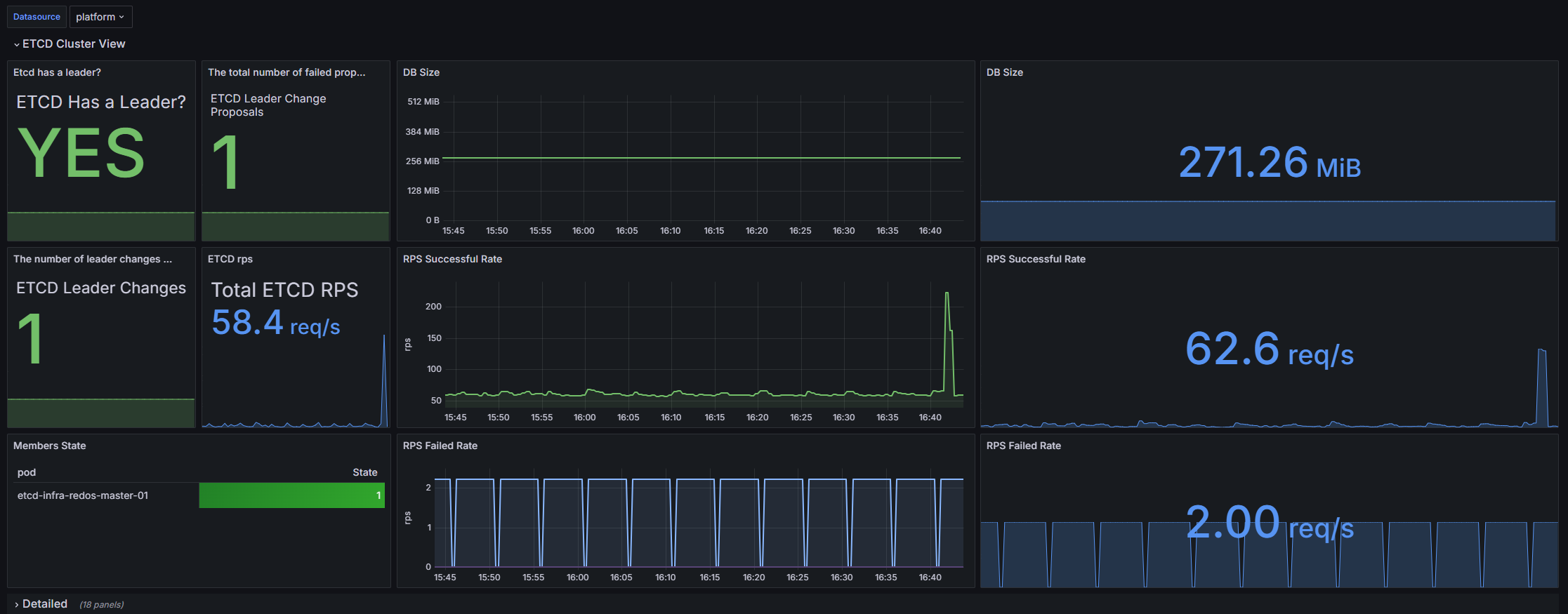
Dashboard structure
ETCD Cluster View:
- Etcd has a leader?: Displays information about the presence of a leader in the ETCD cluster.
- The total number of failed proposals seen: Shows the total number of failed proposals in the cluster.
- DB Size: A graph showing an estimate of the total size of the database, presented as a graph and statistics.
- The number of leader changes seen: The number of leader changes in the cluster.
- ETCD rps: Shows the number of requests per second to ETCD.
- RPS Successful Rate: A graph displaying successful requests per second, presented as a graph and statistics.
- Members State: State table of cluster members, shows which of them is the leader.
- RPS Failed Rate: A graph showing failed requests per second, presented as a graph and statistics.
Detailed:
- Memory: A graph showing the memory usage of the ETCD pod process.
- RPS Failed Rate: Graph of failed requests per second by submission.
- Disk Sync Duration: A graph displaying the duration of synchronization on the disk, presented as a 99th percentile graph.
- Disk Compact Duration: A graph showing the compression time on the disk is shown twice; one of the graphs is with the 99th percentile.
- Heartbeat Failures: A graph showing the number of heartbeat sending failures.
- Raft Proposals: A graph showing overall Raft Proposal metrics, including the rate of successful and unsuccessful proposals.
- Proposals pending: A graph showing the number of pending proposals.
- The total number of consensus proposals committed: The total number of proposals agreed upon in the cluster.
- Client Traffic In: Graph of incoming traffic from clients.
- Client Traffic Out: Graph of outgoing traffic to clients.
- Total Leader Elections Per Day: Graph showing the total number of leader elections per dayb.
- Peer Traffic In: A graph showing incoming traffic between cluster nodes.
- Peer Traffic Out: A graph showing outgoing traffic between cluster nodes.
- Disks operations: Disk operations schedule.
- Network: Graphs of total client traffic, both incoming and outgoing.
- Snapshot duration: A graph showing the duration of snapshots identifies possible disk problems.
Alerts:
- ETCD disk io latency alerts: Graph showing I/O latency alerts on ETCD disk.
- alert if 99th percentile of round trips take 150ms: Graph showing alerts when 150 ms is exceeded for the 99th percentile of round trips take 150ms.
- ETCD Status: The ETCD system status graph shows the overall status of the pods.
- ETCD Leader Changes Alert: Graph showing warnings about leader changes in the cluster.
- Disk Compact Duration: Graph showing alerts based on disk compression time.
- Disk Sync Duration: A graph showing disk sync time alerts.
Customizable parameters
- datasource: Allows you to select a data source to configure the dashboard.
Kubernetes/Ingress
The dashboard is designed to monitor NGINX Ingress operators in Kubernetes. It allows users to monitor various metrics such as request volume, success rates, network load and resource utilization, as well as perform analytics on the performance of Ingress controllers. With graphical data views and customizable parameters, users can easily monitor the health of their applications and identify potential performance issues.
Screenshot
Illustration: Kubernetes/Ingress
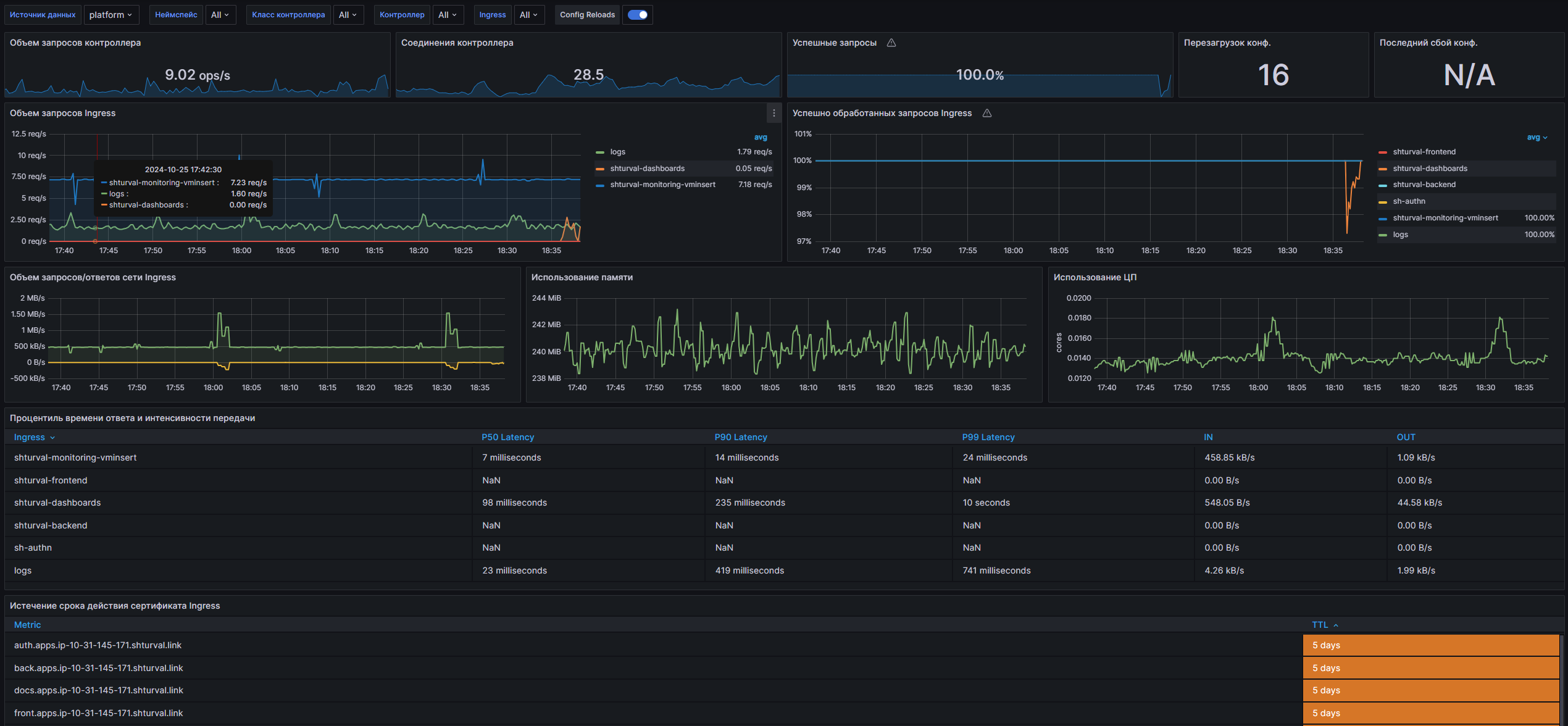
Dashboard structure
- Controller Request Volume: Displays the volume of requests processed by the Ingress controller.
- Controller Connections: Shows the number of active NGINX controller connections.
- Controller Success Rate (non-4|5xx responses): A graph displaying the percentage of successful responses (response codes not 4xx and not 5xx).
- Config Reloads: Displays how often the controller configuration is reloaded.
- Last Config Failed: Displays the number of failed attempts to reload the last configuration.
- Ingress Request Volume: A time graph showing the volume of requests to a specific Ingress.
- Ingress Success Rate (non-4|5xx responses): Percentage of successful responses for a specific Ingress.
- Network I/O pressure: Graphs showing incoming and outgoing network pressure.
- Average Memory Usage: A graph showing the average memory consumption of the NGINX controller.
- Average CPU Usage: A graph showing the average CPU usage of the NGINX controller.
- Ingress Percentile Response Times and Transfer Rates: Table showing percentile response times and transfer rates for Ingress.
- Ingress Percentile Response Times (Ingress Namespaces): Time series of response time percentages for various Ingress.
- Ingress Request Latency Heatmap (Ingress Namespaces): Heatmap showing request latency for Ingress.
- Ingress Certificate Expiry: Table with information about the expiration time of certificates for Ingress.
Customizable parameters
- datasource: Allows you to select a data source to configure the dashboard.
- namespace: Allows you to select the namespace in which the Ingress controller operates.
- controller_class: Allows you to select the controller class to filter metrics.
- controller: Allows you to select a sub-controller to track metrics.
- exported_namespace: Allows you to select the Ingress namespace for query analysis.
- ingress: Allows you to select a specific Ingress to monitor its metrics.
Kubernetes/Kubernetes
The dashboard is designed to monitor the status of Kubernetes clusters using data received via Kubelet. It displays key metrics such as the number of running containers, pods, and execution times, allowing administrators and DevOps teams to effectively manage resources and respond to potential issues.
Screenshot
Illustration: Kubernetes/Kubernetes
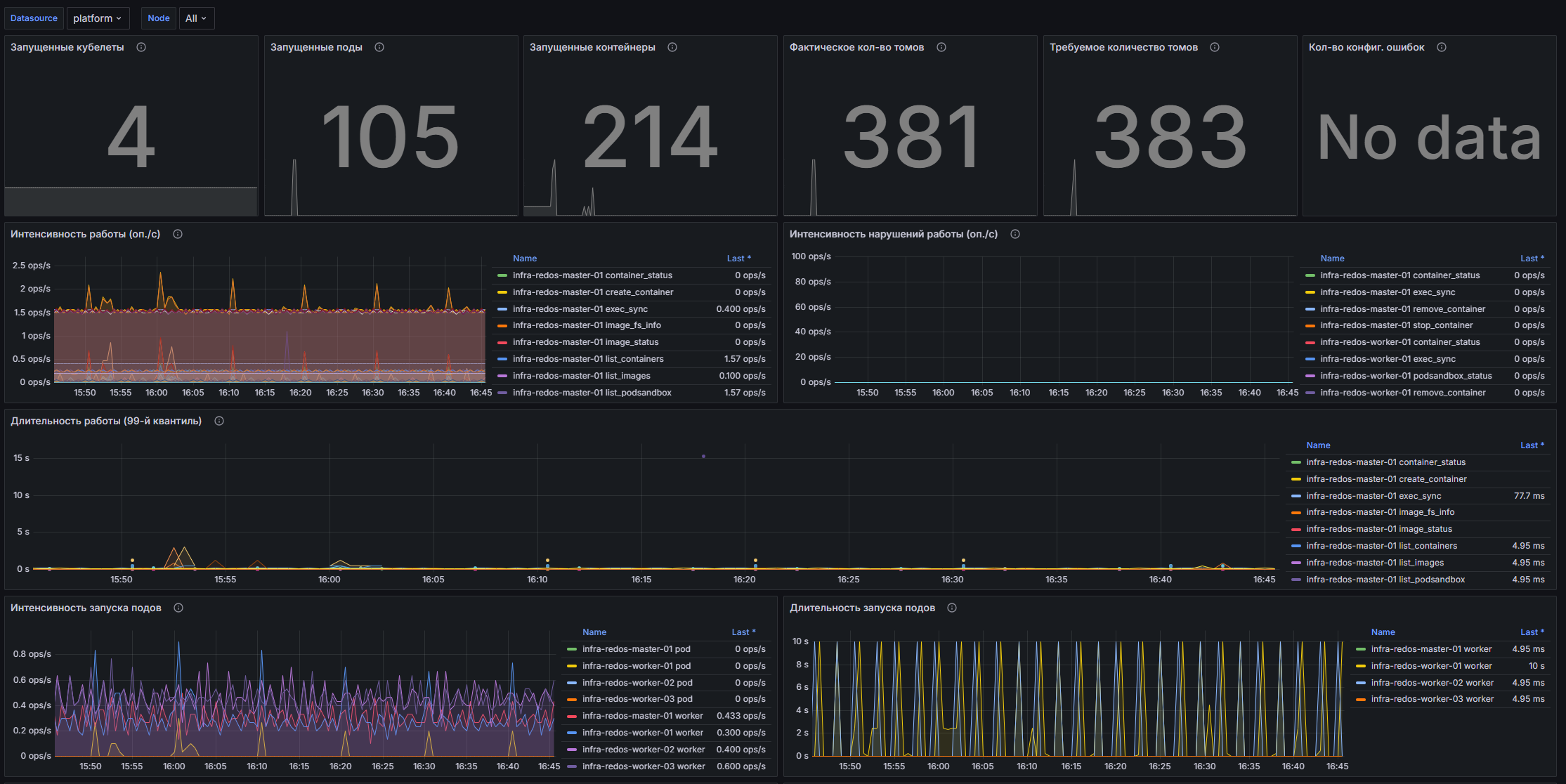
Dashboard structure
- Running Kubelets: Displays the total number of all running Kubelets.
- Running Pods: Displays the total number of all running pods, divided by node.
- Running containers: Displays the total number of all running containers, divided by node.
- Actual number of volumes: Displays the total number of all used volumes.
- Required number of volumes: Displays the total number of volumes required for proper operation.
- Number of config. errors: Displays the total number of Kubelet configuration errors.
- Work intensity (op./s): Graph,displaying the number of operations per second for performing various types of operations.
- Disruption Rate (ops/s): A graph displaying the number of operations per second spent on individual Kubelet tasks.
- Duration of operation (99th quantile): Graph displaying the 99th quantile of the number of operations per second of Kubelet incorrect operation.
- Pod Launch Rate (ops/s): A graph displaying the time spent launching Pods, divided by node.
- Pod Launch Duration (99th Quantile): A graph displaying the 99th quantile of Pod launch duration.
- Storage Operation Intensity (op/s): A graph displaying the number of operations per second spent on storage operations.
- Intensity of storage disruptions (op./s): A graph displaying the number of operations per second of incorrect storage operation.
- Storage run time (99th quantile): Graph displaying the 99th quantile of storage operation time.
- PLEG Update Rate (op/s): The number of operations per second performed by the PLEG event generator.
- PLEG list update period (99th quantile): Graph displaying the 99th quantile of PLEG list update time.
- PLEG list update duration (99th quantile): Graph displaying the 99th quantile of PLEG list update time.
- Remote Call Rate (RPC): A graph showing the total number of remote client requests per second, divided by response code.
- Request Duration (99th Quantile): A graph showing the 99th quantile of API request durations.
- Memory: A graph showing the amount of memory used by the Kubelet.
- CPU Usage: A graph showing the CPU time consumed by the Kubelet.
- Go-routines: A graph showing the number of goroutines used by Kubelet.
Customizable parameters
- datasource: Allows you to select a data source to configure the dashboard.
- node: Allows you to select a node to monitor. Available nodes are taken from the cluster data.
Kubernetes/Networking/Cluster
The dashboard is designed to monitor the network activity of Kubernetes clusters. It provides detailed information about data transmission and reception, as well as network status within clusters. Using this dashboard, users can track key metrics such as byte transfer rate, number of transferredand packets received, as well as the number of packets lost, which is an important part of ensuring the stability and performance of applications running in containers.
Screenshot
Illustration: Kubernetes/Networking/Cluster
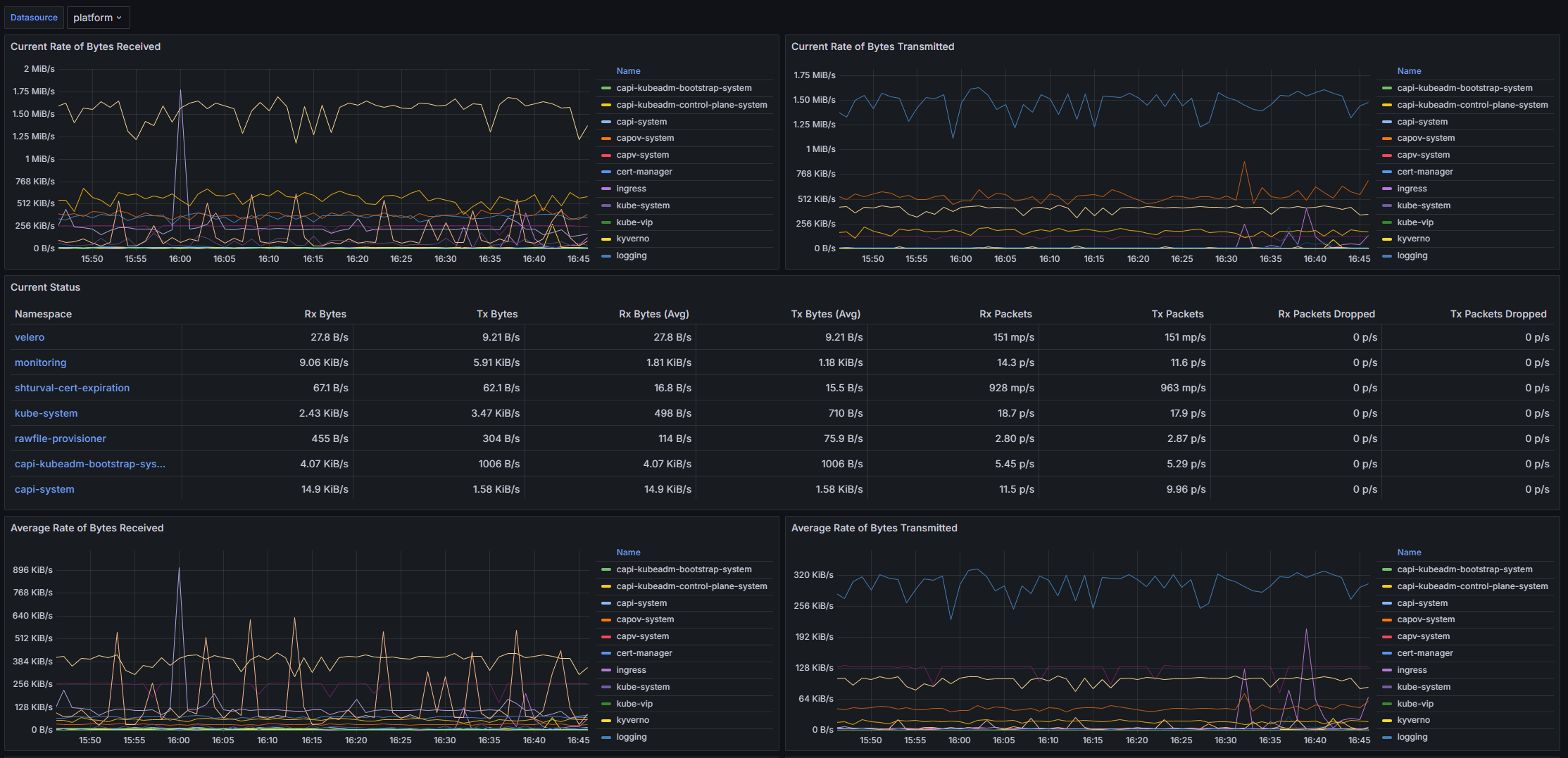
Dashboard structure
- Current Rate of Bytes Received: A graph showing the current rate of bytes received by namespace in the cluster.
- Current Rate of Bytes Transmitted: A graph showing the current byte transmission rate across the namespace.
- Current Status: Table with current metrics for received and transmitted bytes, packets and losses.
- Average Rate of Bytes Received/Transmitted, Receive/Transmit Bandwidth, Rate of Received/Transmitted Packets, Rate of TCP Retransmits, etc.
Customizable parameters
- datasource: Data source.
- cluster: Select a cluster to display data.
Kubernetes/Networking/Namespace (Pods)
The dashboard is designed to monitor the network activity of pods in the Kubernetes cluster. It provides visualization of various metrics related to the transmission and reception of network data, as well as the number of packets transmitted and lost.
Screenshot
Illustration: Kubernetes/Networking/Namespace (Pods)
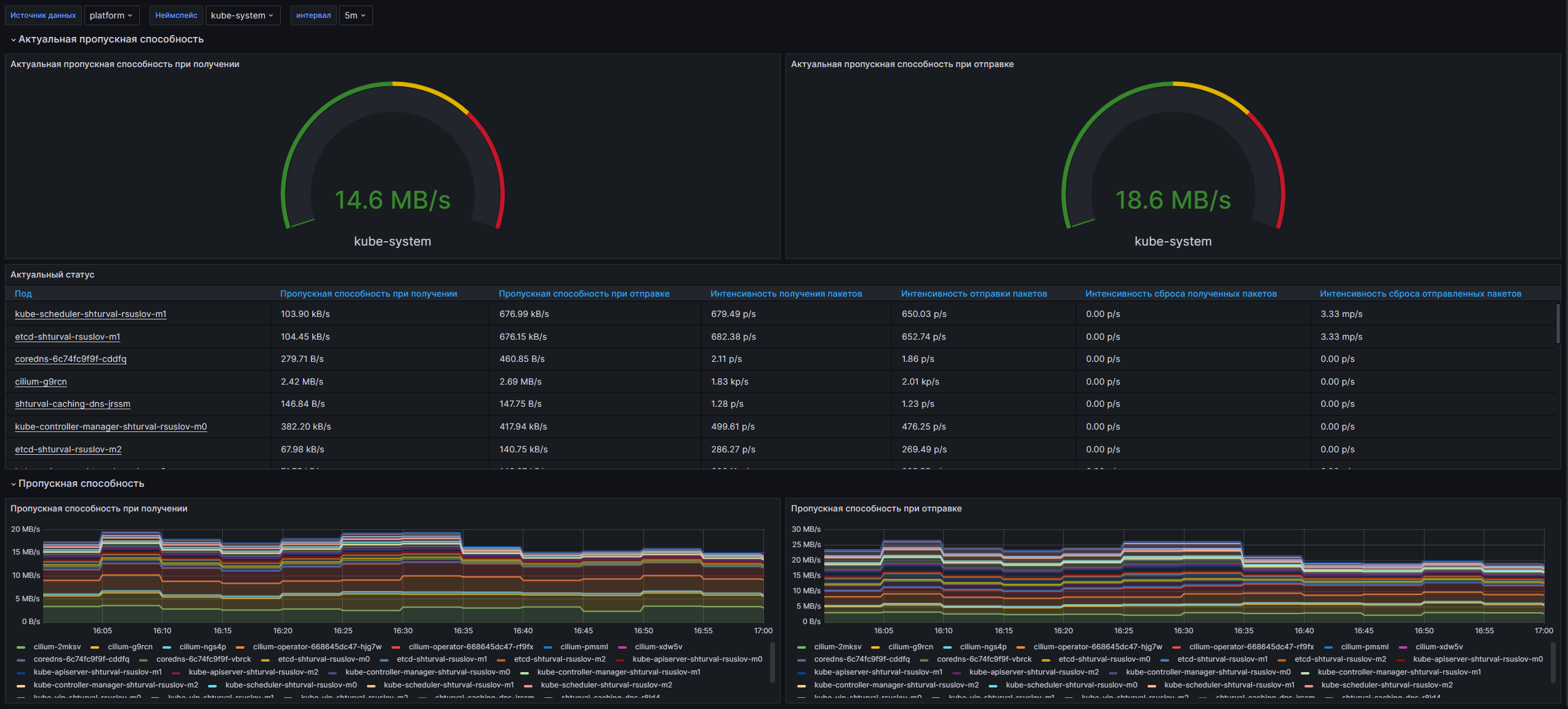
Dashboard structure
- Current Rate of Bytes Received/Transmitted, Current Network Usage, Receive/Transmit Bandwidth, Rate of Received/Transmitted Packets Dropped.
Customizable parameters
- datasource: Data source.
- namespace: Select a namespace.
Kubernetes/Networking/Namespace (Workload)
The dashboard is designed to monitor the network activity of containers in the Kubernetes environment. It provides the ability to track metrics for receiving and transmitting data at the namespace level, helping to quickly identify problems and optimize network performance.
Screenshot
Illustration: Kubernetes/Networking/Namespace (Workload)
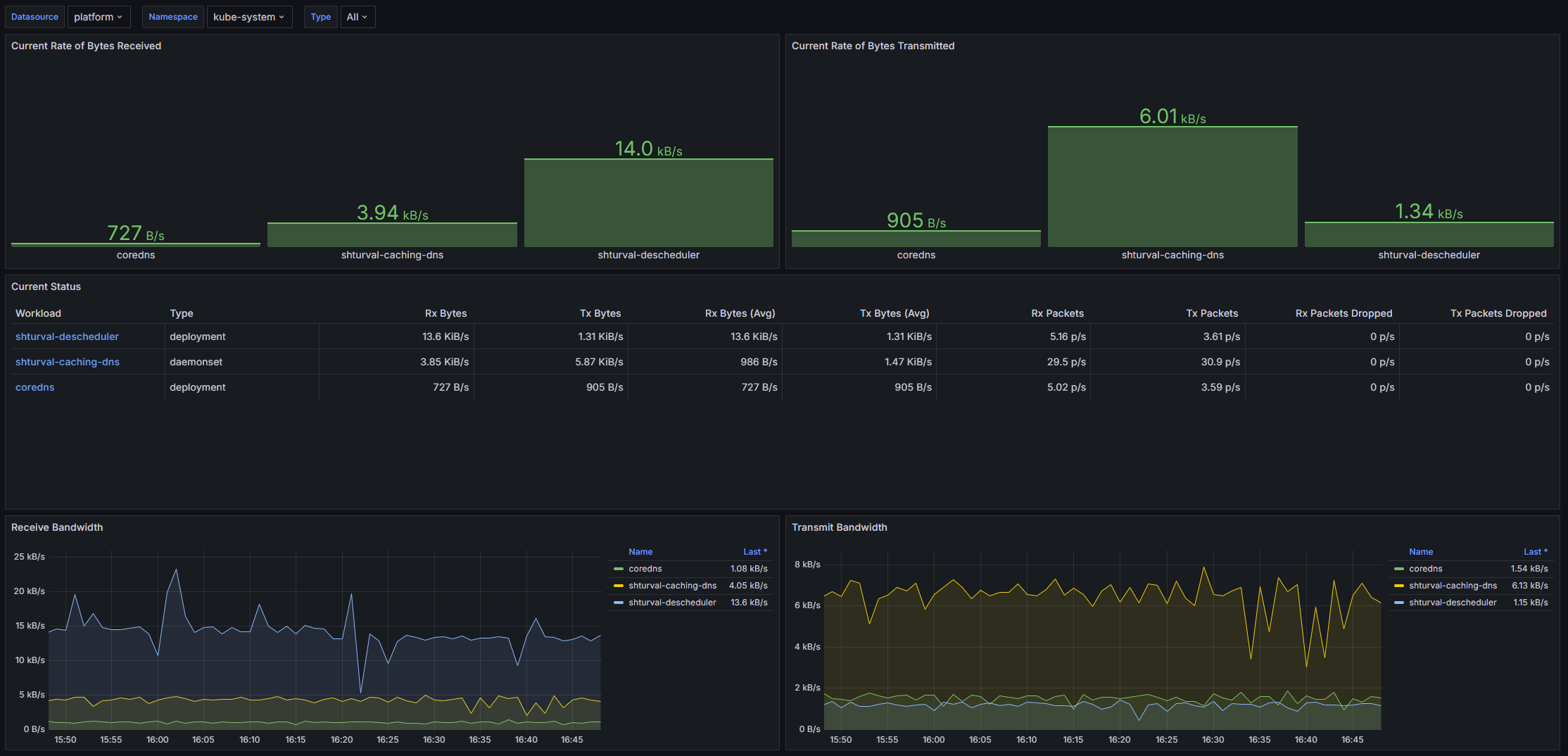
Dashboard structure
- Current Rate of Bytes Received/Transmitted, Current Status, Receive/Transmit Bandwidth, Average Container Bandwidth by Workload, Rate of Received/Transmitted Packets Dropped.
Customizable parameters
- datasource: Data source (VM Agent).
- namespace, type: Filtering by namespace and workload type.
Kubernetes/Networking/Pod
The dashboard is designed to monitor network indicators in the Kubernetes environment. It provides the ability to sendLive current network parameters: speed of receiving and transmitting data, number of packets. Uses data from the VM Agent to visualize metrics.
Screenshot
Illustration: Kubernetes/Networking/Pod
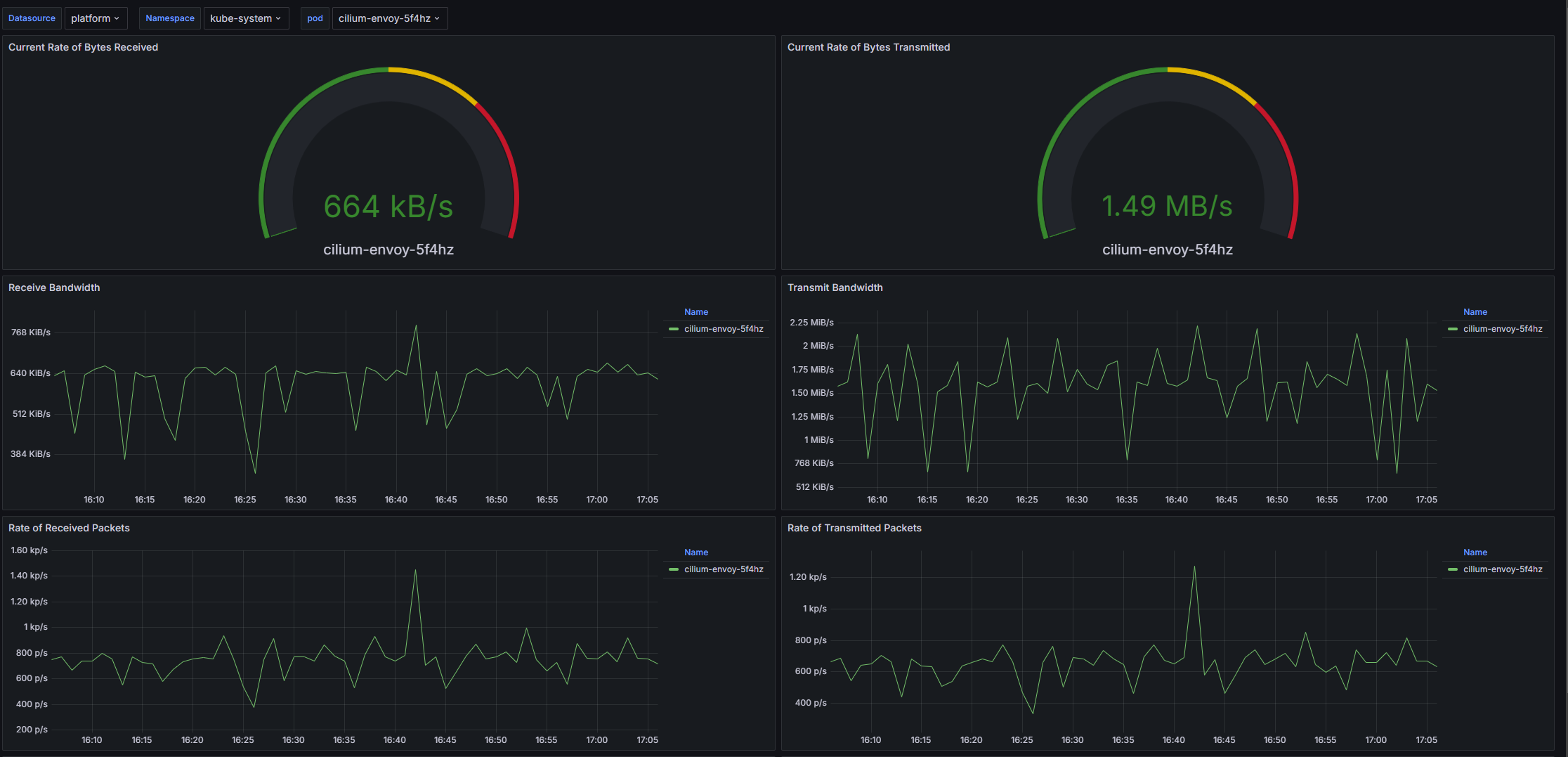
Dashboard structure
- Current Rate of Bytes Received/Transmitted, Receive/Transmit Bandwidth, Rate of Received/Transmitted Packets, Rate of Received/Transmitted Packets Dropped.
Customizable parameters
- datasource, namespace, pod.
Kubernetes/Networking/Workload
The dashboard is designed to monitor network performance in Kubernetes environments. It provides the ability to monitor the current and average speeds of receiving and transmitting bytes, the number of received and transmitted packets. Helps identify bottlenecks in workload networking.
Screenshot
Illustration: Kubernetes/Networking/Workload
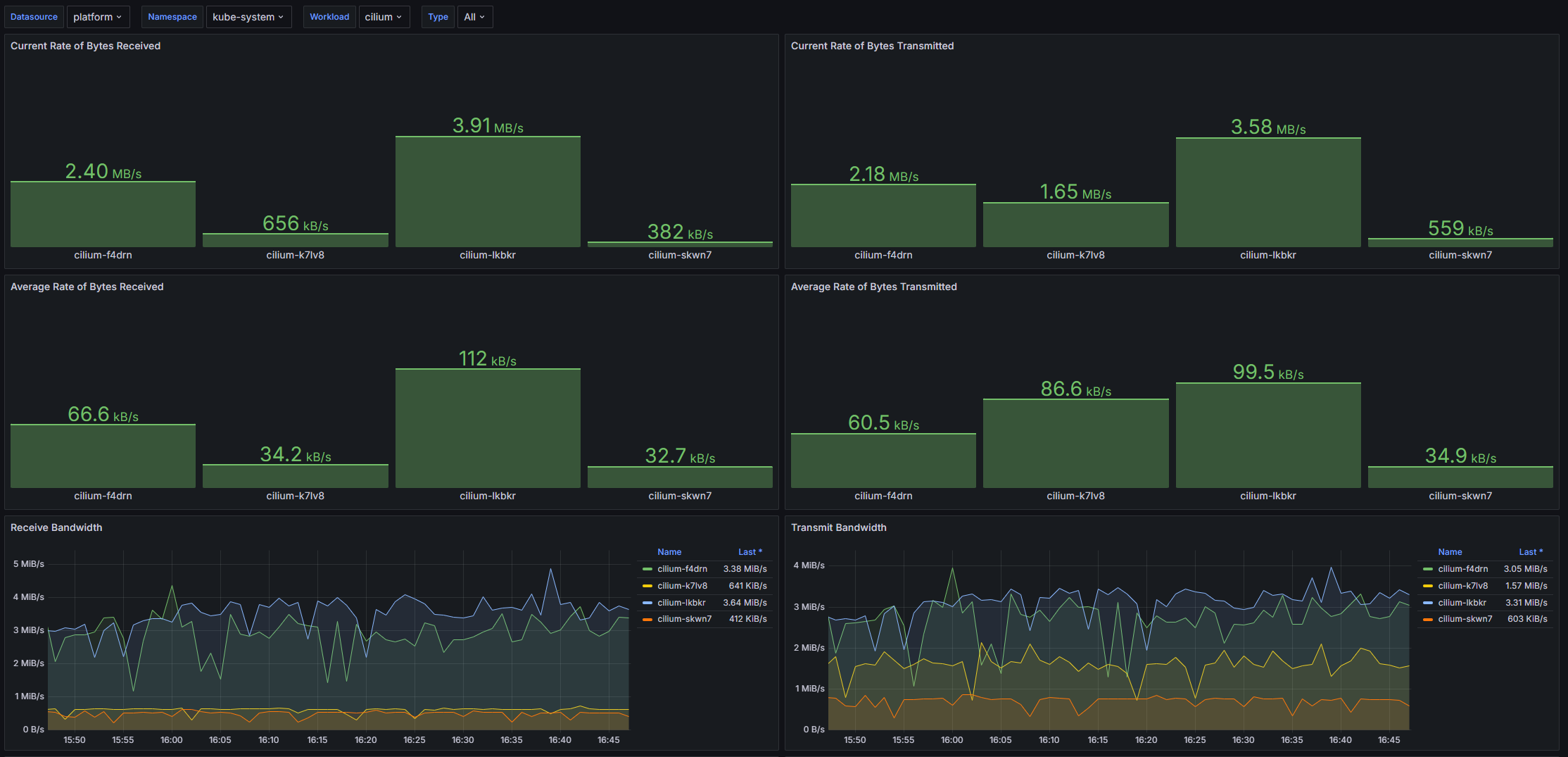
Dashboard structure
- Current/Average Rate of Bytes Received/Transmitted, Receive/Transmit Bandwidth, Rate of Received/Transmitted Packets, Rate of Received/Transmitted Packets Dropped.
Customizable parameters
- datasource, namespace, workload, type.
Kubernetes/Persistent Volumes
The dashboard is designed to monitor resource usage of persistent volumes in the Kubernetes environment. It allows you to monitor parameters such as the amount of used and free memory, as well as the use of inode volumes. This tool is useful for administrators and DevOps professionals by providing the ability to monitor the health of data storage and prevent potential resource shortage issues.
Screenshot
Illustration: Kubernetes/Persistent Volumes
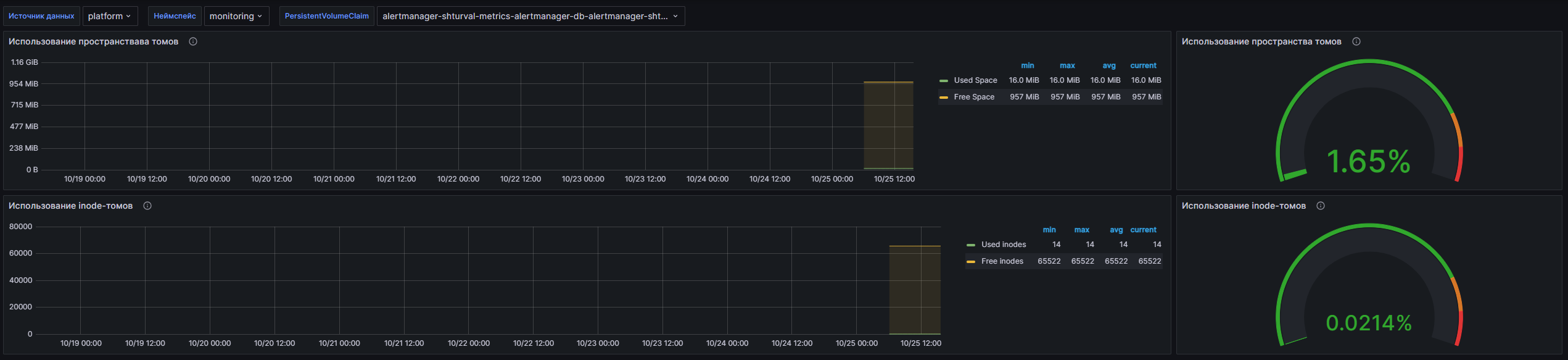
Dashboard structure
- Volume space usage: Graph and percentage of occupied/free memory of persistent volumes.
- Use of inode volumes: Number and percentage of inodes used.
Customizable parameters
- datasource, namespace, volume (PersistentVolumeClaim).
Kubernetes/Compute Resources/Cluster
The dashboard is designed to monitor computing resources in the Kubernetes cluster. It provides the ability to monitor CPU and memory usage, requested and limited resources, as well as network activity and I/O operations of containers. Using this dashboard, administrators can quickly assess the health of the cluster, identify resource bottlenecks, and optimize load distribution.
Screenshot
Illustration: Kubernetes/Compute Resources/Cluster
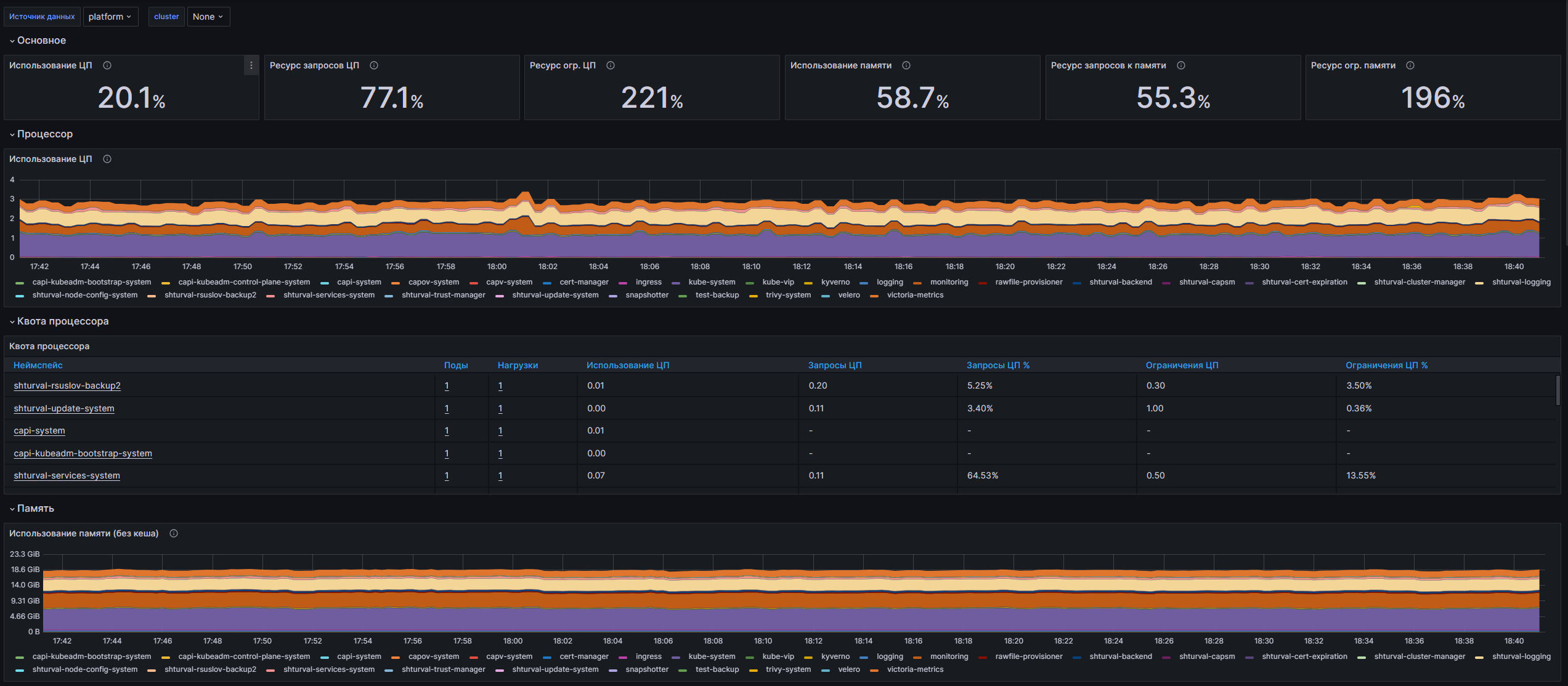
Dashboard structure
- CPU/Memory Utilization, CPU/Memory Requests/Limits Commitment, CPU Usage, CPU Quota, Memory, Memory Requests by Namespace, Current Network Usage, Receive/Transmit Bandwidth, Rate of Received/Transmitted Packets, IOPS, ThroughPut, Current Storage IO.
Customizable parameters
- datasource, cluster.
Kubernetes/Compute Resources/Namespace (Pods)
The dashboard provides comprehensive monitoring of computing resources in the Kubernetes cluster at the namespace level. It allows you to monitor CPU and memory usage, as well as network and disk activity of containers. Using metrics from kube-state-metrics and kubelet, the dashboard offers the ability to visualize key performance indicators and optimize resources in real time.
Screenshot
Illustration: Kubernetes/Compute Resources/Namespace (Pods)
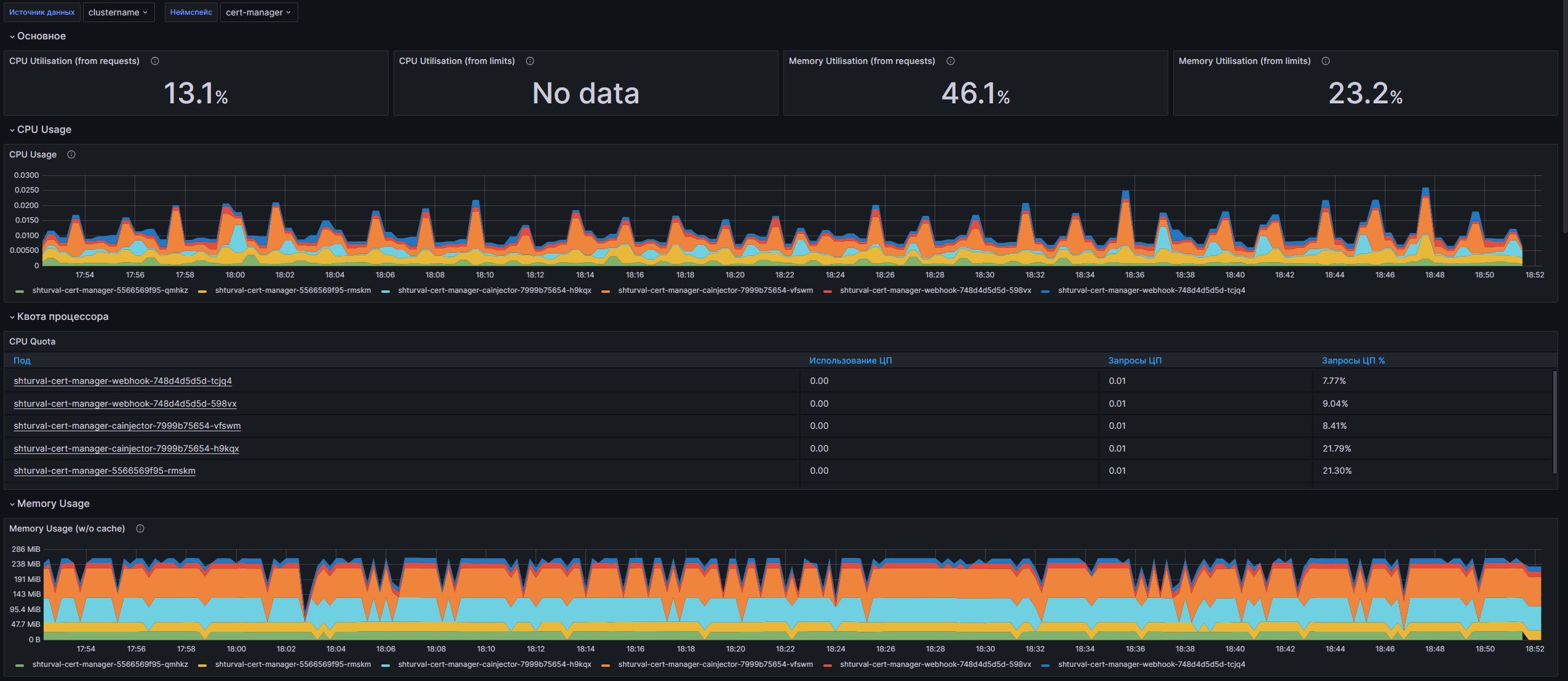
Dashboard structure
- CPU/Memory Utilization (from requests/limits), CPU Usage, CPU Quota, Memory Usage (w/o cache), Memory Quota, Current Network Usage, Receive/Transmit Bandwidth, IOPS, ThroughPut, Current Storage IO.
Customizable parameters
- datasource, cluster, namespace.
Kubernetes/Compute Resources/Namespace (Workloads)
The dashboard is designed to monitor computing resources in the Kubernetes cluster at the namespace level. It provides the ability to monitor CPU and memory usage, as well as network activity of containers within workloads. Using this dashboard, you can effectively manage resources, identify overloads and optimize load distribution on the cluster.
Screenshot
Illustration: Kubernetes/Compute Resources/Namespace (Workloads)
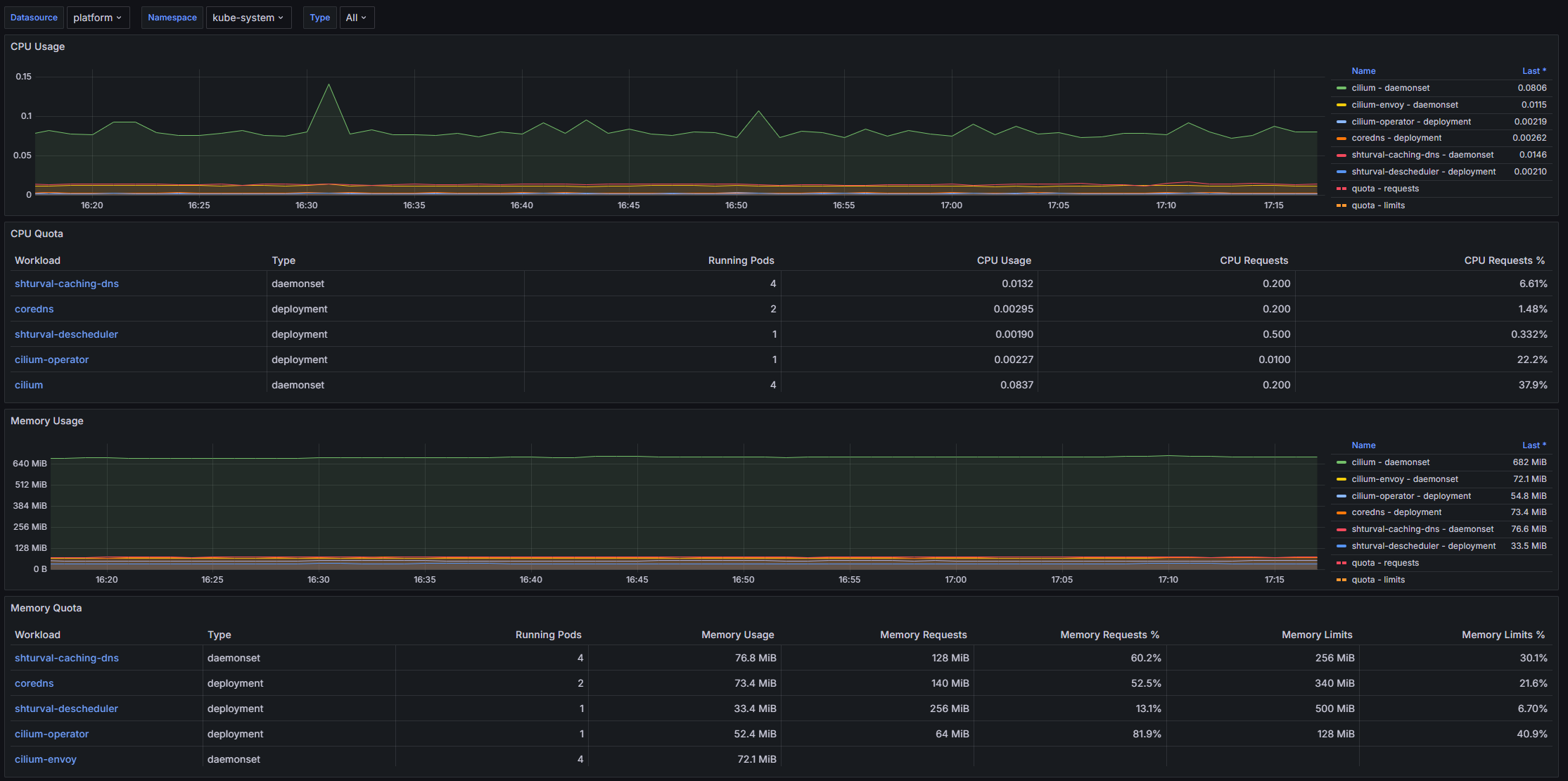
Dashboard structure
- CPU Usage, CPU Quota, Memory Usage, Memory Quota, Current Network Usage, Receive/Transmit Bandwidth, Average Container Bandwidth by Workload, Rate of Received/Transmitted Packets Dropped.
Customizable parameters
- datasource, namespace, type.
Kubernetes/Compute Resources/Node (Pods)
The dashboard is designed to monitor the resources of computing nodes in the Kubernetes cluster. It provides important information about resource consumption (CPU and memory) as well as their quotas for individual pods. Users can quickly assess the current status of nodes while monitoring the maximum available powerand resource use.
Screenshot
Illustration: Kubernetes/Compute Resources/Node (Pods)
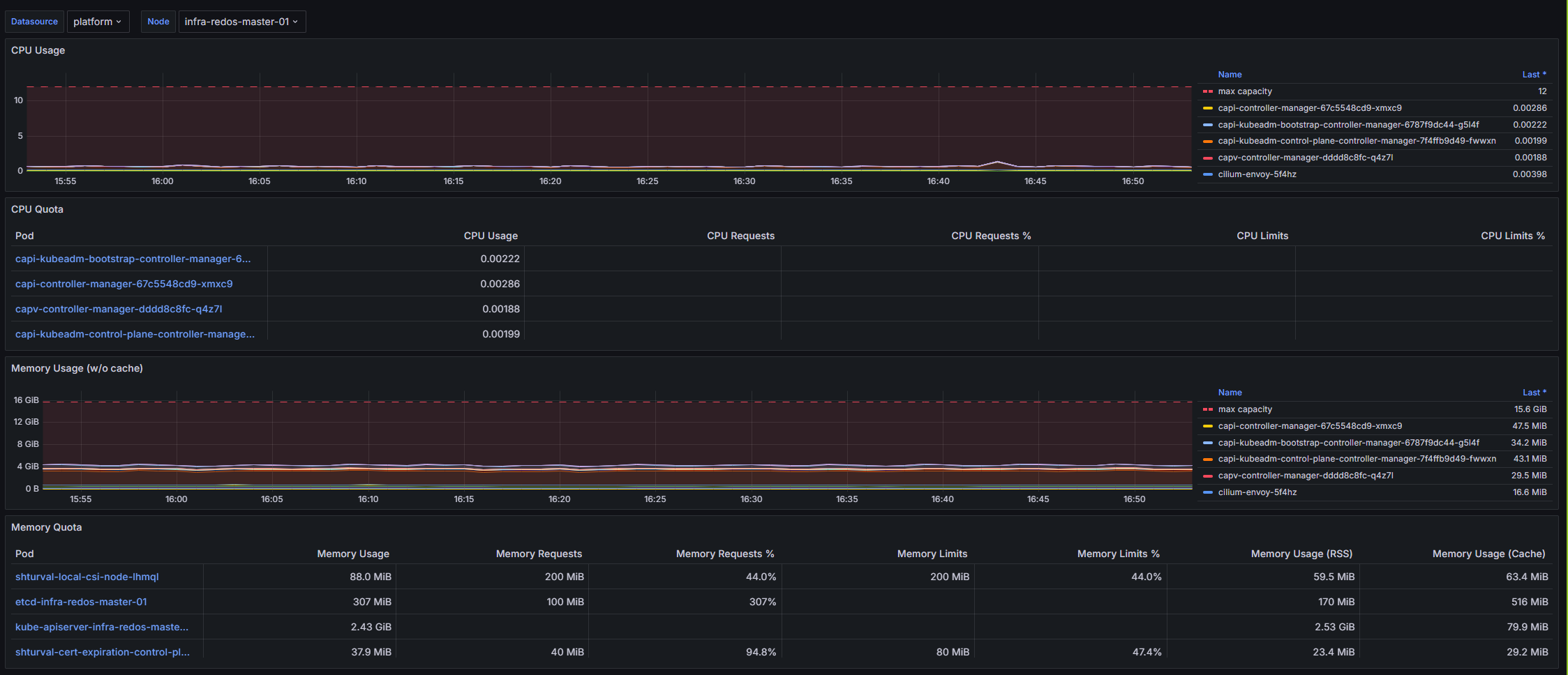
Dashboard structure
- CPU Usage: Dynamics of CPU usage in pods, maximum available power.
- CPU Quota: CPU quotas for pods.
- Memory Usage (w/o cache): Memory usage by pods.
- Memory Quota: Memory usage, queries, limits, RSS, caches, swap.
Customizable parameters
- datasource (VM Agent), node.
Kubernetes/Compute Resources/Pod
The dashboard is designed to monitor container resources in the Kubernetes environment. It provides the ability to monitor CPU and memory usage, network metrics, and disk I/O activity. With this dashboard, administrators and developers can quickly identify performance issues and optimize resource allocation.
Screenshot
Illustration: Kubernetes/Compute Resources/Pod
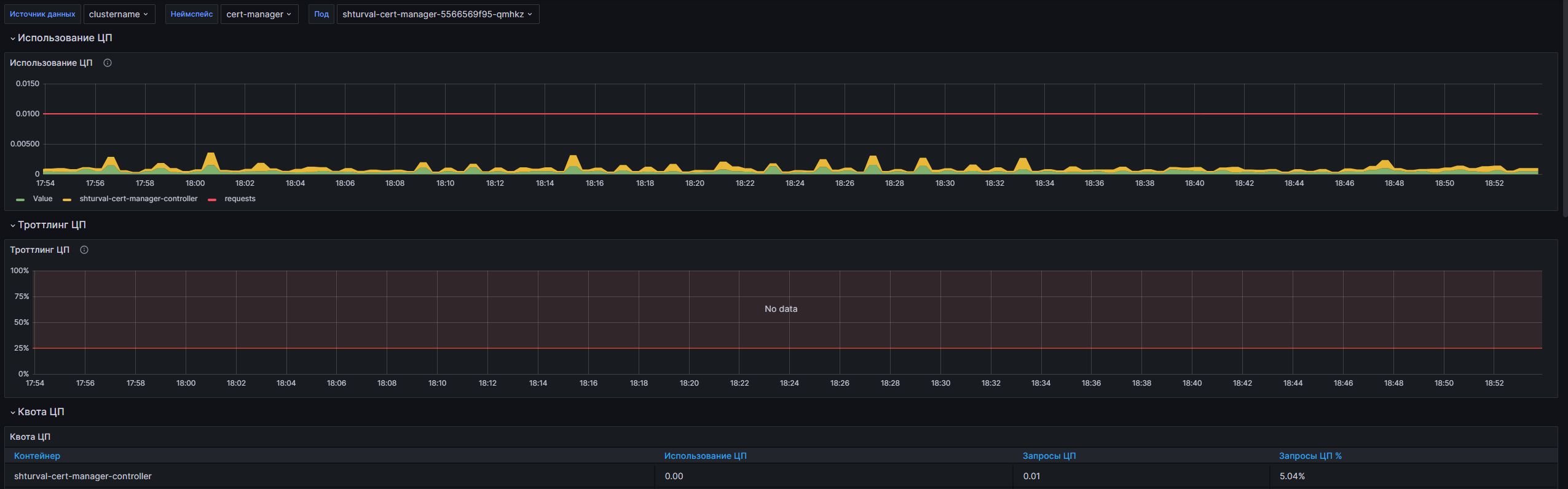
Dashboard structure
- CPU Usage, CPU Throttling, CPU Quota, Memory Usage (WSS), Memory Quota, Receive/Transmit Bandwidth, Rate of Received/Transmitted Packets, IOPS, ThroughPut, Current Storage IO.
Customizable parameters
- datasource, namespace, pod.
Kubernetes/Compute Resources/Workload
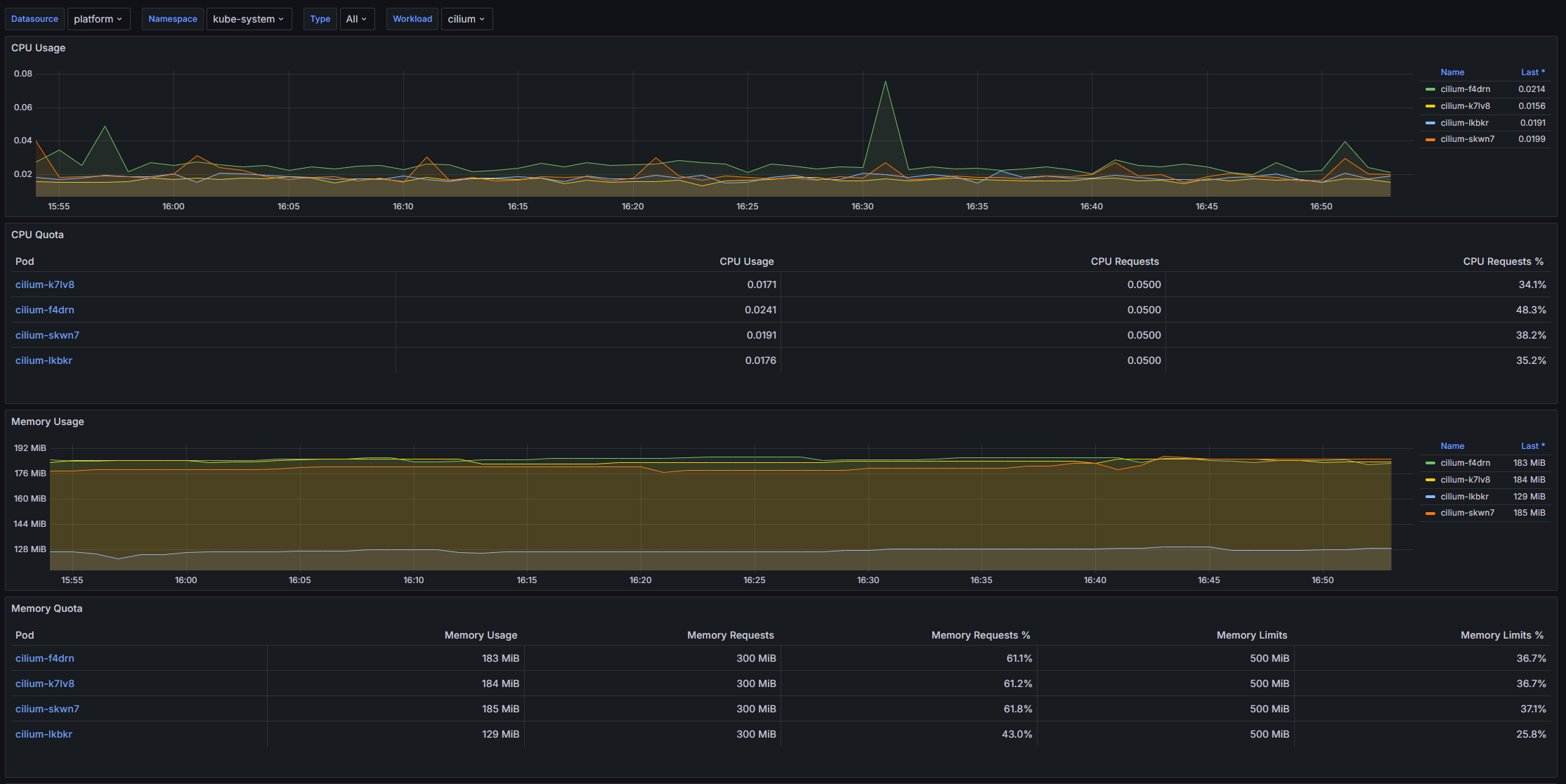
The dashboard is designed to monitor the resources of the computing environment Kubernetes. It provides detailed information about the load on the CPU, memory and network interfaces, as well as the quotas allocated for these resources. By visualizing time graphs and tables in real time, you can monitor the performance and resource efficiency of various workloads in the cluster.
Screenshot
Illustration: Kubernetes/Compute Resources/Workload
Dashboard structure
- CPU Usage, CPU Quota, Memory Usage, Memory Quota, Current Network Usage, Receive/Transmit Bandwidth, Average Container Bandwidth by Pod, Rate of Received/Transmitted Packets Dropped.
Customizable parameters
- datasource, cluster, namespace, type, workload.
Kubernetes/Scheduler
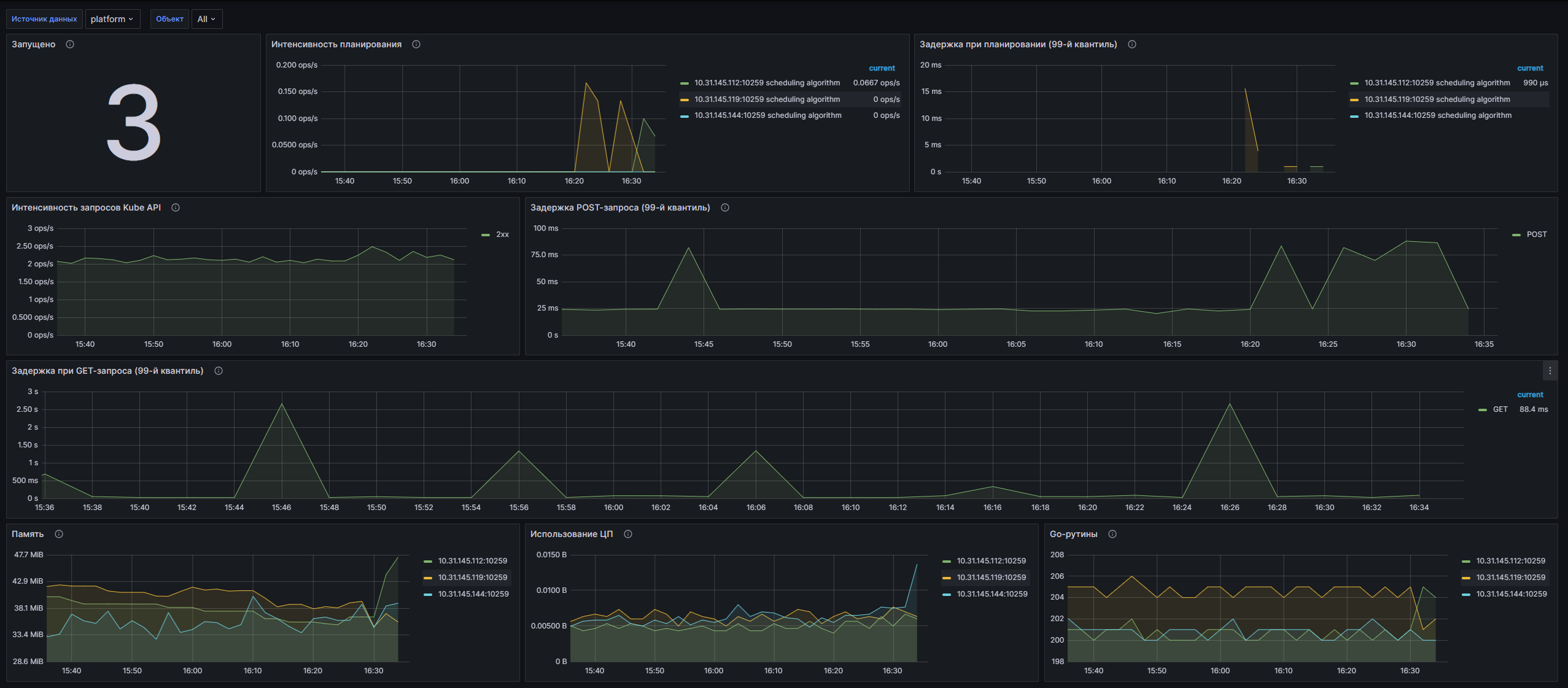
The dashboard is designed to monitor the work of the Kubernetes scheduler. It allows you to track key metrics related to the scheduling process, including the number of active schedulers, scheduling latency, and HTTP request statistics to the Kube API. The dashboard provides graphical visualization of data, which helps in quickly identifying and resolving performance problems in the Kubernetes cluster.
Screenshot
Illustration: Kubernetes/Scheduler
Dashboard structure
- Runned: Number of schedulers in the cluster.
- Planning intensity: Duration of planning stages (op/s).
- Scheduling delay (99th quartile): e2e, binding, scheduling algorithm, volume.
- Kube API request intensity: HTTP requests by status code, method, host.
- POST/GET request latency (99th quartile), Memory, CPU usage, Go routines.
Customizable parameters
- datasource, service.
Kubernetes/StatefulSet
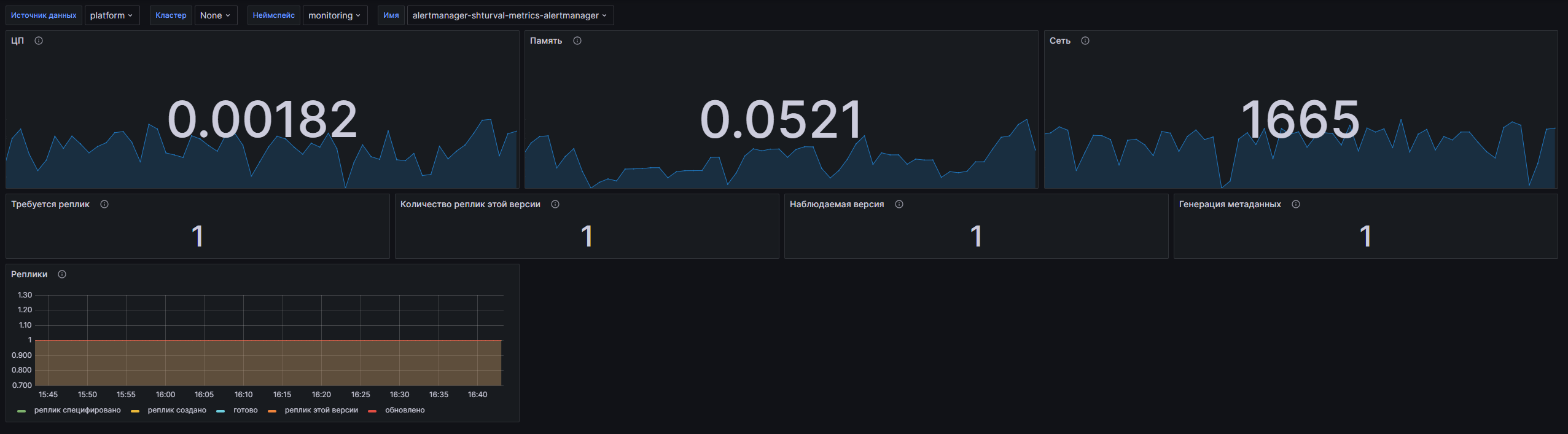
The dashboard is designed to monitor the state of the StatefulSet in the Kubernetes cluster. It provides visual metrics to track resource usage (CPU, memory, network communications) as well as metrics related to StatefulSet replication. Using a dashboard, users can effectively analyze the performance and health of applications running in Stateful mode.
Screenshot
Illustration: Kubernetes/StatefulSet
Dashboard structure
- CPU, Memory, Network: Resource usage.
- Replicas required, Number of replicas of this version, Monitored version, Metadata generation, Replicas (maximum, created, ready, updated).
Customizable parameters
- datasource (VM Agent), cluster, namespace, statefulset.
Kubernetes/Views/Global
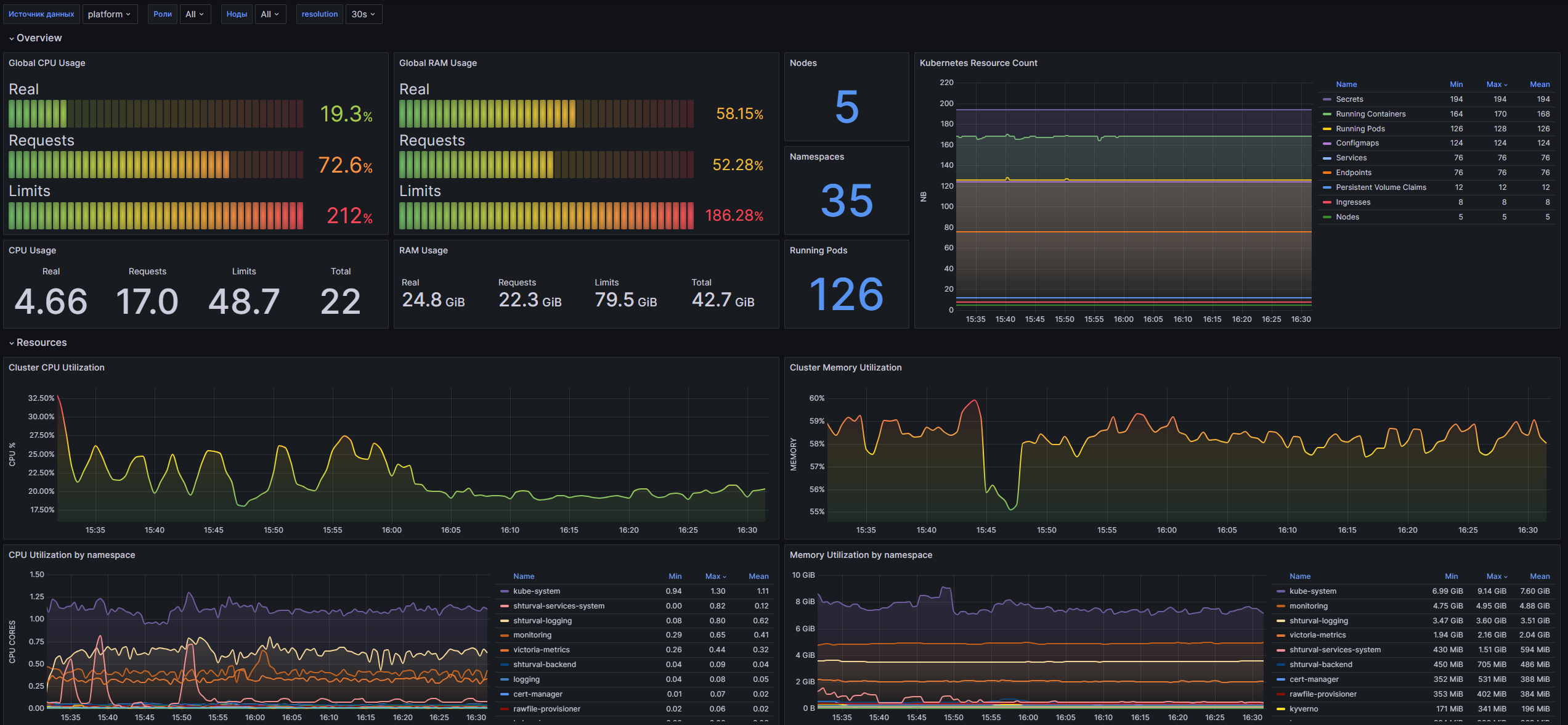
The dashboard is designed to monitor Kubernetes clusters and is a modern “Global View” created for the kube-VM Agent-stack and using the latest Grafana features. It allows users to monitor cluster resources: CPU and memory usage, number of nodes, pods and other metrics, ensuring efficient resource management and maintaining stable application performance.
Screenshot
Illustration: Kubernetes/Views/Global
Dashboard structure
- Overview: Global CPU/RAM Usage, Nodes, Kubernetes Resource Count, Namespaces, Running Pods.
- Resources: Cluster CPU/Memory Utilization, CPU/Memory Utilization by namespace/node, CPU Throttled, CPU Core Throttled by node.
- Kubernetes: Pods QoS classes, Pods Status Reason, OOM Events, Container Restarts by namespace.
- Network: Global Network Utilization by device, Packets dropped, Network Received by namespace/node.
Customizable parameters
- datasource, role, node, resolution (1s, 15s, 30s, 1m, 3m, 5m).
Kubernetes/System/CoreDNS
The dashboard is a solution for monitoring CoreDNS in Kubernetes clusters. It is designed to be used in conjunction with kube-prometheus-stack and implements the latest Grafana features. The dashboard allows you to track various metrics related to CoreDNS operation: health status, resource usage, DNS query and caching statistics.
Screenshot
Illustration: Kubernetes/System/CoreDNS
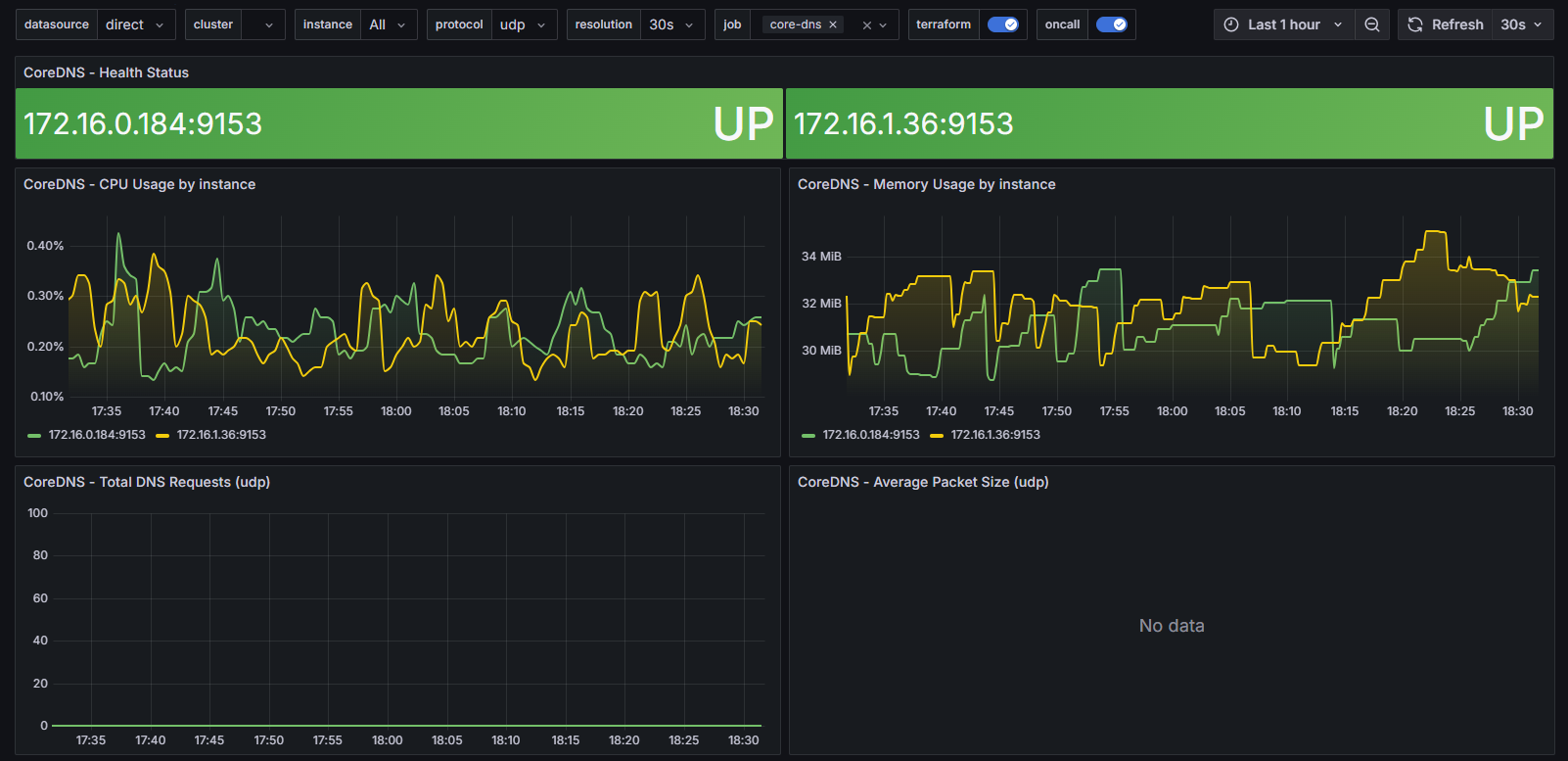
Dashboard structure
- CoreDNS - Health Status, CPU Usage by instance, Memory Usage by instance.
- Total DNS Requests, Average Packet Size, Requests by type, Requests by return code.
- Cache Hits / Misses, Cache Size, DNS request/response duration/size (heat maps).
Customizable parameters
- datasource, cluster, instance, protocol, resolution, job.