How providers work in the platform
From Cluster API to setting up a provider instance: IP pools, VM templates, links to services.
In the Shturval platform, a provider is a Cluster API operator that connects an infrastructure environment to the platform. Configuration uses provider instances — one instance per connected environment (vCenter, oVirt Engine, OpenStack project, etc.). You can create multiple instances for each supported infrastructure type.
This page describes the general model: how the platform connects infrastructure (vCenter, oVirt, cloud, etc.), Cluster API, and GUI objects (provider instance, IP pool, VM template). Below is the [procedure for preparing providers](#infrastructure-Cluster API-service-and-ip-pool) before the first cluster (pool → instance → VM template), where applicable.
Briefly about Cluster API
The Shturval platform uses Cluster API (CAPI) for declarative lifecycle management of client clusters and nodes. In the management cluster, resources such as Cluster, Machine, and MachineDeployment are created and reconciled. An overview is in Cluster API. The main API groups and Kind resources for node lifecycle are on Creating nodes when deploying a client cluster.
The CAPI core is the Cluster API Provider (shturval-capi) service. For each supported infrastructure environment, a separate infrastructure provider service runs in the management cluster and creates VMs through the environment API. The table below lists these services and links to their descriptions.
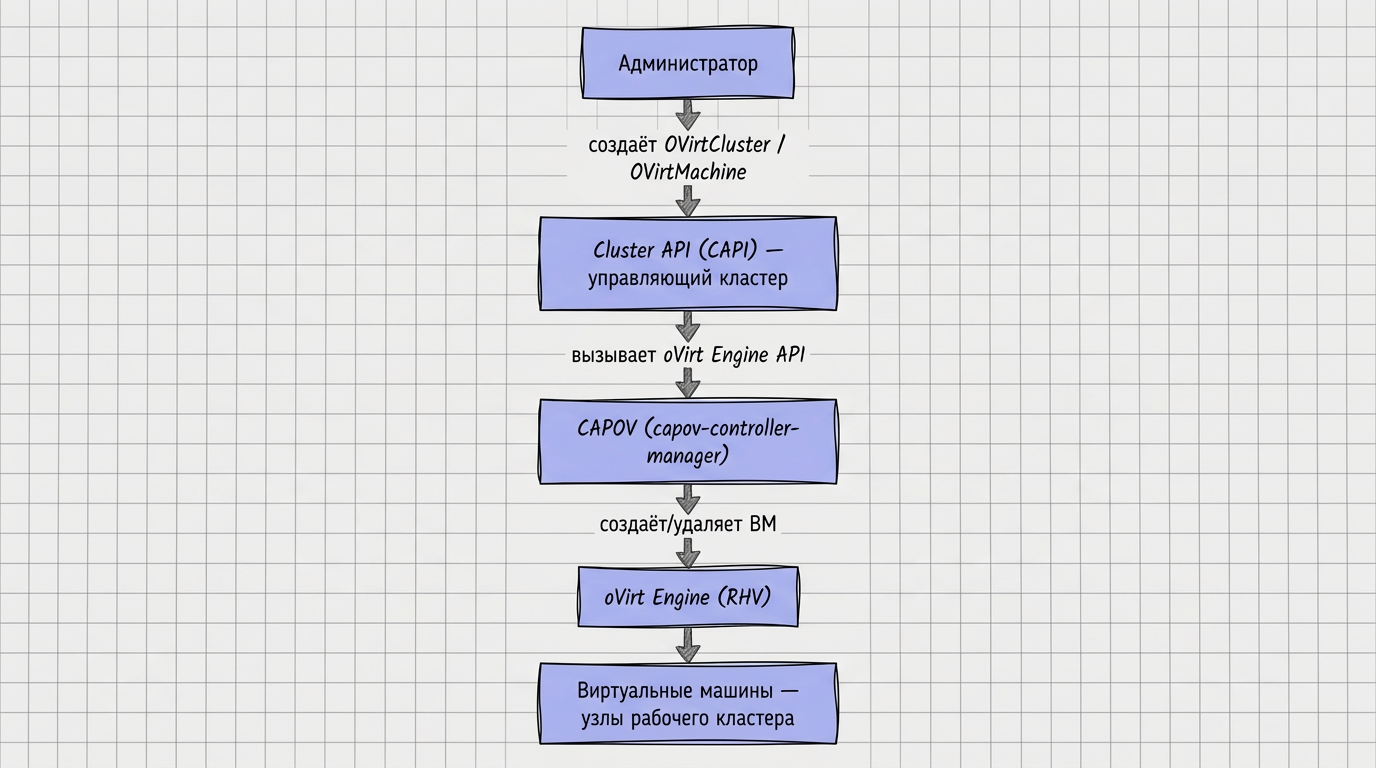
The chain “administrator → CAPI in the management cluster → infrastructure provider → virtualization API → client cluster nodes” is shown below (oVirt example):
Terms to keep distinct
- Cluster API (CAPI) — mechanism for managing clusters and nodes in Kubernetes; CAPI objects live in the management cluster (see Cluster API).
- Infrastructure provider — virtualization, cloud, or physical hosts you connect to Shturval: oVirt, VMware vSphere, OpenStack, Yandex Cloud, etc.
- Cluster API infrastructure provider — component in the management cluster (for example,
shturval-capvsfor vSphere) that implements the CAPI contract for a specific environment. In the management cluster GUI, these may appear as “vSphere Provider”, “oVirt Provider”, and similar names. - Provider instance — object under Providers → Provider configuration: connection to your environment (vCenter, oVirt Engine, OpenStack project, etc.), credentials, zone/project, and optionally an IP pool and VM templates.
- IP address pool — address range from which VIPs for KubeAPI and Ingress can be selected when creating a cluster (or entered manually — see IP address pool). Pools are not available for all infrastructures (see the table below).
- VM template — virtual machine image for delivering nodes. For Shturval v2, VM templates are not used (nodes are prepared hosts).
From abstract to concrete
- The management cluster runs services including shturval-capi and infrastructure providers. You do not configure operator services manually.
- The Cluster API infrastructure provider calls your virtualization or cloud API and creates VMs through CAPI resources.
- In the platform GUI, you configure a provider instance (environment connection), optionally an IP pool and VM templates, then create client clusters.
For the role of Cluster API and the platform approach, see How Shturval manages clouds.
Provider instance
For each supported infrastructure environment, create an instance — configuration for a specific Engine, vCenter, OpenStack project, etc. In the GUI: Providers → Provider configuration. For environments with IP pools, create the pool first under Providers → IP pools (see [preparation order](#infrastructure-Cluster API-service-and-ip-pool)).
Creating an instance requires the corresponding infrastructure provider service to be enabled in the management cluster. In Provider services, control the service mode. After activation, the service may take several minutes to start; when deployed successfully, the provider type appears in Add provider instance.
If a provider service is disabled, existing instances remain view-only.
Note: The provider service used to deploy the management cluster is critical and cannot be disabled (see the screenshot below).
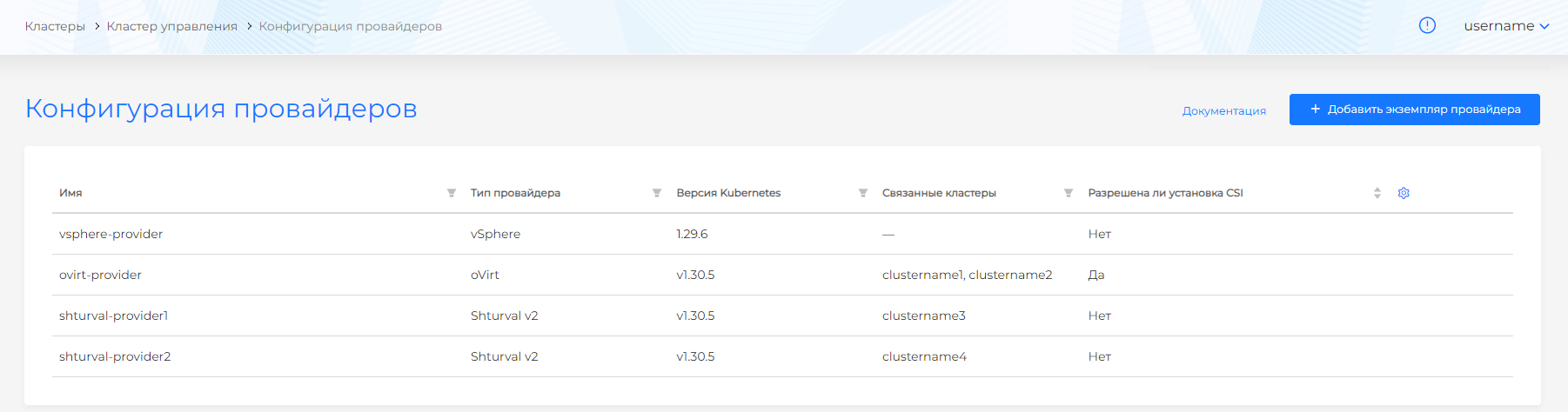
Typically you specify:
- Credentials and API parameters;
- Environment context (datacenter, project, zone, etc., depending on type);
- IP address pool — only where pools are supported (Shturval v2, oVirt, zVirt, HostVM, ED Virtualization, ROSA Virtualization, VMware vSphere);
- VM templates for Kubernetes versions — for providers whose nodes are created from a template (see VM templates).
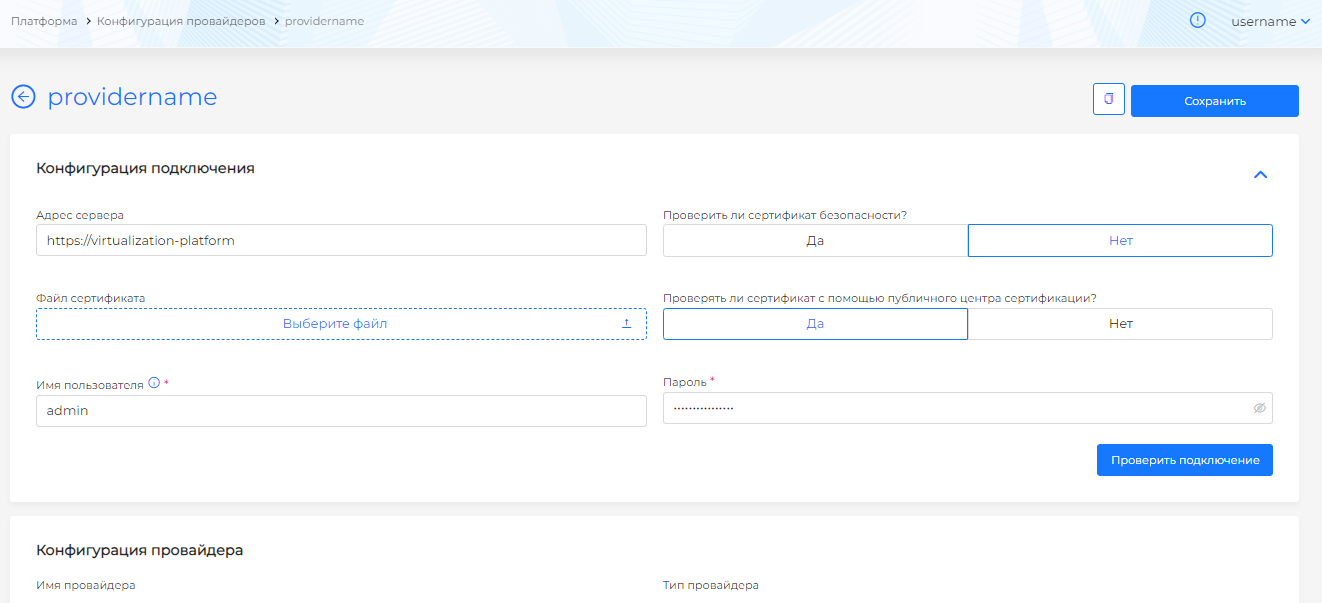
Step order: [IP pool and table by environment](#infrastructure-Cluster API-service-and-ip-pool), then provider instance and VM templates.
Infrastructure, Cluster API service and IP pool {#infrastructure-Cluster API-service-and-ip-pool}
The table lists each infrastructure environment, the documented Cluster API service, whether an IP pool is available in the GUI, and where to read about instance setup.
| Infrastructure environment | IP pool (VIP KubeAPI/Ingress) | Cluster API provider service | Provider namespace | Settings in the GUI |
|---|---|---|---|---|
| Shturval v2 (bare metal / SSH) | Yes | Provider Shturval v2 (shturval-capsm) | shturval-capsm | Shturval v2 |
| oVirt (zVirt, HostVM, ED Virtualization, ROSA Virtualization, etc.) | Yes | oVirt Provider (shturval-capov) | capov-system | oVirt and similar providers |
| VMware vSphere | Yes | vSphere Provider (shturval-capvs) | capv-system | VMware vSphere |
| OpenStack (VK Cloud, Selectel) | No | OpenStack Provider (shturval-capos) | capos-system | OpenStack and similar providers |
| Basis Dynamix | No | Basis Dynamix Provider (shturval-capbd) | capbd-system | Basis Dynamix |
| VMware vCloud Director | No | vCloud Director Provider (shturval-capvcd) | capvcd-system | VMware vCloud Director |
| Yandex Cloud | No | Yandex Cloud Provider (shturval-capy) | capy-system | Yandex Cloud |
VM templates
For infrastructure providers whose cluster nodes are created from a VM image (all except Shturval v2), prepare virtual machine templates using the general method. On the provider instance page, match each template to the Kubernetes version it supports.
For Shturval v2, templates are not used: nodes are hosts with a prepared OS added to the instance. The platform installs and updates Kubernetes on such hosts using the standard mechanism.
Hybrid clusters
One cluster can use multiple providers: a primary infrastructure provider (VMware vSphere, zVirt, oVirt, HostVM, ED Virtualization, ROSA Virtualization, OpenStack, Selectel, VK Cloud, Basis Dynamix, VMware vCloud Director, Yandex Cloud — any provider except Shturval v2 as primary) and additional Worker groups on Shturval v2 hosts (for example, GPU nodes while Control Plane and Workers run on vSphere). The wizard selects one provider at cluster creation; Shturval v2 hosts are added after deployment. See Hybrid clusters.
Frequent errors
Error: “There are no free addresses in the pool”
Solution: Add addresses to the pool or release them (delete the cluster that used them).
Error: “Connection check failed”
Solution: Check URL, login, and password. Ensure platform nodes can reach the virtualization platform or cloud. Check network requirements for your deployment type: open loop, closed loop.
Error: “Template not found”
Solution: Create the template per the instructions and add it to the provider instance for the required Kubernetes version.
What to read next
- Cluster API — resource hierarchy and diagnostics
- Cluster API Provider (shturval-capi) — CAPI core in the management cluster
- IP address pool — when a pool is needed, restrictions, VIP requirements
- [Preparing providers for the first cluster](#infrastructure-Cluster API-service-and-ip-pool) — order: pool (if applicable) → instance → VM template
- Detailed architecture (control components) — management cluster, services, providers
- Client cluster manager (shturval-cluster-manager) — how services including CAPI are coordinated in the delivery