How Shturval controls the clouds
How Cluster API works and why Shturval chose this approach
Creating Kubernetes clusters manually today is bad manners and the right path to “snowflakes” (unique, inimitable and fragile configurations). In the Shturval world, we take a declarative approach: the infrastructure should be described and managed in the same way as pods in a regular cluster. For this we use Cluster API (CAPI).
The goal of this article: you will stop seeing CAPI as a “black box” and understand its internal mechanics - from controllers to specific secrets.
Introduction: why does Shturval need this framework?
Cluster API is a Kubernetes SIG Cluster Lifecycle project. Its task is to automate the cluster life cycle: creation, upgrade and deletion.
An analogy for understanding. Remember Deployment. You change image in the specification, and the controller itself kills old pods and raises new ones. CAPI does the same with nodes. You change the Kubernetes version in the manifest and CAPI rolls over your virtual machines.
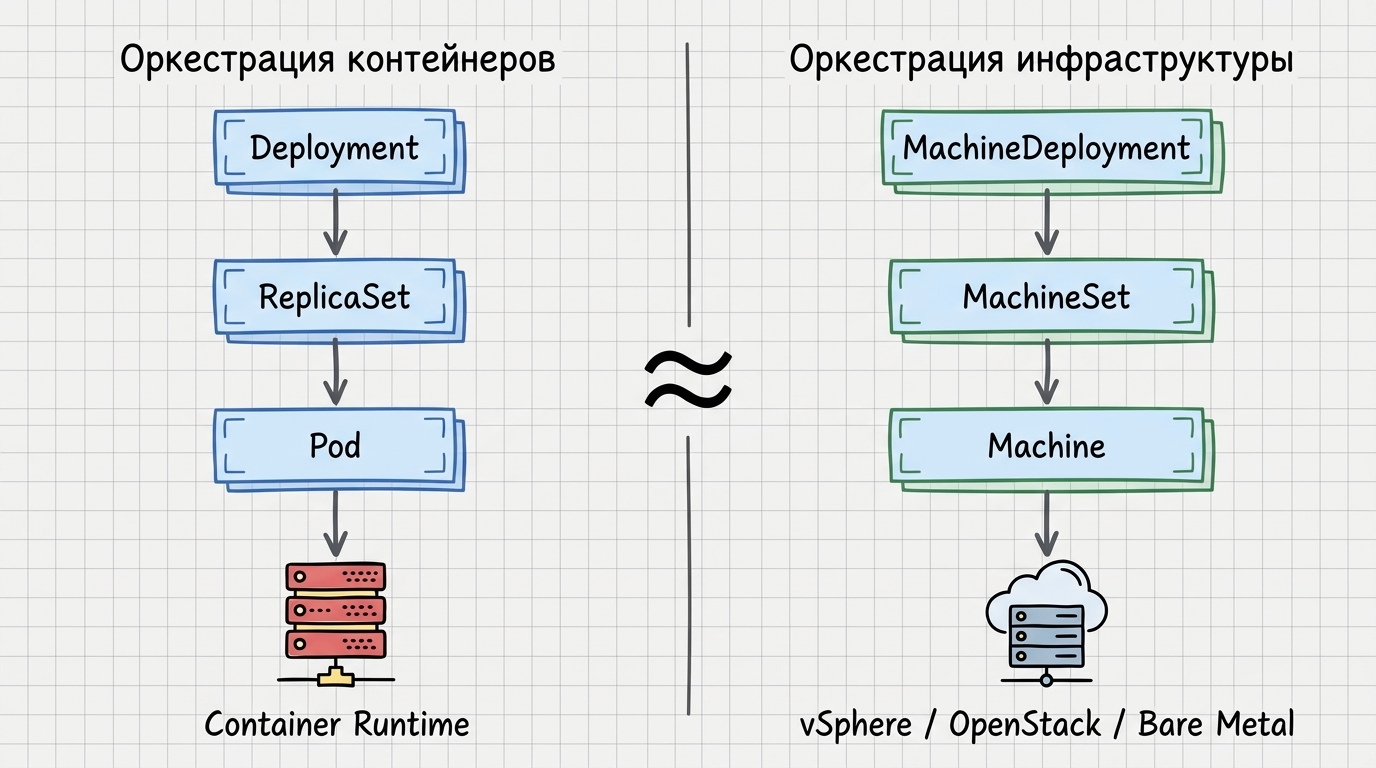
Important point: CAPI by default installs “bare Kubernetes” - basic binaries (kubelet, kubeadm, etcd). Everything else that makes the cluster complete (Cilium network, Shturval system services) is our add-on to the CAPI foundation.
Anatomy of control: six key controllers
The system is not monolithic. It consists of specialized providers, each of which is responsible for its own section of the “pipeline”:
- Core Provider (CAPI) - common abstractions:
ClusterandMachine. - Bootstrap Provider - node initialization configuration. In Shturval it is always kubeadm.
- Control Plane Provider - the “brains” of the client cluster: assembly and scaling of the control plane.
- Infrastructure Provider - cloud-dependent part (vSphere, OpenStack, Yandex, CAPSM): accessing the cloud API and ordering a VM.
- Autoscaler — no CRDs of its own; relies on annotations in
MachineDeployment, runs as a pod in the management cluster in the worker cluster namespace, and monitors cluster load. - Shturval Service Controller — an internal component that delivers service packages to a ready cluster.
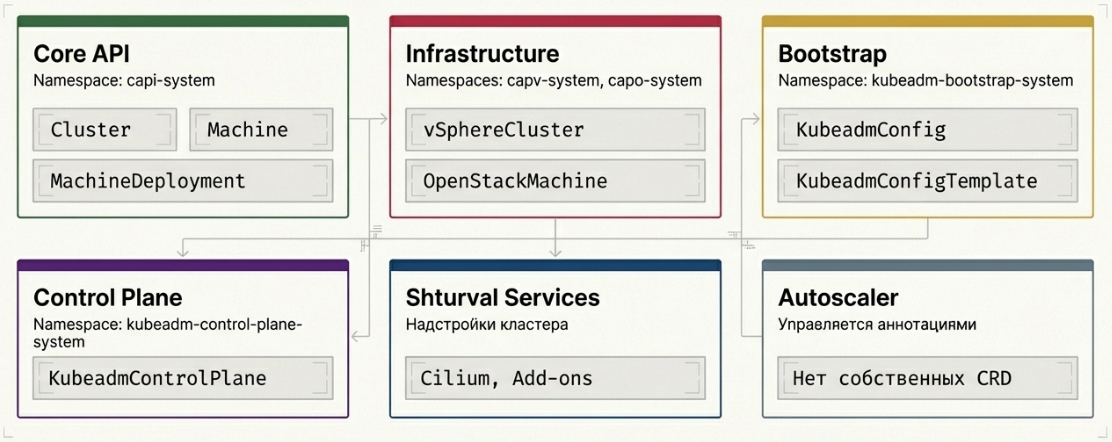
What is the benefit? The same kubeadm (Bootstrap) logic works for both vSphere and bare metal. Only the hardware provider changes.
Hierarchy of objects: from template to real node
If you understand the structure of resources in Kubernetes, this will be easy: CAPI copies familiar patterns.
Control Plane (analogous to StatefulSet)
      |
MachineDeployment (analogous to Deployment)
      |
MachineSet (analogous to ReplicaSet)
      |
Machine (similar to Pod)
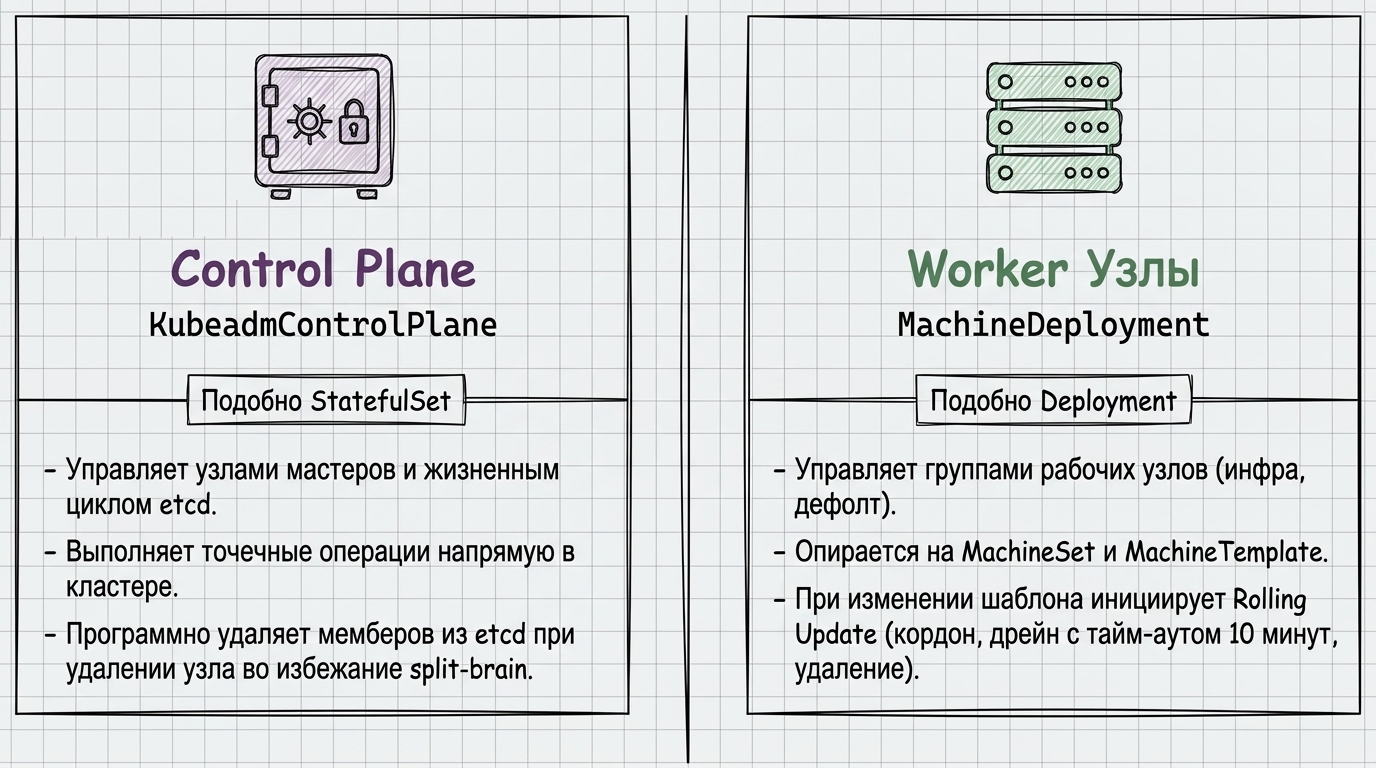
Important note on versions. Watch apiVersion: Shturval moved from v1beta1 to v1beta2 (since versions 2.11/2.12). Update manifests for older resources.
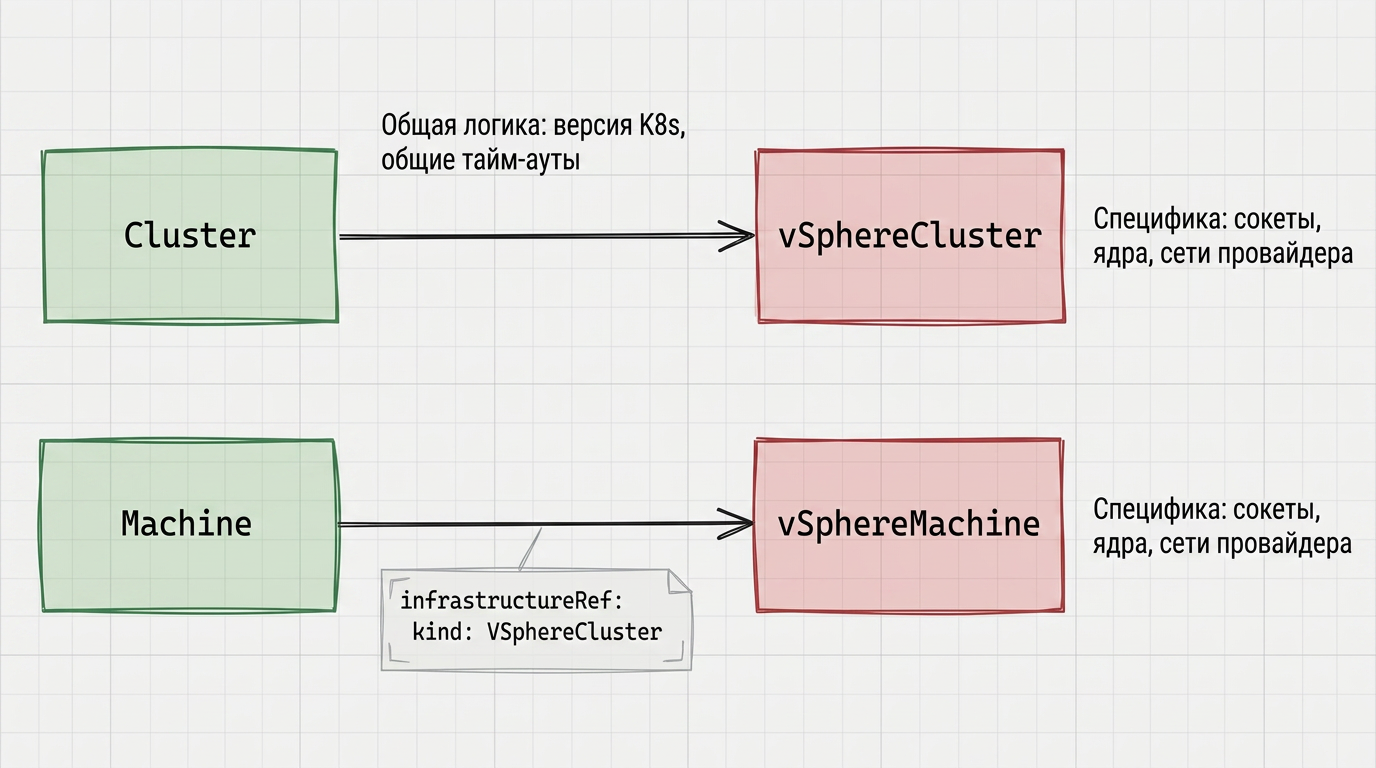
Why can’t there be one specification for all clouds? Environment parameters differ: vSphere has sockets and cores, OpenStack has flavor, Yandex Cloud has its own resource types. The core Machine references an infrastructure object (for example, YandexMachine) where hardware is defined.
The general logic of the cluster and machine (Kubernetes version, timeouts) lives in core resources; sockets, cores and provider networks - in infrastructure provider objects. Using vSphere as an example, it looks like this, see the illustration below.
Bootstrap magic: how a node is born
The process of reviving a virtual machine is to give it an initialization contract.
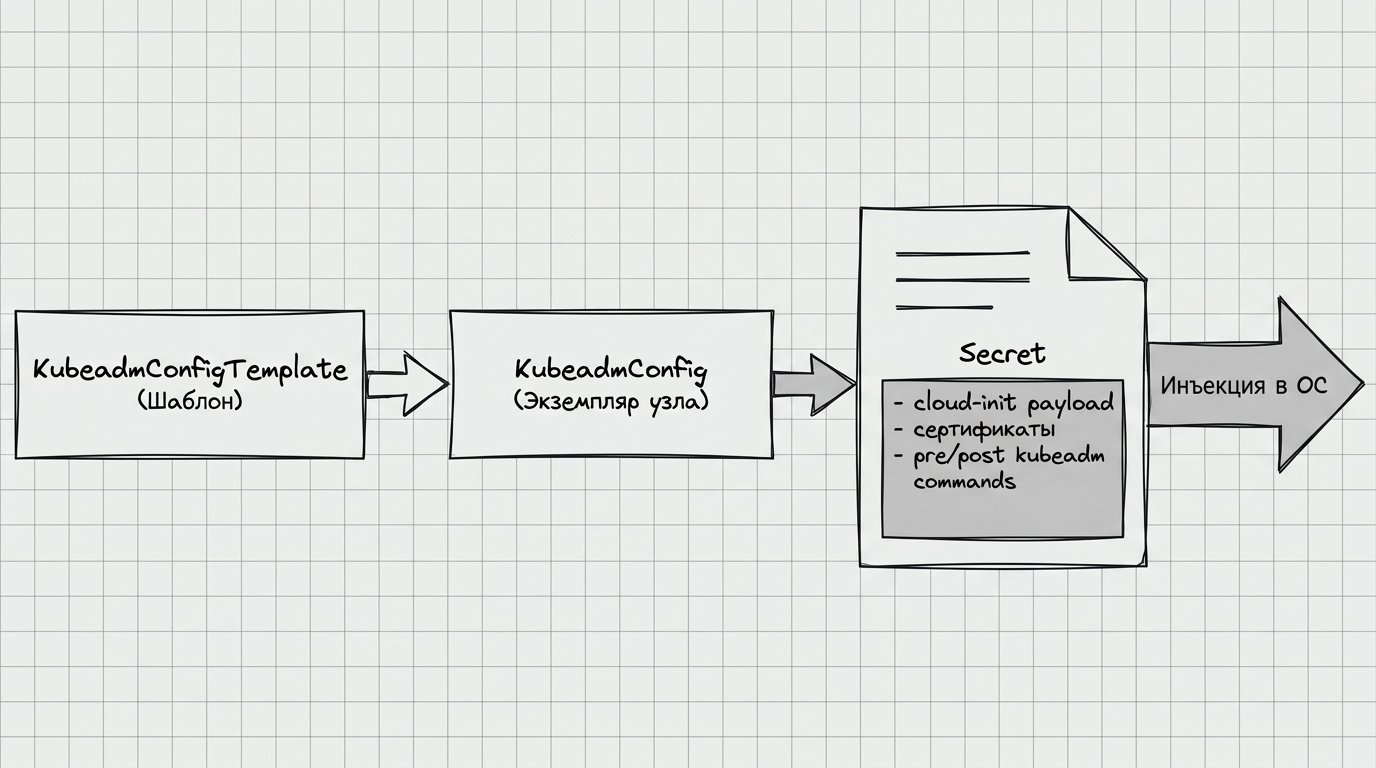
- Chain:
KubeadmConfigTemplate→KubeadmConfig→Secret. - Trigger: The Bootstrap provider creates a secret with a cloud-init script. In
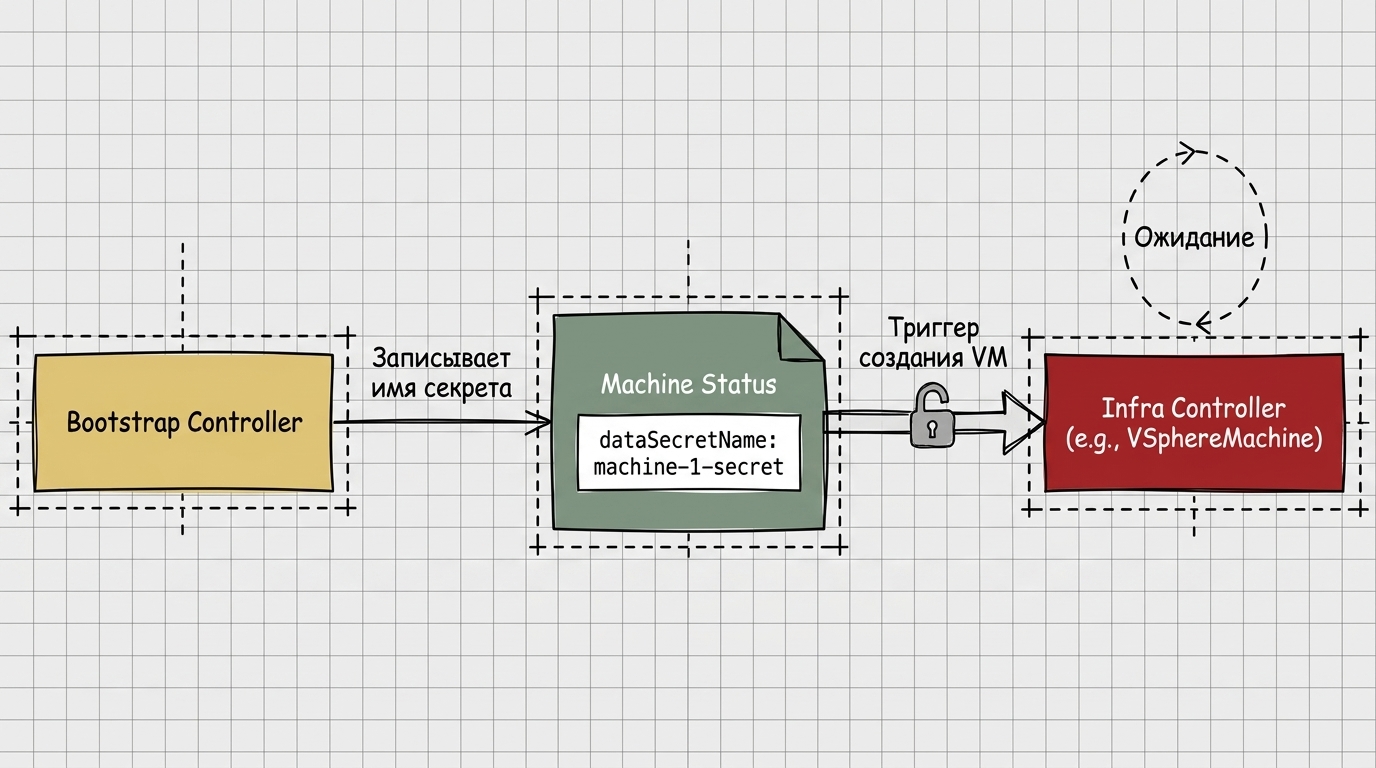
KubeadmConfig,DataSecretNameappears in the status. - Signal for Infra: the infrastructure provider (e.g. CAPOV - Cluster API for oVirt) will not create a VM until it sees this
DataSecretName. No secret - no VM.
The Bootstrap controller writes the secret name to the machine status; the infrastructure controller waits for this signal and only after it starts creating the VM, see the illustration below.
Shturval specifics:
- Utility
stc. Images are prepared in advance: they already have containerd, kubelet and etcd - this saves minutes at startup. - Flag
keep-cloud. In clouds it is used instcso as not to break the standard cloud-init of the cloud provider. - Bare Metal (CAPSM). There is no Cloud-init in its usual form: the
stcagent via SSH puts the file on the machine and executesstd node init, which parses the cloud-init format and configures the system.
Identification: ProviderID
To match a CAPI Machine in the management cluster with a specific Node in the worker cluster, you use ProviderID — a unique node identifier.
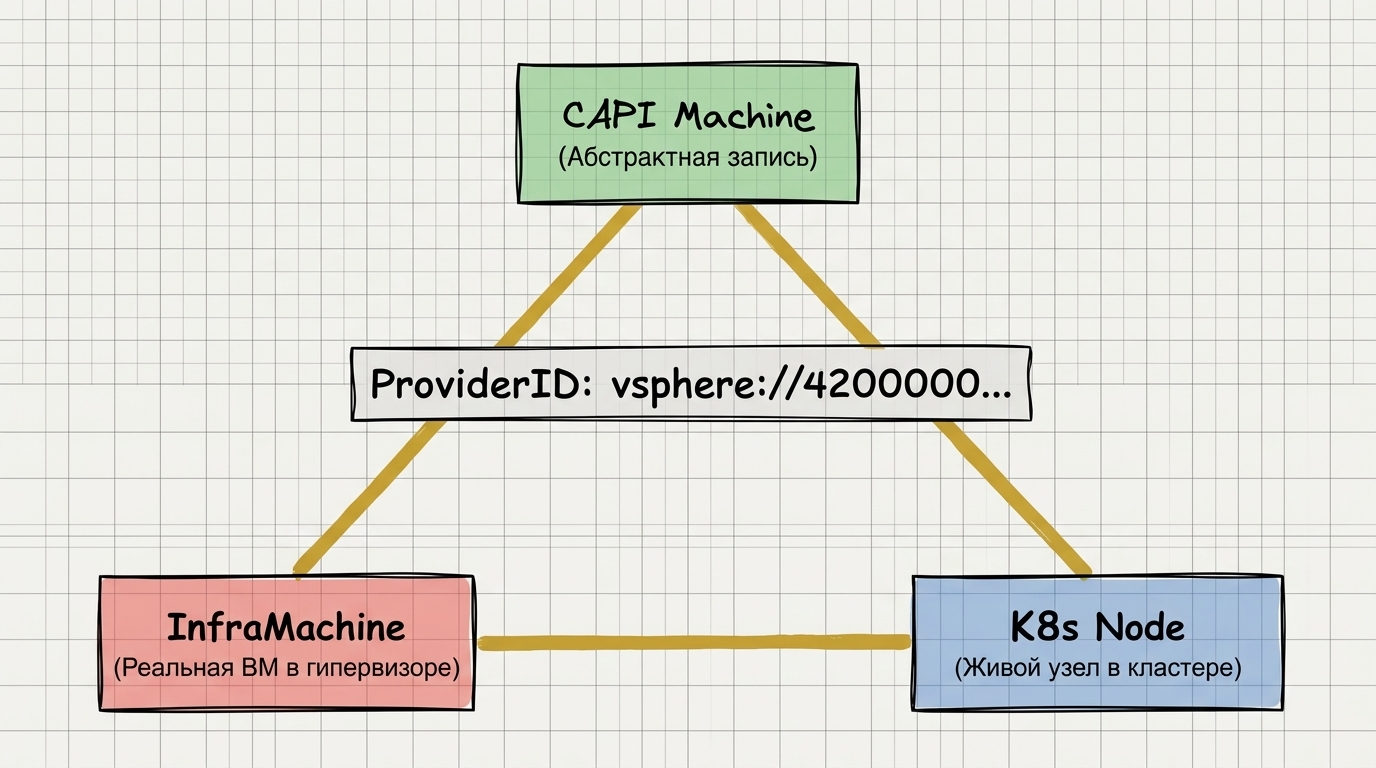
In the clouds it is usually marked CCM (Cloud Controller Manager). Providers like CAPSM or vSphere sometimes use a workaround: the infrastructure controller itself enters the worker cluster and registers the ProviderID in the node spec. This ID is written once. If it does not match CAPI expectations, the resource connection will not work out, and the node may remain in NotReady.
Operation: remediation and pause
CAPI can “treat” a cluster via MachineHealthCheck (MHC). If the NotReady node is longer than ten minutes, it can be deleted and recreated.
War story. An administrator tried to add memory to a VM while it was running: they shut down the VM in vSphere and changed the config. Ten minutes passed. MHC marked the node as failed and deleted it. When the administrator powered the VM back on, the controller was already replacing it with a new one using the old memory settings.
The main rule: before manual infrastructure changes or during a storage incident, pause the cluster (see infrastructure reconciliation and the paused flag):
kubectl patch cluster <name> --type merge -p '{"spec":{"paused":true}}'
This is how reconciliation and MHC are blocked: the controllers will not “fix” what you are currently breaking or repairing.
A nuance with etcd. When updating the control plane, CAPI can forward a port-forward to a live etcd member in order to correctly remove the node from the cluster.
Troubleshooting: search methodology
If the cluster is stuck, don’t grab everything - go through the layers:
- CAPI layer (
capi-system). Status ofMachine: forReady: FalseseeConditions. - Bootstrap Layer.
KubeadmConfig: Is thereDataSecretName? If not, Bootstrap was unable to generate the config (for example, due to an error in the certificates). - Infra Layer (
capv-system,capy-system, etc.). There is a secret, but the VM is not - look at the logs of the infrastructure provider.
Additionally:
- Tip: filter controller logs by specific
Machinename. - Deep debug: raise the logging level (
-v=10) - you will see raw HTTP responses from the cloud API (limits, non-existent folder in vSphere, etc.).
Compare your observations across layers with how controllers and resources are connected in the diagrams above: this makes it easier to understand at which link in the chain objects are “stuck.”
Conclusion
Cluster API is a powerful framework, which makes cloud management predictable. The main thing is to remember the contract between controllers: Bootstrap gives the secret, Infra creates the machine, ProviderID connects everything into one chain.
Use pause before work, don’t be afraid to look into Conditions and keep the object hierarchy in mind. When it is clear what is happening “under the hood”, Shturval becomes noticeably more obedient in your hands.