Cilium Network Policies
Overview
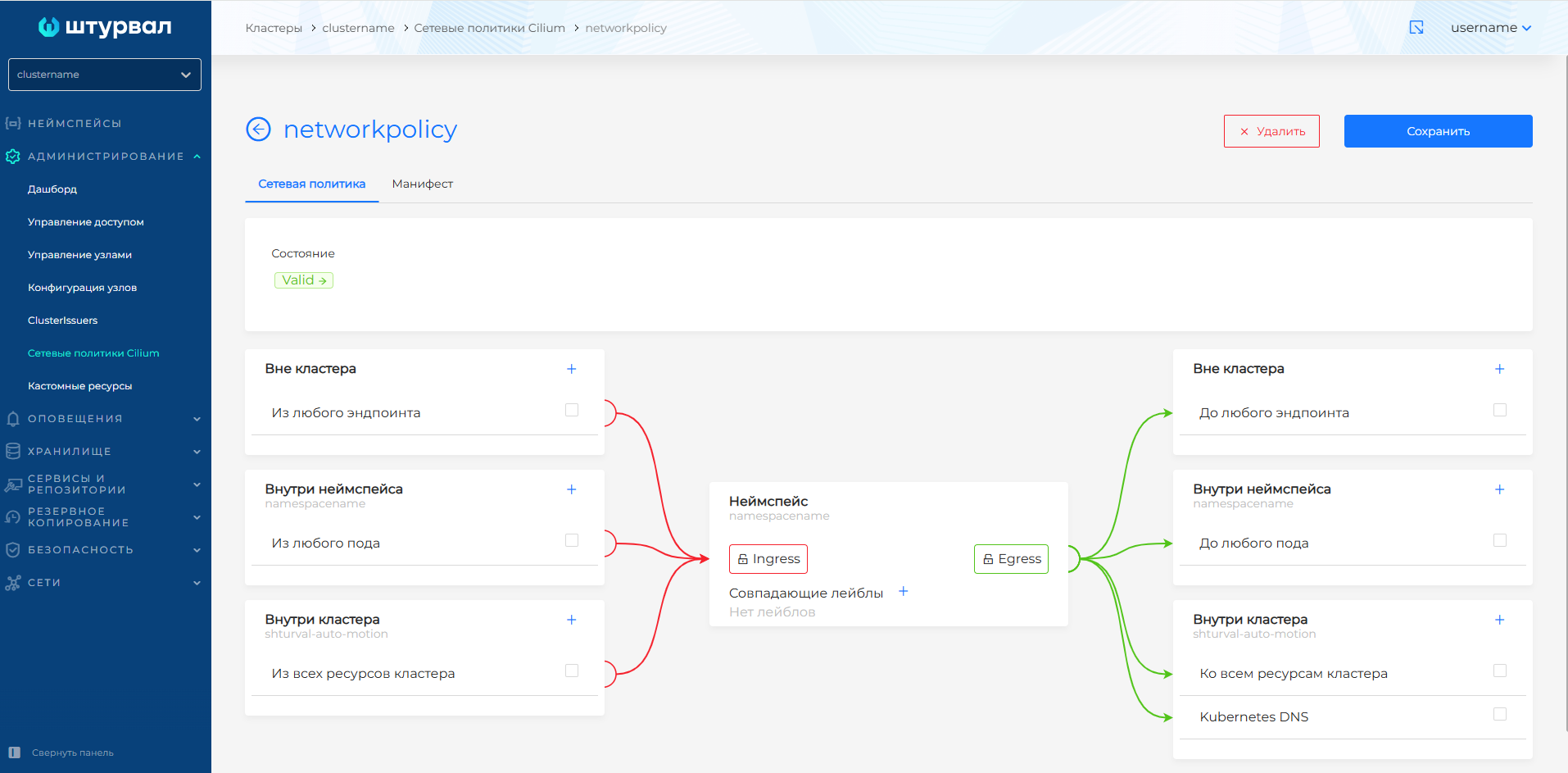
Cilium’s network policies limit what traffic can come into pods (Ingress) and leave pods (Egress). Without policies, all traffic is allowed. After adding at least one policy for a namespace or pod, the principle “everything that is not explicitly allowed” is prohibited.
Where to configure: Network policies in the cluster networks section or Administration → Custom resources. Policies can be created via the GUI or import manifest.
Screenshot: network policy status
Important: how policies work
Default behavior
| Situation | Result |
|---|---|
| There are no network policies in namespace | All traffic is allowed (incoming and outgoing) |
| Namespace has at least one policy | Only traffic that is explicitly described in the rules is allowed. Everything else is blocked |
Note: Common error: Added the “allow Ingress” policy and forgot to allow DNS. The pods stopped resolving names - the application “broke”. Always add all the rules you need in one policy or in multiple policies.
What is endpointSelector
endpointSelector defines to which pods the policy applies:
endpointSelector: {}— to all pods in namespace (empty selector = all pods)endpointSelector: { matchLabels: { app: my-app } }- only for pods with the labelapp=my-app
A policy with endpointSelector: {} and rules ingress/egress specifies what traffic is allowed for the selected pods. Anything that is not included in the rules is blocked.
Cluster and namespace policies
| Type | Application | When to use |
|---|---|---|
| ClusterwideCiliumNetworkPolicy | To the entire cluster | General rules (eg DNS access for everyone) |
| CiliumNetworkPolicy | To one namespace | Application Specific Isolation |
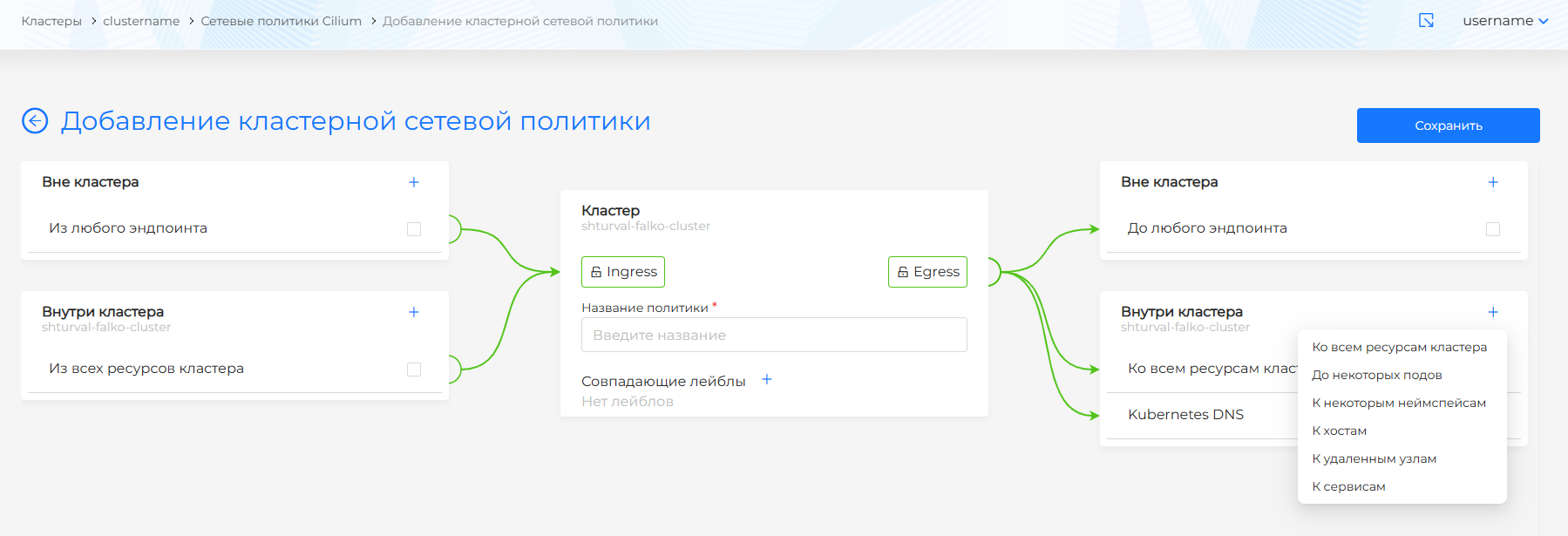
In the cluster-wide and namespaced policy lists you can delete one policy or several at once. How to select objects and confirm deletion: Bulk deletion.
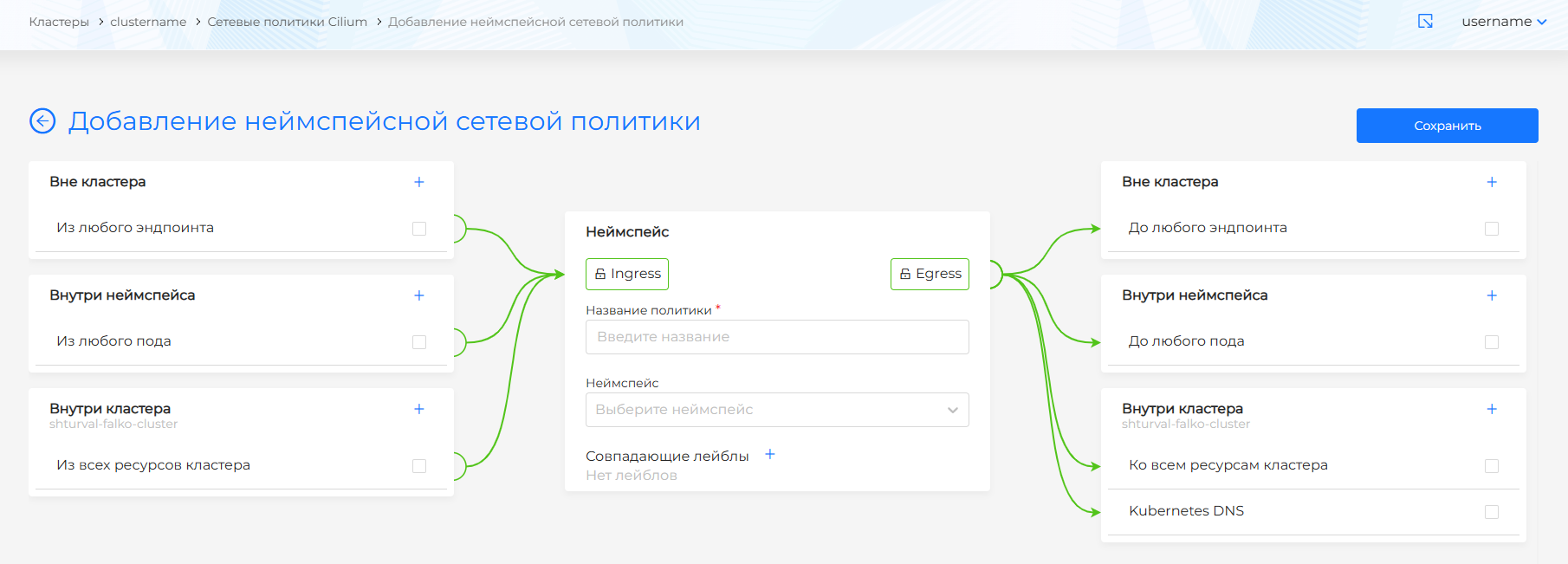
Recommendation to get started: Use namespace policies (CiliumNetworkPolicy). They are simpler and do not affect the entire cluster.
Screenshot: cluster network policy editor
Screenshot: namespace network policies editor
Key concepts
Ingress (incoming traffic)
Who can connect to your pods:
- Outside the cluster - users, external services, Ingress Controller
- Inside the cluster - pods from other namespaces
- Inside the namespace - pods from the same namespace
Egress (outgoing traffic)
Where can your pods connect from:
- Outside the cluster - external APIs, Internet (via IP or FQDN)
- Inside the cluster — Kubernetes DNS, KubeAPI, other pods and services
- Inside the namespace - pods and services in the same namespace
matchLabels
Selector by pod labels. Example:
matchLabels:
  app.kubernetes.io/name: my-backend
  io.kubernetes.pod.namespace: my-app
The rule only applies to pods that have all of the specified labels. View pod labels: kubectl get pod <name> -n <ns> --show-labels.
Step-by-step setup: web application with Ingress
Typical scenario: an application in the namespace my-app, accessible from the outside via Ingress.
Step 1: Determine what traffic you need
| Direction | Who/where | Why |
|---|---|---|
| Ingress | By Ingress Controller | Users log in via browser |
| Egress | TO Kubernetes DNS | Resolve names (Service, external domains) |
| Egress (optional) | To KubeAPI | Only necessary for operators, controllers |
Step 2: Find out the Ingress Controller labels
kubectl get pods -n ingress -l app.kubernetes.io/name=shturval-ingress-controller --show-labels
Typically: app.kubernetes.io/name: shturval-ingress-controller, io.kubernetes.pod.namespace: ingress.
Step 3: Create a policy
One policy with all the rules you need:
apiVersion: cilium.io/v2
kind: CiliumNetworkPolicy
metadata:
  name: my-app-policy
  namespace: my-app
spec:
  description: "Web app: Ingress from controller + DNS"
  endpointSelector: {}
  ingress:
    - fromEndpoints:
        - matchLabels:
            app.kubernetes.io/name: shturval-ingress-controller
            io.kubernetes.pod.namespace: ingress
  egress:
    - toEndpoints:
        - matchLabels:
            io.kubernetes.pod.namespace: kube-system
            k8s-app: kube-dns
      toPorts:
        - ports:
            - port: "53"
              protocol: UDP
            - port: "53"
              protocol: TCP
            - port: "9153"
              protocol: TCP
    - toEndpoints:
        - matchLabels:
            io.kubernetes.pod.namespace: kube-system
            app.kubernetes.io/name: shturval-caching-dns
  toPorts:
        - ports:
            - port: "53"
              protocol: UDP
            - port: "9253"
              protocol: TCP
What this policy does:
endpointSelector: {}- applies to all serves inmy-appingress- allows incoming traffic only from Ingress Controlleregress- allows outgoing traffic to kube-dns and shturval-caching-dns (DNS)
Step 4: Check
# Application responds
curl -H "Host: app.example.com" http://<INGRESS_IP>/

# Pods in Running
kubectl get pods -n my-app
If the application has stopped working, see Troubleshooting.
Typical scenarios
Scenario 1: Frontend + Backend in one namespace
Frontend receives traffic from Ingress and goes to Backend under the name Service.
Need to allow:
- Ingress: from Ingress Controller
- Egress: DNS, traffic to Backend (by labels or
toEndpoints: [{}]inside namespace)
Scenario 2: Backend calls external API
Backend calls https://api.external.com.
Need to allow:
- Egress: DNS (required for FQDN)
- Egress: to CIDR or FQDN of external API (by IP or domain)
Scenario 3: Backend for internal pods only
The backend should not be accessible from the outside, only from other pods in the cluster.
Need to allow:
- Ingress: from specific namespaces or subin (by label)
- Egress: DNS, if necessary - to other services
Scenario 4: Operator or Controller
Pods that need access to KubeAPI (for example, operators).
Need to allow:
- Egress:
toEntities: [kube-apiserver] - Egress: DNS (if needed)
Examples with explanations
Access to KubeAPI server
For pods that need access to the Kubernetes API (operators, controllers):
apiVersion: cilium.io/v2
kind: CiliumNetworkPolicy
metadata:
  name: allow-kube-apiserver
  namespace: operators
spec:
  description: "For endpoints in this namespace, allow egress to kube-apiserver"
  endpointSelector: {}
  egress:
    - toEntities:
        -kube-apiserver
toEntities: [kube-apiserver] is a special Cilium selector for the cluster API server.
Deny policy (deny-all)
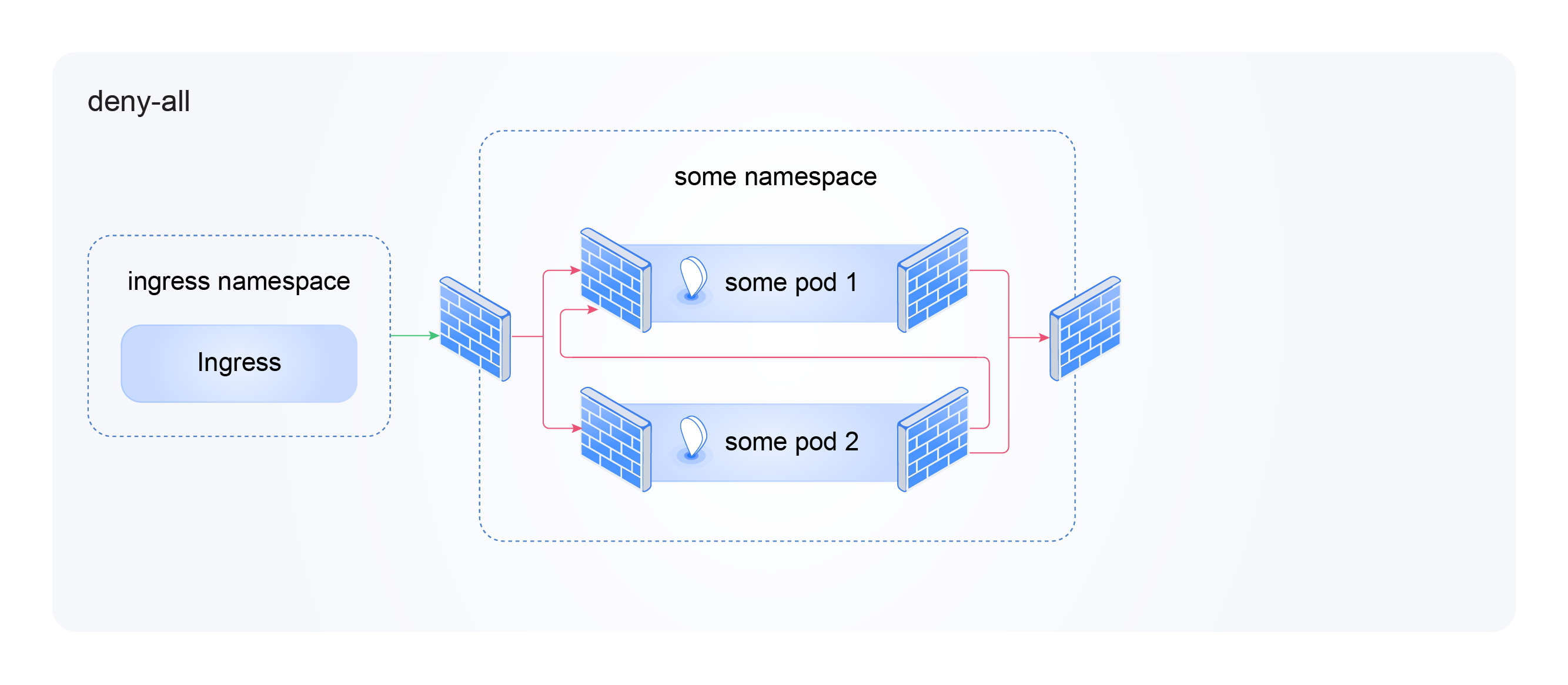
Blocks all traffic in the namespace. Use carefully only if complete isolation is desired.
Screenshot: deny-all in the editor
apiVersion: "cilium.io/v2"
kind: CiliumNetworkPolicy
metadata:
  name: deny-all
  namespace: yournamespacename
spec:
  description: "Deny all traffic in this namespace"
  endpointSelector: {}
  ingress: [{}]
  egress: [{}]
ingress: [{}] and egress: [{}] - empty rules mean “do not allow anything”.
Outgoing traffic to KubeDNS and NodeLocalDNS
Mandatory for pods that are accessed by name (Service, FQDN):
apiVersion: cilium.io/v2
kind: CiliumNetworkPolicy
metadata:
  name: allow-dns
  namespace: yournamespacename
spec:
  description: "For endpoints in this namespace, allow egress to kube-dns and shturval-caching-dns"
  endpointSelector: {}
  egress:
    - toEndpoints:
        - matchLabels:
            io.kubernetes.pod.namespace: kube-system
            k8s-app: kube-dns
      toPorts:
        - ports:
            - port: "53"
              protocol: UDP
            - port: "53"
              protocol: TCP
            - port: "9153"
              protocol: TCP
    - toEndpoints:
        - matchLabels:
            io.kubernetes.pod.namespace: kube-system
            app.kubernetes.io/name: shturval-caching-dns
      toPorts:
        - ports:
            - port: "53"
              protocol: UDP
            - port: "9253"
              protocol: TCP
Port 9153 - CoreDNS metrics; 9253 - shturval-caching-dns. Without them, DNS may be unstable.
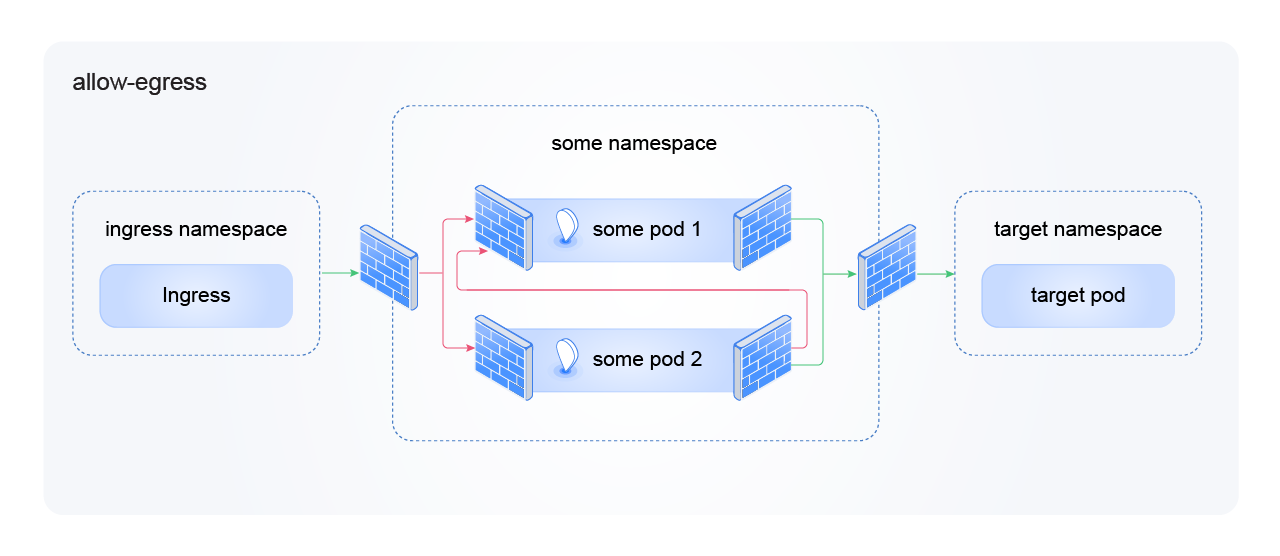
Outgoing traffic to a specific application
Allow pods in the namespace to go only to a specific backend:
Screenshot: allow-egress in the editor
apiVersion: cilium.io/v2
kind: CiliumNetworkPolicy
metadata:
  name: allow-egress
  namespace: frontend
spec:
  description: "Allow egress to backend app only"
  endpointSelector: {}
  egress:
    - toEndpoints:
        - matchLabels:
            io.kubernetes.pod.namespace: backend
            app.kubernetes.io/name: api
      toPorts:
        - ports:
            - port: "8080"
              protocol: TCP
Replace backend, api, 8080 with real namespace, application name and port. Don’t forget to add a DNS rule if the backend is specified by the name Service.
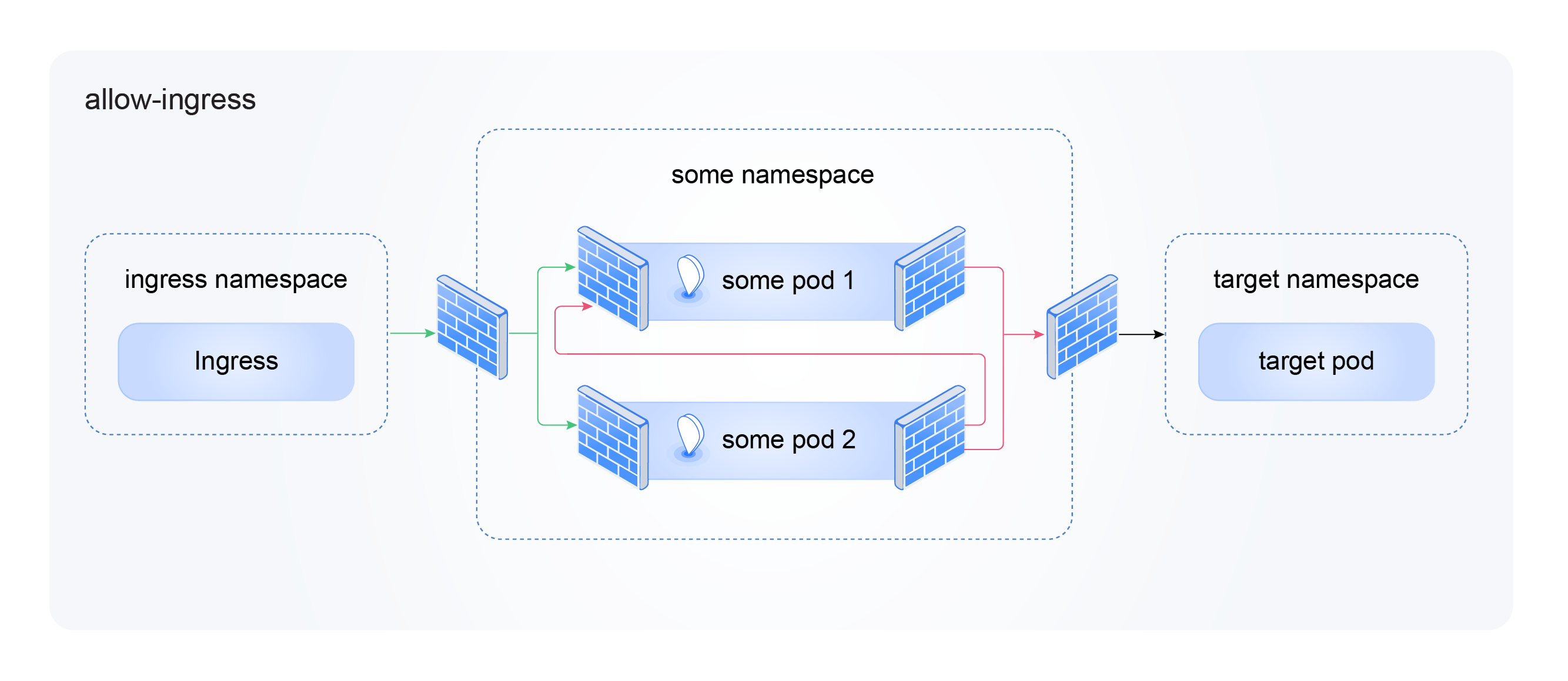
Incoming traffic from the Ingress controller
Required for applications accessible externally via Ingress:
Screenshot: allow-ingress in the editor
apiVersion: cilium.io/v2
kind: CiliumNetworkPolicy
metadata:
  name: allow-ingress
  namespace: my-app
spec:
  description: "Allow ingress from ingress-controller"
  endpointSelector: {}
  ingress:
    - fromEndpoints:
        - matchLabels:
            app.kubernetes.io/name: shturval-ingress-controller
            io.kubernetes.pod.namespace: ingress
Without this rule, requests from users will not reach the application pods.
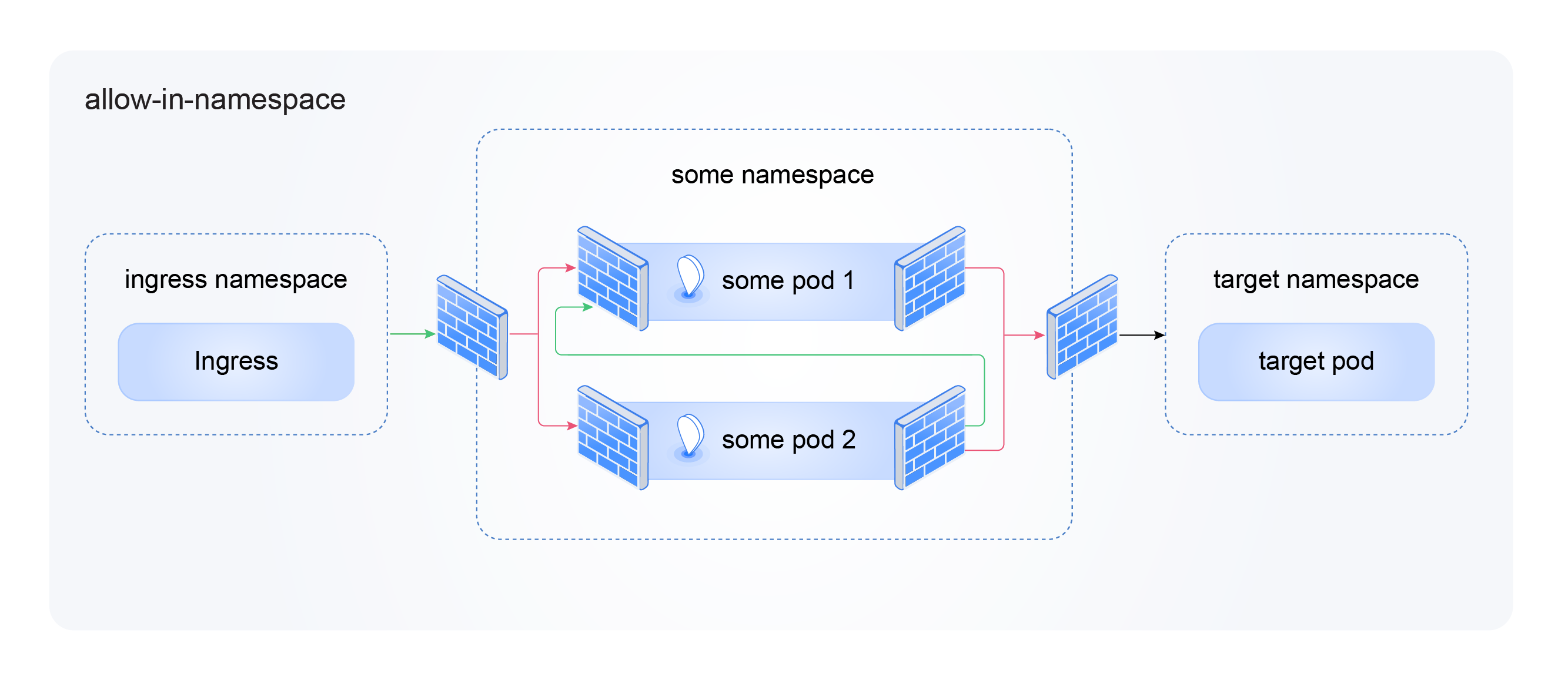
Traffic inside the namespace
Allow pods in namespace to communicate with each other:
Screenshot: allow-in-namespace in the editor
apiVersion: cilium.io/v2
kind: CiliumNetworkPolicy
metadata:
  name: allow-in-namespace
  namespace: my-app
spec:
  description: "Allow all traffic within namespace"
  endpointSelector: {}
  ingress:
    - fromEndpoints: [{}]
  egress:
    - toEndpoints: [{}]
fromEndpoints: [{}] and toEndpoints: [{}] - “any pods in the same namespace.”
Complete example: application with Ingress, DNS and internal API
Web application my-app in the namespace my-app: external access via Ingress, internally runs in Redis under the name Service.
apiVersion: cilium.io/v2
kind: CiliumNetworkPolicy
metadata:
  name: my-app-full
  namespace: my-app
spec:
  description: "Web app: Ingress + DNS + Redis in same namespace"
  endpointSelector: {}
  ingress:
    - fromEndpoints:
        - matchLabels:
            app.kubernetes.io/name: shturval-ingress-controller
            io.kubernetes.pod.namespace: ingress
  egress:
    # DNS - required
    - toEndpoints:
        - matchLabels:
            io.kubernetes.pod.namespace: kube-system
            k8s-app: kube-dns
      toPorts:
        - ports:
            - port: "53"
              protocol: UDP
            - port: "53"
              protocol: TCP
            - port: "9153"
              protocol: TCP
    - toEndpoints:
        - matchLabels:
            io.kubernetes.pod.namespace: kube-system
            app.kubernetes.io/name: shturval-caching-dns
      toPorts:
        - ports:
            - port: "53"
              protocol: UDP
            - port: "9253"
              protocol: TCP
    # Redis in the same namespace
    - toEndpoints:
        - matchLabels:
            app: redis
      toPorts:
        - ports:
            - port: "6379"
              protocol: TCP
Common mistakes
| Error | What’s going on | Solution |
|---|---|---|
| Forgot to resolve DNS | Pods do not resolve names, application does not work | Add egress to kube-dns and shturval-caching-dns |
| Forgot to allow Ingress | Users cannot log in via browser | Add ingress from shturval-ingress-controller |
| Only one DNS port specified | Resolve may be unstable | Add ports 53 (UDP/TCP), 9153, 9253 |
| Incorrect labels in matchLabels | The rule doesn’t work | Check kubectl get pod ... --show-labels |
| Apply deny-all without allowing rules | Everything is blocked | First add all the necessary permissions, then, if necessary, deny-all |
Check after setup
- Pods started:
kubectl get pods -n <namespace> - The application responds:
curlor browser by URL - Application logs:
kubectl logs -n <namespace> <pod> - Cilium: for problems - Troubleshooting
More information about approaches to configuration can be found in Reference.