MachineHealthChecks
Overview
MachineHealthCheck (MHC) is a Cluster API resource (cluster.x-k8s.io), a mechanism for automatically detecting and recovering unhealthy machines. When conditions are triggered (for example, a NotReady node), MHC can restart or recreate the machine.
Where to configure: Administration → Node Management → Group Configuration → MachineHealthCheck tab. Advanced YAML editing - in management cluster: Administration → Custom Resources → MachineHealthCheck.
By default, when installing a client cluster, a MachineHealthCheck is created for the Control Plane group and a separate check for each Worker group. Additional configurations can be added (+ Add).
Screenshot: MachineHealthCheck
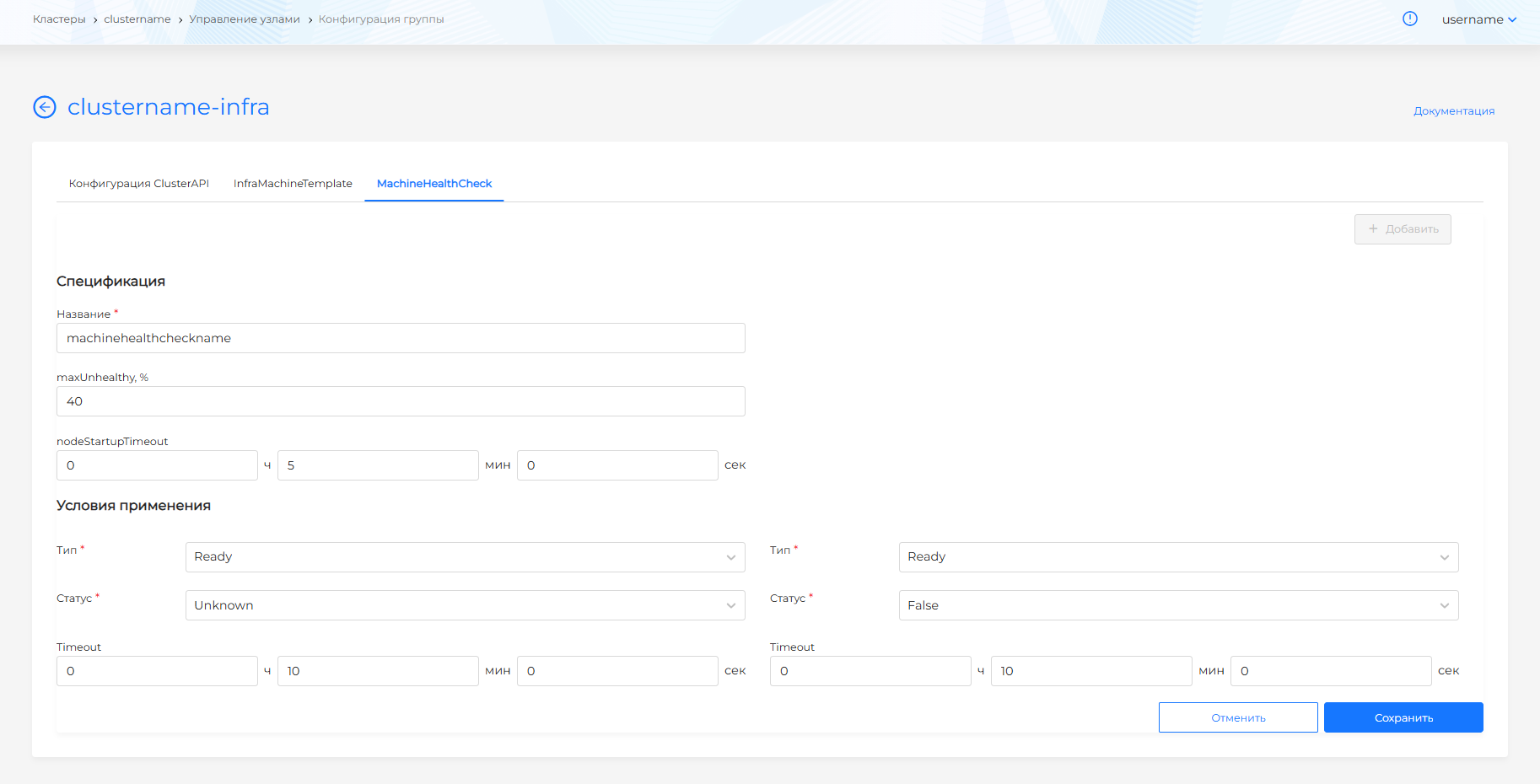
MachineHealthCheck parameters
maxUnhealthy (%)
The maximum percentage of unhealthy nodes in a group at which MHC will repair nodes.
Note: if there are more unhealthy nodes maxUnhealthy, MHC will not restore nodes (protection against cascading deletion).
A value of 0 disables recovery: the condition cannot be met, and MHC does not recreate nodes. How to set it, and how to remove MHC entirely, is in How to disable MachineHealthCheck.
Examples:
| maxUnhealthy | Nodes in group | Unhealthy | Recovery |
|---|---|---|---|
| 90% | 2 | 1 (50%) | Yes |
| 40% | 2 | 1 (50%) | No |
| 50% | 4 | 2 (50%) | Yes |
nodeStartupTimeout
Waiting time for a new node to join the cluster. If a node does not become Ready within this time, it is considered unhealthy.
A value that is too small may result in the VM not having time to create and join - MHC will constantly re-create nodes (cycle).
Recommendation: 10–15 minutes depending on the provider and the speed of VM creation.
Conditions of use (unhealthyConditions)
Conditions under which a node is considered unhealthy:
| Parameter | Description |
|---|---|
| Type | NetworkUnavailable, DiskPressure, MemoryPressure, PIDPressure, Ready |
| Status | True, False, Unknown |
| Timeout | Waiting time after which the condition is considered valid |
Recommendation: do not set Timeout too short - false positives may occur during short-term failures. Timeout is too long - idle load on a non-working node.
Example settings:
- Type: Ready, Status: Unknown, Timeout: 5 min
- Type: Ready, Status: False, Timeout: 5 min
MHC will fire if after 5 minutes the node is in Ready=Unknown or Ready=False state.
Creating and editing MHC
- On the MachineHealthCheck tab, click +Add.
- Set a name (it cannot be changed after saving).
- Specify maxUnhealthy, nodeStartupTimeout and unhealthyConditions.
- Click Save.
For reference: a list of cluster.x-k8s.io resources associated with nodes, along with other CAPI groups, is on the Creating nodes when deploying a client cluster page.
How to disable MachineHealthCheck
Disable MHC for the group so the machine is not restarted or recreated when the node becomes NotReady.
Temporarily
In the cluster, go to Administration → Node Management → Group Configuration. On the MachineHealthCheck tab of the node group, set maxUnhealthy, % to 0 and click Save.
Screenshot: maxUnhealthy, %
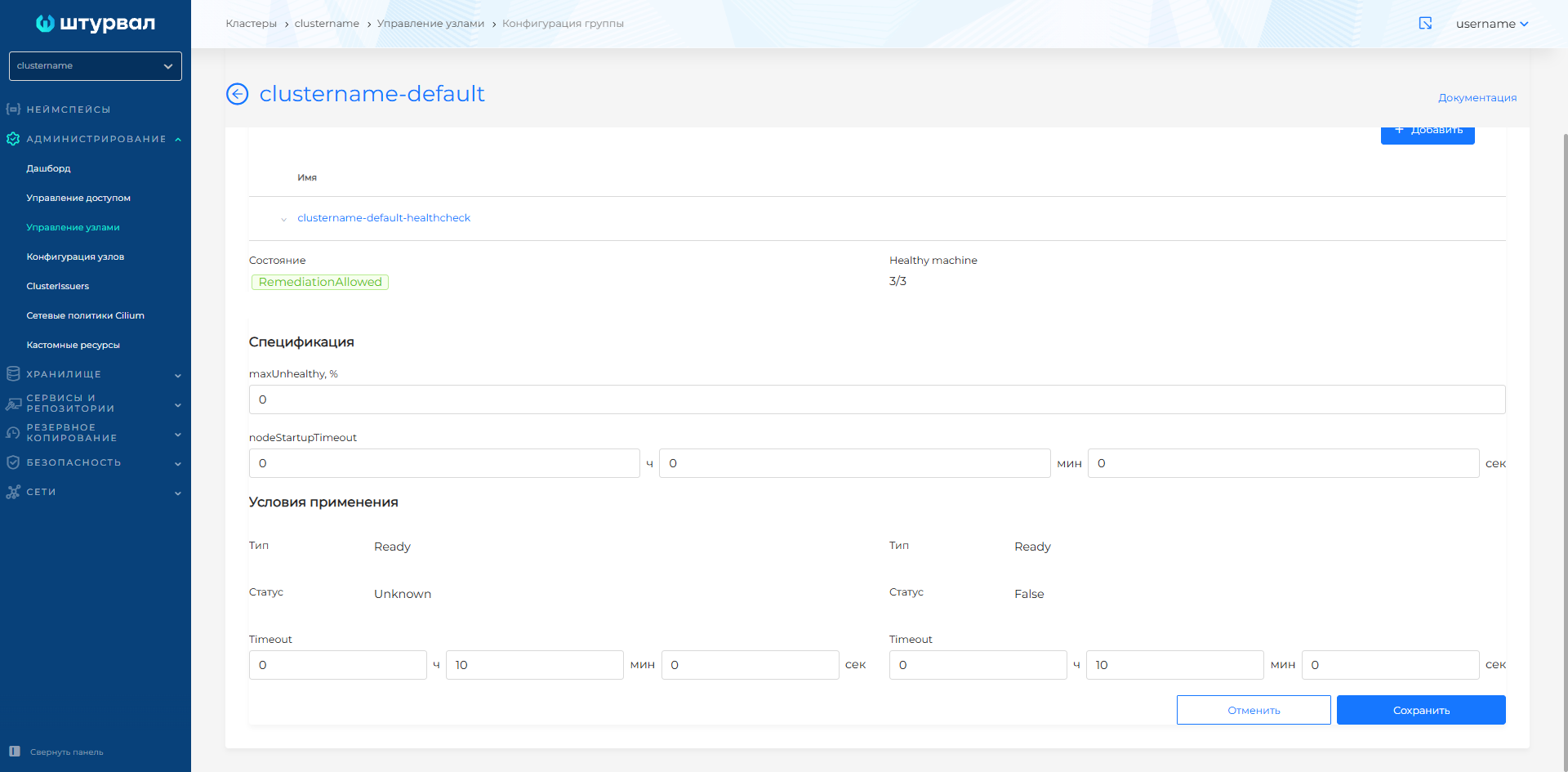
The recovery condition cannot be met, and nodes are not recreated automatically. To turn MHC back on, set the previous value.
Control Plane and each Worker group have an MHC, so set 0 for every group where MHC should be disabled.
Permanently
Delete all MachineHealthCheck objects of the cluster. The command can only be run from the management cluster. The MHC namespace matches the cluster name:
kubectl -n <cluster-name> delete machinehealthchecks.cluster.x-k8s.io --all
The command deletes all MHC objects of the cluster, both Control Plane and Worker groups. Automatic node recreation does not resume until the MHC objects are created again.