Node Configuration (NCI)
Overview
NCI (NodeConfigItem) is an object for applying configuration to cluster nodes without the need to manually configure each node. The shturval-node-config operator applies settings to nodes according to the configured selector(s). NCI can be reused across different clusters.
Where to configure: Cluster → Administration → Node Configuration or import manifest.
When creating a cluster, NCIs are automatically created to prepare nodes - this way the operator prepares nodes to join the cluster, for example:
- controlplane-init-config — directories, files, Linux users for system components (for example, etcd) on Control Plane nodes;
- controlplane-oidc-nci — setting up Kube API Server on Control Plane nodes;
- generic-init-config - directories, files, setting Container Runtime parameters, Sysctl parameters, Systemd units, cube certificate rotation period, trusted certificates, and also installs packages for shturvald (containerd) on all nodes.
Note: The NCI name is immutable after creation.
Note: Deleting NCI and changing parameters: Deleting an NCI object does not delete the configured parameters. To change the settings, create a new NCI object with the desired values and set it to higher priority - if there is a conflict, the higher priority NCI configuration will be applied.
Note: Restarting nodes: When you change a node configuration or update a cluster, you may need to restart the node. In such cases, an automatic restart is performed with preliminary transfer of the pods to other nodes. To control manual restarts, see Protect nodes from automatic restarts.
Node Configuration page
The Node Configuration page displays a list of NodeConfigItem (NCI) objects for the cluster.
For each NCI, the following are displayed: a list of configured partitions, priority, by whom it was created/modified, date of last change, node selector, the ratio of the number of nodes on which the configuration is applied to the number of planned nodes for application.
Screenshot: NCI list
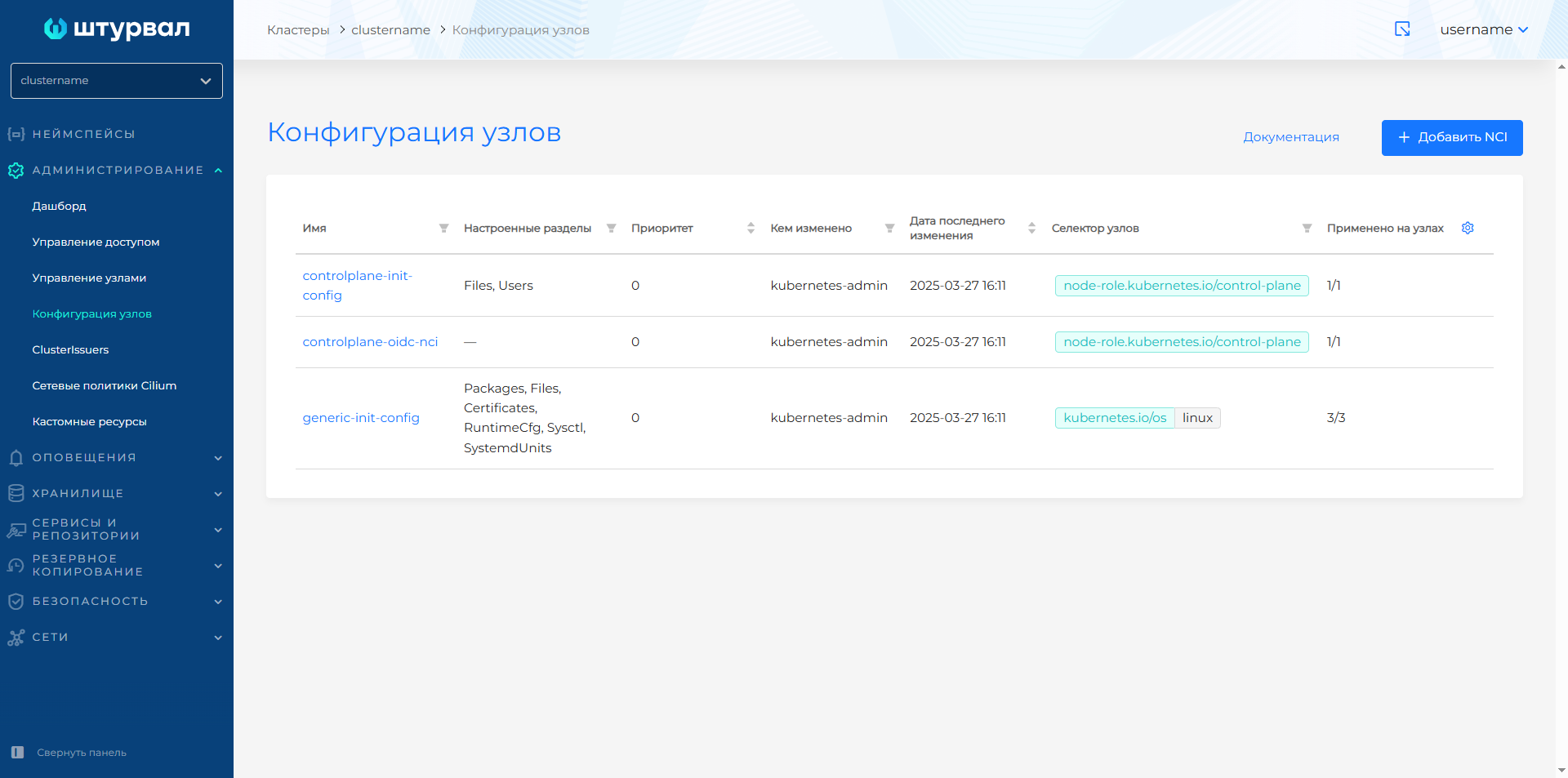
View and Edit: Click on the NCI name. On the Nodes tab - a list of nodes for which this NCI is configured, and the application status. TreasonSection entries are saved using the Continue (preliminary) and Finish or Save buttons on the NCI page.
To change the list of customizable sections, go to the NCI tab and select additional sections or deselect unnecessary ones.
To edit via YAML, go to the Manifest tab, make changes and validate. The test result is displayed on the right. If the NCI manifest format is not validated, manifest verification is not available. Unsaved data is not applied.
Creating and working with NCI
- Node configuration → Add NCI.
- Set the name and priority of applying the configuration (default 100). If the values of different NCIs conflict, the configuration with higher priority is applied.
- Specify the node selector (a list of node labels to which the configuration will be applied).
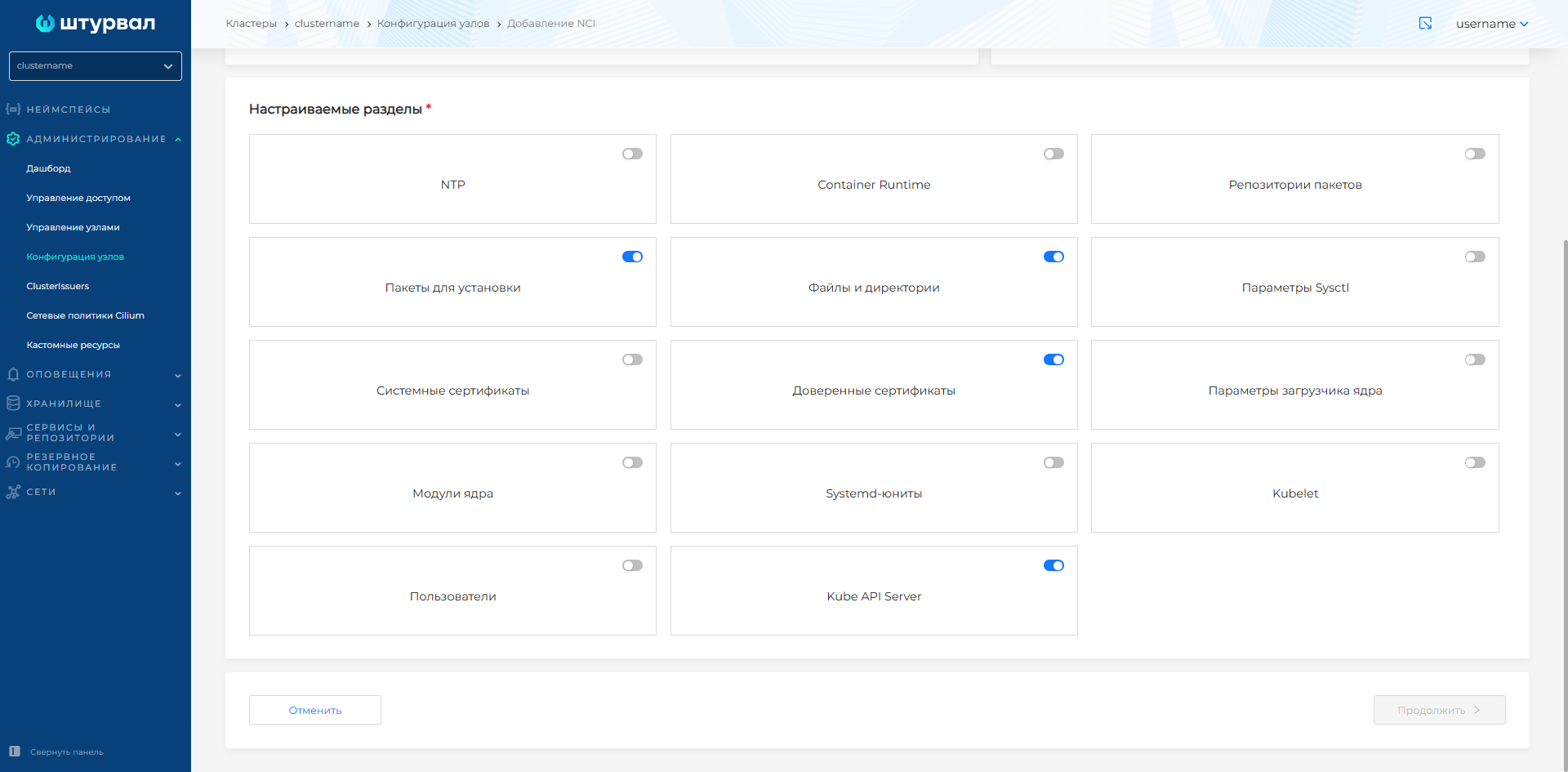
- Select one or more sections to configure:
- NTP;
- Container Runtime;
- sysctl parameters;
- Package repositories;
- Installation packages;
- Files and directories;
- System certificates (setting up the rotation period for Kubecerts system certificates);
- Trusted certificates;
- Kernel loader parameters (grub);
- Kernel modules;
- Systemd units;
- Kubelet;
- Users;
- Kube API Server.
Some of these elements can be in only one instance (for example, NTP), and some can be in multiple instances (for example, directories or files).
- Click Continue and fill in the parameters of the selected sections; upon completion - Finish.
Screenshot: basic NCI data (name, priority, node selector)
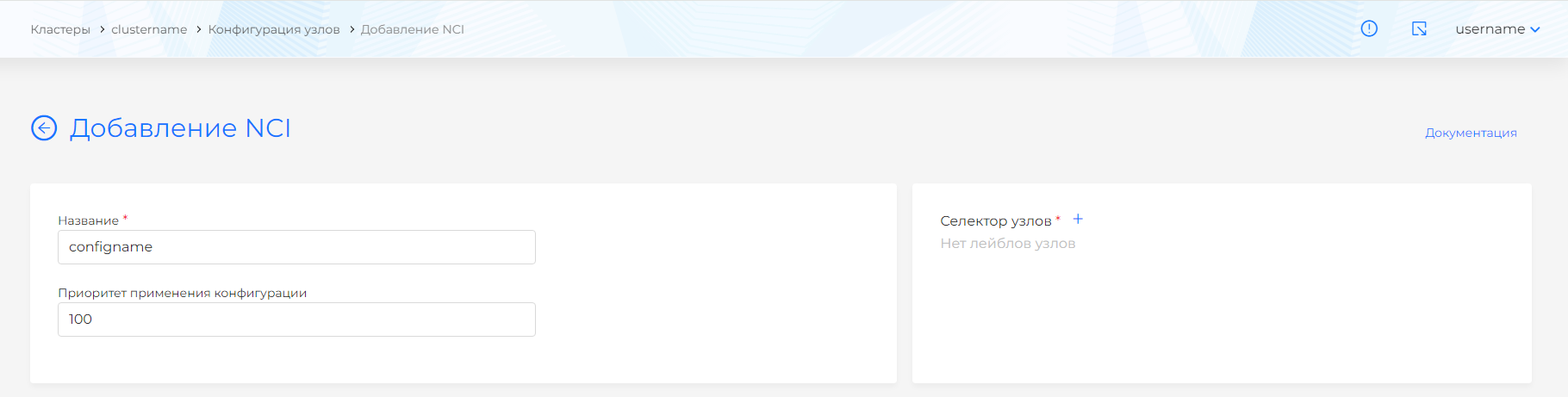
Screenshot: adding a label
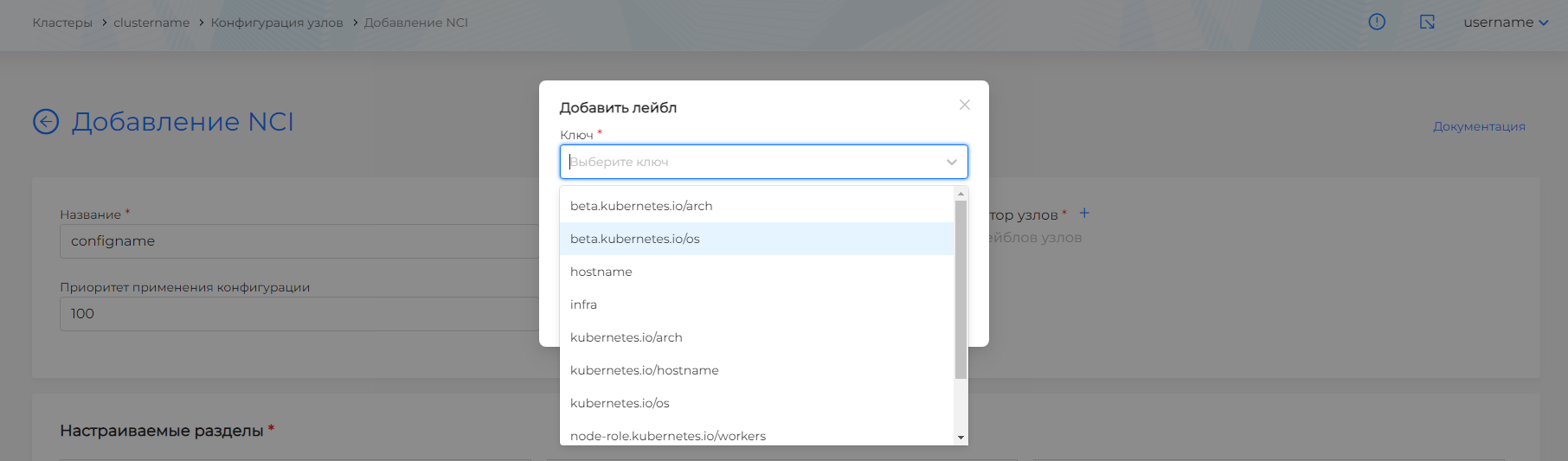
Screenshot: selecting configuration sections
Node selector
The label mechanism allows you to select nodes that require NCI. Examples of installation and selection of nodes for NCI application:
| Label | Nodes |
|---|---|
node-role.kubernetes.io/control-plane | Control Plane nodes only |
node-role.kubernetes.io/worker | Worker nodes only |
kubernetes.io/os: linux | All nodes with Linux OS |
Command to add a label: kubectl label node <name> node-role.kubernetes.io/worker=""
Command to view node labels: kubectl get nodes --show-labels
NCI is a cluster-scoped custom resource (CRD) of type NodeConfigItem (API group node.shturval.tech). When creating and applying NCI, no namespace is specified. Create, view, and apply NCIs with kubectl in the cluster where shturval-node-config is installed (client or management cluster, depending on the scenario).
View NCI
# List all NCIs in the cluster
kubectl get nodeconfigitem
kubectl get nci

# Complete NCI manifest
kubectl get nodeconfigitem <name> -o yaml

# Short output with selector and priority
kubectl get nodeconfigitem -o wide
Applying the NCI manifest
# Create or update NCI from file
kubectl apply -f nci.yaml

# Preview changes (dry-run)
kubectl apply -f nci.yaml --dry-run=client -o yaml
Removing NCI
kubectl delete nodeconfigitem <name>
kubectl delete -f nci.yaml
Note: Reminder: after deleting NCI, the previously applied configuration by the operator on the nodes will remain. If you need to change parameters, you must create a new NCI object with the required values and set a higher priority.
NCI configuration sections
Below is the purpose of each block, fields and examples.
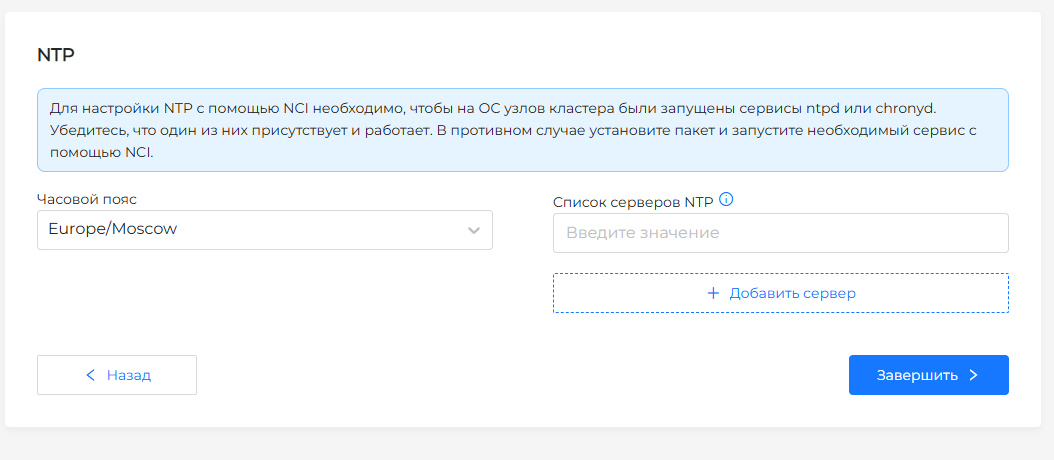
NTP
Setting up NTP servers and time zone.
Note:
To configure NTP using NCI, the ntpd or chronyd service must be installed on the OS of the cluster nodes. Make sure one of them is enabled (active) and added to startup (enabled). Otherwise, install the package (under Node Configuration/Packages to Install) and start the required service (Systemd-units custom section) using NCI.
In addition to NTP, chrony can be used: the running service is determined automatically.
NTP settings on cluster nodes are not available during installation. The default setting is Timezone - Europe/Moscow
Configuring NTP servers if the chronyd or ntpd service is installed and enabled
| Field | Description |
|---|---|
| List of NTP servers | Corporate server addresses. IP address or FQDN of NTP servers (at least one). |
| NTP Service Name | NTP service name, such as ntpd or chronyd. |
| Timezone | Time zone, for example Europe/Moscow. The default is Europe/Moscow. |
Screenshot: NTP block
Installation chrony
Installs the chrony package and enables the chronyd service.
apiVersion: node.shturval.tech/v1beta2
kind: NodeConfigItem
metadata:
  name: chrony
spec:
  nodeconfigselector:
    kubernetes.io/os: linux
  packages:
  - name: chrony
    state: present
  systemdunits:
  - active: true
    enabled: true
    name: chronyd
Installing ntp
Installs the ntp package and enables the ntpd service.
apiVersion: node.shturval.tech/v1beta2
kind: NodeConfigItem
metadata:
  name: ntp
spec:
  nodeconfigselector:
    kubernetes.io/os: linux
  packages:
  - name: ntp
    state: present
  systemdunits:
  - active: true
    enabled: true
    name: ntpd
Installing chrony and configuring NTP
Sets chrony, enables chronyd, sets NTP servers and time zone.
apiVersion: node.shturval.tech/v1beta2
kind: NodeConfigItem
metadata:
  name: chrony
spec:
  nodeconfigselector:
    kubernetes.io/os: linux
  packages:
  - name: chrony
    state: present
  systemdunits:
  - active: true
    enabled: true
    name: chronyd
  ntp:
    servers:
    - 0.ru.pool.ntp.org
    - 1.ru.pool.ntp.org
    timezone: "Europe/Moscow"
installing ntp and configuring NTP
Sets ntp, enables ntpd, sets NTP servers and time zone.
apiVersion: node.shturval.tech/v1beta2
kind: NodeConfigItem
metadata:
  name: ntp
spec:
  nodeconfigselector:
    kubernetes.io/os: linux
  packages:
  - name: ntp
    state: present
  systemdunits:
  - active: true
    enabled: true
    name: ntpd
  ntp:
    servers:
    - 0.ru.pool.ntp.org
    - 1.ru.pool.ntp.org
    timezone: "Europe/Moscow"
NTP setup
apiVersion: node.shturval.tech/v1beta2
kind: NodeConfigItem
metadata:
  finalizers:
  - node.shturval.tech/finalizer
  name: ntp-example
spec:
  ntp:
    servers:
    - 0.ru.pool.ntp.org
    - 1.ru.pool.ntp.org
    timezone: "Europe/Moscow"
  nodeconfigselector:
    kubernetes.io/os: linux
Container Runtime
Container Runtime must be installed on every node in the cluster to enable kubelets to run pods and containers within them. Configuring container runtime (containerd): image registries (mirrors, authorization), if necessary, custom sections of the config (for example, Nvidia runtime).
Container registry configuration block
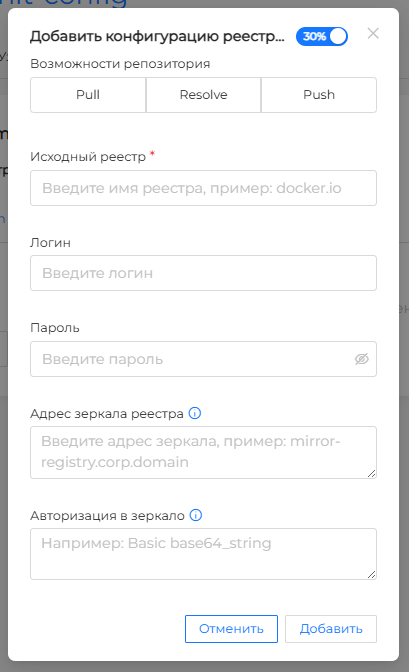
This block sets image registries: the source registry, the mirror, and credentials. To add a configuration, click +, fill in the fields in the Add image registry configuration window, and click Add. Multiple registries appear as separate list items.
In workload manifests a developer can still reference docker.io (Docker Hub) and not know where the cluster actually pulls images from. If a mirror is set, requests to the source registry go to the corporate mirror.
| Field | Description |
|---|---|
| Repository Features | Management and storage of images: add new ones (push); pull; convert the image name in the repository into its digital (digest) representation (resolve). Multiple selection available. |
| Source registry | Registry name in workload manifests, for example docker.io (Docker Hub). The cluster maps it to the mirror if a mirror is set. |
| Login | Username for the private source registryLogin and Password are set only as a pair. |
| Password | Password for the private source registryLogin and Password are set only as a pair. |
| Registry mirror address | Corporate mirror the cluster pulls images from instead of the source registry. Example: mirror-registry.corp.domainRequests to docker.io go to this mirror, not to Docker Hub. |
| Authorization in the mirror | Credentials for the mirror if the mirror requires authorization. Example: Basic base64_string. |
The daemon writes Login and Password to /etc/containerd/config.toml as the plugins."io.containerd.grpc.v1.cri".registry.configs."<source-registry>".auth section (username and password keys). Registry mirror address and Authorization in the mirror go to a different file — hosts.toml for that registry. These settings are independent: one does not replace the other.
If login and password are not set, the auth section is not created. To remove credentials that are already on the node, clear both fields and save: the section is sent with exist: false, and the daemon deletes it from config.toml. Other keys in the file that are not in configSections are left unchanged. After apply, containerd is restarted.
Screenshot: add image registry configuration window
Plugins block
In the Plugins block, the containerd configuration sections (runtimecfg.configSections[]) are configured. After adding, the plugin is displayed in the list by the value of the Path field.
| Field | Description |
|---|---|
| Path | Full path, including containerd configuration sections and subsections. Example: plugins."io.containerd.grpc.v1.cri".containerd.default_runtime. |
| Plugin availability | configSections.exist: true is present - the section has been added to the configuration; configSections.exist: false is missing—the section must be deleted. |
| Options | List of plugin parameters. |
| Parameter availability | configSections.params[].exist: true is present - parameter added to the plugin; Missing - configSections.params[].exist: false - parameter should be removed from the plugin. |
| Key | Parameter key. |
| Value | Parameter value. You can specify a string or numeric value, as well as [] and "" values. |
Note: Private image registry settings are available in the Container registry configuration section. In the Plugins block you cannot create the plugins."io.containerd.grpc.v1.cri".registry.configs."<registry-name>".auth section; an already configured section is not shown here.
NCI example
apiVersion: node.shturval.tech/v1beta2
kind: NodeConfigItem
metadata:
  name: runtime
spec:
  nodeconfigselector:
    kubernetes.io/os: linux
  runtimecfg:
    registries:
    - capabilities:
      - resolve
      - pull
      host: https://yourhostname:443
      name: r.shturval.tech
  priority: 100
NCI example with private registry login and password
apiVersion: node.shturval.tech/v1beta2
kind: NodeConfigItem
metadata:
  name: private-registry
spec:
  nodeconfigselector:
    kubernetes.io/os: linux
  priority: 100
  runtimecfg:
    registries:
    - capabilities:
      - resolve
      - pull
      name: myprivateregistry.domain.ltd
    configSections:
      - exist: true
        path: plugins."io.containerd.grpc.v1.cri".registry.configs."myprivateregistry.domain.ltd".auth
        params:
          - exist: true
            key: username
            value: myLogin
          - exist: true
            key: password
            value: myPassword
NCI example with Nvidia Runtime configuration
apiVersion: node.shturval.tech/v1beta2
kind: NodeConfigItem
metadata:
  name: nvidia-runtime
spec:
  nodeconfigselector:
    node-role.kubernetes.io/gpu: ""
  priority: 100
  runtimecfg:
    configSections:
      - exist: true
        params:
          - exist: true
            key: default_runtime_name
            value: nvidia
        path: plugins."io.containerd.grpc.v1.cri".containerd
      - exist: true
        params:
          - exist: true
            key: base_runtime_spec
            value: ""
          - exist: true
            key: cni_conf_dir
            value: ""
          - exist: true
            key: cni_max_conf_num
            value: 0
          - exist: true
            key: container_annotations
            value: []
          - exist: true
            key: pod_annotations
            value: []
          - exist: true
            key: privileged_without_host_devices
            value: false
          - exist: true
            key: runtime_engine
            value: ""
          - exist: true
            key: runtime_path
            value: ""
          - exist: true
            key: runtime_root
            value: ""
          - exist: true
            key: runtime_type
            value: io.containerd.runc.v2
        path: plugins."io.containerd.grpc.v1.cri".containerd.runtimes.nvidia
      - exist: true
        params:
          - exist: true
            key: BinaryName
            value: /usr/bin/nvidia-container-runtime
          - exist: true
            key: CriuImagePath
            value: ""
          - exist: true
            key: CriuPath
            value: ""
          - exist: true
            key: CriuWorkPath
            value: ""
          - exist: true
            key: IoGid
            value: 0
          - exist: true
            key: IoUid
            value: 0
          - exist: true
            key: NoNewKeyring
            value: false
          - exist: true
            key: NoPivotRoot
            value: false
          - exist: true
            key: Root
            value: ""
          - exist: true
            key: ShimCgroup
            value: ""
          - exist: true
            key: SystemdCgroup
            value: true
        path: plugins."io.containerd.grpc.v1.cri".containerd.runtimes.nvidia.options
sysctl parameters
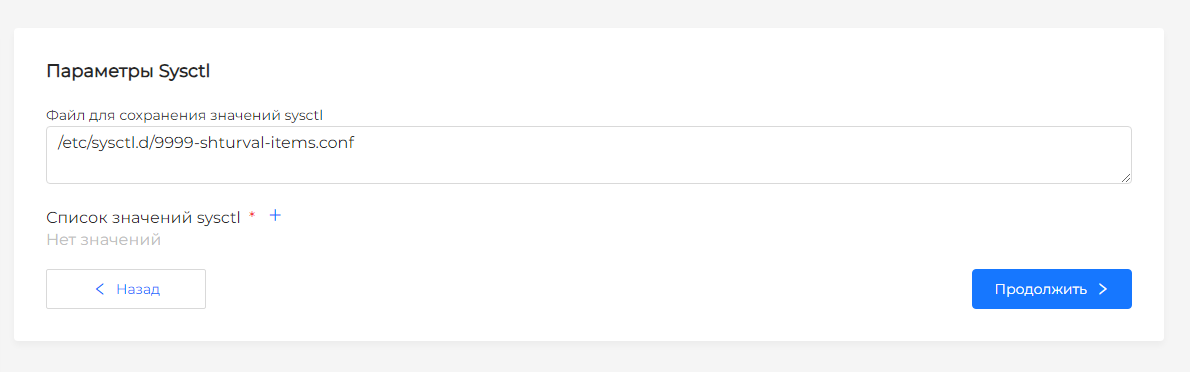
Linux kernel parameters in key-value format. They are written to the /etc/sysctl.d/9999-shturval-items.conf file and applied to the node.
| Field | Description |
|---|---|
| List of sysctl values | List of sysct valuesl in key-value format, for example net.ipv4.ip_forward: "1", vm.max_map_count: "262144". |
Screenshot: sysctl parameters
NCI example: sysctl
apiVersion: node.shturval.tech/v1beta2
kind: NodeConfigItem
metadata:
  name: sysctl
spec:
  nodeconfigselector:
    kubernetes.io/os: linux
  sysctl:
    param:
      kernel.panic: "10"
      kernel.panic_on_oops: "1"
      net.bridge.bridge-nf-call-iptables: "1"
      net.ipv4.ip_forward: "1"
      vm.max_map_count: "262144"
      vm.overcommit_memory: "1"
  priority: 100
Package repositories
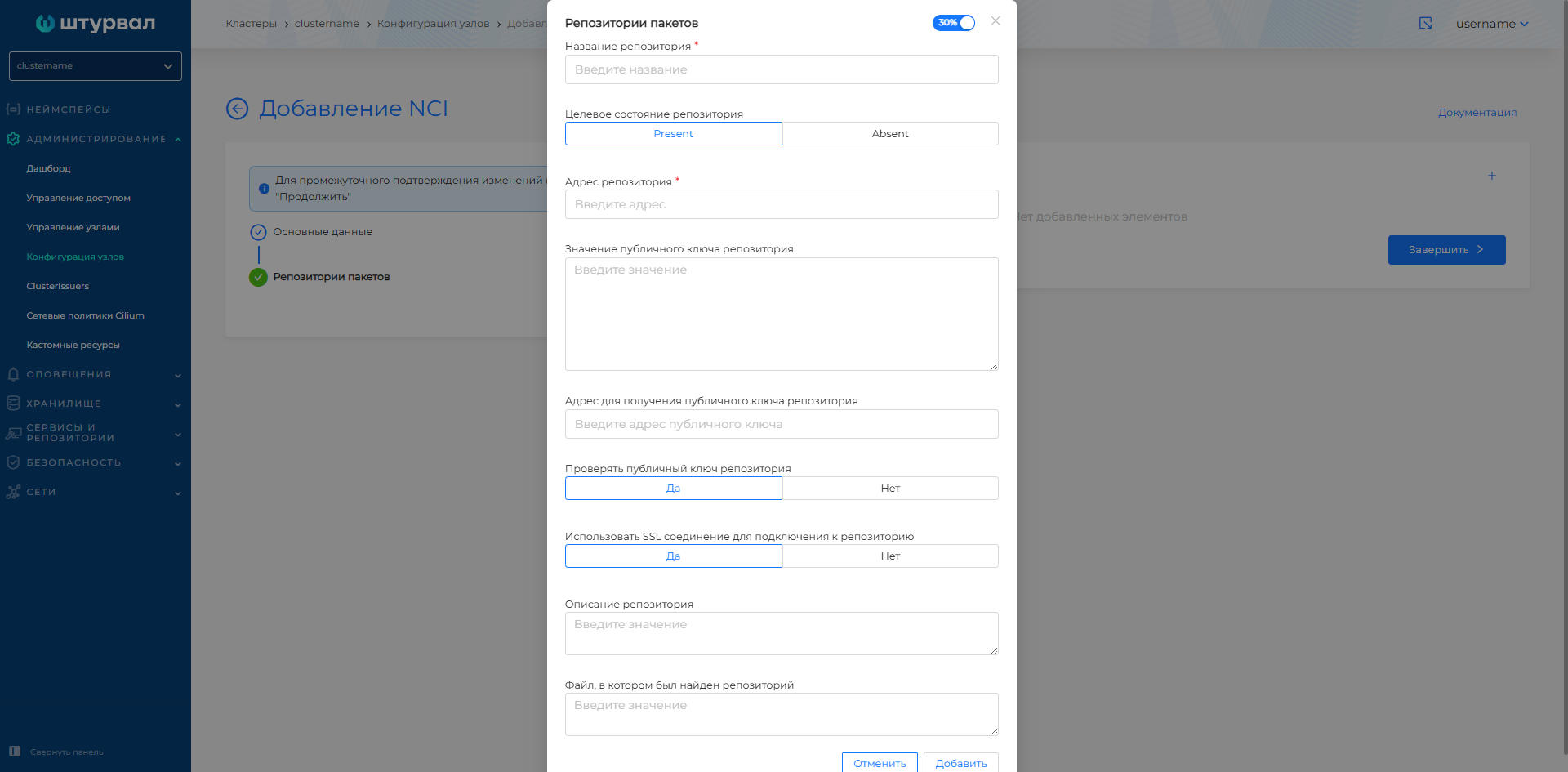
This section configures the connection of network repositories that operate using the HTTP, HTTPS, and FTP protocols.
| Field | Description |
|---|---|
| Repository name | Repository name (required). |
| Target state of repository | Present — connect the repository; Absent - disable. |
| Repository address | URL or repository address (required). |
| Repository public key value | Public key for checking repository packages. |
| Address for receiving the repository public key | URL to download the repository public key. |
| Check repository public key | Yes—enable key verification; No - disable. |
| Use an SSL connection to connect to the repository | Yes - use SSL when connecting to the repository; No - don’t use it. |
| Description of the repository | Text description of the repository. |
| File where the repository was found | Path to the file on the node in which the repository will be described. |
Screenshot: package repositories
NCI Example: Package Repositories
apiVersion: node.shturval.tech/v1beta2
kind: NodeConfigItem
metadata:
  name: repositories-example
spec:
  repositories:
  - name: corp-repo
    description: "Corp Linux repo"
    address: "https://repo.corp.domain.tld/repository/rpm"
    state: present
  nodeconfigselector:
    kubernetes.io/os: linux
Packages to install
Installing or removing packages on nodes (RPM/DEB depending on the OS).
| Field | Description |
|---|---|
| Package name | Package name (required). |
| Package Target State | Present - set; Absent - delete. |
| Required package version | Specific version of the package (if necessary). |
| Set package update prohibition | Yes - disable package update; No - allow. |
| Remove update ban before installation | Yes - remove the update ban before installation; No - don’t take it off. |
| Commands after installing the package | Post-installation commands. |
| Commands should complete successfully after installation | Yes - successful completion is required; No - not necessarily. |
| Commands before installing the package | Pre-installation commands. |
| Tasks must complete successfully before installation | Yes - successful completion is required; No - not necessarily. |
Screenshot: packages for installation
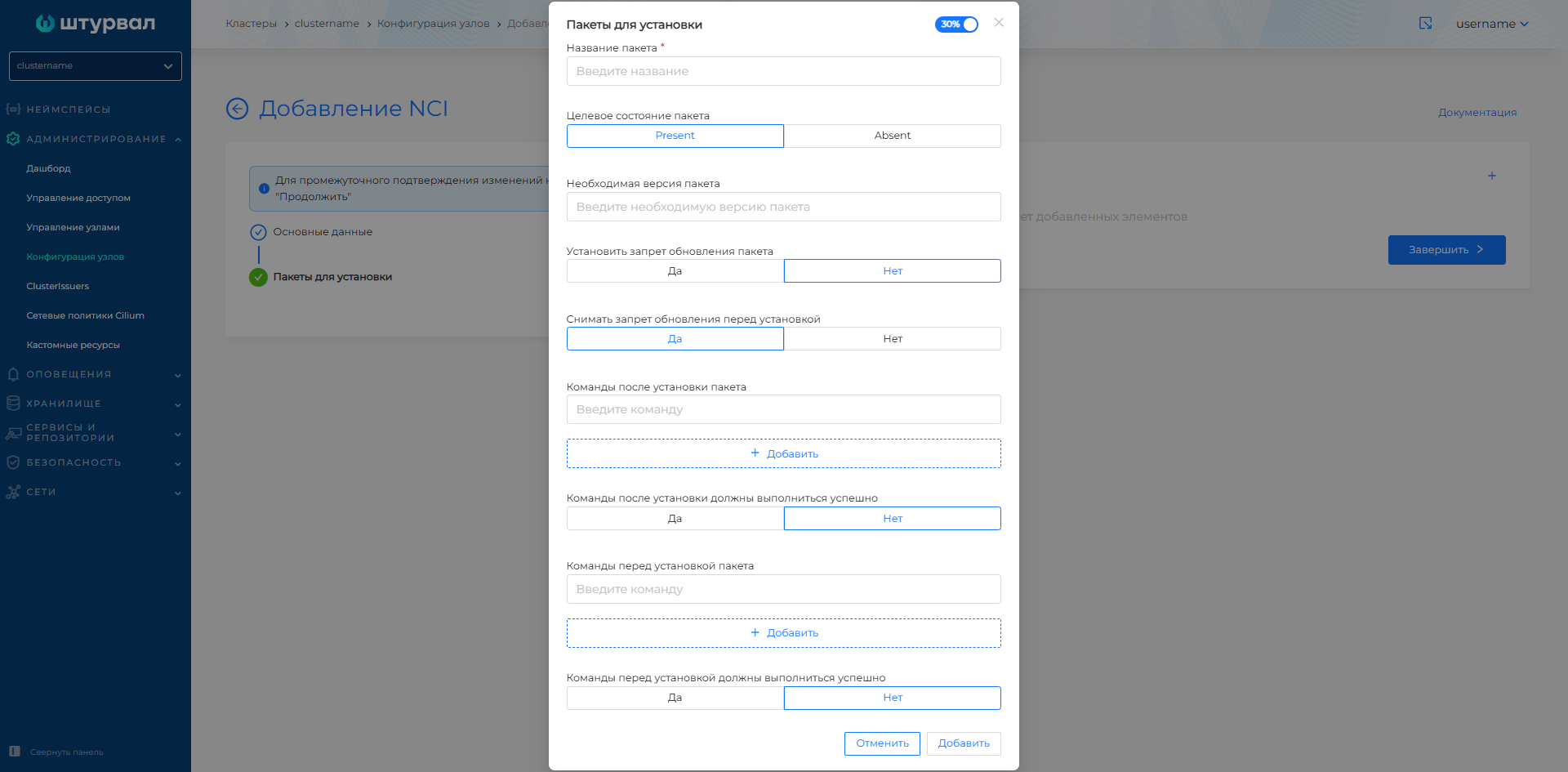
NCI Example: Packets
apiVersion: node.shturval.tech/v1beta2
kind: NodeConfigItem
metadata:
  name: packages-example
spec:
  nodeconfigselector:
    kubernetes.io/os: linux
  packages:
  - name: jq
    state: present
  - name: mc
    state: absent
Files and directories
Creation of files and directories on nodes with specified rights and owner.
| Field | Description |
|---|---|
| Path to file or directory | Full path on the node (required). |
| File/directory type | File or Directory. |
| Permissions | In octal format, for example 0644, 0755. |
| Owner | Owner of the file/directory (user). |
| Group | Owning group. |
| File Contents | File contents. |
Note: when you change the directory name, a new directory with the changed name is created. The directory with the previous name will not be deleted.
Screenshot: files and directories
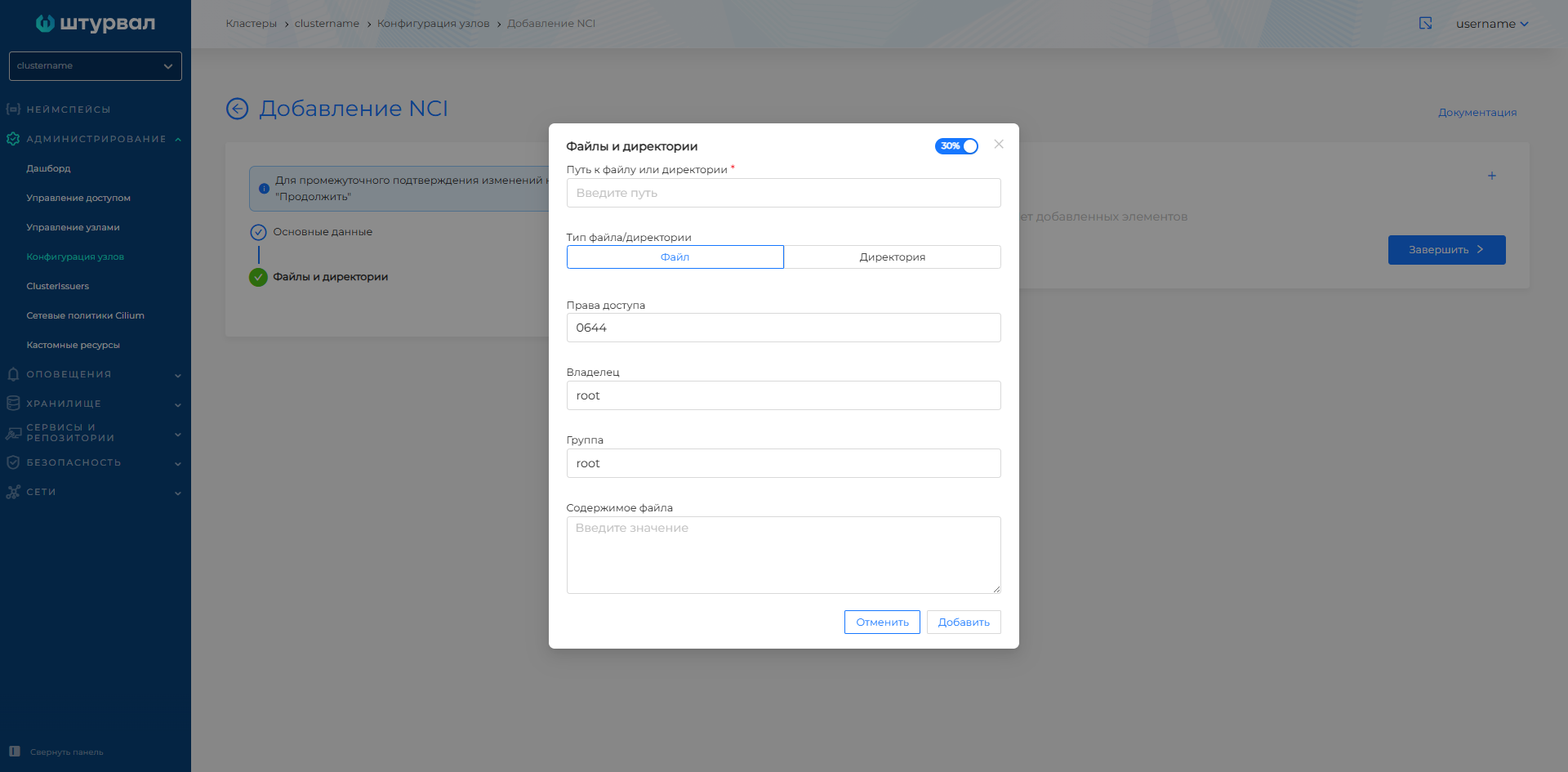
NCI example: directory
apiVersion: node.shturval.tech/v1beta2
kind: NodeConfigItem
metadata:
  name: directory
spec:
  files:
  - group: root
    mode: "0600"
    owner: root
    path: /etc/kubernetes
    type: directory
  nodeconfigselector:
    kubernetes.io/os: linux
System certificates (Kubecerts)
Rotation period for system certificates Kubernetes on nodes.
| Field | Description |
|---|---|
| System certificate rotation period Kubernetes | An integer from 7 to 365 (days). Default is 30. |
Screenshot: system certificates
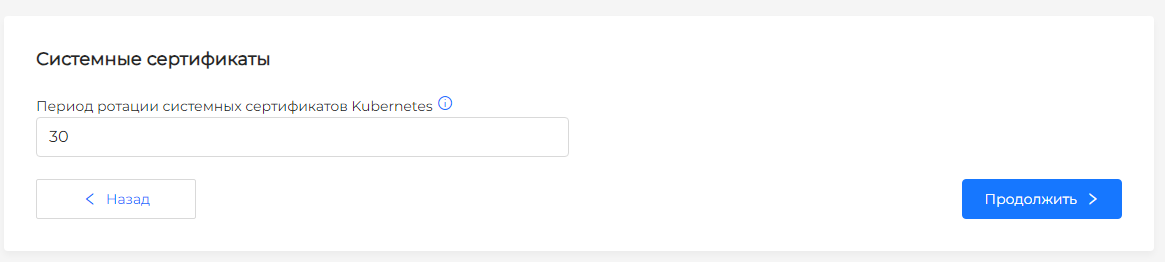
NCI Example: System Certificates (Kubecerts)
apiVersion: node.shturval.tech/v1beta2
kind: NodeConfigItem
metadata:
  name: kubecerts
spec:
  kubecerts:
    rotationperiod: 30
  nodeconfigselector:
    kubernetes.io/os: linux
  priority: 100
Trusted certificates
Adding root/trusted CA certificates to nodes (to verify connections, signatures, etc.). Modal window: Adding a trusted certificate.
| Field | Description |
|---|---|
| Add method | Manual upload - you need to upload a certificate file and specify a name; From Source - Enter the URL and name of the certificate. You can specify a URL with a protocol (https is available) or without a direct protocol. If the protocol is not specified, specify the port. If protocol and port are not specified, port 443 will be automatically added. |
| Certificate name | Identifier for display and storage (required). |
| Certificate Status | Verified - CA can be used to sign SSL certificates; Not confirmed - trust only, without signing. It will be possible for CAs to use the root certificate if the certificate status is Verified. Certificate Authorities will not be able to use the root certificate to sign SSL certificates if the root certificate status is Unverified. |
Screenshot: trusted certificates
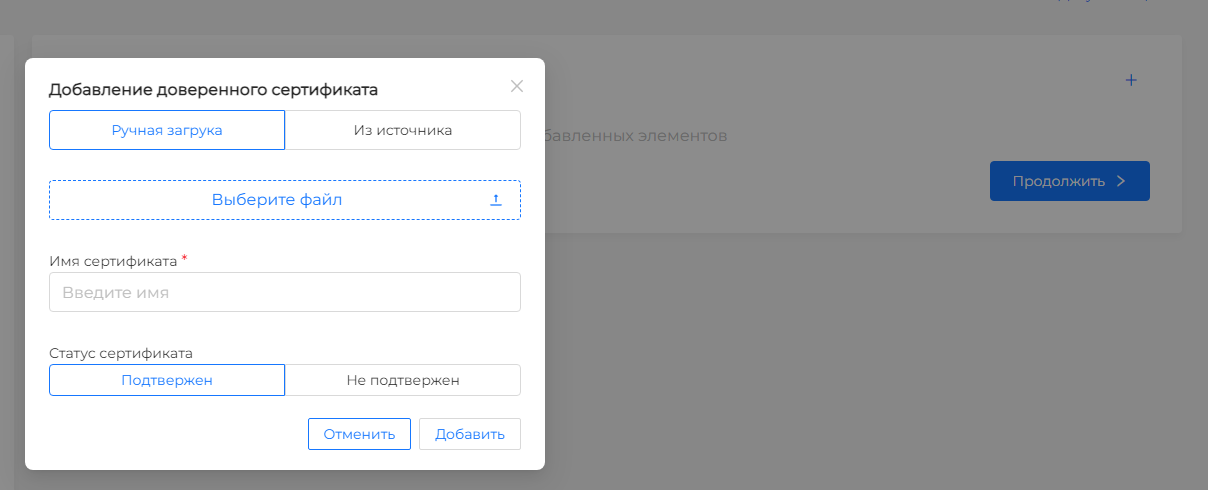
NCI Example: Trusted Certificates
apiVersion: node.shturval.tech/v1beta2
kind: NodeConfigItem
metadata:
  name: certs
spec:
  certificates:
  - exist: true
    name: cert.crt
    url: https://example.com
  nodeconfigselector:
    kubernetes.io/os: linux
Kernel boot loader (GRUB) options
This configuration modifies (adding or removing options) the /etc/default/grub file, generates a grub configuration, and restarts the node to apply the settings. Modal window: Add kernel loader parameter.
| Field | Description |
|---|---|
| Presence or absence of parameter | Present—the parameter has been added to the bootloader; Absent—the parameter must be removed. |
| Kernel parameter in bootloader | Parameter name (required), for example, GRUB_TIMEOUT. |
| Kernel parameter value | Parameter value. |
Screenshot: kernel bootloader parameters
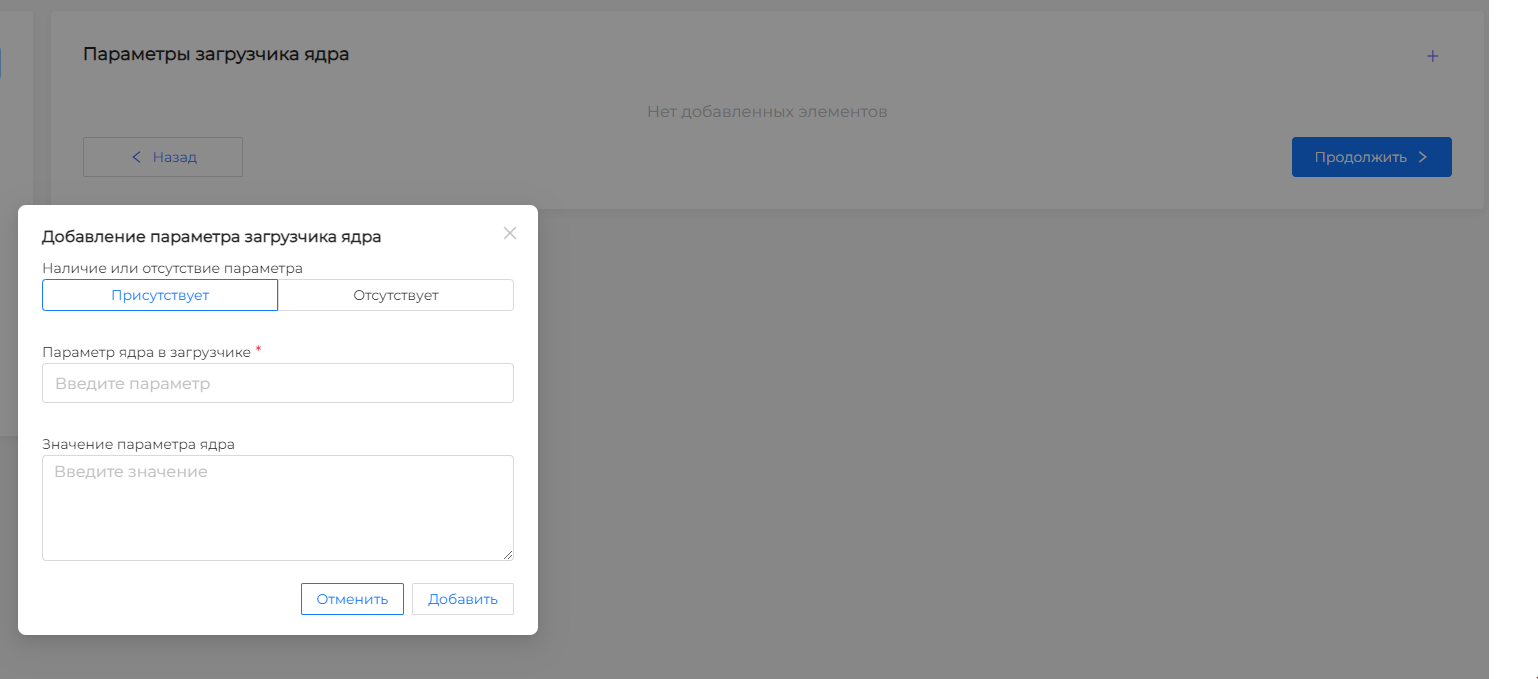
NCI example: kernelarguments
apiVersion: node.shturval.tech/v1beta2
kind: NodeConfigItem
metadata:
  name: kernelarg-example
spec:
  kernelarguments:
  - param: "GRUB_TIMEOUT"
    value: "1"
    exist: true
  nodeconfigselector:
    kubernetes.io/os: linux
Kernel modules
Managing Linux kernel modules. Modal window: Add a kernel module.
| Field | Description |
|---|---|
| Kernel module name | Module name (required). |
| Option file name | File name with module options (if necessary). |
| Kernel module locked | Yes - the module is blacklisted, autoloading is not available; No - not blocked. |
| Autoloading a kernel module | Yes - the module is loaded when the OS boots; No - it does not download automatically. Not available if the module is locked. |
Screenshot: kernel modules
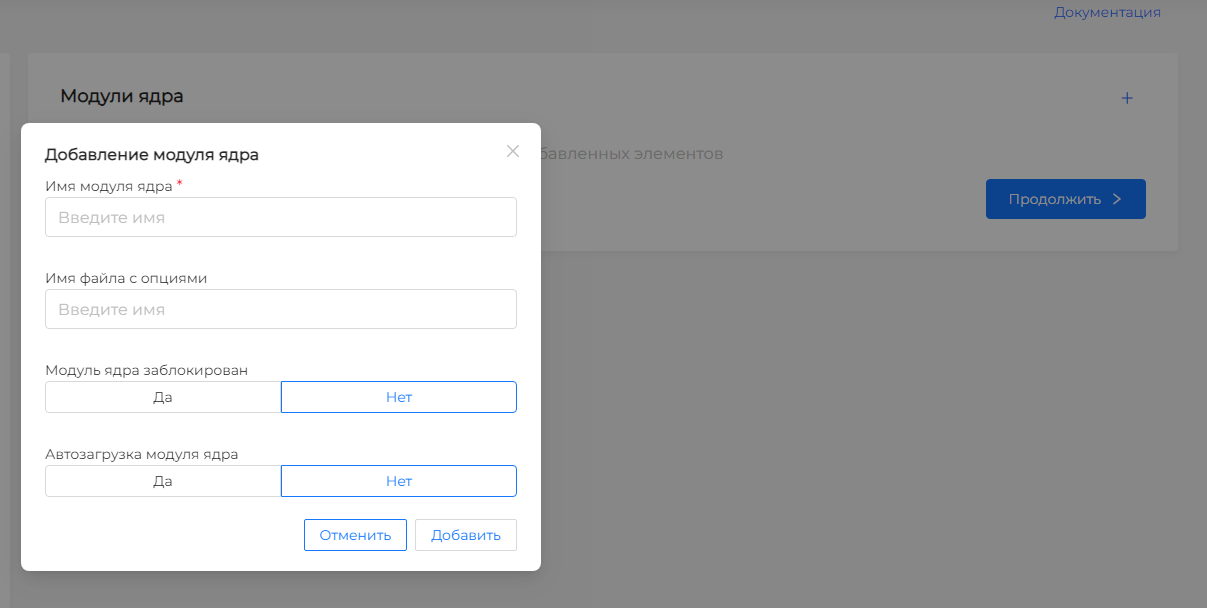
NCI Example: Kernel Modules
apiVersion: node.shturval.tech/v1beta2
kind: NodeConfigItem
metadata:
  name: kernelmodule-example
spec:
  nodeconfigselector:
    kubernetes.io/os: linux
  kernelmodules:
  - name: "br_netfilter"
    autoload: true
  - name: "zram"
    blacklist: true
    autoload: false
Systemd units
Enabling and autobooting systemd-serhangs on knots.
| Field | Description |
|---|---|
| Start service? | Yes - the service must be in the active state (started); No - don’t run. |
| Start service on OS startup? | Yes - the service is turned on when the OS boots (enabled); No - don’t turn it on. |
| systemd unit name | Systemd unit name (required), for example chronyd, containerd, kubelet. |
Screenshot: Systemd units
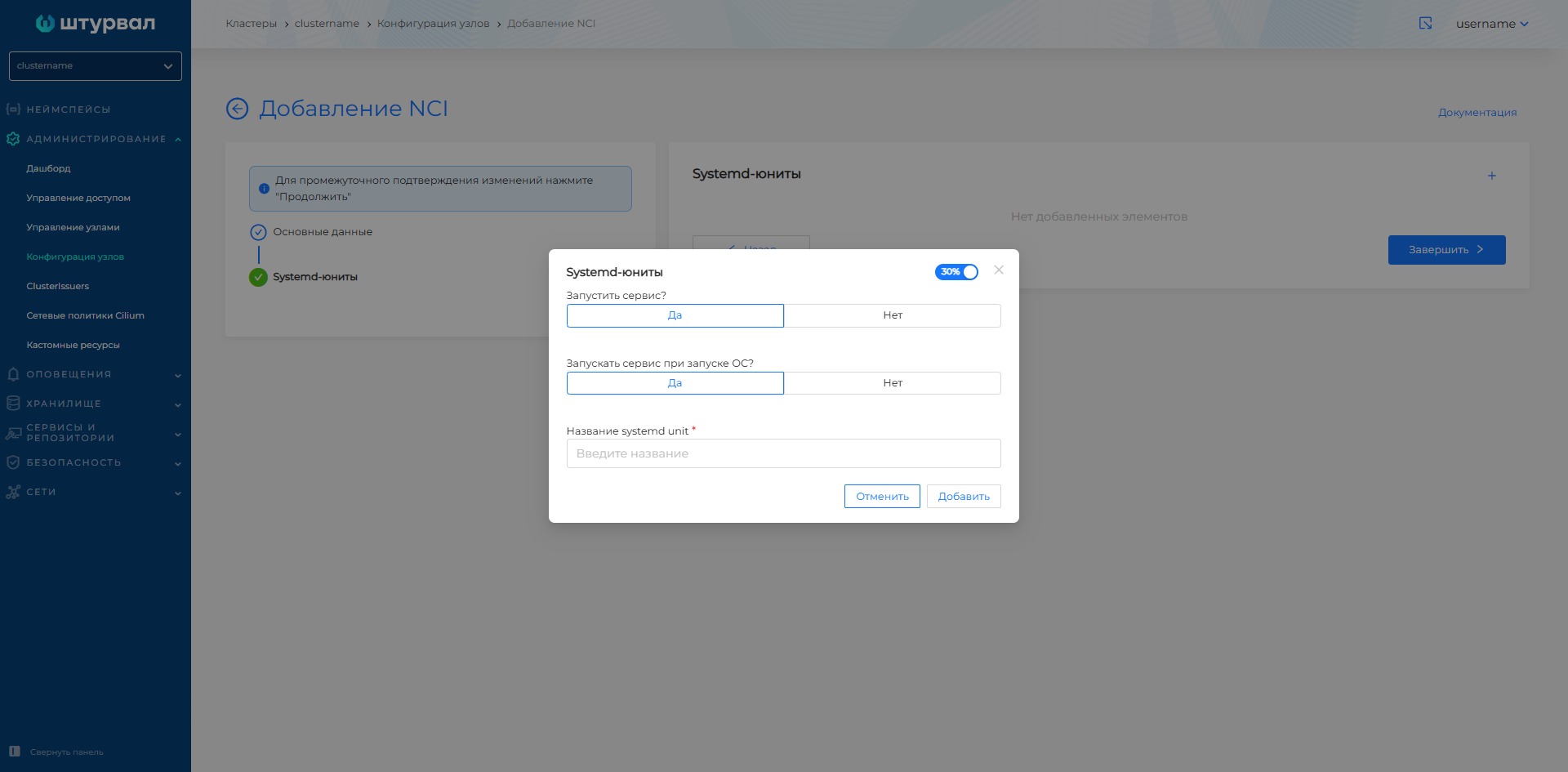
NCI example: Systemd units
apiVersion: node.shturval.tech/v1beta2
kind: NodeConfigItem
metadata:
  name: systemd-units
spec:
  nodeconfigselector:
    kubernetes.io/os: linux
  systemdunits:
  - active: true
    enabled: true
    name: containerd
  - active: true
    enabled: true
    name: kubelet
Kubelet
Kubelet parameters: CPU/RAM policies, pod limits, update rates, TLS, paths to static pods, etc.
| Field | Description |
|---|---|
| CPU Management Policy | This field represents the strategy used by the kubelet to manage the allocation of CPU resources to containers running on the node. For example: none - must allocate CPU on a sharing basis, CPU can be used by pods according to their limitations, without any guarantee of CPU affinity; static - provide unique CPU cores for pods. |
| RAM Management Policy | This field represents the strategy used by kubelet to manage the allocation of memory resources for containers running on the node. For example: none is a general memory management method; static - guarantees strict compliance of the memory address space. |
| List of reserved CPUs | List of CPUs reserved for system components (for example, 0-1). |
| CPU Control Parameters | This field allows you to set additional parameters to control the processor, such as using certain cores. For example: “cpu_hard_limit” : “2” - sets a hard limit on CPU usage to 2; “cpu_soft_limit” : “1” - sets the soft limit on CPU usage to 1. Here the left part is entered as a key, the right part as a value. The use of quotation marks is not required. |
| HairpinMode | This field determines how Kubelet will configure the container bridge to handle hairpin packets that go between two pods on the same node. Available values: HairpinVeth — hairpin channel mod is enabled; HairpinNone — hairpin channel mod is disabled; PromiscuousBridge - all internal traffic of the device is placed in promiscuous mode (Enabled by default)silence). |
| MaxPods | This field specifies the maximum number of pods that can be launched with this Kubelet setup. For example: 150 - Maximum number of pods - 150; 200 — The maximum number of pods is 200. |
| NodeStatusUpdateFrequency | This field determines the frequency with which the kubelet calculates and updates the state of the node. For example: 10 s – node status update every 10 seconds; 1 m - node status update every minute. |
| HTTPCheckFrequency | This field specifies the period between http checks to receive new data. For example: 30 s — The period between http checks to receive new data is 30 seconds; 1 m — The period between http checks to receive new data is 1 minute. |
| StaticPodURL | URL for accessing static pod settings. For example: http://example.com/static_pods. |
| ProtectKernelDefaults | If this option is enabled, Kubelet will throw an error if the kernel flags do not match expectations. Available values: yes - Kubelet error if kernel flags do not match expectations; no - no checking of kernel flags. |
| ServerTLSBootstrap | When enabled, kubelet will automatically run server certificates. Enabling this setting will enable the RotateCertificates setting. Available values: yes—enables autorun of the server certificate; no—disables autorun of the server certificate. |
| Control method | This field defines the strategy the Kubelet should use when making resource binding decisions. Available values: restricted - non-standard pods will be rejected that cannot satisfy the correct execution of the topology calculation map, if any; best-effort - non-standard pods will be launched in best-effort mode, they will be limited in resources if there are not enough of them to satisfy the distribution among kubelet nodes; none — resource topology will not be taken into account when launching pods; single-numa-node - pods will be placed so that their resources are distributed within a single NUMA node. |
| Resource Change Detection Strategy | This field defines the strategy for tracking changes to ConfigMaps and Secrets. Available values: Get - the setting reads resources at each update event; Cache - resources are cached when the resource is updated for further use; Watch - APIServer Kubernetes sends notifications about available updates. |
| EnableServer | When this setting is enabled, Kubelet will workRun in server safe mode. Available values: Yes - enables the secure Kubelet server; No - Disables the secure Kubelet server. |
| StaticPodPath | This field specifies the path to a static pod or a repository with a static pod. For example: /my/path/to/static/pod - defines the path to the directory where manifests of static pods are located; /home/user/my_static_pods - Specifies the directory where static pod manifests are stored. |
| SyncFrequency | This field defines the maximum time between syncing containers and configurations. For example: 30 s - the time between synchronization of containers and configurations is 30 seconds; 2 m - the time between synchronization of containers and configurations is 2 minutes. |
| FileCheckFrequency | This field specifies the time between checking configuration files for changes. For example: 10 s - the time between checking configuration files for changes is 10 seconds; 1 m—the time between checking configuration files for changes is 1 minute. |
| StaticPodURLHeader | This field allows you to configure the HTTP headers used to access the static pod URL. For example: {“X-Api-Key”: “123xyz” } - HTTP headers for accessing the static pod URL contain the API key; {“Authorization”: “Basic QWxhZGRpbjpPcGVuU2VzYW1l”} - HTTP headers for accessing the static pod URL contain basic authorization. |
| Address | This field specifies the IP address on which the Kubelet should run. For example: 192.168.1.1 - Kubelet will run on the IP address 192.168.1.1; 10.0.0.1 - Kubelet will run on IP address 10.0.0.1. |
| CgroupDriver | This field specifies which CGroups driver Kubelet should use. systemd - Kubelet uses the systemd system to manage groups; cgroupfs - Kubelet uses the cgroupfs file system to manage groups. |
| RotateCertificates | Enabling this setting enables automatic certificate rotation for Kubelet. Available values: Yes - enables certificate rotation for Kubelet; No - Disables certificate rotation for Kubelet. |
| EnableProfilingHandler | When this parameter is enabled, profiling through the host host:port/debug/pprof/ becomes available. Available values: Yes - enables profiling through the host host:port/debug/pprof/; No—disables profiling. |
| TLSMinVersion | This field specifies the minimum supported version of the TLS protocol. |
| Feature Gates | Enable or disable featuresy (key and value true/false). |
Screenshot: Kubelet section
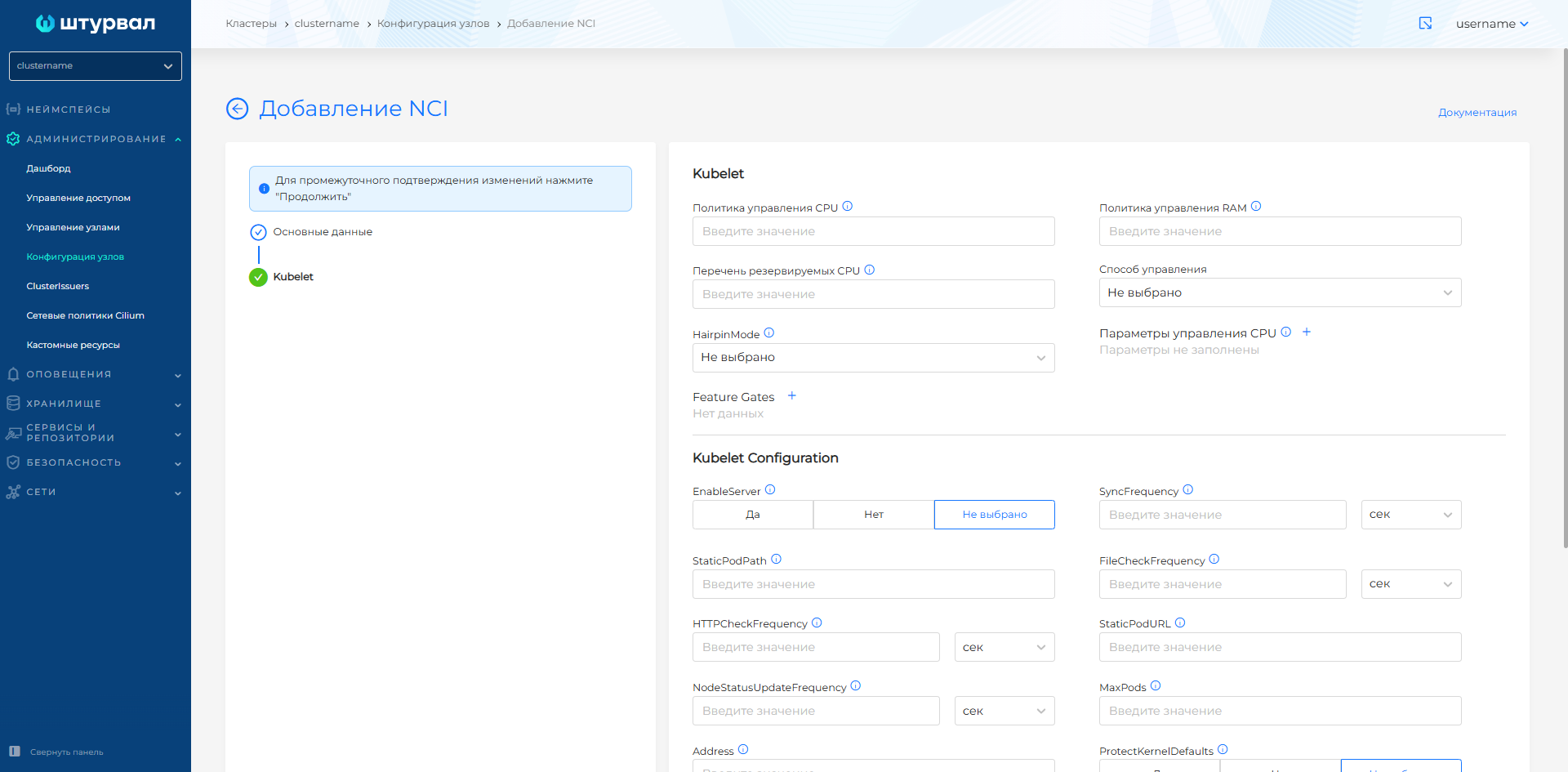
For more information about setting up CPU Pinning, see CPU Reservation for etcd.
NCI Example: Kubelet (CPU Pinning)
apiVersion: node.shturval.tech/v1beta2
kind: NodeConfigItem
metadata:
  name: cpu-pinning
spec:
  kubelet:
    cpuManagerPolicy: static
    featureGates:
      CPUManagerPolicyOptions: true
      CPUManagerPolicyAlphaOptions: true
      CPUManagerPolicyBetaOptions: true
    cpuManagerPolicyOptions:
      align-by-socket: "true"
      distribute-cpus-across-numa: "true"
      full-pcpus-only: "true"
    reservedSystemCPUs: 0-1
  nodeconfigselector:
    node-role.kubernetes.io/control-plane: ""
  priority: 100
Users
Creating local users on nodes (name, home directory, shell, group, SSH keys).
| Field | Description |
|---|---|
| Username | Username to connect to the host via SSH (required). |
| Shell | Path to the command shell, for example /bin/bash or /sbin/nologin. |
| Path to user’s home directory | Path to the user’s home directory. |
| Group | Local Linux group for the user (required). |
| SSH keys | Public SSH keys. |
Screenshot: users
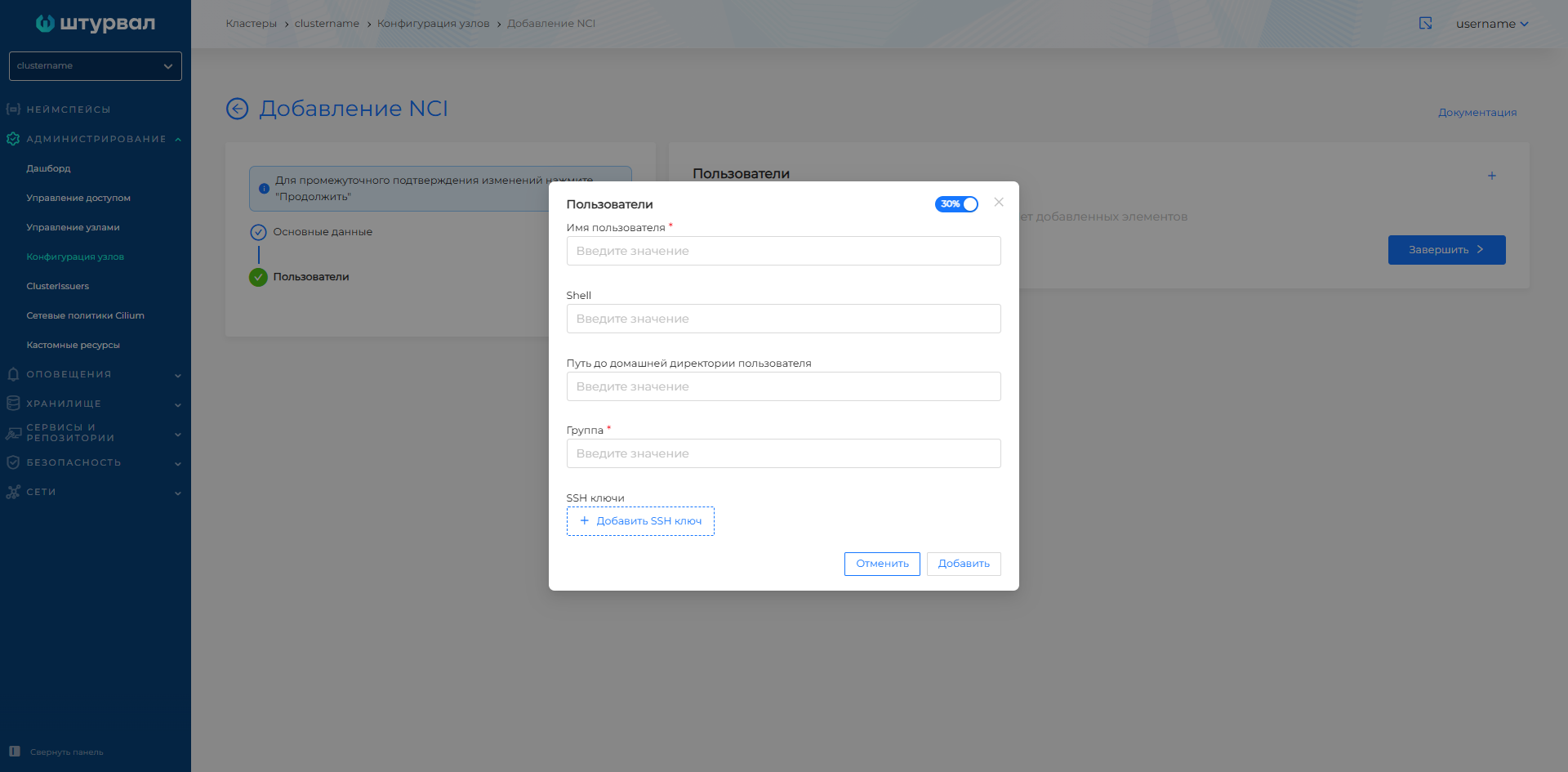
NCI example: user
apiVersion: node.shturval.tech/v1beta2
kind: NodeConfigItem
metadata:
  name: users
spec:
  nodeconfigselector:
    node-role.kubernetes.io/control-plane: ""
  users:
  - group: etcd
    homedir: ""
    shell: /sbin/nologin
    username: etcd
  priority: 100
Kube API Server
Configuring kube-apiserver on Control Plane: resources (requests/limits), Admission Plugins, OIDC, Feature Gates, Audit Policy, encryption Secrets.
The GUI still configures one OIDC provider. Several JWT issuers and the AuthenticationConfiguration file are set in the NCI manifest; see OIDC and AuthenticationConfiguration.
Kube API Server Resources block
| Field | Description |
|---|---|
| Requests / Limits | Requests and Limits for the kube-apiserver container. By default, it is possible to set requests and limits for Memory and CPU. |
| Priority class and priority | priorityClassName and priority of the kube-apiserver pod (default system-node-critical, priority 2000001000). A pod with these values will never be removed from the node. |
Admission Plugins block
| Action | Description |
|---|---|
| Enable plugin | Add to list and allow use. |
| Disable plugin | Add to list and prohibit use. |
| Default | Do not add the plugin to the list - the default settings remain. |
OIDC block
| Field | Description |
|---|---|
| Username claim (usernameclaim) | Claim for username (default sub). |
| Username Prefix | Prefix to the name from OIDC. |
| Group claim (groupsclaim) | Claim for groups. |
| Group Prefix | Prefix to groups. |
| OIDC Issuer URL | OIDC Publisher URL.Only https protocol is available for connection. |
| Client OIDC ID (clientid) | Client ID. |
| CA File (cafile) | CA certificate in base64 (optional). |
Block “Feature Gates”
Key and value (true/false) to enable or disable Kubernetes features.
Audit Policy block
| Field | Description |
|---|---|
| Audit Policy | Audit policy in base64. |
| Maximum number of log copies | If you want to disable the copy limit, set it to 0. |
| Log storage period (days) | Maximum number of days. |
| Maximum log size, Mb | Size in megabytes. |
Secrets Encryption block
Secrets encryption configuration (in base64).
Note: when placing the Audit Policy, the kube-apiserver is restarted. Check the validity of YAML before use.
Screenshot: Kube API Server at NCI
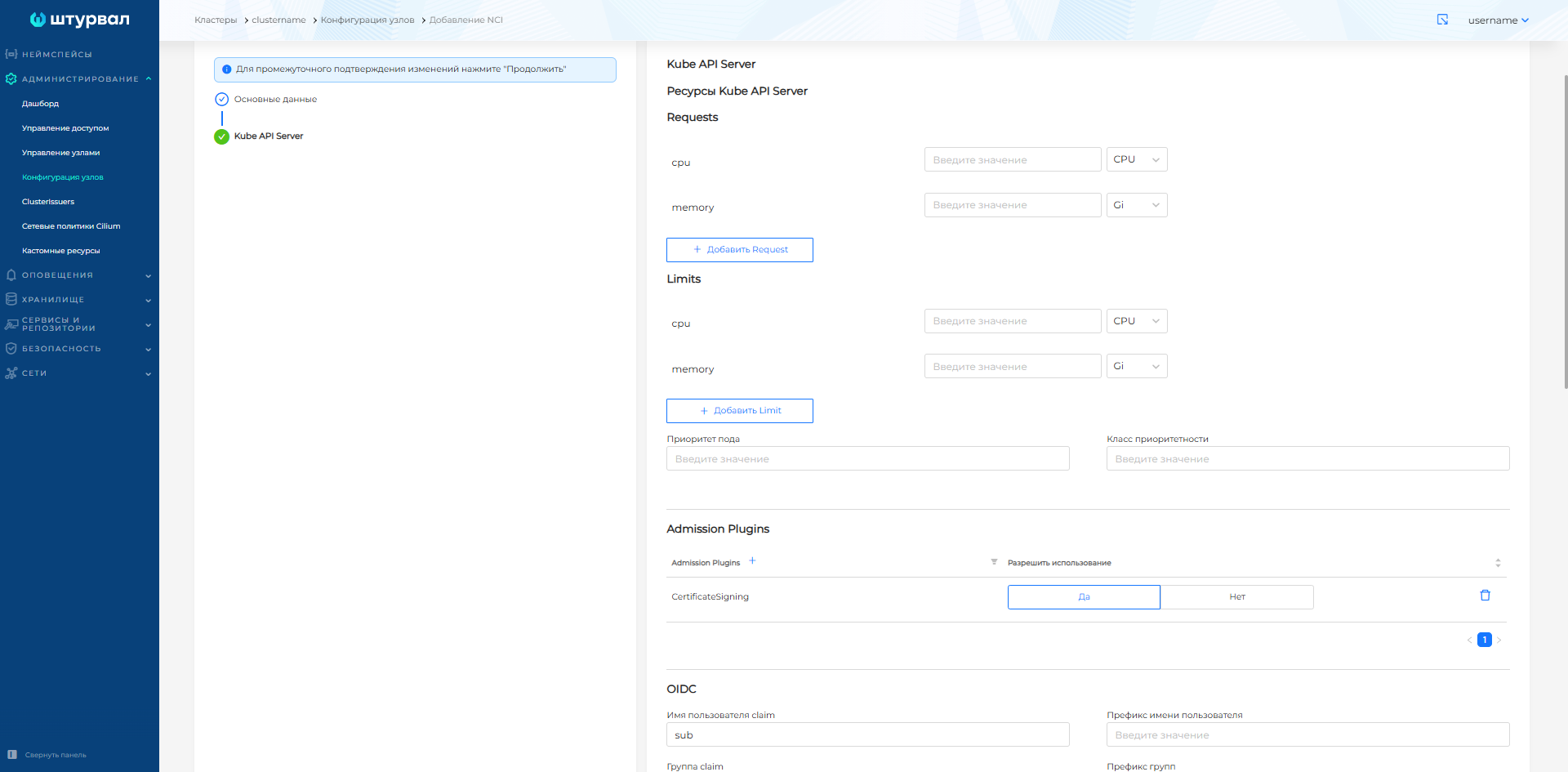
NCI Example: Kube API Server (OIDC)
apiVersion: node.shturval.tech/v1beta2
kind: NodeConfigItem
metadata:
  name: oidc-nci
spec:
  nodeconfigselector:
    node-role.kubernetes.io/control-plane: ""
  kubeapi:
    oidc:
      cafile: LS0tLS1CRUdJTiBDRVJUSUZJQ0FURS0tLS0tClvQtNCw0L3QvdGL0LUg0LIg0LrQvtC00LjRgNC+0LLQutC1IGJhc2U2NF0KLS0tLS1FTkQgQ0VSVElGSUNBVEUtLS0tLQ==
      clientid: backend
      groupsclaim: claims
      groupsprefix: "shturval:"
      issuerurl: https://shturval.clustername.ip-10-11-12-13.shturval.link
      usernameclaim: sub
      usernameprefix: "shturval:"
  priority: 100
Several JWT issuers are set in spec.kubeapi.authenticationConfiguration.jwt. Example and merge rules are in OIDC and AuthenticationConfiguration.
View NCI application
On the node page in the Node Configuration tab, a list of NCIs scheduled for use on this node and the application status are displayed. If there is an error, the status Not applied is displayed.
Reference
- NCI Object (NodeConfigItem) - structure and purpose of the node configuration template.
- NodeConfig (NC) - configuration instance for a specific node and NCI application status.
- Module shturval-node-config - architecture of the operator and daemon
std, drain, reboot, diagnostics.