Node Conditions
Overview
Node Conditions - node conditions that can be used to determine whether the node is healthy and ready to accept pods. Conditions are displayed on node page and in kubectl describe node.
Healthy node states
| State | Description | Healthy Status |
|---|---|---|
| NetworkUnavailable | Cilium/CNI is not running on the node | false |
| MemoryPressure | Kubelet reports low memory | false |
| DiskPressure | Kubelet reports low disk space | false |
| PIDPressure | Too many processes (PID) on node | false |
| Ready | The node is ready to accept pods | true |
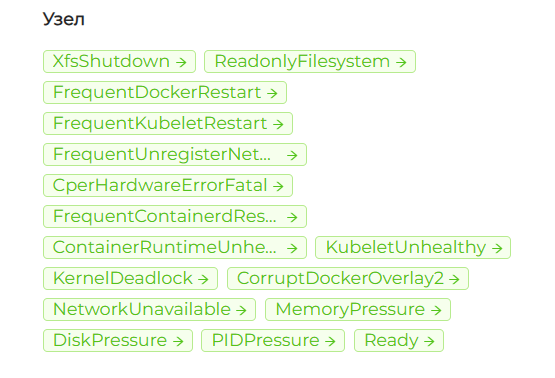
Additional conditions (shturval-npd)
When shturval-npd is installed, the Node column shows the chart conditions. A permanent condition does not return to False by itself.
After chart installation
These five conditions are present immediately, without an SSP:
| State | Description | Healthy Status |
|---|---|---|
| ReadonlyFilesystem | The filesystem was remounted read-only | false |
| KernelDeadlock | The Linux kernel is in a deadlock | false |
| XfsShutdown | The XFS filesystem has shut down | false |
| CperHardwareErrorFatal | A hardware error with fatal severity | false |
| CorruptDockerOverlay2 | overlay2 storage is corrupt | false |
When extra monitors are enabled
These conditions appear when the matching JSON files from the image are passed in an SSP. They are not present after a plain chart install.
| State | Description | Healthy Status |
|---|---|---|
| FrequentKubeletRestart | kubelet restarts often | false |
| FrequentDockerRestart | docker restarts often | false |
| FrequentContainerdRestart | containerd restarts often | false |
| FrequentUnregisterNetDevice | The kernel often waits for a network device to be released | false |
| ContainerRuntimeUnhealthy | The container runtime does not respond | false |
| KubeletUnhealthy | kubelet does not pass the health check | false |
Screenshot: Node column with extra monitors
Automatic Taints under conditions
Under certain conditions, Kubernetes automatically adds Taints to the node:
| Taint | Description | Effect |
|---|---|---|
node.kubernetes.io/not-ready | Ready=False | NoExecute |
node.kubernetes.io/unreachable | Ready=Unknown | NoExecute |
node.kubernetes.io/memory-pressure | Out of memory | NoSchedule |
node.kubernetes.io/disk-pressure | Disk shortage | NoSchedule |
node.kubernetes.io/pid-pressure | PID Limit | NoSchedule |
node.kubernetes.io/network-unavailable | Network unavailable | NoSchedule |
node.kubernetes.io/unschedulable | The node is not subject to scheduling (cordon) | NoSchedule |
node.cloudprovider.kubernetes.io/uninitialized | Node with cloud provider before cloud-controller-manager initialization | NoSchedule |
Read more about built-in taints in Taints and Tolerations.
Where to watch
- GUI: Administration → Manage nodes → click on a node → Node tab → Status block, Node column.
- CLI:
kubectl describe node <name>— Conditions section.