Infrastructure reconciliation
What is infrastructure reconciliation
Infrastructure reconciliation is an ongoing process in which platform controllers (Cluster API and associated operators) compare the desired state of the cluster with the actual and make changes to bring the infrastructure into conformance with the declared state.
The desired state is set by resources in the management cluster: for example, MachineDeployment specifies the number of replicas and the machine template, Cluster specifies the Kubernetes version and Control Plane parameters. The actual state is actually existing objects: Machine, Node, virtual machines in the provider. Controllers periodically check for discrepancies and perform actions: creating or deleting machines, updating node configurations, restoring inoperative nodes (including according to MachineHealthCheck rules).
Why is reconciliation needed?
Reconciliation provides:
- Bringing the infrastructure to specification - if 5 nodes are specified in MachineDeployment, but in fact 4, the controller initiates the creation of the missing machine; when reducing replicas, remove unnecessary ones.
- Reaction to failures - when a node crashes or MachineHealthCheck is triggered, the controller can replace the machine or recreate the node according to the specified rules.
- Applying configuration changes - changing InfraMachineTemplate, image, disk size, etc. is brought to machines and components during reconciliation.
- State Consistency - annotations, labels, conditions of Cluster API resources and nodes are updated with each reconciliation.
Without reconciliation, the cluster would become unresponsive to changes in MachineDeployment, KubeadmControlPlane, and other resources, and recovery from failures would have to be performed manually.
When you may need to pause reconciliation
Pausing reconciliation makes sense in situations where automatic controller actions interfere with scheduled operations or may lead to unnecessary restarts and node replacements:
- Changing node group sizing or configuration — when replica count, machine template (CPU, memory, disk), or image changes, the controller starts applying changes immediately. If MachineHealthChecks is enabled, it may treat temporary node unavailability (reboot, config apply) as a failure and replace the node. Pausing reconciliation lets you change parameters, wait for nodes to stabilize, then resume reconciliation.
- Scheduled node maintenance — when upgrading the OS, replacing components, or working on nodes manually, pausing prevents controllers from rolling back state or triggering recovery because nodes are temporarily unavailable.
- Bulk or cascade changes - when you need to apply several related changes (for example, update several groups in a row) and prevent the controller from reacting to intermediate states until all steps are completed.
- Debugging and analysis of incidents - to record the current state of machines and nodes and prevent the controller from deleting or re-creating objects during analysis.
Suspension is a temporary measure. Once reconciliation is resumed, all accumulated changes will be applied.
For a practical example of pausing reconciliation, see How Shturval controls the clouds.
What does pausing reconciliation do?
When pausing reconciliation (Paused mode):
- Infrastructure controllers temporarily do not apply changes to machines and cluster nodes: they do not create or delete machines, do not update the configuration according to new specifications, and do not perform restoration using MachineHealthCheck.
- All changes planned according to current specifications remain in the queue and will be executed after resumption of reconciliation.
- The cluster and nodes continue to operate in their current state; The only thing that changes is that the controllers stop adjusting the infrastructure to the desired state.
Cluster administrators and platform administrators can pause and resume reconciliation on the cluster dashboard, with kubectl in the management cluster, and through the platform REST API.
To stop only automatic node replacement and leave the rest of infrastructure reconciliation running, change or delete MachineHealthCheck.
How to pause and resume reconciliation
- Open the cluster dashboard.
- In the Description block, next to Infrastructure reconciliation, click Pause.
- To resume, click Resume Infrastructure Reconciliation.
Screenshot: pause reconciliation
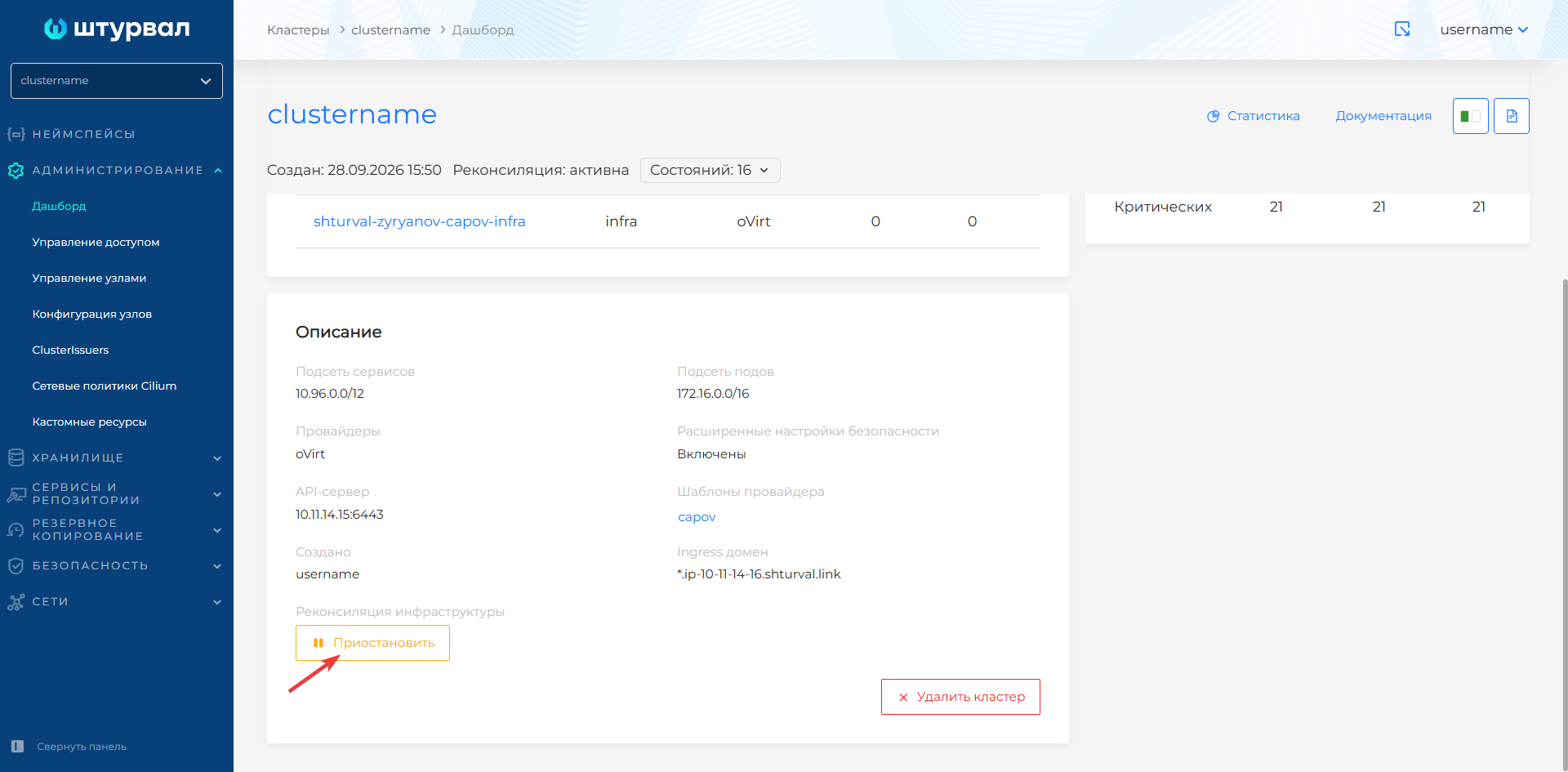
Changes that accumulated while reconciliation was paused are applied after it resumes.
Run the commands in the management cluster. The namespace matches the cluster name. In the Cluster manifest, pause is the spec.paused field.
# Pause reconciliation for the cluster
kubectl -n <cluster-name> patch cluster <cluster-name> --type=merge -p '{"spec":{"paused":true}}'

# Resume reconciliation
kubectl -n <cluster-name> patch cluster <cluster-name> --type=merge -p '{"spec":{"paused":false}}'
Obtain a token as described in Authorization and token.
Send a POST request to
/api/v1/clusters/<cluster-name>/paused.
| Parameter | Description |
|---|---|
$BACKENDPOINT | API base URL, for example https://shturval.<management-cluster-ingress> |
paused | true pauses reconciliation, false resumes it |
# Pause reconciliation for the cluster
curl -k -s -L --request POST "$BACKENDPOINT/api/v1/clusters/<cluster-name>/paused" \
  --header "Authorization: Bearer $token" \
  --header "Content-Type: application/json" \
  --data-raw '{"paused":true}'

# Resume reconciliation
curl -k -s -L --request POST "$BACKENDPOINT/api/v1/clusters/<cluster-name>/paused" \
  --header "Authorization: Bearer $token" \
  --header "Content-Type: application/json" \
  --data-raw '{"paused":false}'