Taints, Tolerances and Affinity
Overview
Managing pod-per-node scheduling in Kubernetes includes:
- Taints and Tolerations - restriction of which pods can be scheduled on which nodes (allocation of nodes for GPU, Ingress, DB);
- Node Affinity — preference for nodes by label;
- Pod Affinity / Anti-Affinity - placing pods next to other pods or dispersing them across nodes.
Taint is a “label” on a node that prohibits scheduling of pods without Toleration.
Toleration - “permission” in the pod to be scheduled on nodes with the specified Taint.
Managing Taints in the GUI
Adding Taint to a node
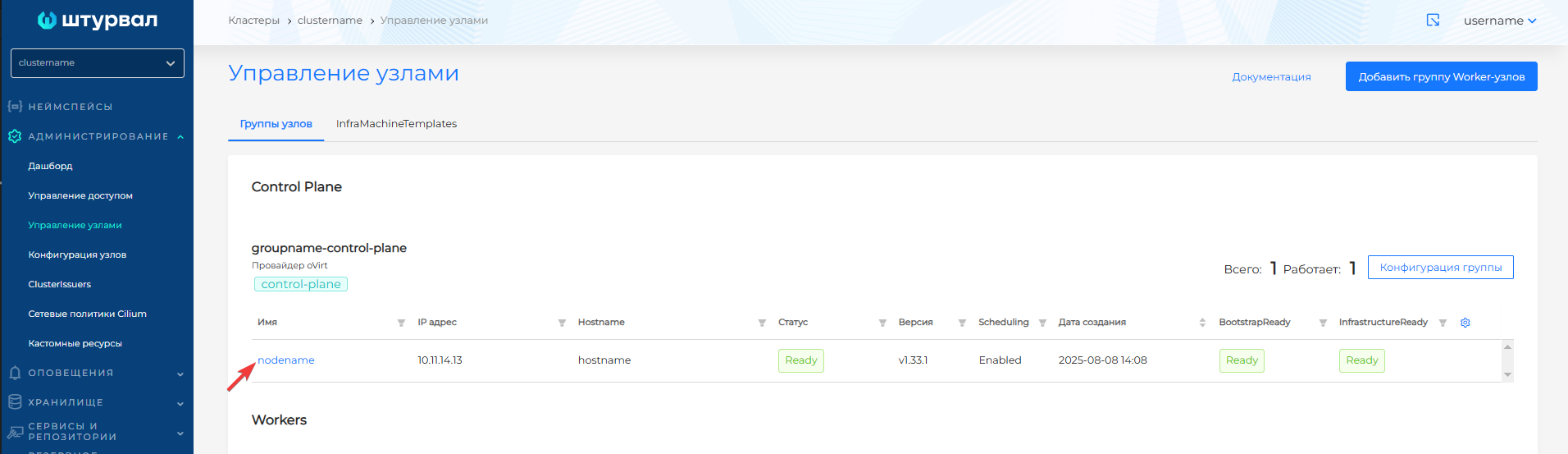
- Administration → Manage Nodes → click on the desired node.
- On the node page, go to the Taints tab.
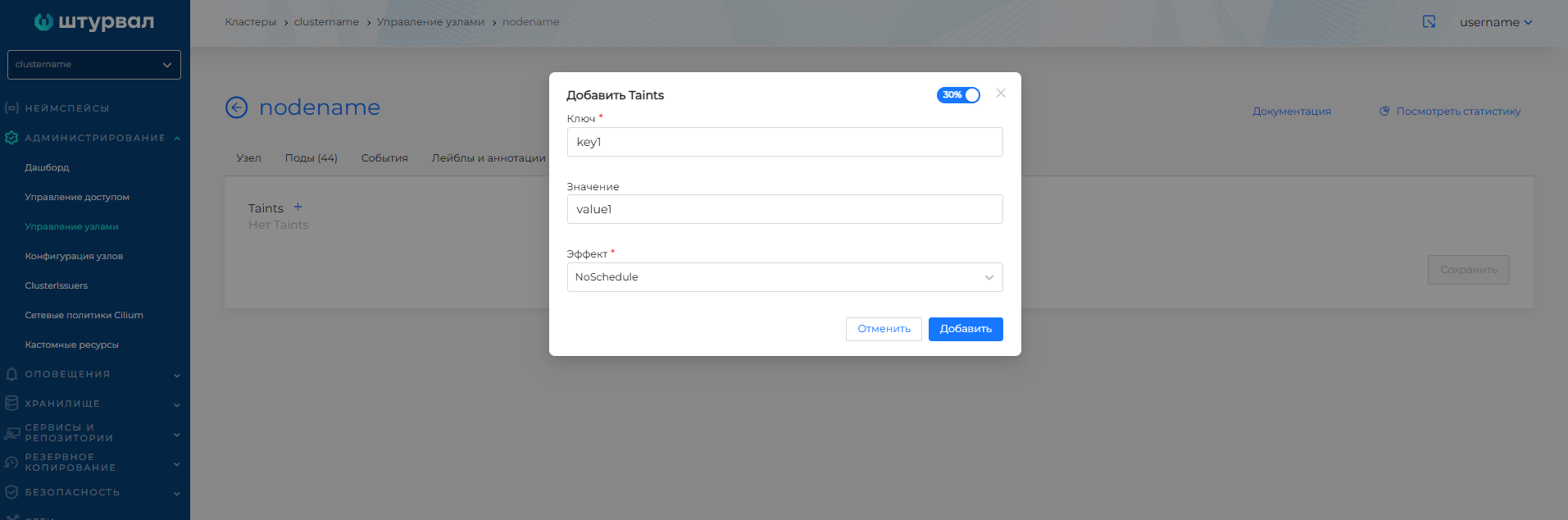
- Press +.
- Set Key (key) and, if necessary, Value (value).
- Select Effect: NoSchedule, PreferNoSchedule or NoExecute.
- Click Add.
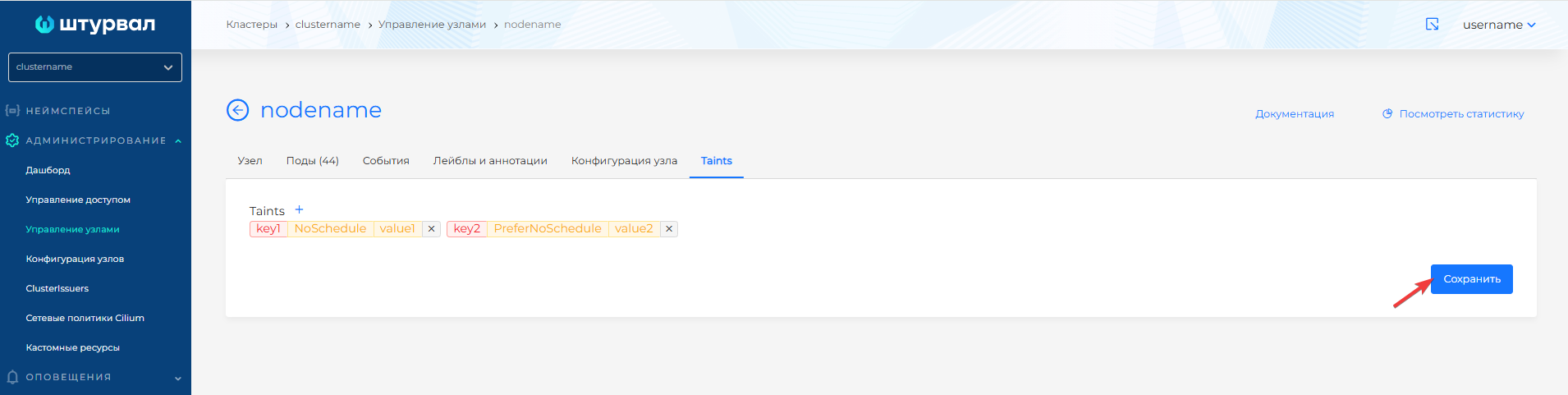
- Click Save.
Screenshot: node page, Taints tab
Screenshot: adding Taint
Screenshot: Taints list
Adding a Taint to a group
- Administration → Node Management → to the right of the Worker group name, click Group Configuration.
- Open the Taints tab.
- Press +.
- Set Key (key) and, if necessary, Value (value).
- Select Effect: NoSchedule, PreferNoSchedule or NoExecute.
- Select Propagation: Always or OnInitialization.
- Click Add.
- Click Save.
Screenshot: group configuration, Taints tab
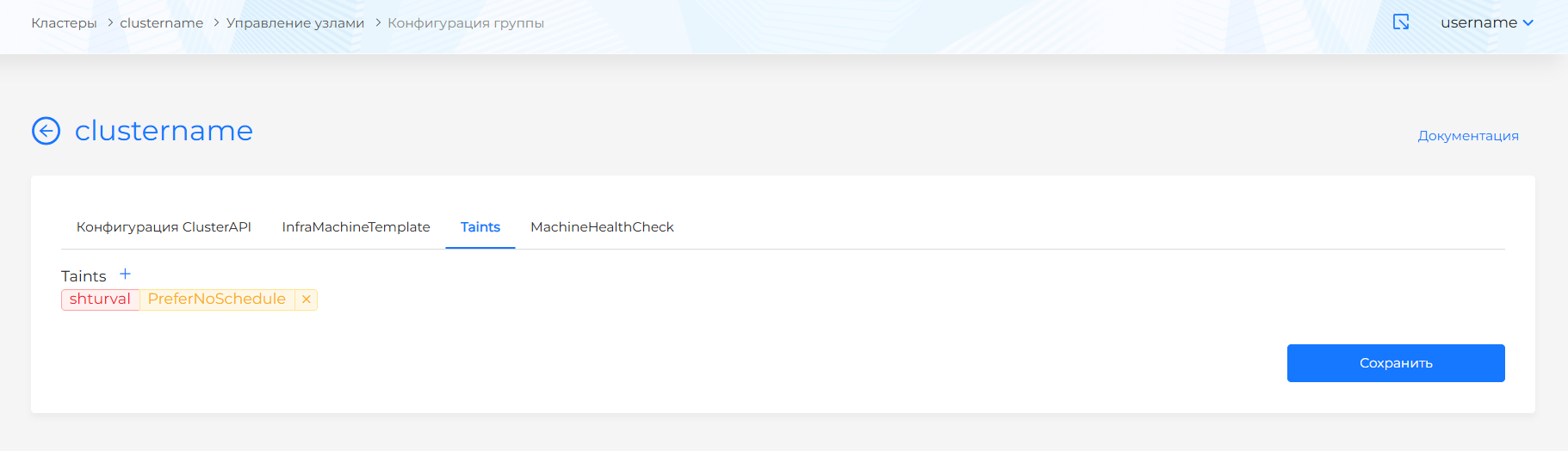
Screenshot: adding Taint
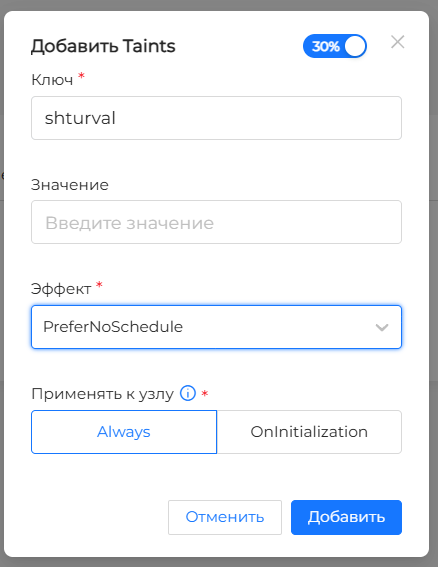
Removing Taint
On the Taints tab, delete the desired Taint (trash icon) and click Save.
Managing Tolerations in the GUI
Tolerations are set in the pod template when creating or editing a workload (Deployment, StatefulSet, DaemonSet, Pod, etc.).
- Select namespace → Loads → desired type (Deployment, etc.) → Add or open an existing load for editing.
- In the Pod Template block, find Tolerations.
- Press +.
- Set the Key and, if necessary, the Value taint that the Toleration should match.
- Select Operator: Exists (by key) or Equal (key and value).
- Select Effect: NoSchedule, PreferNoSchedule, NoExecute, or Any.
- For NoExecute, if necessary, specify Toleration Seconds — the time in seconds before the pod is evicted from the node (300 by default).
- Save the load.
Screenshot: adding Toleration during creation
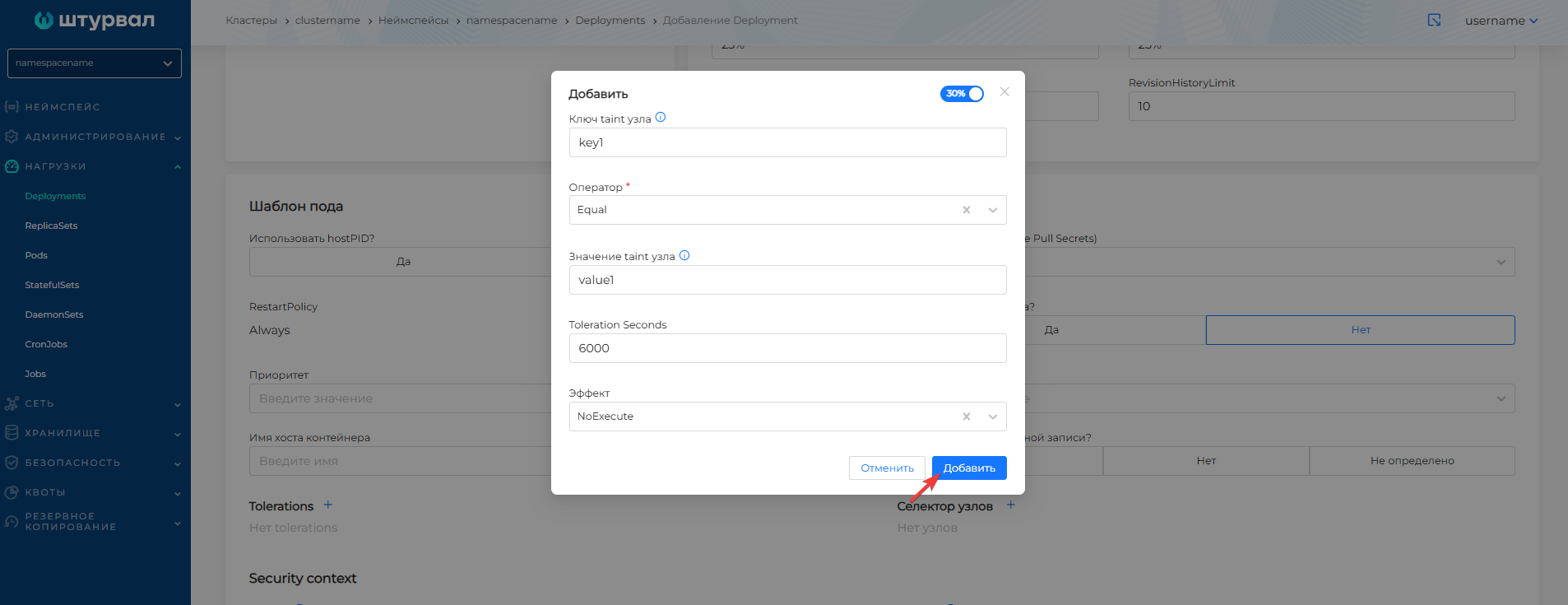
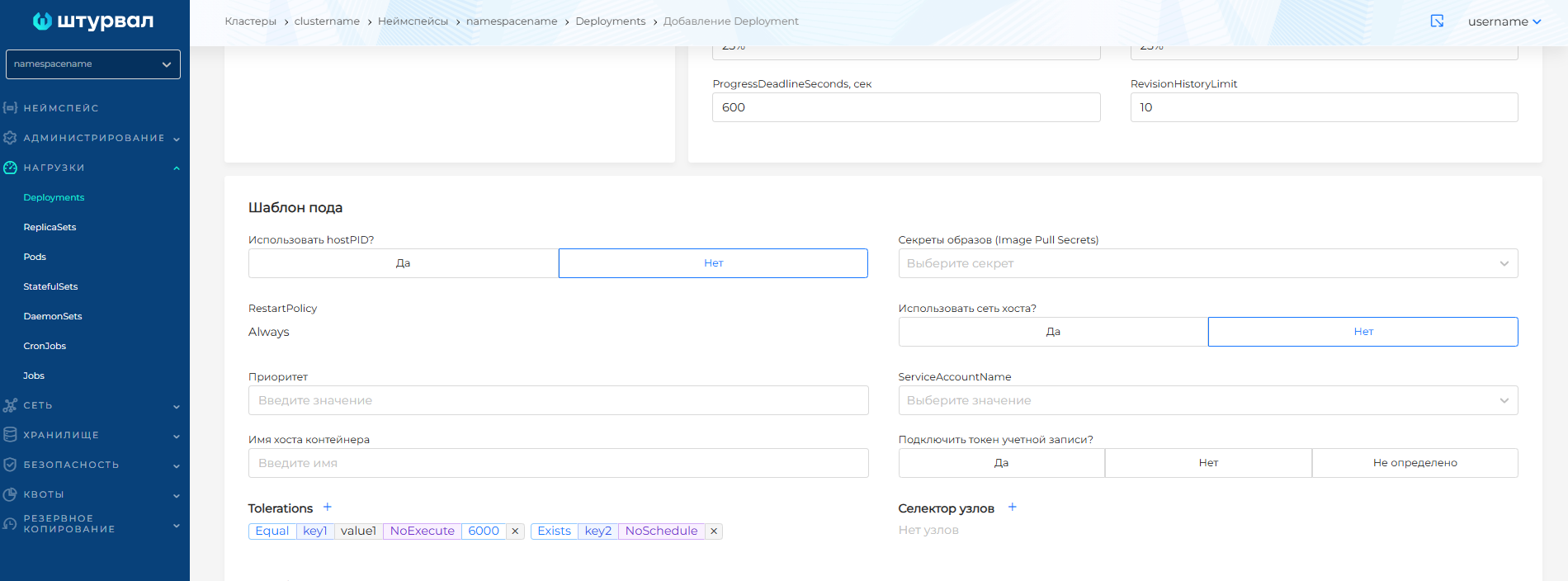
Screenshot: adding Toleration to an existing Deployment
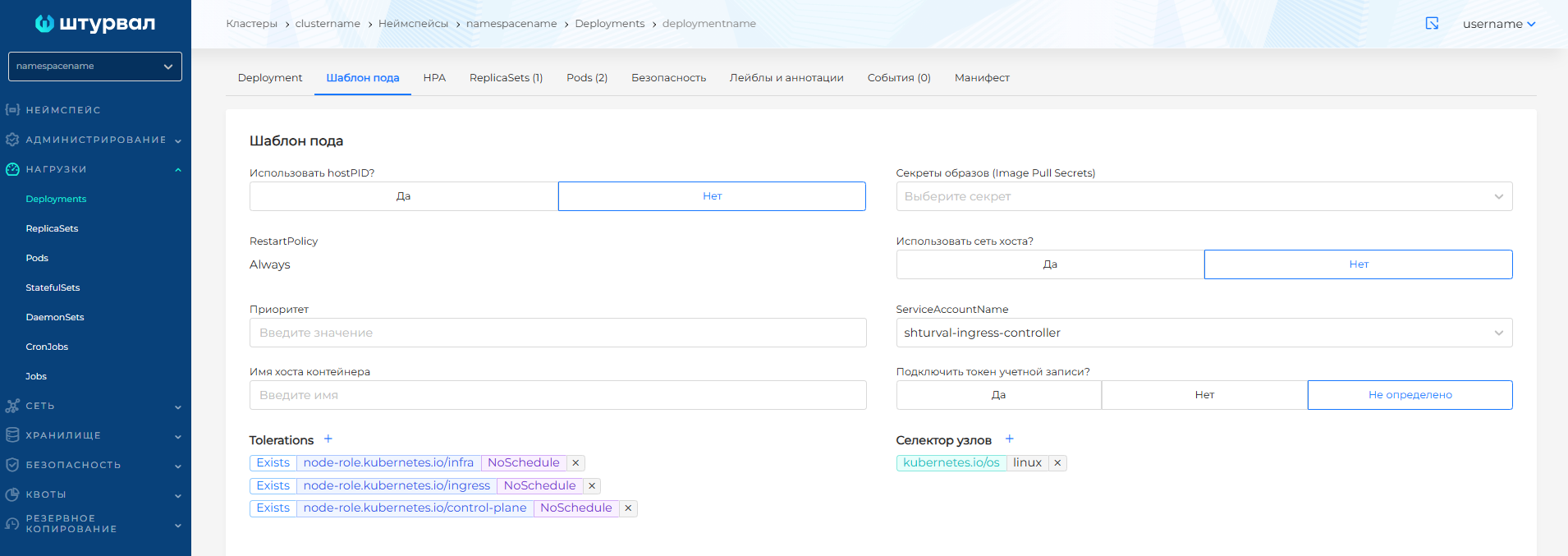
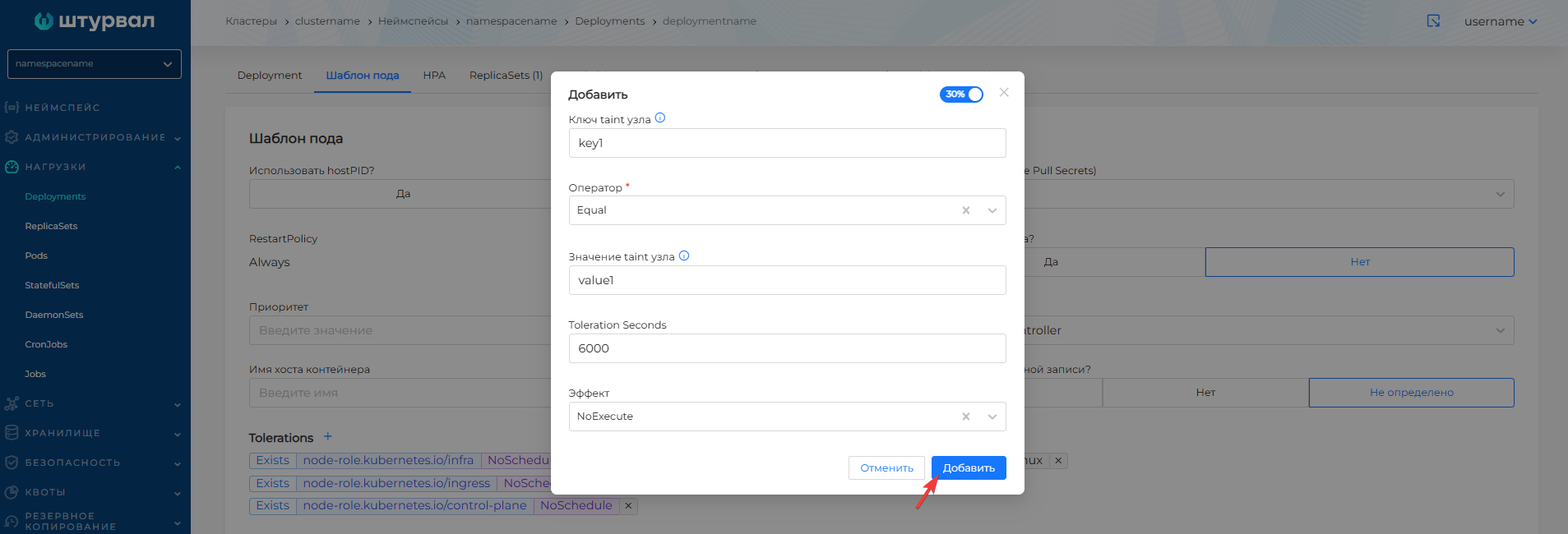
When creating any workload type (Deployment, StatefulSet, DaemonSet, Job, CronJob, Pod), it is possible to add Tolerations.
Taints: parameters and effects
You can add multiple Taints to one node. To place a pod on such a node, Tolerations are needed for every Taint.
Taint Options:
- Key and Value are a pair to identify the constraint.
- Effect - application rule.
| Effect | Description |
|---|---|
| NoSchedule | New pods are not scheduled per node. Existing pods are not affected. |
| PreferNoSchedule | It is preferable not to schedule, but exceptions may occur due to lack of resources. |
| NoExecute | There are no new pods planned. Existing pods without Toleration are evicted (taking into account tolerationSeconds, default 5 minutes). |
Automatic Taints
Kubernetes automatically adds Taints under certain conditions:
| Taint | Description | Effect |
|---|---|---|
node.kubernetes.io/not-ready | The node is not ready (Ready=False) | NoExecute |
node.kubernetes.io/unreachable | Node unavailable (Ready=Unknown) | NoExecute |
node.kubernetes.io/memory-pressure | Out of memory | NoSchedule |
node.kubernetes.io/disk-pressure | Disk shortage | NoSchedule |
node.kubernetes.io/pid-pressure | Process Limit (PID) | NoSchedule |
node.kubernetes.io/network-unavailable | Network unavailable | NoSchedule |
node.kubernetes.io/unschedulable | Node is not schedulable | NoSchedule |
Multiple Taints per node
- If the pod hasTolerations for all Taints, except NoSchedule - under will not be scheduled.
- If there is no Toleration only for PreferNoSchedule - under may be placed.
- If there is no Toleration for NoExecute, the pod will be preempted (if already running) and will not be scheduled.
Examples: Taints and Tolerances
Adding Taint via kubectl
# Node for GPU loads only
kubectl taint nodes node-1 gpu=true:NoSchedule

# Node for Ingress only
kubectl taint nodes node-2 node-role.kubernetes.io/ingress:NoSchedule

# Removing Taint
kubectl taint nodes node-1 gpu=true:NoSchedule-
Toleration in Pod/Deployment
tolerances:
- key: "gpu"
  operator: "Equal"
  value: "true"
  effect: "NoSchedule"
Toleration for any Taint with a key (Exists)
tolerances:
- key: "gpu"
  operator: "Exists"
  effect: "NoSchedule"
Toleration for NoExecute with delayed eviction
tolerances:
- key: "node.kubernetes.io/not-ready"
  operator: "Exists"
  effect: "NoExecute"
  tolerationSeconds: 300
Full example: Deployment for Ingress
apiVersion: apps/v1
kind: Deployment
metadata:
  name: ingress-controller
  namespace: ingress
spec:
  replicas: 2
  selector:
    matchLabels:
      app: ingress
  template:
    metadata:
      labels:
        app: ingress
    spec:
      tolerations:
      - key: "node-role.kubernetes.io/ingress"
        operator: "Exists"
        effect: "NoSchedule"
      containers:
      - name: nginx
        image: nginx:latest
Node Affinity
Node Affinity — rules for scheduling pods into nodes based on node labels. It works “by attraction”: it prefers or requires nodes with certain labels.
Node Affinity Types
| Type | Description |
|---|---|
| requiredDuringSchedulingIgnoredDuringExecution | Mandatory rule. The Pod will only be scheduled to a suitable node. |
| preferredDuringSchedulingIgnoredDuringExecution | Preferred rule. Scheduler tries to place on a suitable node, but may choose another one. |
Example: mandatory placement on GPU nodes
apiVersion: v1
kind: Pod
metadata:
  name: gpu-app
spec:
  affinity:
    nodeAffinity:
      requiredDuringSchedulingIgnoredDuringExecution:
        nodeSelectorTerms:
        - matchExpressions:
          - key: gpu
            operator: In
            values:
            - "true"
  containers:
  - name: app
    image: my-gpu-app:latest
Example: Preferring nodes with more memory
affinity:
  nodeAffinity:
    preferredDuringSchedulingIgnoredDuringExecution:
    - weight: 100
      preference:
        matchExpressions:
        - key: node.kubernetes.io/instance-type
          operator: In
          values:
          - high-memory
Operators in matchExpressions
| Operator | Description |
|---|---|
| In | Label of a node in the list of values |
| NotIn | Node label not in values list |
| Exists | The label key exists (values are not needed) |
| DoesNotExist | Label key does not exist |
| Gt, Lt | For numeric values (eg CPU) |
Pod Affinity
Pod Affinity - the pod is planned near to pods that match the selector (in the same zone, on the same node, etc.).
Example: place under next to cache
affinity:
  podAffinity:
    requiredDuringSchedulingIgnoredDuringExecution:
    - labelSelector:
        matchLabels:
          app: redis-cache
      topologyKey: kubernetes.io/hostname # on the same node
topologyKey
kubernetes.io/hostname- on the same node;topology.kubernetes.io/zone- in the same availability zone;topology.kubernetes.io/region- in the same region.
Pod Anti-Affinity
Pod Anti-Affinity - pods disperse (not on one node, not in one zone). Used for fault tolerance.
Example: replicas on different nodes
apiVersion: apps/v1
kind: Deployment
metadata:
  name: my-app
spec:
  replicas: 3
  template:
    spec:
      affinity:
        podAntiAffinity:
          requiredDuringSchedulingIgnoredDuringExecution:
          - labelSelector:
              matchLabels:
                app: my-app
            topologyKey: kubernetes.io/hostname
      containers:
      - name: app
        image: my-app:latest
Pods with app: my-app will not be on the same node.
Example: preferential dispersal (soft)
affinity:
  podAntiAffinity:
    preferredDuringSchedulingIgnoredDuringExecution:
    - weight: 100
      podAffinityTerm:
        labelSelector:
          matchLabels:
            app: my-app
        topologyKey: kubernetes.io/hostname
Scheduler will try to place pods on different nodes, but does not guarantee.
Example: zone dispersal
affinity:
  podAntiAffinity:
    requiredDuringSchedulingIgnoredDuringExecution:
    - labelSelector:
        matchLabels:
          app: my-app
      topologyKey: topology.kubernetes.io/zone
Replicas will be in different availability zones.
Comparison: when to use what
| Problem | Tool |
|---|---|
| Select nodes for a specific load (GPU, Ingress) | Taints + Tolerations |
| Prefer nodes with certain labels | Node Affinity (preferred) |
| Require nodes with labels | Node Affinity (required) or nodeSelector |
| Place pods on different nodes | Pod Anti-Affinity |
| Place pods side by side (on the same node) | Pod Affinity |
| Place hearts in different zones | Pod Anti-Affinity with topologyKey: zone |
Communication with node groups
The same taint for every node in a Worker group is set on the Taints tab of the group configuration, for example, to keep the infra group for Ingress and monitoring. How Cluster API copies that taint to the nodes is described in Labels, annotations, and taints in Cluster API.
A taint for a single node is changed on the node page, Taints tab. If the group uses Always for that key, Cluster API puts the taint back on the node.