Provider Basis Dynamix (shturval-capbd)
About the service
| Parameter | Description |
|---|---|
| GUI name | Provider Basis Dynamix |
| System name (identifier) | shturval-capbd |
| Cluster Assignment | Integration with the Basis Dynamix virtualization platform: deployment of virtual machines for cluster nodes via the Cluster API. Installed in the management cluster. |
| Critical | No |
| Public repository | Basis Dynamix (proprietary platform) |
| Dependencies | shturval-capbd-crds, shturval-capi |
| Namespace | capbd-system |
Purpose
shturval-capbd is the Basis Dynamix provider for the Cluster API. Enables the creation and management of virtual machines in Basis Dynamix for use as nodes in Kubernetes clusters. Depends on shturval-capbd-crds.
Installing the service
shturval-capbd - infrastructure provider Cluster API for the Basis Dynamix platform. In the Shturval platform, the connection and life cycle of such a provider in the management cluster is ensured by cluster-manager; ShturvalServiceConfig (SSC) objects for provider charts are created and maintained as part of the platform configuration, rather than as an arbitrary manual installation of a service chart.
In the production environment, the provider is represented by two SSCs:
shturval-capbd— the main chart of the provider Basis Dynamix;shturval-capbd-crds— CRD chart of the Basis Dynamix provider module.
For the provider to work in the management cluster, the Cluster API (shturval-capi and associated SSCs must be available).
If the service was disabled during platform deployment, the provider’s SSCs could receive an absence mode (mode: absent). To ensure that the provider is available to work with virtualization, first change the shturval-capbd-crds mode to auto, then shturval-capbd to auto.
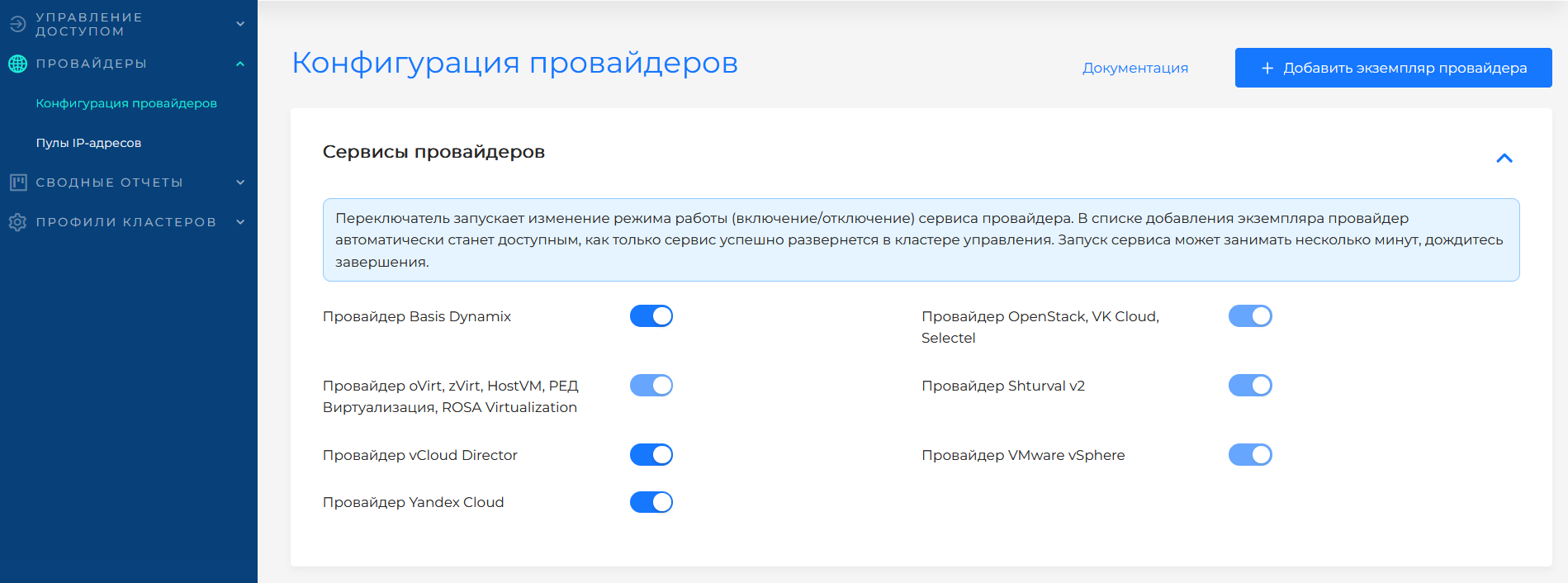
In the GUI, this action is performed by the service mode switch on the Providers page. The screenshot shows the selection of the Auto mode for the provider service.
Where to configure
Services and repositories → Installed services → shturval-capbd → Manage. The service is hosted in the management cluster.
Configuring provider instances in the platform - Basis Dynamix. General overview - How work with providers in the platform works.
Reference: for Basis Dynamix infrastructure CRs, see section Custom node lifecycle resources - Basis Dynamix.