Provider oVirt (shturval-capov)
About the service
| Parameter | Description |
|---|---|
| GUI name | Provider oVirt |
| System name (identifier) | shturval-capov |
| Cluster Assignment | Integration with oVirt: deployment of virtual machines for cluster nodes via the Cluster API. Installed in the management cluster. |
| Critical | Yes, if the management cluster is deployed with the oVirt |
| Public repository | — (provider for the delivery of the Shturval platform) |
| Dependencies | shturval-capov-crds, shturval-capi-crds |
| Namespace | capov-system |
CAPOV (Cluster API Provider for oVirt) is a Cluster API infrastructure provider for the oVirt (Red Hat Virtualization) platform. The operator runs in the management cluster and automates VM creation, configuration, and removal in oVirt when deploying production clusters with CAPI.
For reference: For a list of OVirt* objects, see the section Custom node life cycle resources - oVirt.
Contents
- 1. Review
- 2. Architecture
- 3. Service installation
- Where to configure
- 4. Diagnosis and troubleshooting
- 5. Machine life cycle
- 6. Operator parameters (Feature Gates)
- 7. CRD: Resource Directory
1. Review
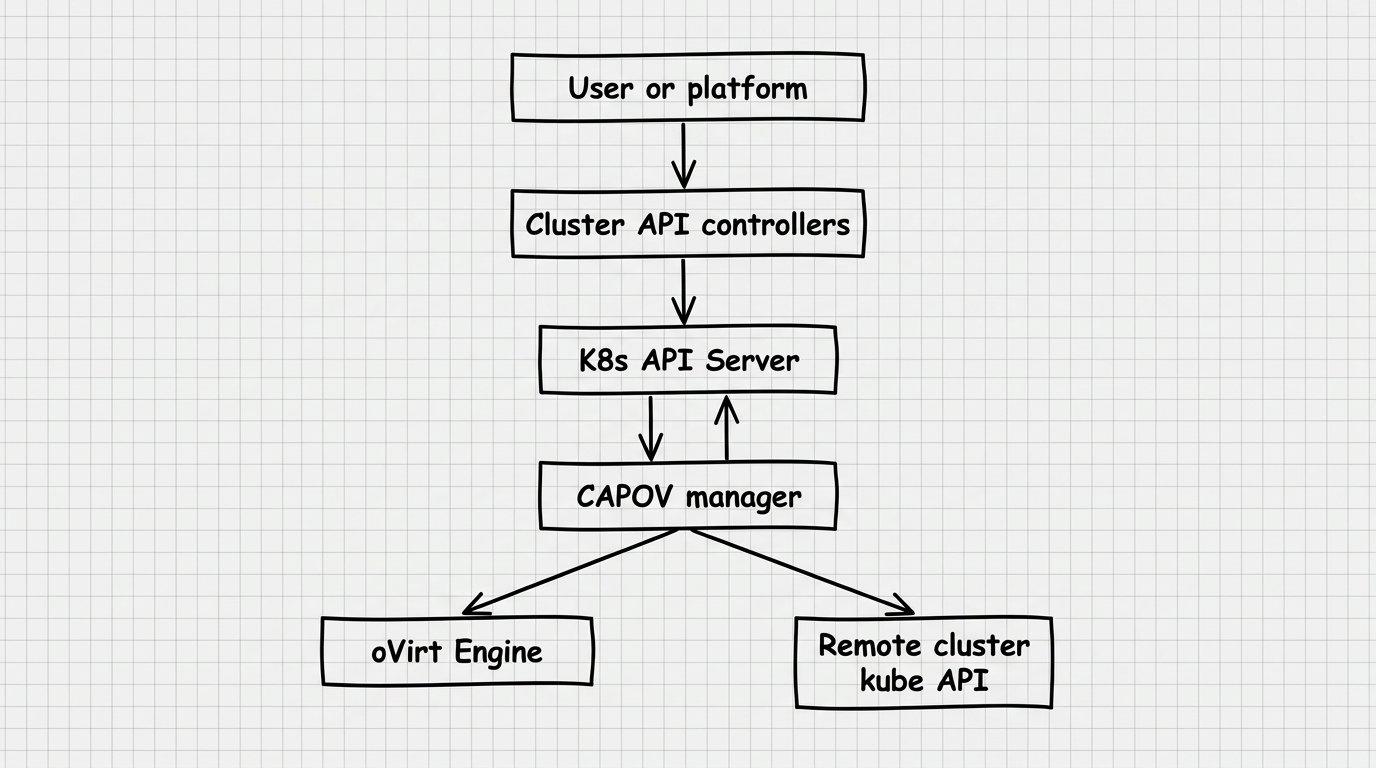
CAPOV implements the Cluster API contract for the infrastructure provider: it receives requests from CAPI controllers and performs the necessary operations in oVirt through its REST API.
Place in the chain of command
Illustration: Place in the chain of command
Key Features
- API group:
infrastructure.cluster.x-k8s.io/v1beta1 - Operator Namespace:
capov-system - Parallel processing: up to 10 simultaneous reconcile for
OVirtMachine - Leader election enabled: safe operation with multiple replicas
- Metrics: HTTPS on port
:8443; health/readiness: HTTP on:8081
2. Architecture
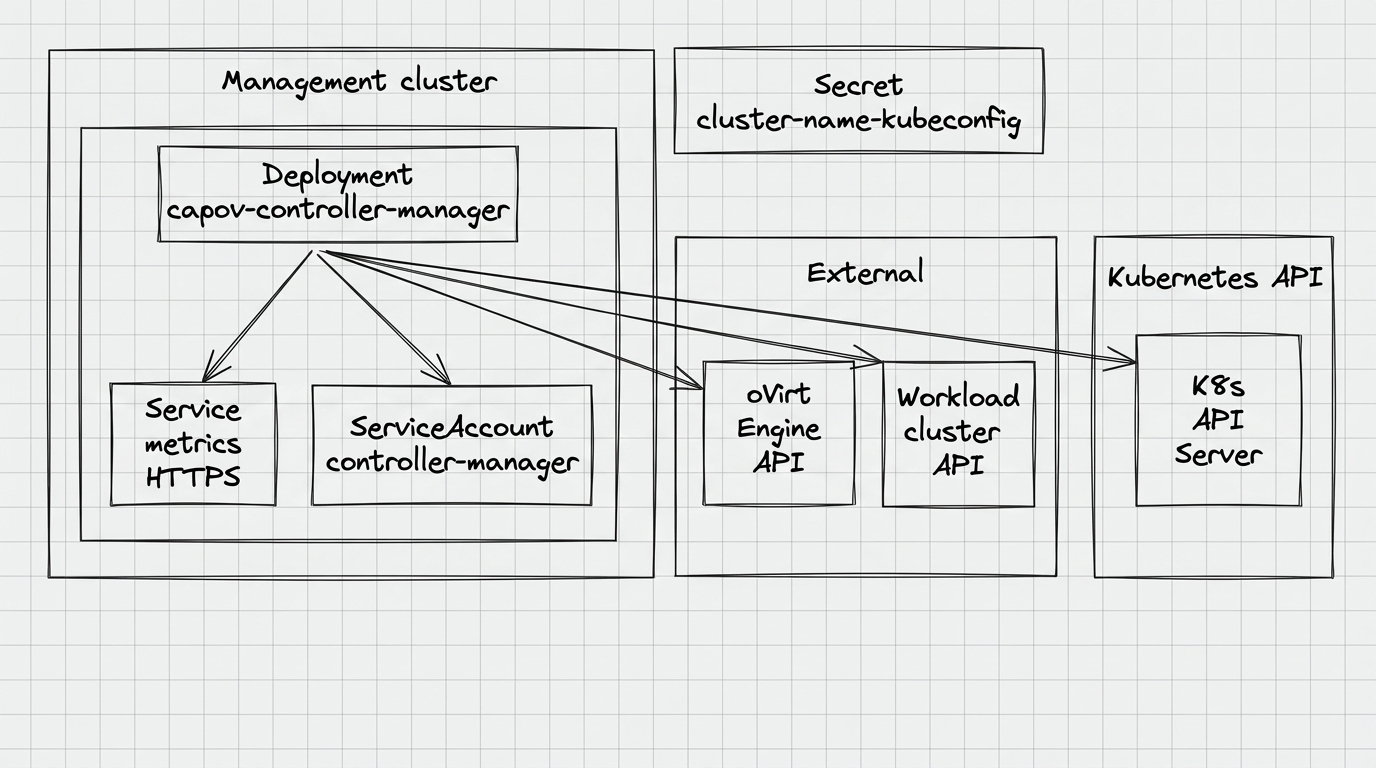
Components
Illustration: Components
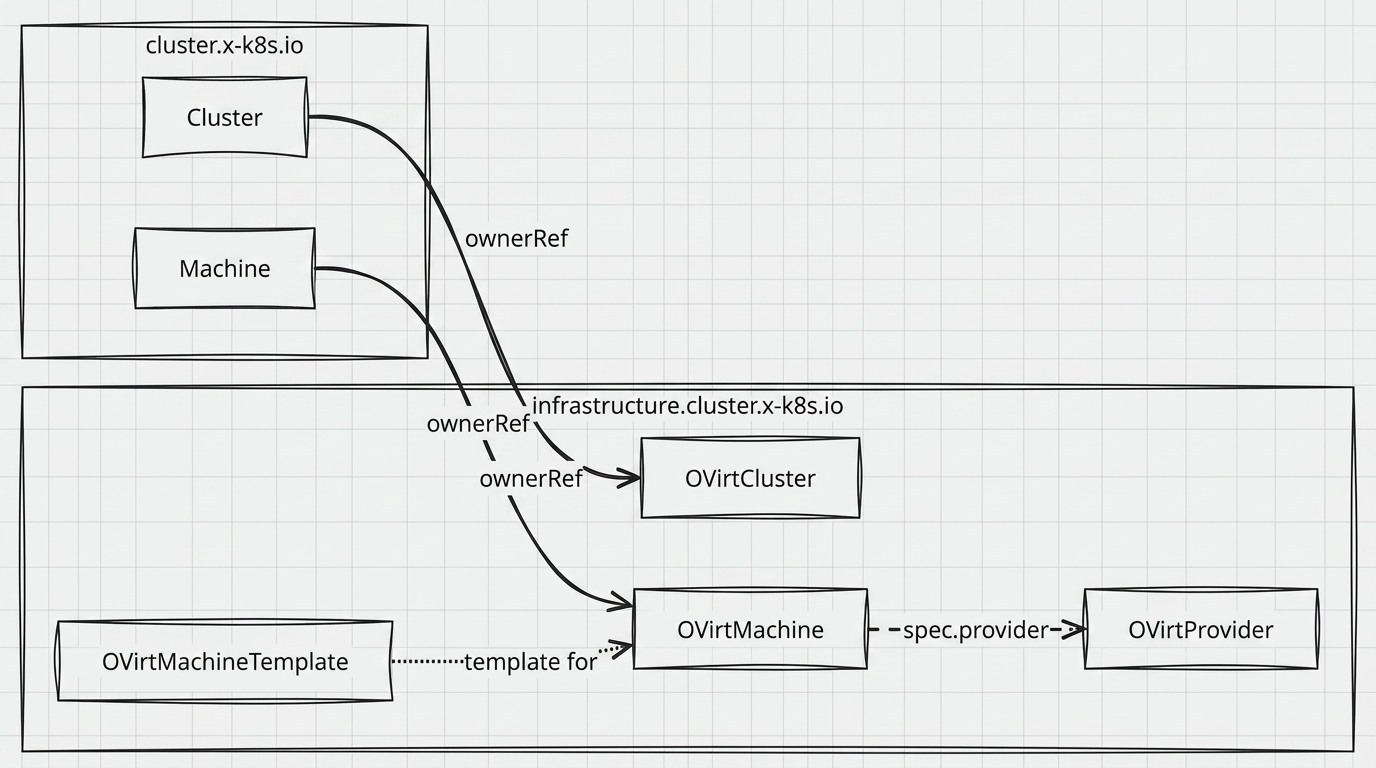
CR and resource relationships
Illustration: CR and resource relationships
Two controllers
| Controller | Resource | What does |
|---|---|---|
OVirtClusterReconciler | OVirtCluster | Sets status.ready=true, controls finalizer |
OVirtMachineReconciler | OVirtMachine | Creates a VM in oVirt, configures disks/network, launches the VM, sets ProviderID |
Pod ports
| Port | Protocol | Purpose |
|---|---|---|
8081 | HTTP | /healthz (liveness), /readyz (readiness) |
8443 | HTTPS | /metrics (Prometheus; see below) |
Metrics and ServiceMonitor
- Service
capov-metrics-servicein the operator namespace exposes port 8443 (https) on the sub labeledcontrol-plane: controller-manager. - If there is a CRD Prometheus Operator (
monitoring.coreos.com/v1) in the cluster, the chart creates ServiceMonitorcapov-metrics-monitor: scrape the path/metricsvia HTTPS with the service account token (labelrelease: shturval-metrics- coordinate with your Prometheus stack).
Launch flags (from Helm chart)
The chart specifies only part of the arguments; the rest are the default values of the main.go binary:
/manager
  --metrics-bind-address=:8443
  --leader-elect
  [--feature-gates=disk-keep-template-name=true,...]
Additional flags not set by the Helm template, but are supported during manual debugging:
| Flag | Default | Purpose |
|---|---|---|
--metrics-secure | true | HTTPS for endpoint metrics; at false - HTTP |
--enable-http2 | false | Enable HTTP/2 for metrics/webhook |
--debug | false | Detailed logs (development and diagnostics) |
3. Installing the service
CAPOV — infrastructure provider for Cluster API (infrastructure.cluster.x-k8s.io). In the Shturval platform, cluster-manager manages provider lifecycle in the management cluster. ShturvalServiceConfig (SSC) objects for provider charts are created and maintained as part of the platform configuration, not as arbitrary manual chart installations.
In the production environment, the provider is represented by two SSCs:
shturval-capov— main chart of the oVirt provider;shturval-capov-crds— CRD chart of the oVirt provider module.
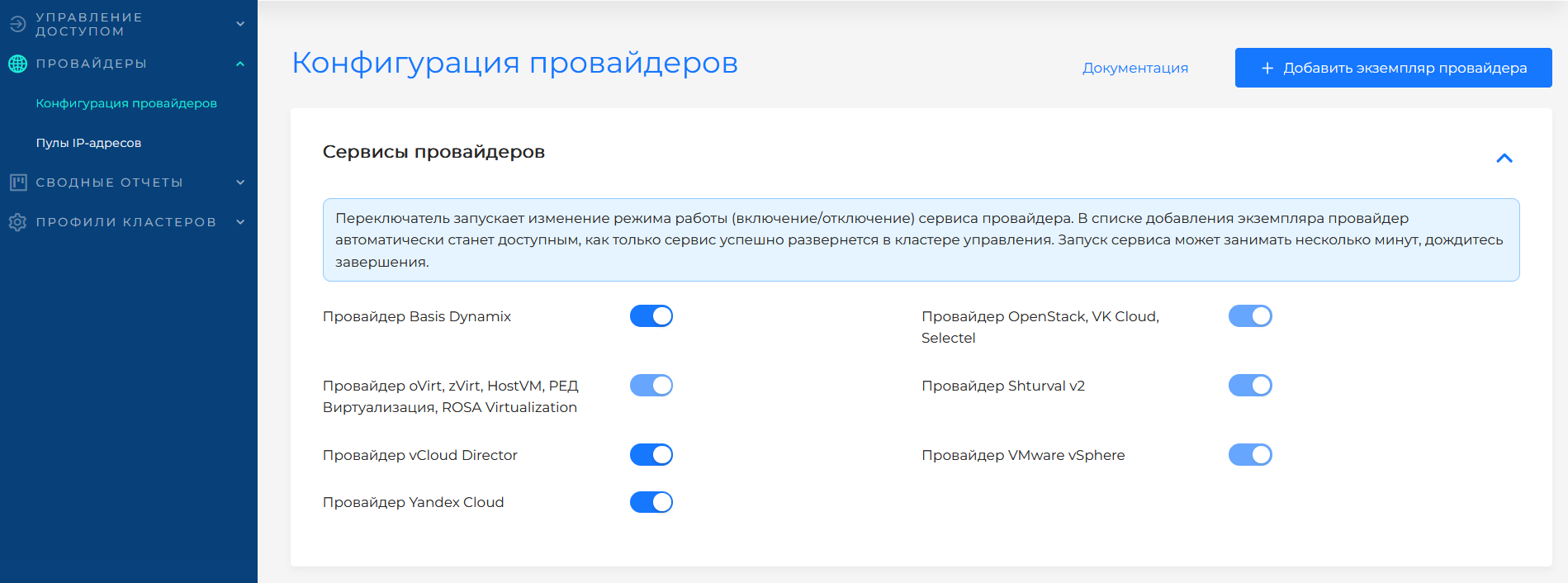
If the service was disabled when the platform was deployed, the provider’s SSC could receive an absence mode (mode: absent). To make the provider available for working with virtualization (zVirt, oVirt, HostVM, ED Virtualization, ROSA Virtualization, etc.), first switch the shturval-capov-crds mode to auto, then shturval-capov to auto. You can change the mode in the platform GUI on the Providers page.
In the GUI, this action is performed by the service mode switch. The screenshot shows the selection of the Auto mode for the provider service.
3.1 Customvalues parameters
The structure of chart values is described by the spec.customvalues field of ShturvalServiceConfig and coincides with helm/main/values.yaml. Full list of supported parameters:
Recommendation: do not edit the ShturvalServiceConfig object manually to change limits, nodeSelector, feature gates and other release parameters - such an object belongs to the platform configuration and can be overwritten during updates. Make all changes to service behavior via ShturvalServicePatch (SSP), which overlays spec.customvalues on top of the base SSC (see example below).
| Parameter | Description | Default |
|---|---|---|
manager.repository | Operator image repository | r.shturval.tech/capov-manager |
manager.tag | Image tag | Chart.AppVersion |
resources.limits.cpu | CPU limit | 500m |
resources.limits.memory | Memory limit | 128Mi |
resources.requests.cpu | CPU Request | 10m |
resources.requests.memory | Memory Request | 64Mi |
nodeSelector | Selecting a node by tags | {} (any node) |
tolerations | Tolerations | infra and control-plane NoSchedule |
affinity | Affinity rules | Prefers infra nodes |
featureGates | Feature gates (see section 6) | not specified |
Default Affinity
The chart configures soft preference (preferredDuringSchedulingIgnoredDuringExecution): operator pods are preferentially scheduled on nodes with role infra. In the absence of such nodes, the pod can be scheduled on any working node, including the Control Plane.
Example of customization via SSP (resources and nodeSelector)
apiVersion: ops.shturval.tech/v1beta2
kind: ShturvalServicePatch
metadata:
  name: shturval-capov-resources
  labels:
    ops.shturval.tech/ssc: shturval-capov
spec:
  shturvalServiceConfigName: shturval-capov
  customvalues:
    manager:
      tag: "2.14.0"
    resources:
      limits:
        cpu: 1000m
        memory: 256Mi
      requests:
        cpu: 50m
        memory: 128Mi
    nodeSelector:
      node-role.kubernetes.io/infra: ""
Where to configure
Services and repositories → Installed services → shturval-capov → Manage. The service is hosted in the management cluster.
Configuring provider instances in the platform - oVirt and similar providers. General overview - How to work with providers in the platform works.
4. Diagnosis and troubleshooting
4.1 Checking operator status
# Pod status
kubectl get pods -n capov-system
kubectl describe pod -n capov-system -l control-plane=controller-manager

# Operator logs (last 100 lines)
kubectl logs -n capov-system deployment/capov-controller-manager --tail=100

# Logs in follow mode
kubectl logs -n capov-system deployment/capov-controller-manager -f

# Enable debug logging (via args override)
# Add to deployment args: --debug=true

# Metrics service (if you need manual access to /metrics)
kubectl get svc -n capov-system capov-metrics-service

# ServiceMonitor (with Prometheus Operator installed)
kubectl get servicemonitor -n capov-system 2>/dev/null || true
4.2 Checking resources
# All OVirtProviders and their status
kubectl get capovp
# NAME READY
# ovirt-prod true

# All OVirtClusters in all namespaces
kubectl get capovc -A

# All OVirtMachine in all namespaces
kubectl get capovm -A
# NAMESPACE NAME READY
# default worker-abc123 true
# default worker-def456 false

# Detailed information about the car
kubectl describe capovm worker-def456 -n default
4.3 The machine is stuck in the “not Ready” state
First step: get the machine’s conditions.
kubectl get capovm worker-def456 -n default \
  -o jsonpath='{range .status.conditions[*]}{.type}{"\t"}{.status}{"\t"}{.reason}{"\t"}{.message}{"\n"}{end}'
Condition CanConnectToOVirt = False
The operator cannot connect to oVirt. Reasons:
- Invalid URL in
spec.engineobjectOVirtProvider - Incorrect credentials in the Secret in the
capov-systemnamespace (keysusernameandpassword). Ifspec.credentialsSecretNameis empty or the Secret is not found, the username and password are taken fromspec.userandspec.pass - TLS problems (invalid certificate, try
spec.tls.insecure: truefor diagnostics) - Network problems between the operator pod and oVirt Engine
# Check OVirtProvider
kubectl get capovp ovirt-prod -o yaml

# Check the network from the operator's side
kubectl exec -n capov-system deployment/capov-controller-manager -- \
  wget -qO- https://ovirt.example.com/ovirt-engine/api --no-check-certificate
If status.failureReason = OVirtEngineConnectionCritical, you need to fix OVirtProvider and reset FailureReason (delete the field via patch or recreate OVirtMachine):
kubectl patch capovm worker-def456 -n default \
  --type=merge \
  -p '{"status":{"failureReason":null,"failureMessage":null}}'
Condition MachineCreated = False
VM not created in oVirt:
- Template
spec.templatedoes not exist in oVirt - Cluster oVirt
spec.ovirtclusternot found spec.storagedomainnameis specified, but a storage domain with that name is missing in oVirt or is not available to host disks- Bootstrap Secret is not ready yet (normally at the beginning of creation, operationor will try again)
Condition MachineDiskResized = False
- The requested disk size
osdisksizegbis smaller than the disk size in the template - cannot be reduced
Condition MachineNetworkSet = False
- vNIC Profile with name from
spec.nics[].vnicprofilewas not found in oVirt
Condition K8sProviderIDSetup = False
- The VM has not yet registered in the working cluster as Node
- Problems with operator access to the worker cluster API
4.4 The machine is not deleted
kubectl describe capovm worker-def456 -n default | grep -A5 "Conditions"
If MachineDeleted = False with reason VMHasNonSystemDisk:
message: VM has non system disk, cannot delete
This means that there is a CSI disk connected to the VM, which has not yet been disconnected. The operator will try again every minute. Solution: Make sure PVC/PV is freed before removing Node.
If CSI is frozen, the disk can be detached manually in the oVirt interface - the operator will delete the VM in the next iteration.
5. Machine life cycle
5.1 Creation
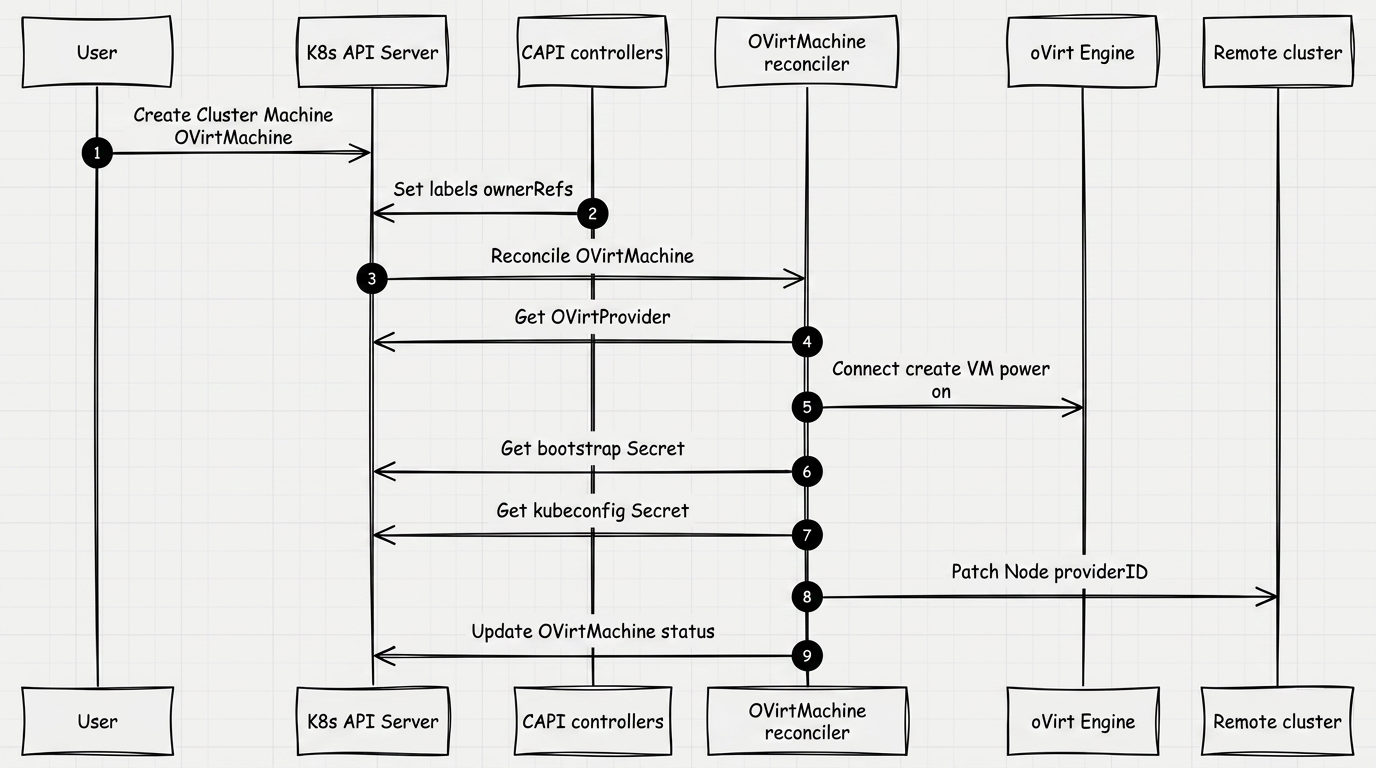
The OVirtMachineReconciler controller performs the steps sequentially. If the step fails, the object goes into the retry queue. The progress of each step is reflected in status.conditions.
The storage domain for the disks of the new VM is specified by the optional field spec.storagedomainname. If it is not specified, the disks are created in the same storage domain as the template disks in oVirt (see §7.3). Whether those disks are cloned is decided by the diskclone rules. VMs that already exist in oVirt are left unchanged.
Illustration: 5.1 Creation
5.2 Uninstallation
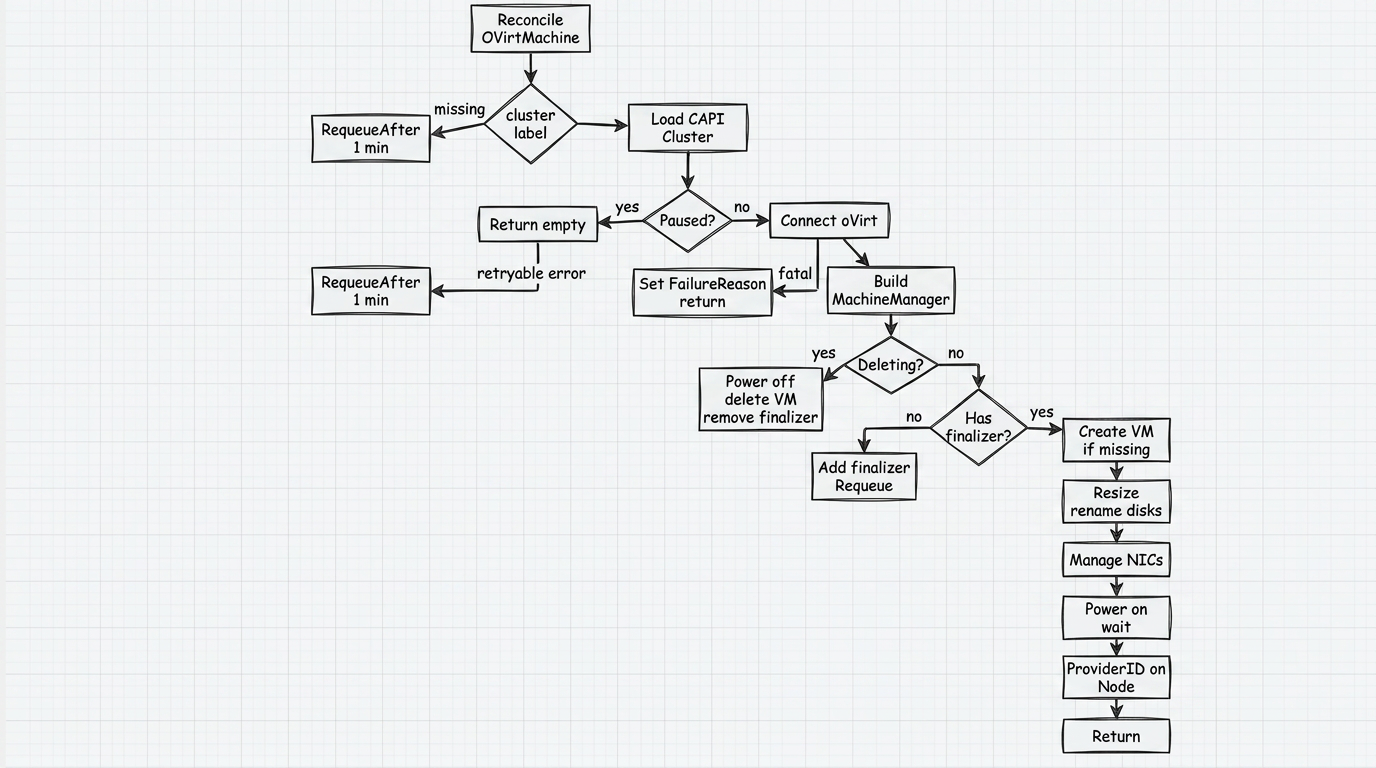
When deletionTimestamp is set, the controller follows the Deleting branch on the diagram: powers off the VM, deletes it in oVirt, and removes the finalizer. If a non-system (CSI) disk is attached to the VM, deletion is blocked until it is detached (see §4.4).
Illustration: 5.2 Uninstallation
5.3 Conditions
| Condition | What does |
|---|---|
CanConnectToOVirt | The operator successfully connected to the oVirt API using data from OVirtProvider |
MachineCreated | The VM was created in oVirt from a template with data transferred to cloud-init |
MachineDiskResized | System disk expanded to osdisksizegb and disks renamed |
MachineNetworkSet | Network interfaces are configured (vNIC Profiles are connected) |
MachineOn | VM is up and running |
K8sProviderIDSetup | spec.providerID installed on the corresponding Node in the working cluster |
MachineDeleted | VM removed from oVirt (only present during removal process) |
Ready | Summary condition - all of the above are met |
View terms:
kubectl get capovm worker-abc123 -n default \
  -o jsonpath='{.status.conditions}' | jq .
Example output for a machine in an intermediate state (starting):
[
  {"type": "CanConnectToOVirt", "status": "True"},
  {"type": "MachineCreated",    "status": "True"},
  {"type": "MachineDiskResized","status": "True"},
  {"type": "MachineNetworkSet", "status": "True"},
  {"type": "MachineOn",         "status": "False",
   "reason": "VMPoweringUp",    "severity": "Info",
   "message": "powering up"},
  {"type": "K8sProviderIDSetup","status": "False"}
]
5.4 Critical errors (FailureReason)
If the operator encounters an error after which automatic retry is impossible or meaningless, it sets status.failureReason and status.failureMessage.
| FailureReason | Reason | What to do |
|---|---|---|
OVirtEngineConnectionCritical | Object OVirtProvider not found, invalid credentials or certificate | Check spec.engine, the Secret capov-system / spec.credentialsSecretName (keys username, password), and spec.tls. If the Secret name is empty or the Secret is not found, check spec.user and spec.pass |
NodeHasIncorrectProviderID | On Node in the working cluster another providerID | Check kubectl get node -o wide in production cluster |
6. Feature Gates
Feature gates - flags that change the behavior of the operator when working with VM disks. Passed through the argument --feature-gates (Helm: values.featureGates). In Shturval environment, they are set in customvalues.featureGates via SSP; It is not recommended to edit SSC for this purpose. The general procedure for working with SSP is How to manage CustomValues of services.
Format
--feature-gates=disk-keep-template-name=true,disk-add-vm-name=false
Unknown keys and invalid values are silently ignored.
Available gates
| Key | Default | Description |
|---|---|---|
disk-keep-template-name | true | When connecting a disk to a new VM, save the disk name from the template |
disk-add-vm-name | false | When creating a VM, add the VM name to the disk name |
disk-clone | false | Clone disks when creating a VM if the machine spec has no diskclone and no storage domain |
Configuration via SSP (recommended)
Create or modify ShturvalServicePatch associated with shturval-capov (see How to manage CustomValues of services):
apiVersion: ops.shturval.tech/v1beta2
kind: ShturvalServicePatch
metadata:
  name: shturval-capov-featuregates
  labels:
    ops.shturval.tech/ssc: shturval-capov
spec:
  shturvalServiceConfigName: shturval-capov
  customvalues:
    featureGates:
      disk-add-vm-name: true
      disk-clone: false
SSP is overlaid on top of SSC.spec.customvalues. After you apply or change the SSP, the platform operator updates the Deployment and the pod is recreated automatically.
Moving a disk to a Storage Domain
To create disks of new VMs in a domain other than the template domain, set a Storage Domain on the oVirt provider instance or in the group’s InfraMachineTemplate. Disks must be cloned to use another domain.
Set cloning with Clone disk when creating a VM on the same provider instance and, separately, on each Control Plane and Worker node group — when you create a cluster and in a cluster that is already running.
| Value | What to do |
|---|---|
| Yes | Clone disks of new VMs in this group. Use this when another Storage Domain is selected |
| No | Create disks without cloning. Do not use this for another Storage Domain: disks are not placed in the selected domain |
| Default | Do not set the mode at this level |
A group uses its own Yes or No. If the group is Default, the provider instance value is used. If that is also Default, the disk-clone feature gate of shturval-capov applies (off by default). VMs that already exist are not changed. New nodes are created with the mode you selected.
In a manifest the same field is diskclone: true, false, or omit the field. The group value (spec.diskclone on OVirtMachine / OVirtMachineTemplate) takes precedence over the feature gate.
For another Storage Domain, cloning must be on: Yes on the group or on the provider instance. If every level stays Default, enable the feature gate in the management cluster:
apiVersion: ops.shturval.tech/v1beta2
kind: ShturvalServicePatch
metadata:
  name: shturval-capov-disk-clone
  labels:
    ops.shturval.tech/ssc: shturval-capov
spec:
  shturvalServiceConfigName: shturval-capov
  customvalues:
    featureGates:
      disk-clone: true
After you apply the SSP, wait until shturval-capov is updated and create the nodes. No does not fit another domain: disks are not placed in the selected Storage Domain.
Why do you need to rename disks?
When CAPI creates multiple VMs from the same template, oVirt inherits the disk aliases directly from the template. As a result, all disks of all created VMs receive the same aliases - the same as the template disks had.
The problem becomes obvious in the Storage → Disks section: this is a global directory of all disks in the data center. It is impossible to determine by name which cluster node this or that disk belongs to - all records look the same. Setting disk-add-vm-name: true fixes the problem: the VM name is added to the alias, the alias becomes unique and uniquely points to the owner VM.
Where the disk alias is visible in oVirt
Alias is the display name of the Disk object in oVirt. It is visible in two places:
- Storage → Disks — global list of all disks in the data center. This is where identical aliases create confusion when there are a large number of nodes.
- Compute → Virtual Machines → [VM] → Disks tab — list of disks connected to a specific VM.
Disk names: behavior based on flag combinations
In all the examples below: the VM name is worker-abc123, the template is rhcos-4.14.
disk-keep-template-name: true, disk-add-vm-name: false (default values)
Renaming is not performed. The operator does not touch aliases - they remain as oVirt assigned them when creating a VM from a template.
| Disk alias in template | Alias after VM creation | Change |
|---|---|---|
rhcos-4.14_Disk1 | rhcos-4.14_Disk1 | no |
| (empty) | (empty) | no |
disk-keep-template-name: true, disk-add-vm-name: true
The VM name is inserted before the _Disk… suffix. The template part of the alias is preserved.
| Disk alias in template | Alias after VM creation (worker-abc123) | Change |
|---|---|---|
rhcos-4.14_Disk1 | rhcos-4.14_worker-abc123_Disk1 | yes |
disk-keep-template-name: false, disk-add-vm-name: true
The template part of the alias is removed. The alias is built only from the VM name and the _Disk… suffix. If the VM name is already present in the alias, renaming is not performed.
| Disk alias in template | Alias after VM creation (worker-abc123) | Change |
|---|---|---|
rhcos-4.14_Disk1 | worker-abc123_Disk1 | yes |
worker-abc123_Disk1 | worker-abc123_Disk1 | no (the VM name is already in the alias) |
How the value reaches oVirt
The VM create request receives the resolved boolean: Clone(true) or Clone(false). VMs created earlier are not affected.
Check the current feature gates in the logs when starting the pod:
kubectl logs -n capov-system deployment/capov-controller-manager | grep "feature gates"
7. CRD: Resource reference
7.1 OVirtProvider
Scope: cluster-scoped (no namespace)
Short name: capovp
Group: infrastructure.cluster.x-k8s.io/v1beta1
Stores connection parameters to oVirt Engine. One object can be used by several machines from different namespaces.
The service account username and password are stored in a Secret in the capov-system namespace. The Secret name is set in spec.credentialsSecretName. The Secret keys are username and password. The cluster-replicator controller replicates this Secret to the target cluster, including when the management cluster is installed from a bootstrap cluster.
The fields spec.user and spec.pass are kept for backward compatibility: they are optional and marked deprecated. The fields will be removed in a future version.
- If
credentialsSecretNameis empty or the Secret is not found, the username and password are taken fromspec.userandspec.pass. - If the Secret is found, the values of
spec.userandspec.passare not used. - An update of an object without
credentialsSecretNameis blocked until the field is set.
Specification fields
| Field | Type | Required | Description |
|---|---|---|---|
spec.engine | string | Yes | Full oVirt Engine API URL. Example: https://ovirt.example.com/ovirt-engine/api |
spec.credentialsSecretName | string | Yes | Name of the Secret in the capov-system namespace. Secret keys: username, password |
spec.user | string | No | Deprecated. Username. Used when credentialsSecretName is empty or the Secret is not found |
spec.pass | string | No | Deprecated. Password. Used when credentialsSecretName is empty or the Secret is not found |
spec.tls.insecure | bool | Yes | true - do not check the server’s TLS certificate (not recommended in production) |
spec.tls.cert | bool | No | true - use system CAs to verify thecertificate |
spec.tls.certs | bytes | No | PEM CA certificate in base64 to verify server certificate |
Status
| Field | Type | Description |
|---|---|---|
status.ready | bool | Result of checking connection to oVirt Engine |
Examples
Option 1: Disable TLS checking (dev/test)
apiVersion: v1
kind: Secret
metadata:
  name: ovirt-dev-capov-provider-secret
  namespace: capov-system
type: Opaque
stringData:
  username: admin@internal
  password: change-me
---
apiVersion: infrastructure.cluster.x-k8s.io/v1beta1
kind: OVirtProvider
metadata:
  name: ovirt-dev
spec:
  engine: "https://ovirt-dev.example.com/ovirt-engine/api"
  credentialsSecretName: ovirt-dev-capov-provider-secret
  tls:
    insecure: true
Option 2: System CA (public certificate)
apiVersion: infrastructure.cluster.x-k8s.io/v1beta1
kind: OVirtProvider
metadata:
  name: ovirt-prod
spec:
  engine: "https://ovirt.example.com/ovirt-engine/api"
  credentialsSecretName: ovirt-prod-capov-provider-secret
  tls:
    insecure: false
    cert: true
Option 3: Own CA certificate
apiVersion: infrastructure.cluster.x-k8s.io/v1beta1
kind: OVirtProvider
metadata:
  name: ovirt-internal
spec:
  engine: "https://ovirt.internal/ovirt-engine/api"
  credentialsSecretName: ovirt-internal-capov-provider-secret
  tls:
    insecure: false
    certs: LS0tLS1CRUdJTi... # base64-encoded PEM
Check connection status:
kubectl get capovp
# NAME READY
# ovirt-prod true
7.2 OVirtCluster
Area: namespaced
Short name: capovc
Group: infrastructure.cluster.x-k8s.io/v1beta1
Represents an infrastructure cluster in oVirt. Created as part of a CAPI cluster: the Cluster object references OVirtCluster through the spec.infrastructureRef field.
Specification fields
| Field | Type | Required | Description |
|---|---|---|---|
spec.controlPlaneEndpoint.host | string | Yes | Hostname or IP address of the API server of the created cluster |
spec.controlPlaneEndpoint.port | int32 | Yes | API Server Port |
Status
| Field | Type | Description |
|---|---|---|
status.ready | bool | The infrastructure is ready (set by the controller immediately after creation) |
status.conditions | list | Conditions (CAPI conditions) |
status.failureDomains | map | Failure domains (not used in current implementation) |
Example
apiVersion: infrastructure.cluster.x-k8s.io/v1beta1
kind: OVirtCluster
metadata:
  name: my-cluster
  namespace: default
spec:
  controlPlaneEndpoint:
    host: "10.0.1.100" # VIP or control-plane balancer address
    port: 6443
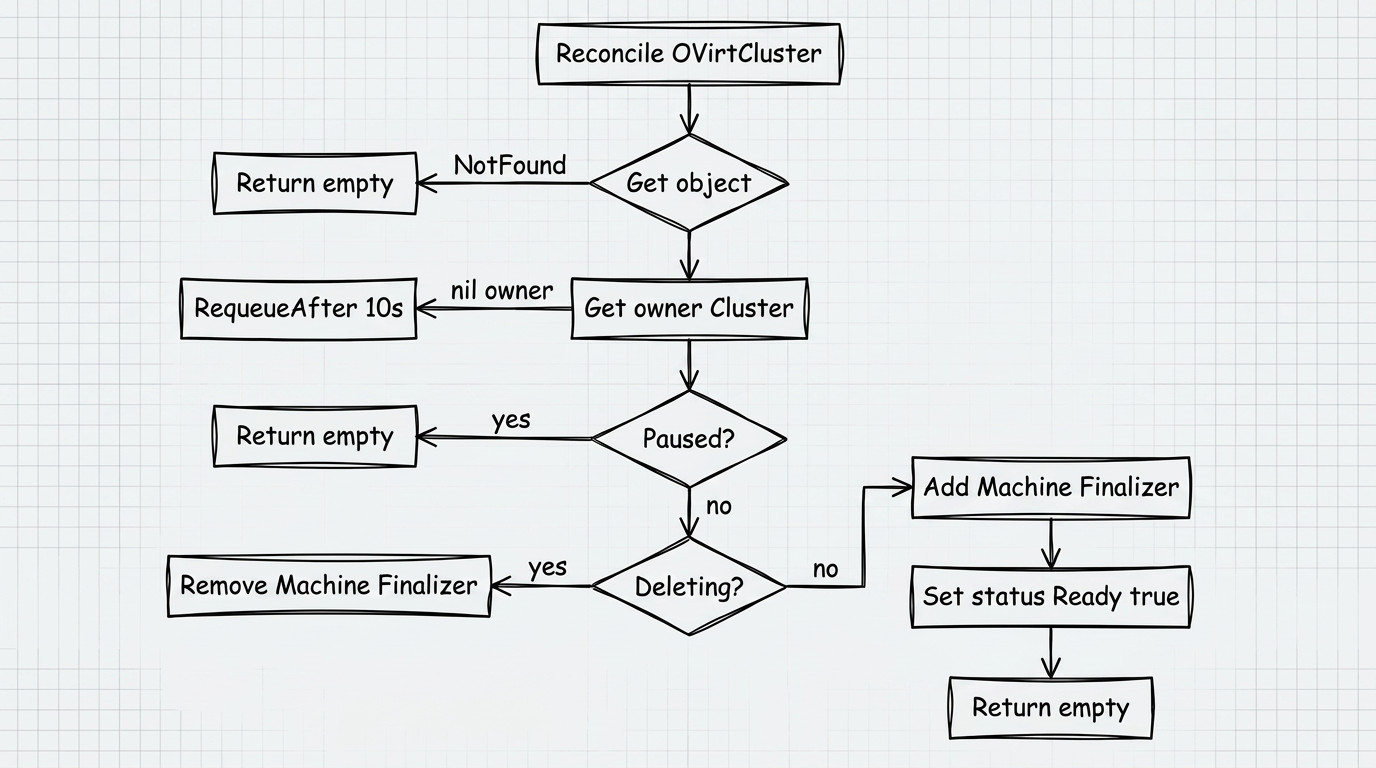
Controllerbehavior:
- When creating: adds finalizer
capovmachine.infrastructure.cluster.x-k8s.io, setsstatus.ready = true. - On deletion: removes the finalizer - the object is deleted from etcd.
- If object
Clusteris paused (spec.paused: true), reconcile is skipped. (see the screenshot below)
Check status:
kubectl get capovc -n default
# NAME         CONTROLPLANE ENDPOINT   READY
# my-cluster   10.0.1.100              true
7.3 OVirtMachine
Area: namespaced
Short name: capovm
Group: infrastructure.cluster.x-k8s.io/v1beta1
Represents one virtual machine in oVirt. Created automatically by the CAPI controller based on OVirtMachineTemplate when scaling MachineDeployment or KubeadmControlPlane. Direct creation of OVirtMachine by an administrator is not a typical scenario.
Specification fields
| Field | Type | Required | Description |
|---|---|---|---|
spec.provider | string | Yes | Object name OVirtProvider (cluster-scoped) |
spec.ovirtcluster | string | Yes | Cluster name in oVirt (not Kubernetes cluster name) |
spec.template | string | Yes | oVirt VM template name |
spec.storagedomainname | string | No | Storage domain for VM disks. If unset, disks stay in the template domain. For another domain, turn cloning on: diskclone: true or the disk-clone feature gate |
spec.diskclone | bool | No | true clones disks, false does not. Takes precedence over the disk-clone feature gate. If omitted, see disk cloning |
spec.vmtype | string | No | VM type: desktop, server, high_performance |
spec.cpu.sockets | uint | No | Number of CPU sockets |
spec.cpu.cores | uint | No | Number of cores per socket |
spec.cpu.threads | uint | No | Number of threads per core |
spec.memory.sizemb | int64 | No | RAM capacity in MB |
spec.memory.guaranteedmb | int64 | No | Guaranteed RAM capacity in MB |
spec.osdisksizegb | int64 | No | System disk size in GB (minimum 1) |
spec.nics[] | list | No | List of network interfaces |
spec.nics[].vnicprofile | string | Yes | vNIC Profile name in oVirt |
spec.providerID | string | No | ProviderID in the format capov://<UUID> (filled in automatically by the controller) |
Status
| Field | Type | Description |
|---|---|---|
status.ready | bool | The car is ready (all conditions are met) |
status.address | string | IPv4 address of the main interface |
status.conditions | list | Detailed progress (see section 5) |
status.failureReason | MachineStatusError (CAPI) | Critical error code (see §5.4); not an arbitrary string |
status.failureMessage | string | Critical error text |
Example
apiVersion: infrastructure.cluster.x-k8s.io/v1beta1
kind: OVirtMachine
metadata:
  name: worker-abc123
  namespace: default
spec:
  provider: ovirt-prod # name OVirtProvider
  ovirtcluster: "Default" # cluster name in oVirt (Default - standard)
  template: "rhcos-4.14" # VM template in oVirt
  # storagedomainname: "my-datastore" # optional: different storage domain for disks than the template
  # diskclone: true                    # optional: true or false; empty field uses the disk-clone feature gate
  vmtype:server
  CPU:
    sockets: 1
    cores: 4
    threads: 1
  memory:
    sizemb: 8192
    guaranteedmb: 4096
  osdisksizegb: 80
  nics:
    - vnicprofile: "ovirtmgmt" # vNIC Profile name in oVirt
Check the condition of the machine:
kubectl get capovm -n default
# NAME READY
# worker-abc123 true

kubectl describe capovm worker-abc123 -n default
7.4 OVirtMachineTemplate
Area: namespaced
Group: infrastructure.cluster.x-k8s.io/v1beta1
Configuration template for OVirtMachine. Used by MachineDeployment and KubeadmControlPlane objects as spec.template.spec.infrastructureRef. The CAPOV controller does not directly manage this resource; it only reads it when needed.
Structure
OVirtMachineTemplate.spec.template
  ├── metadata (optional) - standard `labels` and `annotations` node (CAPI MachineTemplate contract; inherited to `Machine` and further to Node according to CAPI rules)
  └── spec - all fields `OVirtMachine.spec`, except `providerID` (it is set by the controller on the created machine)
The spec.template.spec field corresponds to the OVirtMachine schema (including storagedomainname, diskclone, cpu, memory, nics, etc.).
Example
apiVersion: infrastructure.cluster.x-k8s.io/v1beta1
kind: OVirtMachineTemplate
metadata:
  name: worker-template
  namespace: default
spec:
  template:
    # metadata:
    #labels:
    # node.kubernetes.io/instance-type: "standard"
    spec:
      provider: ovirt-prod
      ovirtcluster: "Default"
      template: "rhcos-4.14"
      # storagedomainname: "my-datastore"
      # diskclone: false
      vmtype:server
      CPU:
        sockets: 1
        cores: 4
        threads: 1
      memory:
        sizemb: 8192
        guaranteedmb: 4096
      osdisksizegb: 80
      nics:
        - vnicprofile: "ovirtmgmt"
Changing OVirtMachineTemplate does not affect already created machines. To apply the changes, you need to update the link in MachineDeployment (rolling update).