Provider Shturval v2 (shturval-capsm)
About the service
| Parameter | Description |
|---|---|
| GUI name | Provider Shturval v2 |
| System name (identifier) | shturval-capsm |
| Cluster Assignment | Integration with the Shturval v2 platform: deployment and management of clusters via the Cluster API when using Shturval v2 as an infrastructure provider. Installed in the management cluster. |
| Critical | Yes, if the management cluster is deployed with the Shturval v2 provider |
| Public repository | — (component of the Shturval platform) |
| Dependencies | shturval-capsm-crds, shturval-capi-crds |
| Namespace | shturval-capsm |
For reference: For a list of Shturval* objects, see the section Custom node life cycle resources - Shturval v2.
Contents
1. Review
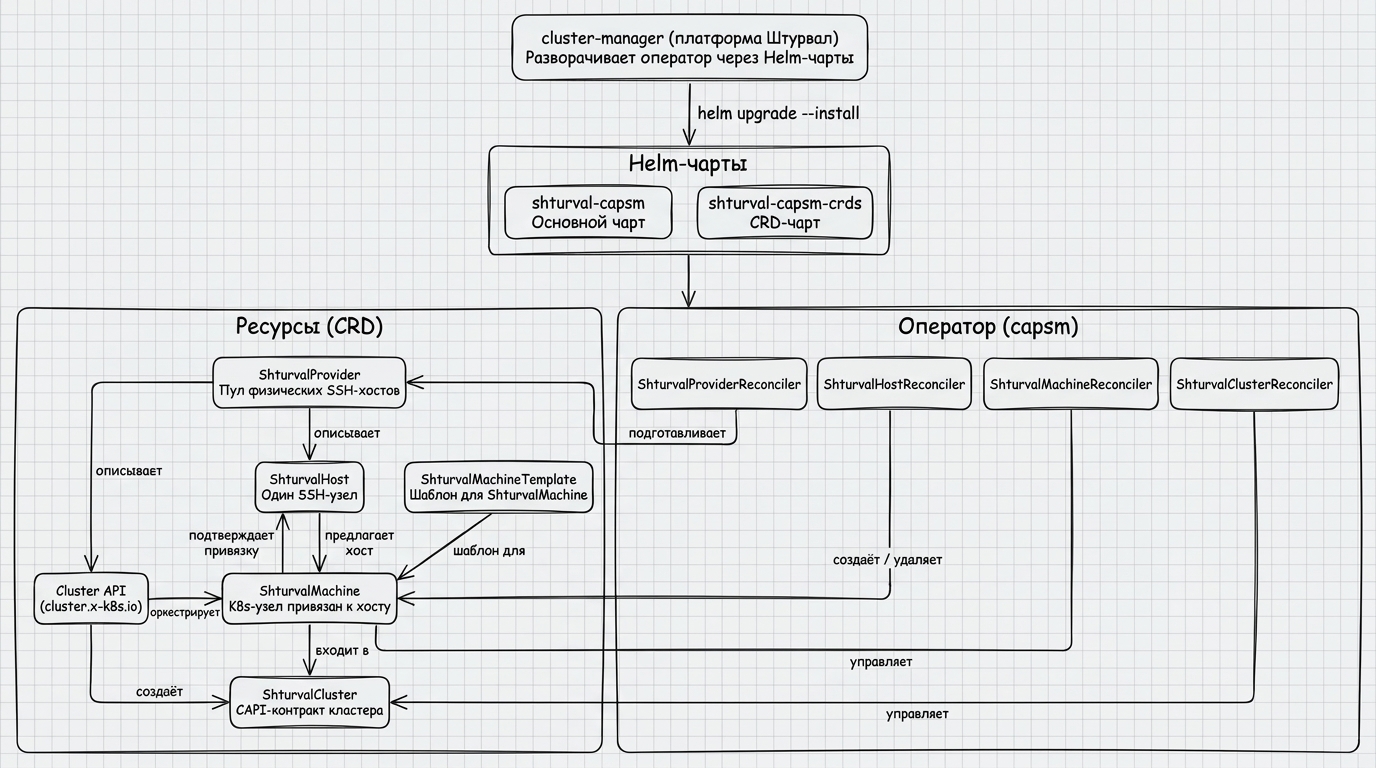
shturval-manual is a Kubernetes operator that implements the CAPI infrastructure provider role for the Shturval platform. The operator manages bare-metal and SSH nodes: automatically registers physical hosts, monitors their readiness, associates with Cluster API objects and performs initial initialization (bootstrap) of Kubernetes nodes.
Place in the chain of command
Illustration: Place in the chain of command
Key Features
Note: The shturval-capsm provider (Shturval v2 / manual) is designed for the x86_64 architecture. Before deployment, ensure that the target nodes conform to the supported architecture.
| Characteristics | Description |
|---|---|
| API Group | infrastructure.cluster.x-k8s.io/v1beta1 |
| Operator namespace | shturval-capsm |
| Leader election | included; ID 5eeb8da4.cluster.x-k8s.io - safe operation with multiple replicas |
| Metrics | Disabled by default (--metrics-bind-address=0). When enabled, available via HTTPS on port :8443 with RBAC authentication |
| Health/Readiness | HTTP on port :8081 (/healthz, /readyz) |
| Webhook | Mutating webhook for ShturvalCluster on port :9443 |
| Pod Security | Pod Security Standards: restricted |
Controllers and webhook
The operator registers four controllers and one mutating webhook:
| Controller/component | Purpose |
|---|---|
ShturvalProvider | Creates and deletes ShturvalHost objects based on spec.hosts; synchronizes credentials and version fields |
ShturvalHost | Prepares a physical node via SSH: checks availability, installs the shturvald daemon, ensures the uniqueness of the machine-id, binds to ShturvalMachine |
ShturvalMachine | Selects a ready host, executes the Kubernetes node bootstrap, sets providerID |
ShturvalCluster | Manages the life cycle of a CAPI cluster: sets it to Ready, when removed, waits for all machines to be cleaned |
Webhook ShturvalCluster | Mutating: if spec.controlPlaneEndpoint.port == 0, sets the default to 6443 |
Operating constraints
| Constraint | Operational impact |
|---|---|
SSH is supported only on port 22 | A non-standard SSH port cannot be configured through operator parameters |
| SSH keys with passphrase are not supported | The Secret must contain an unencrypted private key |
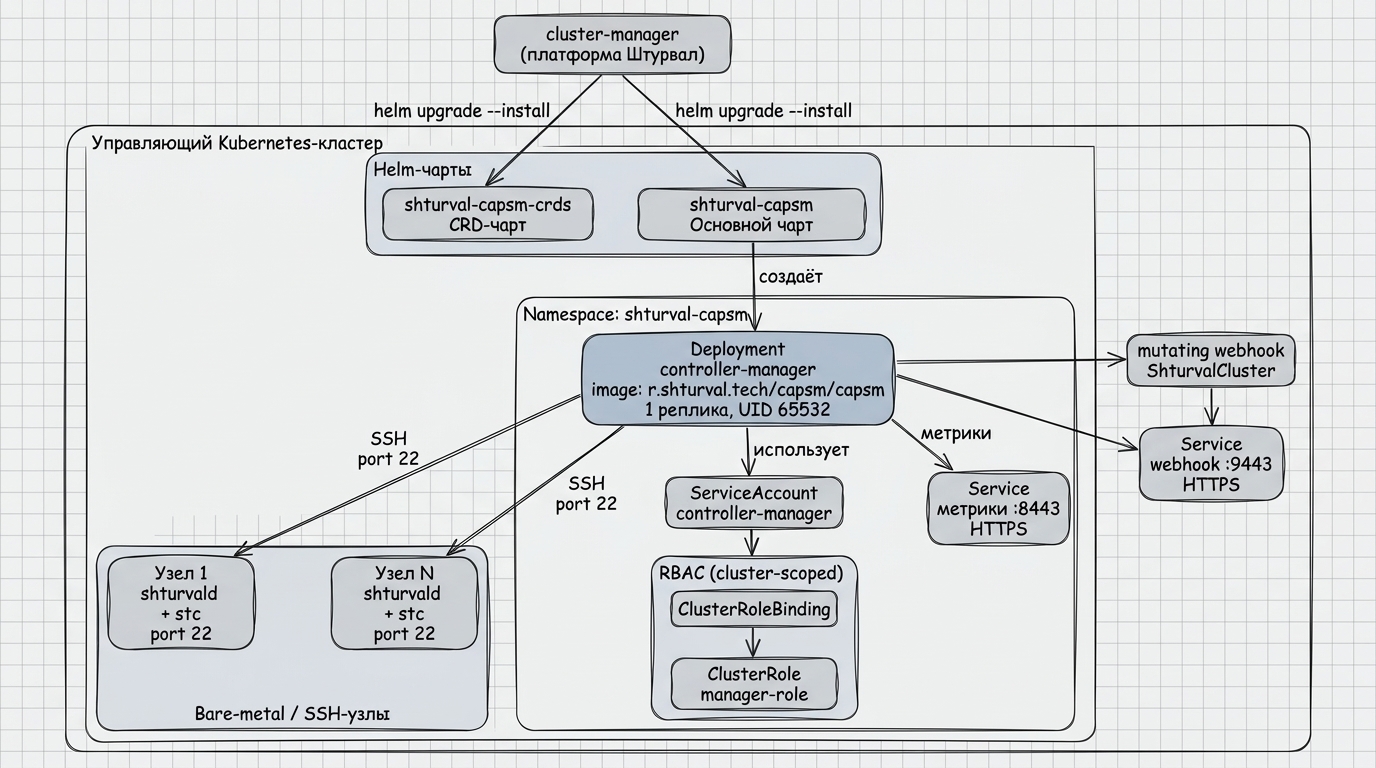
2. Architecture
Illustration: 2. Architecture
Workload Components
| Object | Name | Options |
|---|---|---|
| Deployment | controller-manager | 1 replica, image r.shturval.tech/capsm/capsm |
| Container | manager | CPU request: 10m, limit: 500m; RAM request: 64Mi, limit: 128Mi |
| Liveness test | HTTP GET | :8081/healthz, delay 15 s, interval 20 s |
| Readiness test | HTTP GET | :8081/readyz, delay 5 s, interval 10 s |
| Metrics Service | HTTPS | when enabled — :8443, access via RBAC only (authn/authz) |
| Webhook server | HTTPS | :9443, mutating webhook for ShturvalCluster |
| Leader election | included | ID 5eeb8da4.cluster.x-k8s.io |
Pod Security Settings
Under deploymentThis is in accordance with the Pod Security Standards: restricted policy:
| Parameter | Description |
|---|---|
runAsNonRoot | true |
RBAC
The operator operates on behalf of ServiceAccount controller-manager, which is assigned ClusterRole manager-role through ClusterRoleBinding.
| API Group | Resources | Rights |
|---|---|---|
"" (core) | secrets | get, list, watch, create, update, patch, delete |
cluster.x-k8s.io | clusters, machines, machines/status | get, list, watch |
infrastructure.cluster.x-k8s.io | shturvalclusters, shturvalhosts, shturvalproviders | get, list, watch, create, update, patch, delete |
infrastructure.cluster.x-k8s.io | shturvalmachines | get, list, patch, update, watch |
infrastructure.cluster.x-k8s.io | shturvalclusters/finalizers, shturvalhosts/finalizers, shturvalmachines/finalizers, shturvalproviders/finalizers | patch, update |
infrastructure.cluster.x-k8s.io | shturvalclusters/status, shturvalhosts/status, shturvalmachines/status, shturvalproviders/status | get, patch, update |
Additionally, aggregated roles are provided for each CRD type with the suffixes -admin, -editor, -viewer.
Interaction with external systems
The operator connects via SSH to physical nodes whose addresses are specified in ShturvalProvider.spec.hosts. Kubernetes Secrets are used for authentication, referenced by ShturvalProvider.spec.credentials.secretRef and, optionally, ShturvalHost.spec.credentials.ssh.
A secret of type Opaque with data for connecting via SSH is created in the management cluster in namespace shturval-capsm. The name is formed from the name of the Shturval v2 provider instance with the suffix capsm-v2-provider-secret.
Example Secret:
apiVersion: v1
kind: Secret
metadata:
  name: provider-name-capsm-v2-provider-secret
  namespace: shturval-capsm
type: Opaque
data:
  sshKey: LS0tLS1CRUdJTiBPUEVOU1NIIFBSSVZBVEUgS0VZLS0tLS0KdXNlcnNzaGtleQotLS0tLUVORCBPUEVOU1NIIFBSSVZBVEUgS0VZLS0tLS0=
  sshUser: c2h0dXJ2YWw=
  sshPassword: bXlwYXNzd29yZA==
| Key | Required | Description |
|---|---|---|
sshUser | Yes | Username for SSH connection to host |
sshKey | Yes | Private SSH key |
sshPassword | No | Password for sudo commands on the host. When installing the management cluster from the console, set it with --ssh-user-password or credentials.SSH.sshUserPassword — see SSH user password for sudo. In the interface — see Shturval v2 |
The private key must be unencrypted, without passphrase: password protection of the key is not supported.
3. Installing the service
The CAPSM provider is an infrastructure provider Cluster API (infrastructure.cluster.x-k8s.io). In the Shturval platform, the connection and life cycle of such a provider in the management cluster is ensured by cluster-manager; ShturvalServiceConfig (SSC) objects for provider charts are created and maintained as part of the platform configuration, rather than as an arbitrary manual installation of a service chart.
In the production environment, the provider is represented by two SSCs:
shturval-capsm— operator’s main chart;shturval-capsm-crds— CRD chart of the provider module.
The CRD chart is allocated to a separate SSC so that the helm.sh/resource-policy: keep annotation protects the CRD from being deleted when the main chart is updated.
For correct operation, the CRD of the main Cluster API (shturval-capi-crds and the associated component shturval-capi) must be available in the management cluster.
Below are the chart names and the correspondence of spec.customvalues to the helm/main/values.yaml file of the main chart - for comparison with the release and configuration via ShturvalServicePatch (SSP). This does not duplicate the full deployment scenario via the cluster-manager UI/API.
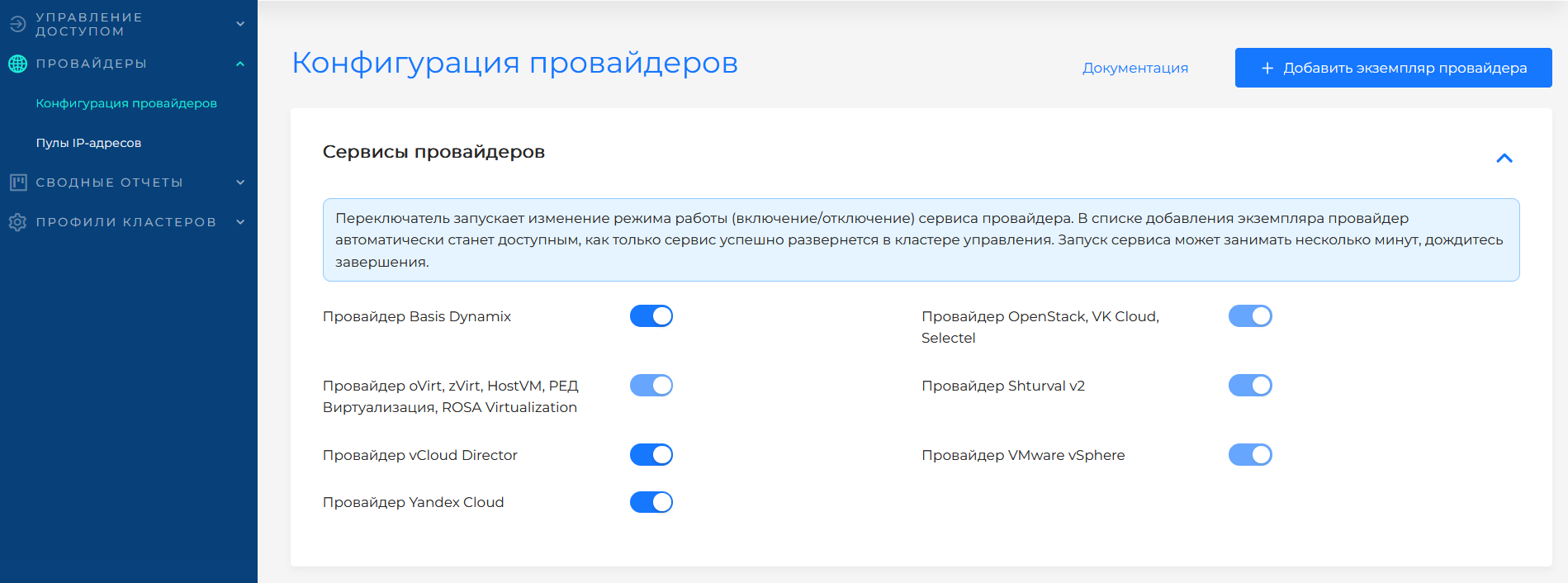
If the service was disabled during platform deployment, the provider’s SSCs could receive an absence mode (mode: absent). In order for the provider to be available to work with the Shturval v2 infrastructure, first switch the shturval-capsm-crds mode to auto, then shturval-capsm to auto. You can change the mode in the platform GUI on the Providers page.
In the GUI, this action is performed by the service mode switch. The screenshot shows the selection of the Auto mode for the provider service.
3.1 Customvalues parameters
The structure of the main chart values is described by the spec.customvalues field of the corresponding ShturvalServiceConfig and coincides with helm/main/values.yaml of the shturval-capsm chart. Full list of fields specified through this file:
Recommendation: do not edit the ShturvalServiceConfig object manually to change limits, nodeSelector, operator image, etc.Other release parameters - such an object relates to the platform configuration and can be overwritten during updates. Make all changes to the behavior of the service through ShturvalServicePatch (SSP), which overlays spec.customvalues on top of the base SSC.
| Field | Type | Default | Description |
|---|---|---|---|
replicaCount | int | 1 | Number of Deployment Replicas |
image.repository | string | r.shturval.tech/capsm/capsm | Operator image repository |
image.tag | string | — | Image tag. If not specified, appVersion from Chart.yaml is used |
serviceAccount.create | bool | true | Create ServiceAccount |
serviceAccount.name | string | controller-manager | ServiceAccount Name |
resources.limits.cpu | string | 500m | Manager container CPU limit |
resources.limits.memory | string | 128Mi | Manager container memory limit |
resources.requests.cpu | string | 10m | Query CPU container manager |
resources.requests.memory | string | 64Mi | Manager container memory request |
Webhook
By default, webhook ShturvalCluster is enabled. To disable, set the environment variable ENABLE_WEBHOOKS=false in the container manager. Webhook requires a TLS certificate; the path is specified via --webhook-cert-path (see section 6).
Creating ShturvalProvider
ShturvalProvider — global (cluster-scoped) provider configuration object. When creating ShturvalProvider, the controller automatically creates ShturvalHost objects for each address from spec.hosts. The object must exist before clusters and machines are created.
Example of minimum ShturvalProvider:
apiVersion: infrastructure.cluster.x-k8s.io/v1beta1
kind: ShturvalProvider
metadata:
  name: shturval-demo
spec:
  systemRegistry: registry.example.com
  releaseVersion: "2.14"
  licenseToken: "<license token>"
  credentials:
    secretRef:
      name: shturval-demo-provider-secret
      namespace: shturval-capsm
  hosts:
    - address: 192.168.1.10
      labels:
        role: worker
        zone: dc1
    - address: 192.168.1.11
      labels:
        role: master
        zone: dc1
  paused: false
spec.releaseVersion sets the platform version for host bootstrap (downloading stc-<releaseVersion>). For a single host the version is set in spec.hosts[].releaseVersion; if the field is empty, the provider version is used. In the interface this is the Version field of the provider instance or the host. Specify the full version, for example 2.13.1.
After creating ShturvalProvider, the controller creates ShturvalHost with a name equal to the host’s IP address and a label provider_config_name: <provider-name>. spec.systemRegistry and spec.licenseToken are copied from the provider. The host spec.releaseVersion is taken from spec.hosts[].releaseVersion, or from the provider spec.releaseVersion if that field is not set.
It is not recommended to create ShturvalHost manually, bypassing ShturvalProvider, if the hosts are intended to be shared with the provider: the controller may overwrite such objects or fix an ownership conflict.
Where to configure
Services and repositories → Installed services → shturval-capsm → Manage. The service is hosted in the management cluster.
Configuring provider instances in the platform - Shturval v2. General overview - How to work with providers in the platform works.
4. Diagnostics
Operator performance check
| Check | Command | Expected result |
|---|---|---|
| Operator launched | kubectl get pod -n shturval-capsm -l control-plane=controller-manager | STATUS: Running |
| Liveness | kubectl exec -n shturval-capsm <pod> -- wget -qO- http://localhost:8081/healthz | ok |
| readiness | kubectl exec -n shturval-capsm <pod> -- wget -qO- http://localhost:8081/readyz | ok |
| Metrics available | When metrics are enabled: request to :8443/metrics via ServiceAccount with role metrics-reader | HTTP 200, contains controller_runtime_reconcile_total |
| Logs | kubectl logs -n shturval-capsm -l control-plane=controller-manager | Line starting manager at startup |
Diagnostics ShturvalHost
kubectl get shturvalhost
kubectl describe shturvalhost <hostname>
Flags in the output of kubectl get shturvalhost:
| Column | Description |
|---|---|
READYFORMACHINE | true - the host has passed all checks and is ready to bind ShturvalMachine |
MACHINEATTACHEDANDCONFIRMED | true - the host is bound to ShturvalMachine and the binding is confirmed |
Conditions for ShturvalHost
status.readyformachine = true is set when the following are executed simultaneously: CanConnectToTheNode=True, CheckSudo=True, ShturvalNodeConfigIsCorrect=True and at least one of: StcCompleted=True or StdDeployed=True.
| Condition | What is being checked | Action at False / Unknown |
|---|---|---|
CanConnectToTheNode | SSH connection to host established | Check spec.address and the correctness of the SSH key in Secret. Reasons: FailedToGetCredentials, FailedToGetHostManager, FailedToConnect, NetworkError |
CheckSudo | The SSH user has sudo access | Check account permissions on the host. Reason: FailedToCheckSudo |
StdDeployed | The shturvald daemon is installed and available | Check for the presence of a daemon on the node. Reasons: NetworkError, ShturvaldDaemonNotFound |
StcDeployed | The stc binary file is uploaded to node | Check availabilityhttps://public.<systemRegistry>/stc-<releaseVersion> |
StcCompleted | The stc template command successfully completed host preparation | Check the /var/log/stc-template.log log on the node |
StcMigrationRequired | STC migration is required for a free and ready host | Check STC status on the host and wait until migration completes |
MachineIDUnique | The /etc/machine-id value is unique among all registered hosts | The operator resets machine-id automatically. Reasons: NetworkError, FailedToResetMachineID, MachineIDNeedCheck |
ShturvalNodeConfigIsCorrect | The node configuration is correct; host is not occupied by another cluster | Check status.nodeInfo.kubestatus. Reasons: HostOccupied, HostInfoIsNotCorrect |
MachineAttached | ShturvalMachine is bound to the host | Create ShturvalMachine with hostSelector corresponding to host labels |
Conditions for ShturvalMachine
| Condition | What is being checked | Action at False |
|---|---|---|
HostAttached | A suitable ShturvalHost was found and the binding was confirmed | Check the availability of free hosts with the required tags. Reasons: NoApplicableHost, HostNotReadyReason, HostMatchWaitingReason, HostNotMatchReason |
K8sComponentsInstallationSucceeded | The command sudo std node status returns synched | Wait for the Kubernetes components to complete synchronization on the node. Reasons: STDGetStatusFailed, NodeStatusReason |
ShturvaldRestartBeforeBootstrap | For versions before 2.14: shturvald was restarted and the node returned to synched | Wait for synchronization. Reason: ShturvaldRestartedWaitingSyncedReason, ShturvaldRestartFailedReason |
K8sNodeBootstrapSucceeded | Bootstrap Kubernetes node via BootstrapWithCloudInit completed successfully | Check for the presence of a bootstrap secret in CAPI. Reasons: BootstrapNotReadyReason, BootstrapExecutionFailedReason, PreBootstrapExecutionFailedReason |
K8sProviderIDSetup | providerID installed on spec.providerID machine and spec.providerID Kubernetes node | Make sure that the node appears in the cluster with the correct machine-id. The reason for the error is inthe operator’s logs |
Ready | The machine is fully ready for operation | Check conditions HostAttached, K8sComponentsInstallationSucceeded, K8sNodeBootstrapSucceeded, K8sProviderIDSetup |
Conditions for ShturvalCluster
| Condition | What is being checked | Action at False |
|---|---|---|
ShturvalClusterReconciliationReady | Cluster API set OwnerReference to cluster; cluster is not paused | Check the presence of Cluster in CAPI and its status. Reasons: WaitingForClusterOwnerReference, ClusterIsPaused |
ShturvalClusterDeleting | On deletion: all ShturvalMachine clusters are deleted | Wait for the removal of machines to complete. Reasons: WaitingForMachinesDeletion, FailedToListMachinesForDeletion |
Common failures
| Symptom | Probable Cause | Action |
|---|---|---|
CanConnectToTheNode=False, reason FailedToConnect | Invalid IP or SSH port not available | Check spec.address and network availability of the node |
CanConnectToTheNode=False, reason FailedToGetCredentials | Secret with SSH key not found | Ensure that Secret from spec.credentials.ssh exists in the specified namespace |
StdDeployed=False, reason ShturvaldDaemonNotFound | shturvald was manually removed from the node | Reinstall shturvald on node |
ShturvalNodeConfigIsCorrect=False, reason HostOccupied | The node is part of another Kubernetes cluster | Remove a node from the cluster or use another host |
MachineIDUnique=False, reason MachineIDNeedCheck | Duplicate machine-id (VM cloning) | Expect: operator will automatically reset machine-id |
HostAttached=False, reason NoApplicableHost | There are no available hosts with the required tags | Add hosts to ShturvalProvider.spec.hosts with the required tags |
K8sComponentsInstallationSucceeded=False, reason NodeStatusReason | sudo std node status returned syncFailed or syncInProgress | For syncFailed — check shturvald logs on the node; for syncInProgress - wait for completion |
ShturvalMachine.status.ready remains false | One of the conditions is not met | Sequentially eliminate all conditions with the status False |
View node information
After successfully passing all checks, the operator fills in status.nodeInfo with ShturvalHost:
kubectl get shturvalhost <hostname> -o jsonpath='{.status.nodeInfo}' | python -m json.tool
5. Life cycle
ShturvalProvider controller
The controller fully manages the life cycle of ShturvalHost objects based on spec.hosts.
Host creation: when adding an address to spec.hosts, the controller creates ShturvalHost with a name equal to the IP address, assigns it labels from spec.hosts[].labels, label provider_config_name: <provider-name>, SSH credentials and version fields (systemRegistry, releaseVersion, licenseToken). Sets the OwnerReference of the provider to the host.
Host update: when labels change in spec.hosts[].labels the controller synchronizes them in ShturvalHost. Labels from the system list (architecture, memory, cpu_cores, ethernet_interface, operating_system, root_volume_size, hostname, provider_config_name) are not affected by synchronization. systemRegistry and licenseToken are always synchronized. releaseVersion is updated only while the host is not bound to a machine. If the host has spec.hosts[].releaseVersion set, changing the provider version does not change it. Labels are not updated while the host is bound to the machine (MachineAttached=True).
Host Removal: When an address is removed from spec.hosts, the controller triggers the removal of the corresponding ShturvalHost. Waits for finalizers to finish cleaning up.
Deleting a provider: A provider can only be deleted if none of its hosts are bound to the cluster (no MachineAttached=True). When deleting, the operator removes the shturval/<provider-name> finalizer from the Secret with the credentials.
Host Credentials: If spec.hosts[].credentials is set to individual host credentials, they are used instead of the global spec.credentials.
ShturvalHost controller
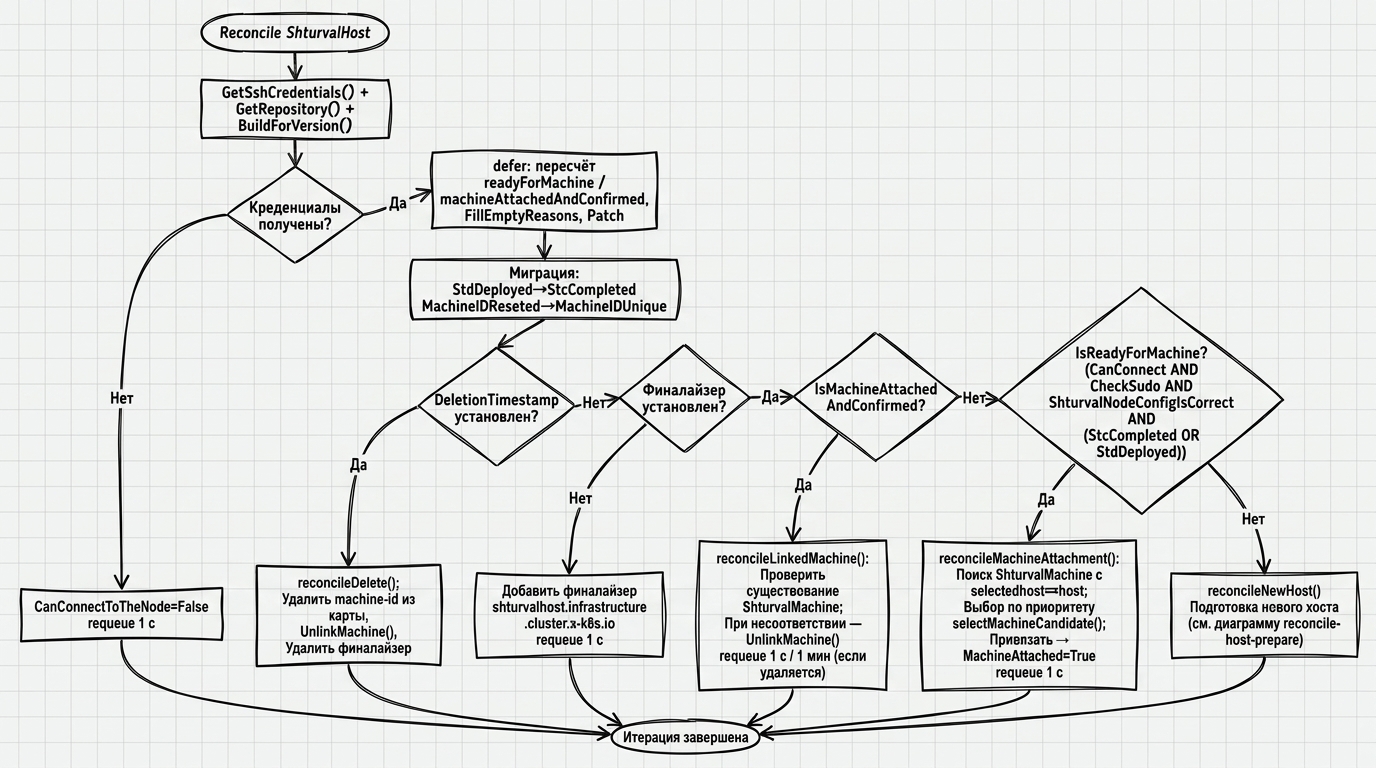
The controller prepares the physical node to join the Kubernetes cluster.
Illustration: ShturvalHost controller
Finalizer
When a new ShturvalHost is first encountered, the controller adds the shturvalhost.infrastructure.cluster.x-k8s.io finalizer and ends the iteration with requeue after 1 second.
Preparing a new host
- SSH connection — establishes a connection using
spec.address. If there is a network error -CanConnectToTheNode=False, requeue 1 s. - Check sudo (one time, until
CheckSudois notTrue) - if there is an errorCheckSudo=False. - Deployment of the shturvald daemon (one time, until
StdDeployedorStcCompletedis notTrue) - callEnsureSTDDeployed(). - Receiving information about the node - metadata is requested via shturvald (architecture, hostname, memory, CPU, machine-id, Kubernetes status). If the daemon is manually removed,
StdDeployedis reset. - Busy check - if the Kubernetes service is active on the node or kubeconfig is present,
ShturvalNodeConfigIsCorrect=False (HostOccupied)is set. - Uniqueness of machine-id - the operator maintains an in-memory map of machine-id (initialized at startup for all existing hosts). If there is a duplicate,
ResetMachineID()is called and the iteration is restarted. - Result - when all steps are completed,
ShturvalNodeConfigIsCorrect=TrueandMachineIDUnique=Trueare set;status.readyformachinebecomestrue.
Ready condition IsReadyForMachine
The host is considered ready to bind a machine (readyformachine=true) when simultaneously executing:
CanConnectToTheNode=TrueStcCompleted=TrueORStdDeployed=True
Linking a car
When readyformachine=true, the controller looks for ShturvalMachine with status.selectedhost == host.name. From the found candidates, one is selected by priority:
priority = 10 × len(matchExpressions) + 1 × len(matchLabels)
If the priority is the same, the machine with the lexicographically smaller name is selected. Machines in Deleting state are skipped. After selection, status.linkedmachine and MachineAttached=True are set.
Binding consistency
While the host is bound (machineAttachedAndConfirmed=true), each iteration checks that ShturvalMachine of status.linkedmachine exists and that the machine is not removed. If there is a mismatch, the binding is reset.
Triggers reconcile
| Event | Description |
|---|---|
Change ShturvalHost | Standard trigger |
Change status.selectedhost from ShturvalMachine | The operator queues the reconcile of the corresponding host |
Removal
With deletionTimestamp != nil, the controller detaches the linked machine, cleans host service state, and removes finalizer shturvalhost.infrastructure.cluster.x-k8s.io.
ShturvalMachine controller
The controller selects a host and bootstraps the Kubernetes node.
Host selection: if status.selectedhost is empty, the controller looks for a free (not busy) ShturvalHost by the label provider_config_name (taken from the spec.providerConfigName machine or from ShturvalCluster.spec.providerConfigName). Additionally, spec.hostSelector is applied. If the host is found but not ready (readyformachine=false) - wait. If the host is ready, but has not confirmed the choice, wait for confirmation from ShturvalHost.
Checking the installation status of components: The sudo std node status command is executed. If the status is synched, it goes to bootstrap. At syncInProgress orwaitingRebootApprove - wait (requeue in 1 minute). When syncFailed - an error is recorded, reconcile stops.
Bootstrap (version ≥ 2.14): Called node.PreBootstrapWithCloudInit(). If shturvald requires a restart, restart and requeue. Then node.BootstrapWithCloudInit() with data from the bootstrap CAPI secret.
Bootstrap (version < 2.14): removes /etc/std/nci.json, restarts shturvald, waits for synched, then executes BootstrapWithCloudInit.
Setting providerID: After a successful bootstrap, the controller connects to the target cluster, finds a Kubernetes node with a matching machine-id and sets spec.providerID in the format shturval://xxxxxxxx-xxxx-xxxx-xxxx-xxxxxxxxxxxx.
Delete: If deletionTimestamp is present, the controller calls node.Reset() on the node to clean it up. If IgnoreResetError=true - reset errors are ignored and deletion continues. After successful cleaning, the finalizer is removed.
Reconcile trigger: ShturvalHost status change (update or delete) queues all related machines.
ShturvalCluster controller
reconcileNormal: adds the finalizer shturvalcluster.infrastructure.cluster.x-k8s.io, sets status.ready=true and condition ShturvalClusterReconciliationReady=True. If the CAPI cluster has paused the cluster, it sets Ready=false.
reconcileDelete: expects to delete all ShturvalMachine labeled cluster.x-k8s.io/cluster-name: <cluster name>. While the machines exist - requeue every 5 seconds. After removing all the machines, the finalizer is removed.
6. Operator parameters
Parameters are set through container launch arguments manager. To change, use the customization mechanism via cluster-manager or ShturvalServicePatch.
| Parameter | Type | Default | Description |
|---|---|---|---|
--leader-elect | bool | false | Enable leader election. Recommended for production |
--health-probe-bind-address | string | :8081 | Address liveness/readiness samples |
--metrics-bind-address | string | 0 | Metrics address (:8443 - HTTPS, :8080 - HTTP, 0 - disable) |
--metrics-secure | bool | true | Enable HTTPS for metrics with authn/authz via RBAC |
--enable-http2 | bool | false | Enable HTTP/2 (disabled due to CVE-2023-44487 and CVE-2023-39325) |
--condition-message-max-length | int | 32768 | Maximum length of text in condition message fields before truncation |
--metrics-cert-path | string | "" | Path to the directory with the TLS metrics certificate |
--metrics-cert-name | string | tls.crt | Metrics Certificate File Name |
--metrics-cert-key | string | tls.key | Metrics Certificate Key File Name |
--webhook-cert-path | string | "" | Path to the directory with the TLS certificate webhook |
--webhook-cert-name | string | tls.crt | webhook certificate file name |
--webhook-cert-key | string | tls.key | Webhook certificate key file name |
Environment Variables
| Variable | Default | Description |
|---|---|---|
ENABLE_WEBHOOKS | "" (enabled) | Set false to disable mutating webhook ShturvalCluster |
7. CRD/API reference
All resources belong to the API group infrastructure.cluster.x-k8s.io, version v1beta1.
ShturvalHost
A cluster-scoped object representing a physical SSH node. Created and managed by the ShturvalProvider controller.
Short name: smh
Scope: Cluster
Finalizer: shturvalhost.infrastructure.cluster.x-k8s.io
spec
| Field | Type | Required | Description |
|---|---|---|---|
spec.address | string | Yes | IP address or hostname for SSH connection |
spec.credentials | object | No | Individual SSH host credentials. If not specified, used from ShturvalProvider |
spec.credentials.ssh.name | string | No | Secret name with SSH key |
spec.credentials.ssh.namespace | string | No | Namespace Secret with SSH key |
spec.paused | bool | No | Suspend host processing. Default false |
spec.systemRegistry | string | No | Address of the system image registry. Filled by controller ShturvalProvider from ShturvalProvider.spec.systemRegistry |
spec.releaseVersion | string | No | Shturval platform version. Taken from ShturvalProvider.spec.hosts[].releaseVersion or, if that field is empty, from ShturvalProvider.spec.releaseVersion |
spec.licenseToken | string | No | Licensed token. Filled by controller ShturvalProvider from ShturvalProvider.spec.licenseToken |
spec.providerID | string | No | Deprecated as of version 28. Not used, will be removed |
status
| Field | Type | Description |
|---|---|---|
status.status | string | Text host status |
status.readyformachine | bool | true - the host is ready to bind ShturvalMachine |
status.machineAttachedAndConfirmed | bool | true - the host is bound to ShturvalMachine and the binding is confirmed |
status.linkedmachine.name | string | Linked name ShturvalMachine |
status.linkedmachine.namespace | string | Namespace bound ShturvalMachine |
status.conditions | array | Host Conditions (see section 4) |
status.nodeInfo.nodetype | string | Node type: master or worker |
status.nodeInfo.arch | string | Processor architecture |
status.nodeInfo.hostname | string | Hostname |
status.nodeInfo.memory | int | Amount of RAM in MB |
status.nodeInfo.cpucores | int | Number of CPU cores |
status.nodeInfo.rootvolumesize | int | Root volume size in MB |
status.nodeInfo.ethinterface | string | Primary network interface name |
status.nodeInfo.operatingsystem | string | OS name |
status.nodeInfo.osrelease | string | OS Version |
status.nodeInfo.kernelversion | string | Kernel version |
status.nodeInfo.machineid | string | Value /etc/machine-id |
status.nodeInfo.kubestatus.service_running | bool | Is the Kubernetes service running |
status.nodeInfo.kubestatus.config_present | bool | Is kubeconfig present |
status.nodeInfo.kubestatus.cluster_name | string | Owner cluster name (if busy) |
status.nodeInfo.kubestatus.api_addr | string | Owner’s cluster API server address |
status.nodeInfo.disks | array | Information about node disks |
status.nodeInfo.ports | array | Information about node network ports |
ShturvalProvider
Cluster-scoped provider global configuration object: list of hosts, image registry, Helm version, license, default SSH credentials. Is the source of truth for everyone ShturvalHost.
Short name: smp
Scope: Cluster
Finalizer: shturvalprovider.infrastructure.cluster.x-k8s.io
spec
| Field | Type | Required | Description |
|---|---|---|---|
spec.hosts | array | No | List of hosts managed by this provider |
spec.hosts[].address | string | Yes | Host IP address or FQDN (validated against IPv4 or FQDN template) |
spec.hosts[].labels | map[string]string | No | Host tags for use on spec.hostSelector machines |
spec.hosts[].releaseVersion | string | No | Platform version for this host. If not set, the provider spec.releaseVersion is used |
spec.hosts[].credentials.ssh.name | string | No | Individual Secret name for the host |
spec.hosts[].credentials.ssh.namespace | string | No | Namespace of individual Secret |
spec.systemRegistry | string | No | System image registry address |
spec.releaseVersion | string | No | Platform version Shturval (used with bootstrap) |
spec.licenseToken | string | No | Platform license token |
spec.credentials.secretRef.name | string | Yes | Secret name with global SSH credentials |
spec.credentials.secretRef.namespace | string | Yes | Namespace Secret with global SSH credentials |
spec.paused | bool | No | Pause provider processing |
status
| Field | Type | Description |
|---|---|---|
status.hosts | map[string]object | Host status map by address |
status.hosts[address].ready | bool | Host Readiness |
status.hosts[address].conditions | array | Host Conditions (type HostCreated) |
ShturvalCluster
Namespaced Kubernetes cluster object in terms of the Cluster API.
Short name: smc
Scope: Namespace
Finalizer: shturvalcluster.infrastructure.cluster.x-k8s.io
spec
| Field | Type | Required | Description |
|---|---|---|---|
spec.controlPlaneEndpoint.host | string | Yes | Hostname or IP of the cluster API server |
spec.controlPlaneEndpoint.port | int32 | Yes | API server port. If 0 - webhook automatically sets 6443 |
spec.secure | bool | Yes | Enable strict security settings |
spec.deployKeepAlive | bool | Yes | Expand the KeepAlive component |
spec.ingress | string | Yes | DNS record for Ingress controller |
spec.providerConfigName | string | Yes | The name is ShturvalProvider for this cluster. Used when searching for hosts if ShturvalMachine.spec.providerConfigName is not set |
status
| Field | Type | Description |
|——|—–|———|| status.ready | bool | Cluster readiness |
| status.conditions | array | Cluster Conditions (ShturvalClusterReconciliationReady, ShturvalClusterDeleting) |
| status.failureDomains | array ([]FailureDomain) | Fault domains |
ShturvalMachine
A Namespaced object representing a cluster node in terms of the Cluster API.
Short name: smm
Scope: Namespace
Finalizer: shturvalmachine.infrastructure.cluster.x-k8s.io
spec
| Field | Type | Required | Description |
|---|---|---|---|
spec.nodeType | string | No | Node type (eg master, worker) |
spec.hostSelector | object | No | Label selector for selecting ShturvalHost |
spec.hostSelector.matchLabels | map[string]string | No | Conditions for exact match of labels |
spec.hostSelector.matchExpressions | array | No | Extended terms. Take precedence over matchLabels when selecting a host candidate |
spec.providerConfigName | string | No | Name ShturvalProvider to search for hosts. If not specified, taken from ShturvalCluster.spec.providerConfigName |
spec.providerID | string | No | Unique node ID in the format shturval://<machine-id>. Filled in automatically after bootstrap |
spec.hostName | string | No | Deprecated as of version 28. Will be removed |
status
| Field | Type | Description |
|---|---|---|
status.ready | bool | Node readiness for operation |
status.address | string | IPv4 address of the main interface |
status.selectedhost | string | Name of the selected ShturvalHost (requires confirmation from the host) |
status.info | object | Node information (same as ShturvalHost.status.nodeInfo) |
status.initialization.provisioned | *bool | true - node infrastructure is completely ready (part of the Cluster API contract) |
status.failureReason | string | Terminal error code requiring manual intervention |
status.failureMessage | string | Description of the terminal error |
status.conditions | array | Conditions of the node (see section 4) |
ShturvalMachineTemplate
Namespaced template for ShturvalMachine. Used by CAPI to automatically create ShturvalMachine objects within MachineDeployment or MachineSet.
Short name: smt
Scope: Namespace
spec
| Field | Type | Required | Description |
|---|---|---|---|
spec.template.metadata | object | No | Labels and annotations applied to generated ShturvalMachine |
spec.template.spec | object | Yes | Specification of created ShturvalMachine. Fields are identical to ShturvalMachine.spec |