Graphical metrics display module (shturval-dashboards)
About the service
| Parameter | Description |
|---|---|
| GUI name | Metrics visualization module |
| System name (identifier) | shturval-dashboards |
| Cluster Assignment | Visualization of metrics: dashboards for Kubernetes, Victoria Metrics, platform services. Access via the “Statistics” button on the cluster dashboard. |
| Critical | No |
| Public repository | Grafana |
| Dependencies | — |
| Namespace | monitoring |
Purpose
shturval-dashboards - metrics visualization module based on Grafana. Provides dashboards for Kubernetes, Victoria Metrics, and platform services. Access via the Statistics button on the cluster dashboard.
Features
- Located in the management cluster;
- SSO authorization when leaving the platform;
- Pre-installed dashboards (API server, etcd, Kubelet, Compute Resources, etc.);
- Support for custom dashboards via ConfigMap (provisioning).
Detailed descriptions of sets of panels by topic (Kubernetes, VictoriaMetrics, exporters, services) - Monitoring Dashboards.
Where to configure
Services and repositories → Installed services → find Graphical display of metrics module (shturval-dashboards) → Manage.
Changing the configuration (admin password, OAuth, root_url, etc.) - via ShturvalServicePatch for shturval-dashboards.
ShturvalServicePatch example: password and user Grafana
apiVersion: ops.shturval.tech/v1beta2
kind: ShturvalServicePatch
metadata:
  name: shturval-dashboards-access
spec:
  shturvalServiceConfigName: shturval-dashboards
  customvalues:
    adminUser: <your value>
    adminPassword: <your value>
| Parameter | Description | Type | Example |
|---|---|---|---|
adminUser | Grafana Account Name | string | admin |
adminPassword | Grafana account password | string | password |
ShturvalServicePatch Example: OAuth and Access URL
apiVersion: ops.shturval.tech/v1beta2
kind: ShturvalServicePatch
metadata:
  name: shturval-dashboards-oauth
spec:
  shturvalServiceConfigName: shturval-dashboards
  customvalues:
    grafana.ini:
      auth.generic_oauth:
        api_url: <your value>
        auth_url: <your value>
        client_id: grafana
        client_secret: <your value>
        token_url: <your value>
      server:
        root_url: <your value>
    ingress:
      enabled: true
      hosts:
        - <your value>
| Parameter | Description | Example |
|---|---|---|
auth.generic_oauth.api_url | URL to get OAuth2 user information | http://auth.shturval.tech/oauth/user_info |
auth.generic_oauth.auth_url | OAuth2 Authorization URL | http://auth.shturval.tech/oauth/authorize |
auth.generic_oauth.client_secret | OAuth2 Client Secret | HG0rxJMKopmAGSasDxDtkJYQH |
auth.generic_oauth.token_url | OAuth2 Token Retrieval URL | http://auth.shturval.tech/oauth/token |
server.root_url | URL to access Grafana from the browser | dashboards.admin-manual.shturval |
ingress.hosts | Ingress Host List | dashboards.admin-manual.shturval |
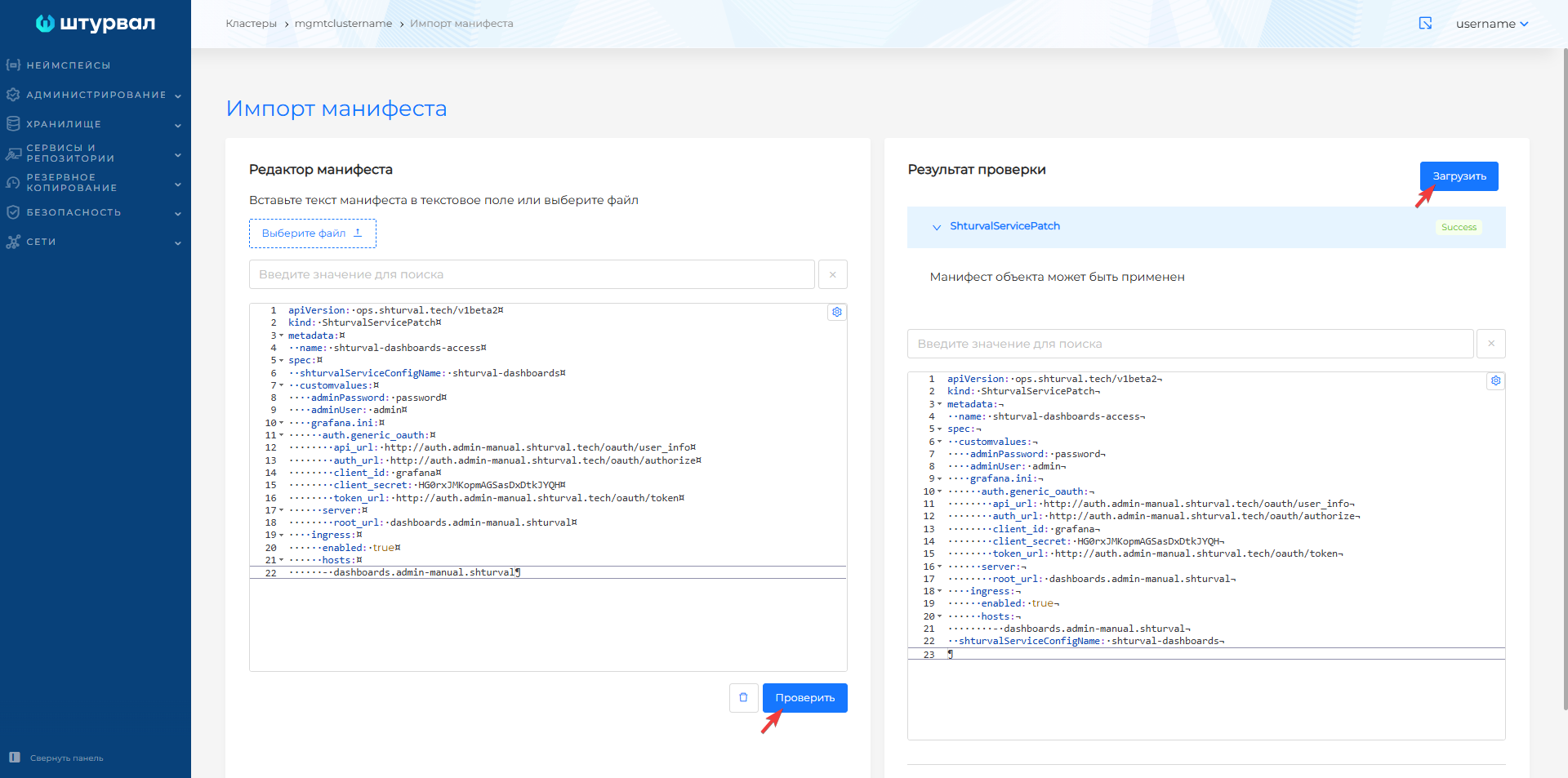
Screenshot of the applied ShturvalServicePatch
Access to Grafana
The Grafana interface is accessible by the dashboards prefix in the cluster domain, for example dashboards.clustername.ip-XX-XX-XX-XX.shturval.link. Login data is generated when the cluster is deployed and stored in Secret shturval-dashboards in namespace monitoring of the management cluster.
kubectl -n monitoring get secret shturval-dashboards -o go-template='{{ index .data "admin-user" | base64decode }}'
kubectl -n monitoring get secret shturval-dashboards -o go-template='{{ index .data "admin-password" | base64decode }}'
The Statistics button on the cluster dashboard is available if shturval-metrics-collector is enabled in the client cluster, and shturval-dashboards and shturval-monitoring are enabled in the management cluster).
When navigating from the Shturval platform to Grafana dashboards, an error 401 may occur. To access the dashboards, log back into the Grafana interface.
More details: Adding dashboards, Monitoring dashboards. Official documentation: Grafana.
How to deploy this service - How to deploy a new service.