Node configuration management module (shturval-node-config)
About the service
| Parameter | Description |
|---|---|
| GUI name | Node Configuration Management Module |
| System name (identifier) | shturval-node-config |
| Cluster Assignment | Applying node configuration (NCI, NodeConfigItem) to cluster machines: NTP, Container Runtime (including registries), sysctl, Kubelet, trusted certificates, etc. |
| Critical | Yes |
| Public repository | — (component of the Shturval platform) |
| Dependencies | shturval-node-config-crds, shturval-networking |
| Namespace | shturval-node-config-system |
Configuring NCI in the GUI, selectors, priorities and examples of sections can be found on the Node Configuration (NCI) page.
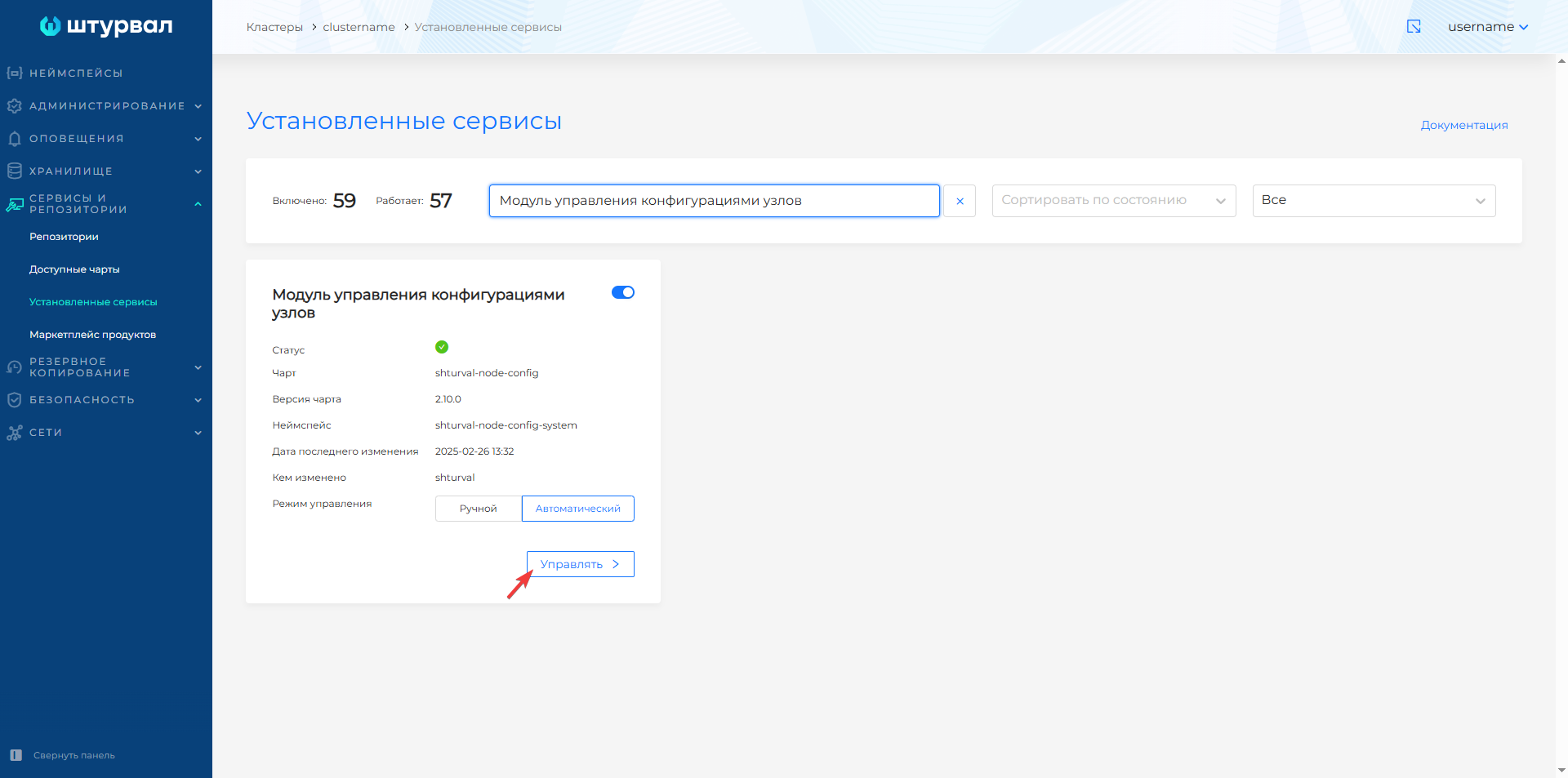
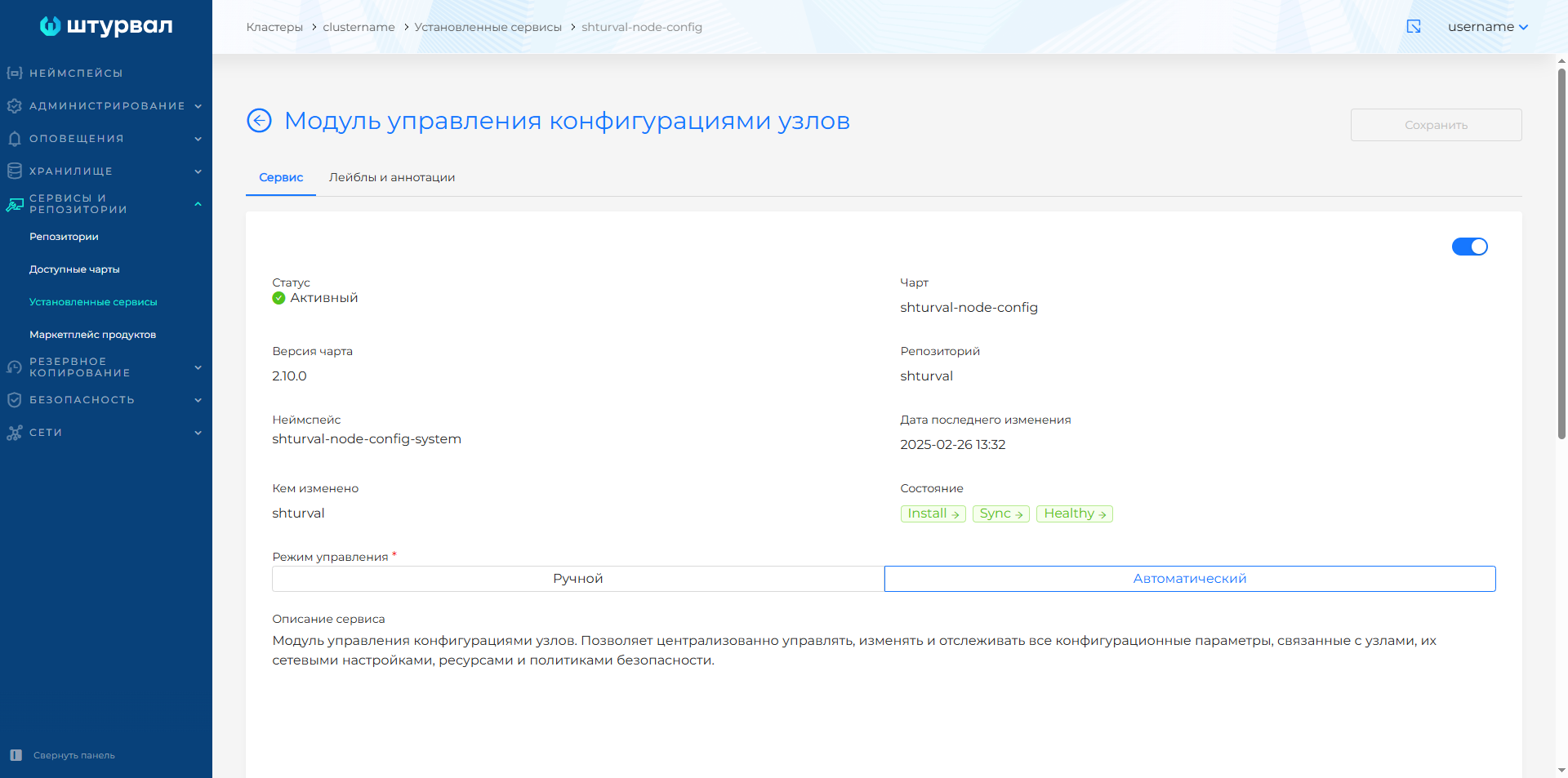
The service status can be viewed in the GUI: Services and repositories → Installed services → Node configuration management module (shturval-node-config) → Manage.
Screenshots of the service page
Contents
- Review
- Architecture
- Installation/deployment
- Diagnostics
- Lifecycle
- Operator and Daemon Parameters
- CRD/API reference
1. Review
shturval-node-config ensures that the Kubernetes cluster node configuration is delivered and applied. The operator manages configuration objects and secure reboot, and the std daemon applies the configuration to the node, signals the need for a reboot, and completes it when authorized by the operator.
Place in the chain of command
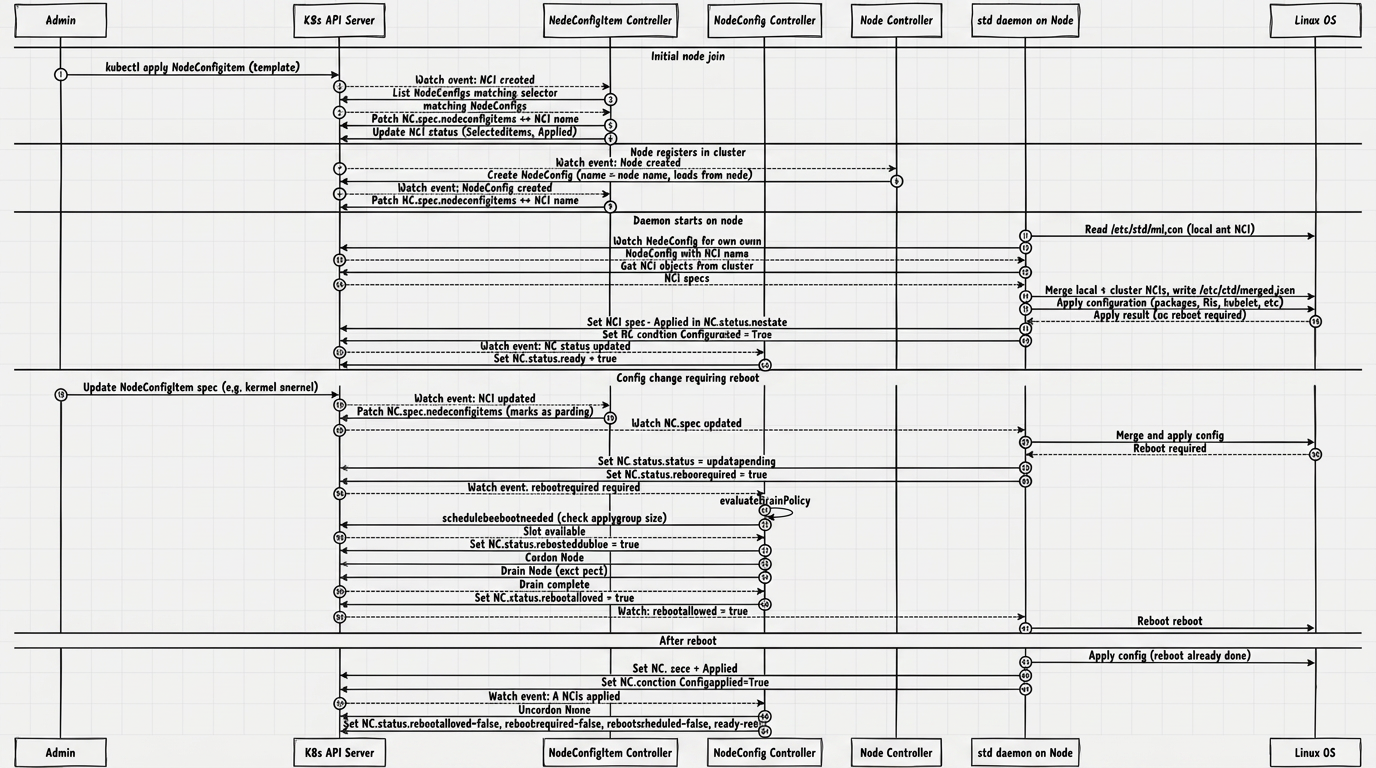
The administrator creates and modifies NodeConfigItem objects, the operator maps them to the NodeConfig of specific nodes, and the std daemon on each node receives the resulting configuration, applies it, and reflects the state back to NodeConfig.status. If necessary, the operator performs a cordon/drain and only then allows the node to reboot.
End-to-end sequence (NCI → NodeConfig → daemon, drain, reboot, CSR) in the diagram below; Detailed steps are in §5.
Illustration: Place in the chain of command
2. Architecture
In the working environment, the controller is represented by two SSCs:
shturval-node-config-crds— CRD chart of the groupnode.shturval.tech; (see the screenshot below)shturval-node-config— the main chart of the module. (see the screenshot below)
General architecture diagram, see the illustration below.
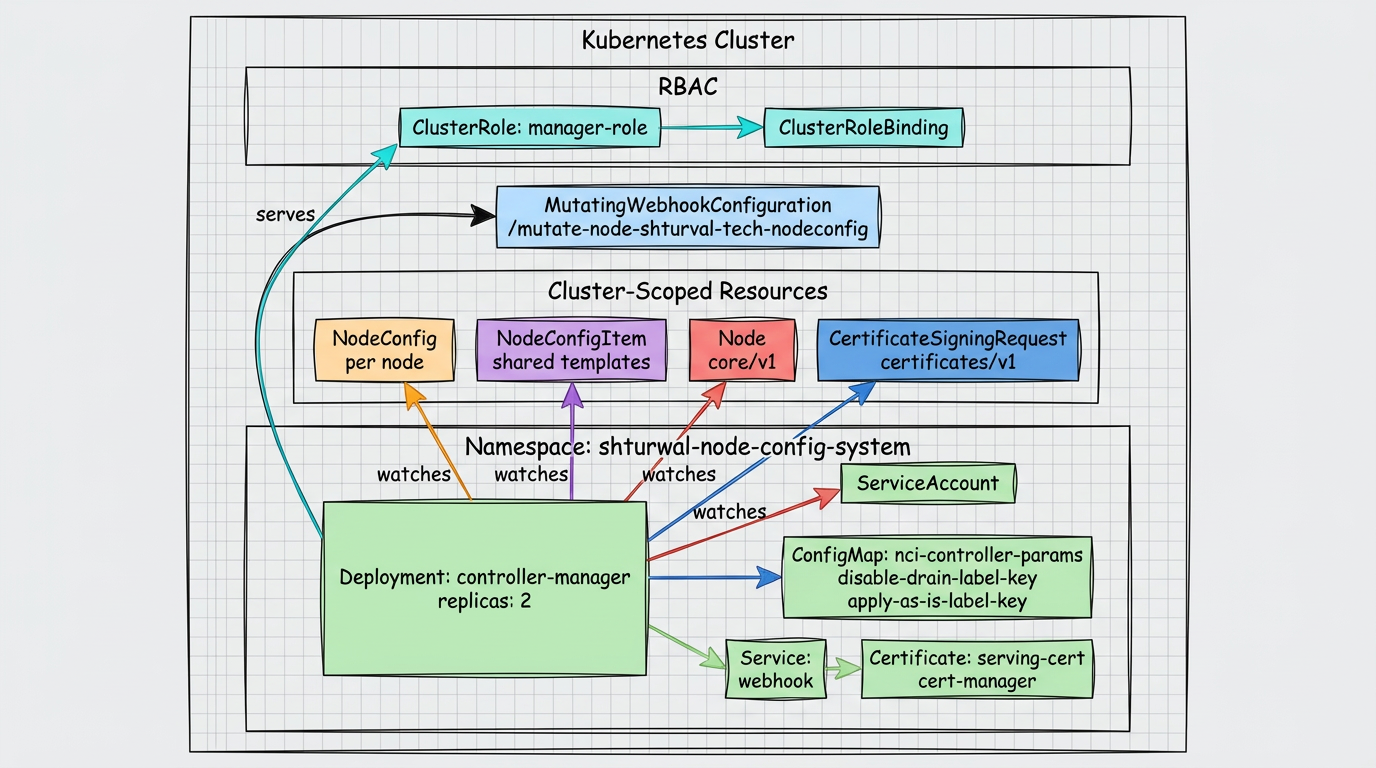
shturval-node-config service
The operator manages the configuration of cluster nodes through the CRDs NodeConfig and NodeConfigItem, orchestrates drains and reboots, and automatically approves the CSR for kubelet-serving.
Key Features
| Characteristics | Description |
|---|---|
| API Group | node.shturval.tech |
| API Version | v1beta2 |
| Deployment Namespace | shturval-node-config-system |
| Scope of resources | Clusterfor NodeConfig and NodeConfigItem |
| Leader election | Controlled by flag --leader-elect, identifier nci.shturval.tech |
| Metrics | The address is set by --metrics-bind-address, disabled by default (0) |
| health probe | :8081 |
| Webhook | Mutating webhook, path /mutate-node-shturval-tech-nodeconfig |
| HTTP/2 | Disabled by default |
| Default Replicas | 2 |
Components
| Component | Type Kubernetes | Purpose |
|---|---|---|
NodeConfigReconciler | Controller | Controls node drainage and reboot |
NodeConfigItemReconciler | Controller | Distributes patterns NodeConfigItem to NodeConfig |
NodeReconciler | Controller | Supports matching Node ↔ NodeConfig |
NodeCSRReconciler | Controller | Automatically approves CSR kubelet-serving |
NodeConfigItemAdmitter | MutatingWebhook | Adds service annotations to NodeConfigItem |
Demon std
std (shturvald) runs on every Linux node in the cluster. It applies the merged node configuration, monitors the local init config, synchronizes the state with the NodeConfig object, and reboots only after permission from the operator.
Key Features
| Characteristics | Description |
|---|---|
| Binary name | std |
| systemd unit name | shturvald.service |
| Unit file path | /etc/systemd/system/shturvald.service |
| Required Rights | Running with root access only |
| kubeconfig default | /etc/kubernetes/kubelet.conf |
| Local init NCI | /etc/std/nci.json |
| NCI Cache | /etc/std/caches/ |
| Status of applied NCIs | /etc/std/applied/ |
| United config | /etc/std/merged.json |
| Working directory | /etc/std/ |
Main tasks
| Component | Purpose |
|---|---|
Daemon | Basic Workcycle, Signal Processing and Queues |
NodeReader | Reading NodeConfig and NCI from the cluster |
NodeWriter | Recording status and conditions in NodeConfig |
WorkQueue | Periodic Synchronization Queue |
fsnotify | Change tracking /etc/std/nci.json |
configsyncer | NCI synchronization from cluster to local cache |
Objects in the cluster
| Objects | Type | Purpose |
|---|---|---|
| Operator Main Process | Deployment | Executes controllers and webhook |
| ServiceAccount | ServiceAccount | Operator Process Account |
| Permissions | ClusterRole / ClusterRoleBinding | Access to CRD, Node, CSR and related objects |
| Webhook endpoint | Mutating webhook | Annotates NodeConfigItem with CREATE and UPDATE |
ConfigMap nci-controller-params | ConfigMap | Passes required environment variables to webhook |
External dependencies
| System | Purpose |
|---|---|
| Kubernetes API | Read and update Node, NodeConfig, NodeConfigItem, CSR |
| Cluster nodes | Cordon, drain, uncordon and reboot coordination |
cert-manager | Issuing TLS webhook certificates with the appropriate deployment option |
Demon shurvald (std)
The daemon is deployed directly on a Linux node and runs as a system service. It uses local files in /etc/std/, kubeconfig kubelet and sync queue to apply the configuration and exchange state with the operator.
Demon Circuits
Logical architecture of the std daemon on the node, see the illustration below.
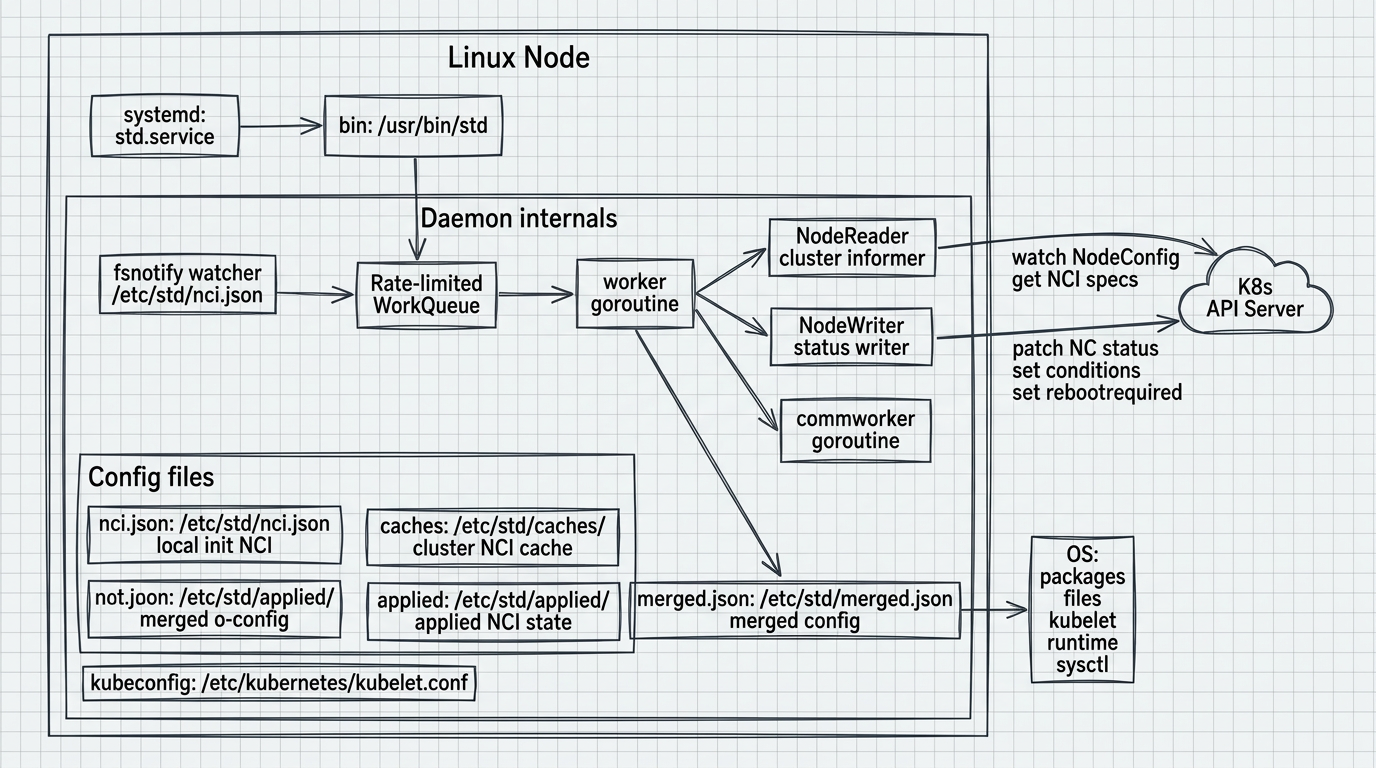
Processing flow: configuration, application, interaction with NodeConfig:
Illustration: Demon Circuits
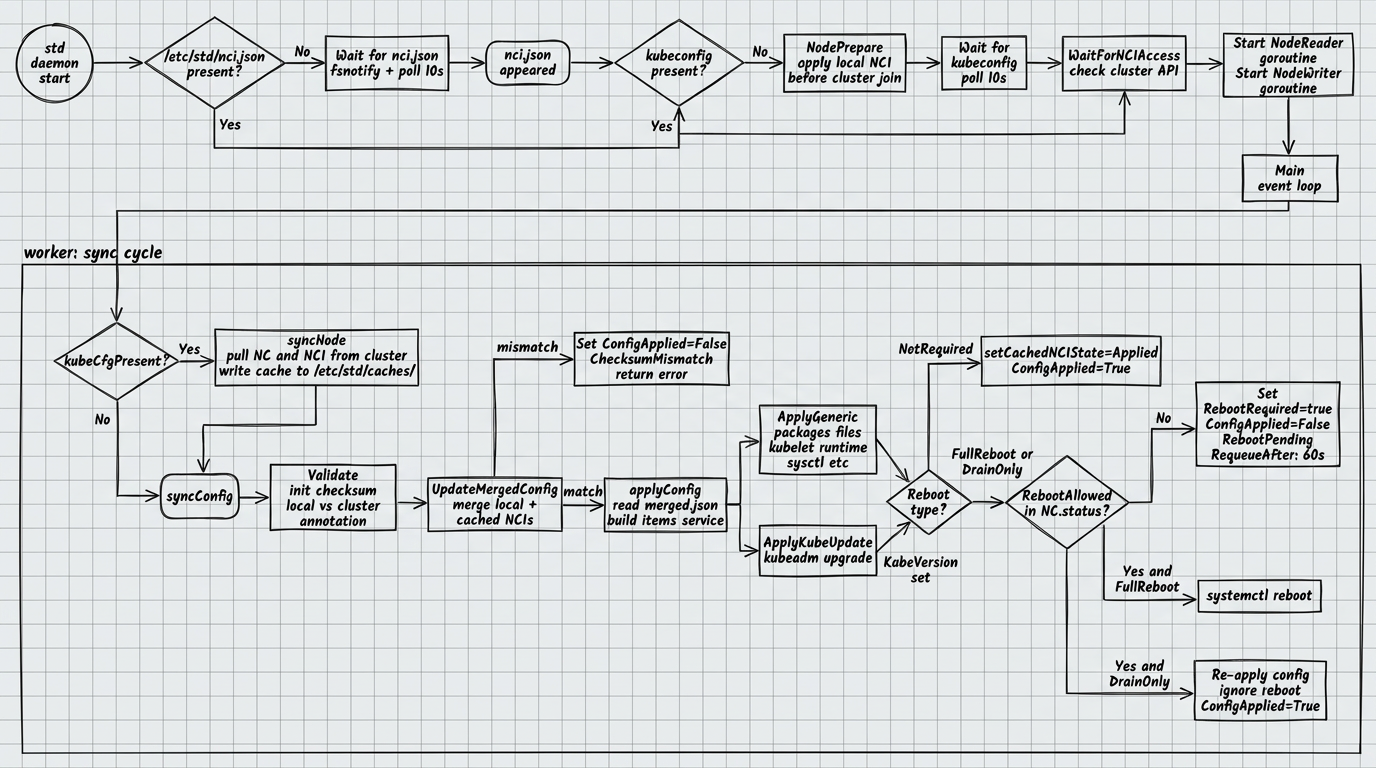
Components on a node
| Component | Purpose |
|---|---|
shturvald.service | Permanently running the daemon as a systemd unit |
/etc/std/nci.json | Local start NCI before connecting to the cluster |
/etc/std/caches/ | NCI cache obtained from cluster |
/etc/std/applied/ | Local confirmation of already applied NCIs |
/etc/std/merged.json | Final merged configuration |
/etc/kubernetes/kubelet.conf | Accessing the cluster API after joining a node |
Operator-daemon communication
| Direction | Mechanism |
|---|---|
| Operator → daemon | Fields NodeConfig.spec, flags rebootallowed and list nodeconfigitems |
| Demon → operator | Fields NodeConfig.status, condition ConfigApplied, annotation node.shturval.tech/initchecksum |
| Reboot Coordination | Through rebootrequired, rebootscheduled, rebootallowed and state ncistate |
3. Installation / deployment
shturval-node-config is a critical platform service. The activation and life cycle of the controller in the cluster is provided by cluster-manager (platform service); ShturvalServiceConfig (SSC) objects for associated charts are created and maintained as part of the platform configuration, rather than as an arbitrary manual installation of a Helm chart by an administrator.
The std agent (shturvald) is installed by the platform on nodes automatically as part of the node preparation process (bootstrap). No separate manual installation of the agent is required.
CRDs, controllers and resource ownership:
Illustration: 3. Installation / deployment
4. Diagnostics
shturval-node-config service
Quick checks
kubectl get nc
kubectl get nci
The operator publishes the following printable columns for NodeConfig:
| Column | Description |
|---|---|
APPLY GROUP | Reboot Coordination Team |
READY | All NCIs applied, no reboot required |
REBOOT REQUIRED | The daemon requested a reboot |
REBOOT SCHEDULED | The operator has queued the node |
REBOOT ALLOWED | The operator allowed the reboot |
The following columns are available for NodeConfigItem:
| Column | Description |
|---|---|
PRIORITY | Merger priority |
APPLIED | Ratio UpdatedNodes/SelectedNodes |
READY | All selected NodeConfig updated |
SELECTOR | Match selector NodeConfig |
Conditions of the NodeConfig resource
| Condition | What does True mean | What does False mean / what to check |
|---|---|---|
NodeDrained | Drain completed, not required or drain timeout exceeded | The drain is still running or ended with an error |
RebootScheduled | The node is queued for reboot | Slots are busy or there is a scheduling conflict |
ConfigApplied | Configuration successfully applied | Configuration still in use, failed, checksum discrepancy detected, merge failed, or awaiting permission to reboot |
Note: NodeDrained only appears with rebootscheduled=true, and RebootScheduled only appears with rebootrequired=true.
Demon std
Quick checks
systemctl status shturvald
std node status
std node info
If the daemon has not yet joined the cluster, an additional guideline is the presence of the /etc/std/nci.json and /etc/kubernetes/kubelet.conf files.
Demon states
| State | Description |
|---|---|
Working | Configuration in progress |
Done | Configuration successfully applied |
Unreconcilable | The configuration cannot be brought to the required state |
Degraded | An error not directly related to the configuration has been reported |
Annotations affecting diagnostics
| Annotation | Purpose |
|---|---|
node.shturval.tech/initchecksum | Checksum /etc/std/nci.json to detect discrepancies between local init NCI and state in cluster |
Typical operating situations
| Symptom | Possible reason | Action |
|---|---|---|
ConfigApplied=False with reason ChecksumMismatch | Local /etc/std/nci.json does not match checksum written in NodeConfig | Check local init NCI and expected cluster configuration |
RebootScheduled=False with reason SlotsOccupied | Another reboot is already in progress at applygroup | Wait until the slot becomes free and the operator tries again |
NodeDrained=False with reason DrainFailed | The operator was unable to complete the drain | Check blocking workloads on the node and repeat processing |
| The demon does not enter operating mode for a long time | Missing /etc/std/nci.json | Prepare local init NCI |
| The daemon does not start synchronizing with the cluster | Missing /etc/kubernetes/kubelet.conf | Finish joining the node to the cluster |
std ends immediately after start | The process is not running as root | Run the daemon as root or via systemd unit |
If, after reconciling the local init NCI and the expected cluster configuration, you need to re-run the configuration application, remove the node.shturval.tech/initchecksum annotation written to NodeConfig:
kubectl get nodeconfig <node-name> -o jsonpath='{.status}'
kubectl annotate nodeconfig <node-name> node.shturval.tech/initchecksum-
5. Life cycle
shturval-node-config service
Complete scenario on one diagram: see also §1 - place in the chain.
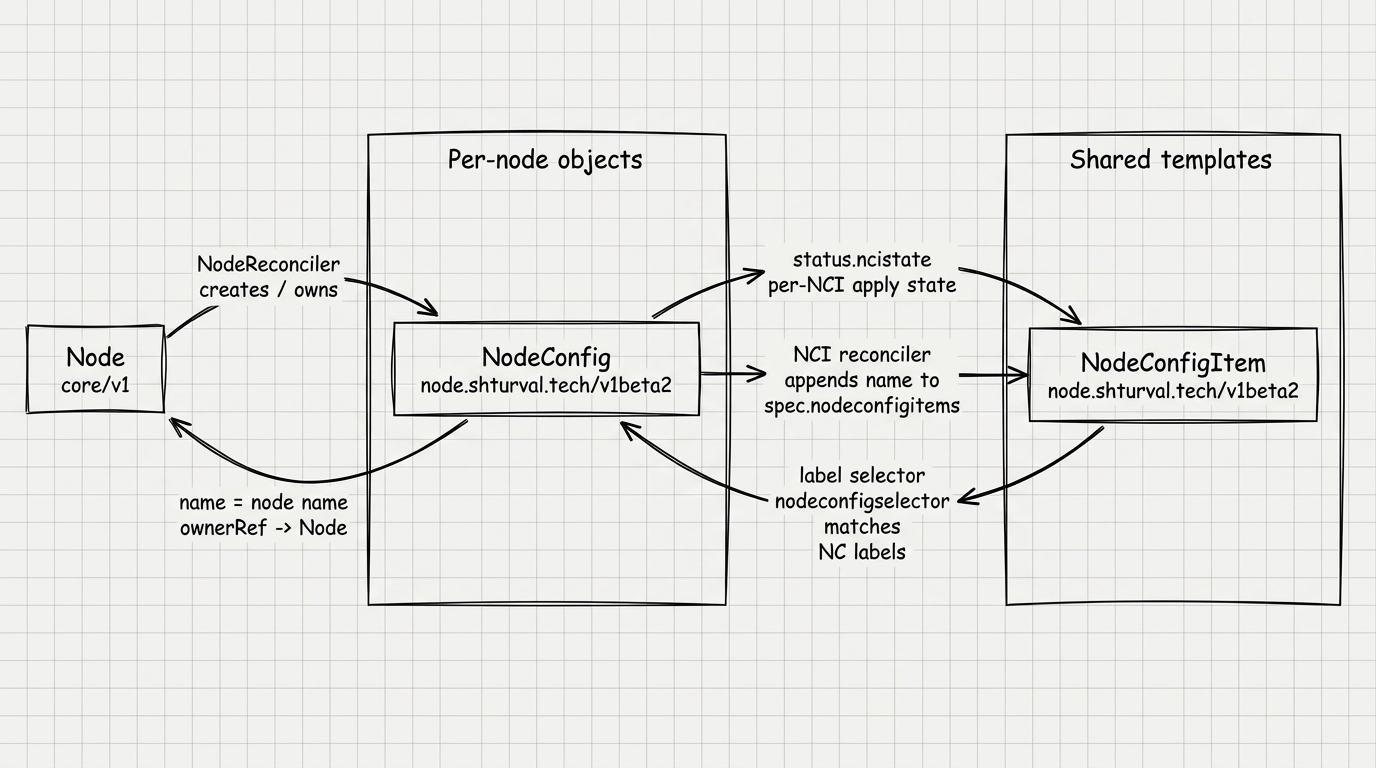
Node Circuit → NodeConfig
| Actor | Action |
|---|---|
NodeReconciler | For each Node supports NodeConfig with the same name |
NodeReconciler | Copies node labels to NodeConfig, assigns applygroup (workers or controlplane) |
NodeReconciler | For a single Control Plane node, sets donotdrain=true |
NodeReconciler | When deleted, Node deletes the associated NodeConfig |
Matching Node and NodeConfig, see the illustration below.
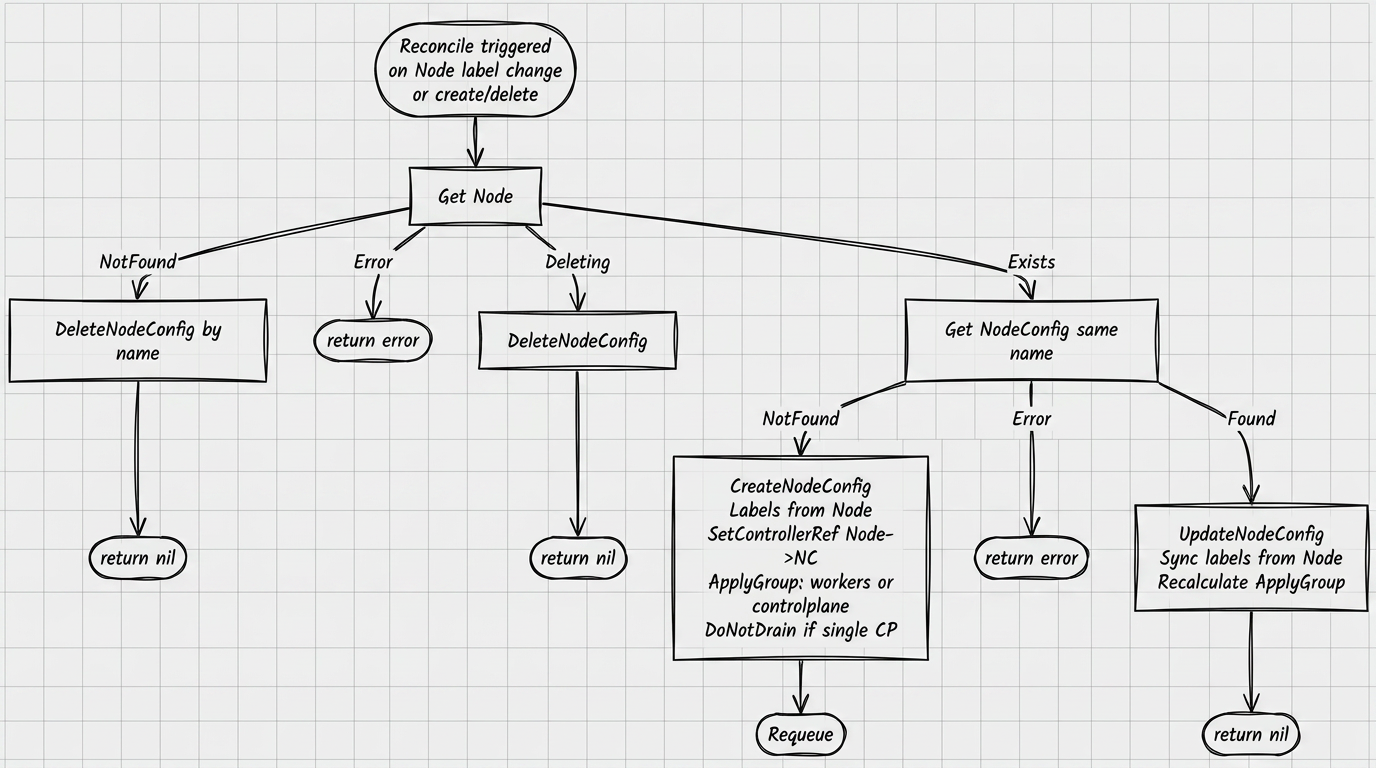
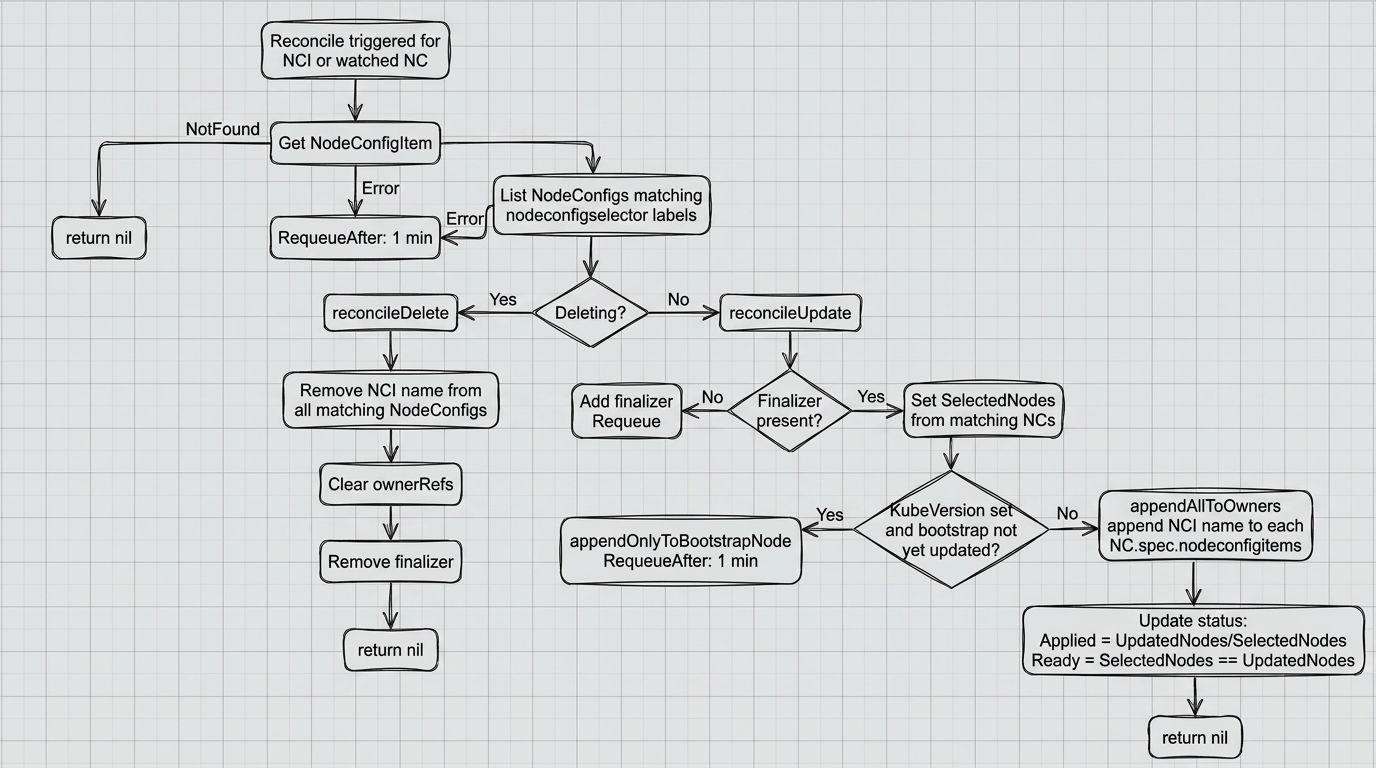
Outline NodeConfigItem → NodeConfig
| Actor | Action |
|---|---|
| Administrator | Creates or updates NodeConfigItem |
NodeConfigItemReconciler | Finds all NodeConfig matching nodeconfigselector |
NodeConfigItemReconciler | Adds the NCI name to the spec.nodeconfigitems selected NodeConfig |
NodeConfigItemReconciler | Updates status.selectednodeconfigs, status.updatednodeconfigs, status.applied, status.ready |
NodeConfigItemReconciler | When deleted, removes the NCI name from the corresponding NodeConfig and removes the finalizer |
Matching NodeConfigItem and selected NodeConfig, see the illustration below.
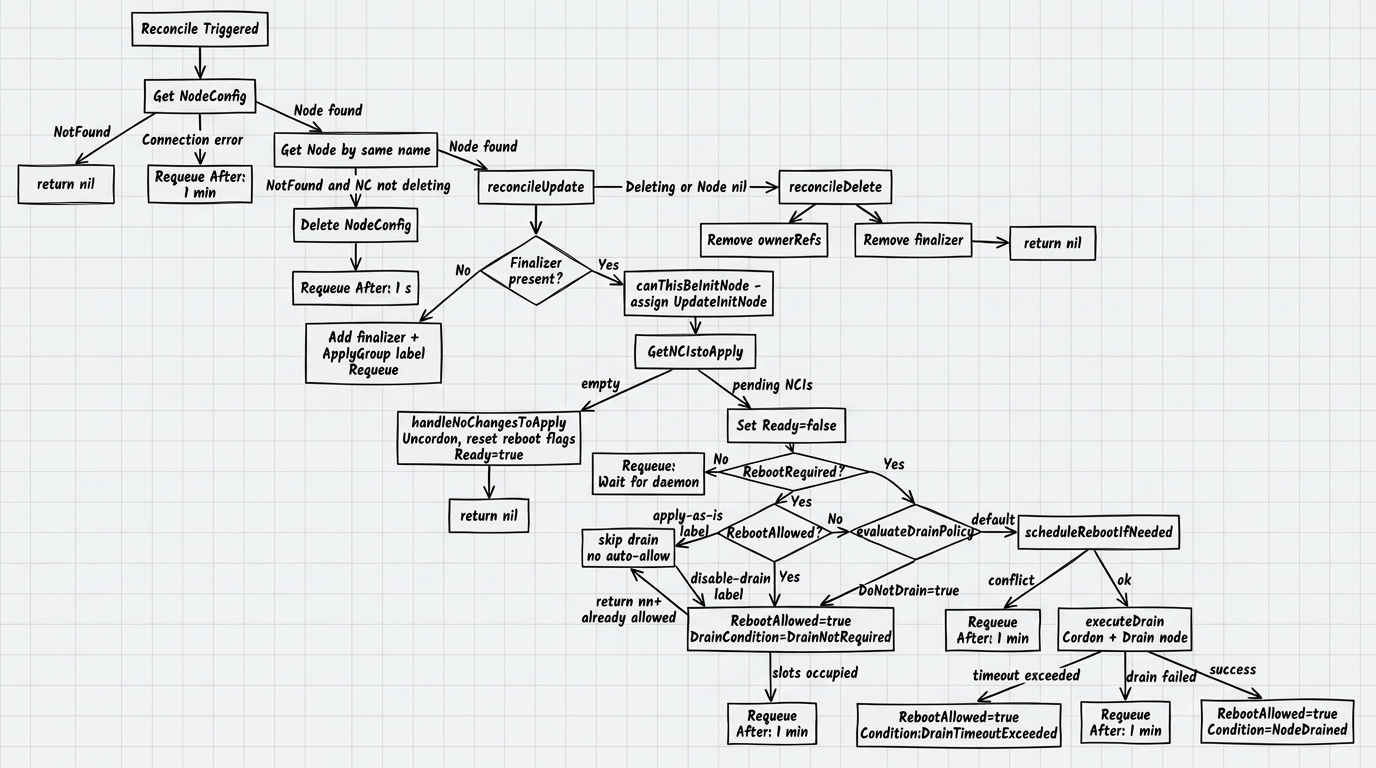
Application and reload circuit
| Step | Actor | Action |
|---|---|---|
| 1 | Demon | Applies the configuration and, if necessary, sets ncistate=updatepending |
| 2 | Demon | Sets rebootrequired=true |
| 3 | Operator | Evaluates drain policy based on node labels and spec.donotdrain |
| 4 | Operator | Schedules a reboot within applygroup; one node is allowed in a group at a time |
| 5 | Operator | Performs cordon and drain, after which it sets rebootallowed=true |
| 6 | Demon | Performs a reboot or reapply without a physical reboot |
| 7 | Demon | After the node returns, sets ncistate=applied |
| 8 | Operator | Clears the reboot flags, performs uncordon and returns ready=true |
Application and reload reconcile flow for NodeConfig, see the illustration below.
Agreement NodeConfig: drain:
Negotiation NodeConfig: reboot queue:
Agreement NodeConfig: conditions:
Drain Policy
| Condition | Behavior |
|---|---|
Node is labeled node.shturval.tech/apply-as-is | The node is not drained, reboot is allowed immediately |
Node is labeled node.shturval.tech/disable-drain | Drain fails, immediate reboot not allowed |
In NodeConfig.spec.donotdrain=true | The node is not drained, reboot is allowed immediately |
| No special conditions | Cordon and drain are executed, then permission to reboot is issued |
Finalizers
| Resource | Finalizer | Purpose |
|---|---|---|
NodeConfig | node.shturval.tech/finalizer | Clearing the owner reference and completing the deletion correctly |
NodeConfigItem | node.shturval.tech/finalizer | Removing NCI reference from related NodeConfig |
Demon std
Startup order
| Step | Action |
|---|---|
| 1 | Sets up signal processing |
| 2 | Runs commworker with a period of 60 seconds |
| 3 | Starts tracking /etc/std/nci.json through fsnotify |
| 4 | If not present, /etc/std/nci.json goes into a wait loop with polling every 10 seconds |
| 5 | If nci.json is already there, but kubeconfig is missing, execute NodePrepare() |
| 6 | Starts the main worker with a period of 60 seconds |
| 7 | Waiting for /etc/kubernetes/kubelet.conf to appear |
| 8 | Checks access to the cluster API |
| 9 | Runs NodeReader and NodeWriter |
Configuration application cycle
| Step | Action |
|---|---|
| 1 | If present, kubeconfig synchronizes NodeConfig and NCI cache from the cluster |
| 2 | Counts checksum of local /etc/std/nci.json |
| 3 | Checks checksum against the annotation node.shturval.tech/initchecksum |
| 4 | Combines local init NCI and cached NCIs into /etc/std/merged.json |
| 5 | Applies the resulting configuration |
| 6 | If the result is NotRequired, marks the NCI as Applied and puts ConfigApplied=True |
| 7 | If the result is Reboot or DrainOnly, marks NCI as UpdatePending, sets rebootrequired=true and waits for rebootallowed=true |
Reboot and reapply
| Script | Behavior |
|---|---|
FullReboot | The daemon performs a system reboot after permission from the operator |
DrainOnly | After permission from the operator, reapplies the configuration without a physical reboot |
6. Operator and daemon parameters
shturval-node-config service
Process flags
| Parameter | Default | Purpose |
|---|---|---|
--metrics-bind-address | 0 | Metrics endpoint address; 0 disables metrics |
--health-probe-bind-address | :8081 | health probe address |
--leader-elect | false | Enabling leader election |
--metrics-secure | true | Publishing metrics over HTTPS |
--enable-http2 | false | Enabling HTTP/2 |
--debug | false | Debug logging mode |
Environment Variables
| Variable | Required | Default | Purpose |
|---|---|---|---|
namespace | Required | — | Namespace operator for forming the ServiceAccount name in webhook |
serviceAccountName | Required | — | Operator ServiceAccount Name |
disable-drain-label-key | Optional | node.shturval.tech/disable-drain | Drain disconnect mark key |
apply-as-is-label-key | Optional | node.shturval.tech/apply-as-is | Key mark immediate reboot without drain |
Demon std
Global CLI flags
| Parameter | Default | Purpose |
|---|---|---|
--kubeconfig | /etc/kubernetes/kubelet.conf | Alternative path to kubeconfig; in production operation the system kubeconfig of the node is used |
-v | 0 | Logging detail level |
--logtostderr | false | Outputting logs to stderr |
--stderrthreshold | 2 | Minimum log level for stderr |
Basic commands
| Command | Purpose |
|---|---|
std daemon | Starting the main daemon loop |
std node init -f /etc/std/init.yaml | Joining a node to a cluster |
std node prepare | Using init NCI locally without connecting to a cluster |
std node preinit | Preparing init files |
std node reset | Node Reset |
std node status | View configuration application status |
std node info | View node information |
std version | View binary version |
Operating restrictions
| Limit | Consequence for the administrator |
|---|---|
Running std requires root access | The daemon must be run as root or via a systemd unit |
The file /etc/kubernetes/kubelet.conf is fixed as the main kubeconfig | Changing this path does not apply to normal operation and requires the release of a new version |
Without /etc/std/nci.json, the daemon only waits for the file | Before putting the node into operation, you need to prepare a local init NCI |
| Queue synchronization repeats every 60 seconds | There may be a technology delay between changing the configuration and trying again |
7. CRD/API reference
Loop API group: node.shturval.tech, version v1beta2.
NodeConfig
NodeConfig is created automatically for each Node and is not intended to be created manually.
Resource characteristics
| Property | Description |
|---|---|
| Short name | nc |
| Scope | Cluster |
| Destination | Represents the configuration and application status for a specific node |
spec
| Field | Type | Required | Description |
|---|---|---|---|
applygroup | string | Yes | Reboot Coordination Group: workers or controlplane |
donotdrain | bool | No | Disables draining before reboot |
nodeconfigitems | []string | No | List of NodeConfigItem names to be applied to the node |
status
| Field | Type | Description |
|---|---|---|
ncistate | []NodeConfigItemReference | Application status of each NCI: updatepending, scheduled, applied, orphaned |
rebootrequired | bool | The demon reported the need to reboot |
rebootscheduled | bool | The operator has queued the node for reboot |
rebootallowed | bool | The operator allowed the reboot |
updateinitnode | bool | Node selected first for Kubernetes upgrade |
ready | bool | All NCIs applied, no reboot required |
lastdrainstarted | metav1.Time | Last drain start time |
conditions | []metav1.Condition | Conditionsapplication and reboot |
Conditions
| Condition | Value True | Value False |
|---|---|---|
NodeDrained | Drain completed, not required or timed out | The drain is still running or ended with an error |
RebootScheduled | Reboot planned | Slots are busy or there is a scheduling conflict |
ConfigApplied | Configuration applied | Applying in progress, an error has occurred, a checksum discrepancy has been detected, a merge error has occurred, or awaiting permission to reload |
Example
apiVersion: node.shturval.tech/v1beta2
kind: NodeConfig
metadata:
  name: node-1
  labels:
    kubernetes.io/os: linux
    node.shturval.tech/applygroup: workers
spec:
  applygroup: workers
  donotdrain: false
  nodeconfigitems:
    - packages-basic-install
    - kubelet-basic
NodeConfigItem
NodeConfigItem is created by the administrator and specifies a reusable configuration template for a group of nodes selected by tags.
Resource characteristics
| Property | Description |
|---|---|
| Short name | nci |
| Scope | Cluster |
| Destination | Configuration template that applies to set NodeConfig by selector |
spec
| Field | Type | Required | Description |
|---|---|---|---|
nodeconfigselector | map[string]string | Yes | Selector NodeConfig |
priority | uint | No | Configuration merge priority |
kubeversion | string | No | Kubernetes version for upgrade according to the init-node first scheme |
repositories | Repos | No | OS package repositories |
packages | Packages | No | OS Packages |
files | Files | No | Files and directories |
ntp | *NTP | No | NTP servers and time zone |
certificates | Certificates | No | CA/TLS OS certificates |
runtimecfg | *ContainerRuntimeConfig | No | containerd configuration |
kernelarguments | KernelArguments | No | Kernel options |
kernelmodules | KernelModules | No | Kernel Modules |
sysctl | *Sysctl | No | sysctl options |
systemdunits | SystemdUnits | No | Systemd unit management |
users | Users | No | OS users |
swap | *Swap | No | Swap management |
iptables | *Iptables | No | iptables settings |
selinux | *Selinux | No | SELinux mode |
kubecerts | *KubeCerts | No | Kubernetes certificate rotation |
kubelet | *Kubelet | No | kubelet options |
kubeapi | *KubeAPI | No | kube-apiserver options, including OIDC and authenticationConfiguration.jwt |
status
| Field | Type | Description |
|---|---|---|
selectednodeconfigs | []string | List of NodeConfig matching selector |
updatednodeconfigs | []string | List of NodeConfig on which NCI has already been applied |
ready | bool | All selected NodeConfig are updated and the list is not empty |
applied | string | Format string UpdatedNodes/SelectedNodes |
Examples
Minimal example of installing packages:
apiVersion: node.shturval.tech/v1beta2
kind: NodeConfigItem
metadata:
  name: packages-basic-install
spec:
  nodeconfigselector:
    node-role.kubernetes.io/worker: ""
  packages:
    - name: chrony
      state: present
    - name: curl
      state: present
Example of kubelet setup:
apiVersion: node.shturval.tech/v1beta2
kind: NodeConfigItem
metadata:
  name: kubelet-basic
spec:
  nodeconfigselector:
    node-role.kubernetes.io/worker: ""
  kubelet:
    cpuManagerPolicy: none
    memoryManagerPolicy: None
    maxPods: 110
    hairpinMode: promiscuous-bridge
OIDC and AuthenticationConfiguration
kube-apiserver can admit users with a JWT token from an external OIDC provider.
Previously, OIDC on kube-apiserver was set with startup flags: --oidc-issuer-url, --oidc-client-id, and the other --oidc-* flags. That allowed only one provider.
Since Kubernetes 1.34 the same settings go into an AuthenticationConfiguration file (apiserver.config.k8s.io/v1). The file has a jwt list: each item is a separate provider with its issuer address (issuer.url) and, if needed, its own discovery address (issuer.discoveryURL).
Do not set --oidc-* flags together with the path to this file (--authentication-config): kube-apiserver will not start.
Fields for a single provider in the GUI are on the Node Configuration (NCI) page. Several providers are set in the manifest only.
In NCI:
spec.kubeapi.oidc— one provider, same as the GUI. The field is still supported: on merge and apply it becomes one JWT entry.spec.kubeapi.authenticationConfiguration.jwt— a list of providers.
Through the platform API, oidc can list several providers: each item is a separate issuer. An item can have several client IDs (clientid), plus exist and discoveryURL. In the cluster NCI object those items are stored in authenticationConfiguration.jwt.
Kubernetes has supported the configuration file since 1.34. The platform switches a node from --oidc-* flags to the file only during a Kubernetes upgrade to 1.36 or newer (the version comes from the kube-apiserver image). Outside an upgrade the mode does not change. Below 1.36 the flags remain: if the NCI has several JWT entries, the node gets only the first issuer (by issuer.url).
After the switch to the file, the daemon does the following on the node:
- Writes the configuration to
/etc/kubernetes/auth-config/authentication-config.yaml. - In the kube-apiserver manifest, points to that file with
--authentication-config=and attaches the/etc/kubernetes/auth-config/directory so the API server can read it. - Removes the old
--oidc-*flags.
If later the file or arguments on the node no longer match the NCI, the daemon brings them back in line.
If several NCI objects apply to a node, their JWT lists are combined.
- The same
issuer.urlin two NCI objects — the description from the NCI with the higher priority is kept. - A new
issuer.url— the provider is added to the list. exist: falseon the entry with that URL — the provider is not in the resulting configuration. Ifexistis omitted ortrue, the provider stays.
One NCI cannot list the same issuer.url twice. The CA certificate must be PEM. Otherwise the object is not saved.
jwt[] field | Description |
|---|---|
exist | true or omitted — the provider must be in the file; false — remove the entry with this issuer.url |
issuer.url | Token issuer URL (iss). Same as oidc.issuerurl. Values in one NCI must be unique |
issuer.discoveryURL | If set, the OpenID Discovery document is fetched from this address instead of {issuer.url}/.well-known/openid-configuration. Include the full path, including /.well-known/openid-configuration. Must differ from issuer.url |
issuer.audiences | Accepted token audiences (aud). Same as oidc.clientid |
issuer.certificateAuthority | Issuer CA in PEM. Same content as oidc.cafile (there the certificate is base64) |
claimMappings.username | Username claim and prefix. Same as oidc.usernameclaim / usernameprefix |
claimMappings.groups | Groups claim and prefix. Same as oidc.groupsclaim / groupsprefix |
An example with a single oidc field is on the Node Configuration (NCI) page. Several providers:
apiVersion: node.shturval.tech/v1beta2
kind: NodeConfigItem
metadata:
  name: auth-config-nci
spec:
  nodeconfigselector:
    node-role.kubernetes.io/control-plane: ""
  kubeapi:
    authenticationConfiguration:
      jwt:
        - issuer:
            url: https://auth.example.com
            discoveryURL: https://discovery.example.com/.well-known/openid-configuration
            audiences:
              - backend
          claimMappings:
            username:
              claim: sub
              prefix: "shturval:"
            groups:
              claim: groups
              prefix: "shturval:"
        - issuer:
            url: https://sso.example.com
            audiences:
              - backend
          claimMappings:
            username:
              claim: sub
        - exist: false
          issuer:
            url: https://old-idp.example.com
          claimMappings:
            username:
              claim: sub
  priority: 100
Data the daemon writes to NodeConfig
Annotations
| Annotation | Purpose |
|---|---|
node.shturval.tech/initchecksum | Monitoring the discrepancy between the local init NCI and the state in the cluster |
Application states
| Field | Description |
|---|---|
Working | Configuration applied |
Done | Configuration successfully applied |
Unreconcilable | The configuration cannot be brought to the required state |
Degraded | An operational error was detected outside of the configuration itself |