Yandex Cloud CSI module (shturval-capy-csi)
About the service
| Parameter | Description |
|---|---|
| GUI name | Yandex Cloud CSI module |
| System name (identifier) | shturval-capy-csi |
| Cluster assignment | Dynamic provisioning of Yandex Cloud disks; attaching Compute Cloud disks as a PersistentVolume on request. |
| Critical | No |
| Public repository | Yandex Cloud CSI driver |
| Dependencies | shturval-networking |
| Namespace | shturval-capy-csi |
| Chart version in platform 2.15 | 2.15.0 |
Purpose
shturval-capy-csi is the CSI module for clusters that use the Yandex Cloud provider. The driver disk-csi-driver.mks.ycloud.io creates disks in the cloud folder and attaches them to pods as a PersistentVolume.
The service account needs the k8s.clusters.agent role. The compute.editor and alb.editor roles cover nodes and the load balancer; they are not enough for CSI.
Where to configure
Services and repositories → Installed services → shturval-capy-csi → Manage.
Storage classes: StorageClasses.
Automatic installation when creating a cluster
The module is installed when the provider instance allows CSI and CSI integration is enabled during client cluster creation.
Together with the chart, the platform creates the cloud connection in the shturval-capy-csi namespace. The data comes from the provider instance. It is not part of the chart custom values:
| Object | Name | Key | Contents |
|---|---|---|---|
| ConfigMap | yc-csi-config | folderId | Yandex Cloud folder ID |
| Secret | yc-csi-sa-key | sa-key.json | Service account JSON key |
The controller reads the folder from the ConfigMap and mounts the key at /etc/yc-disk-csi-driver/sa-key.json. The chart does not create these objects. Chart values only name them.
After installation the cluster has two StorageClasses:
| Name | Disk | File system | Volume binding | Reclaim | Default |
|---|---|---|---|---|---|
yc-network-hdd | network-hdd | ext4 | WaitForFirstConsumer | Delete | Yes, when this CSI is the default provisioner |
yc-network-ssd | network-ssd | ext4 | WaitForFirstConsumer | Delete | No |
Volume expansion is disabled on these classes (allowVolumeExpansion: false).
The platform writes these classes into the service custom values. The key and the folder ID are not part of the custom values. If shturval-capy-csi is not the default provisioner, isDefault for yc-network-hdd is false.
Default custom values
storageClasses:
  - name: yc-network-hdd
    isDefault: true
    type: network-hdd
    fstype: ext4
    volumeBindingMode: WaitForFirstConsumer
    allowVolumeExpansion: false
    reclaimPolicy: Delete
  - name: yc-network-ssd
    isDefault: false
    type: network-ssd
    fstype: ext4
    volumeBindingMode: WaitForFirstConsumer
    allowVolumeExpansion: false
    reclaimPolicy: Delete
shturval-networking must be enabled in the cluster. Change chart parameters through ShturvalServicePatch (SSP).
By default, deleting the cluster does not delete CSI disks in Yandex Cloud. To remove persistent volumes together with the cluster, set that when creating the cluster.
Manual installation
If CSI integration was left off when the cluster was created, go to Services and repositories → Available charts, find shturval-capy-csi in the shturval repository, select management mode Auto and the chart version, namespace shturval-capy-csi, and click Save.
Screenshot: installing the shturval-capy-csi chart
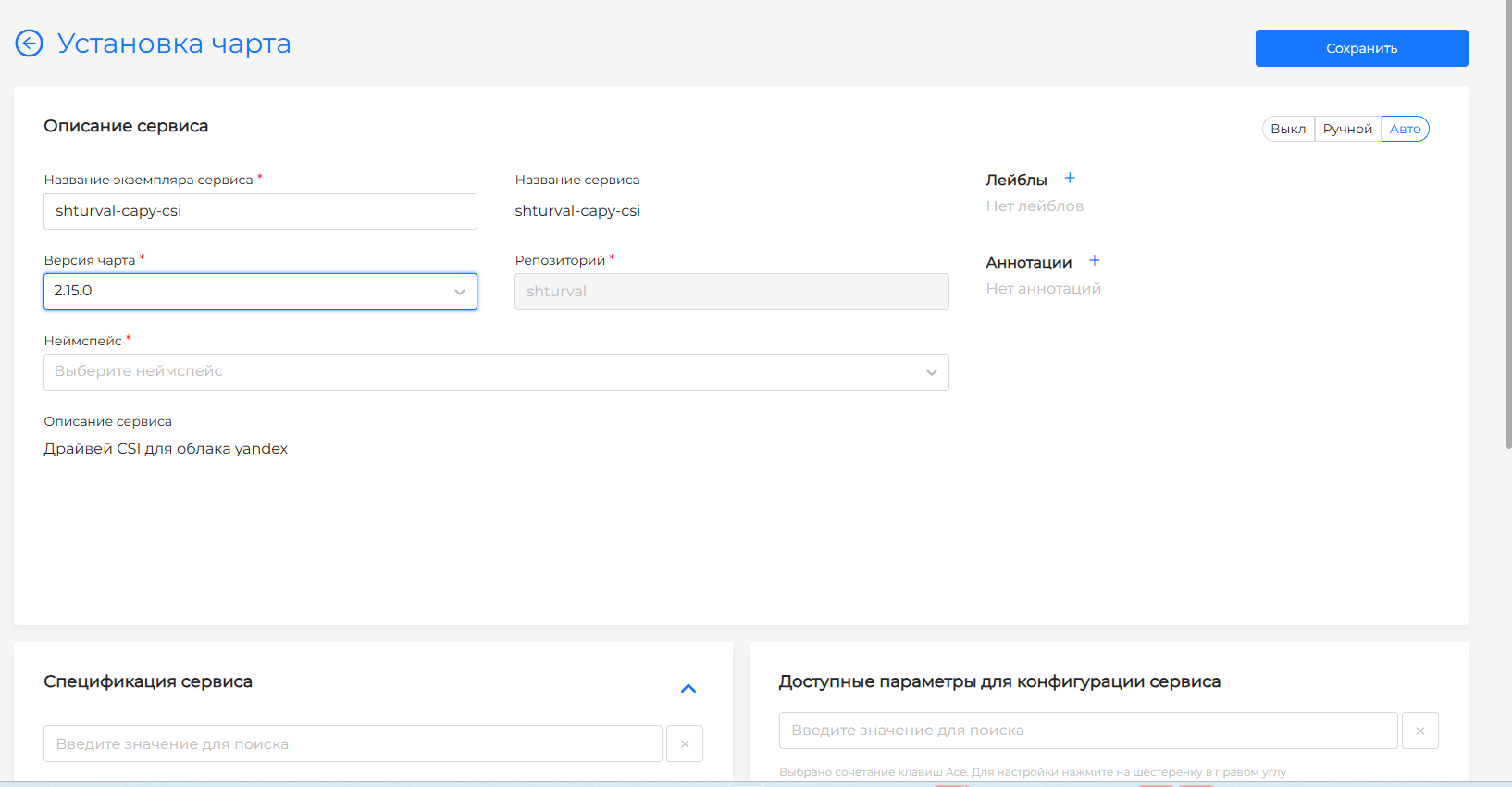
A manual install creates the same StorageClasses. It does not create the cloud connection: the chart waits for the ConfigMap and Secret, and the platform creates them only when CSI integration is enabled.
Create both objects in the shturval-capy-csi namespace. Until they exist, the controller does not start.
- Storage → ConfigMaps → + Add ConfigMap. Name —
yc-csi-config. Key —folderId, value — the folder ID. - Storage → Secrets. Name —
yc-csi-sa-key, type —Opaque. Key —sa-key.json, value — the JSON key of a service account with thek8s.clusters.agentrole.
ConfigMap and Secret example
apiVersion: v1
kind: ConfigMap
metadata:
  name: yc-csi-config
  namespace: shturval-capy-csi
data:
  folderId: <folder-id>
---
apiVersion: v1
kind: Secret
metadata:
  name: yc-csi-sa-key
  namespace: shturval-capy-csi
type: Opaque
stringData:
  sa-key.json: |
        <JSON key contents>
Object names can be changed through SSP: configMap.name, configMap.folderIdKey, secret.name, secret.key. The folder ID and the key itself are not passed in custom values.
SSP example
apiVersion: ops.shturval.tech/v1beta2
kind: ShturvalServicePatch
metadata:
  name: shturval-capy-csi-connection
spec:
  shturvalServiceConfigName: shturval-capy-csi
  customvalues:
    configMap:
      name: yc-disk-config
      folderIdKey: folderId
    secret:
      name: yc-disk-sa-key
      key: sa-key.json
| Parameter | Description | Type | Example |
|---|---|---|---|
configMap.name | ConfigMap name in the shturval-capy-csi namespace | string | yc-disk-config |
configMap.folderIdKey | ConfigMap key that holds the folder ID | string | folderId |
secret.name | Secret name in the shturval-capy-csi namespace | string | yc-disk-sa-key |
secret.key | Secret key with the service account JSON key | string | sa-key.json |
How to deploy a service — How to deploy a new service.