Module for searching nodes with running hostport services (shturval-coreha)
About the service
| Parameter | Description |
|---|---|
| GUI name | Module for searching nodes with running hostport services |
| System name (identifier) | shturval-coreha |
| Cluster Assignment | Dynamically adding backends to HAProxy: tracking Ingress pods from hostPort and generating DNS records for the balancer. |
| Critical | No |
| Public repository | — (component in the delivery of the Shturval platform) |
| Dependencies | shturval-ingress-controller |
| Namespace | kube-system |
Purpose
shturval-coreha is designed for dynamically adding backends to an external balancer (HAProxy). The service is needed if you use an external balancer for Ingress. By default it is installed in the cluster in the disabled state. To enable: Services and repositories → Installed services → find the service by name above and change the mode. If the service is not in the list, install it from the Available charts page (chart shturval-coreha), selecting the namespace kube-system.
Note: when setting up the search for Ingress Controller pods, you will also need to make changes to the External connection control module (shturval-ingress-controller).
Where to configure
Services and repositories → Installed services → find Module for searching nodes with running hostport services (shturval-coreha) → Manage. If you need to redefine chart parameters, apply the changes via ShturvalServicePatch.
Configuration parameters (customvalues)
| Parameter | Description | Example / default |
|---|---|---|
config.zoneName | DNS zone name for records | cluster-prod01-dc1.shturval |
config.labelKey | Label key by which pods are tracked; the key value is involved in the formation of the DNS name | ingress.cluster/name |
config.dns_port | Module DNS server port | 1053 |
config_name | CoreDNS configuration file name | shturval-coreha-config |
strictHostPort | Strict selection of pods with hostPort | false |
Example customvalues for shturval-coreha
config:
  zoneName: cluster-prod01-dc1.shturval
Link with Ingress and HAProxy
When shturval-coreha is running in the cluster and you need to configure the search for Ingress Controller pods:
- ShturvalServicePatch for shturval-ingress-controller - set the label
ingress.cluster/nameand, if necessary, enable hostPort, NodePort (for example, 30080/30443).
Example ShturvalServicePatch for ingress-controller
apiVersion: ops.shturval.tech/v1beta2
kind: ShturvalServicePatch
metadata:
  name: <resource name>
spec:
  shturvalServiceConfigName: shturval-ingress-controller
  customvalues:
    controller:
      labels:
        ingress.cluster/name: <your parameter value>
      hostPort:
        enabled: true # When enabled, the ingress controller pods will also use ports 80 and 443 on cluster nodes
      service:
        nodePorts:
          http: "<your parameter value>"
          https: "<your parameter value>"
        type: NodePort
The DNS record is formed as <label_value>.<namespace>.<config.zoneName> (for example, default-nginx.ingress.cluster-prod01-dc1.shturval).
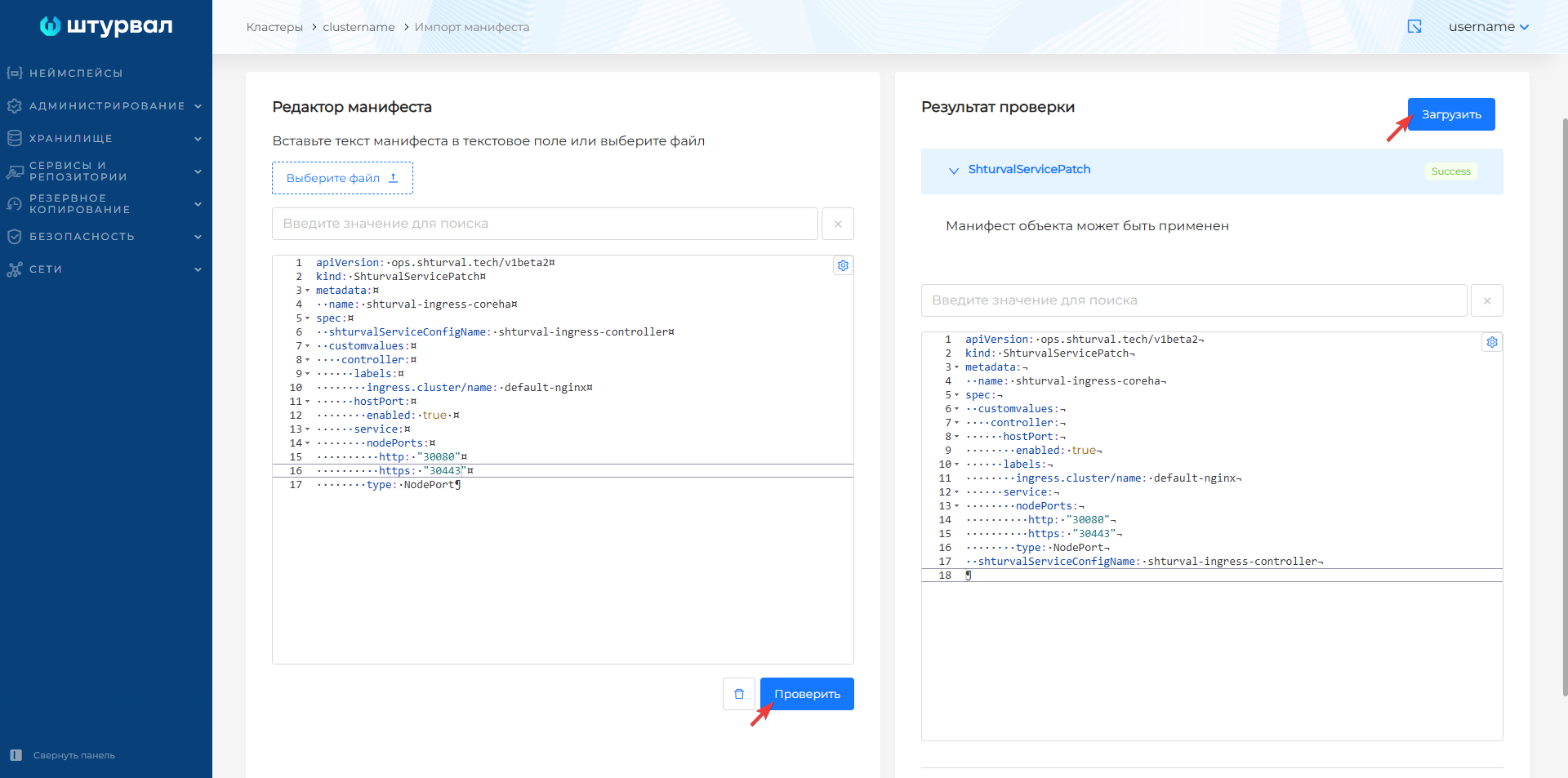
- Upload ShturvalServicePatch to the cluster (import manifests or kubectl).
Screenshot of ShturvalServicePatch for ingress-controller
- Configure HAProxy - use a resolver pointing to the cluster API server and DNS port (for example, 1053), backend with
server-templateby DNS name.
Example of HAProxy configuration snippet
resolvers coredns-cluster
    nameserver ns1 <api-server-vip>:1053
    accepted_payload_size 8192

backend cluster-prod01-dc1-ingress-http
    balance source
    mode tcp
    server-template daemonset 2 default-nginx.ingress.cluster-prod01-dc1.shturval:80 check resolvers coredns-cluster init-addr none
- Check - from a node with access to the cluster API server:
dig @<api-server-vip> -p 1053 default-nginx.ingress.cluster-prod01-dc1.shturval(IP of Ingress pods should be returned).
How to deploy this service - How to deploy a new service.