Snapshots
A snapshot is a copy of a Persistent Volume (PVC) at a point in time without creating a new volume. Snapshots are created by the storage backend through compatible CSI drivers and are used for fast rollback, volume cloning, and restore points before risky operations (for example, before a database upgrade).
In the Shturval platform, snapshot support is provided by the shturval-snapshotter operator (CSI Snapshotter). The operator is critical for the platform (it cannot be disabled). By default it is installed and enabled in client clusters and in the management cluster. For details, see shturval-snapshotter.
What snapshots are for
- Restore point — before an application upgrade, database migration, or bulk data change, create a snapshot and roll back if needed.
- Volume cloning — create a new PVC with the same data from a snapshot (without exporting data out of the storage system).
- Short-term protection — a quick snapshot on the same storage platform without copying to external storage.
Snapshots do not replace a full backup of the cluster and data to external storage. For the differences, see What is the difference between backups and snapshots.
Kubernetes objects for snapshots
The snapshotter operator installs the following CRDs (Custom Resource Definitions):
| Object | Description |
|---|---|
| VolumeSnapshotClass | Snapshot class: attributes for creating snapshots; the main parameter is the CSI driver (the StorageClass equivalent for snapshots). |
| VolumeSnapshotContent | The actual snapshot contents in the storage system, bound to a VolumeSnapshot object (often created automatically). |
| VolumeSnapshot | A namespaced Kubernetes object that requests a snapshot of a specific PVC. |
Typical flow: the user creates a VolumeSnapshot, specifying the source PVC and a VolumeSnapshotClass. The snapshotter controller creates the snapshot through the CSI driver and, on success, creates or updates VolumeSnapshotContent. When the snapshot is ready, you can create a new PVC from it (restore or clone).
CSI driver support
Snapshots require a compatible CSI driver. Behavior depends on the driver: some create a snapshot without stopping the workload, others only after stopping the workload (pods must not use the PVC).
| Storage type | CSI / module | Snapshot support |
|---|---|---|
| Local (RawFile) | shturval-local-csi | Yes, only after stopping the workload |
| CephFS | shturval-ceph-csi | Yes, without stopping the workload |
| Ceph RBD | shturval-ceph-csi | Yes, without stopping the workload |
| NFS | shturval-nfs-csi | Yes |
| VMware vSphere | shturval-capvs-csi | Yes1 |
| OpenStack Cinder | shturval-capos-csi | Yes |
| oVirt | shturval-capov-csi | No |
| vCloud Director | shturval-capvcd-csi | No |
1 For VMware vSphere, enable the snapshotter sidecar in the CSI customvalues and grant the vCenter account permissions for volume snapshots (CNS Searchable, Datastore.FileManagement). See VMware vSphere account requirements, the vSphere tab in step 1 and step 2.
Before using snapshots, make sure snapshotter CRDs (shturval-snapshotter-crds) and the snapshotter operator (shturval-snapshotter) are enabled, along with the CSI module for your volume type. Deploy the CRDs first, then the operator. VolumeSnapshotClass must reference a driver compatible with your StorageClass.
Where to manage snapshots
- Operator status: Services and Repositories → Installed Services → find Snapshotter operator (
shturval-snapshotter) → Manage. - Snapshot objects (CR): select the cluster → Administration → Custom Resources. In the search field, enter
snapto filter CRDs related to volume snapshots.
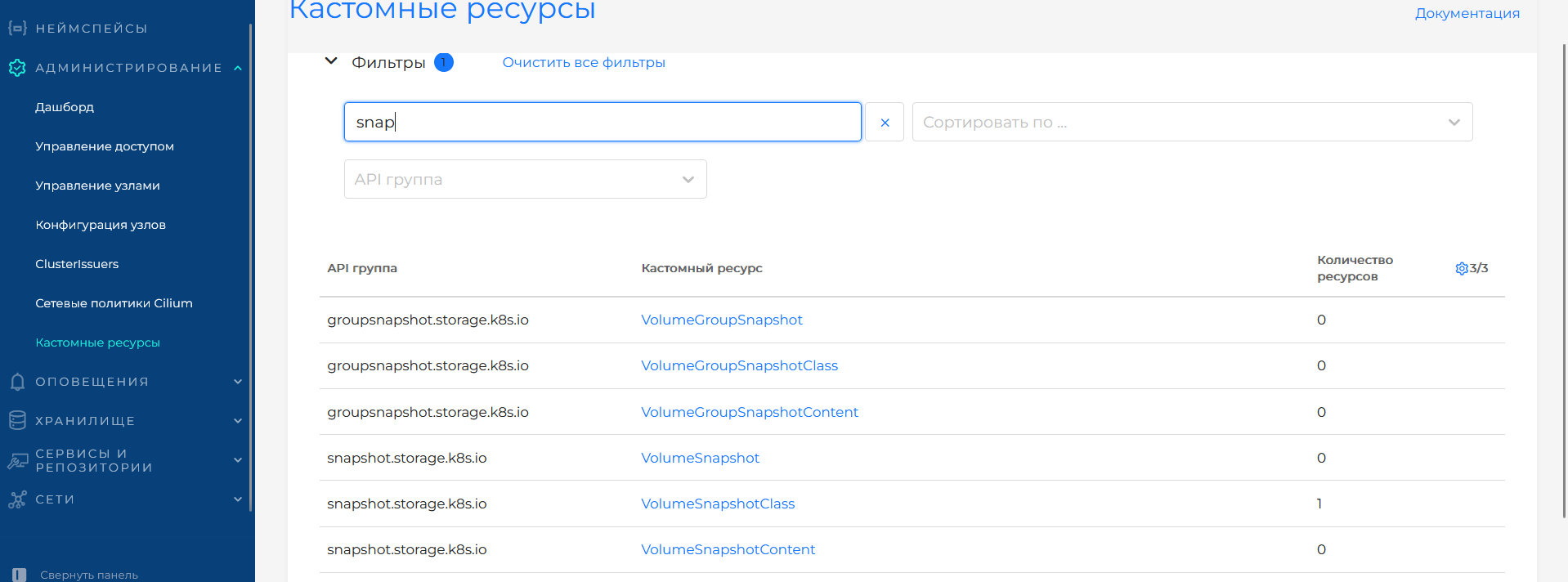
The Custom Resources table shows the API group, custom resource, and number of resources in the cluster. Individual volume snapshots use the snapshot.storage.k8s.io group — VolumeSnapshot, VolumeSnapshotClass, VolumeSnapshotContent. The groupsnapshot.storage.k8s.io group contains types for group snapshots: VolumeGroupSnapshot, VolumeGroupSnapshotClass, VolumeGroupSnapshotContent. Click a resource name to open its instances and create or view objects. Sorting, API-group filters, and Clear all filters are available.
You can also apply manifests through manifest import or kubectl apply -f.
How to create, restore, and clone a volume
Commands in each step are the same for all drivers. VolumeSnapshotClass, VolumeSnapshot, and PVC manifests are on the tab for your driver.
Step 1. Check VolumeSnapshotClass
kubectl get VolumeSnapshotClass
If the class for your driver is missing, create it as shown below for each CSI provider. Upload the VolumeSnapshotClass manifest through manifest import: import icon to the left of your username → paste or upload YAML → Check → Save.
The shturval-local-csi module (driver rawfile.csi.openebs.io). Snapshot support starts with version 2.14.0.
The platform creates VolumeSnapshotClass rawfile-localpv. If the class is missing:
apiVersion: snapshot.storage.k8s.io/v1
kind: VolumeSnapshotClass
metadata:
  name: rawfile-localpv
driver: rawfile.csi.openebs.io
deletionPolicy: Delete
parameters: {}
| Parameter | Description | Type | Example |
|---|---|---|---|
metadata.name | VolumeSnapshotClass name | string | rawfile-localpv |
driver | CSI driver. Must match the StorageClass provisioner | string | rawfile.csi.openebs.io |
deletionPolicy | Delete (Delete) or keep (Retain) snapshot contents when the VolumeSnapshot is deleted | string | Delete |
parameters | Driver parameters. Not required for RawFile | object | {} |
The shturval-ceph-csi module (driver cephfs.csi.ceph.com). A VolumeSnapshotClass is not created by default. The clusterID, fsName, and secret parameters must match the StorageClass and CSI module. Secret namespace: ceph-csi-operator.
apiVersion: snapshot.storage.k8s.io/v1
kind: VolumeSnapshotClass
metadata:
  name: cephfs
driver: cephfs.csi.ceph.com
deletionPolicy: Delete
parameters:
  clusterID: <clusterID>
  fsName: <filesystem-name>
  csi.storage.k8s.io/snapshotter-secret-name: <secret-name>
  csi.storage.k8s.io/snapshotter-secret-namespace: ceph-csi-operator
| Parameter | Description | Type | Example |
|---|---|---|---|
metadata.name | VolumeSnapshotClass name | string | cephfs |
driver | CephFS CSI driver. Must match the StorageClass provisioner | string | cephfs.csi.ceph.com |
deletionPolicy | Delete (Delete) or keep (Retain) snapshot contents when the VolumeSnapshot is deleted | string | Delete |
parameters.clusterID | Ceph cluster ID. Must match the StorageClass | string | my-cluster-id |
parameters.fsName | CephFS file system name | string | myfs |
parameters.csi.storage.k8s.io/snapshotter-secret-name | Secret with Ceph credentials for the snapshotter | string | csi-cephfs-secret |
parameters.csi.storage.k8s.io/snapshotter-secret-namespace | Secret namespace | string | ceph-csi-operator |
The shturval-ceph-csi module (driver rbd.csi.ceph.com). A VolumeSnapshotClass is not created by default. The clusterID, pool, and secret parameters must match the StorageClass and CSI module. Secret namespace: ceph-csi-operator.
apiVersion: snapshot.storage.k8s.io/v1
kind: VolumeSnapshotClass
metadata:
  name: cephrbd
driver: rbd.csi.ceph.com
deletionPolicy: Delete
parameters:
  clusterID: <clusterID>
  pool: <pool-name>
  csi.storage.k8s.io/snapshotter-secret-name: <secret-name>
  csi.storage.k8s.io/snapshotter-secret-namespace: ceph-csi-operator
| Parameter | Description | Type | Example |
|---|---|---|---|
metadata.name | VolumeSnapshotClass name | string | cephrbd |
driver | Ceph RBD CSI driver. Must match the StorageClass provisioner | string | rbd.csi.ceph.com |
deletionPolicy | Delete (Delete) or keep (Retain) snapshot contents when the VolumeSnapshot is deleted | string | Delete |
parameters.clusterID | Ceph cluster ID. Must match the StorageClass | string | my-cluster-id |
parameters.pool | Ceph pool that holds the RBD images | string | rbd |
parameters.csi.storage.k8s.io/snapshotter-secret-name | Secret with Ceph credentials for the snapshotter | string | csi-ceph-secret |
parameters.csi.storage.k8s.io/snapshotter-secret-namespace | Secret namespace | string | ceph-csi-operator |
The shturval-capvs-csi module (driver csi.vsphere.vmware.com).
Enable the csi-snapshotter sidecar in the CSI controller by applying a ShturvalServicePatch to shturval-capvs-csi:
apiVersion: ops.shturval.tech/v1beta2
kind: ShturvalServicePatch
metadata:
  name: capvs-csi-volume-snapshots
spec:
  shturvalServiceConfigName: shturval-capvs-csi
  customvalues:
    controller:
      config:
        block-volume-snapshot: true
| Parameter | Description | Type | Example |
|---|---|---|---|
metadata.name | ShturvalServicePatch resource name | string | capvs-csi-volume-snapshots |
spec.shturvalServiceConfigName | SSC name of the vSphere CSI service | string | shturval-capvs-csi |
spec.customvalues.controller.config.block-volume-snapshot | Enable the csi-snapshotter sidecar in the CSI controller. Without true the sidecar does not start | boolean | true |
Without this parameter, the snapshotter sidecar is not present in the CSI controller pod.
Then create the VolumeSnapshotClass:
apiVersion: snapshot.storage.k8s.io/v1
kind: VolumeSnapshotClass
metadata:
  name: vspherecsi
driver: csi.vsphere.vmware.com
deletionPolicy: Delete
parameters: {}
| Parameter | Description | Type | Example |
|---|---|---|---|
metadata.name | VolumeSnapshotClass name | string | vspherecsi |
driver | vSphere CSI driver. Must match the StorageClass provisioner | string | csi.vsphere.vmware.com |
deletionPolicy | Delete (Delete) or keep (Retain) snapshot contents when the VolumeSnapshot is deleted | string | Delete |
parameters | Driver parameters. Not required for vSphere | object | {} |
The shturval-capos-csi module (driver cinder.csi.openstack.org).
apiVersion: snapshot.storage.k8s.io/v1
kind: VolumeSnapshotClass
metadata:
  name: cinder
driver: cinder.csi.openstack.org
deletionPolicy: Delete
parameters:
  force-create: "true"
| Parameter | Description | Type | Example |
|---|---|---|---|
metadata.name | VolumeSnapshotClass name | string | cinder |
driver | Cinder CSI driver. Must match the StorageClass provisioner | string | cinder.csi.openstack.org |
deletionPolicy | Delete (Delete) or keep (Retain) snapshot contents when the VolumeSnapshot is deleted | string | Delete |
parameters.force-create | Create a snapshot without stopping the workload. Without "true" a snapshot of an in-use volume is not created | string | “true” |
The shturval-nfs-csi module (driver nfs.csi.k8s.io).
apiVersion: snapshot.storage.k8s.io/v1
kind: VolumeSnapshotClass
metadata:
  name: nfs
driver: nfs.csi.k8s.io
deletionPolicy: Delete
parameters: {}
| Parameter | Description | Type | Example |
|---|---|---|---|
metadata.name | VolumeSnapshotClass name | string | nfs |
driver | NFS CSI driver. Must match the StorageClass provisioner | string | nfs.csi.k8s.io |
deletionPolicy | Delete (Delete) or keep (Retain) snapshot contents when the VolumeSnapshot is deleted | string | Delete |
parameters | Driver parameters. Not required for NFS CSI | object | {} |
Step 2. Create a VolumeSnapshot
Select the driver tab, set the source PVC, and apply the manifest:
kubectl apply -f volumesnapshot.yaml
Snapshots are created only after stopping the workload: pods must not use the PVC. Before you create the VolumeSnapshot, stop the workload:
kubectl scale statefulset <statefulset-name> -n <namespace> --replicas=0
apiVersion: snapshot.storage.k8s.io/v1
kind: VolumeSnapshot
metadata:
  name: <snapshot-name>
  namespace: <namespace>
spec:
  volumeSnapshotClassName: rawfile-localpv
  source:
    persistentVolumeClaimName: <pvc-name>
| Parameter | Description | Type | Example |
|---|---|---|---|
metadata.name | Snapshot name | string | app-snap-1 |
metadata.namespace | Namespace of the source PVC | string | app-data |
spec.volumeSnapshotClassName | VolumeSnapshotClass of the RawFile driver | string | rawfile-localpv |
spec.source.persistentVolumeClaimName | PVC to snapshot | string | data-app-0 |
Note: RawFile snapshots are a local physical copy on the node. For production workloads, prefer external storage (Ceph, vSphere, and others) and a full backup.
Snapshots are created without stopping the workload. Pods that use the PVC can keep running — you do not need to scale the Deployment or StatefulSet to 0 replicas.
apiVersion: snapshot.storage.k8s.io/v1
kind: VolumeSnapshot
metadata:
  name: <snapshot-name>
  namespace: <namespace>
spec:
  volumeSnapshotClassName: cephfs
  source:
    persistentVolumeClaimName: <pvc-name>
| Parameter | Description | Type | Example |
|---|---|---|---|
metadata.name | Snapshot name | string | app-snap-1 |
metadata.namespace | Namespace of the source PVC | string | app-data |
spec.volumeSnapshotClassName | VolumeSnapshotClass of the CephFS driver | string | cephfs |
spec.source.persistentVolumeClaimName | PVC to snapshot | string | data-app-0 |
Snapshots are created without stopping the workload. Pods that use the PVC can keep running — you do not need to scale the Deployment or StatefulSet to 0 replicas.
apiVersion: snapshot.storage.k8s.io/v1
kind: VolumeSnapshot
metadata:
  name: <snapshot-name>
  namespace: <namespace>
spec:
  volumeSnapshotClassName: cephrbd
  source:
    persistentVolumeClaimName: <pvc-name>
| Parameter | Description | Type | Example |
|---|---|---|---|
metadata.name | Snapshot name | string | app-snap-1 |
metadata.namespace | Namespace of the source PVC | string | app-data |
spec.volumeSnapshotClassName | VolumeSnapshotClass of the Ceph RBD driver | string | cephrbd |
spec.source.persistentVolumeClaimName | PVC to snapshot | string | data-app-0 |
The vCenter account used by CSI must have permissions for volume snapshots. An account that can provision PVCs may still lack VolumeSnapshot rights.
For VolumeSnapshot, the CSI user role must include:
- CNS > Searchable (
Cns.Searchable) — service role No. 2, on the vCenter root object; - Datastore > Low level file operations (
Datastore.FileManagement) — service role No. 1, on the datastore that holds the volumes. CNS requires this privilege to create and delete block volume snapshots.
Service role No. 1 also includes Virtual machine > Snapshot management (Create / Remove / Rename / Revert snapshot). For CSI volume snapshots (FCD/CNS), the vSphere API specifies Datastore.FileManagement; the exact privilege set may depend on the vSphere version.
The full role list is in VMware vSphere account requirements.
apiVersion: snapshot.storage.k8s.io/v1
kind: VolumeSnapshot
metadata:
  name: <snapshot-name>
  namespace: <namespace>
spec:
  volumeSnapshotClassName: vspherecsi
  source:
    persistentVolumeClaimName: <pvc-name>
| Parameter | Description | Type | Example |
|---|---|---|---|
metadata.name | Snapshot name | string | app-snap-1 |
metadata.namespace | Namespace of the source PVC | string | app-data |
spec.volumeSnapshotClassName | VolumeSnapshotClass of the vSphere driver | string | vspherecsi |
spec.source.persistentVolumeClaimName | PVC to snapshot | string | data-app-0 |
If the VolumeSnapshotClass has force-create: "true", the snapshot is created without stopping the workload: pods that use the PVC can keep running.
apiVersion: snapshot.storage.k8s.io/v1
kind: VolumeSnapshot
metadata:
  name: <snapshot-name>
  namespace: <namespace>
spec:
  volumeSnapshotClassName: cinder
  source:
    persistentVolumeClaimName: <pvc-name>
| Parameter | Description | Type | Example |
|---|---|---|---|
metadata.name | Snapshot name | string | app-snap-1 |
metadata.namespace | Namespace of the source PVC | string | app-data |
spec.volumeSnapshotClassName | VolumeSnapshotClass of the Cinder driver | string | cinder |
spec.source.persistentVolumeClaimName | PVC to snapshot | string | data-app-0 |
Snapshots are created without stopping the workload.
apiVersion: snapshot.storage.k8s.io/v1
kind: VolumeSnapshot
metadata:
  name: <snapshot-name>
  namespace: <namespace>
spec:
  volumeSnapshotClassName: nfs
  source:
    persistentVolumeClaimName: <pvc-name>
| Parameter | Description | Type | Example |
|---|---|---|---|
metadata.name | Snapshot name | string | app-snap-1 |
metadata.namespace | Namespace of the source PVC | string | app-data |
spec.volumeSnapshotClassName | VolumeSnapshotClass of the NFS driver | string | nfs |
spec.source.persistentVolumeClaimName | PVC to snapshot | string | data-app-0 |
Step 3. Wait until the snapshot is ready
kubectl get VolumeSnapshot -n <namespace>
Confirm that the READYTOUSE column is true.
| CSI / module | READYTOUSE wait notes |
|---|---|
| RawFile (shturval-local-csi) | Status does not become true immediately: the snapshot is a physical copy of the data. Copy on the node: /var/csi/rawfile/<PV-name>/snapshots. When the status is true, you can start the workload again: kubectl scale statefulset <statefulset-name> -n <namespace> --replicas=1 |
| CephFS (shturval-ceph-csi) | — |
| Ceph RBD (shturval-ceph-csi) | — |
| vSphere (shturval-capvs-csi) | If the status stays false, check the block-volume-snapshot sidecar (step 1) and the vCenter account privileges (step 2) |
| OpenStack (shturval-capos-csi) | If a snapshot without stopping the workload is not created, check force-create: "true" in the VolumeSnapshotClass (step 1) |
| NFS (shturval-nfs-csi) | — |
Step 4. Restore or clone the PVC
Set the snapshot in dataSource and apply the PersistentVolumeClaim manifest. The requested volume size must be at least the original size.
- Restore the same volume (for example, a StatefulSet PVC): stop the workload, delete the original PVC, create a PVC with the same name from the snapshot, then start the workload again.
Example of restoring a StatefulSet PVC:
kubectl scale statefulset <statefulset-name> -n <namespace> --replicas=0
kubectl delete pvc -n <namespace> <pvc-name>
kubectl apply -f pvc-from-snapshot.yaml
kubectl scale statefulset <statefulset-name> -n <namespace> --replicas=1
- Clone: create a PVC with a new name. You do not have to delete the original volume:
kubectl apply -f pvc-from-snapshot.yaml
In the PVC set StorageClass local-path. It typically uses volumeBindingMode: WaitForFirstConsumer: the PVC stays Pending until a pod mounts it.
apiVersion: v1
kind: PersistentVolumeClaim
metadata:
  name: <pvc-name>
  namespace: <namespace>
spec:
  storageClassName: local-path
  dataSource:
    name: <snapshot-name>
    kind: VolumeSnapshot
    apiGroup: snapshot.storage.k8s.io
  accessModes:
    - ReadWriteOnce
  resources:
    requests:
      storage: <size>
| Parameter | Description | Type | Example |
|---|---|---|---|
metadata.name | PVC name. To restore a StatefulSet, use the same name as the original PVC | string | data-app-0 |
metadata.namespace | PVC namespace | string | app-data |
spec.storageClassName | StorageClass of the original RawFile volume | string | local-path |
spec.dataSource.name | Source VolumeSnapshot name | string | app-snap-1 |
spec.dataSource.kind | Data source kind | string | VolumeSnapshot |
spec.dataSource.apiGroup | Snapshot API group | string | snapshot.storage.k8s.io |
spec.accessModes | Access mode. Usually matches the original PVC | array | ReadWriteOnce |
spec.resources.requests.storage | Volume size, not smaller than the original | string | 100Mi |
In the PVC use the same StorageClass as the original volume. The default name after installing the module is csi-cephfs-sc.
apiVersion: v1
kind: PersistentVolumeClaim
metadata:
  name: <pvc-name>
  namespace: <namespace>
spec:
  storageClassName: csi-cephfs-sc
  dataSource:
    name: <snapshot-name>
    kind: VolumeSnapshot
    apiGroup: snapshot.storage.k8s.io
  accessModes:
    - ReadWriteMany
  resources:
    requests:
      storage: <size>
| Parameter | Description | Type | Example |
|---|---|---|---|
metadata.name | PVC name. To restore a StatefulSet, use the same name as the original PVC | string | data-app-0 |
metadata.namespace | PVC namespace | string | app-data |
spec.storageClassName | StorageClass of the original CephFS volume | string | csi-cephfs-sc |
spec.dataSource.name | Source VolumeSnapshot name | string | app-snap-1 |
spec.dataSource.kind | Data source kind | string | VolumeSnapshot |
spec.dataSource.apiGroup | Snapshot API group | string | snapshot.storage.k8s.io |
spec.accessModes | Access mode. Usually matches the original PVC | array | ReadWriteMany |
spec.resources.requests.storage | Volume size, not smaller than the original | string | 100Mi |
In the PVC use the same StorageClass as the original volume. The default name after installing the module is csi-cephrbd-sc.
apiVersion: v1
kind: PersistentVolumeClaim
metadata:
  name: <pvc-name>
  namespace: <namespace>
spec:
  storageClassName: csi-cephrbd-sc
  dataSource:
    name: <snapshot-name>
    kind: VolumeSnapshot
    apiGroup: snapshot.storage.k8s.io
  accessModes:
    - ReadWriteOnce
  resources:
    requests:
      storage: <size>
| Parameter | Description | Type | Example |
|---|---|---|---|
metadata.name | PVC name. To restore a StatefulSet, use the same name as the original PVC | string | data-app-0 |
metadata.namespace | PVC namespace | string | app-data |
spec.storageClassName | StorageClass of the original Ceph RBD volume | string | csi-cephrbd-sc |
spec.dataSource.name | Source VolumeSnapshot name | string | app-snap-1 |
spec.dataSource.kind | Data source kind | string | VolumeSnapshot |
spec.dataSource.apiGroup | Snapshot API group | string | snapshot.storage.k8s.io |
spec.accessModes | Access mode. Usually matches the original PVC | array | ReadWriteOnce |
spec.resources.requests.storage | Volume size, not smaller than the original | string | 100Mi |
In the PVC set the vSphere CSI StorageClass, usually vsphere-csi.
apiVersion: v1
kind: PersistentVolumeClaim
metadata:
  name: <pvc-name>
  namespace: <namespace>
spec:
  storageClassName: vsphere-csi
  dataSource:
    name: <snapshot-name>
    kind: VolumeSnapshot
    apiGroup: snapshot.storage.k8s.io
  accessModes:
    - ReadWriteOnce
  resources:
    requests:
      storage: <size>
| Parameter | Description | Type | Example |
|---|---|---|---|
metadata.name | PVC name. To restore a StatefulSet, use the same name as the original PVC | string | data-app-0 |
metadata.namespace | PVC namespace | string | app-data |
spec.storageClassName | StorageClass of the original vSphere CSI volume | string | vsphere-csi |
spec.dataSource.name | Source VolumeSnapshot name | string | app-snap-1 |
spec.dataSource.kind | Data source kind | string | VolumeSnapshot |
spec.dataSource.apiGroup | Snapshot API group | string | snapshot.storage.k8s.io |
spec.accessModes | Access mode. Usually matches the original PVC | array | ReadWriteOnce |
spec.resources.requests.storage | Volume size, not smaller than the original | string | 100Mi |
In the PVC set the Cinder StorageClass: csi-cinder-sc-delete or csi-cinder-sc-retain — the same one as the original volume.
apiVersion: v1
kind: PersistentVolumeClaim
metadata:
  name: <pvc-name>
  namespace: <namespace>
spec:
  storageClassName: csi-cinder-sc-delete
  dataSource:
    name: <snapshot-name>
    kind: VolumeSnapshot
    apiGroup: snapshot.storage.k8s.io
  accessModes:
    - ReadWriteOnce
  resources:
    requests:
      storage: <size>
| Parameter | Description | Type | Example |
|---|---|---|---|
metadata.name | PVC name. To restore a StatefulSet, use the same name as the original PVC | string | data-app-0 |
metadata.namespace | PVC namespace | string | app-data |
spec.storageClassName | StorageClass of the original Cinder volume | string | csi-cinder-sc-delete |
spec.dataSource.name | Source VolumeSnapshot name | string | app-snap-1 |
spec.dataSource.kind | Data source kind | string | VolumeSnapshot |
spec.dataSource.apiGroup | Snapshot API group | string | snapshot.storage.k8s.io |
spec.accessModes | Access mode. Usually matches the original PVC | array | ReadWriteOnce |
spec.resources.requests.storage | Volume size, not smaller than the original | string | 100Mi |
In the PVC set the NFS provisioner StorageClass. The default name is nfs-csi; if you set another name when installing the module, use that name.
apiVersion: v1
kind: PersistentVolumeClaim
metadata:
  name: <pvc-name>
  namespace: <namespace>
spec:
  storageClassName: nfs-csi
  dataSource:
    name: <snapshot-name>
    kind: VolumeSnapshot
    apiGroup: snapshot.storage.k8s.io
  accessModes:
    - ReadWriteMany
  resources:
    requests:
      storage: <size>
| Parameter | Description | Type | Example |
|---|---|---|---|
metadata.name | PVC name. To restore a StatefulSet, use the same name as the original PVC | string | data-app-0 |
metadata.namespace | PVC namespace | string | app-data |
spec.storageClassName | StorageClass of the original NFS volume | string | nfs-csi |
spec.dataSource.name | Source VolumeSnapshot name | string | app-snap-1 |
spec.dataSource.kind | Data source kind | string | VolumeSnapshot |
spec.dataSource.apiGroup | Snapshot API group | string | snapshot.storage.k8s.io |
spec.accessModes | Access mode. Usually matches the original PVC | array | ReadWriteMany |
spec.resources.requests.storage | Volume size, not smaller than the original | string | 100Mi |
volumeBindingMode: WaitForFirstConsumer, the new PVC may stay Pending with a waiting for first consumer event. That is expected: the PVC becomes Bound after a pod mounts it. For a clone without a workload, create a temporary pod, wait for Bound, then delete the pod.Temporary pod to bind a PVC
apiVersion: v1
kind: Pod
metadata:
  name: pvc-init
  namespace: <namespace>
spec:
  containers:
  - name: pause
    image: r.shturval.tech/pause:3.10.1
    volumeMounts:
    - mountPath: /data
      name: data
  volumes:
  - name: data
    persistentVolumeClaim:
      claimName: <pvc-name>
| Parameter | Description | Type | Example |
|---|---|---|---|
metadata.name | Temporary pod name | string | pvc-init |
metadata.namespace | PVC namespace | string | app-data |
spec.containers[].image | Pause image from the platform registry | string | r.shturval.tech/pause:3.10.1 |
spec.volumes[].persistentVolumeClaim.claimName | PVC to bring to Bound | string | data-app-0-clone |
If you clone often, you can change volumeBindingMode on the StorageClass from WaitForFirstConsumer to Immediate.
Backing up snapshot objects
You can include VolumeSnapshot and VolumeSnapshotContent resources in a backup, but that does not copy snapshot data.
After you restore those resources, snapshots are in READYTOUSE=false. The field may later become true, but that is a new snapshot state, not the restored original snapshot data.
A PV backup also does not restore snapshot data. To keep the data, use a backup to external storage.
Limits and recommendations
- A snapshot captures the volume at creation time. Data written after that is not in the snapshot.
- For application-consistent data (for example, a database), stop writes or use application mechanisms (flush, freeze) before creating the snapshot. For RawFile, stopping the workload is required.
- Snapshots consume space in the same storage system; keeping a large number of snapshots for a long time may be limited by quotas and provider policies.
- Deleting a PVC that still has snapshots may be blocked or may require deleting the snapshots first, depending on the reclaim policy and driver.
- VolumeSnapshotClass
deletionPolicy:Deleteremoves snapshot contents with the object;Retainkeeps the contents in the storage system.