Cluster deployment status
Deployment status on the cluster dashboard until deployment is complete.
Cluster deployment contains several steps, see the illustration below.
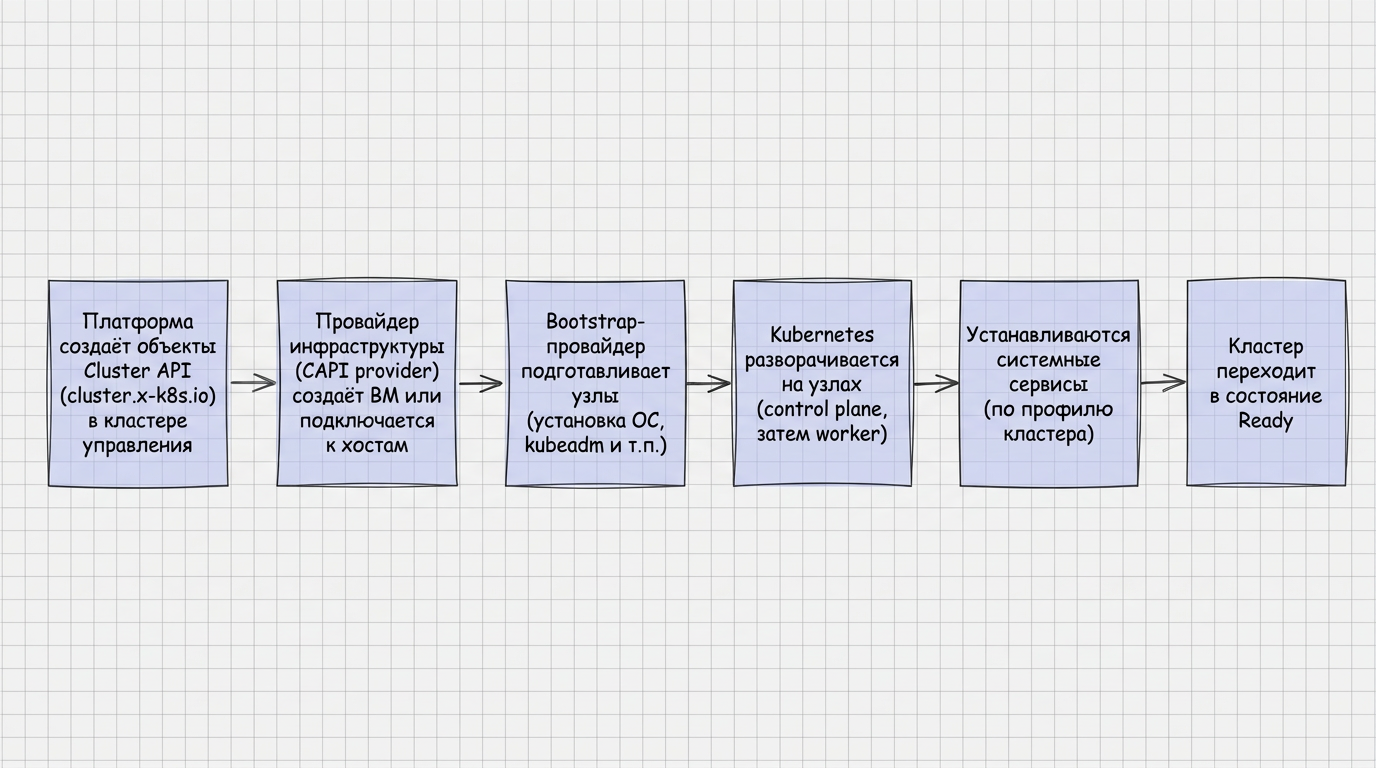
After you start creating a client cluster or installing the management cluster, progress is shown on the dashboard in the Cluster deployment status block. The data is updated automatically.
The dashboard stays available until deployment is complete. It shows the overall progress and how the details of each stage change. Stages do not run strictly one after another: some checks and operations can run in parallel.
While the cluster is being deployed, conditions that have not succeeded yet are shown next to the cluster name. Click Show details to open the full list of conditions and see the details.
The deployment block shows:
- the infrastructure provider of the cluster being deployed;
- the platform version;
- the Kubernetes version;
- the time of the last data update, during management cluster installation;
- the overall deployment progress based on stages that have completed successfully.
During management cluster installation, once the control plane is initialized and the API server address is known, you can access the management cluster with kubeconfig. Download it with Download Kubeconfig.
How stages are displayed
| State | Description |
|---|---|
| Ready | The stage has completed successfully. |
| In progress | The stage is running. Details are updated every 5 seconds. |
| Waiting | The stage has not started. There are no details for it yet. |
| Terminal error | The stage failed, and cluster installation cannot continue. See the error reason and message. |
The Show stage details dynamically switch controls how stage details are shown:
- when the switch is off (the default), only the overall progress and the stage status are shown, and the details stay hidden. Click a stage to expand it and see the details;
- when the switch is on, stages that are in progress or have a terminal error are expanded. Their details are refreshed as deployment data is updated;
- in both modes, successfully completed stages are grouped in the Ready block;
- in both modes, stages that are still waiting stay collapsed.
To show the full details of every deployment stage, click Expand all. To hide them, click Collapse all.
The Cluster ready stage is not included in the shared block of completed stages.
Deployment steps
Resources created
The resources required for deployment are created. For a client cluster, these are its namespace in the management cluster and the ClusterInfo object.
Cluster infrastructure ready
At this stage, Cluster Manager waits for the InfrastructureReady: true condition on the Cluster API controller. This means the controller has successfully contacted the infrastructure provider.
Control Plane nodes initialized
This stage shows the Control Plane nodes: their addresses, statuses, and conditions of the Cluster API Machine, InfrastructureMachine, and Node objects.
Details are grouped on two levels: first by group, then by node. Each node is a separate block. Its header shows:
- name;
- IP address;
- hostname;
- readiness status.
Nodes that are still being prepared for the cluster stay visible in the stage and are updated as deployment data changes. The changes are shown on the screen.
Nodes that have been prepared successfully, and individual objects that are ready, are collapsed automatically and leave the stage view, so you can follow the deployment. You can open the details when you need them.
For each Cluster API Machine, InfrastructureMachine, and Node object, the stage shows the name, state and its status, the reason, a message with the details, and the time of the last state change.
Cluster API Machine and InfrastructureMachine objects are in the management cluster. The Node object appears in the target cluster after the machine is prepared and kubelet registers.
Worker nodes created
This stage shows the Worker nodes: their addresses, statuses, and conditions of the Cluster API Machine, InfrastructureMachine, and Node objects.
Details are grouped on two levels: first by group, then by node. Each node is a separate block. Its header shows:
- name;
- IP address;
- hostname;
- readiness status.
Nodes that are still being prepared for the cluster stay visible in the stage and are updated as deployment data changes. The changes are visible immediately.
Nodes that have been prepared successfully, and individual objects that are ready, are collapsed automatically and leave the stage view, so you can follow the deployment. You can open the details when you need them.
For each Cluster API Machine, InfrastructureMachine, and Node object, the stage shows the name, state and its status, the reason, a message with the details, and the time of the last state change.
Cluster API Machine and InfrastructureMachine objects are in the management cluster. The Node object appears in the target cluster after the machine is prepared and kubelet registers.
NCI applied
The shturval-node-config operator applies the default NodeConfigItem (NCI) configurations to each cluster node:
| Column | Description |
|---|---|
| Name | NCI name, for example controlplane-init-config, controlplane-oidc-nci, or generic-init-config. |
| Configured sections | Configuration sections set in the NCI: Files, Users, KubeAPIServer, Packages, RuntimeCfg, Sysctl, SystemdUnits, and other sections. |
| Node group name | The group the node belongs to. |
| Node name | The node the NCI is applied to. |
| State | How the NCI is applied to the node. |
| Reason | A short reason for the current state. |
| Message | Details of the state or error. |
| Status received at | Time of the last state change. |
After deployment, the NCI list is available under Administration → Node configuration.
System services installed
The stage lists the Shturval repository services and shows how their installation is progressing.
Cluster Manager creates ShturvalServiceConfig objects and ShturvalServicePatch (SSP) objects according to the selected services and the ClusterProfile settings. Critical services are installed first, then the services selected when the cluster was created. The stage finishes after both groups are installed.
Services are installed in two steps:
- Critical services are installed first. They cannot be turned off. For the management cluster these include shturval-backend, shturval-frontend, shturval-auth, network components, shturval-local-csi, and other services from Critical services.
- Services selected at Select services are installed after the critical ones.
The stage finishes only after the critical services and the services selected at Select services are installed.
Services not selected during creation
Some service CRDs that were not selected for automatic enablement:
- are installed in the cluster during deployment;
- stay disabled;
- are available under Services and repositories → Installed services.
This prepares the service in advance. When you enable it later, you do not configure it by hand: turn it on in the interface. After the cluster is deployed, you can install more services. See how to deploy a new service.
Parameters of the selected services
Selected services are installed with:
- Version — latest for this platform version;
- Mode — automatic management (auto);
- Instance name — the service instance name from the chart annotation.
The set, versions, and grouping of services depend on the Shturval platform version. The current list of Shturval repository services, their quick-install groups, and their roles is on Shturval repository services.
If a service fails to install or update, the message is shown in the stage conditions.
The stage header shows how many critical services are installed, as installed/total, and the table shows:
| Column | Description |
|---|---|
| Service name | Name of the service. |
| Chart name | Name of the Helm chart used to deploy the service. |
| Critical | Whether the service is critical for the platform. See Shturval repository services. |
| Status | Installation result: Installed, Not running, Error, or Not installed. |
| Reason | Reason and message from the latest service condition. |
| Status received at | Time of the last condition change. |
You can search by text, filter by status and criticality, and sort by the time the state was received. The column settings button can hide optional columns. Service name is always shown.
What the services do is described on Shturval repository services. After deployment, manage them under Services and repositories → Installed services.
Replication
If this stage is part of the deployment, its conditions are shown.
Cluster ready
This is the final deployment state. When the management cluster is being installed, a static kubeconfig is available for download, and a URL opens the platform interface.
Under the hood
Creating nodes
Between clicking Create Cluster and the cluster becoming Ready, the platform gets the cluster nodes: infrastructure machine or host, then installs Kubernetes. For step-by-step wizard fields, see details of installation wizard steps.
The Shturval platform has two models for preparing nodes:
For virtualization and cloud providers, the platform, through the appropriate CAPI provider, requests the environment to create a host infrastructure from the specified template or image (in provider-specific terms). The platform does not prepare templates itself: preparation of the OS and the stc utility, association of the Kubernetes version with the template and adding the template to the instance are described on the page Preparing the provider template.
When creating a VM from a template, the platform autonomously installs Kubernetes of the selected version. The VM template stores the OS and associated disk limits, but **does not store the CPU/RAM resources of the original VM, i.e. when creating a VM from a template, the Cluster API provider requests resources from the infrastructure provider in the amount specified by the administrator when initializing the cluster.
After the cluster is deployed, the administrator can also override the node template settings using the InfraMachineTemplate resource. This resource is stored in the management cluster and does not create a template (image) on the virtualization (or cloud) side.
Custom resources
Cluster API (CAPI) and infrastructure provider objects describe the desired and actual state of the cluster and nodes; these custom resources are located in the management cluster. The Node object appears in the target cluster after the bootstrap machine is raised and the kubelet is registered.
View in GUI: Custom resources in the platform. The hierarchy and roles of the main types are in the tables below. For owner/dependent relationships in CAPI terms, see Cluster API (owner references) documentation.
Infrastructure machine templates by provider: InfraMachineTemplate. Self-healing of nodes: MachineHealthCheck.
CAPI core in the platform: Cluster API Provider (shturval-capi). Infrastructure providers: vSphere (shturval-capvs), oVirt (shturval-capov), OpenStack (shturval-capos), Shturval v2 (shturval-capsm), Basis Dynamix (shturval-capbd), Yandex Cloud (shturval-capy), vCloud Director (shturval-capvcd). Setting up provider instances in the UI: How to work with providers.
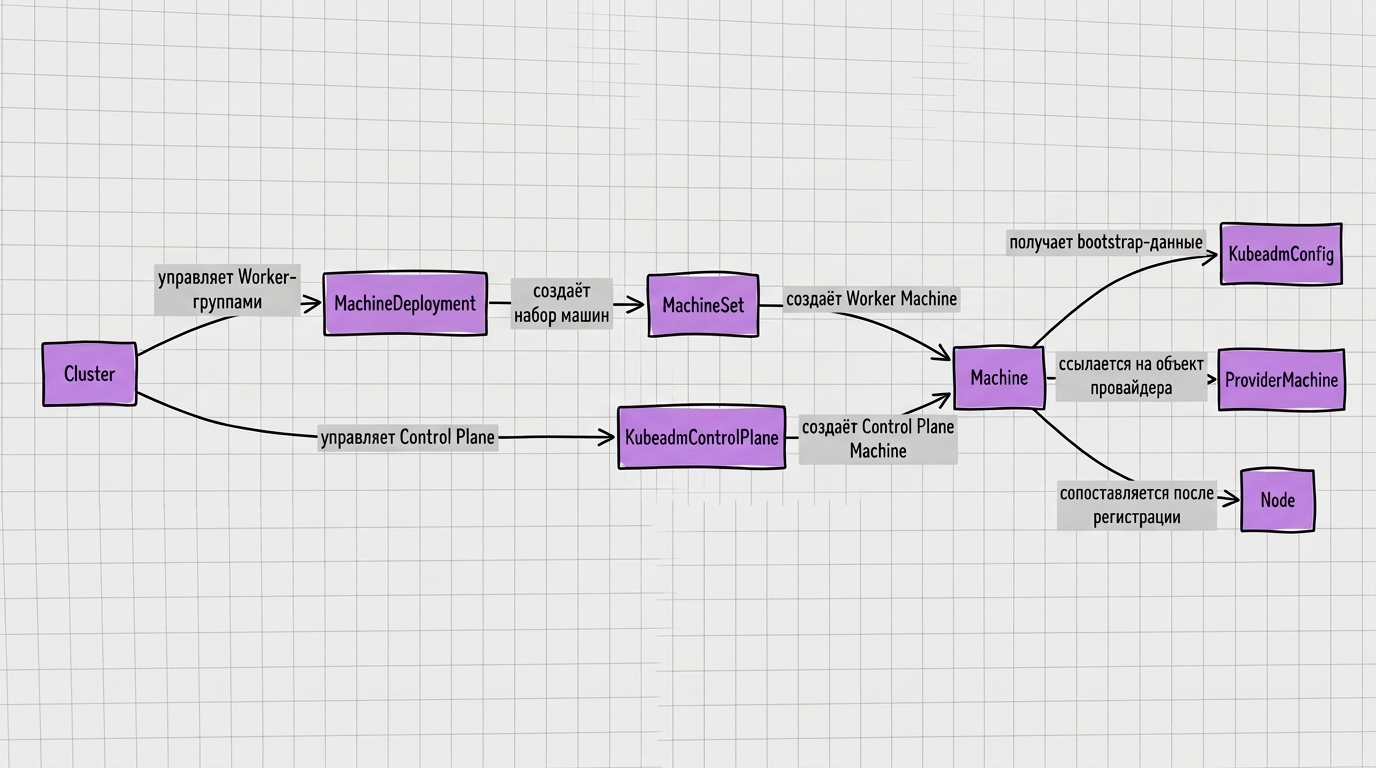
Listed below are the API and Kind groups used for the node lifecycle.
cluster.x-k8s.io
| Custom resource | Purpose | Role in the node life cycle | Where more details |
|---|---|---|---|
| Cluster | Root CAPI object representing the client Kubernetes cluster | Stores links to the infrastructure cluster, Control Plane and groups of Worker nodes | Cluster API |
| ClusterClass | Template model for describing clusters of the same type | Not used in the Shturval platform | Cluster API documentation |
| Machine | Representation of a single machine/node in a CAPI model | Links the bootstrap configuration and the infrastructure machine; after bootstrap gets a connection with Kubernetes Node | Cluster API |
| MachineDeployment | Declarative management of a group of Worker nodes | Sets the desired number of Worker nodes and templates for creating Machine, BootstrapConfig and InfraMachine | Cluster API |
| MachineDrainRule | Rules for draining machines during maintenance or removal | Affects the order of evacuation of workloads from the node; details depend on CAPI version | Cluster API documentation |
| MachineHealthCheck | Policy for automatic recovery of inoperative Machine | Monitors the status of nodes and can initiate replacement Machine | MachineHealthChecks |
| MachinePool | Model of a group of machines as a single pool | Not used in the Shturval platform | Cluster API documentation |
| MachineSet | Set of similar Machines according to template | MachineDeployment is created and supports the required number of Worker Machines | Cluster API |
controlplane.cluster.x-k8s.io
| Custom resource | Purpose | Role in the node life cycle | Where more details |
|---|---|---|---|
| KubeadmControlPlane | Control Plane control object based on kubeadm | Creates and maintains Machine for Control Plane nodes | Cluster API |
| KubeadmControlPlaneTemplate | KubeadmControlPlane Template | Used to create a KubeadmControlPlane from a template | Cluster API documentation |
bootstrap.cluster.x-k8s.io
| Custom resource | Purpose | Role in the node life cycle | Where more details |
|---|---|---|---|
| KubeadmConfig | Bootstrap configuration for one Machine | Generates data for kubeadm init / kubeadm join and a secret that is used when preparing the node | Cluster API |
| KubeadmConfigTemplate | Bootstrap configuration template | Used by MachineDeployment and other objects to create KubeadmConfig when new Machine | Cluster API |
infrastructure.cluster.x-k8s.io
Below are infrastructure CRs for the providers supplied in the platform. Detailed help on oVirt and Shturval v2 is provided on the service pages shturval-capov and shturval-capsm.
Basis Dynamix
| Custom resource | Purpose | Role | Where more details |
|---|---|---|---|
| BasisProvider | Basis Dynamix Connection/Provider Configuration | Used to work with a specific environment Basis Dynamix | shturval-capbd |
| BasisCluster | Cluster infrastructure object in Basis Dynamix | Associates a Cluster object with a provider infrastructure context | shturval-capbd |
| BasisMachine | One VM/machine in Basis Dynamix | Infrastructure part Machine; the provider creates or maintains a VM on it | shturval-capbd, InfraMachineTemplate |
| BasisMachineTemplate | BasisMachine Parameter Template | Used CAPI to create new BasisMachines in node groups | InfraMachineTemplate |
oVirt
Also relevant for zVirt, oVirt, HostVM, RED Virtualization, ROSA Virtualization
| Custom resource | Purpose | Role | Where more details |
|---|---|---|---|
| OVirtProvider | Connection parameters to oVirt Engine | Gives access to the oVirt API for creating and maintaining VMs | shturval-capov (CRD directory) |
| OVirtCluster | Cluster infrastructure object in oVirt | Stores the endpoint control plane and connects the Cluster with the oVirt infrastructure | shturval-capov |
| OVirtMachine | One VM in oVirt | Infrastructure part Machine; creates a VM from a template and sets ProviderID | shturval-capov |
| OVirtMachineTemplate | OVirtMachine Parameter Template | Used by MachineDeployment or KubeadmControlPlane to create OVirtMachine | InfraMachineTemplate |
OpenStack
Also relevant for VK Cloud, Selectel
| Custom resource | Purpose | Role | Where more details |
|---|---|---|---|
| OpenStackCluster | Cluster infrastructure object in OpenStack | Associates CAPI Cluster with project, network and endpoint in OpenStack | shturval-capos |
| OpenStackClusterTemplate | OpenStackCluster Template | Used when creating a template infrastructure cluster | shturval-capos |
| OpenStackMachine | One VM in OpenStack | Infrastructure part Machine; the provider creates and maintains the instance | shturval-capos |
| OpenStackMachineTemplate | OpenStackMachine Options Template | Used CAPI to create new OpenStackMachines in node groups | InfraMachineTemplate |
| OpenStackFloatingIPPool | Floating IP pool in the OpenStack provider model | Can be used by the provider to manage external addresses; details depend on CAPOS version | shturval-capos |
| OpenStackServer | OpenStack server/instance object in the provider model | Reflects the infrastructure essence of the provider; details - in the CRD of the specific version of CAPOS | shturval-capos |
Shturval v2
| Custom resource | Purpose | Role | Where more details |
|---|---|---|---|
| ShturvalProvider | Global SSH host configuration, version, registry and credentials | Creates and maintains ShturvalHost for addresses from the provider’s configuration | shturval-capsm |
| ShturvalHost | Description of the physical host or existing VM | Validated and provisioned via SSH, then can be linked to ShturvalMachine | shturval-capsm |
| ShturvalCluster | Cluster infrastructure object for Shturval v2 | Associates CAPI Cluster with provider configuration and cluster endpoint | shturval-capsm |
| ShturvalMachine | Infrastructure machine Shturval v2 | Selects the appropriate ShturvalHost, executes bootstrap and sets ProviderID | shturval-capsm |
| ShturvalMachineTemplate | ShturvalMachine Parameter Template | Describes a host selector for a group of hosts | InfraMachineTemplate |
| ShturvalManualCluster | Reinfrastructure provider resource Shturval v2 | The purpose depends on the CRD version; use the provider’s service help | shturval-capsm |
| ShturvalManualMachine | Infrastructure provider resource Shturval v2 | The purpose depends on the CRD version; use the provider’s service help | shturval-capsm |
VMware vCloud Director
| Custom resource | Purpose | Role | Where more details |
|---|---|---|---|
| VCDCluster | Cluster infrastructure object in vCloud Director | Associates CAPI Cluster with vCD context | shturval-capvcd |
| VCDClusterTemplate | VCDCluster Template | Used when creating a template infrastructure cluster | shturval-capvcd |
| VCDMachine | One VM in vCloud Director | Infrastructure part Machine; the provider creates and maintains the VM | shturval-capvcd |
| VCDMachineTemplate | VCDMachine Parameters Template | Used CAPI to create new VCDMachines in node groups | InfraMachineTemplate |
VMware vSphere
| Custom resource | Purpose | Role | Where more details |
|---|---|---|---|
| VSphereCluster | Cluster Infrastructure Object in vSphere | Links CAPI Cluster to VMware vSphere infrastructure | shturval-capvs |
| VSphereClusterIdentity | Credentials or identity for accessing VMware vSphere | Used by the provider for authentication in vCenter | shturval-capvs |
| VSphereClusterTemplate | VSphereCluster Template | Used when creating a template infrastructure cluster | shturval-capvs |
| VSphereDeploymentZone | Placement area in the CAPVS model | Helps describe where to place machines; details depend on CRD provider | shturval-capvs |
| VSphereFailureDomain | Failure Domain in the CAPVS Model | Used to distribute machines across fault-tolerant domains, if configured | shturval-capvs |
| VSphereMachine | One VM in VMware vSphere | Infrastructure part Machine; the provider creates and maintains the VM | shturval-capvs |
| VSphereMachineTemplate | VSphereMachine Options Template | Used CAPI to create new VSphereMachines in node groups | InfraMachineTemplate |
| VSphereVM | VM objectin the CAPVS model | Reflects VMware vSphere VMs at the provider level; details - in the CRD of the specific CAPV version | shturval-capvs |
Yandex Cloud
| Custom resource | Purpose | Role | Where more details |
|---|---|---|---|
| YandexCluster | Cluster infrastructure object in Yandex Cloud | Links CAPI Cluster to cloud infrastructure | shturval-capy |
| YandexIdentity | Account/identification data for Yandex Cloud | Used by the provider to access the cloud | shturval-capy |
| YandexMachine | One VM in Yandex Cloud | Infrastructure part Machine; the provider creates and maintains the VM | shturval-capy |
| YandexMachineTemplate | YandexMachine parameters template | Used CAPI to create new YandexMachines in node groups | InfraMachineTemplate |
IPAM (CAPI)
| Custom resource | Purpose | Role | Where more details |
|---|---|---|---|
| IPAddress | Individual IP Address Object in the IPAM CAPI Model | Can be used by CAPI/providers to keep track of issued addresses; details depend on IPAM provider | Cluster API Provider, Cluster API documentation |
| IPPool | IP address pool in the IPAM CAPI model | Source of addresses for IPAddress objects, if the corresponding IPAM provider is used | Cluster API Provider |
Built-in resources Kubernetes
| API group | Resource | Purpose | Role | Where more details |
|---|---|---|---|---|
core | Node | Built-in Kubernetes registered node object | Appears in the target cluster after bootstrap; CAPI Machine receives a link to Node | Cluster API (Machine ↔ Node connection) |
node.k8s.io | RuntimeClass | Built-in Kubernetes selection object container runtime handler | Not used in the Shturval platform | Kubernetes documentation |
Deployment errors
If an error occurs while the cluster is being installed or created, the stage becomes a terminal error. The reason and message are in the stage conditions. Typical causes:
- Troubleshooting client cluster creation;
- What to do if there is an error (client cluster).