Setting up integration with HashiCorp Vault in the cluster profile
Setting up integration with Vault in client clusters with a standard configuration via ClusterProfile.
Introduction
The Shturval platform provides management of client cluster profiles (ClusterProfile), which allow you to pre-define YAML manifests for use when initializing a cluster.
You can set the ClusterProfile configuration to standard integration with HashiCorp Vault for newly created client clusters. This configuration uses vault-secrets-operator as the mechanism for synchronizing secrets between Vault and Kubernetes. HashiCorp Vault and Vault Secrets Operator are supplied as a separate bundle on request and are not included in the platform bundle.
The instructions describe a scenario in which:
- for new client clusters, the administrator creates a cluster profile (
ClusterProfile) in advance with the necessary manifests to configure integration with Vault during the cluster deployment process.
Note: Once the client cluster is deployed, the final integration with Vault will require:
- setting up the authentication method on the Vault side;
- creation of a custom resource
VaultAuthwith parameters of the authentication method in the cluster.
Do these steps in the cluster that has already been created. They are described in “Setting up integration with Vault in a deployed cluster”. The link is in What’s next at the end of this page.
Preconditions
- deploy the HashiCorp Vault server, unseal the storage, and write down the Vault server address;
- if the connection to Vault will use TLS, obtain the CA certificate that signs the Vault server certificate;
- request a separate bundle with HashiCorp Vault and Vault Secrets Operator and upload it to the mirror. How to add packages and images to the mirror is described in Working with patches.
Step 1: Configure ClusterProfile
To pre-configure integration via ClusterProfile, prepare manifests and create ClusterProfile manually or in one run by running a Bash script.
Step 1.1 Prepare ShturvalServiceConfig, Secret and VaultConnection manifests
The first step is to prepare manifests that will be added to the cluster profile:
- two manifests
ShturvalServiceConfigof thevault-secrets-operatorservice; - custom resource
VaultConnection; - Secret with a Vault CA certificate, if a TLS connection is required when connecting to Vault.
Creating ShturvalServiceConfig resources deploys the service to the cluster.
apiVersion: ops.shturval.tech/v1beta1
kind: ShturvalServiceConfig
metadata:
  name: vault-secrets-operator
spec:
  dependency:
  - vault-secrets-operator-crds
  mode: auto
  namespace: vault-operator
  chart: vault-secrets-operator
  reponame: shturval
  version: 2.14.0
apiVersion: ops.shturval.tech/v1beta1
kind: ShturvalServiceConfig
metadata:
  name: vault-secrets-operator-crds
spec:
  mode: auto
  namespace: vault-operator
  chart: vault-secrets-operator-crds
  reponame: shturval
  version: 2.14.0
VaultConnection specifies connection parameters to the Vault server.
apiVersion: secrets.hashicorp.com/v1beta1
kind: VaultConnection
metadata:
  name: vault-connection-name
  namespace: vault-operator
spec:
  address: https://vault.ip-11-12-13-14.shturval.link
  caCertSecretRef: vault-ca
  skipTLSVerify: false
Description of the VaultConnection parameters used:
| Field | Type | Description |
|---|---|---|
address | string | Address inof your Vault server |
caCertSecretRef | string | Secret name with a CA certificate to connect to Vault. If skipTLSVerify is set to false, the manifest of this Secret must be added to the cluster profile in advance to be created in the namespace, where VaultConnection |
skipTLSVerify | boolean | Disable Vault TLS certificate verification. If false is specified, the Secret specified in caCertSecretRef is required |
If VaultConnection is set to skipTLSVerify: false, prepare a Secret with a Vault CA certificate in advance. Secret must be created in the same namespace as VaultConnection, and its name must be specified in the caCertSecretRef parameter.
apiVersion: v1
kind: Secret
metadata:
  name: vault-ca
  namespace: vault-operator
type: Opaque
data:
  ca.crt: <CA-encoded-base64>
Step 1.2. Create a ClusterProfile
A cluster profile can be created in one of two ways:
- in the platform GUI;
- using the CLI via CLI.
Learn more about how to configure and use profiles on the Cluster Profiles page.
Where to configure: Platform → Configuration Profiles → Create Profile.
Screenshot: transition from the “Platform” tab
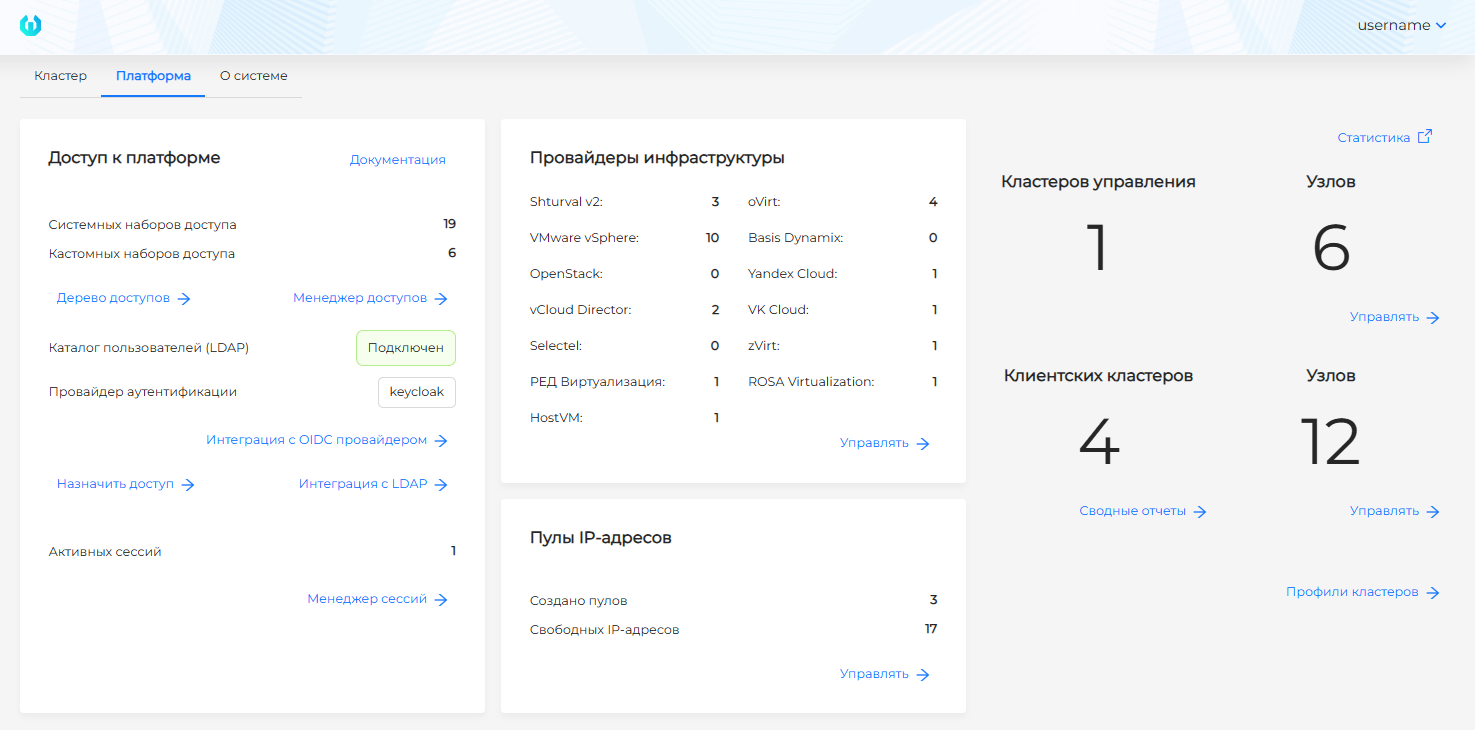
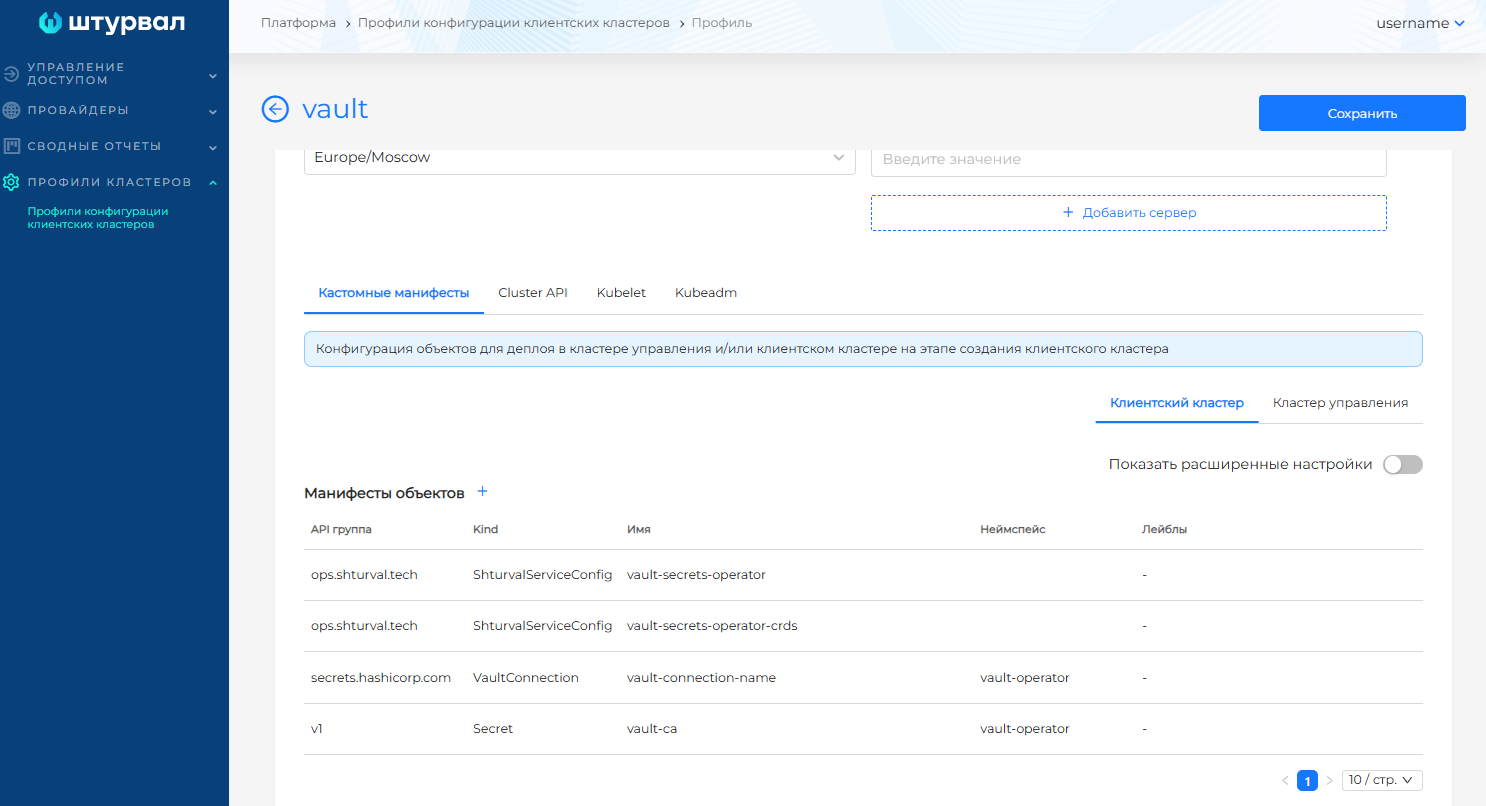
On the profile creation page, fill in the required fields. In the Specification block, go to the “Custom manifests” tab and select “Create in client cluster”. Add the manifests prepared in step 1:
- two
ShturvalServiceConfig; VaultConnection;- Secret with a Vault CA certificate, if TLS certificate verification is required.
Screenshot: manifests in profile
Save the cluster profile.
To use manifests via ClusterProfile:
- In the management cluster in the namespace
kube-systemcreate a Secret:
- with type
Opaque; - with the obligatory label
cluster.shturval.tech/manifest; - with a custom label for subsequent indication in the cluster profile through the label selector mechanism (
matchLabels); - add keys whose values indicate: two manifests
ShturvalServiceConfig, a manifestVaultConnectionand a Secret manifest with a Vault CA certificate if it is necessary to verify the TLS certificate, encoded inbase64.
kubectl apply -f - <<EOF
apiVersion: v1
kind: Secret
type: Opaque
metadata:
  name: vault-profile-manifests
  namespace: kube-system
  labels:
    cluster.shturval.tech/manifest: ""
    profile: vault
data:
  ssc: base64-encoded-ShturvalServiceConfig
  crd: base64-encoded-ShturvalServiceConfigCrd
  vaultcasecret: base64-encoded-VaultCaSecret
  vaultconnection: base64-encoded-VaultConnection
EOF
- In the management cluster in the namespace
kube-system, create a cluster profile, where inmatchLabelsadd a custom label for the created Secret:
kubectl apply -f - <<EOF
apiVersion: cluster.shturval.tech/v1beta1
kind: ClusterProfile
metadata:
  name: vault-client-cluster-profile
  namespace: kube-system
spec:
  customManifests:
    - clientManifestsSelector:
        matchLabels:
          profile: vault
EOF
- Do not override
default-client-cluster-profile; - changes in
ClusterProfileare not automatically applied to previously created clusters.
Note: Before running the script, check the values of the variables. The script automatically generates manifests, creates a Secret with them and creates ClusterProfile, so an error in the parameters can lead to the creation of an incorrect profile for new client clusters.
Before running the script, connect to the management cluster via kubeconfig.
Variables used in the script:
| Variable | Default | Limit | Description |
|---|---|---|---|
VAULT_ADDRESS | — | — | Vault server address. The value must be set before running the script |
VSO_NAMESPACE | vault-operator | Don’t override | Namespace in which the service vault-secrets-operator will be created |
VSO_SSC_NAME | vault-secrets-operator | — | Resource name ShturvalServiceConfig for service vault-secrets-operator |
VSO_SSC_CRD_NAME | vault-secrets-operator-crds | — | Resource name ShturvalServiceConfig for CRD service vault-secrets-operator |
VSO_CHART_NAME | vault-secrets-operator | Don’t override | Service Helm chart name vault-secrets-operator |
VSO_CRD_CHART_NAME | vault-secrets-operator-crds | Don’t override | Helm chart name CRD service vault-secrets-operator |
VSO_REPONAME | shturval | Don’t override | Service Helm chart repository name vault-secrets-operator |
VSO_VERSION | 2.14.0 | — | Helm version chart of the service vault-secrets-operator |
VAULTCONNECTION_NAME | vault-connection-name | — | Resource name VaultConnection |
VAULT_CACERT_SECRET_REF | vault-ca | Don’t override | Secret name with cluster CA certificate to connect to Vault |
VAULT_CA_CERT_PATH | — | — | Path to the file with the Vault CA certificate in PEM format. Required if VAULT_SKIP_TLS_VERIFY=false |
VAULT_SKIP_TLS_VERIFY | false | — | Disable Vault TLS Certificate Verification |
MGMT_NAMESPACE | kube-system | Don’t override | Namespace of the management cluster where Secret and ClusterProfile are created |
PROFILE_LABEL_VALUE | vault | — | Label value profile for selecting manifests in ClusterProfile |
MANIFESTS_SECRET_NAME | vault-profile-manifests | — | Secret name that stores base64-encoded manifests |
CLUSTERPROFILE_NAME | vault-client-cluster-profile | — | The name of the created resource is ClusterProfile |
bash /dev/stdin <<'EOF'
set -euo pipefail

: "${VAULT_ADDRESS:?Set VAULT_ADDRESS, for example https://vault.example.shturval.link}"

VSO_NAMESPACE="${VSO_NAMESPACE:-vault-operator}"
VSO_SSC_NAME="${VSO_SSC_NAME:-vault-secrets-operator}"
VSO_SSC_CRD_NAME="${VSO_SSC_CRD_NAME:-vault-secrets-operator-crds}"
VSO_CHART_NAME="${VSO_CHART_NAME:-vault-secrets-operator}"
VSO_CRD_CHART_NAME="${VSO_CRD_CHART_NAME:-vault-secrets-operator-crds}"
VSO_REPONAME="${VSO_REPONAME:-shturval}"
VSO_VERSION="${VSO_VERSION:-2.14.0}"

VAULTCONNECTION_NAME="${VAULTCONNECTION_NAME:-vault-connection-name}"
VAULT_CACERT_SECRET_REF="${VAULT_CACERT_SECRET_REF:-vault-ca}"
VAULT_CA_CERT_PATH="${VAULT_CA_CERT_PATH:-}"
VAULT_SKIP_TLS_VERIFY="${VAULT_SKIP_TLS_VERIFY:-false}"

MGMT_NAMESPACE="${MGMT_NAMESPACE:-kube-system}"
PROFILE_LABEL_VALUE="${PROFILE_LABEL_VALUE:-vault}"
MANIFESTS_SECRET_NAME="${MANIFESTS_SECRET_NAME:-vault-profile-manifests}"
CLUSTERPROFILE_NAME="${CLUSTERPROFILE_NAME:-vault-client-cluster-profile}"

b64_oneline() {
  # For GNU coreutils base64 -w0 is used, otherwise line breaks are removed separately.
  if base64 --help 2>/dev/null | grep -q -- ' -w'; then
    base64 -w0
  else
    base64 | tr -d '\n'
  fi
}

SSC_YAML=$(cat <<EOF2
apiVersion: ops.shturval.tech/v1beta1
kind: ShturvalServiceConfig
metadata:
  name: ${VSO_SSC_NAME}
spec:
  dependency:
  - ${VSO_SSC_CRD_NAME}
  mode: auto
  namespace: ${VSO_NAMESPACE}
  chart: ${VSO_CHART_NAME}
  reponame: ${VSO_REPONAME}
  version: ${VSO_VERSION}
EOF2
)

SSC_CRD_YAML=$(cat <<EOF2
apiVersion: ops.shturval.tech/v1beta1
kind: ShturvalServiceConfig
metadata:
  name: ${VSO_SSC_CRD_NAME}
spec:
  mode: auto
  namespace: ${VSO_NAMESPACE}
  chart: ${VSO_CRD_CHART_NAME}
  reponame: ${VSO_REPONAME}
  version: ${VSO_VERSION}
EOF2
)

VAULT_CACERT_LINE=""
VAULT_CA_SECRET_ENTRY=""

if [ "${VAULT_SKIP_TLS_VERIFY}" != "true" ]; then
  : "${VAULT_CA_CERT_PATH:?Set VAULT_CA_CERT_PATH if VAULT_SKIP_TLS_VERIFY=false}"

  VAULT_CACERT_LINE=" caCertSecretRef: ${VAULT_CACERT_SECRET_REF}"
  VAULT_CA_CERT_B64=$(b64_oneline < "${VAULT_CA_CERT_PATH}")
  VAULT_CA_SECRET_YAML=$(cat <<EOF2
apiVersion: v1
kind: Secret
metadata:
  name: ${VAULT_CACERT_SECRET_REF}
  namespace: ${VSO_NAMESPACE}
type: Opaque
data:
  ca.crt: ${VAULT_CA_CERT_B64}
EOF2
)
  VAULT_CA_SECRET_B64=$(printf '%s' "$VAULT_CA_SECRET_YAML" | b64_oneline)
  VAULT_CA_SECRET_ENTRY=" vaultcasecret: ${VAULT_CA_SECRET_B64}"
fi

VAULTCONNECTION_YAML=$(cat <<EOF2
apiVersion: secrets.hashicorp.com/v1beta1
kind: VaultConnection
metadata:
  name: ${VAULTCONNECTION_NAME}
  namespace: ${VSO_NAMESPACE}
spec:
  address: ${VAULT_ADDRESS}
${VAULT_CACERT_LINE}
  skipTLSVerify: ${VAULT_SKIP_TLS_VERIFY}
EOF2
)

SSC_B64=$(printf '%s' "$SSC_YAML" | b64_oneline)
SSC_CRD_B64=$(printf '%s' "$SSC_CRD_YAML" | b64_oneline)
VAULTCONNECTION_B64=$(printf '%s' "$VAULTCONNECTION_YAML" | b64_oneline)

kubectl apply -f - <<EOF2
apiVersion: v1
kind: Secret
type: Opaque
metadata:
  name: ${MANIFESTS_SECRET_NAME}
  namespace: ${MGMT_NAMESPACE}
  labels:
    cluster.shturval.tech/manifest: ""
    profile: ${PROFILE_LABEL_VALUE}
data:
  ssc: ${SSC_B64}
  crd: ${SSC_CRD_B64}
${VAULT_CA_SECRET_ENTRY}
  vaultconnection: ${VAULTCONNECTION_B64}
EOF2

kubectl apply -f - <<EOF2
apiVersion: cluster.shturval.tech/v1beta1
kind: ClusterProfile
metadata:
  name: ${CLUSTERPROFILE_NAME}
  namespace: ${MGMT_NAMESPACE}
spec:
  customManifests:
    - clientManifestsSelector:
        matchLabels:
          profile: ${PROFILE_LABEL_VALUE}
EOF2
EOF
After running the script, go to step 2.
Step 2: Select a profile when creating a client cluster
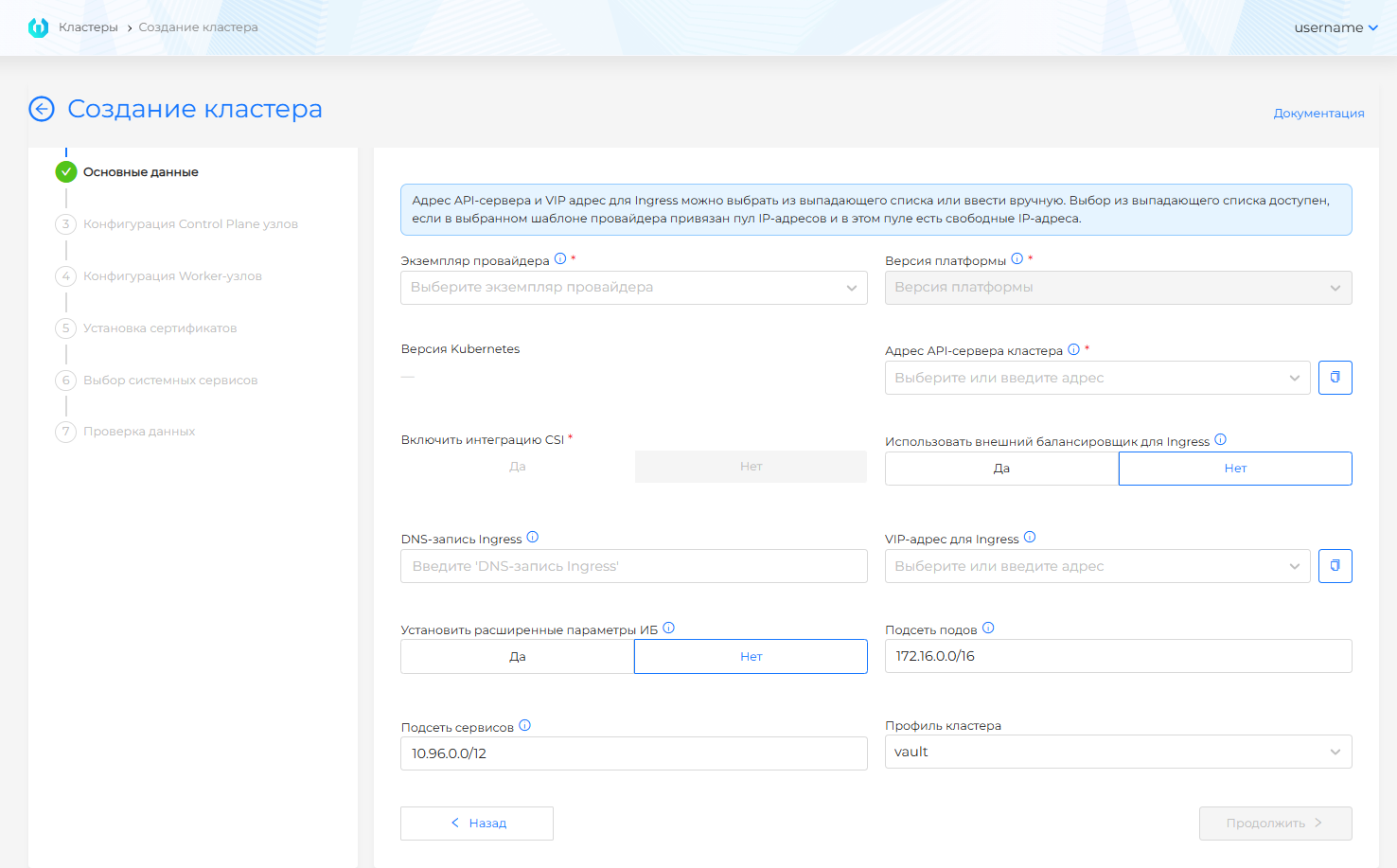
In the GUI for creating a client cluster, at the “Basic data” step (where to go from details of wizard steps) in the Cluster profile field, select the created profile.
Screenshot: selecting a cluster profile
What is being created
When initializing the cluster after the service deployment stage, the manifests in the client cluster from the profile will be applied:
- two manifests
ShturvalServiceConfigand servicevault-secrets-operatordeployed; - a Secret was created with a Vault CA certificate, if it was added to the profile;
- a custom resource
VaultConnectionwas created.
When deploying vault-secrets-operator in a client cluster in the namespace vault-operator the following will be created:
- ServiceAccount
vault-secrets-operator-controller-managerwith rolesystem:auth-delegatorfor authentication in Vault; - Secret
vault-secretwith typekubernetes.io/service-account-tokenwith token and cluster CA for ServiceAccount.
This Secret does not replace the Secret with the Vault server CA certificate that is specified in caCertSecretRef.