Checking the intersection of subnets when creating a cluster
When deploying a cluster, several different network ranges are specified. If they intersect with already occupied networks or with each other incorrectly, cluster creation may fail.
When creating a cluster in the wizard, at the “Basic data” step, the API and Ingress addresses, the pod subnet and the service subnet are specified.
What exactly can conflict
IP range overlap is a situation where two different entities “claim” the same addresses according to routing rules. Below are different layers, which are specified separately when creating a cluster and should not be confused.
Network of nodes (infrastructure)
Cluster nodes receive addresses in your provider’s network (VM, VPC, etc.). If this subnet coincides or intersects with an already occupied network (another cluster, office segment, etc.), deployment errors may occur. For several clusters, it is recommended to allocate non-overlapping subnets; For IP pools, this also reduces the risk of conflicts - see pool guidelines.
Pod subnet (Pod CIDR) and service subnet (Service CIDR)
By default, when creating a cluster, the following are specified:
- pod subnet:
172.16.0.0/16; - service subnet:
10.96.0.0/12.
Ranges can be changed; before creating a cluster they need to be checked for intersections.
Requirements depend on the scenario:
- for VMware vSphere: the subnet of pods must not intersect with the network of nodes and services - see the table in vSphere instructions;
- for Yandex Cloud: subnets of pods and services must not intersect with VPC subnets and other clusters - see Yandex Cloud features.
The wizard step explicitly states: ranges should not overlap with corporate networks and other clusters - see the description of the “Basic Data” step in your provider documentation.
Pool of IP addresses (see below) are not addresses of pods and not ClusterIP services; This is a separate mechanism for VIP.
VIP for KubeAPI and VIP for Ingress
KubeAPI and Ingress require virtual IPs (VIPs). If IP address pool is used, addresses are selected from the pool range. Requirements for VIP from the pool:
- VIP for KubeAPI and VIP for Ingress must be on the same subnet as the Control Plane nodes;
- VIP must not match the IP addresses of the cluster nodes.
More details can be found in the section “Requirements for addresses in the pool” and at the “Basic data” step in documentation for your provider. For Yandex Cloud, pools are not used - addresses are set through external balancers (Yandex Cloud features).
Diagram “Used subnets”
Illustration: Diagram “Used subnets”
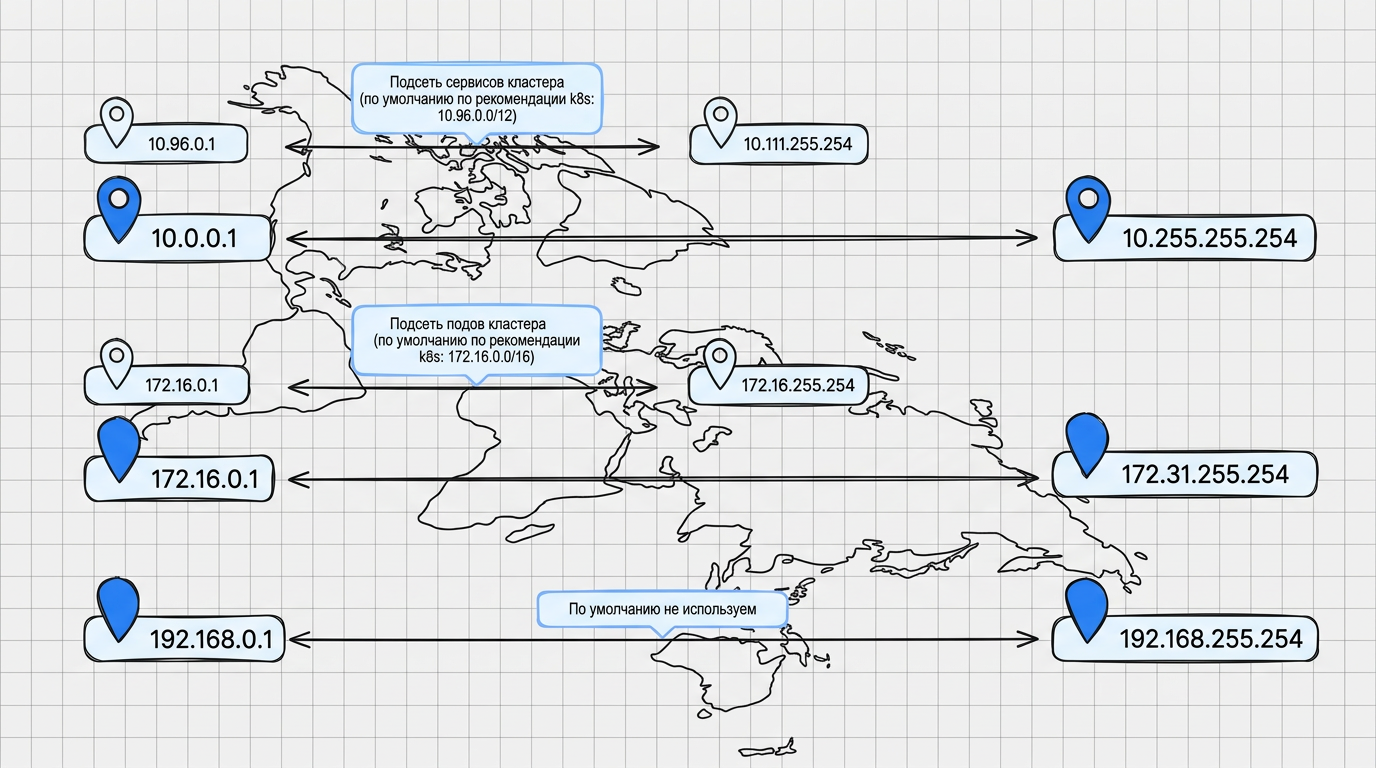
Figure 1. Default subnets used.
Scheme “Example of using subnets in an overlay network of a cluster and a corporate network”
Illustration: Scheme “Example of using subnets in an overlay network of a cluster and a corporate network”
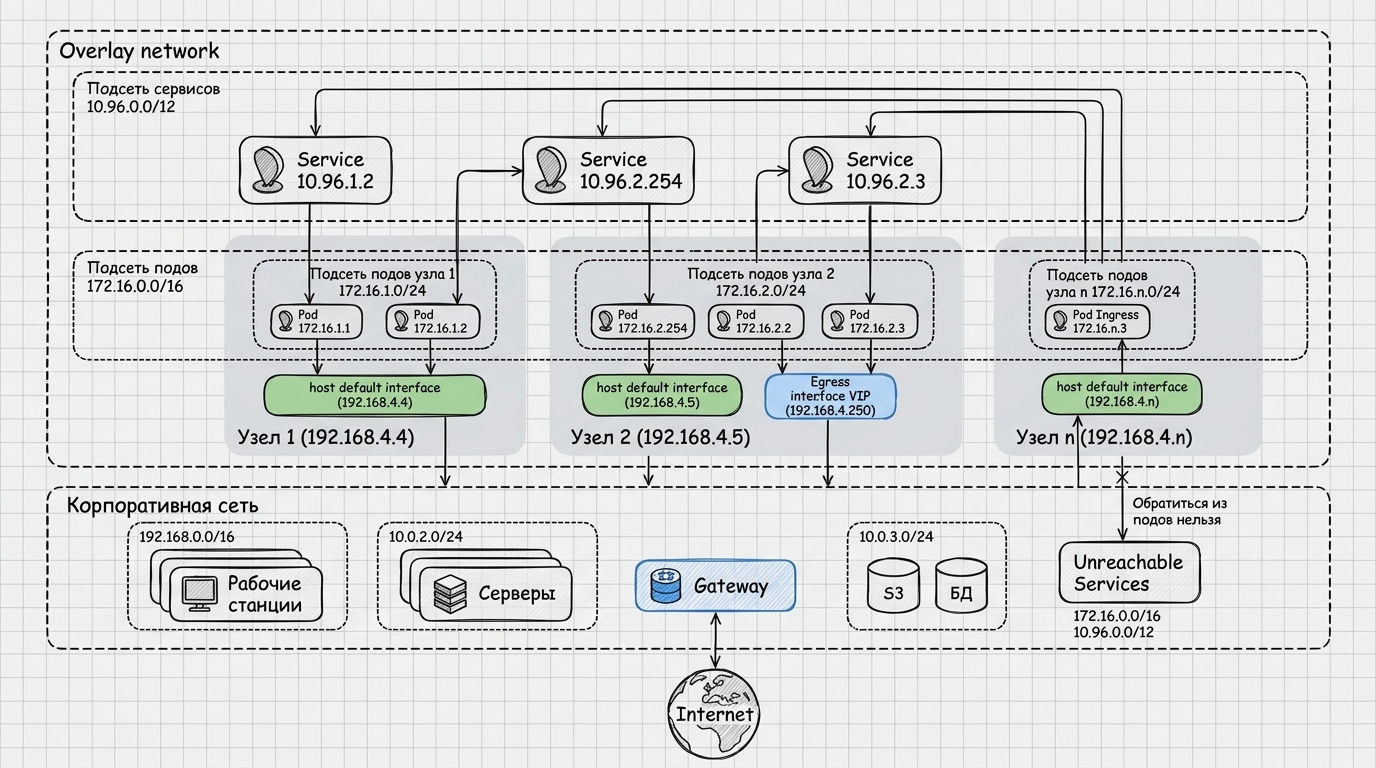
The diagram shows:
- Overlay cluster network - service subnet (
10.96.0.0/12), pod subnet (172.16.0.0/16), examples of addresses of services and pods, as well as nodes with addresses in an external subnet network in relation to the Pod/Service (for example,192.168.4.x) and fragments of the pod network allocated to each node. - Corporate network - conditional segments (workstations, servers, gateway, storage, etc.) with their own subnets.
If the corporate infrastructure already uses the same address spaces that you specified as Pod CIDR and Service CIDR, traffic from the pods will not reach the required corporate services in these ranges: the request “remains” within the overlay cluster logic. Therefore, when creating a cluster, it is important to check in advance the intersections with corporate and cloud networks - see the “Basic data” step in your provider documentation and the “What exactly may conflict” block above on this page.
Common mistakes
- Specifies a node subnet or other infrastructure range that is already in use by other resources.
- The pod subnet and/or service subnet intersect with networks unacceptable for the selected provider (for example, the host network or VPC — see the links above), or with each other, so the cluster cannot deploy. More details: Diagnostics of subnet intersection in a cluster.
- Multiple clusters use the same network ranges where separate subnets are needed.
- For VIP: the address matches the host IP, does not fall into the required subnet, or is busy at the time of startup (there is no backup mechanism from the pool - see important pool restrictions and note for VMware vSphere).
How to check before creating a cluster
- At the “Basic Data” step of the wizard (described in your provider documentation), check the pod subnet and service subnet with corporate networks and with other clusters; for non-standard CIDR, check the ranges for intersection (subnet calculator).
- Make sure that the restrictions for your provider are met: for example, for vSphere - no intersection of the pod subnet with the network of nodes and services; for Yandex Cloud - no overlap with VPC (links in the section “What exactly may conflict”).
- If you are using an IP pool, verify that the pool range is consistent with the host subnets and that the selected VIPs satisfy address requirements.
- Establish separate non-overlapping subnets for different clusters if they are deployed in the same area of responsibility.
See also
- Details of wizard steps - links to descriptions of fields by provider, including the “Basic data” step.
- Architectural diagrams of cluster networks - how overlay subnets of pods and services are arranged.
- IP address pool - VIP KubeAPI and Ingress only.
- Diagnostics of intersection of subnets in a cluster - after initializing the cluster, with the commands
kubectl.