Setting Permissions
Complete list of access sets, platform and cluster permissions.
Rights management in the Shturval platform is carried out using access sets (permissions). This page contains a complete list of preconfigured sets, platform and cluster permissions, as well as roles in Argo CD and Kubeflow permissions.
Access set levels
| Level | Description of features |
|---|---|
| Platform | Access to the entire platform; to client clusters without access to the management cluster; only to the management cluster; to logs; to Argo CD; to Kubeflow |
| Cluster | Access to a specific client cluster; to the cluster logs; to infrastructure; to Argo CD projects and Kubeflow cluster profiles |
| Namespace | Access to a specific namespace; to the Argo CD project and Kubeflow namespace profile |
Changing the access set will change the rights of all users and groups to whom it is assigned. If a set is assigned to at least one user or group, it can only be deleted after all assignments have been removed. Pre-configured sets cannot be edited or deleted - create a new set if necessary.
Permissions apply only to users and groups. For ServiceAccounts, a separate mechanism for assigning rights is used (see the screenshot below).
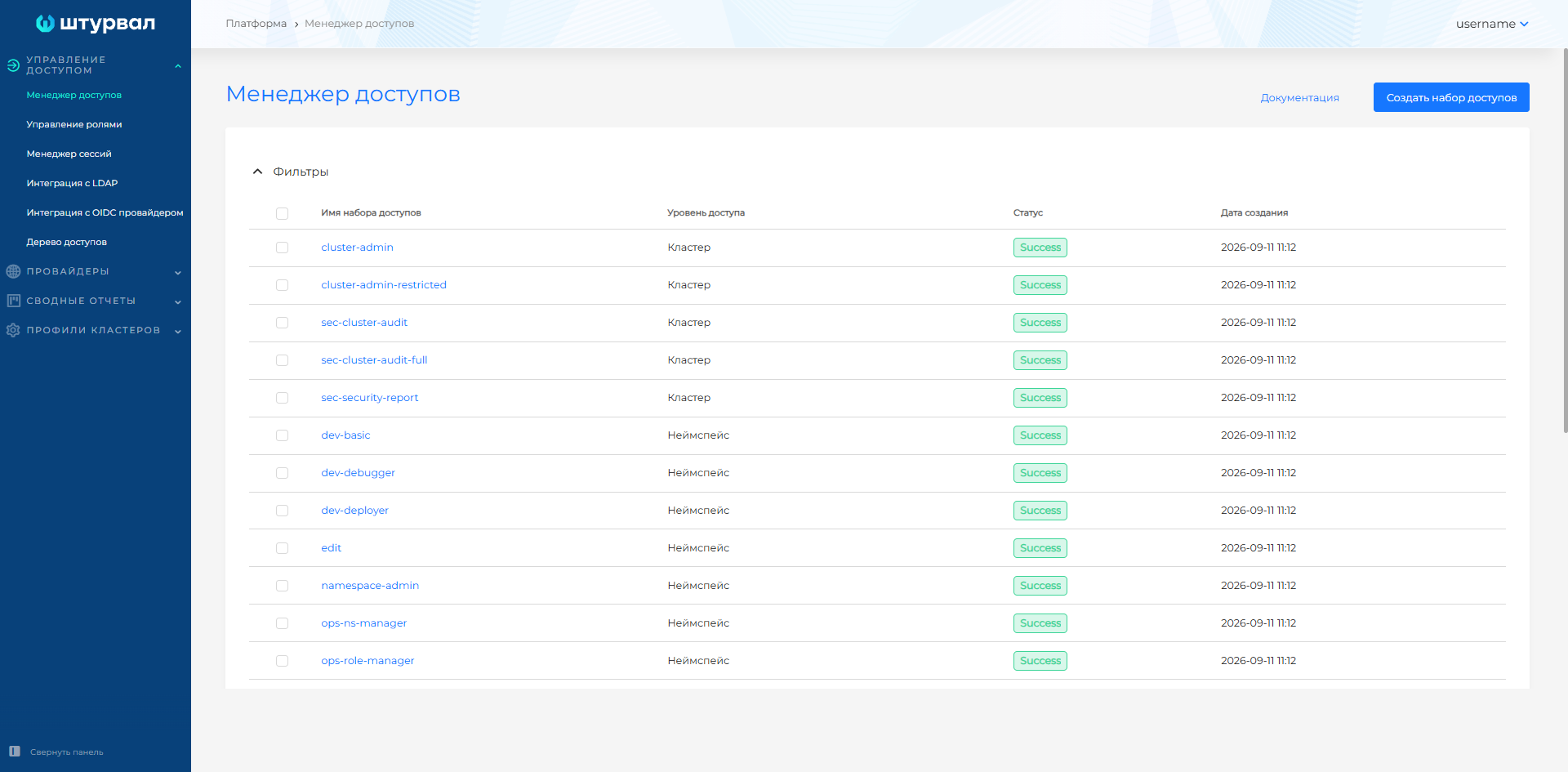
Platform permissions
Platform permissions control access to resources managed by the management cluster.
| Resolution | Authority | Levels | Comment |
|---|---|---|---|
| access-map-get | View assigned roles, access tree | Platform | — |
| cluster-create | Creating client clusters | Platform | Additionally requires at least provider-get, provider-edit and ippool-get. It is recommended to use the platform-admin |
| permissions-edit | Managing user and group rights in the management cluster | Platform | — |
| permissions-get | Obtaining rights information in the management cluster | Platform | — |
| platform-roles-edit | ServiceAccounts Rights Management | Platform | — |
| platform-roles-get | Retrieving information about ServiceAccounts rights | Platform | — |
| provider-edit | Infrastructure Provider Management | Platform | Recommended in conjunction with ippool-get |
| provider-get | Getting information about providers | Platform | Recommended in conjunction with ippool-get |
| ippool-edit | Managemente pools of IP addresses | Platform | Recommended in conjunction with ippool-get, provider-get, provider-edit |
| ippool-get | Obtaining IP Address Pools | Platform | Pools are assigned to the provider, so it is recommended in conjunction with provider-get, provider-edit |
| cluster-delete | Removing client clusters | Platform, Cluster | — |
| cluster-edit | Annotations, Reconciliation Suspension, Newsletters | Platform, Cluster | Additionally requires at least cluster-get and cluster-info |
| cluster-get | View cluster and informational messages | Platform, Cluster, Namespace | At the Namespace level, allows reading cluster objects |
| cluster-info | Getting information about the cluster | Platform, Cluster | — |
| cluster-infra-edit | Management of units, machines | Platform, Cluster | — |
| cluster-infra-get | Obtaining information about nodes, machines | Platform, Cluster | — |
| cluster-roles-edit | Rights management in a cluster | Platform, Cluster | — |
| cluster-roles-get | Retrieving information about rights in a cluster | Platform, Cluster | — |
| namespace-roles-edit | Rights management in namespaces | Platform, Cluster, Namespace | — |
| namespace-roles-get | Obtaining information about rights in namespaces | Platform, Cluster, Namespace | — |
| tenant-get | Obtaining information about a tenant | Platform, Cluster, Namespace | Only users with platform assignments can obtain information about the tenant itself |
| tenant-edit | Tenant management | Platform, Cluster | Only users with platform assignments can change information about the tenant itself |
Cluster permissions
They are specified in YAML format. The first line is the API group. Full access example:
- apiGroups: ['*']
  resources: ['*']
  verbs: ['*']
- nonResourceURLs: ['*']
  verbs: ['*']
Roles in Argo CD
All roles are available at any permission set level. If the Argo CD role is defined in the Platform tier set, it is assigned in each client cluster. The role is not created in the management cluster.
| Role | Permissions in Argo CD | Description |
|---|---|---|
| admin | policyAppCreate, policyAppGet, policyAppUpdate, policyAppSync, policyAppDelete, policyAppSetCreate, policyAppSetGet, policyAppSetUpdate, policyAppSetDelete, policyExecCreate, policyLogsGet | Full access: creating projects, applications |
| edit | policyAppCreate, policyAppGet, policyAppSync, policyAppSetCreate, policyAppSetGet | Creating applications without changing the repository and deleting them |
| view | policyAppGet, policyAppSetGet | Read only |
Kubeflow permissions
| Role | Kubeflow Permissions | Description |
|---|---|---|
| kubeflow-admin | Full access to notebooks, pipelines, runs, jobs, experiments, KServe/Knative, Argo Workflows, Spark/Training, TensorBoard/PVC, associated Kubernetes resources, also managing roles/rolebindings, creating localsubjectaccessreviews and full access to Knative resources | Full administration of the Kubeflow environment and related resources, including access control |
| kubeflow-edit | Create, edit, delete and view: notebooks, pipelines, runs, jobs, experiments, KServe/Knative, Argo Workflows, Spark/Training, TensorBoard/PVC and related Kubernetes resources | Working with ML resources: launching, changing and deleting workloads, without environment administration and access control |
| kubeflow-view | View notebooks, pipelines, runs, jobs, experiments, KServe/Knative, Spark/Training, TensorBoard/PVC, pods, logs, statuses and events; additionally creating visualizations and creating/deleting viewer | Read-only on Kubeflow Resources |
Illustration: Kubeflow permissions
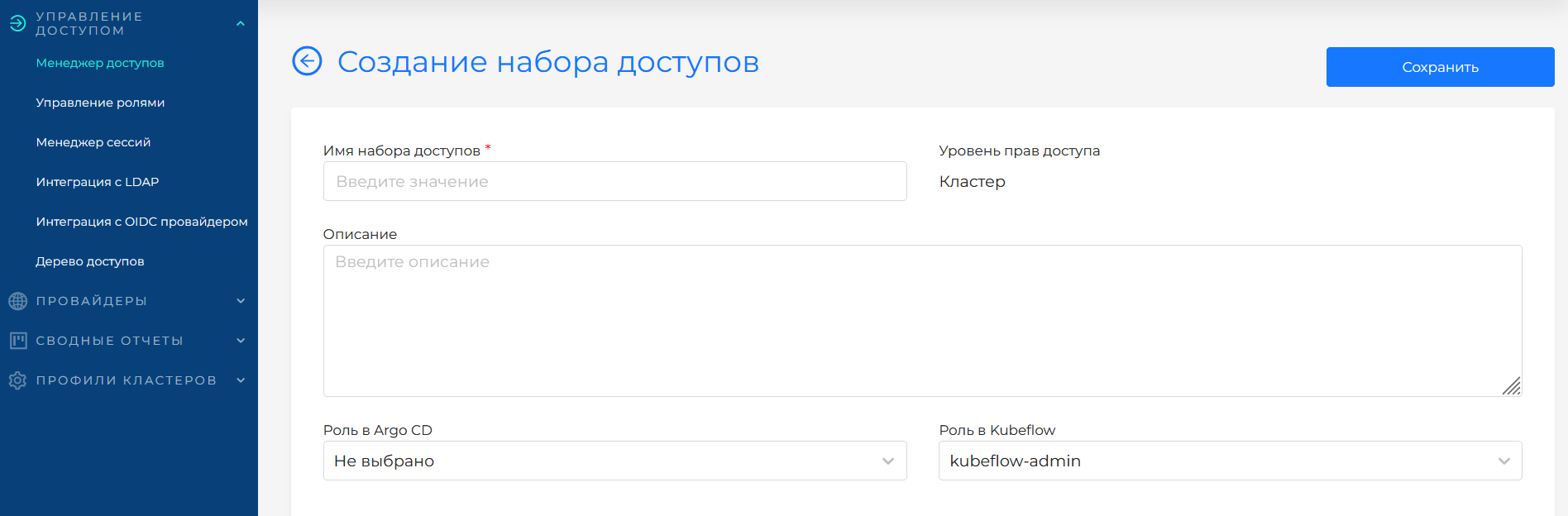
Default access sets
Illustration: Default access sets
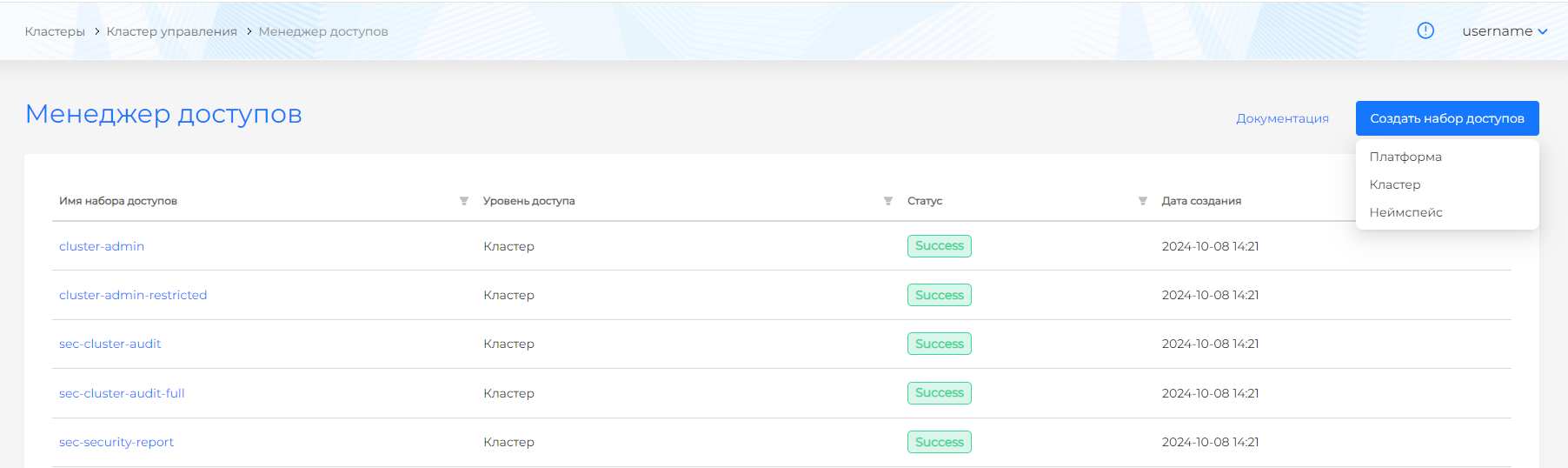
Level “Platform”
| Set | Purpose | Description | Kubeflow | Argo CD |
|---|---|---|---|---|
| platform-admin | Platform Administrator | Full access to all platform and cluster resources | kubeflow-admin | admin |
| sec-platform-admin | Security Administrator | Managing assignments at all levels, ClusterIssuers; viewing logs, cluster certificates, metrics, service availability, Issuers at the namespace level, Cilium network policies and pages of the “Security” section (security policies, report on scan results, report on violated policies, report on found vulnerabilities) | kubeflow-view | view |
| sec-platform-audit | Auditor of main objects | View platform and cluster pages, except Secrets, NCI, SSC, Ingress Controllers | kubeflow-view | view |
| sec-platform-audit-full | Auditor of all objects | View all platform and cluster pages | kubeflow-view | view |
| tenant-role-binder | Tenant Access Manager | Managing access to tenants, viewing tenants, section “Access Management”. No access to clusters | — | — |
| tenant-role-viewer | Tenant Access Auditor | View access in tenants, managerand access tree. No access to clusters | — | — |
Cluster level
| Set | Purpose | Description | Kubeflow | Argo CD |
|---|---|---|---|---|
| cluster-admin | Cluster Administrator | Full access to the resources of the selected cluster | kubeflow-admin | admin |
| cluster-admin-restricted | Cluster management | All resources except nodes, machines, tenants and deleting a cluster | kubeflow-admin | admin |
| sec-cluster-audit | Auditor of main cluster objects | View cluster pages except Secrets, NCI, SSC, Ingress Controllers | kubeflow-view | view |
| sec-cluster-audit-full | Auditor of all cluster objects | View all cluster pages | kubeflow-view | view |
| sec-security-report | Viewing information security reports | Access at the level of the selected cluster to view pages of the “Security” section (security policies, report on scan results, report on violated policies, report on found vulnerabilities), events and reports on violated policies and found vulnerabilities in all namespaces of the cluster | — | — |
Level “Namespace”
| Set | Purpose | Description | Kubeflow | Argo CD |
|---|---|---|---|---|
| dev-basic | Browse Resources | View the “Loads”, “Network” sections, PersistentVolumeClaims, Configmaps, Quotas pages in the selected namespace. You can view events, reports on triggered security policies and found vulnerabilities. No access to sub-resources, for example pods/logs, pods/exec | — | view |
| dev-debugger | Finding errors | Viewing a report on found vulnerabilities, Pods of the selected namespace, reading logs (pods/logs), port forwarding (pods/portforward) and connecting to remote access (pods/exec) | — | — |
| dev-deployer | Deploying the application | Resource management in the “Loads” and “Network” sections, on the PersistentVolumeClaims, Configmaps, Quotas pages. You can view events, reports on triggered security policies and found vulnerabilities. No access to sub-resources, for example pods/logs, pods/exec | kubeflow-edit | edit |
| edit | Changing Resources | Changing all resources in the namespace, including sub-resources services/proxy, deployments/rollback, pods/attach, pods/exec, pods/portforward, pods/proxy, deployments/scale, replicasets/scale, statefulsets/scale, serviceaccounts/token. You can view events, reports on triggered security policies and found vulnerabilities, logs (pods/log) | kubeflow-edit | edit |
| namespace-admin | Namespace administrator | Full access to namespace resources | kubeflow-admin | admin |
| ops-ns-manager | Quota management | Managing Quotas in namespace | — | — |
| ops-role-manager | Access Control | ServiceAccounts and access rights in namespace | — | — |
| view | Browse Resources | View all resources in the namespace, except Secrets. You can view events, reports on triggered security policies and found vulnerabilities, logs (pods/log) | kubeflow-view | view |
Creating a custom access set
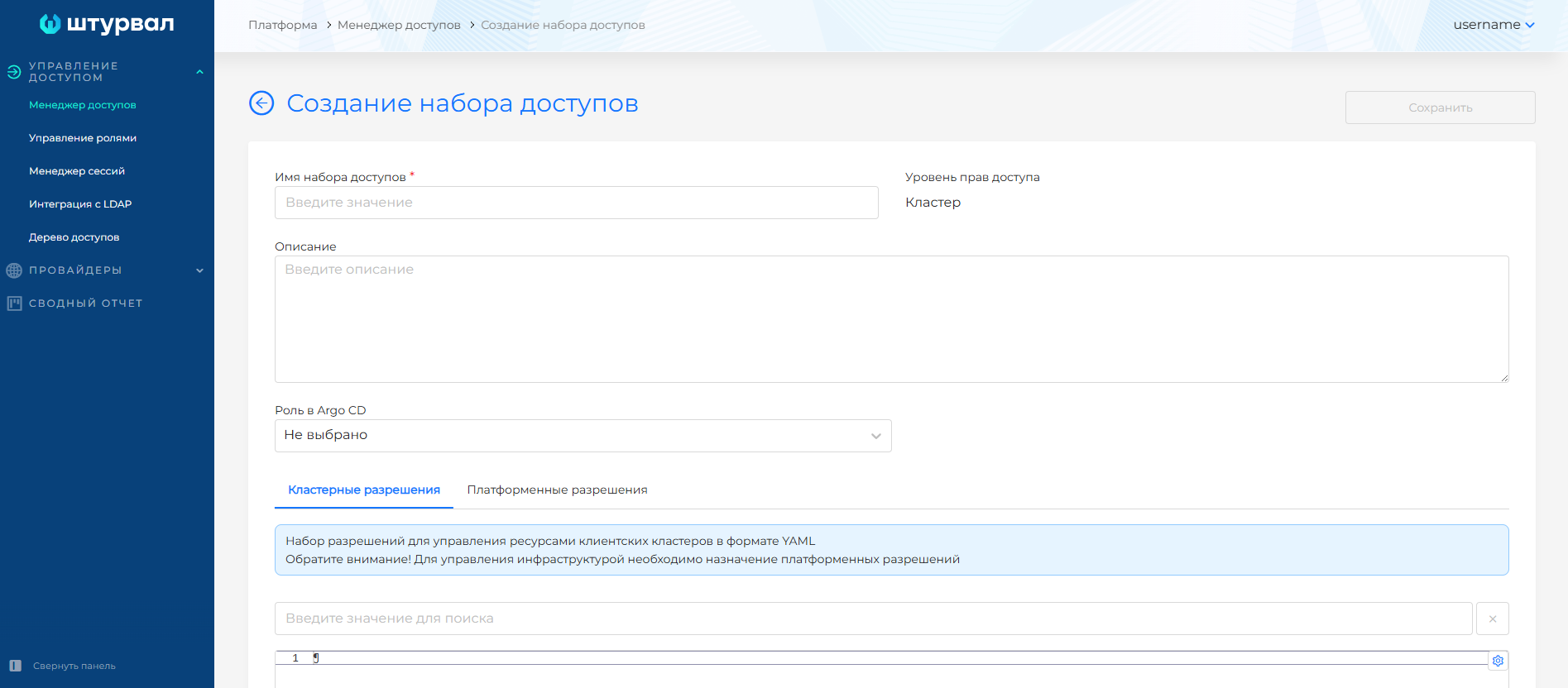
Step-by-step instructions
- Go to Access Management → Access Manager.
- Create a set, select a level (Platform, Cluster, Namespace).
- Set a name (required, immutable), description, optional Kubeflow role, and role in Argo CD.
- Add cluster permissions (YAML) and/or platform permissions.
- Save. The set will become available for assignment to users and groups.
Illustration: Step-by-step instructions
Deleting a custom access set
You can delete custom sets from the Access Manager list: one or several at once. How to select objects and confirm deletion: Bulk deletion. Preconfigured sets cannot be deleted. If a set is assigned to a user or group, remove all assignments first.
Platform and cluster permissions
Platform permissions control access to resources managed by the management cluster. These objects are stored in the management cluster, even if the assignment is made at the Cluster or Namespace level:
- Cluster API objects:
cluster.x-k8s.io,bootstrap.cluster.x-k8s.io,infrastructure.cluster.x-k8s.io(Cluster, Machine, KubeadmControlPlane, etc.); - Access control objects:
permissions.shturval.tech(UserRole, GroupRole, Permissions); - Providers, IP pools, tenants, etc.
The list of platform permissions is in the Platform permissions table above.
Cluster permissions are RBAC in Kubernetes format. They specify access to resources of client clusters (Pods, Deployments, Services, ConfigMaps, etc.). The format is standard for ClusterRole: apiGroups, resources, verbs, if necessary nonResourceURLs. Cluster permissions from the Platform tier set apply to all client clusters; from the “Cluster” level set - to the selected cluster; from the “Namespace” level set - to the selected namespace.
You can create a set with only the Argo CD role or only with the Kubeflow role - then leave the cluster and platform permissions empty.
Custom resources under the hood
When creating a custom access set, the platform creates the Permissions resource (API group permissions.shturval.tech) in the namespace shturval-backend of the management cluster. Architecture of the rights approval operator and CRD field reference - in the docment Permissions operator. The Permissions resource stores:
- Set name;
- Level (Platform, Cluster, Namespace);
- List of platform permissions;
- Cluster permissions (YAML);
- Kubeflow role (kubeflow-admin, kubeflow-edit, kubeflow-view);
- Role in Argo CD (admin, edit, view).
When assigning a set to a user or group, a UserRole or GroupRole is created - they refer to one or more Permissions.
When synchronizing the access control module controller:
- Reads UserRole/GroupRole and associated Permissions;
- Combines permissions from all assigned sets;
- Creates or updates in target clusters:
- ClusterRole — from cluster permissions set;
- RoleBinding — ClusterRole binding to a subject (user or group members);
- If there is a Kubeflow role, it gives the user or group the appropriate access rights to Kubeflow;
- If there is an Argo CD role, creates or updates roles in Argo CD projects.
More details: Custom resources for managing access rights, How access rights are assigned.