How access rights are assigned
The chain of events when assigning rights to a user or group.
Process overview
If you are not yet familiar with the features of resources for managing access rights in the Shturval platform, start by reading the article Custom resources for managing access rights.
- The administrator assigns rights in the GUI (user or group + one or more access sets).
- Backend creates or updates
Scope(level boundary) andUserRole/GroupRole(subject + listPermission). - Permissions Negotiation Operator (shturval-permission-operator, Deployment
shturval-permission-operator-controller) performs a reconcile:Permission→ClusterRolein the management cluster and client clusters;UserRole/GroupRole→ application via plugins (Argo CD, Kubeflow).
- In parallel, the operator updates the OPA bundle (HTTP
/bundle, port 8082) - data for Authz (OPA) when checking requests in the Backend. - The status is reflected in
UserRole/GroupRole.statusand in the GUI.
Flow diagram
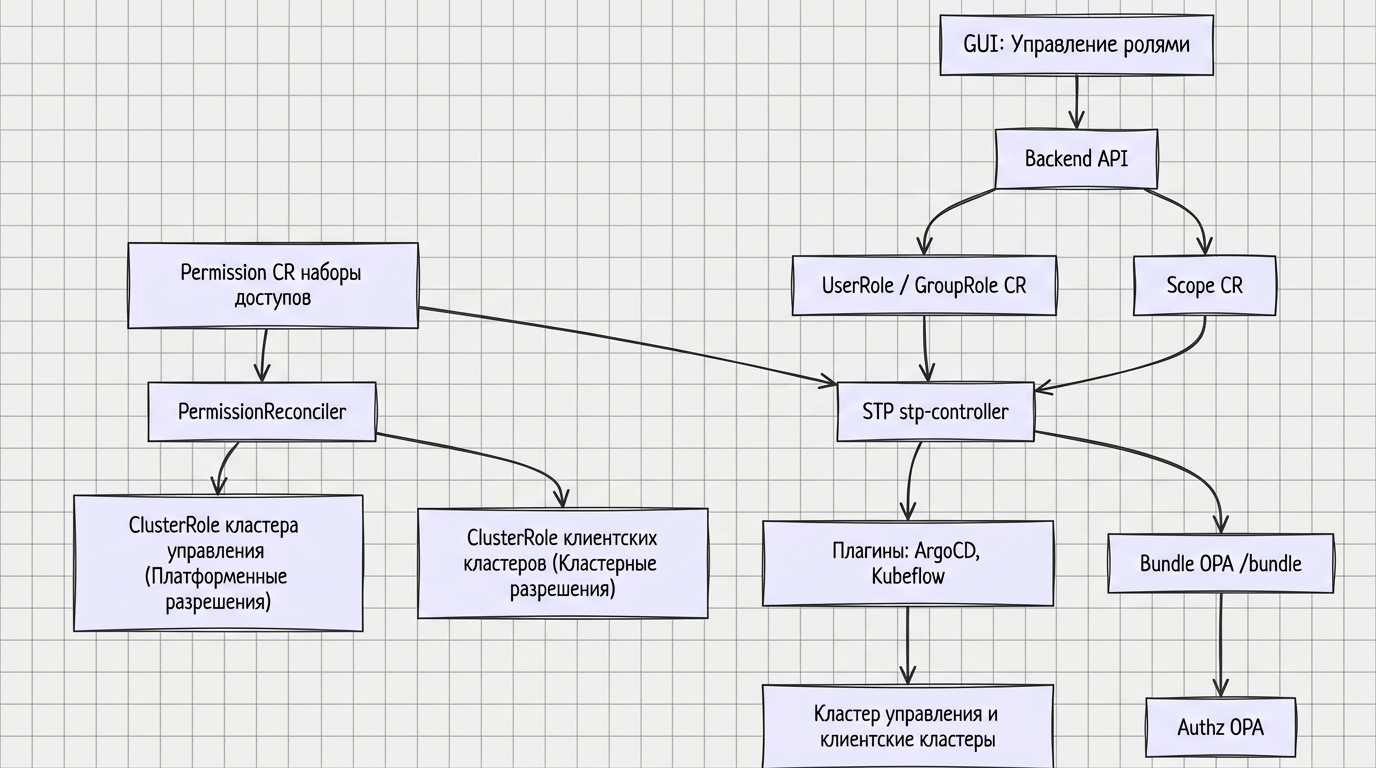
Detailed reconcile diagrams are in Rights Negotiation Operator.
Step by step process
Step 1. Action in the GUI
Administrator on the Manage Roles page:
- Selects a level (Platform, Tenant, Cluster or Namespace).
- Click + next to “Users” or “Groups”.
- Specifies the user or group name (from LDAP or manually).
- Selects one or more access sets.
- Clicks Save.
More details: Assigning access rights.
Step 2: Scope and Binding (Scope, UserRole / GroupRole)
The backend saves the assignment in the form of custom Kubernetes resources (API group permissions.shturval.tech, namespace shturval-backend management cluster).
2a. Area (Scope)
Backend creates or uses Scope corresponding to the selected level (platform, tenant, cluster, namespace). The boundaries of the area are specified by the spec.objects field.
At the Tenant level, the associated Scope is also created by the operator from the Tenant object (the scope name is the same as the tenant name).
2b. Bind (UserRole / GroupRole)
- UserRole — assignment to the user;
- GroupRole — assignment to a group.
The specification states:
| Field | UserRole | GroupRole |
|---|---|---|
| Region | spec.scope - name Scope | spec.scope - name Scope |
| Subject | spec.username | spec.claim |
| Access Sets | spec.permissions - names Permission | spec.permissions - names Permission |
Note: after creating an object, spec.username (UserRole) and spec.claim (GroupRole) cannot be changed - the validating webhook will reject the Update.
More details: Custom resources for managing access rights.
Step 3: Set reconciliation (Permission)
Each access set in the platform corresponds to CR Permission. It is agreed upon by PermissionReconciler of the shturval-permission-operator operator:
granted_platform_permissions→ aggregatingClusterRoleon the platform (name prefixplatform:);granted_cluster_rules→ClusterRolein client clusters (prefixshturval:); access to the client cluster API is via Secret<cluster-name>-kubeconfig, keyvalue.
CAPI events Cluster (control plane ready, delete, pause) trigger renegotiation of the affected Permission.
Step 4. Negotiate binding via shturval-permission-operator
UserRoleReconciler and GroupRoleReconciler (shturval-permission-operator operator, Deployment shturval-permission-operator-controller) perform binding reconcile:
- Read the associated
Scopeand sets ofPermissionfromspec.permissions. - Determine target clusters by
Scope(see table of levels below). - Consistently call plugins for each permission:
- RBAC — binding the subject to
ClusterRolecreated in step 3; - Argo CD, Kubeflow, tenant — if the corresponding fields are set in
Permission.
- RBAC — binding the subject to
- If there is a plugin error, immediately reconcile; if successful, update
status.
More information about operator architecture: Permissions operator.
Step 5. Kubeflow and Argo CD plugins
If Kubeflow roles (kubeflow-admin, kubeflow-edit, kubeflow-view) are specified in the permission set (Permission), Kubeflow plugin applies the corresponding rights:
- Platform — profiles (namespaces) in all clusters;
- Cluster — cluster profiles;
- Namespace — profile of one namespace.
If the Argo CD role is specified (admin, edit, view), the Argo CD plugin creates or updates roles in projects:
- Platform — all projects;
- Cluster — cluster projects;
- Namespace is a project of one namespace.
Step 6. Application status
The operator writes the result to UserRole.status / GroupRole.status: submap status.permissions → cluster or platform → plugin name → PluginApplyStatus.
The GUI displays a summary status for each target contour:
| GUI | Value in CR | Description |
|---|---|---|
| Green | applied | Plugin successfully applied |
| Red | undefined or reconcile error | Network or other error, plugin failure |
| Gray | not required | No entitlement required (e.g. no Kubeflow or Argo CD role in the set) |
| Waiting | not applied | Reconcile not yet completed |
For debugging: kubectl describe userrole <name> -n shturval-backend (or grouprole).
Destination level dependencies
| Level | Where is UserRole/GroupRole stored | Where rights apply |
|---|---|---|
| Platform | shturval-backend | Management cluster + all client clusters |
| Tenant | shturval-backend | Management cluster + all tenant clusters |
| Cluster | shturval-backend | Management cluster (for platform objects) + selected client cluster |
| Namespace | shturval-backend | Management cluster + selected namespace in the client cluster |
The level boundaries are set by Scope, which is referenced by UserRole.spec.scope / GroupRole.spec.scope.
Note: cluster objects (Cluster, Machine, etc.) and permissions.shturval.tech objects are stored in the management cluster. Therefore, even when assigned at the “cluster” or “namespace” level, some of the rights are applied in the management cluster.
Typical causes of failures
| Symptom | Possible reason |
|---|---|
| Red status in management cluster | Platform permissions in the set are missing or incorrect |
| Red status in client cluster | The cluster is unavailable; no Secret <cluster-name>-kubeconfig or invalid key value; RoleBinding name conflict |
| “Not applicable” for a long time | Status not applied - reconcile is still in progress; check Pod shturval-permission-operator-controller in namespace shturval-backend |
| Error when manually patching UserRole/GroupRole | Changing spec.username or spec.claim after creation (validating webhook) |
| Rights disappeared or were not updated after a cluster pause | CAPI Cluster.Spec.Paused - operator renegotiates when cluster state changes |
| The user does not see the cluster | The assignment was not applied or was applied in error; check status in GUI |
| The group does not receive rights | Group not found in LDAP; for OIDC - check the mapping of groups in the token |
More details: Access troubleshooting.