Installation process
Installation of a management cluster via GUI/CLI, microcluster, troubleshooting.
Installation is performed from the administrator’s workstation using the shtil utility. In open loop the shtil machine and the nodes of the created cluster must have network access to the official image registry r.shturval.tech (HTTPS, port 443).
Before installation, check the Open Loop Requirements, the Installation Preparations (shtil machine, nodes, SSH, image registry), and the applicable scripts in the Internetworking Diagrams. For the general composition of the image registry, see also repository services.
Available installation scripts:
- with GUI —
install-gui, then the installation wizard in the browser; - with flags —
install-cliand the provider subcommand; - with YAML -
install-cli … --yaml-path/-f.
Installation from GUI
GUI installation consists of two stages: first shtil creates a local installation cluster, then the administrator configures the management cluster in the browser-based installation wizard.
The install-gui command is also available through the create-cluster and create synonyms.
Step 1: Start a local installation cluster
In an open loop, the --bootstrap-license flag is required. By default, temporary installation cluster images are loaded with r.shturval.tech.
./shtil install-gui \
  --bootstrap-license="YOUR-LICENSE"
With the given password admin:
./shtil install-gui \
  --bootstrap-license="YOUR-LICENSE" \
  --password="PASSWORD-ADMIN"
The password in --password must be at least 8 characters long and contain a lowercase letter, an uppercase letter, and a number.
Basic parameters for launching the local installer:
| Parameter | Description |
|---|---|
--bootstrap-license | Platform license. Required for install-gui |
--bootstrap-registry | Image registry address; default r.shturval.tech |
--bootstrap-insecure | Disable TLS checking when accessing the image registry |
--bootstrap-registry-certs-dir | Directory with trusted registry certificates |
--bootstrap-kubeconfig-path | Local installation cluster kubeconfig path |
--password | Platform administrator password for logging into the GUI |
--name, -n | Local installation cluster name (default help prompt: shturval-installer) |
--wait, --retry, --debug | Waiting for Control Plane of a local cluster node, number of retries, container saving mode in case of error |
-v, --verbosity | CLI log detail (up to 10; see ./shtil --help) |
After a successful launch, the administrator account information and the installation wizard URL in the GUI are displayed in the console. Credentials are saved in user.conf in the installer data directory (~/.shturval/installer or /tmp/shturval/installer). Save your login and password - you will need them to log into the permanent cluster.
Browser for the GUI - see browser requirements.
If shtil install-gui is launched on a remote Linux machine, open the installation wizard in a browser using the IP address or hostname of this machine, without first forwarding ports, for example, http://10.11.12.13:30080/.
Going by hostname is only possible if the DNS is configured to resolve the domain name to an IP address.
Life cycle of a local installer: the “Cancel installation” button in the installation wizard resets the completed cluster creation form and returns to the initialization screen; refreshing a page without canceling field data usually doesn’t reset. After successful installation of a permanent cluster, the temporary (bootstrap) cluster is not deleted automatically - if necessary, clean it according to the instructions Uninstalling a temporary cluster. If there is an error without --debug, the local installer container may be deleted; for diagnostics use ./shtil install-gui ... --debug.
Step 2: Open the installation wizard in the GUI and go through the steps
- Open the GUI URL from the output of
shtil(usuallyhttp://<shtil-machine-ip>:30080). - Log in as an administrator.
- Click Create Management Cluster.
- Complete the installation wizard and click Create cluster at the data verification step.
- Wait for deployment to complete (approximately 15–30 minutes). You can close the tab earlier: the installer address brings you back to the status page. What is kept is described in Management cluster installation status.
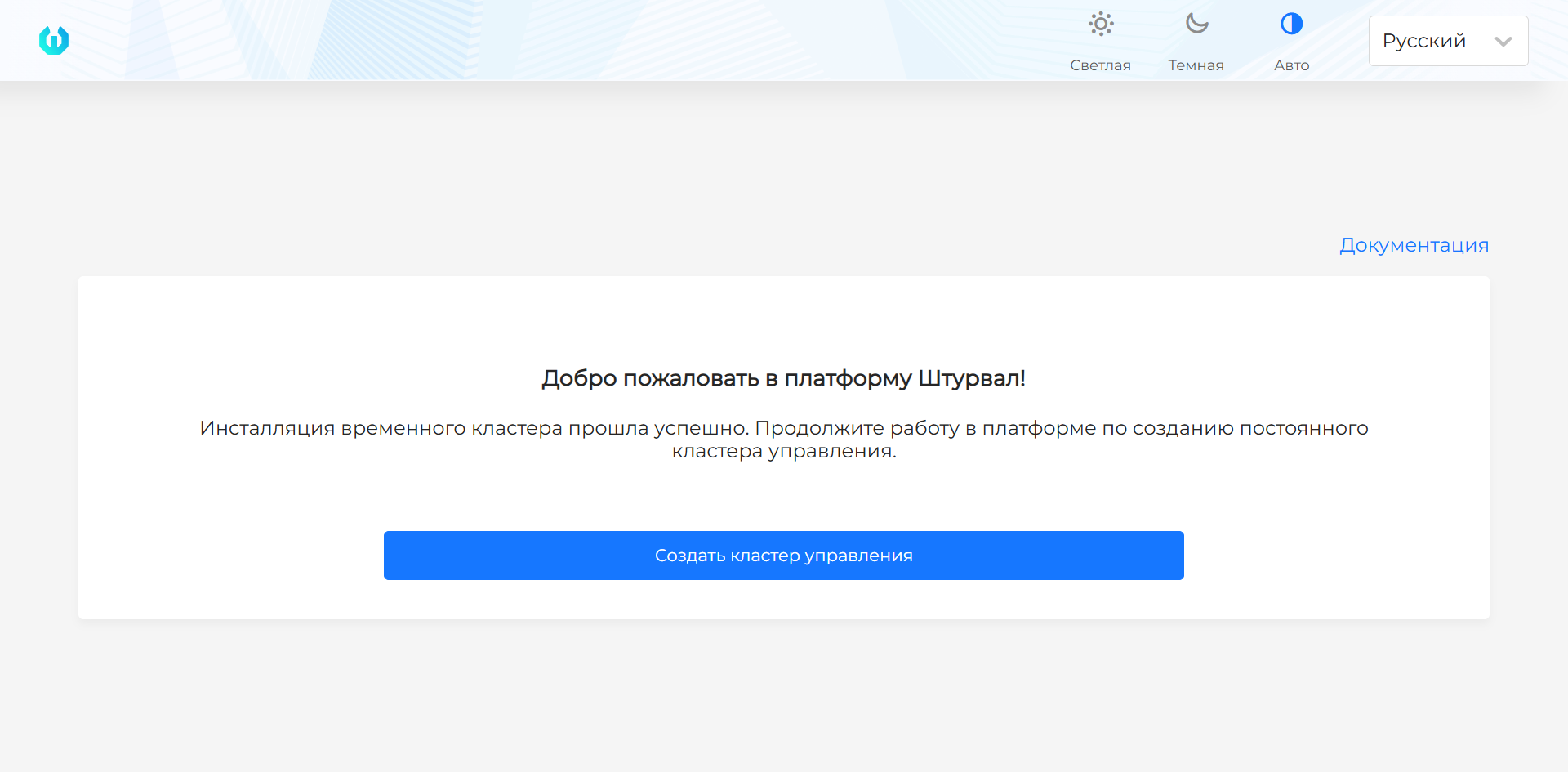
Screenshot of the local installer start screen
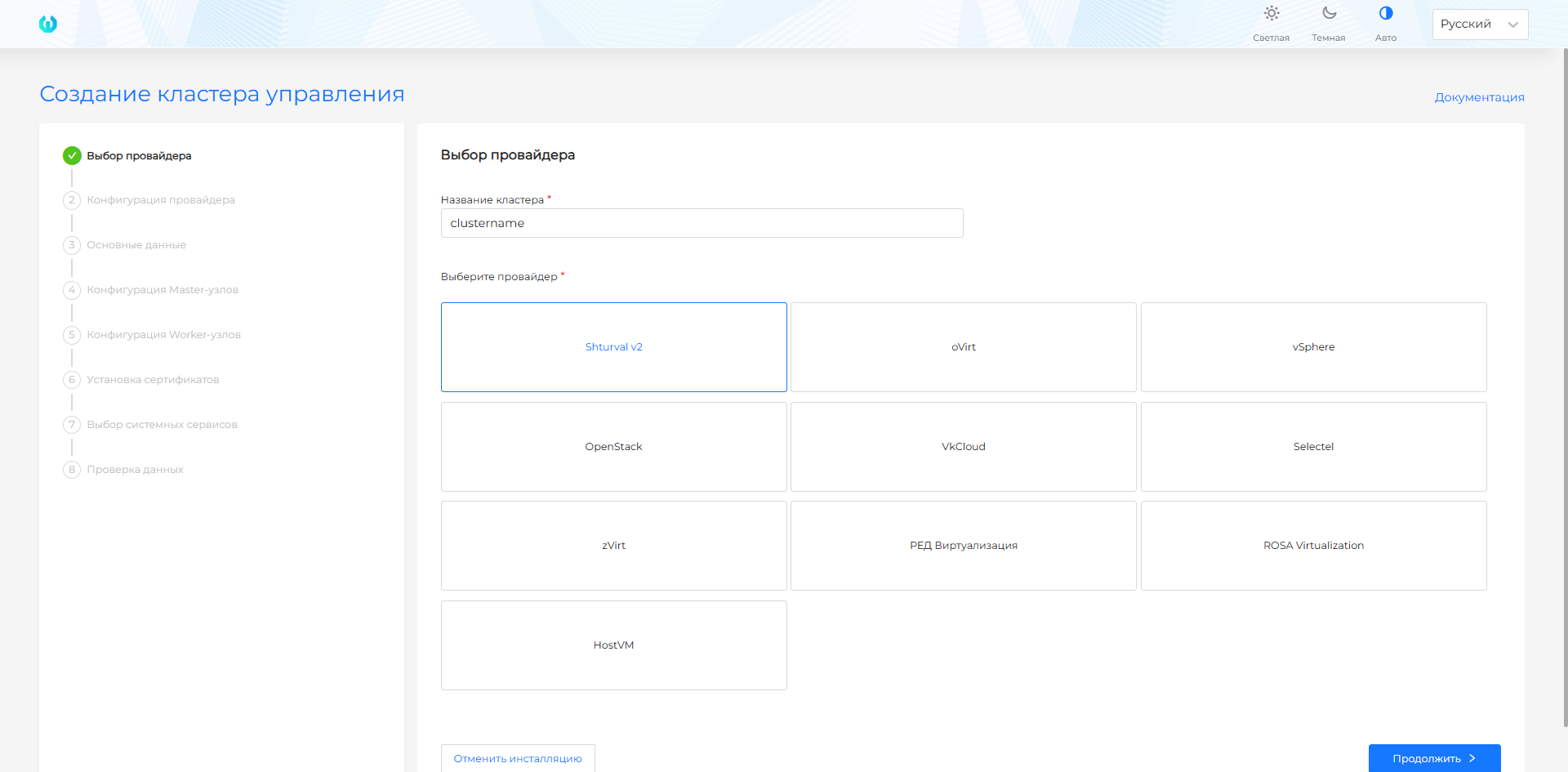
Step 1. Selecting a provider
Screenshot and step fields
| Field | Description |
|---|---|
| Cluster name | The unique name of the management cluster. Used in service objects and FQDN. Indicate the Latin alphabet, numbers and hyphens. |
| Select provider | Select an infrastructure provider prepared before installation: Shturval v2, VMware vSphere, oVirt and similar, OpenStack, VK Cloud or Selectel, Yandex Cloud. |
Note: the provider with which the platform is deployed will be installed in the platform as a critical service - it cannot be disabledI. The remaining infrastructure providers in the platform will be disabled.
Before filling out the form, check the requirements of the selected provider: Shturval v2, VMware vSphere, oVirt and similar providers, OpenStack, VK Cloud, Selectel, Yandex Cloud.
Step 2. Provider configuration
Shturval v2
The Shturval v2 provider uses pre-prepared physical or virtual hosts. A VM template is not needed for this provider: the installation wizard connects to hosts via SSH and installs components on the selected hosts.
Screenshot and step fields
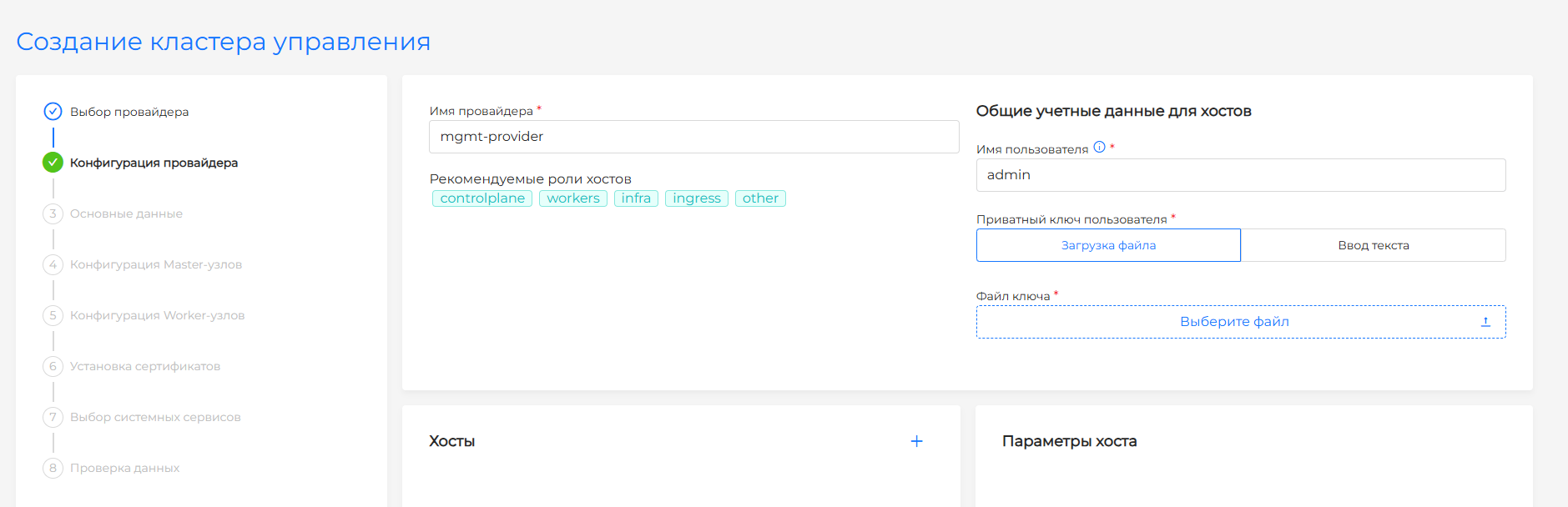
| Field | Description |
|---|---|
| Provider name | Provider instance name. |
| Username | In Common credentials for hosts. User for connecting to hosts over SSH. |
| User password | Optional. In the same block. SSH user password for sudo commands on the nodes. If the field is empty, sudo runs without a password. |
| User’s private key | Private key for connecting to hosts. Upload a file or enter the text. The public part of the key must be on all target hosts. |
| Hosts | IP addresses or FQDN of hosts, roles (controlplane, workers, infra and others) and, if necessary, labels. In Host parameters, User password is available if Use common credentials is not selected. |
After the hosts are loaded, the provider prepares each of them to join the cluster. Over SSH it checks access and sudo rights, deploys the node components, and checks whether the host is free and whether /etc/machine-id is unique. The next configuration step is available only when every added host has passed the checks and is ready to be bound to a ShturvalMachine: status.readyformachine: true.
A free host may still be going through preparation. If a host is not ready, check its conditions and resolve the reported cause if necessary.
By default, the provider uses common credentials for all hosts, including User password. For a single host, set the password in Host parameters. From the console, pass the same password with --ssh-user-password or credentials.SSH.sshUserPassword — see SSH user password for sudo.
Credentials are stored in the Secret of the management cluster in the namespace shturval-capsm. The Secret name is formed from the name of the provider instance with the suffix capsm-v2-provider-secret. An example of Secret is given on the page Provider Shturval v2 (shturval-capsm).
VMware vSphere
For the VMware vSphere provider, use vCenter and the settings prepared before installation. Management cluster nodes will be created from VM template; if the template was not created in advance, prepare it according to the instructions and return to installation.
Screenshot and step fields
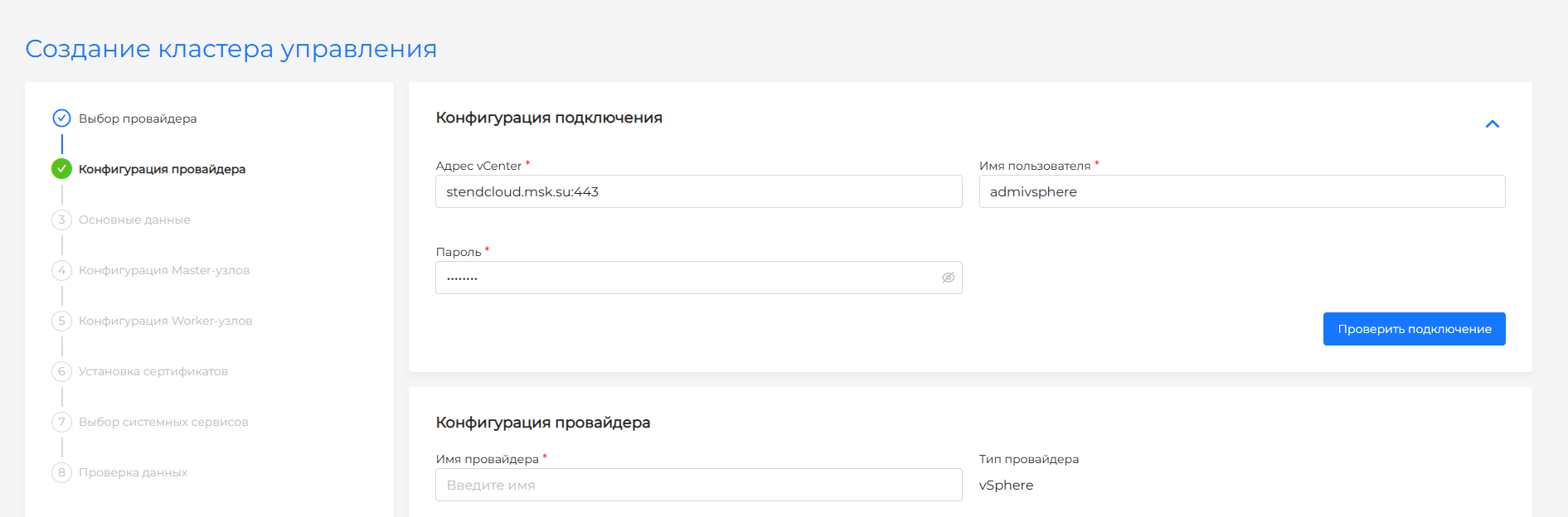
| Field | Description |
|---|---|
| Instance name | The name of the vSphere configuration in the installation wizard. |
| IP Pool-addresses | Pool for API server and VIP Ingress. Without a pool, addresses are entered manually. |
| vCenter Address | IP address or FQDN of the vCenter server. |
| Username | vCenter account in username@domain format. |
| Password | vCenter account password. |
| Datacenter | Virtual data center, available after checking the connection. |
| Resource Pool | Resource pool in which management cluster VMs will be created. |
| Network | Network for VM. DHCP must be enabled on the network. |
| Datastore | Storage for VM disks. |
| VM storage path | Folder or path to Datastore for VM files. |
oVirt, zVirt, HostVM, ED Virtualization, ROSA Virtualization
For oVirt and similar providers, use the Engine, network and virtualization settings prepared before installation. Management cluster nodes will be created from VM template; if the template was not created in advance, prepare it according to the instructions and return to installation.
Screenshot and step fields
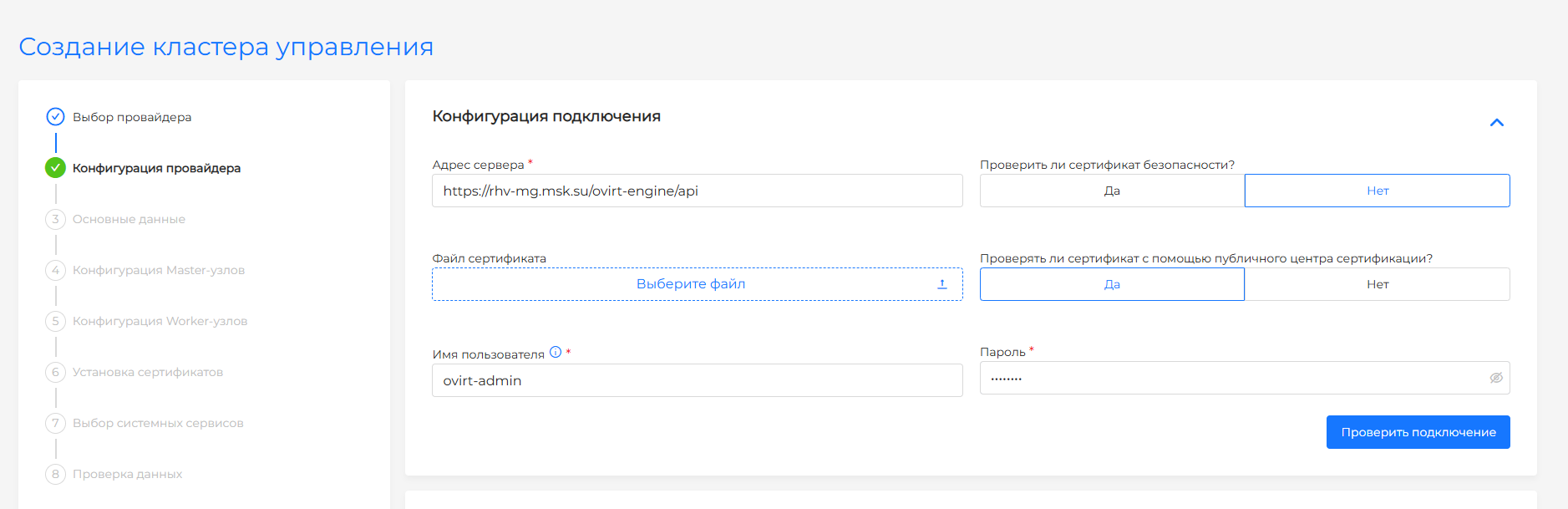
| Field | Description |
|---|---|
| Instance name | The name of the provider configuration in the installation wizard. |
| URL Engine | Full API Engine address, for example https://ovirt.example.com/ovirt-engine/api. |
| Username | An Engine account with a domain such as admin@internal. |
| Password | Engine account password. |
| Certificate Verification | Engine TLS certificate verification. Disable only if trust in an enterprise or self-signed CA is not configured. |
| Datacenter | Virtual data center from the list after successful connection verification. |
| Clusters | Virtualization cluster where VMs will be created. |
| VNIC Profile | Network profile for VM interfaces. DHCP must be enabled on the network. |
| Allow CSI | Allows you to enable CSI integration for Persistent Volumes in the basic data step. |
| IP Pool | Pool for API server and VIP Ingress. Without a pool, addresses are entered manually. |
OpenStack, VK Cloud, Selectel
For the provider OpenStack, VK Cloud or Selectel, use the project, network, VM types and API parameters prepared before installation. The management cluster nodes will be created from the VM image/template; if it has not been created beforehand, prepare a Provider VM template and go back to installation.
Screenshots and step fields
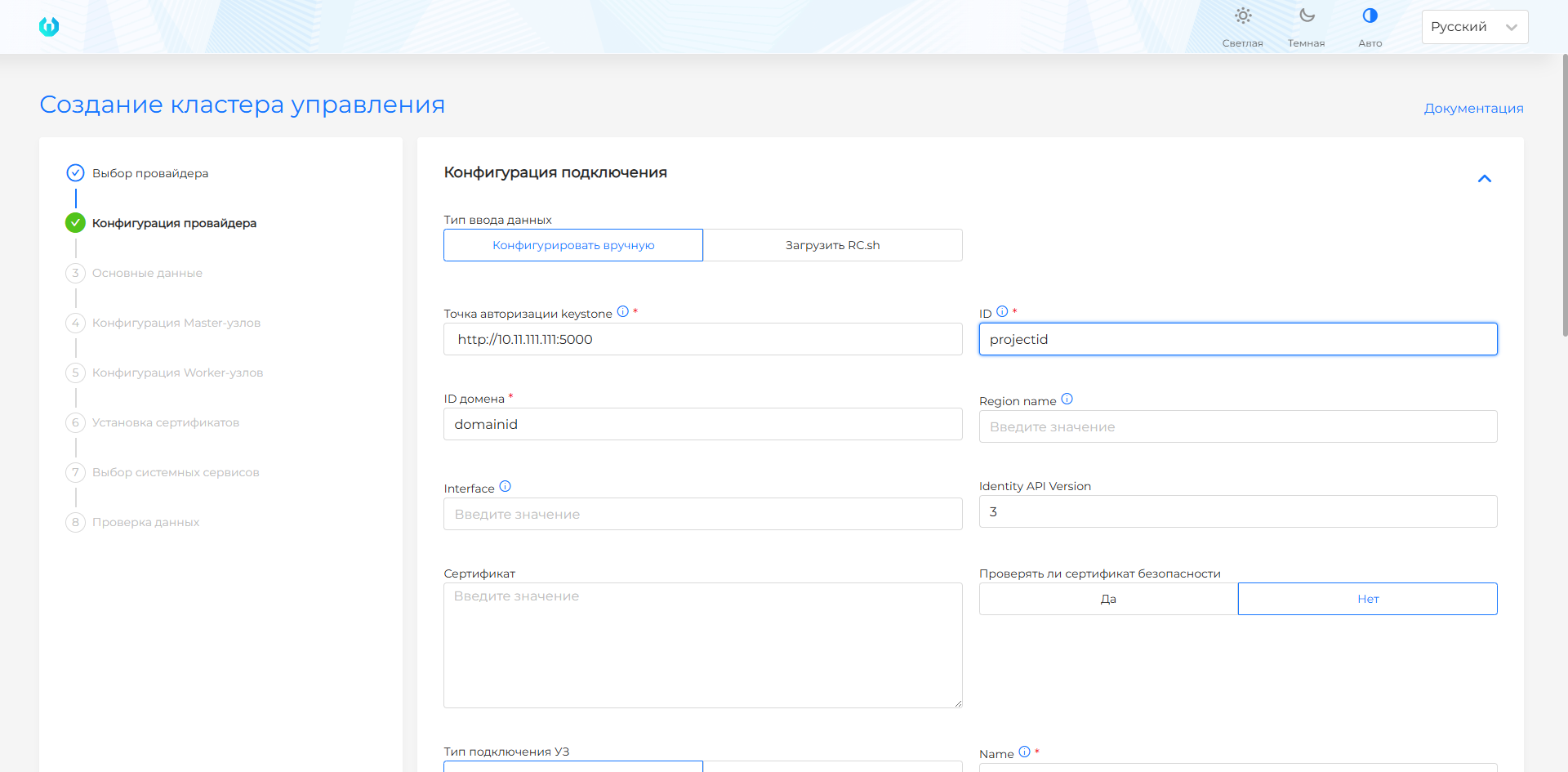
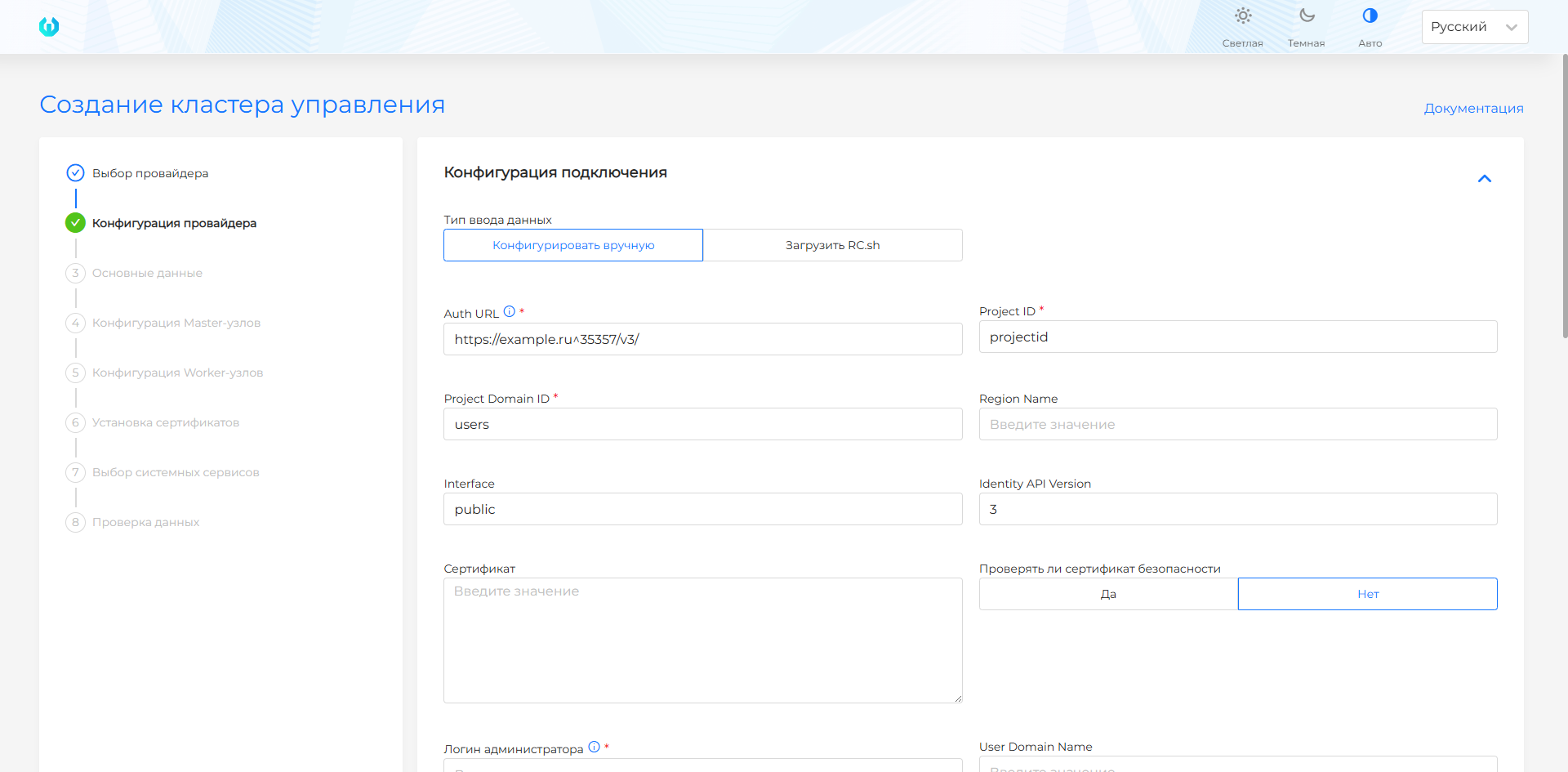
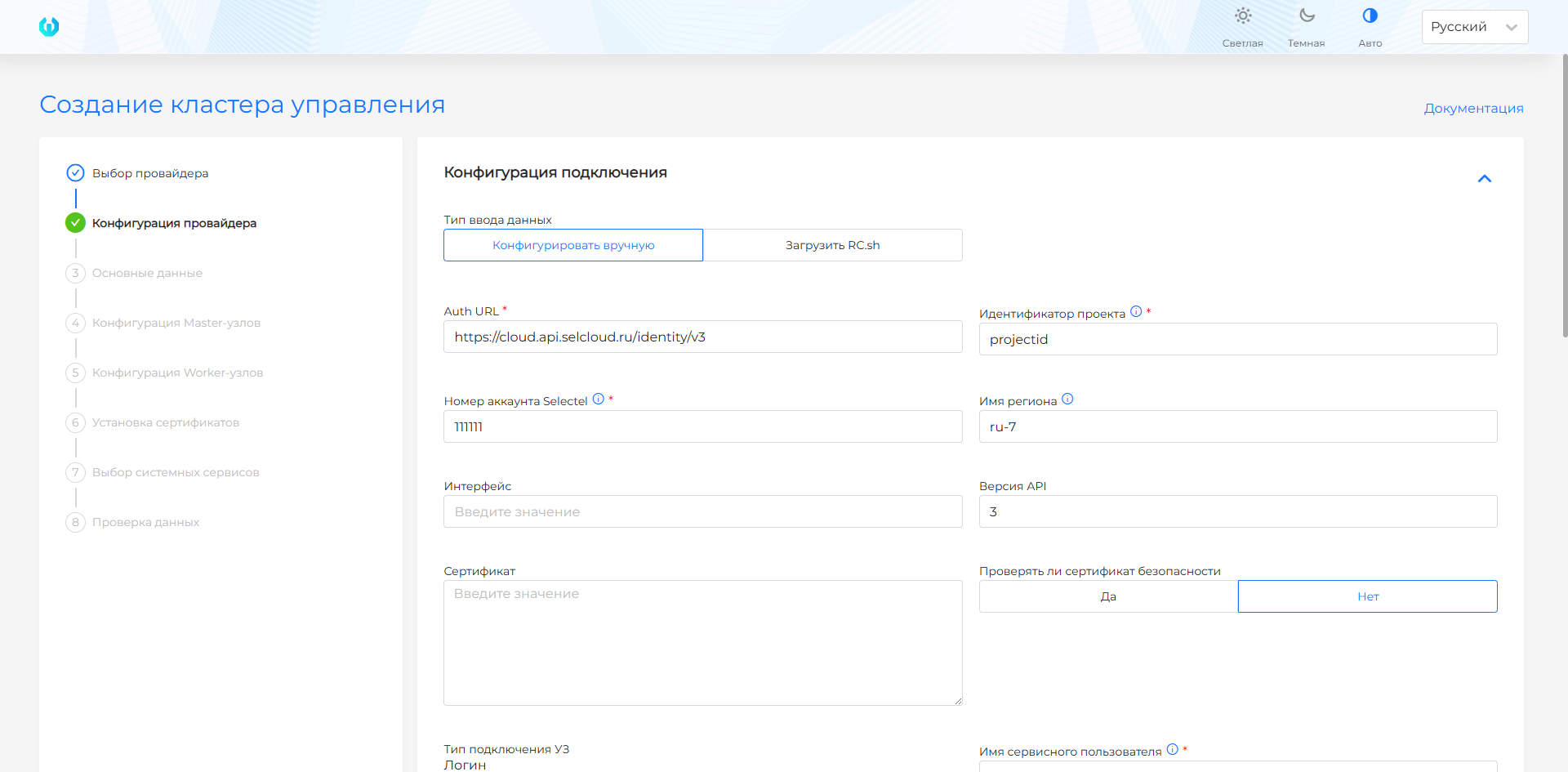
| Field | Description |
|---|---|
| Auth URL / Identity endpoint | Keystone Authorization Service URL. |
| Project ID | Cloud project ID. |
| Project Domain ID | Project domain ID. |
| Region name | Region or zone of placement. |
| Interface | API access interface, usually public. |
| Identity API Version | Identity API version, usually 3. |
| Certificate (cacert) | Root certificate when using an enterprise or self-signed CA. |
| Check certificate | Enables API TLS certificate verification. |
| Account Type | Service user or token. For Selectel, use the service user. |
| Name/username | Service user name. |
| Password | Service user password. |
| User Domain Name | The user’s domain, if required in the cloud. |
| Token | Access token, if the account type is Token. |
| Provider Name | The unique name of the provider instance. |
| CloudName | Cloud name in configuration. |
| VM network interface | Interface name on the created VMs, for example eth0. |
| sshKeyName | OpenStack SSH key for accessing the VM. |
| Host Subnet | Subnet for management cluster nodes. |
| externalNetworkID | External network identifier for external access. |
| VM types (flavors) | Available virtual machine types for hosts. |
| Disk types (volume types) | Available volume types for VM disks. |
| Accessibility zones | Availability zones if necessary. |
| Security Groups Management | Management of security groups from the platform. |
| Allow CSI | Allows OpenStack Cinder CSI to be enabled in the basic data step. |
Yandex Cloud
For the Yandex Cloud provider, use the folder, subnet, and API parameters prepared before installation. Management cluster nodes are created from a VM template; if the template was not created in advance, prepare it with the --keep-cloud-init flag and return to the installation.
Screenshot and step fields
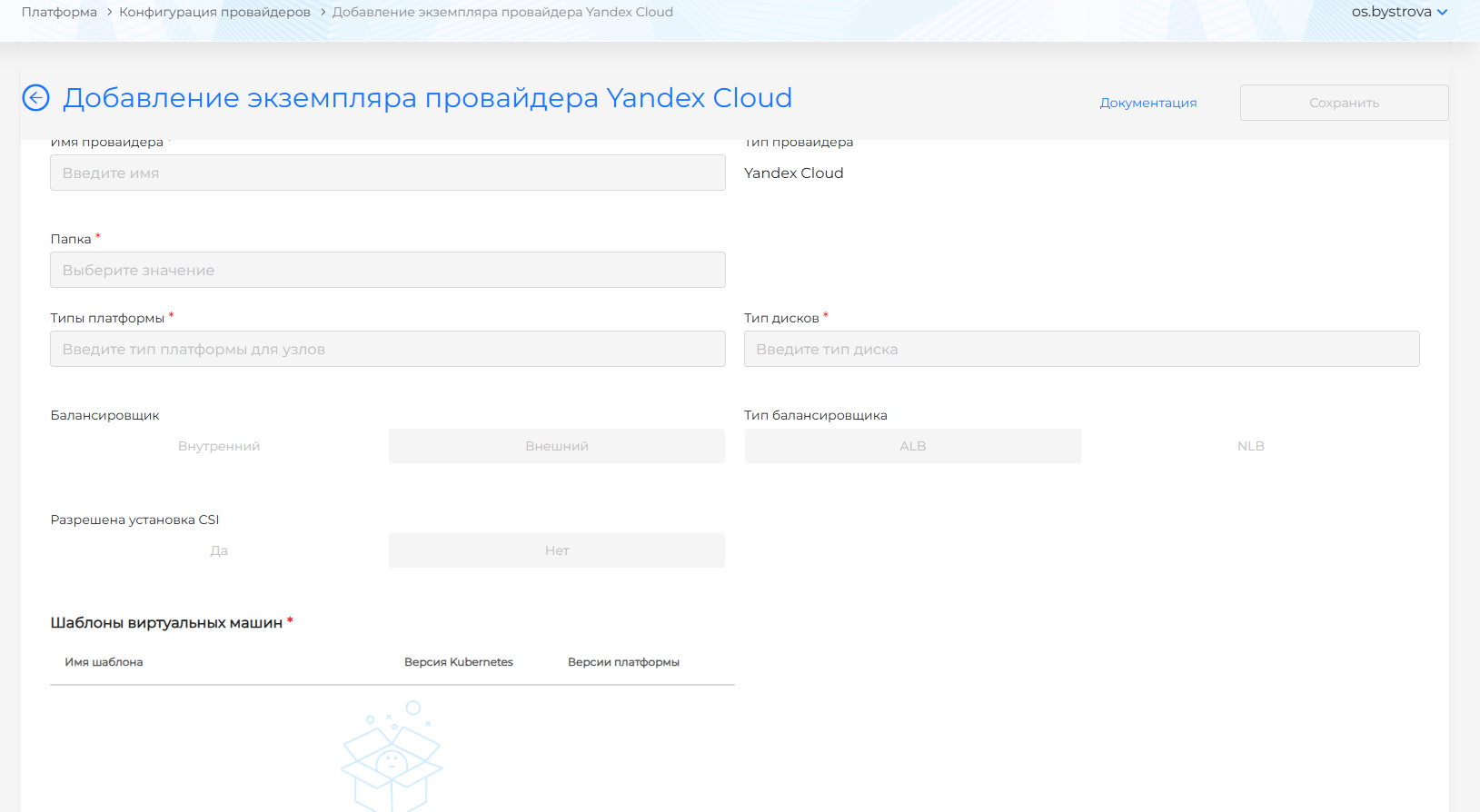
| Field | Description |
|---|---|
| Authorized key of the service account | JSON key of the service account. After you enter it, click Check connection. |
| Folder ID | Required when the account cannot list folders. |
| Provider name | Instance name. Lowercase letters, digits, and hyphen, 1 to 63 characters. The name create is not allowed. |
| Folder | Yandex Cloud folder. If only one folder is available, it cannot be changed. |
| Subnet | One subnet of the selected folder: name, ID, and availability zone. |
| Platform types | Platform IDs later used as node sizes. |
| Disk type | Node disk types, for example network-ssd and network-hdd. |
| Load balancer | External or Internal. Default External. |
| Load balancer type | ALB or NLB. Default ALB. |
| Allow CSI | Yes / No. Default No. Yes lets the basic-data step enable CSI integration. |
| Virtual machine templates | At least one template: cloud image name and Kubernetes version. |
The service account needs the compute.editor and alb.editor roles. To enable CSI on the basic-data step, also add k8s.clusters.agent.
Step 3. Basic data
Shturval v2
Screenshots and step fields
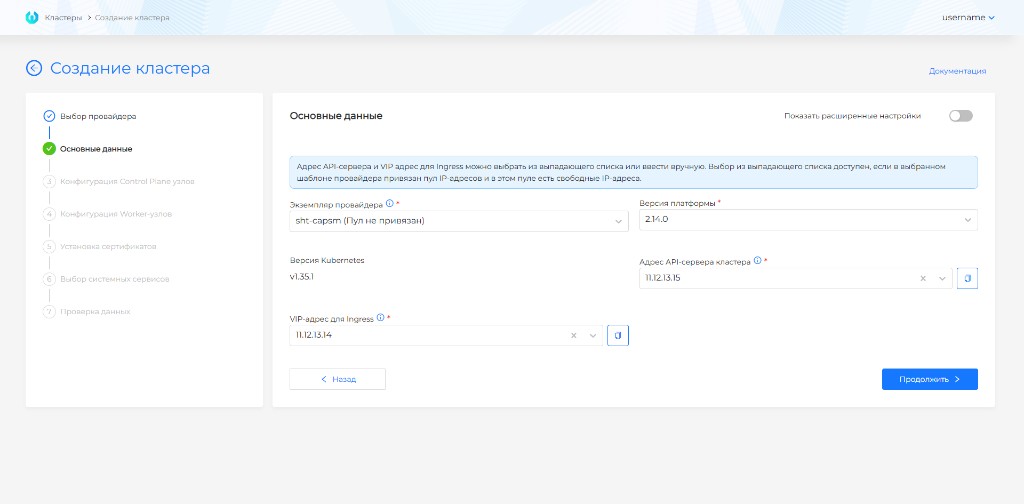
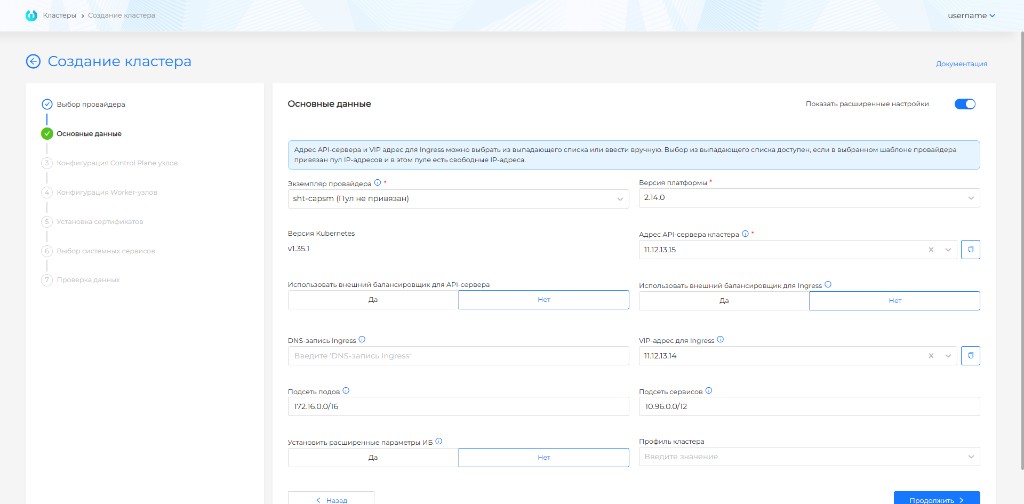
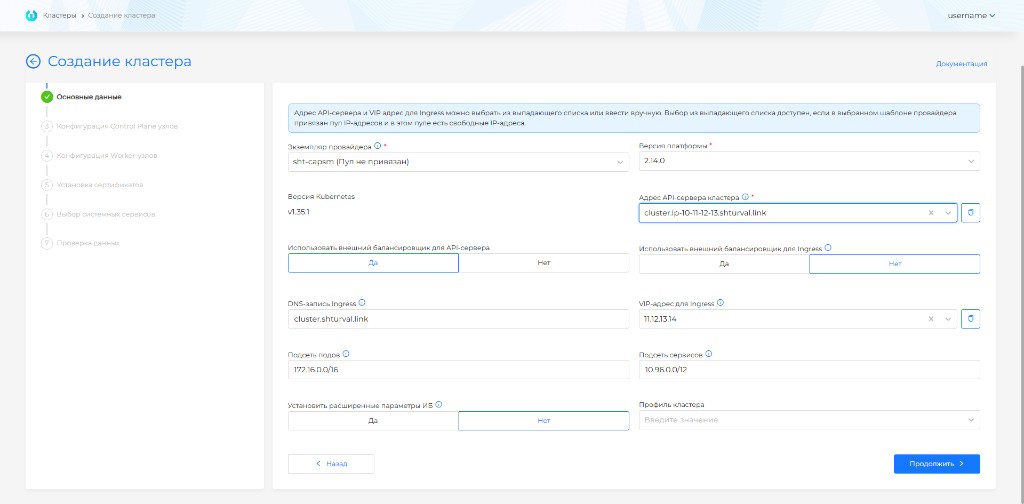
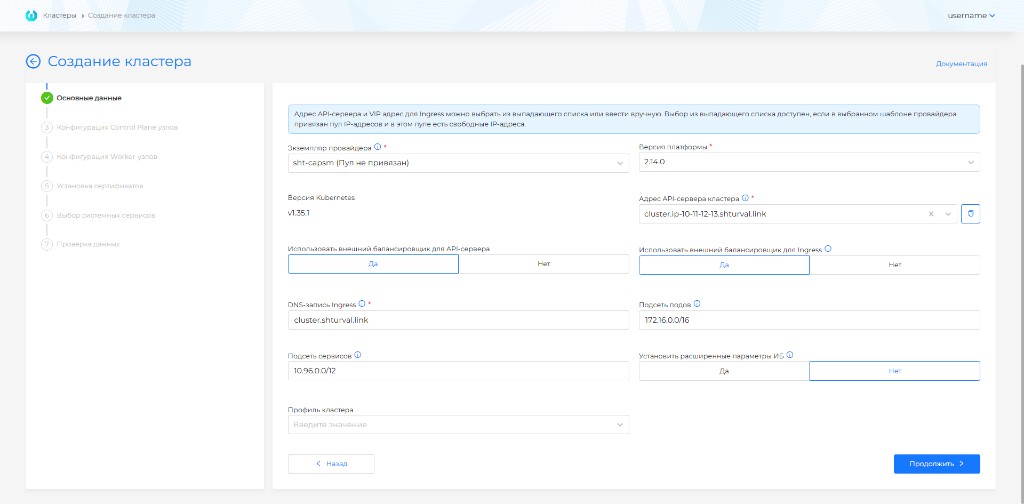
| Field | Description |
|---|---|
| Version Kubernetes / platform version | Compatible version of Kubernetes and platform for the management cluster. |
| cluster API server address | IP or FQDN for KubeAPI. You can select a free address from the pool or enter it manually. |
| VIP address for Ingress | IPv4 address for system Ingress if an external Ingress balancer is not used. |
| DNS record Ingress | Wildcard FQDN for Ingress when using DNS instead of VIP. |
| Use external balancer for Ingress | Leaves the DNS record field for Ingress. The external load balancer must be provisioned before the deployment starts. |
| Use an external balancer for the API server | For the API server, the FQDN of the external balancer is specified. The balancer must be ready before installation. |
| Set advanced information security settings | Includes Secret Encryption for etcd, TLS connection to Kubelet and pre-configured audit policy. |
| PodSubnet | CIDR for Pod network. Should not intersect with the network of nodes and services. |
| Service Subnet | CIDR for Service ClusterIP. Should not interfere with the network of nodes and pods. |
| Cluster Profile | A set of policies and settings that apply to a cluster. |
VIPs are needed if external balancers for KubeAPI and Ingress are not used. Both addresses must be free. The API address must be on the Control Plane subnet, and VIP Ingress must be accessible from the administrator workstation.
VMware vSphere
Screenshots and step fields
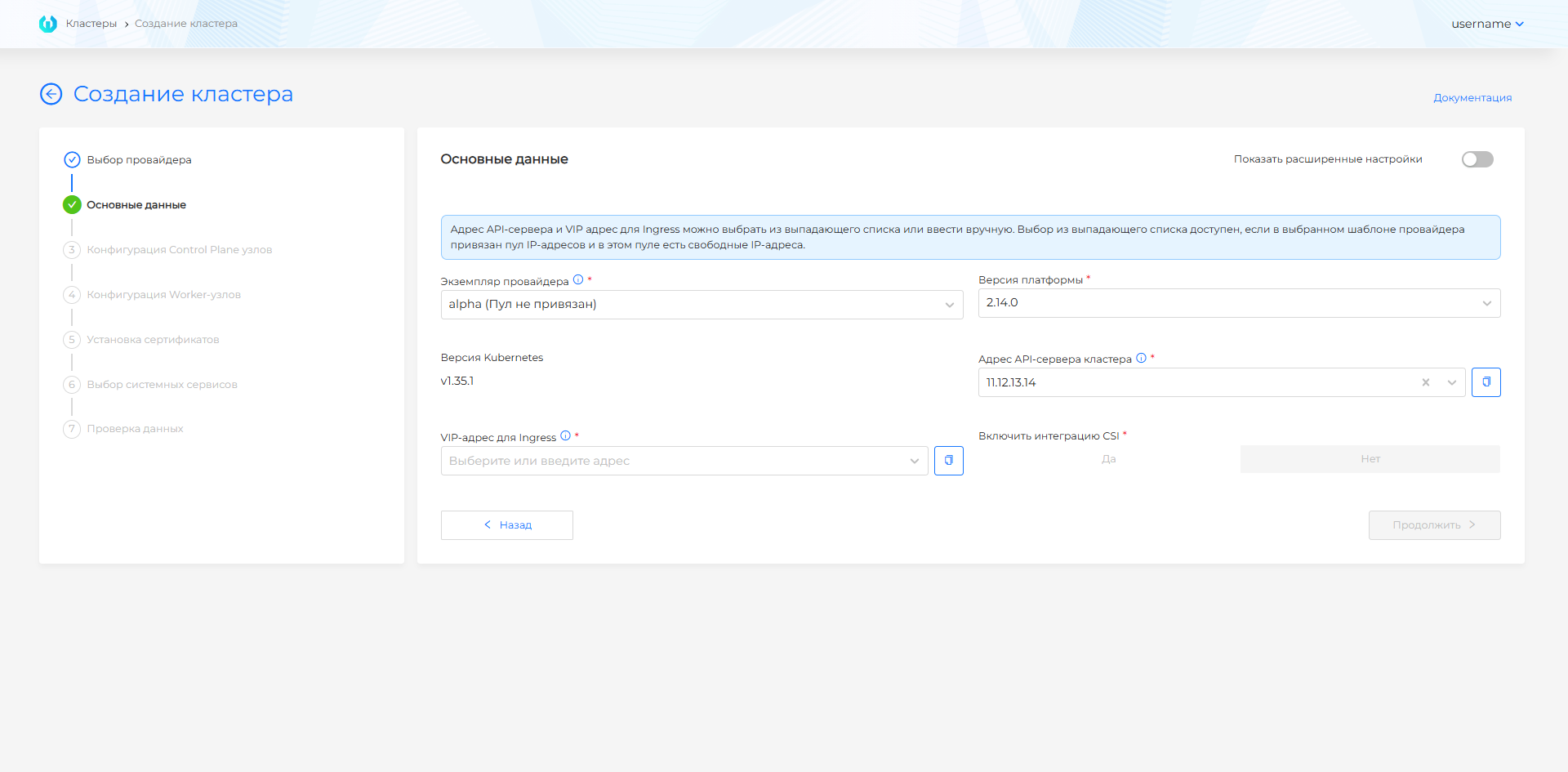
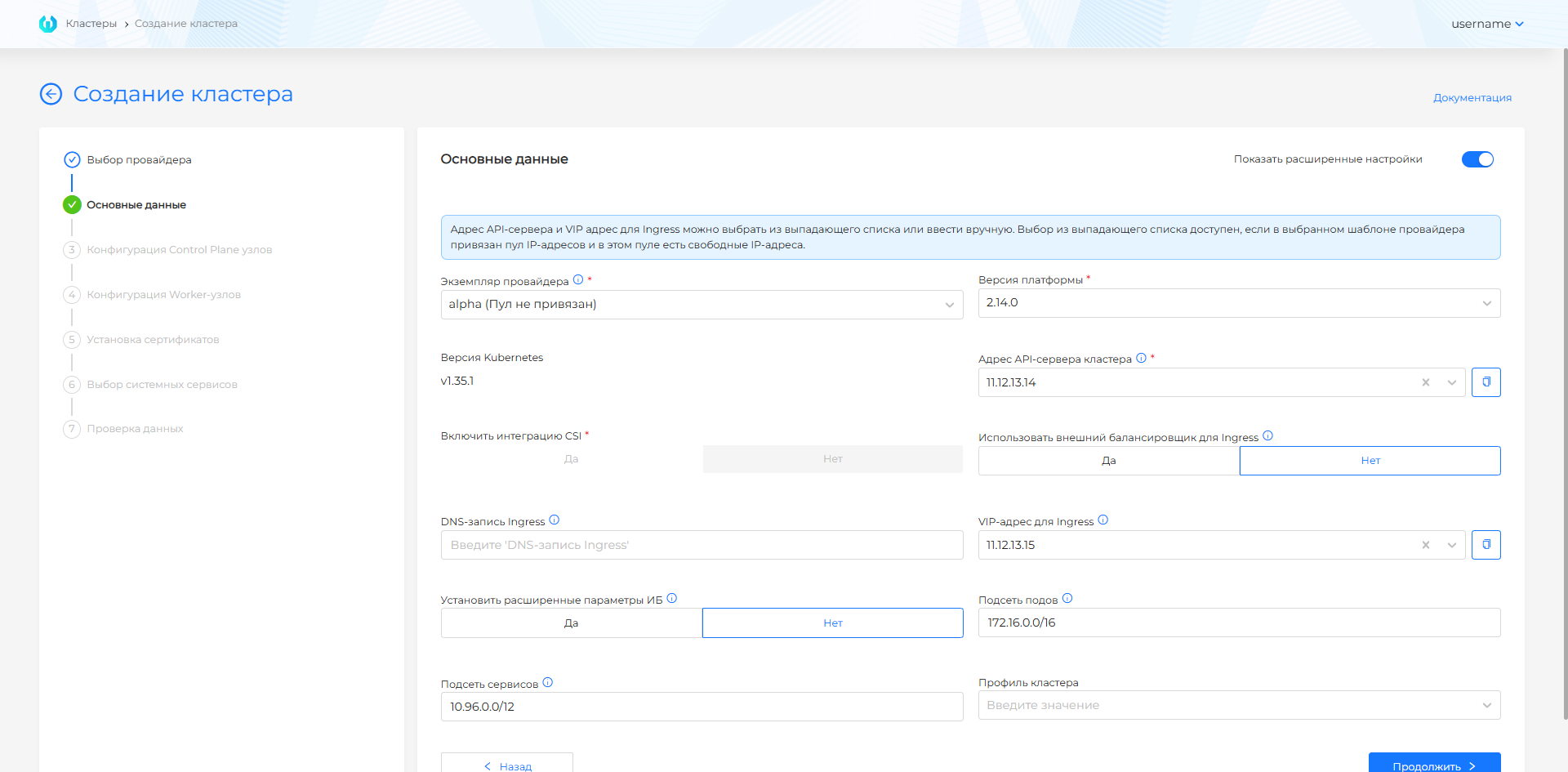
| Field | Description |
|---|---|
| Provider Template | A VM template for the required version of Kubernetes, prepared before installation according to instructions. If there is only one template, it is selected automatically. If the instance has several templates for one Kubernetes version, a required VM template field appears after you select the platform version. |
| cluster API server address | VIP or FQDN for KubeAPI. Select an address from the pool or enter it manually. |
| VIP address for Ingress | IPv4 address for system Ingress in basic mode. |
| VIP address for Ingress or DNS record for Ingress | In advanced mode, you can specify an IPv4 address or Wildcard FQDN. |
| Platform Version | Compatible platform version for the selected template. |
| Enable CSI Integration | Enables vSphere CSI for Persistent Volumes if allowed by the template and vCenter permissions. |
| Delete PVs when deleting a cluster with CSI integration enabled | Yes / No. Default No. Details: Deleting PVs when deleting a cluster. |
| Use external balancer | Transfers Ingress traffic to an external balancer; for Ingress, a DNS record is specified. |
| Set advanced information security settings | Includes Secret Encryption for etcd, TLS connection to Kubelet and pre-configured audit policy. |
| PodSubnet | CIDR for Pod network. |
| Service Subnet | CIDR for Service ClusterIP. |
| Cluster Profile | A set of policies and settings that apply to a cluster. |
VIPs are needed if external balancers for KubeAPI and Ingress are not used. Both addresses must be free. The API address must be on the Control Plane subnet, and VIP Ingress must be accessible from the administrator workstation.
oVirt, zVirt, HostVM, ED Virtualization, ROSA Virtualization
Screenshots and step fields
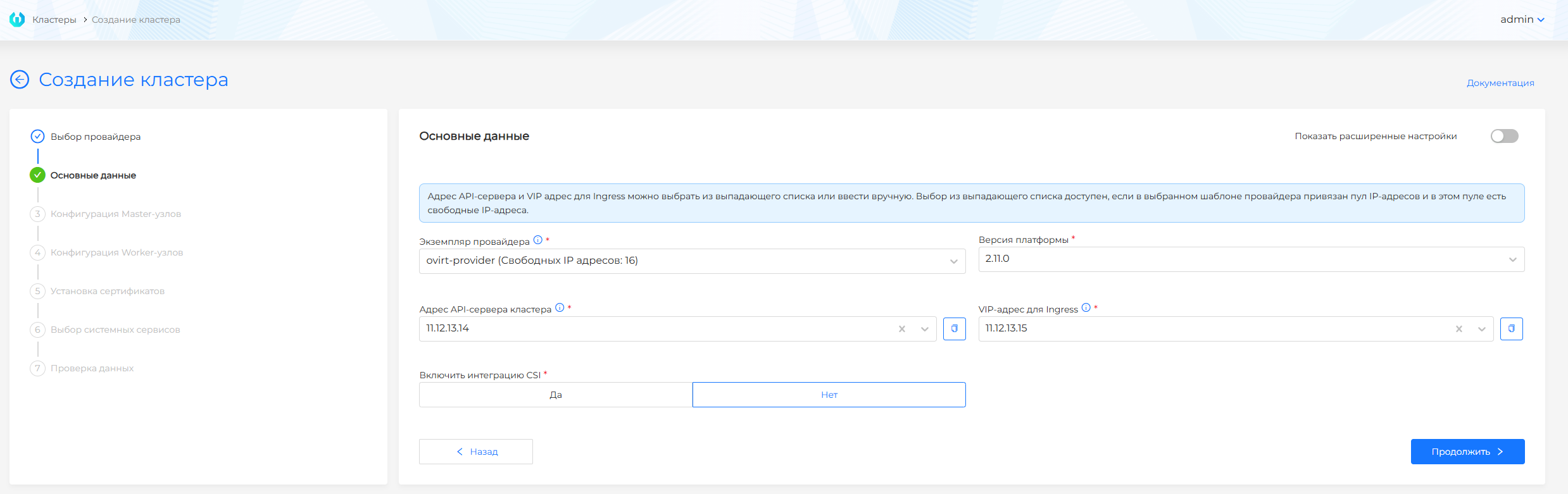
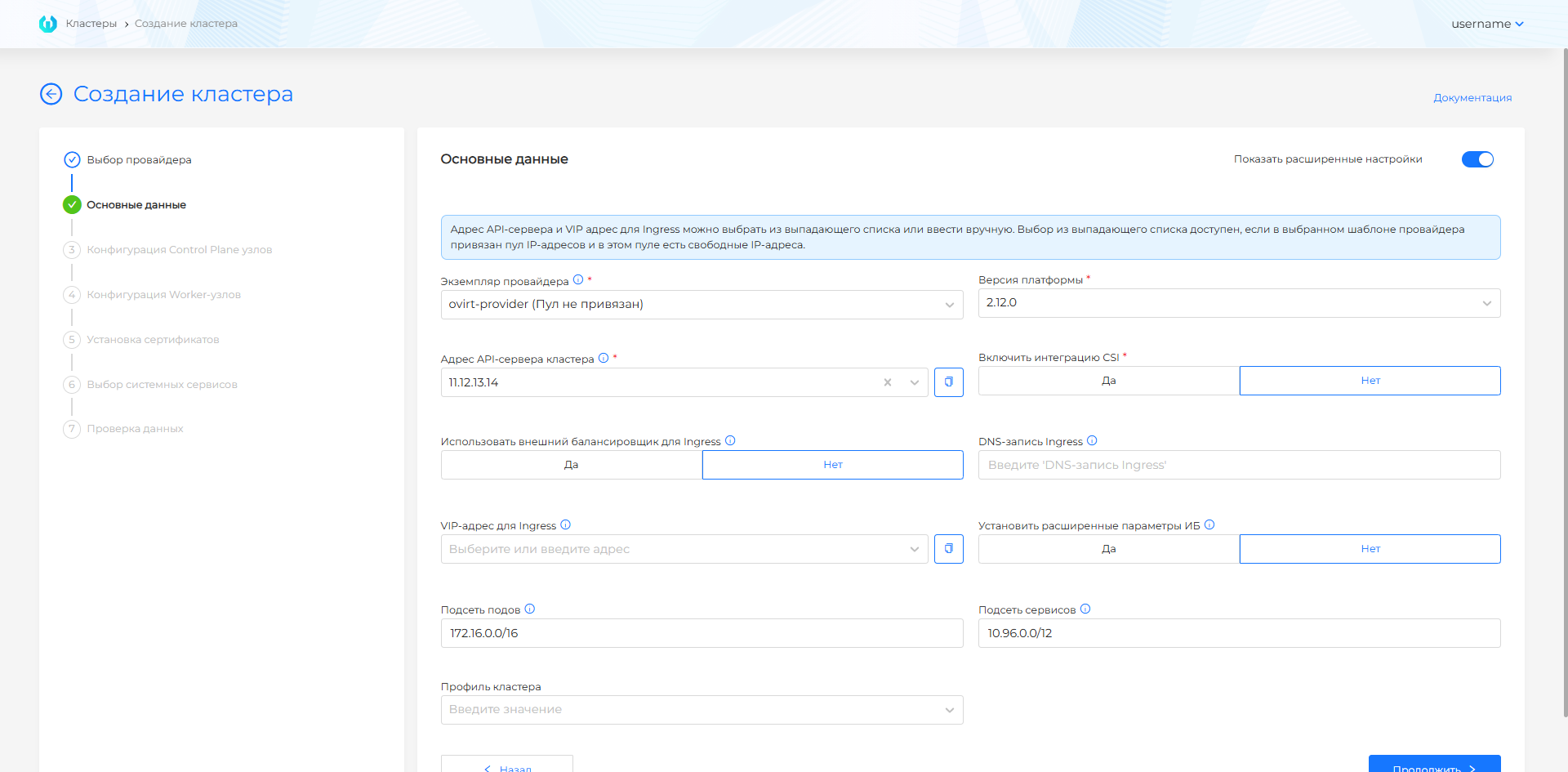
Screenshot: PV deletion field
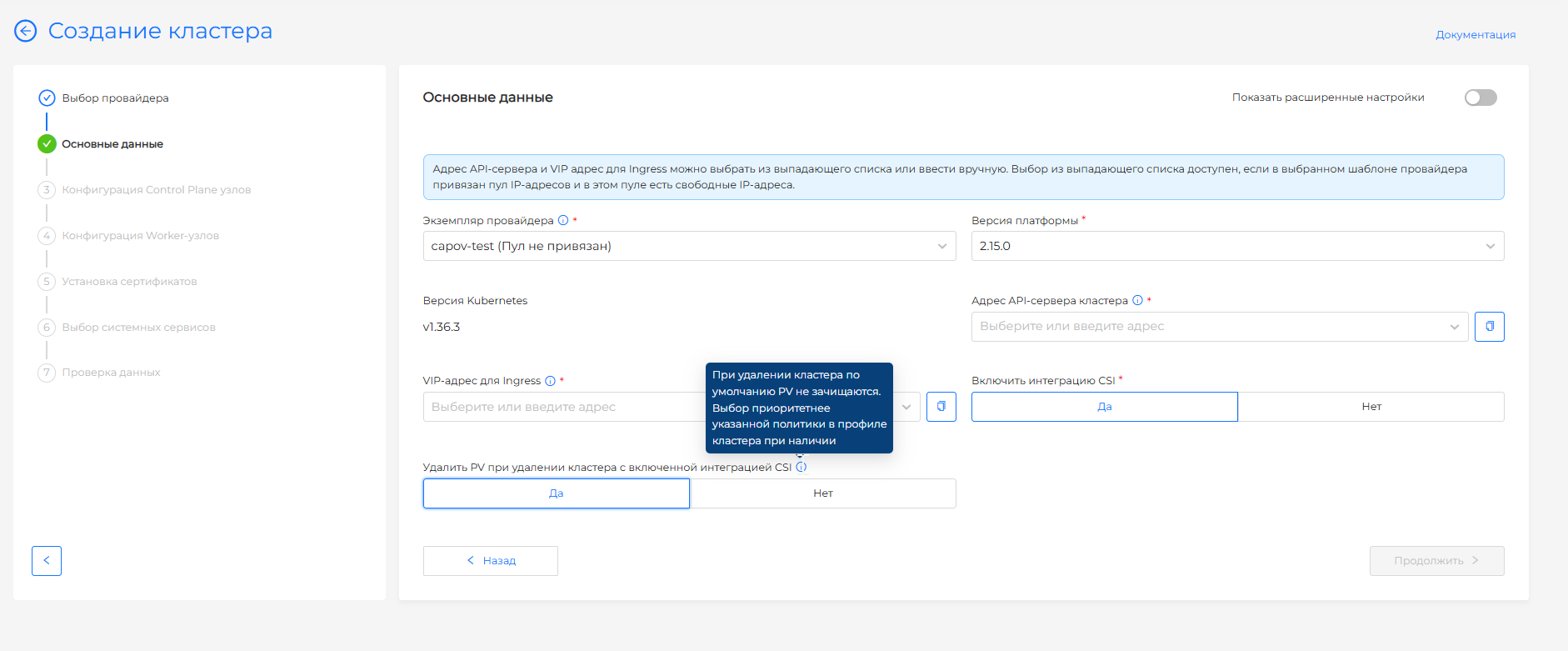
| Field | Description |
|---|---|
| Provider Template | A VM template for the required version of Kubernetes, prepared before installation according to instructions. |
| Platform Version | Compatible platform version for the selected template. |
| cluster API server address | VIP or FQDN for KubeAPI. Select an address from the pool or enter it manually. |
| VIP address for Ingress | IPv4 address for system Ingress in basic mode. |
| VIP address for Ingress or DNS record for Ingress | In advanced mode, you can specify an IPv4 address or Wildcard FQDN. |
| Enable CSI Integration | Enables CSI integration if it is enabled on the provider instance. |
| Delete PVs when deleting a cluster with CSI integration enabled | Yes / No. Default No. Details: Deleting PVs when deleting a cluster. |
| Use external balancer | Transfers Ingress traffic to an external balancer; for Ingress, a DNS record is specified. |
| Set advanced information security settings | Includes Secret Encryption for etcd, TLS connection to Kubelet and pre-configured audit policy. |
| PodSubnet | CIDR for Pod network. |
| Service Subnet | CIDR for Service ClusterIP. |
| Cluster Profile | A set of policies and settings that apply to a cluster. |
VIPs are needed if external balancers for KubeAPI and Ingress are not used. Both addresses must be free. The API address must be on the Control Plane subnet, and VIP Ingress must be accessible from the administrator workstation.
OpenStack, VK Cloud, Selectel
Screenshot and step fields
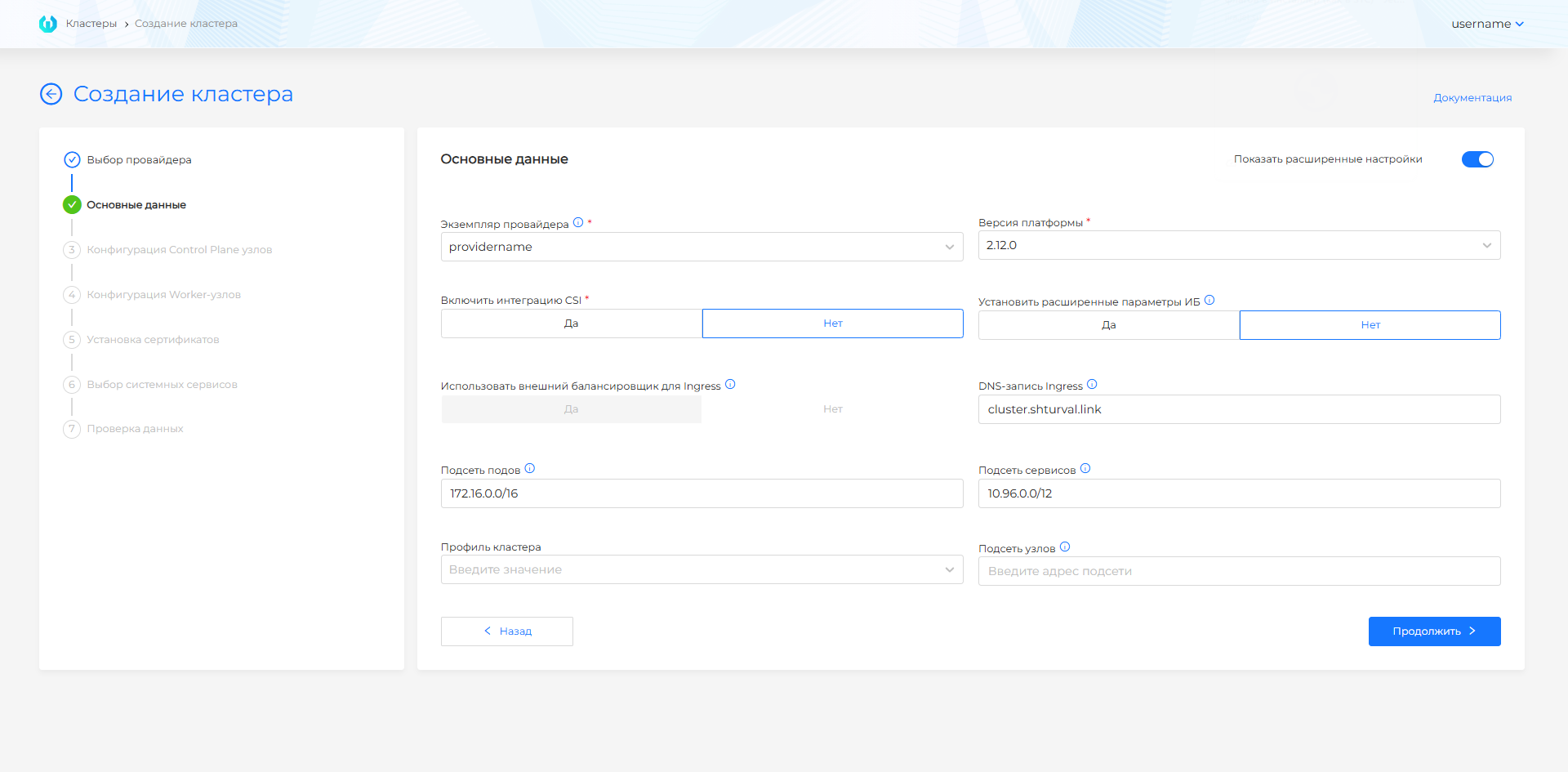
| Field | Description |
|---|---|
| Provider Instance | An instance of OpenStack, VK Cloud or Selectel, which specifies the prepared VM image/template. If there is only one instance, it is selected automatically. |
| Platform Version | Compatible platform version for the selected images. |
| Enable CSI Integration | Enables CSI for cloud disks if enabled by the provider instance. |
| Delete PVs when deleting a cluster with CSI integration enabled | Yes / No. Default No. Details: Deleting PVs when deleting a cluster. |
| Use external balancer for Ingress | For a cloud scenario, usually enabled; After creating the cluster, configure the balancer in the cloud panel. |
| DNS record Ingress | Wildcard FQDN. If the field is empty, the automatic scheme *.<cluster-name>.ip-<IP_EXTERNAL_LB>.shturval.link is applied. |
| Set advanced information security settings | Includes Secret Encryption for etcd, TLS connection to Kubelet and pre-configured audit policy. |
| PodSubnet | CIDR for Pod network. |
| Service Subnet | CIDR for Service ClusterIP. |
| Host Subnet | CIDR for nodes; if not specified, the subnet from the provider’s configuration is used. |
| Cluster Profile | A set of policies and settings that apply to a cluster. |
Yandex Cloud
Screenshot and step fields
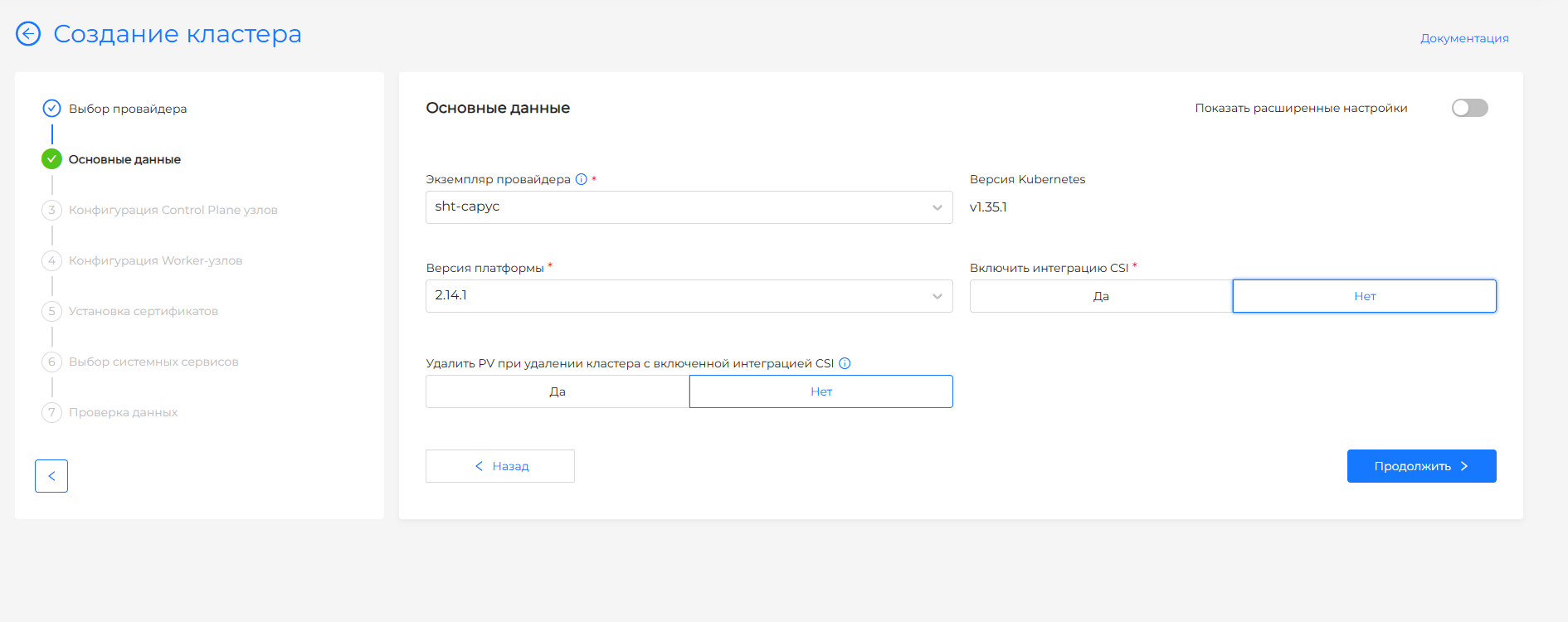
| Field | Description |
|---|---|
| Provider instance | Yandex Cloud instance created in step 2. If there is only one instance, it is selected automatically. |
| Kubernetes version | Version from the instance VM template. |
| Platform version | Compatible platform version for the selected template. |
| VM template | Shown when the instance has several templates for one Kubernetes version. |
| Enable CSI integration | Enables CSI for Yandex Cloud disks (shturval-capy-csi) if the provider instance allows it. Default No. |
| Delete PVs when deleting a cluster with CSI integration enabled | Yes / No. Default No. Unavailable while Allow CSI on the instance is No. Details: Deleting PVs when deleting a cluster. |
| Use an external load balancer for Ingress | Usually enabled for Yandex Cloud; after the cluster is created, configure the balancer in the Yandex Cloud console. |
| Ingress DNS record | Wildcard FQDN. You can change it in advanced mode. |
| Set advanced information security settings | Includes Secret Encryption for etcd, TLS connection to Kubelet and pre-configured audit policy. |
| Pod subnet | CIDR for the Pod network. Must not overlap the node and service networks. |
| Service subnet | CIDR for Service ClusterIP. Must not overlap the node and Pod networks. |
| Cluster profile | A set of policies and settings that apply to a cluster. |
KubeAPI and Ingress are published through Yandex Cloud load balancers. The external Ingress load balancer is on by default.
Step 4. Configuring Control Plane nodes
Shturval v2
Screenshots and step fields
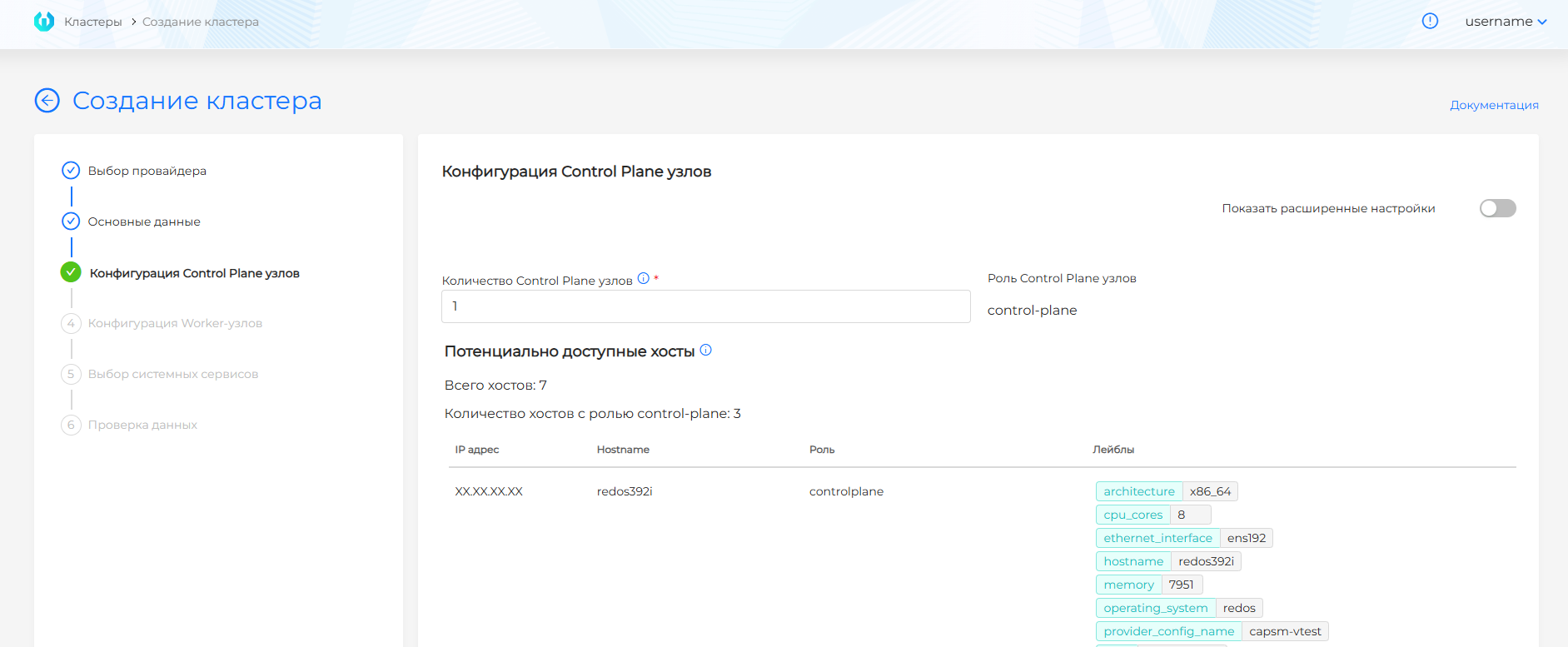
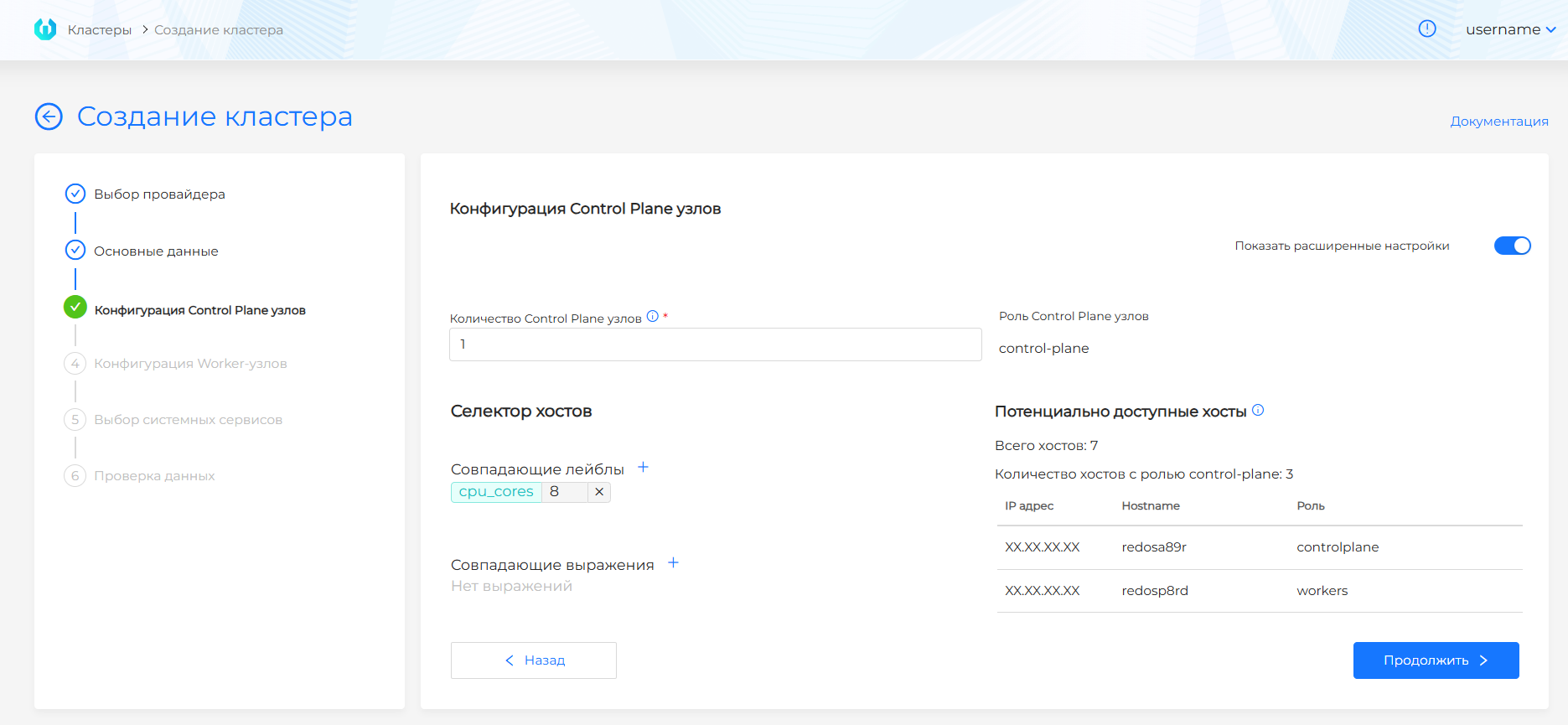
| Field | Description |
|---|---|
| Number of Control Plane nodes | Odd value, no more than 5. |
| Potentially available hosts | Hosts with role controlplane or suitable labels. |
| Host Selector | Expanded selection of hosts by labels and expressions. |
VMware vSphere
Screenshot and step fields
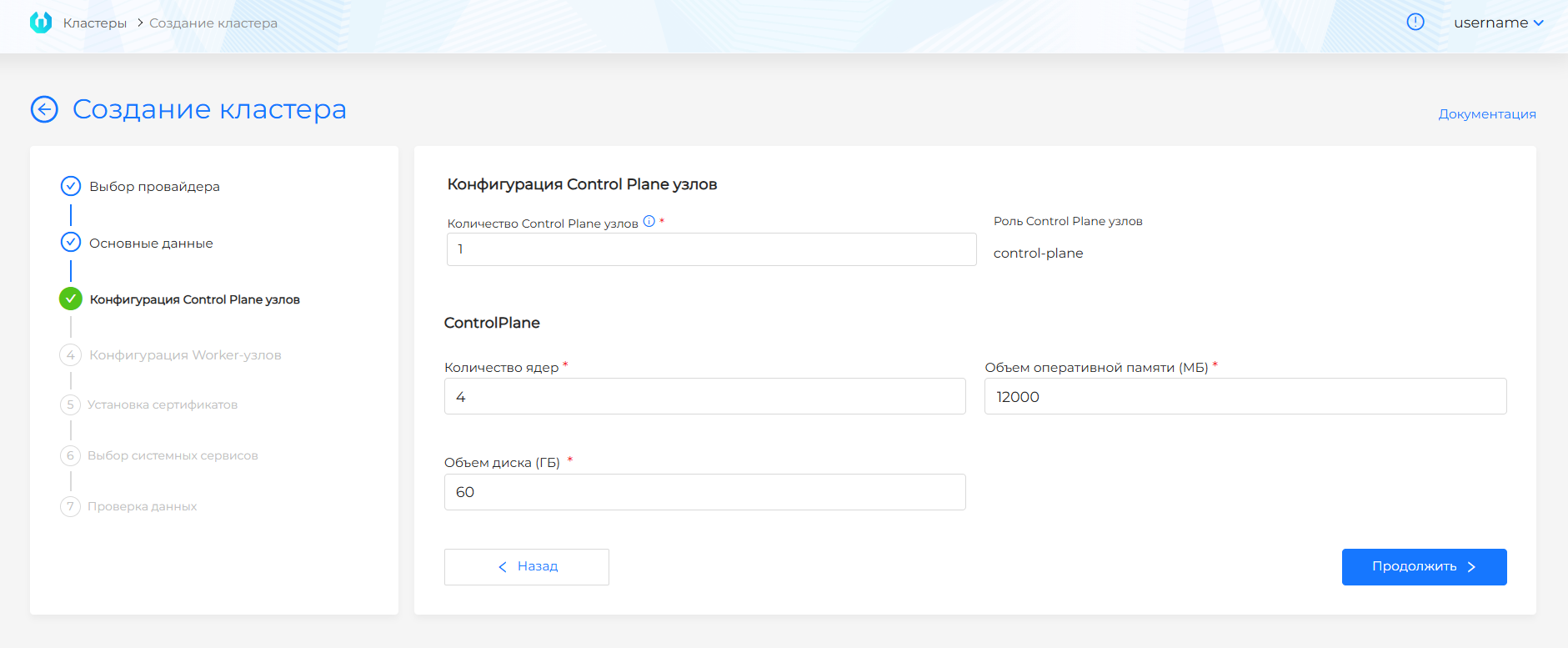
| Field | Description |
|---|---|
| Number of Control Plane nodes | An odd value, typically 1 for test or 3 for failover cluster. |
| CPU/memory/disk | Control Plane VM resources. The values must not be below the GUI minimum limits. |
oVirt, zVirt, HostVM, ED Virtualization, ROSA Virtualization
Screenshot and step fields
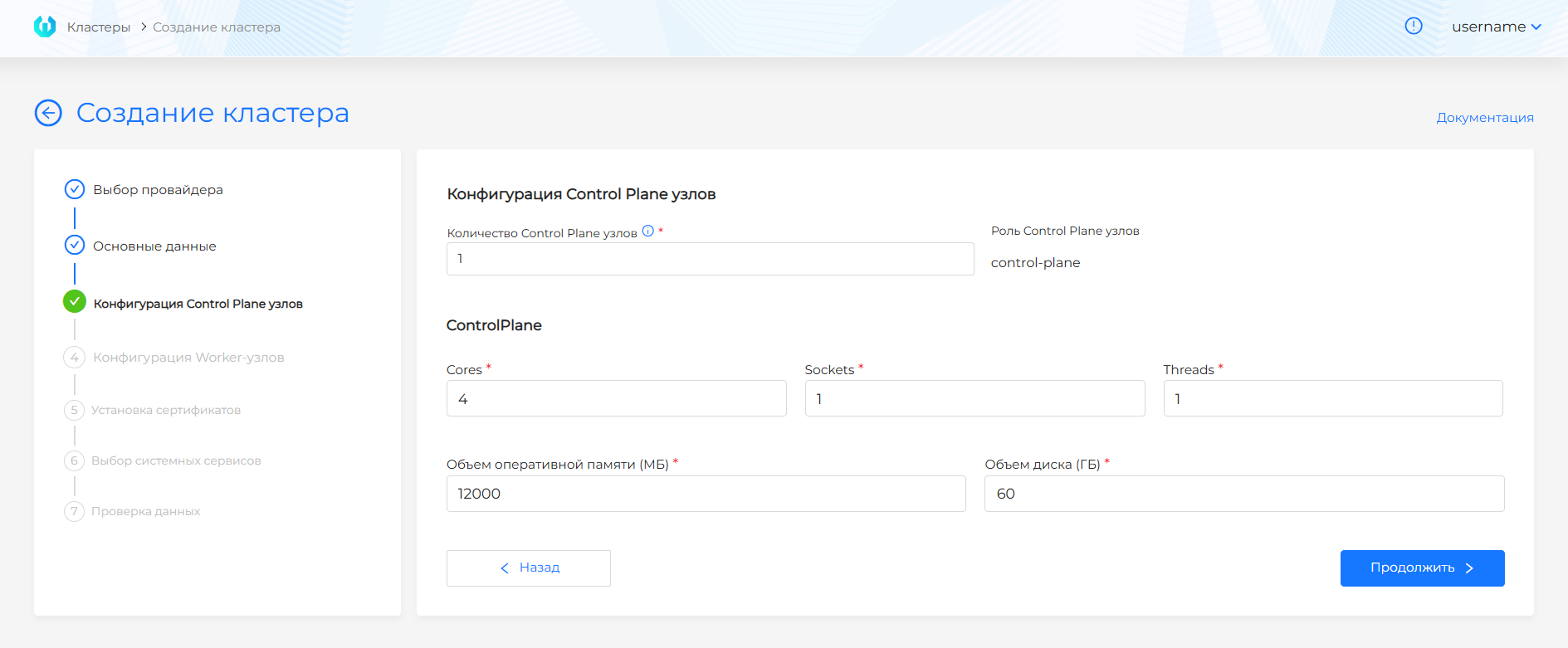
| Field | Description |
|---|---|
| Number of Control Plane nodes | Odd value, no more than 5. |
| Cores/Sockets/Threads | ComputationalVM Control Plane resources. |
| Memory | The amount of RAM of the VM. |
| Disk | VM disk capacity; for local storage, not less than the minimum interface value. |
| Clone disk when creating a VM | Yes clones disks of nodes in this group, No creates them without cloning. Default uses the provider instance value, or the disk-clone feature gate if the instance is also Default. Details: disk cloning. |
OpenStack, VK Cloud, Selectel
Screenshot and step fields
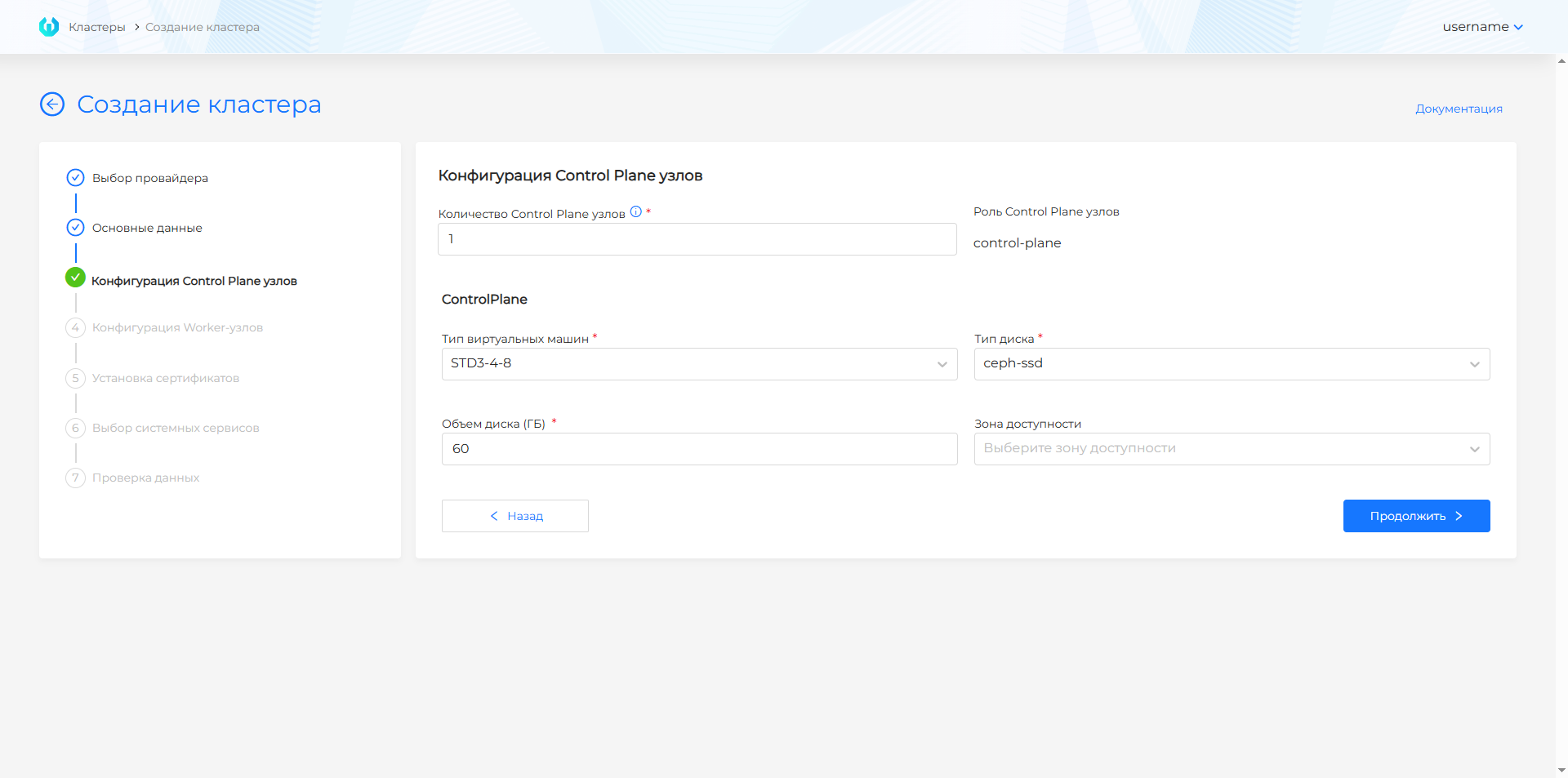
| Field | Description |
|---|---|
| Number of Control Plane nodes | Odd value, no more than 5. |
| VM Type | Flavor for VM Control Plane. |
| Disk Type | Volume type for the VM disk. |
| Disk | VM disk capacity. |
| Availability area | Availability zone for placing Control Plane nodes. |
Yandex Cloud
Screenshot and step fields
| Field | Description |
|---|---|
| Number of Control Plane nodes | Odd value, no more than 5. |
| Platform type | Platform ID from the list set in step 2. |
| Disk type | Disk type from the step 2 list. |
| Number of cores | At least 4. |
| Memory | At least 8Gi (8192Mi). |
| Disk size | Boot disk size. The interface default is 60Gi. |
Step 5. Configuration of Worker nodes
Shturval v2
Screenshots and step fields
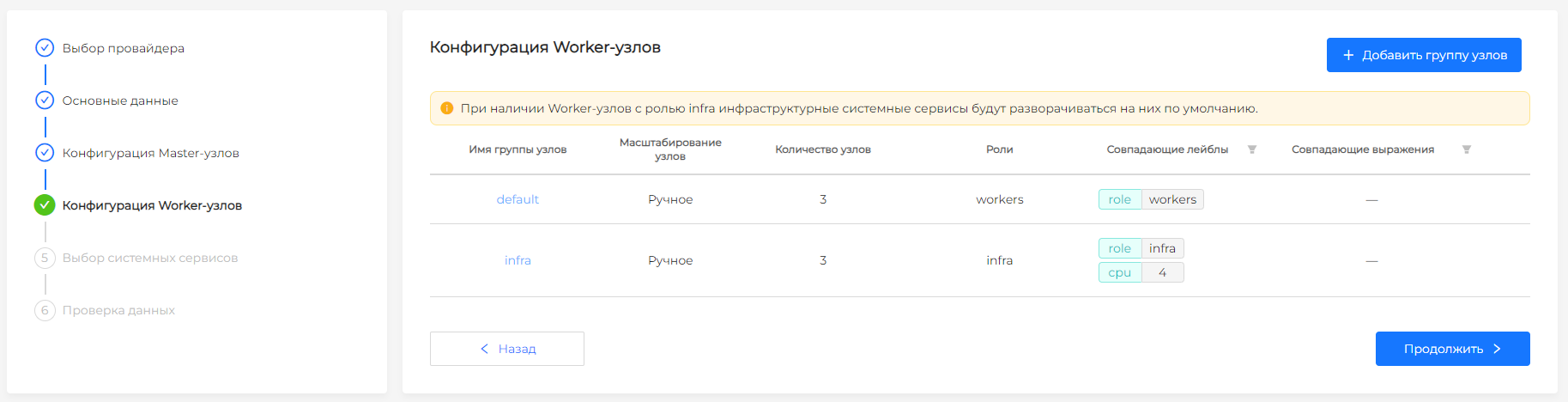
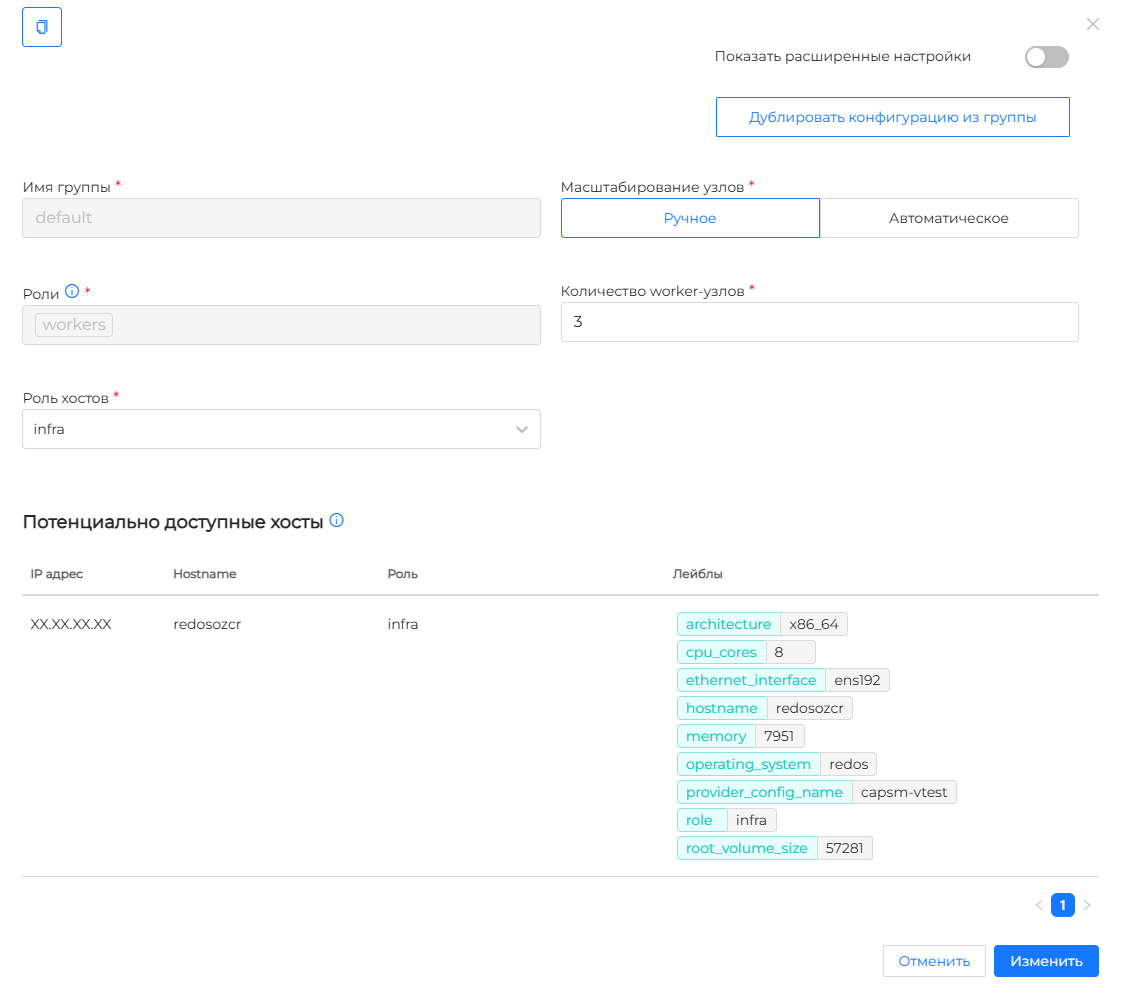
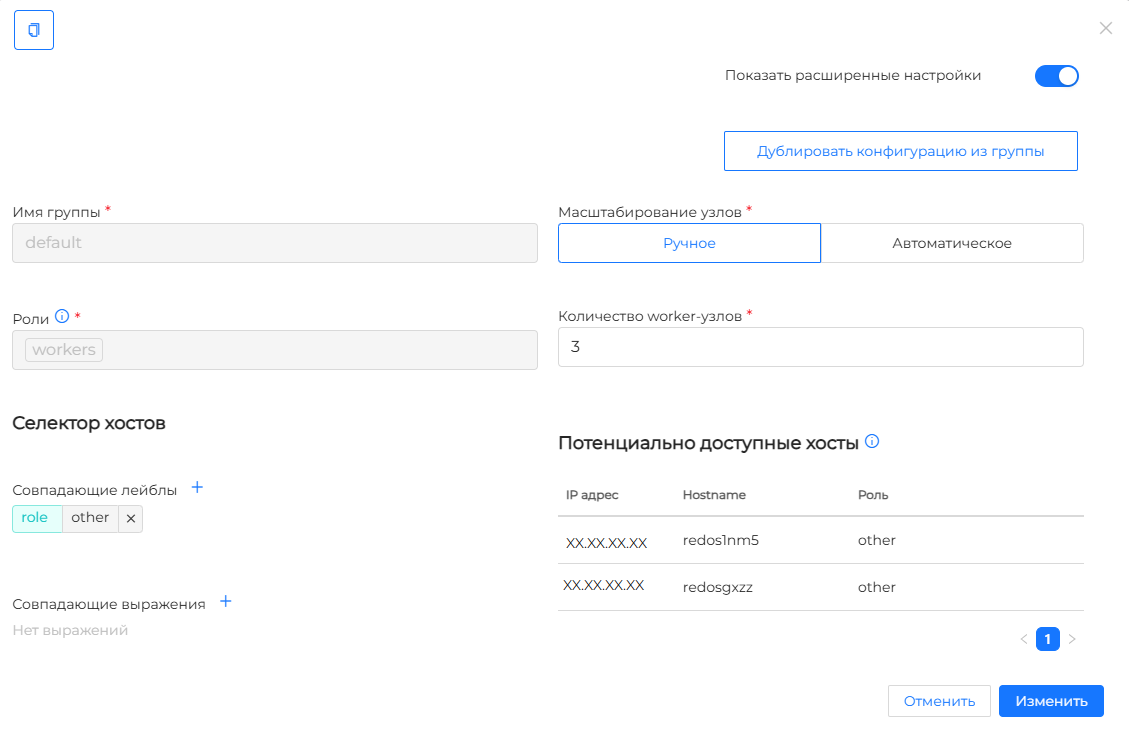
| Field | Description |
|---|---|
| Worker node group | A group of hosts, such as default or infra. |
| Zoom | Manual number of nodes or automatic range. |
| Host Role | Role for selecting hosts in basic mode, such as workers or infra. |
| Host Selector | Expanded selection of Worker hosts by label. |
VMware vSphere
Screenshots and step fields
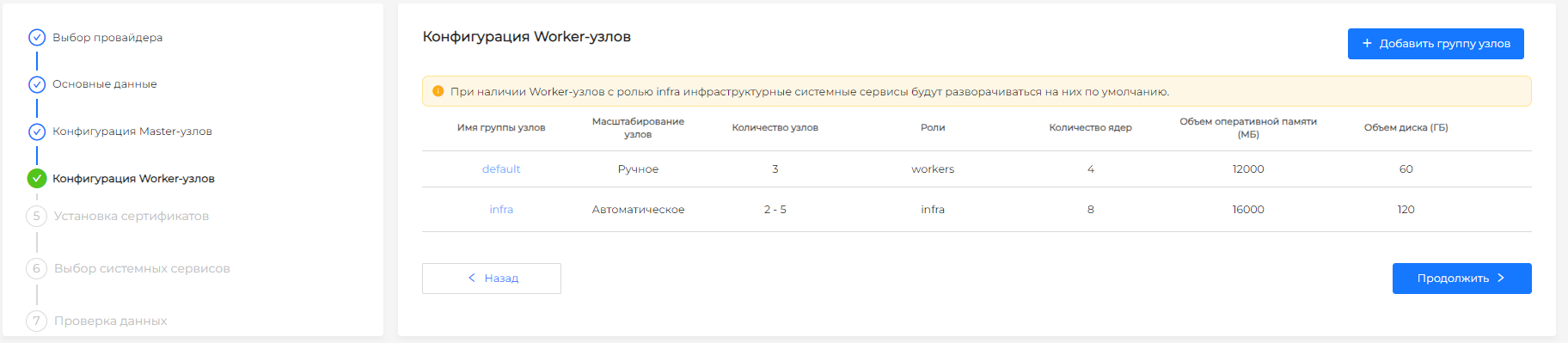
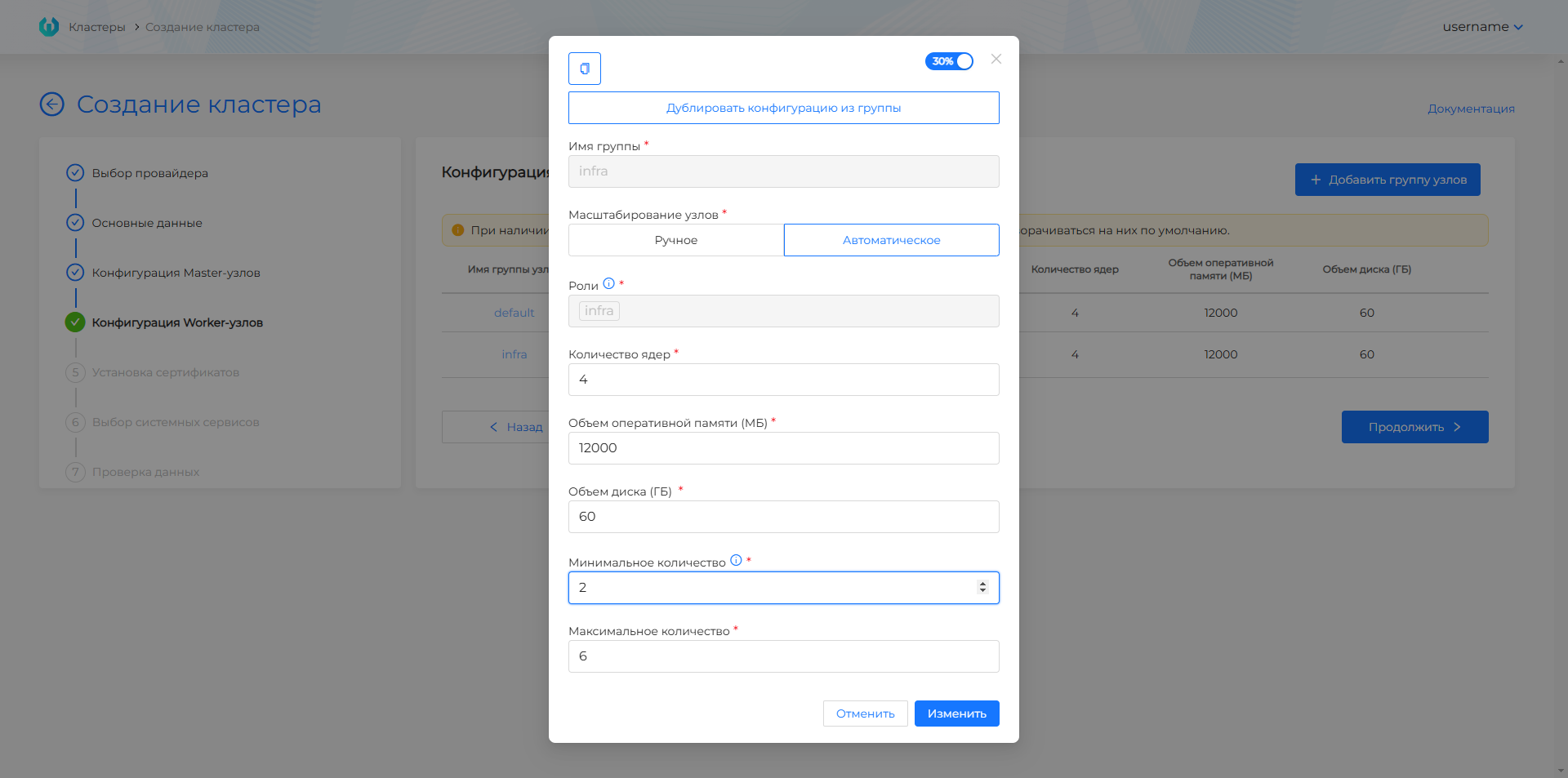
| Field | Description |
|---|---|
| Worker node group | VM group, for example default or infra. |
| Zoom | Manual number of nodes or automatic range. |
| CPU/memory/disk | Resources of VM Worker nodes. |
| Roles | Roles of nodes separated by commas; they will be added to the node labels. |
oVirt, zVirt, HostVM, ED Virtualization, ROSA Virtualization
Screenshots and step fields
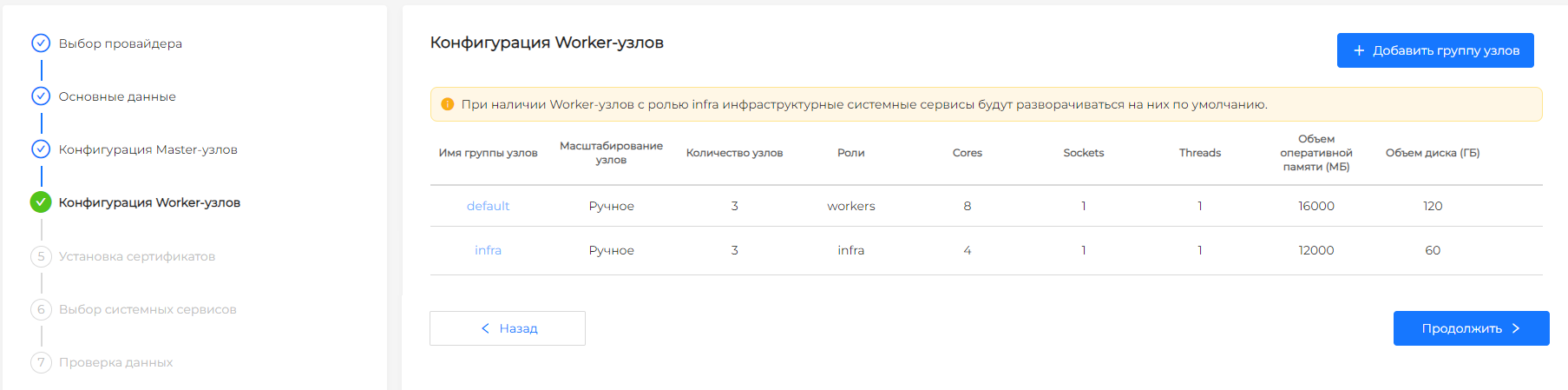
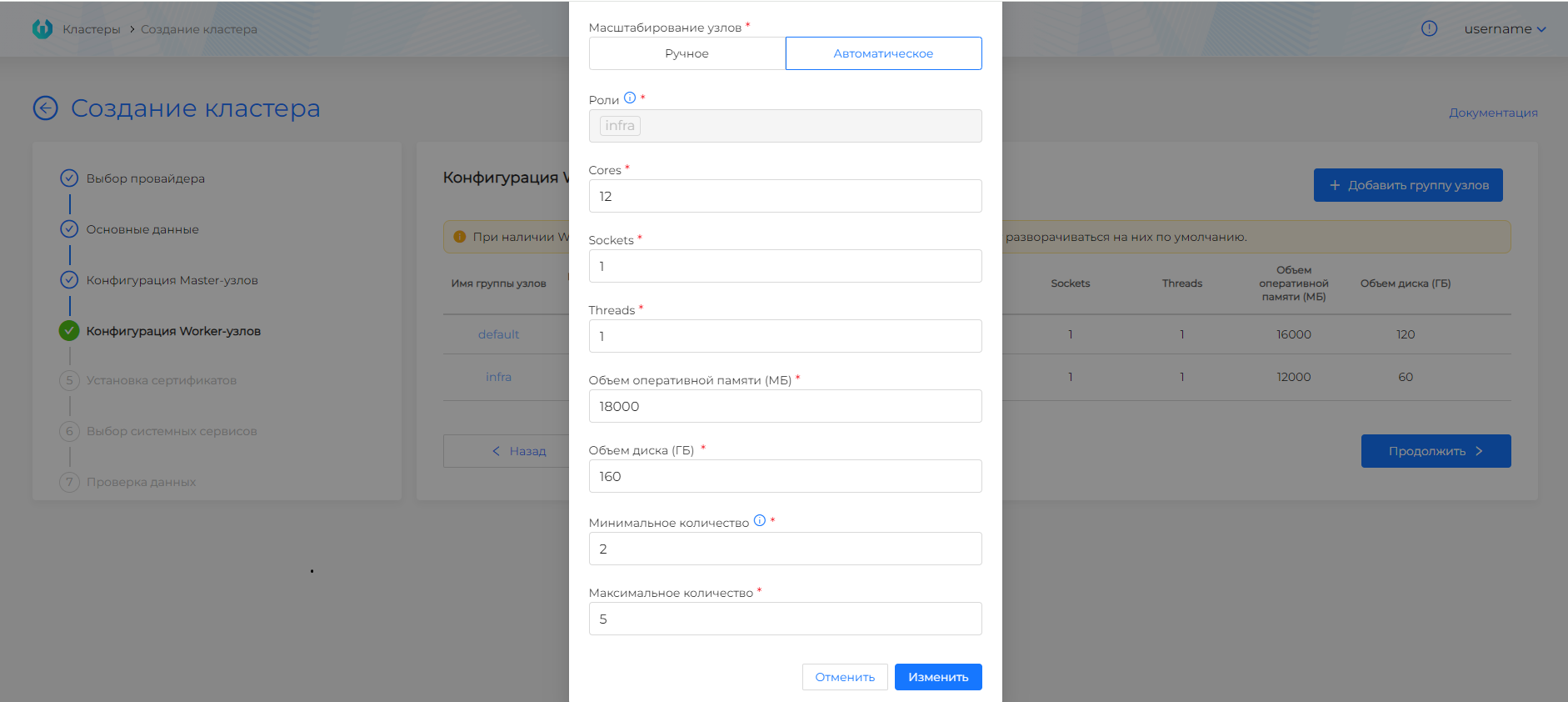
| Field | Description |
|---|---|
| Worker node group | VM group, for example default or infra. |
| Zoom | Manual number of nodes or automatic range. |
| Cores/Sockets/Threads | Computing resources of VM Worker nodes. |
| Memory | The amount of RAM of Worker nodes. |
| Disk | Disk capacity Worker-nodes. |
| Clone disk when creating a VM | Yes clones disks of nodes in this group, No creates them without cloning. Default uses the provider instance value, or the disk-clone feature gate if the instance is also Default. Details: disk cloning. |
| Roles | Roles of nodes separated by commas; they will be added to the node labels. |
OpenStack, VK Cloud, Selectel
Screenshot and step fields
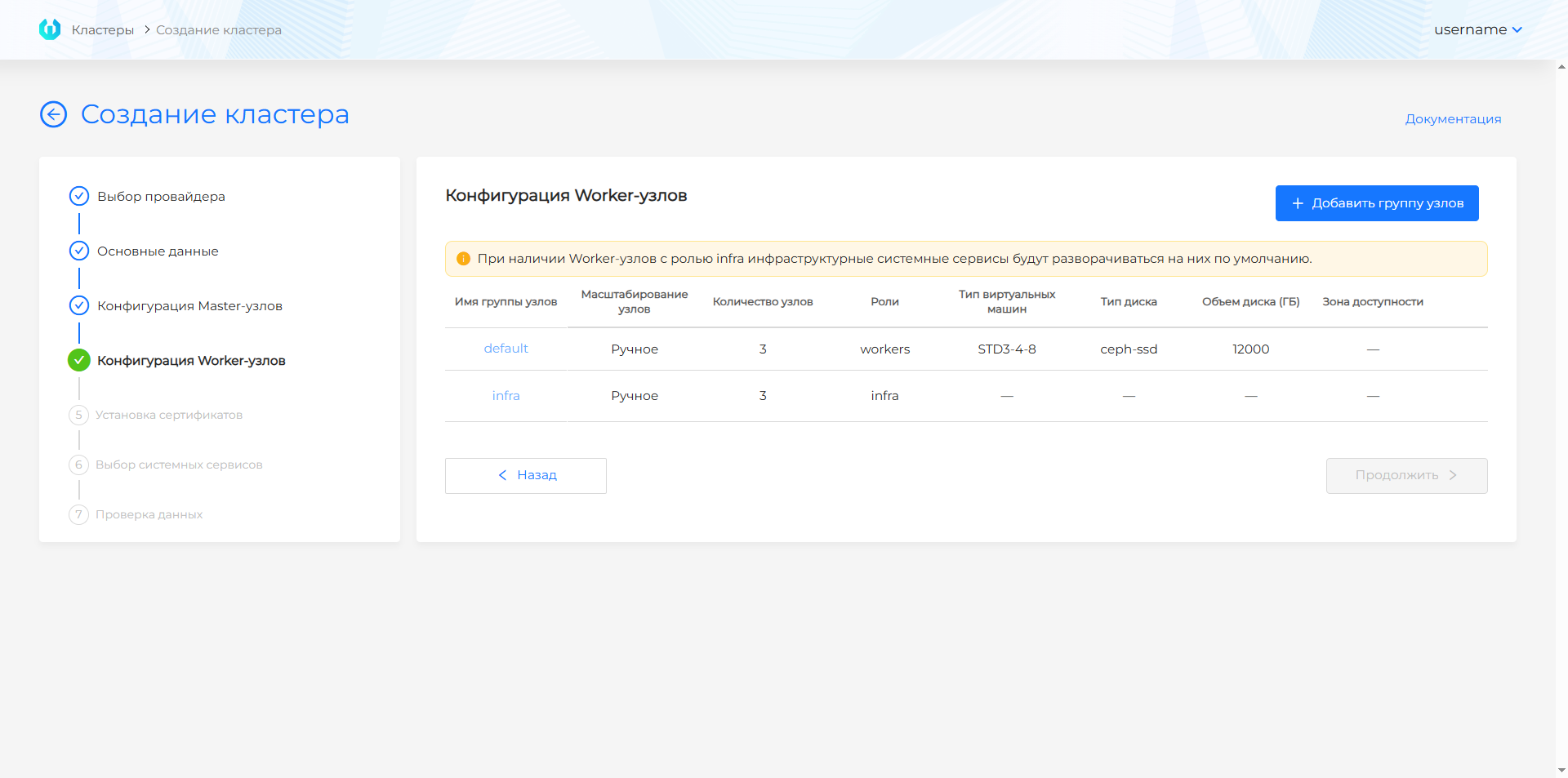
| Field | Description |
|---|---|
| Worker node group | VM group, for example default or infra. |
| Zoom | Manual number of nodes or automatic range. |
| VM Type | Flavor for Worker nodes. |
| Disk Type | Volume type for the Worker node disk. |
| Disk | Disk capacity of Worker nodes. |
| Availability area | Availability zone for placing Worker nodes. |
| Roles | Roles of nodes separated by commas; they will be added to the node labels. |
Yandex Cloud
Screenshot and step fields
| Field | Description |
|---|---|
| Worker node group | VM group, for example default or infra. |
| Zoom | Manual number of nodes or an automatic range. |
| Platform type | Platform ID from the list set in step 2. |
| Disk type | Disk type from the step 2 list. |
| Number of cores | At least 4. |
| Memory | At least 8Gi (8192Mi). |
| Disk size | Worker node disk size. |
| Roles | Node roles separated by commas; they are added to the node labels. |
Step 6. Install the certificate
Shturval v2
Screenshot and step fields
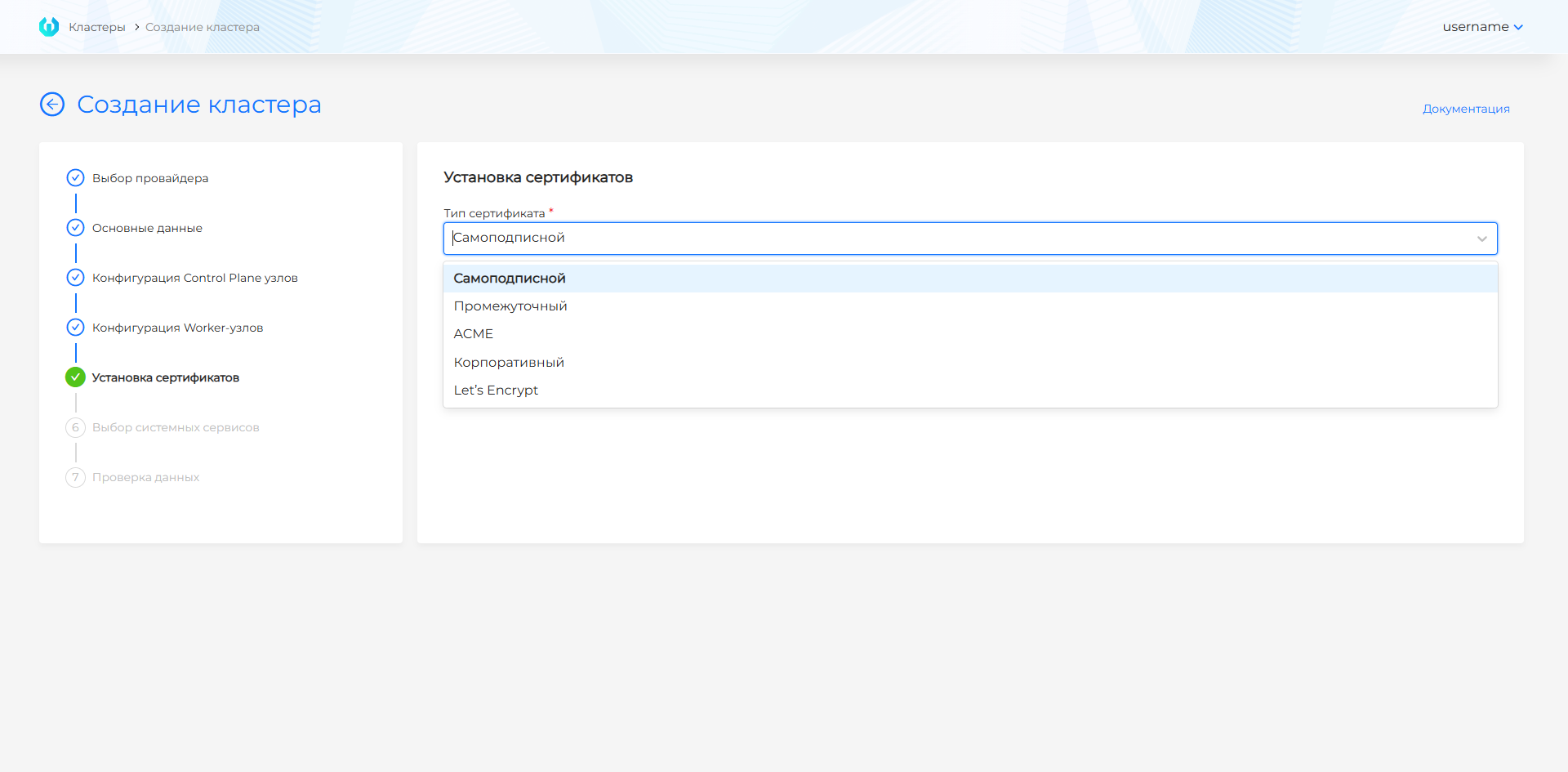
| Option | Description |
|---|---|
| Self-Subscribed | The certificate is issued by the platform. Suitable for test and indoor benches. |
| Intermediate | An intermediate CA is used; download the certificate chain and private key. |
| ACME | ACME server is used; specify the root CA and server URL. |
| Corporate | Uses a ready-made Ingress certificate and private key issued by your CA. |
| Let’s Encrypt | Uses Let’s Encrypt; enter your account email. |
VMware vSphere
Screenshot and step fields
| Option | Description |
|---|---|
| Self-Subscribed | The certificate is issued by the platform. Suitable for test and indoor benches. |
| Intermediate | An intermediate CA is used; download the certificate chain and private key. |
| ACME | ACME server is used; specify the root CA and server URL. |
| Corporate | Uses a ready-made Ingress certificate and private key issued by your CA. |
| Let’s Encrypt | Uses Let’s Encrypt; enter your account email. |
oVirt, zVirt, HostVM, ED Virtualization, ROSA Virtualization
Screenshot and step fields
| Option | Description |
|---|---|
| Self-Subscribed | The certificate is issued by the platform. Suitable for test and indoor benches. |
| Intermediate | Isuses an intermediate CA; download the certificate chain and private key. |
| ACME | ACME server is used; specify the root CA and server URL. |
| Corporate | Uses a ready-made Ingress certificate and private key issued by your CA. |
| Let’s Encrypt | Uses Let’s Encrypt; enter your account email. |
OpenStack, VK Cloud, Selectel
Screenshot and step fields
| Option | Description |
|---|---|
| Self-Subscribed | The certificate is issued by the platform. Suitable for test and indoor benches. |
| Intermediate | An intermediate CA is used; download the certificate chain and private key. |
| ACME | ACME server is used; specify the root CA and server URL. |
| Corporate | Uses a ready-made Ingress certificate and private key issued by your CA. |
| Let’s Encrypt | Uses Let’s Encrypt; enter your account email. |
Yandex Cloud
Screenshot and step fields
| Option | Description |
|---|---|
| Self-Subscribed | The certificate is issued by the platform. Suitable for test and indoor benches. |
| Intermediate | An intermediate CA is used; download the certificate chain and private key. |
| ACME | ACME server is used; specify the root CA and server URL. |
| Corporate | Uses a ready-made Ingress certificate and private key issued by your CA. |
| Let’s Encrypt | Uses Let’s Encrypt; enter your account email. |
The name in the certificate must match the Ingress DNS record.
Step 7. Selecting services
The management cluster is deployed with Gateway API by default. This step does not offer a choice of how to manage HTTP traffic: external HTTP traffic is served by Gateway API on Cilium. The Cilium Gateway API controller and cert-manager issuance for Gateway API certificates are already enabled. The external connections module (shturval-ingress-controller) is installed in absent mode. Gateway API CRDs are a critical service and are installed with the other critical services.
Shturval v2
Screenshots and step fields
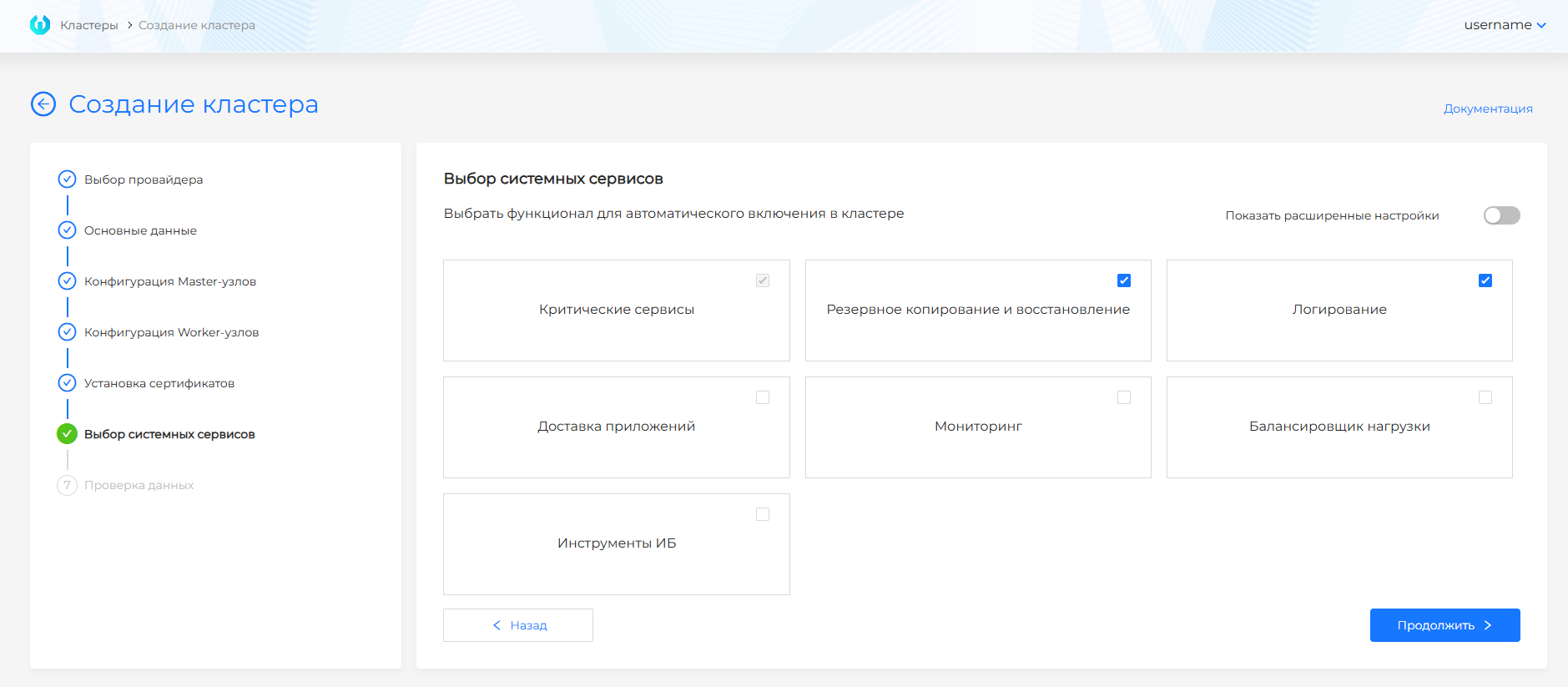
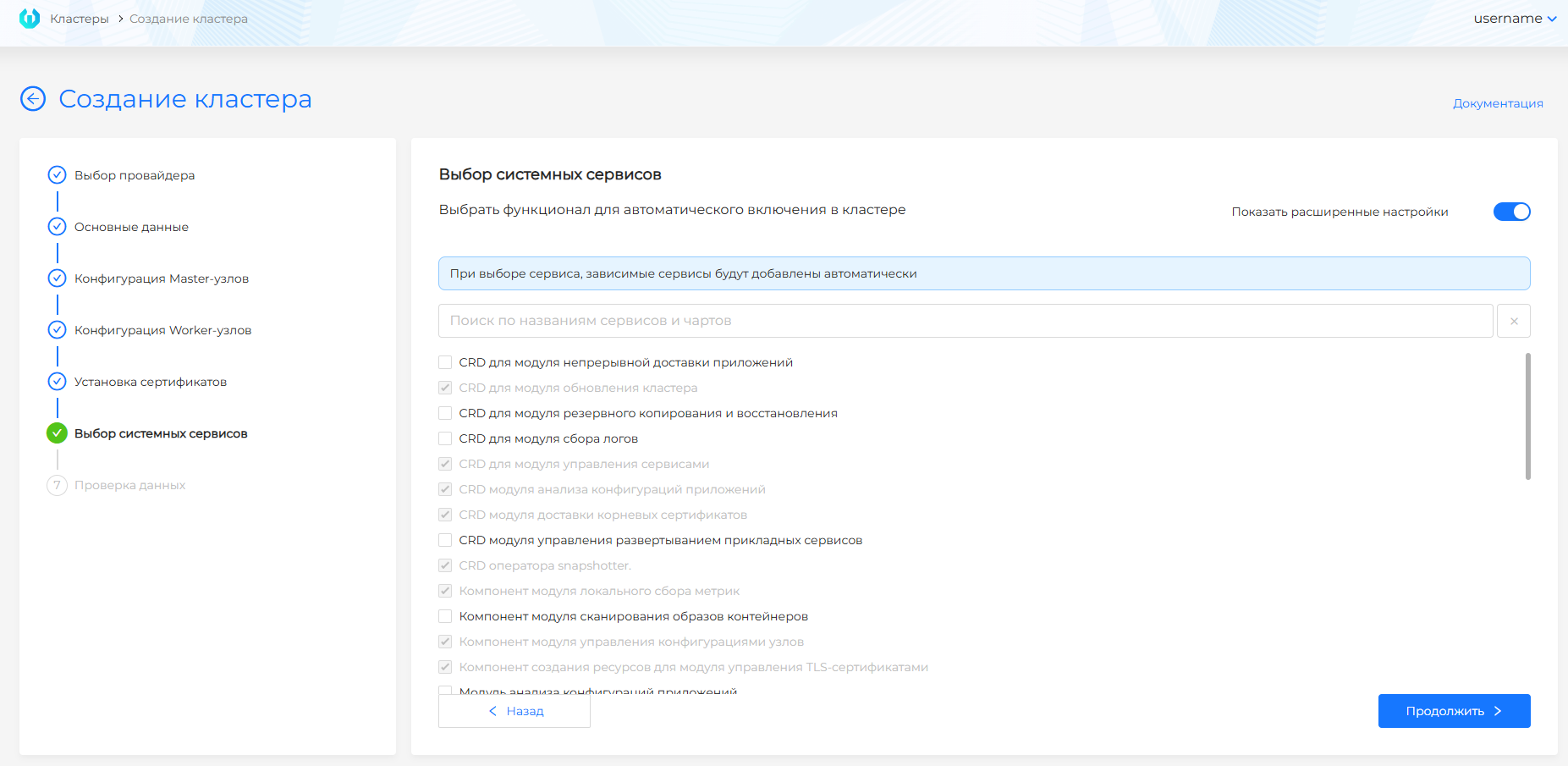
| Field | Description |
|---|---|
| Critical Services | Required platform components, including Gateway API CRDs. Always enabled and cannot be disabled. |
| Monitoring | Metrics, dashboards and metrics export. |
| Logging | Collection and processing of logs. |
| Backup and Restore | Backup and snapshot services. |
| Application Delivery | Components of continuous delivery and deployment strategies. |
| Load Balancer | Load balancing and traffic management components. |
| Information Security Tools | Configuration analysis and image scanning. |
| Show advanced settings | Switches the selection from groups of services to individual services and charts. |
VMware vSphere
Screenshots and step fields
| Field | Description |
|---|---|
| Critical Services | Required platform components, including Gateway API CRDs. Always enabled and cannot be disabled. |
| Monitoring | Metrics, dashboards and metrics export. |
| Logging | Collection and processing of logs. |
| Backup and Restore | Reserve serviceseasy copying and working with snapshot. |
| Application Delivery | Components of continuous delivery and deployment strategies. |
| Load Balancer | Load balancing and traffic management components. |
| Information Security Tools | Configuration analysis and image scanning. |
| Show advanced settings | Switches the selection from groups of services to individual services and charts. |
oVirt, zVirt, HostVM, ED Virtualization, ROSA Virtualization
Screenshots and step fields
| Field | Description |
|---|---|
| Critical Services | Required platform components, including Gateway API CRDs. Always enabled and cannot be disabled. |
| Monitoring | Metrics, dashboards and metrics export. |
| Logging | Collection and processing of logs. |
| Backup and Restore | Backup and snapshot services. |
| Application Delivery | Components of continuous delivery and deployment strategies. |
| Load Balancer | Load balancing and traffic management components. |
| Information Security Tools | Configuration analysis and image scanning. |
| Show advanced settings | Switches the selection from groups of services to individual services and charts. |
OpenStack, VK Cloud, Selectel
Screenshots and step fields
| Field | Description |
|---|---|
| Critical Services | Required platform components, including Gateway API CRDs. Always enabled and cannot be disabled. |
| Monitoring | Metrics, dashboards and metrics export. |
| Logging | Collection and processing of logs. |
| Backup and Restore | Backup and snapshot services. |
| Application Delivery | Components of continuous delivery and deployment strategies. |
| Load Balancer | Load balancing and traffic management components. |
| Information Security Tools | Configuration analysis and image scanning. |
| Show advanced settings | Switches the selection from groups of services to individual services and charts. |
Yandex Cloud
Screenshots and step fields
| Field | Description |
|---|---|
| Critical Services | Required platform components, including Gateway API CRDs. Always enabled and cannot be disabled. |
| Monitoring | Metrics, dashboards and metrics export. |
| Logging | Collection and processing of logs. |
| Backup and Restore | Backup and snapshot services. |
| Application Delivery | Components of continuous delivery and deployment strategies. |
| Load Balancer | Load balancing and traffic management components. |
| Information Security Tools | Configuration analysis and image scanning. |
| Show advanced settings | Switches the selection from groups of services to individual services and charts. |
shturval-capy-csi is not in this list. It is installed when CSI integration is enabled on the basic-data step.
Step 8. Data verification
Shturval v2
Step description
Check parameter summary: cluster name, provider, API and Ingress addresses, setlocal CIDR, Control Plane configuration, Worker groups, certificate, and the selected services. The management cluster is deployed with Gateway API. To correct a parameter, return to the desired step through the left panel or the Back button. After verification, click Create Cluster.
VMware vSphere
Step description
Check the summary of parameters: cluster name, provider, API and Ingress addresses, network CIDRs, Control Plane configuration, Worker groups, certificate, and the selected services. The management cluster is deployed with Gateway API. To correct a parameter, return to the desired step through the left panel or the Back button. After verification, click Create Cluster.
oVirt, zVirt, HostVM, ED Virtualization, ROSA Virtualization
Step description
Check the summary of parameters: cluster name, provider, API and Ingress addresses, network CIDRs, Control Plane configuration, Worker groups, certificate, and the selected services. The management cluster is deployed with Gateway API. To correct a parameter, return to the desired step through the left panel or the Back button. After verification, click Create Cluster.
OpenStack, VK Cloud, Selectel
Step description
Check the summary of parameters: cluster name, provider, API and Ingress addresses, network CIDRs, Control Plane configuration, Worker groups, certificate, and the selected services. The management cluster is deployed with Gateway API. To correct a parameter, return to the desired step through the left panel or the Back button. After verification, click Create Cluster.
Yandex Cloud
Step description
Check the summary of parameters: cluster name, provider, API and Ingress addresses, network CIDRs, Control Plane configuration, Worker groups, certificate, and the selected services. The management cluster is deployed with Gateway API. To correct a parameter, return to the desired step through the left panel or the Back button. After verification, click Create Cluster.
Management cluster installation status
For a detailed description of status stages, color indication, node and service tables, see Cluster Deployment Status.
After the deployment starts, the management cluster installation status and stages are displayed on the screen.
Installation takes a long time, so you can close or reload the browser tab before it finishes. In this browser the installer address remembers an unfinished installation: open it again and you land on the status page, where the stages keep updating. The page says so: “Installation has started. If you reload the page, installation progress will be restored automatically. Once the installation is complete, you will receive login information for the platform.”
When the cluster is already deployed, the same address opens the installation wizard again, not the page of the previous installation. If the temporary cluster has been removed and shtil install-gui is started again, the previous installation is not picked up either.
Upon completion of the installation, you will automatically move to the “Cluster ready” stage. At this stage the following are available:
- static kubeconfig of the persistent management cluster - download and save it;
- link to switch to the permanent management cluster. To log in, use the platform administrator login and password received when you started the installation.
The management cluster installation is considered complete when the minimum requirements are met:
- infrastructure is ready;
- at least 1 Control Plane node is ready;
- services
shturval-backend,shturval-auth,shturval-frontend, andshturval-gateway-api-crdswere successfully installed. Theshturval-ingress-controllermodule is installed inabsentmode.
When kubeconfig and a link to the persistent cluster interface are already available, individual steps can stillnot executed: for example, not all services may be installed or not all NCIs may be used. You can wait for all stages to complete in the temporary cluster interface or check the status in the permanent cluster: NCI - on the Node Configuration page, if necessary, edit nodes through creating and working with NCI; services - on the Installed services page.
Installation of Shturval repository services is carried out in two stages: first, critical services are installed, then the services selected in the “Selecting services” step. The installation of Shturval repository services stage is considered completed only after installation of all services: critical and user-selected (for the composition and updating of registry artifacts, see repository services). For the management cluster, the status also displays the “Replication” stage with a list of replication conditions.
Installation with flags
Installation with flags is performed with the command install-cli (synonymous with install) without going through the platform installation wizard.
The --bootstrap-registry / --bootstrap-insecure parameters are usually not specified: the public registry of platform images is used. Pass the license for the temporary installation cluster with the --bootstrap-license flag if you are not using a pre-prepared kubeconfig (--existing-bootstrap-kubeconfig - see install-cli --help).
Providers
| Provider/environment | Subcommand install-cli |
|---|---|
| Shturval v2 | shturvalv2 |
| oVirt, zVirt, HostVM, ED Virtualization, ROSA Virtualization | ovirt |
| VMware vSphere | vsphere |
| OpenStack | openstack |
| VK Cloud | vkcloud |
| Selectel | selectel |
| Yandex Cloud | yandex |
General parameter groups
Network Context: Internetworking Patterns and Open Loop Requirements.
| Group | Parameters (example) | Purpose |
|---|---|---|
| Basic | --api-endpoint, -a, --provider-name, --cluster-name | Platform Management API Point, Provider Instance and Cluster Names |
| Network | --pod-subnet, --service-subnet | CIDR Pod and Service; see also checking the intersection of subnets |
| Ingress | --ingress-vip, --ingress-default-fqdn, --use-external-ingress-lb | Access to Ingress |
| System Services | --enabled-system-services, --minimal | Composition of components; see installing services |
| Bootstrap | --bootstrap-license, --bootstrap-registry, --bootstrap-insecure, --bootstrap-registry-certs-dir, --existing-bootstrap-kubeconfig, --bootstrap-kubeconfig-path, … | Connecting a temporary installation cluster or using an existing bootstrap-kubeconfig; in an open loop, --bootstrap-license is often sufficient. For mutually exclusive and mandatory combinations, see --help |
| Other | --yaml-path, -f, --platform-version, --overwrite (instead of overwrite you can write the command -y), --cluster-kubeconfig-path, --follow-install-logs, --install-logs-file | Alternative settings, platform version, overwrite mode, final kubeconfig path, and temporary-cluster pod logs while waiting for readiness |
When combining YAML and set flags, the fields of the YAML file are read first; only those command line flags that are specified explicitly are overridden.
Shturval v2 - example
./shtil install-cli shturvalv2 \
  --bootstrap-license="YOUR-LICENSE" \
  --ssh-user="shturval" \
  --path-ssh-private-key="/home/admin/.ssh/id_ed25519" \
  --controlplane-nodes="10.11.12.1,10.11.12.2,10.11.12.3" \
  --worker-nodes="10.11.12.11,10.11.12.12,10.11.12.13" \
  --api-endpoint="10.11.12.100" \
  --ingress-vip="10.11.12.101" \
  --cluster-name="mgmt-cluster"
SSH user password for sudo
If commands on the hosts run through sudo with a password, pass the SSH user password. The parameter is optional. Without it, installation works as before: the user runs sudo without a password.
- flag
--ssh-user-password; - in YAML, block
credentials.SSH—sshUserPassword; - in YAML, block
hosts, when the host has its own credentials —credentials.SSH.sshUserPassword.
How to set the password in the interface of an existing provider is described in How to add a password for sudo commands.
Mandatory combinations and short forms (-c, -w, -a, etc.) are specified in ./shtil install-cli shturvalv2 --help. Complete tables for providers are in the [flag directory](#install-cli-flags directory).
Minimum configuration (one CP):
./shtil install-cli shturvalv2 \
  --bootstrap-license="YOUR-LICENSE" \
  --ssh-user="shturval" \
  --path-ssh-private-key="/home/admin/.ssh/id_ed25519" \
  --controlplane-nodes="10.11.12.1" \
  --api-endpoint="10.11.12.100" \
  --ingress-vip="10.11.12.101" \
  --cluster-name="mgmt-cluster" \
  --minimal=true
An example of a rerun with overwriting conflicting resources on an existing bootstrap cluster:
bin/shtil install-cli shturvalv2 \
  --overwrite\
  --ssh-user="shturval" \
  --path-ssh-private-key="/home/username/sh/kubeconfigs/certs/id_ed25519" \
  --api-endpoint="10.XX.XXX.246" \
  --ingress-vip="10.XX.XXX.252" \
  --controlplane-nodes="10.XX.XXX.145" \
  --worker-nodes="10.XX.XXX.69" \
  --bootstrap-kubeconfig-path="/home/username/sh/kubeconfigs/01bt" \
  -v=10 \
  --cluster-name="mgmt617c1" \
  --provider-name="sht617p1"
Install-cli flags directory {#install-cli-flags directory}
General parameters (all providers)
| Parameter | Required | Description |
|---|---|---|
-a, --api-endpoint [string] | Yes for all providers except OpenStack/VK Cloud/Selectel and Yandex Cloud | Management cluster API server address (IP or FQDN without port and protocol, for example 10.11.12.100) |
--provider-name [string] | No | Provider instance name (default cluster-management-provider) |
--cluster-name [string] | No | Cluster name (default shturval-management) |
--pod-subnet [string] | No | Pod subnet in CIDR format (default 172.16.0.0/16) |
--service-subnet [string] | No | Service subnet in CIDR format (default 10.96.0.0/12) |
--ingress-default-fqdn [string] | Yes, if --ingress-vip is not set. No for OpenStack/VK Cloud/Selectel and Yandex Cloud | Ingress DNS name. apps.example.corp or *.apps.example.corp |
--ingress-vip [string] | Yes, if --ingress-default-fqdn is not set. For OpenStack/VK Cloud/Selectel and Yandex Cloud it is not required: only with --use-external-ingress-lb=false, and not together with --ingress-default-fqdn | Ingress VIP |
--use-external-ingress-lb | No | External Ingress load balancer. Usually true for OpenStack/VK Cloud/Selectel. Default true for Yandex Cloud |
--secure | No | Advanced Security Settings (default false) |
--ingress-certs-* | No | Paths to CA/TLS/ACME for Ingress (--ingress-certs-ca-crt-path, --ingress-certs-tls-crt-path, --ingress-certs-acme-url, etc.; see help) |
--enabled-system-services [string] | No | List of system services separated by commas. Ignored with --minimal=true |
--existing-bootstrap-kubeconfig, -b | No | Path to the kubeconfig of an existing temporary cluster. Not together with --bootstrap-kubeconfig-path |
--bootstrap-kubeconfig-path | No | Path of the file where the kubeconfig of the temporary cluster being created is written. Not together with --existing-bootstrap-kubeconfig |
--bootstrap-license [string] | As a rule, yes, if there is no ready-made bootstrap-kubeconfig | License; for special characters - single quotes |
--bootstrap-registry [string] | No | Image Registry (default r.shturval.tech) |
--bootstrap-insecure | No | Do not check TLS registry |
--yaml-path, -f | No | Path to the YAML manifest of the persistent cluster |
--minimal | No | Minimum set of services (often one CP) |
--platform-version [string] | No | Platform version (default = versions shtil) |
-y, --overwrite | No | Force update on restart |
--follow-install-logs | No | While shtil waits for the management cluster to become ready, print logs of running pods from the temporary cluster to stderr. The namespaces are Cluster API (capi-system, capi-kubeadm-bootstrap-system, capi-kubeadm-control-plane-system), shturval-cluster-manager, and the provider controller namespace. Each line starts with [namespace/pod]. Off by default |
--install-logs-file [string] | No | Append the same lines to a file. Used only together with --follow-install-logs. If the path is omitted, shtil creates shtil-install-<cluster-name>.log in the directory where the command was started |
-v, --verbosity | No | Log details |
Shturval v2
| Parameter | Required | Description |
|---|---|---|
--path-ssh-private-key [string] | Yes | Path to private SSH key |
--ssh-user [string] | Yes | SSH user |
--ssh-user-password [string] | No | SSH user password for sudo commands on the nodes. If the flag is omitted, sudo runs without a password. In the installation wizard this is User password. See SSH user password for sudo |
-c, --controlplane-nodes [string] | Yes | IP/FQDN Control Plane separated by commas |
-w, --worker-nodes [string] | Yes, if --minimal false | Worker IP or FQDN, separated by commas. A cluster without Worker nodes is installed only with --minimal; otherwise shtil does not run the command |
--use-external-kubeapi-lb | No | KubeAPI External Balancer |
A Shturval v2 cluster without Worker nodes is installed only in minimal mode: pass --minimal. That is how a microcluster on a single Control Plane node is built. If --worker-nodes is empty and --minimal is omitted, shtil does not start the installation and prints at least one worker node is required; installation without worker nodes is only possible with --minimal. The same hint is in ./shtil install-cli shturvalv2 --help: the command description and the --worker-nodes flag say Installation without worker nodes is only possible with --minimal. When you install from YAML, --minimal on the command line turns minimal mode on even if the file does not set it.
oVirt / zVirt / HostVM / ED Virtualization / ROSA Virtualization
| Parameter | Required | Description |
|---|---|---|
-u, --url-provider | Yes | API Engine URL, with suffix /ovirt-engine/api |
--user-provider | Yes | Account (for example admin@internal) |
--password-provider | Yes | Password; for special characters - quotes |
--tls-insecure-provider | No | Disable TLS check to Engine |
--tls-cert-path-provider | No | Path to trusted CA |
--sub-type-provider | No | zvirt, hostvm, redvirt, rosavirt |
--datacenter-provider | Yes | Data center name |
--datacenter-cluster-provider | Yes | Cluster name |
--vnic-profile-provider | Yes | VNIC profile |
-t, --template | Yes | VM template |
--provider-csi-storage | Yes | Storage Domain for CSI |
--allow-csi | No | Allow CSI |
--delete-persistent-volumes | No | Delete PVs when the cluster is deleted (true / false). If omitted, the cluster profile policy is used |
--control-plane, --workers | No | Number of nodes |
--cores-control-plane, --memory-control-plane, --disk-control-plane, --sockets-*, --threads-* | No | Control Plane VM Resources |
--cores-workers, --memory-workers, --disk-workers, … | No | Worker Resources |
--disk-clone | No | Clone the VM disk at the provider instance. If the flag is omitted, the field is not sent |
--disk-clone-control-plane | No | Clone the VM disk for Control Plane nodes. If the flag is omitted, the field is not sent |
--disk-clone-workers | No | Clone the VM disk for the default Worker group. If the flag is omitted, the field is not sent |
VMware vSphere
| Parameter | Required | Description |
|---|---|---|
--address-vcenter | Yes | FQDN or IP vCenter |
--user-vcenter | Yes | Account |
--password-vcenter | Yes | Password |
--provider-datacenter | Yes | Datacenter |
--provider-datastore | Yes | Datastore |
--provider-resource-pool | Yes | resource pool |
--provider-network | Yes | Network (DHCP for VM nodes) |
--provider-folder | Yes | VM folder |
--provider-clone-mode | No | linkedClone / fullClone |
--provider-storage-policy | No | Storage policy if necessary |
-t, --template | Yes | VM template |
--enable-csi | No | Enable CSI |
--delete-persistent-volumes | No | Delete PVs when the cluster is deleted (true / false). If omitted, the cluster profile policy is used |
--control-plane, --workers | No | Number of nodes |
--cpu-control-plane, --memory-control-plane, --disk-control-plane | No | CP Resources |
--cpu-workers, --memory-workers, --disk-workers | No | Worker Resources |
OpenStack / VK Cloud / Selectel
| Parameter | Required | Description |
|---|---|---|
--url-auth | Yes for OpenStack; may not be required for VK/Selectel | Keystone URL with port, for example https://openstack.example.com:5000/v3 |
--project-id | Yes | Project ID |
--project-domain-id | Yes | Project Domain ID |
--tls-insecure-provider | No | Skip TLS check |
--tls-cert-path | No | PEM CA for API |
--region-name | No | Region |
--interface | No | Endpoint interface (public, etc.) |
--identity-api-version | No | Identity API version |
--token | Conditionally | Token (OpenStack; not with login/password) |
--login | Conditionally | Service ultrasound |
--password | Conditionally | UZ password |
--user-domain-name | Conditionally | User Domain |
--cloud-name | Yes | Cloud name in terms of cloud API |
--ssh-key-name | Yes | Cloud SSH keypair name |
--node-cidr | Yes | Host subnet, for example 10.0.0.0/24 |
--external-network-id | Yes | External network ID |
--flavors | Yes | List of flavors separated by commas |
--volume-types | Yes | Volume types separated by commas |
--availability-zones | No | Availability zones |
--manage-security-groups, --disable-port-security, --dns | No | Network/SEC |
--machine-image-name | Yes | VM image/template name |
--enable-csi | No | CSI |
--delete-persistent-volumes | No | Delete PVs when the cluster is deleted (true / false). If omitted, the cluster profile policy is used |
--control-plane, --workers | No | Number of nodes |
--flavor-name-cp, --volume-type-cp, --availability-zone-cp, --disk-cp | No | CP in the Cloud |
--flavor-name-workers, --volume-type-workers, … | No | Workers in the cloud |
Yandex Cloud
Subcommand yandex. --api-endpoint is not required: Yandex Cloud load balancers publish KubeAPI and Ingress. The external Ingress load balancer is on by default. The default cluster name is shturval-management. This subcommand has no --delete-persistent-volumes flag: PV deletion is set in the GUI or by the cluster profile policy.
| Parameter | Required | Description |
|---|---|---|
--yandex-key-path | Yes | Path to the service account JSON key. The request sends the file contents. Node operations need compute.editor and alb.editor; CSI also needs k8s.clusters.agent |
--folder-id | Yes | Yandex Cloud folder ID. The instance uses one folder |
--network-id | Yes | Network ID where the nodes are created |
--subnet-id | Yes | Node subnet ID |
--zone-id | Yes | Availability zone, for example ru-central1-a |
--allowed-platform-ids | Yes | Allowed platform IDs, comma-separated, for example standard-v3 |
--allowed-volume-types | Yes | Allowed disk types, comma-separated, for example network-ssd |
--template | Yes | VM image ID. Prepare the image with the flag stc --keep-cloud-init |
--enable-csi | No | Enable CSI (shturval-capy-csi) and allow it on the provider instance. Default false |
--load-balancer-type | No | Cloud load balancer type: ALB or NLB. Default ALB |
--load-balancer-internal | No | Internal load balancer. Default false, which means external |
--provider-name | No | Instance name. Default cluster-management-provider. Lowercase letters, digits, and hyphen, 1 to 63 characters. The name create is not allowed |
--control-plane, --workers | No | Node counts. Control Plane is a positive odd number, default 1. Workers are an integer of 0 or greater, default 3 |
--platform-id-control-plane, --cores-control-plane, --memory-control-plane, --disk-control-plane, --volume-type-control-plane | No | Control Plane VM size. Default 4 vCPU, 16000Mi, and a 60Gi disk. At least 4 vCPU and 8Gi of memory. If omitted, the platform ID and disk type are the first values from the allowed lists |
--platform-id-workers, --cores-workers, --memory-workers, --disk-workers, --volume-type-workers | No | Worker VM size. Default 8 vCPU, 32000Mi, and a 300Gi disk. The same vCPU and memory minimums |
Examples of commands for the selected network diagram
Ports, protocols and traffic matrices are on the Internetworking Schemes page. Below are separate commands for copying: block install-gui (default registry r.shturval.tech) and examples install-cli for the management cluster network.
Local installer (install-gui)
./shtil install-gui \
  --bootstrap-license="YOUR-LICENSE"
Shturval v2 - internal KubeAPI, external Ingress
Schemes: with CoreHA on the client, without it on the client scheme.
./shtil install-cli shturvalv2 \
  --bootstrap-license="YOUR-LICENSE" \
  --ssh-user="shturval" \
  --path-ssh-private-key="/home/admin/.ssh/id_ed25519" \
  --controlplane-nodes="10.11.12.1,10.11.12.2,10.11.12.3" \
  --worker-nodes="10.11.12.11,10.11.12.12,10.11.12.13" \
  --api-endpoint="10.11.12.100" \
  --ingress-default-fqdn="*.apps.example.corp" \
  --use-external-ingress-lb=true \
  --cluster-name="mgmt-cluster"
Shturval v2 - internal KubeAPI and internal Ingress
Scheme: internal Ingress (VIP Worker).
./shtil install-cli shturvalv2 \
  --bootstrap-license="YOUR-LICENSE" \
  --ssh-user="shturval" \
  --path-ssh-private-key="/home/admin/.ssh/id_ed25519" \
  --controlplane-nodes="10.11.12.1,10.11.12.2,10.11.12.3" \
  --worker-nodes="10.11.12.11,10.11.12.12,10.11.12.13" \
  --api-endpoint="10.11.12.100" \
  --ingress-vip="10.11.12.101" \
  --cluster-name="mgmt-cluster"
Shturval v2 - external KubeAPI and external Ingress
Scheme: both external balancers.
./shtil install-cli shturvalv2 \
  --bootstrap-license="YOUR-LICENSE" \
  --ssh-user="shturval" \
  --path-ssh-private-key="/home/admin/.ssh/id_ed25519" \
  --controlplane-nodes="10.11.12.1,10.11.12.2,10.11.12.3" \
  --worker-nodes="10.11.12.11,10.11.12.12,10.11.12.13" \
  --api-endpoint="api.example.corp" \
  --use-external-kubeapi-lb=true \
  --ingress-default-fqdn="*.apps.example.corp" \
  --use-external-ingress-lb=true \
  --cluster-name="mgmt-cluster"
Shturval v2 Stand-alone - internal KubeAPI and internal Ingress
Scheme: stand-alone, both VIPs inside the cluster.
./shtil install-cli shturvalv2 \
  --bootstrap-license="YOUR-LICENSE" \
  --ssh-user="shturval" \
  --path-ssh-private-key="/home/admin/.ssh/id_ed25519" \
  --controlplane-nodes="10.11.12.1,10.11.12.2,10.11.12.3" \
  --worker-nodes="10.11.12.11,10.11.12.12,10.11.12.13" \
  --api-endpoint="10.11.12.100" \
  --ingress-vip="10.11.12.101" \
  --cluster-name="mgmt-cluster"
Shturval v2 Stand-alone - internal KubeAPI, external Ingress
Scheme: stand-alone and external Ingress LB.
./shtil install-cli shturvalv2 \
  --bootstrap-license="YOUR-LICENSE" \
  --ssh-user="shturval" \
  --path-ssh-private-key="/home/admin/.ssh/id_ed25519" \
  --controlplane-nodes="10.11.12.1,10.11.12.2,10.11.12.3" \
  --worker-nodes="10.11.12.11,10.11.12.12,10.11.12.13" \
  --api-endpoint="10.11.12.100" \
  --ingress-default-fqdn="*.apps.example.corp" \
  --use-external-ingress-lb=true \
  --cluster-name="mgmt-cluster"
oVirt / VMware vSphere - internal KubeAPI, external Ingress
Scheme: oVirt and vSphere.
./shtil install-cli ovirt\
  --bootstrap-license="YOUR-LICENSE" \
  --api-endpoint="10.11.12.100" \
  --ingress-default-fqdn="*.apps.example.corp" \
  --use-external-ingress-lb=true \
  --url-provider="https://ovirt.example.corp/ovirt-engine/api" \
  --user-provider="admin@internal" \
  --password-provider="Example-Ovirt-Pass1" \
  --datacenter-provider="Default" \
  --datacenter-cluster-provider="Default" \
  --vnic-profile-provider="ovirtmgmt" \
  --template="rocky9-template" \
  --provider-csi-storage="data-domain-1" \
  --cluster-name="mgmt-cluster"
./shtil install-cli vsphere \
  --bootstrap-license="YOUR-LICENSE" \
  --api-endpoint="10.11.12.100" \
  --ingress-default-fqdn="*.apps.example.corp" \
  --use-external-ingress-lb=true \
  --address-vcenter="vcenter.example.corp" \
  --user-vcenter="administrator@vsphere.local" \
  --password-vcenter="Example-Vcenter-Pass1" \
  --provider-datacenter="/Example-Datacenter" \
  --provider-datastore="datastore1" \
  --provider-resource-pool="/Example-Datacenter/host/Example-Cluster/Resources/Example-Pool" \
  --provider-network="/Example-Datacenter/network/VM-Network" \
  --provider-folder="/Example-Datacenter/vm/workloads" \
  --template="rocky9-template" \
  --cluster-name="mgmt-cluster"
oVirt / VMware vSphere - CoreHA on the client
Scheme: CoreHA DNS on client. The management cluster installation commands are the same as in the “internal KubeAPI, external Ingress” subsection.
oVirt / VMware vSphere - internal KubeAPI and internal Ingress
Scheme: both VIPs inside the cluster.
./shtil install-cli ovirt \
  --bootstrap-license="YOUR-LICENSE" \
  --api-endpoint="10.11.12.100" \
  --ingress-vip="10.11.12.101" \
  --url-provider="https://ovirt.example.corp/ovirt-engine/api" \
  --user-provider="admin@internal" \
  --password-provider="Example-Ovirt-Pass1" \
  --datacenter-provider="Default" \
  --datacenter-cluster-provider="Default" \
  --vnic-profile-provider="ovirtmgmt" \
  --template="rocky9-template" \
  --provider-csi-storage="data-domain-1" \
  --cluster-name="mgmt-cluster"
./shtil install-cli vsphere \
  --bootstrap-license="YOUR-LICENSE" \
  --api-endpoint="10.11.12.100" \
  --ingress-vip="10.11.12.101" \
  --address-vcenter="vcenter.example.corp" \
  --user-vcenter="administrator@vsphere.local" \
  --password-vcenter="Example-Vcenter-Pass1" \
  --provider-datacenter="/Example-Datacenter"\
  --provider-datastore="datastore1" \
  --provider-resource-pool="/Example-Datacenter/host/Example-Cluster/Resources/Example-Pool" \
  --provider-network="/Example-Datacenter/network/VM-Network" \
  --provider-folder="/Example-Datacenter/vm/workloads" \
  --template="rocky9-template" \
  --cluster-name="mgmt-cluster"
OpenStack, VK Clouf, Selectel - external LBs
Schema: external LBs for KubeAPI and Ingress.
The install-cli help lists the openstack, vkcloud, selectel subcommands. For complete flag tables, see the [install-cli flags reference](#install-cli-flags directory) section on this page.
./shtil install-cli openstack \
  --bootstrap-license="YOUR-LICENSE" \
  --use-external-kubeapi-lb=true \
  --use-external-ingress-lb=true \
  --url-auth="https://openstack.example.com:5000/v3" \
  --project-id="example-project-id" \
  --project-domain-id="example-project-domain-id" \
  --user-domain-name="users" \
  --login="openstack-admin" \
  --password="Openstack-Example-Pass1" \
  --cloud-name="openstack" \
  --ssh-key-name="my-ssh-keypair" \
  --node-cidr="10.0.0.0/24" \
  --external-network-id="external-network-uuid" \
  --flavors="flavor-medium,flavor-large" \
  --volume-types="fast-ssd,default" \
  --machine-image-name="rocky9-shturval-template"
./shtil install-cli vkcloud \
  --bootstrap-license="YOUR-LICENSE" \
  --use-external-kubeapi-lb=true \
  --use-external-ingress-lb=true \
  --url-auth="https://openstack.example.com:5000/v3" \
  --cloud-name="vkcloud" \
  --project-id="example-project-id" \
  --project-domain-id="example-project-domain-id" \
  --user-domain-name="users" \
  --login="openstack-admin" \
  --password="Openstack-Example-Pass1" \
  --ssh-key-name="my-ssh-keypair" \
  --node-cidr="10.0.0.0/24" \
  --external-network-id="external-network-uuid" \
  --flavors="flavor-medium,flavor-large" \
  --volume-types="fast-ssd,default" \
  --machine-image-name="rocky9-shturval-template"
./shtil install-cli selectel \
  --bootstrap-license="YOUR-LICENSE" \
  --use-external-kubeapi-lb=true \
  --use-external-ingress-lb=true \
  --url-auth="https://openstack.example.com:5000/v3" \
  --cloud-name="selectel" \
  --project-id="example-project-id" \
  --project-domain-id="example-project-domain-id" \
  --user-domain-name="users"\
  --login="openstack-admin" \
  --password="Openstack-Example-Pass1" \
  --ssh-key-name="my-ssh-keypair" \
  --node-cidr="10.0.0.0/24" \
  --external-network-id="external-network-uuid" \
  --flavors="flavor-medium,flavor-large" \
  --volume-types="fast-ssd,default" \
  --machine-image-name="rocky9-shturval-template"
Yandex Cloud — external load balancers
KubeAPI and Ingress addresses are assigned by Yandex Cloud load balancers. --api-endpoint is not required. --use-external-ingress-lb defaults to true.
./shtil install-cli yandex \
  --bootstrap-license="YOUR-LICENSE" \
  --yandex-key-path="/home/admin/yandex-sa-key.json" \
  --folder-id="b1g-folder-id" \
  --network-id="enp-network-id" \
  --subnet-id="e9b-subnet-id" \
  --zone-id="ru-central1-a" \
  --allowed-platform-ids="standard-v3" \
  --allowed-volume-types="network-ssd,network-hdd" \
  --template="fd8-image-id" \
  --ingress-default-fqdn="*.apps.example.corp" \
  --enable-csi=true
Example: minimum configuration (1 Control Plane)
Microcluster is a management cluster option on one Control Plane node (6 vCPUs, 8 GiB RAM, 80 GiB disk). Convenient for testing and pilots. Requirements: [minimum configuration in requirements](/2.15/en/platform-admin/installation/open-circuit/requirements/#minimum-configuration-only-1-Control Plane-node).
Note: not for production. Up to 5 client clusters. Logging, monitoring and backup are not installed in this preset.
Console (install-cli):
The command has no Worker nodes, so --minimal is set. Without this flag shtil will not start such a Shturval v2 installation.
./shtil install-cli shturvalv2 \
  --bootstrap-license="YOUR-LICENSE" \
  --ssh-user="shturval" \
  --path-ssh-private-key="/home/admin/.ssh/id_ed25519" \
  --controlplane-nodes="10.11.12.1" \
  --api-endpoint="10.11.12.100" \
  --ingress-vip="10.11.12.101" \
  --cluster-name="mgmt-cluster" \
  --minimal=true
oVirt / compatible virtualizations
./shtil install-cli ovirt \
  --bootstrap-license="YOUR-LICENSE" \
  --url-provider="https://ovirt.example.corp/ovirt-engine/api" \
  --user-provider="admin@internal" \
  --password-provider="Example-Ovirt-Pass1" \
  --datacenter-provider="Default" \
  --datacenter-cluster-provider="Default" \
  --vnic-profile-provider="ovirtmgmt" \
  --template="rocky9-template" \
  --provider-csi-storage="data-domain-1" \
  --api-endpoint="10.11.12.100" \
  --ingress-vip="10.11.12.101" \
  --cluster-name="mgmt-cluster"
If necessary: --sub-type-provider, --control-plane, --workers, reVM resources (--cores-*, --memory-*, --disk-*), --allow-csi, --tls-insecure-provider, --tls-cert-path-provider - see ./shtil install-cli ovirt --help.
vSphere
Use ./shtil install-cli vsphere and vCenter parameters (--address-vcenter, account, datacenter, datastore, resource pool, network, folder, template). Full list: ./shtil install-cli vsphere --help.
OpenStack / VK Cloud / Selectel
| Launch | Purpose |
|---|---|
./shtil install-cli openstack | OpenStack (CAPOS) |
./shtil install-cli vkcloud | VK Cloud |
./shtil install-cli selectel | Selectel |
Refer to OpenStack and CAPOS and the shtil install-cli openstack --help output for listing flags (--url-auth, --project-id, --ssh-key-name, --external-network-id, machine images, etc.). Subcommand help isrequired for clouds: API and object names depend on the project.
Yandex Cloud
Control Plane stays at the default of one node. --workers=0 creates no Worker nodes. --minimal=true installs the minimal service set.
./shtil install-cli yandex \
  --bootstrap-license="YOUR-LICENSE" \
  --yandex-key-path="/home/admin/yandex-sa-key.json" \
  --folder-id="b1g-folder-id" \
  --network-id="enp-network-id" \
  --subnet-id="e9b-subnet-id" \
  --zone-id="ru-central1-a" \
  --allowed-platform-ids="standard-v3" \
  --allowed-volume-types="network-ssd,network-hdd" \
  --template="fd8-image-id" \
  --ingress-default-fqdn="*.apps.example.corp" \
  --workers=0 \
  --minimal=true
Installation with YAML
Installation parameters are passed by the YAML file using the --yaml-path flag. YAML is applied first, then only explicitly specified CLI flags override individual fields.
Providers and document types
Examples of a YAML file for filling in parameters with your own values are displayed by the example subcommand indicating the provider:
Shturval v2:
./shtil install-cli shturvalv2 example > install.yaml
oVirt (and compatible virtualizations):
./shtil install-cli ovirt example > install.yaml
VMware vSphere:
./shtil install-cli vsphere example > install.yaml
OpenStack:
./shtil install-cli openstack example > install.yaml
VK Cloud:
./shtil install-cli vkcloud example > install.yaml
Selectel:
./shtil install-cli selectel example > install.yaml
Yandex Cloud:
./shtil install-cli yandex example > install.yaml
The configuration consists of sections: the provider configuration and the cluster itself, separated by ---.
| Region | First document type | Second document type |
|---|---|---|
| Shturval v2 | CapsmProviderConfig | CapsmClusterConfig |
| oVirt | CapovProviderConfig | CapovClusterConfig |
| vSphere | CapvsProviderConfig | CapvsClusterConfig |
| OpenStack, VK Cloud, Selectel | CaposProviderConfig | CaposClusterConfig |
| Yandex Cloud | CapycProviderConfig | CapycClusterConfig |
YAML constructors
Interactive forms to prepare manifests (two files: provider and cluster):
YAML manifest parameters
The following are required by annotated YAML templates. Fields without an explicit value can be left commented out if they are optional and the default value is appropriate.
General cluster parameters
| YAML Parameter | Providers | Required | Description |
|---|---|---|---|
type | All | Yes | Document type: CapsmProviderConfig, CapsmClusterConfig, CapovProviderConfig, CapovClusterConfig, CapvsProviderConfig, CapvsClusterConfig, CaposProviderConfig, CaposClusterConfig, CapycProviderConfig, or CapycClusterConfig |
cluster | All cluster documents | Yes | Management Cluster Configuration |
cluster.apiEndpoint | Shturval v2, oVirt, vSphere | Yes | Cluster management API server addressApplications: IP or FQDN without port and protocol |
cluster.clusterName | All except Yandex Cloud | No | Management cluster name. Default cluster-management |
cluster.clusterName | Yandex Cloud | Yes | Management cluster name. The template uses shturval-management. An empty name is rejected |
cluster.enabledServices | All | No | List of included services. If cluster.minimal: true, the value is ignored |
cluster.externalKubeAPILB | Shturval v2 | No | Use an external balancer for the API server. Default false |
cluster.externalingresslb | All except Yandex Cloud | No | Use an external balancer for Ingress. Default false |
cluster.externalingresslb | Yandex Cloud | No | External Ingress load balancer. Default true |
cluster.ingress | Shturval v2, oVirt, vSphere | Yes, if cluster.ingressvip | Wildcard DNS record for Ingress, for example <cluster_name>.<base_domain> |
cluster.ingress | OpenStack, VK Cloud, Selectel, Yandex Cloud | No | Ingress DNS name. apps.example.corp and *.apps.example.corp are both valid. For Yandex Cloud, use it when externalingresslb: true |
cluster.ingressvip | Shturval v2, vSphere | Yes, if cluster.externalingresslb: false | Ingress controller VIP address |
cluster.ingressvip | oVirt | No | VIP address of the Ingress controller; used with cluster.externalingresslb: false |
cluster.ingressvip | Yandex Cloud | No | Ingress VIP. Set it only when externalingresslb: false, and not together with cluster.ingress |
cluster.controlPlaneNodesCount | All | No | Number of Control Plane nodes. Minimum 1, default 1 |
cluster.podSubnet | All | No | CIDR of the Pod subnet. Default 172.16.0.0/16 |
cluster.serviceSubnet | All | No | Service subnet CIDR. Default 10.96.0.0/12 |
cluster.secure | All | No | Enable advanced security options. Default false |
cluster.deletePersistentVolumes | oVirt, vSphere, OpenStack, VK Cloud, Selectel | No | Delete persistent volumes when the cluster is deleted. true / false. If omitted, the cluster profile policy is used |
cluster.shturvalVersion | All | No | Platform version. Must match version shtil; in Shturval v2 the passed value is ignored |
cluster.minimal | All | No | Minimum set of services. If true, cluster.enabledServices is ignored |
cluster.overwrite | All | No | Overwrite the provider if it already exists. Default false |
cluster.followInstallLogs | All | No | While shtil waits for the management cluster to become ready, print logs of running pods from the temporary cluster to stderr: Cluster API, shturval-cluster-manager, and the provider controller. Each line starts with [namespace/pod]. Default false. Flag --follow-install-logs |
cluster.installLogsFile | All | No | Where to append the same lines. The file is created only when followInstallLogs: true. If the path is empty, shtil writes shtil-install-<cluster-name>.log in the directory where the command was started. Flag --install-logs-file |
Ingress Certificates
| YAML Parameter | Required | Description |
|---|---|---|
ingressCerts | No | Cluster certificate. If not specified, a self-signed certificate is used. You can only select one subtype: ca, tls or acme |
ingressCerts.ca.crtPath | No, but together with ingressCerts.ca.keyPath | Path to certificate chain in PEM |
ingressCerts.ca.keyPath | No, but together with ingressCerts.ca.crtPath | Path to the private key of the intermediate CA certificate |
ingressCerts.tls.crtPath | No, but together with ingressCerts.tls.keyPath | Path to the enterprise or self-signed TLS certificate for the Ingress domain name |
ingressCerts.tls.keyPath | No, but together with ingressCerts.tls.crtPath | Path to the private key of the Ingress TLS certificate |
ingressCerts.acme.rootPath | No, but together with ingressCerts.acme.url | ACME CA Root Certificate Path |
ingressCerts.acme.url | No, but together with ingressCerts.acme.rootPath | ACME server address with port and path to resource |
ingressCerts.acme.email | No | Email for Let’s Encrypt account |
Shturval v2 (CapsmProviderConfig)
| YAML Parameter | Required | Description |
|---|---|---|
name | No | Provider instance name. Default cluster-management-provider |
credentials.SSH | Yes | General credentials for SSH connection to hosts |
credentials.SSH.privateKey | Yes | Path to private SSH key |
credentials.SSH.userName | Yes | SSH username |
credentials.SSH.sshUserPassword | No | SSH user password for sudo commands on hosts that use shared credentials. If omitted, sudo runs without a password. See SSH user password for sudo |
hosts | Yes | List of hosts for cluster nodes |
hosts[].address | Yes | Host IP address or FQDN |
hosts[].labelsSelector | Yes | Selector with host role label role |
hosts[].credentials | No | null means shared credentials from credentials.SSH. To set host-specific credentials, provide an SSH object with userName, privateKey, and, if needed, sshUserPassword |
hosts[].credentials.SSH.sshUserPassword | No | SSH user password for sudo on this host. Set it when hosts[].credentials is not null. If the password is set neither here nor in credentials.SSH.sshUserPassword, sudo runs without a password |
Shturval v2 (CapsmClusterConfig)
| YAML Parameter | Required | Description |
|---|---|---|
provider | No | Node group configurations; by default the Control Plane and Worker groups are pre-filled |
provider.controlPlaneNodeConfig.controlPlaneSelector.matchExpressions | No | Matching Host Expressions for Control Plane Group |
provider.controlPlaneNodeConfig.controlPlaneSelector.matchLabels.role | No | Control Plane hosts label. The role must be controlplane |
provider.controlPlaneNodeConfig.nodeConfig.groupName | Do not override | Control Plane Node Group Name |
provider.controlPlaneNodeConfig.nodeConfig.roles[].name | Do not override | Role of the Control Plane Node Group |
provider.controlPlaneNodeConfig.name | No | Provider instance name; must match name in CapsmProviderConfig |
provider.workerNodeConfigs | No | Configuration of Worker nodes; creation of additional Worker groups is not available |
provider.workerNodeConfigs[].workersCount | No | Number of nodes in the default Worker group. Default 3 |
provider.workerNodeConfigs[].workerSelector.matchExpressions | No | Matching Host Expressions for Worker Group |
provider.workerNodeConfigs[].workerSelector.matchLabels.role | No | Host role label for the Worker group. Recommended and default workers |
provider.workerNodeConfigs[].nodeConfig.groupName | No | Worker group name, for example default or infra |
provider.workerNodeConfigs[].nodeConfig.roles[].name | Do not override | Role of the Worker Node Group |
oVirt / zVirt / HostVM / ED Virtualization / ROSA Virtualization (CapovProviderConfig)
| YAML Parameter | Required | Description |
|---|---|---|
name | No | Provider instance name. Default cluster-management-provider |
credentials.oVirt | Yes | Credentials for connecting to API Engine oVirt |
credentials.oVirt.url | Yes | API Engine oVirt URL with suffix /ovirt-engine/api |
credentials.oVirt.username | Yes | Username for oVirt API authentication |
credentials.oVirt.password | Yes | Password for authentication in oVirt API |
connection | No | Settings for TLS connection to oVirt API |
connection.tlsInsecure | Net | Disable TLS certificate verification. Default true |
connection.tlsCertPath | No | Path to the CA certificate for TLS verification at tlsInsecure: false |
providerConfig | Yes | oVirt provider configuration |
providerConfig.subtype | No | oVirt-like provider subtype: zvirt, hostvm, redvirt, rosavirt |
providerConfig.datacenter | Yes | Datacenter name oVirt |
providerConfig.datacenterCluster | Yes | Cluster name oVirt inside the data center |
providerConfig.vnicProfile | Yes | VNIC profile name for VM network interfaces |
providerConfig.template | Yes | Name of the VM template in the selected data center |
providerConfig.csiStorage | No | Storage domain name for dynamic persistent volumes via CSI; an empty value disables CSI |
providerConfig.diskClone | No | Clone the VM disk on creation. true or false. If omitted, the disk-clone feature gate applies |
providerConfig.vmType | No | Type of VMs being created. Default server |
providerConfig.templateNetInterface | No | The name of the network interface in the template. Default eth0 |
oVirt / zVirt / HostVM / ED Virtualization / ROSA Virtualization (CapovClusterConfig)
| YAML Parameter | Required | Description |
|---|---|---|
provider | No | Node configurations; by default the Control Plane and Worker groups are pre-filled |
provider.name | No | Provider instance name. Default cluster-management-provider |
provider.controlPlaneNodeConfig | No | Control Plane Node Configuration |
provider.controlPlaneNodeConfig.nodeConfig.groupName | Do not override | Control Plane Node Group Name |
provider.controlPlaneNodeConfig.nodeConfig.roles[].name | Do not override | Role of the Control Plane Node Group |
provider.controlPlaneNodeConfig.capovNodeConfig.cpu.cores | No | Number of CPU cores per Control Plane node. Default 4 |
provider.controlPlaneNodeConfig.capovNodeConfig.cpu.sockets | No | Number of CPU sockets per Control Plane node. Default 1 |
provider.controlPlaneNodeConfig.capovNodeConfig.cpu.threads | No | Number of CPU threads per socket. Default 1 |
provider.controlPlaneNodeConfig.capovNodeConfig.memory.sizeMB | No | Memory size in MB on the Control Plane node. Default 16000 |
provider.controlPlaneNodeConfig.capovNodeConfig.memory.guaranteedMB | No | Guaranteed memory in MB; must match sizeMB. Default 16000 |
provider.controlPlaneNodeConfig.capovNodeConfig.osDiskSizeGB | No | OS disk size in GB per Control Plane node. Default 100 |
provider.controlPlaneNodeConfig.capovNodeConfig.diskClone | No | Clone the VM disk for Control Plane nodes. If omitted, providerConfig.diskClone is used, then the disk-clone feature gate |
provider.workerNodeConfigs | No | Worker node configuration |
provider.workerNodeConfigs[].nodeConfig.groupName | No | Worker group name, for example default or infra |
provider.workerNodeConfigs[].nodeConfig.roles[].name | Do not override | Role of the Worker Node Group |
provider.workerNodeConfigs[].workersCount | No | Number of nodes in the default Worker group. Default 3 |
provider.workerNodeConfigs[].capovNodeConfig.cpu.cores | No | Number of CPU cores per Worker node. Default 8 |
provider.workerNodeConfigs[].capovNodeConfig.cpu.sockets | No | Number of CPU sockets per Worker node. Default 1 |
provider.workerNodeConfigs[].capovNodeConfig.cpu.threads | No | Number of CPU threads per socket. Default 1 |
provider.workerNodeConfigs[].capovNodeConfig.memory.sizeMB | No | Memory size in MB on the Worker node. Default 32000 |
provider.workerNodeConfigs[].capovNodeConfig.memory.guaranteedMB | No | Guaranteed memory in MB; must match sizeMB. Default 32000 |
provider.workerNodeConfigs[].capovNodeConfig.osDiskSizeGB | No | OS disk size in GB per Worker node. Default 300 |
provider.workerNodeConfigs[].capovNodeConfig.diskClone | No | Clone the VM disk for this group. If omitted, providerConfig.diskClone is used, then the disk-clone feature gate |
vSphere (CapvsProviderConfig)
| YAML Parameter | Required | Description |
|---|---|---|
name | No | Provider instance name. Default cluster-management-provider |
credentials.vSphere | Yes | Credentials for connecting to vCenter |
credentials.vSphere.addressVcenter | Yes | IP address or FQDN vCenter |
credentials.vSphere.usernameVcenter | Yes | vCenter account username |
credentials.vSphere.passwordVcenter | Yes | vCenter account password |
connection | No | TLS connection settings for vCenter |
connection.tlsInsecure | No | Disable TLS certificate checking. Default true |
connection.tlsCertPath | No | Path to the CA certificate for TLS verification at tlsInsecure: false |
providerConfig | Yes | vSphere Provider Configuration |
providerConfig.datacenter | Yes | Name datacenter vSphere |
providerConfig.datastore | Yes | Datastore in datacenter |
providerConfig.resourcePool | Yes | Path to the resource pool for the VM |
providerConfig.network | Yes | Network name for VM network interfaces |
providerConfig.folder | Yes | Path to the VM folder in the vCenter inventory |
providerConfig.template | Yes | Name of the VM template in the selected data center |
providerConfig.cloneMode | No | Clone mode: linkedClone or fullClone. Default linkedClone |
providerConfig.storagePolicy | No | Storage policy name for VM disks |
providerConfig.enableCSI | No | Enable vSphere CSI driver. Default true |
providerConfig.templateNetInterface | No | The name of the network interface in the template. Default eth0 |
vSphere (CapvsClusterConfig)
| YAML Parameter | Required | Description |
|---|---|---|
provider | No | Node configurations; by default the Control Plane and Worker groups are pre-filled |
provider.name | No | Provider instance name. Default cluster-management-provider |
provider.controlPlaneNodeConfig | No | Control Plane Node Configuration |
provider.controlPlaneNodeConfig.nodeConfig.groupName | Don’t override | Control Plane Node Group Name |
provider.controlPlaneNodeConfig.nodeConfig.roles[].name | Don’t override | Role of the Control Plane Node Group |
provider.controlPlaneNodeConfig.capvsNodeConfig.cpu.cores | No | Number of CPU cores per Control Plane node. Default 4 |
provider.controlPlaneNodeConfig.capvsNodeConfig.memory.sizeMB | No | Memory size in MB on the Control Plane node. Default 16000 |
provider.controlPlaneNodeConfig.capvsNodeConfig.osDiskSizeGB | No | OS disk size in GB per Control Plane node. Default 100 |
provider.workerNodeConfigs | No | Worker node configuration |
provider.workerNodeConfigs[].nodeConfig.groupName | Do not override | Default Worker group name |
provider.workerNodeConfigs[].nodeConfig.roles[].name | Don’t override | Role of the Worker Node Group |
provider.workerNodeConfigs[].workersCount | No | Number of nodes in the default Worker group. Default 3 |
provider.workerNodeConfigs[].capvsNodeConfig.cpu.cores | No | Number of CPU cores per Worker node. Default 8 |
provider.workerNodeConfigs[].capvsNodeConfig.memory.sizeMB | No | Memory size in MB per Worker node. Default 32000 |
provider.workerNodeConfigs[].capvsNodeConfig.osDiskSizeGB | No | OS disk size in GB per Worker node. Default 300 |
OpenStack / VK Cloud / Selectel (CaposProviderConfig)
| YAML Parameter | Required | Description |
|---|---|---|
name | No | Provider instance name. Default cluster-management-provider |
cloudName | Yes | Cloud name, such as vkcloud or openstack |
connection | Yes | Credentials for connecting to OpenStack |
connection.authURL | Yes | OpenStack Keystone Authorization Service URL with Port |
connection.projectID | Yes | OpenStack Project ID |
connection.projectDomainID | Yes | OpenStack Project Domain ID |
connection.tlsInsecure | No | Skip OpenStack API TLS Certificate Verification |
connection.tlsCertPath | No | Path to CA certificate in PEM format |
connection.region | No | OpenStack Region Name |
connection.interface | No | OpenStack endpoint interface, such as public or internal |
connection.identityAPIVersion | No | OpenStack Identity API version. Default 3 |
connection.token | No | Authentication token; OpenStack only, cannot be used simultaneously with login and password |
connection.login | No, but together with connection.password | Service account name with roles heat_stack_owner, admin |
connection.password | No, but together with connection.login | Service account password |
connection.userDomainName | No | User domain name; must be set for OpenStack and VK Cloud |
resources | Yes | OpenStack Provider Configuration |
resources.sshKeyName | Yes | Name of the SSH key pair for accessing the VM |
resources.nodeCIDR | Yes | Host subnet; must not intersect with cluster.podSubnet and cluster.serviceSubnet |
resources.externalNetworkID | Yes | External network ID for floating IP and external access |
resources.flavors | Yes | List of VM types |
resources.volumeTypes | Yes | List of disk types |
resources.machineImageName | Yes | VM template name; the version of the Kubernetes template must match the version of Shturval and shtil |
resources.availabilityZones | No | List of Availability Zones |
resources.managedSecurityGroups | No | Security group management. Default true |
resources.disablePortSecurity | No | Disable port security. Default false |
resources.dns | No | DNS-servers |
resources.enableCSI | No | Enable CSI integration. Default false |
OpenStack / VK Cloud / Selectel (CaposClusterConfig)
| YAML Parameter | Required | Description |
|---|---|---|
provider | No | Node configurations; by default the Control Plane and Worker groups are pre-filled |
provider.name | No | Provider instance name. Default cluster-management-provider |
provider.controlPlaneNodeConfig | No | Control Plane Node Configuration |
provider.controlPlaneNodeConfig.nodeConfig.groupName | Do not override | Control Plane Node Group Name |
provider.controlPlaneNodeConfig.nodeConfig.roles[].name | Do not override | Role of the Control Plane Node Group |
provider.controlPlaneNodeConfig.caposNodeConfig.openstackFlavorName | No | VM type for Control Plane nodes; if not specified, the first of resources.flavors is used |
provider.controlPlaneNodeConfig.caposNodeConfig.volumeSize | No | Size of the Control Plane root volume of the nodes in GB. Default 100 |
provider.controlPlaneNodeConfig.caposNodeConfig.volumeType | No | Disk type Control Plane nodes; if not specified, the first of resources.volumeTypes is used |
provider.controlPlaneNodeConfig.caposNodeConfig.availabilityZone | No | Availability zone of Control Plane nodes; if not specified, the first of the resources.availabilityZones |
provider.workerNodeConfigs | No | Worker node configuration |
provider.workerNodeConfigs[].nodeConfig.groupName | Don’t override | Default Worker group name |
provider.workerNodeConfigs[].nodeConfig.roles[].name | Don’t override | Role of the Worker Node Group |
provider.workerNodeConfigs[].workersCount | No | Number of nodes in the default Worker group. Default 3 |
provider.workerNodeConfigs[].caposNodeConfig.openstackFlavorName | No | VM type for Worker nodes; if not specified, the first of resources.flavors is used |
provider.workerNodeConfigs[].caposNodeConfig.volumeSize | No | Size of the root volume of Worker nodes in GB. Default 300 |
provider.workerNodeConfigs[].caposNodeConfig.volumeType | No | Worker node disk type; if not specified, the first of resources.volumeTypes is used |
provider.workerNodeConfigs[].caposNodeConfig.availabilityZone | No | Availability zone of Worker nodes; if not specified, the first of the resources.availabilityZones |
Yandex Cloud (CapycProviderConfig)
| YAML parameter | Required | Description |
|---|---|---|
name | No | Provider instance name. Default cluster-management-provider. Lowercase letters, digits, and hyphen. The name create is not allowed |
connection | Yes | Yandex Cloud connection credentials |
connection.keyPath | Yes | Path to the service account JSON key. The request sends the file contents |
connection.folderId | Yes | Folder ID. The configuration uses one folder |
networkID | Yes | Yandex Cloud network ID |
subnetID | Yes | Yandex Cloud subnet ID |
zoneID | Yes | Availability zone, for example ru-central1-a |
allowedPlatformIDs | Yes | Allowed platform IDs |
allowedVolumeTypes | Yes | Allowed disk types |
template | Yes | VM image ID |
kubeVersion | No | Kubernetes version of the image. If empty, shtil fills it from the platform version |
loadBalancerType | No | Load balancer type: ALB or NLB. Default ALB |
loadBalancerInternal | No | Internal load balancer. Default false |
enableCSI | No | Enable CSI (shturval-capy-csi) and allow it on the instance. Default false |
ingressCerts | No | Ingress certificate. If omitted, a self-signed certificate is used. One subtype: ca, tls, or acme |
Yandex Cloud (CapycClusterConfig)
| YAML parameter | Required | Description |
|---|---|---|
cluster.clusterName | Yes | Management cluster name. The template uses shturval-management |
cluster.externalingresslb | No | External Ingress load balancer. Default true |
cluster.ingress | No | Ingress DNS name, apps.example.corp or *.apps.example.corp. Used when externalingresslb: true |
cluster.ingressvip | No | Ingress VIP. Only when externalingresslb: false, and not together with cluster.ingress |
cluster.controlPlaneNodesCount | No | Control Plane node count. A positive odd number, default 1 |
cluster.podSubnet | No | Pod subnet CIDR. Default 172.16.0.0/16 |
cluster.serviceSubnet | No | Service subnet CIDR. Default 10.96.0.0/12 |
cluster.secure | No | Advanced security settings. Default false |
cluster.shturvalVersion | No | Platform version. Must match the shtil version |
cluster.minimal | No | Minimal service set. If true, cluster.enabledServices is ignored |
cluster.enabledServices | No | Enabled services from the Shturval repository |
provider | No | Node configuration. If omitted, shtil fills the default sizes and a default group |
provider.name | No | Provider instance name. If set, it replaces name from CapycProviderConfig |
provider.controlPlaneNodeConfig.nodeConfig.groupName | Do not override | Control Plane group name |
provider.controlPlaneNodeConfig.nodeConfig.roles[].name | Do not override | Control Plane group role |
provider.controlPlaneNodeConfig.capycNodeConfig.platformID | No | Control Plane platform ID. If omitted, the first allowedPlatformIDs value is used |
provider.controlPlaneNodeConfig.capycNodeConfig.cpuCores | No | Control Plane vCPU. Default 4, at least 4 |
provider.controlPlaneNodeConfig.capycNodeConfig.memorySize | No | Control Plane memory, for example 16000Mi. Default 16000Mi, at least 8Gi |
provider.controlPlaneNodeConfig.capycNodeConfig.volumeSize | No | Control Plane disk size, for example 60Gi. Default 60Gi |
provider.controlPlaneNodeConfig.capycNodeConfig.volumeType | No | Control Plane disk type. If omitted, the first allowedVolumeTypes value is used |
provider.workerNodeConfigs | No | Worker groups. The first group without the infra role becomes default. A group with role node-role.kubernetes.io/infra is the infra group. If that group is missing, shtil adds an infra group with 0 nodes and the same VM size as the workers |
provider.workerNodeConfigs[].nodeConfig.groupName | No | Group name, for example default or infra. Names must be unique. Another group cannot be named infra, and the infra group cannot be named default |
provider.workerNodeConfigs[].nodeConfig.roles[].name | No | Group role: node-role.kubernetes.io/workers or node-role.kubernetes.io/infra |
provider.workerNodeConfigs[].workersCount | No | Nodes in the group, an integer of 0 or greater. Default 3 for default |
provider.workerNodeConfigs[].capycNodeConfig.cpuCores | No | Worker vCPU. Default 8, at least 4 |
provider.workerNodeConfigs[].capycNodeConfig.memorySize | No | Worker memory. Default 32000Mi, at least 8Gi |
provider.workerNodeConfigs[].capycNodeConfig.volumeSize | No | Worker disk. Default 300Gi |
provider.workerNodeConfigs[].capycNodeConfig.platformID | No | Worker platform ID. If omitted, the first allowedPlatformIDs value is used |
provider.workerNodeConfigs[].capycNodeConfig.volumeType | No | Worker disk type. If omitted, the first allowedVolumeTypes value is used |
Subnets and VIPs must be consistent with the Open Loop Requirements and the topology in the Internetworking Schemes.
In case of a collision, CIDR is checking the intersection of subnets when creating a cluster.
Steps
- Save the output of the desired
examplesubcommand to a file. - Edit the manifest: provider, cluster, nodes, VIP, subnets and, if necessary, certificates and services (for the list of components, see also installing services).
- Run the installation (open loop, standard registry - usually a license is enough):
./shtil install-cli PROVIDER-TYPE \
  --yaml-path="/home/admin/install.yaml" \
  --bootstrap-license="YOUR-LICENSE"
Example YAML manifest for Shturval v2 (two documents in one file, delimiter ---). Conditional addresses in the same format as CLI examples: nodes 10.11.12.x, KubeAPI 10.11.12.100, Ingress VIP 10.11.12.101.
The first document is the provider (CapsmProviderConfig):
---
type: CapsmProviderConfig
name: myprovidername
credentials:
  SSH:
    privateKey: /home/admin/.ssh/id_ed25519
    userName: shturval
    # sshUserPassword: user-password
hosts:
  - address: 10.11.12.1
    labelsSelector: { role: controlplane }
    credentials: null
    # Host-specific credentials instead of null:
    # credentials:
    #   SSH:
    #     privateKey: /home/admin/.ssh/id_ed25519
    #     userName: shturval
    #     sshUserPassword: user-password
  - address: 10.11.12.11
    labelsSelector: { role: workers }
    credentials: null

---

type: CapsmClusterConfig
cluster:
  apiEndpoint: 11/10/12.100
  clusterName: myclustername
  controlPlaneNodesCount: 1
  ingressvip: 10.11.12.101
  podSubnet: 172.16.0.0/16
  serviceSubnet: 10.96.0.0/12
  minimal: true
provider:
  controlPlaneNodeConfig:
    controlPlaneSelector: { matchLabels: { role: controlplane } }
    nodeConfig: { groupName: control-plane, roles: [{ name: node-role.kubernetes.io/control-plane }] }
  workerNodeConfigs:
    - nodeConfig: { groupName: default, roles: [{ name: node-role.kubernetes.io/workers }] }
      workersCount: 1
      workerSelector: { matchLabels: { role: workers } }
Example YAML manifest for oVirt with multiple groups of Worker nodes. In provider.workerNodeConfigs, set a separate element for each group, for example default and infra.
---
type: CapovProviderConfig
name: sht-capov-mgmt-prov
credentials:
  oVirt:
    url: https://ovirt.example.com/ovirt-engine/api
    username: ENTER-USER
    password: ENTER-PASSWORD
connection:
  tlsInsecure: true
providerConfig:
  datacenter:DCname
  datacenterCluster: RHVLab
  vnicProfile: CHLab_LAN_3260
  template: template-name-in-ovirt-infrastructure
  csiStorage: CHLab_Pure_VM_Store
ingressCerts:
  ##ca:
    ##crtPath:
    ##keyPath:
  ##tls:
    ##crtPath:
    ##keyPath:

---
type: CapovClusterConfig
cluster:
  apiEndpoint: 10.XX.XXX.236
  clusterName: sht-capov-mgmt7
  controlPlaneNodesCount: 1
  ingressvip: 10.XX.XXX.237
  minimal: true
provider:
  name: sht-capov-mgmt-prov
  controlPlaneNodeConfig:
    nodeConfig:
      groupName: control-plane
    roles:
      - name: node-role.kubernetes.io/control-plane
    capovNodeConfig:
      CPU:
        cores: 8
        sockets: 1
        threads: 1
      memory:
        sizeMB: 9000
        guaranteedMB: 9000
      osDiskSizeGB: 60
  workerNodeConfigs:
    - nodeConfig:
        groupName: default
        roles:
          - name: node-role.kubernetes.io/workers
      workersCount: 1
      capovNodeConfig:
        CPU:
          cores: 8
          sockets: 1
          threads: 1
        memory:
          sizeMB: 12000
          guaranteedMB: 12000
        osDiskSizeGB: 60
    - nodeConfig:
        groupName:infra
        roles:
          - name: node-role.kubernetes.io/workers
      workersCount: 1
      capovNodeConfig:
        CPU:
          cores: 8
          sockets: 1
          threads: 1
        memory:
          sizeMB: 9000
          guaranteedMB: 9000osDiskSizeGB: 60
Full annotated YAML templates
You get the structure of the fields and comments to them in an up-to-date form using the command ./shtil install-cli <provider> example (recommended method).
Installation with one command with manifest (open loop):
./shtil install-cli shturvalv2 \
  --yaml-path="/home/admin/install.yaml" \
  --bootstrap-license='YOUR-LICENSE'
For a closed loop, add --bootstrap-registry to the command and, if necessary, --bootstrap-insecure / --bootstrap-registry-certs-dir - see installation without Internet access.
First steps after installation
| Action | Description |
|---|---|
| Check access | Open the cluster manager URL. Login: admin, password - in user.conf installer data directory (~/.shturval/installer or /tmp/shturval/installer) or specified in --password. The management cluster must be in the Ready status. |
| Save your credentials | Save your administrator password and kubeconfig. In the interface: user menu → Download Kubeconfig. |
| Set up base entities | User delivery, IP pool, VM provider and template. Further services - install services; platform registry - repository services; node settings - node configuration (NCI). |
Before performing temporary cluster cleanup or platform uninstallation, if you need to re-access an already deployed GUI, save user.conf manually.
Note: The infrastructure provider instance that was deployed to the management cluster should not be reused as an infrastructure provider for client clusters - create a separate provider instance for workloads (see providers overview).
Diagnostics
Quick CLI check and logging
./shtil --help
./shtil install-gui --help
./shtil install-cli --help
./shtil install-cli shturvalv2 --help
./shtil version
For detailed CLI logs, use --verbosity / -v globally (up to 10).
When re-running install-cli after an erroneous configuration on the same temporary cluster, see the -y / --overwrite flag in the help. License strings with special characters ($, <, >, *, &, ?, /, \) must be wrapped in single quotes in the shell.
Local installer exits early
| Check | What to do |
|---|---|
docker or podman in PATH | Container tools are required for install-gui; when both are installed, Docker is preferred by default |
| Resources and OS on the shtil machine | See shtil machine requirements and supported OS |
| Image registry access | From the shtil machine and target cluster nodes: curl -v https://r.shturval.tech |
SSH errors (Shturval v2)
| Symptom | Action |
|---|---|
Permission denied | Verify the key and run ssh-copy-id before installer access |
sudo: no tty present | If sudo requires a password, pass --ssh-user-password or credentials.SSH.sshUserPassword — see SSH user password for sudo. For passwordless sudo, add the user to sudoers, for example shturval ALL=(ALL) NOPASSWD: ALL |
| SELinux blocks access | Per organizational policy, temporarily set permissive mode or disable SELinux for the installation window (coordinate with security) |
Persistent cluster and network
| Symptom | Action |
|---|---|
| VIP in use | Free addresses, assign non-pingable VIPs, or configure external load balancers |
| Subnets / overlapping CIDR | See subnet overlap check and align --pod-subnet, --service-subnet, or YAML fields |
| Nodes cannot pull images | Verify network access to r.shturval.tech and firewall rules; see also repository services |
Additional
- Time: NTP/Chrony on nodes; clock skew no more than 1–2 s.
- Disk: See the resources section in open loop requirements.
- GUI debugging:
install-gui ... --debug— the local installer container is not removed on error.